COMPUTER HARDWARE
Ehtasham Ul Haq
Lecture No 3
Govt. collage Hayatabad
HARDWARE
 Hardware is the physical aspect of computers, telecommunications, and other
devices.
 It includes not only the computer proper but also the cables, connectors, power
supply units, and peripheral devices such as the keyboard, mouse, audio speakers,
and printers.
TYPES OF HARDWARE
 INTERNAL HARDWARE
Internal hardware is also called components.
 CPU
 Motherboard
 RAM
 ROM
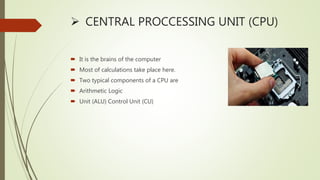
 CENTRAL PROCCESSING UNIT (CPU)
 It is the brains of the computer
 Most of calculations take place here.
 Two typical components of a CPU are
 Arithmetic Logic
 Unit (ALU) Control Unit (CU)
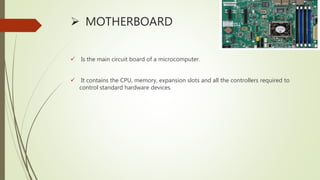
 MOTHERBOARD
 Is the main circuit board of a microcomputer.
 It contains the CPU, memory, expansion slots and all the controllers required to
control standard hardware devices.
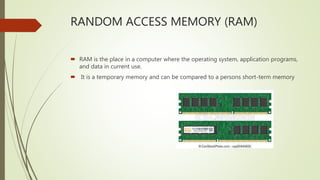
RANDOM ACCESS MEMORY (RAM)
 RAM is the place in a computer where the operating system, application programs,
and data in current use.
 It is a temporary memory and can be compared to a persons short-term memory
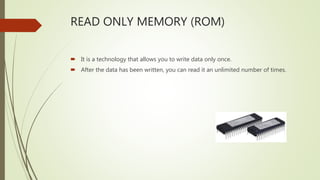
READ ONLY MEMORY (ROM)
 It is a technology that allows you to write data only once.
 After the data has been written, you can read it an unlimited number of times.
INPUT HARDWARE
 Input hardware consists of external devices by which we give information and
instructions to the computer.
 Common input hardware are:
 Keyboard
 Mouse
 Scanner
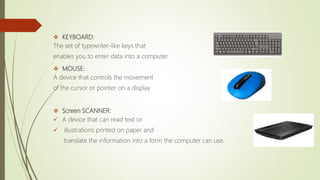
 KEYBOARD:
The set of typewriter-like keys that
enables you to enter data into a computer.
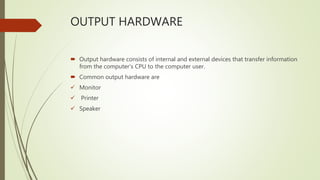
 MOUSE:
A device that controls the movement
of the cursor or pointer on a display
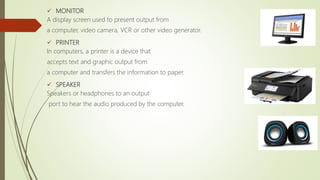
 Screen SCANNER:
 A device that can read text or
 illustrations printed on paper and
translate the information into a form the computer can use.
OUTPUT HARDWARE
 Output hardware consists of internal and external devices that transfer information
from the computer’s CPU to the computer user.
 Common output hardware are
 Monitor
 Printer
 Speaker
 MONITOR
A display screen used to present output from
a computer, video camera, VCR or other video generator.
 PRINTER
In computers, a printer is a device that
accepts text and graphic output from
a computer and transfers the information to paper.
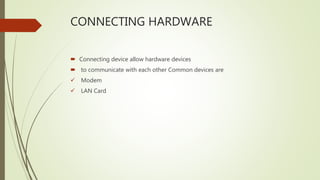
 SPEAKER
Speakers or headphones to an output
port to hear the audio produced by the computer.
CONNECTING HARDWARE
 Connecting device allow hardware devices
 to communicate with each other Common devices are
 Modem
 LAN Card
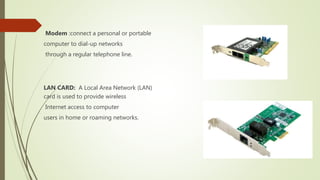
Modem :connect a personal or portable
computer to dial-up networks
through a regular telephone line.
LAN CARD: A Local Area Network (LAN)
card is used to provide wireless
Internet access to computer
users in home or roaming networks.
STORAGE HARDWAREA
 A computer storage device is any type of hardware that stores data.
Some common storage devices are
 Hard Disc
 Floppy Disc
 CD ROM
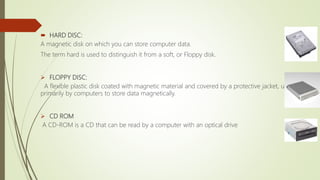
 HARD DISC:
A magnetic disk on which you can store computer data.
The term hard is used to distinguish it from a soft, or Floppy disk.
 FLOPPY DISC:
A flexible plastic disk coated with magnetic material and covered by a protective jacket, used
primarily by computers to store data magnetically.
 CD ROM
A CD-ROM is a CD that can be read by a computer with an optical drive

Computer Hardware

  • 1.
    COMPUTER HARDWARE Ehtasham UlHaq Lecture No 3 Govt. collage Hayatabad
  • 2.
    HARDWARE  Hardware isthe physical aspect of computers, telecommunications, and other devices.  It includes not only the computer proper but also the cables, connectors, power supply units, and peripheral devices such as the keyboard, mouse, audio speakers, and printers.
  • 3.
    TYPES OF HARDWARE INTERNAL HARDWARE Internal hardware is also called components.  CPU  Motherboard  RAM  ROM
  • 4.
     CENTRAL PROCCESSINGUNIT (CPU)  It is the brains of the computer  Most of calculations take place here.  Two typical components of a CPU are  Arithmetic Logic  Unit (ALU) Control Unit (CU)
  • 5.
     MOTHERBOARD  Isthe main circuit board of a microcomputer.  It contains the CPU, memory, expansion slots and all the controllers required to control standard hardware devices.
  • 6.
    RANDOM ACCESS MEMORY(RAM)  RAM is the place in a computer where the operating system, application programs, and data in current use.  It is a temporary memory and can be compared to a persons short-term memory
  • 7.
    READ ONLY MEMORY(ROM)  It is a technology that allows you to write data only once.  After the data has been written, you can read it an unlimited number of times.
  • 8.
    INPUT HARDWARE  Inputhardware consists of external devices by which we give information and instructions to the computer.  Common input hardware are:  Keyboard  Mouse  Scanner
  • 9.
     KEYBOARD: The setof typewriter-like keys that enables you to enter data into a computer.  MOUSE: A device that controls the movement of the cursor or pointer on a display  Screen SCANNER:  A device that can read text or  illustrations printed on paper and translate the information into a form the computer can use.
  • 10.
    OUTPUT HARDWARE  Outputhardware consists of internal and external devices that transfer information from the computer’s CPU to the computer user.  Common output hardware are  Monitor  Printer  Speaker
  • 11.
     MONITOR A displayscreen used to present output from a computer, video camera, VCR or other video generator.  PRINTER In computers, a printer is a device that accepts text and graphic output from a computer and transfers the information to paper.  SPEAKER Speakers or headphones to an output port to hear the audio produced by the computer.
  • 12.
    CONNECTING HARDWARE  Connectingdevice allow hardware devices  to communicate with each other Common devices are  Modem  LAN Card
  • 13.
    Modem :connect apersonal or portable computer to dial-up networks through a regular telephone line. LAN CARD: A Local Area Network (LAN) card is used to provide wireless Internet access to computer users in home or roaming networks.
  • 14.
    STORAGE HARDWAREA  Acomputer storage device is any type of hardware that stores data. Some common storage devices are  Hard Disc  Floppy Disc  CD ROM
  • 15.
     HARD DISC: Amagnetic disk on which you can store computer data. The term hard is used to distinguish it from a soft, or Floppy disk.  FLOPPY DISC: A flexible plastic disk coated with magnetic material and covered by a protective jacket, used primarily by computers to store data magnetically.  CD ROM A CD-ROM is a CD that can be read by a computer with an optical drive