Raz Tamir
Agenda
●Introduction
●Terminologies
●Architecture
●Getting Gluster Working
What is Gluster?
- Gluster was developed originally by Gluster, Inc., then by Red Hat, Inc., after
their purchase of Gluster in 2011
- Gluster is an open source distributed scale out storage
- Heterogeneous Commodity Hardware
- No centralized metadata server
Terminology
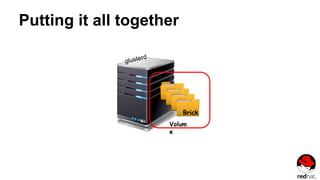
● Brick
- Brick is the basic unit of storage, represented by an export directory on a
server in the trusted storage pool
- i.e., NODE:/DIR
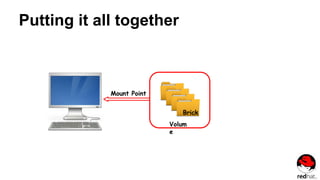
● Volume
- A logical collection of bricks. Most of the gluster management operations
happen on the volume
● Node
- Server running the gluster daemon and sharing volumes
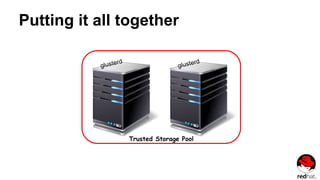
● Trusted Storage Pool
- Collection of storage servers (nodes)
Trusted storage pool
A trusted network of nodes that host storage resources
Trusted storage pool commands
Add new node:
- gluster peer probe [node] command is used to add nodes to the
trusted storage pool
Remove node:
- gluster peer detach [node] command is used to remove nodes from
the trusted storage pool
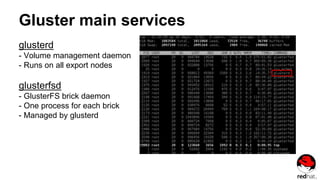
Gluster main services
glusterd
- Volume management daemon
- Runs on all export nodes
glusterfsd
- GlusterFS brick daemon
- One process for each brick
- Managed by glusterd
Putting it all together
Trusted Storage Pool
Putting it all together
Brick
Volum
e
Putting it all together
Brick
Volum
e
Mount Point
Scaling
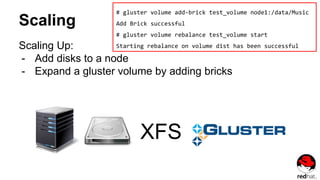
Scaling Up:
- Add disks to a node
- Expand a gluster volume by adding bricks
XFS
# gluster volume add-brick test_volume node1:/data/Music
Add Brick successful
# gluster volume rebalance test_volume start
Starting rebalance on volume dist has been successful
Scaling
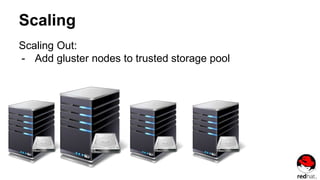
Scaling Out:
- Add gluster nodes to trusted storage pool
Gluster volume types
Gluster storage supports different types of volumes based on the
requirements.
Some volumes are good for scaling storage size, while others are better for
improving performance and some are good for both size and performance.
● Distributed Volume
● Replicated Volume
● Distributed Replicated Volume
● Striped Volume
Distributed Volume
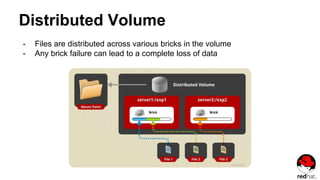
- Files are distributed across various bricks in the volume
- Any brick failure can lead to a complete loss of data
Creating a Distributed Volume
gluster volume create NEW-VOLNAME [transport [tcp | rdma | tcp,rdma]] NEW-BRICK...
For example, to create a distributed volume with four storage servers using TCP:
# gluster volume create test-volume server1:/exp1 server2:/exp2
server3:/exp3 server4:/exp4
Creation of test-volume has been successful
Please start the volume to access data
Display the volume information
# gluster volume info test-volume
Volume Name: test-volume
Type: Distribute
Status: Created
Number of Bricks: 4
Transport-type: tcp
Bricks:
Brick1: server1:/exp1
Brick2: server2:/exp2
Brick3: server3:/exp3
Brick4: server4:/exp4
Replicated Volume
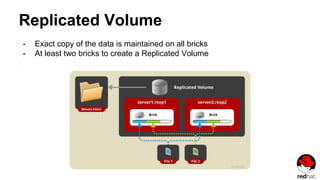
- Exact copy of the data is maintained on all bricks
- At least two bricks to create a Replicated Volume
Create a Replicated Volume
gluster volume create NEW-VOLNAME [replica COUNT] [transport [tcp | rdma |
tcp,rdma]] NEW-BRICK...
For example, to create a replicated volume with two storage servers:
# gluster volume create test-volume replica 2 transport tcp server1:/exp1
server2:/exp2
Creation of test-volume has been successful
Please start the volume to access data
Distributed Replicated Volume
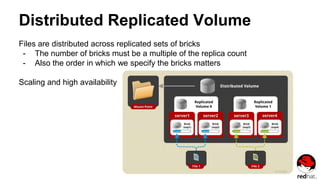
Files are distributed across replicated sets of bricks
- The number of bricks must be a multiple of the replica count
- Also the order in which we specify the bricks matters
Scaling and high availability
Create a Distributed Replicated Volume
gluster volume create NEW-VOLNAME [replica COUNT] [transport [tcp | rdma |
tcp,rdma]] NEW-BRICK...
# gluster volume create test-volume replica 2 transport tcp
server1:/exp1 server2:/exp2 server3:/exp3 server4:/exp4
Creation of test-volume has been successful
Please start the volume to access data
Striped Volume
- Data is stored in the bricks after dividing it into smaller chunks
- Load is distributed and the file can be fetched faster
Create a Striped Volume
gluster volume create NEW-VOLNAME [stripe COUNT] [transport [tcp | dma | tcp,rdma]]
NEW-BRICK...
For example, to create a striped volume across two storage servers:
# gluster volume create test-volume stripe 2 transport tcp server1:/exp1
server2:/exp2
Creation of test-volume has been successful
Please start the volume to access data
Which Volume Type Should I Use?
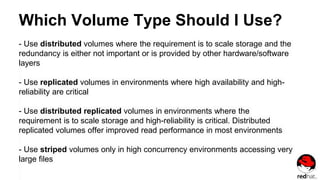
- Use distributed volumes where the requirement is to scale storage and the
redundancy is either not important or is provided by other hardware/software
layers
- Use replicated volumes in environments where high availability and high-
reliability are critical
- Use distributed replicated volumes in environments where the
requirement is to scale storage and high-reliability is critical. Distributed
replicated volumes offer improved read performance in most environments
- Use striped volumes only in high concurrency environments accessing very
large files
Getting Gluster Working
Six step process:
- Install the Gluster packages
- Start the Gluster services
- Create a trusted storage pool
- Create new volumes
- Start volumes
- Mount the volumes on clients
Getting Gluster Working
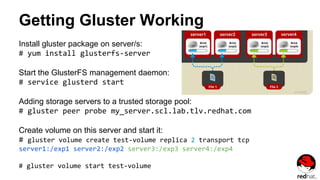
Install gluster package on server/s:
# yum install glusterfs-server
Start the GlusterFS management daemon:
# service glusterd start
Adding storage servers to a trusted storage pool:
# gluster peer probe my_server.scl.lab.tlv.redhat.com
Create volume on this server and start it:
# gluster volume create test-volume replica 2 transport tcp
server1:/exp1 server2:/exp2 server3:/exp3 server4:/exp4
# gluster volume start test-volume
Questions?
Thank you!

Gluster Storage

  • 1.
  • 2.
  • 3.
    What is Gluster? -Gluster was developed originally by Gluster, Inc., then by Red Hat, Inc., after their purchase of Gluster in 2011 - Gluster is an open source distributed scale out storage - Heterogeneous Commodity Hardware - No centralized metadata server
  • 4.
    Terminology ● Brick - Brickis the basic unit of storage, represented by an export directory on a server in the trusted storage pool - i.e., NODE:/DIR ● Volume - A logical collection of bricks. Most of the gluster management operations happen on the volume ● Node - Server running the gluster daemon and sharing volumes ● Trusted Storage Pool - Collection of storage servers (nodes)
  • 5.
    Trusted storage pool Atrusted network of nodes that host storage resources Trusted storage pool commands Add new node: - gluster peer probe [node] command is used to add nodes to the trusted storage pool Remove node: - gluster peer detach [node] command is used to remove nodes from the trusted storage pool
  • 6.
    Gluster main services glusterd -Volume management daemon - Runs on all export nodes glusterfsd - GlusterFS brick daemon - One process for each brick - Managed by glusterd
  • 7.
    Putting it alltogether Trusted Storage Pool
  • 8.
    Putting it alltogether Brick Volum e
  • 9.
    Putting it alltogether Brick Volum e Mount Point
  • 10.
    Scaling Scaling Up: - Adddisks to a node - Expand a gluster volume by adding bricks XFS # gluster volume add-brick test_volume node1:/data/Music Add Brick successful # gluster volume rebalance test_volume start Starting rebalance on volume dist has been successful
  • 11.
    Scaling Scaling Out: - Addgluster nodes to trusted storage pool
  • 12.
    Gluster volume types Glusterstorage supports different types of volumes based on the requirements. Some volumes are good for scaling storage size, while others are better for improving performance and some are good for both size and performance. ● Distributed Volume ● Replicated Volume ● Distributed Replicated Volume ● Striped Volume
  • 13.
    Distributed Volume - Filesare distributed across various bricks in the volume - Any brick failure can lead to a complete loss of data
  • 14.
    Creating a DistributedVolume gluster volume create NEW-VOLNAME [transport [tcp | rdma | tcp,rdma]] NEW-BRICK... For example, to create a distributed volume with four storage servers using TCP: # gluster volume create test-volume server1:/exp1 server2:/exp2 server3:/exp3 server4:/exp4 Creation of test-volume has been successful Please start the volume to access data
  • 15.
    Display the volumeinformation # gluster volume info test-volume Volume Name: test-volume Type: Distribute Status: Created Number of Bricks: 4 Transport-type: tcp Bricks: Brick1: server1:/exp1 Brick2: server2:/exp2 Brick3: server3:/exp3 Brick4: server4:/exp4
  • 16.
    Replicated Volume - Exactcopy of the data is maintained on all bricks - At least two bricks to create a Replicated Volume
  • 17.
    Create a ReplicatedVolume gluster volume create NEW-VOLNAME [replica COUNT] [transport [tcp | rdma | tcp,rdma]] NEW-BRICK... For example, to create a replicated volume with two storage servers: # gluster volume create test-volume replica 2 transport tcp server1:/exp1 server2:/exp2 Creation of test-volume has been successful Please start the volume to access data
  • 18.
    Distributed Replicated Volume Filesare distributed across replicated sets of bricks - The number of bricks must be a multiple of the replica count - Also the order in which we specify the bricks matters Scaling and high availability
  • 19.
    Create a DistributedReplicated Volume gluster volume create NEW-VOLNAME [replica COUNT] [transport [tcp | rdma | tcp,rdma]] NEW-BRICK... # gluster volume create test-volume replica 2 transport tcp server1:/exp1 server2:/exp2 server3:/exp3 server4:/exp4 Creation of test-volume has been successful Please start the volume to access data
  • 20.
    Striped Volume - Datais stored in the bricks after dividing it into smaller chunks - Load is distributed and the file can be fetched faster
  • 21.
    Create a StripedVolume gluster volume create NEW-VOLNAME [stripe COUNT] [transport [tcp | dma | tcp,rdma]] NEW-BRICK... For example, to create a striped volume across two storage servers: # gluster volume create test-volume stripe 2 transport tcp server1:/exp1 server2:/exp2 Creation of test-volume has been successful Please start the volume to access data
  • 22.
    Which Volume TypeShould I Use? - Use distributed volumes where the requirement is to scale storage and the redundancy is either not important or is provided by other hardware/software layers - Use replicated volumes in environments where high availability and high- reliability are critical - Use distributed replicated volumes in environments where the requirement is to scale storage and high-reliability is critical. Distributed replicated volumes offer improved read performance in most environments - Use striped volumes only in high concurrency environments accessing very large files
  • 23.
    Getting Gluster Working Sixstep process: - Install the Gluster packages - Start the Gluster services - Create a trusted storage pool - Create new volumes - Start volumes - Mount the volumes on clients
  • 24.
    Getting Gluster Working Installgluster package on server/s: # yum install glusterfs-server Start the GlusterFS management daemon: # service glusterd start Adding storage servers to a trusted storage pool: # gluster peer probe my_server.scl.lab.tlv.redhat.com Create volume on this server and start it: # gluster volume create test-volume replica 2 transport tcp server1:/exp1 server2:/exp2 server3:/exp3 server4:/exp4 # gluster volume start test-volume
  • 25.

Editor's Notes

  • #4 Gluster is a distributed filesystem that allows rapid provisioning of additional storage, based on your storage consumption needs. 1) Gluster runs in the user space, eliminating the need for complex kernel patches or dependencies. 2) Gluster can run on almost everything in terms of hardware 3) Unlike other distributed file-systems, Gluster does not create, store, or use a separate metadata index. Instead, it places and locates files by using hashing algorithm to locate data in the storage pool. This removes the common source of I/O bottleneck and single point of failure. ??? Data access is fully parallelized and performance scales linearly. ** A distributed file system is a client/server-based application that allows clients to access and process data stored on the server as if it were on their own computer. When a user accesses a file on the server, the server sends the user a copy of the file, which is cached on the user's computer while the data is being processed and is then returned to the server.
  • #5 Brick: Brick is the combination of a server fqdn or IP and an export directory No limit on the number bricks per node ??? Ideally, each brick in a cluster should be of the same size Volume: A volume is a logical collection of bricks. Volume is the mount point to the end user and the volume name is provided at the time of creation. ??? Bricks from the same node can be part of different volumes Trusted Storage Pool ----> NEXT SLIDE!
  • #6 Trusted Storage Pool: “probe” a new member from the cluster and not vice versa. Adding additional nodes to the storage pool is achieved by using the probe command from a running, trusted node. Members (nodes) can be dynamically added and removed from the pool. The glusterd service must be running on all storage servers before adding or removing from the trusted storage pool. ??? When the first server starts, the storage pool consists of that server alone.
  • #7 If you will take a look at a gluster node, what you are going to see, as far as the services are running, are these primary 2 here. glusterd - Volume management daemon - the main service that handle gluster communications This service run on every node Interact with it using the ‘gluster’ command line tool (examples later) glusterfsd - Is running once for each brick
  • #8 Trusted storage pools contain one or more nodes that host Gluster volumes
  • #9 A brick is a path to a directory located on the node where data will be read and written by clients Bricks are combined into volumes based on performance and reliability requirements
  • #10 Volumes are shared with Gluster clients through Gluster file system or NFS
  • #11 The most important thing of gluster, is its ability to scale. I have a server, I add disk to it, put a file system on it, (XFS is recommended by redhat for more than 100 TB it total, but ext4 is also good ) I tell gluster that this file system is a brick And now I have an additional storage and this can be done over and over ** We can add new bricks to an existing volume with the add-brick command → CLICK We will run a rebalance (optional) to get the files distributed ideally. This will involve distributing some existing files on to our new brick on rhs-lab3:
  • #12 But the real power of gluster is scaling out: We can simply replicate the process of scaling up over and over again. We also talked about gluster supporting a Heterogeneous set of environments, so for example if you want to deploy a larger node, that will work. you can also remove a node. We have that flexibility without having to interrupt the end user.
  • #13 As I mentioned earlier, Volume is a collection of bricks and most of the gluster file system operations happen on the volume. Gluster volume type is chosen based on your requirements and type of data needs to be stored. The Volume type is specified when creating a volume, and it determines how and where data is placed
  • #14 This is the default gluster volume when creating a new volume, and not specifying the type of the volume, it will be created as distributed volume. In this volume type, a single file will only be stored in either brick 1 or brick 2 but not on both. → → Hence, There is no data redundancy, which is like File-level RAID 0 ** Use this volume type where scaling and redundancy requirements are not important, or provided by other hardware or software layers. ??? How does a distributed volume work? Uses Davies-Meyer hash algorithm. During a file creation or retrieval, hash function is computed on the file name. This hash value is used to locate or place the file.
  • #15 No need to specify the type Transport default type is tcp (can be omitted)
  • #16 To see volume information of all volumes: #gluster volume info all Or just omit the ‘all’ → #gluster volume info
  • #17 In this volume type we overcome the data loss problem faced in the previous (distributed) volume type, By copying each file or directory on all bricks. The number of replicas in the volume is decided by the client when creating the volume (→ File-level RAID 1 ) And the number of bricks must be equal to the replica count. To protect against server and disk failures, it is recommended that the bricks of the volume are from different servers. The order in which bricks are specified determines how bricks are replicated with each other. For example, every 2 bricks, where 2 is the replica count forms a replica set. If more bricks were specified, the next two bricks in sequence would replicate each other. One major advantage of such a volume is that even if one brick fails, the data can still be accessed from its replica brick. (Recovery on last slide) ** Use this volume type in environments where high-availability and high-reliability are critical. ** Add new bricks - count of bricks we add must be equal to the replica count
  • #18 Replica - number of bricks to use server1:/exp1 and server2:/exp2 will be identical ** Can be use the same server for second brick but there is no point doing that
  • #19 The order in which bricks are specified has a great effect on data protection. Each replica_count consecutive bricks in the list you provide will form a replica set. This type of volume is used when high-reliability is critical, due to a redundancy that it provides, and scale storage is required. So, for example, if there were 4 bricks and replica count 2 then the first 2 bricks become replicas of each other, then the next two and so on. ** To make sure that replica-set members are not placed on the same node, list the first brick on every server, then the second brick on every server in the same order, and so on. ** Distributed replicated volumes also offer improved read performance in most environments.
  • #20 AFTER COMMAND: For example, 4 node distributed (replicated) volume with a two-way mirror
  • #21 Consider a large file being stored in a brick which is frequently accessed by many clients at the same time. This will cause too much load on a single brick and would reduce the performance. So the large file will be divided into smaller chunks (equal to the number of bricks in the volume) and each chunk is stored in a brick. The number of bricks must be equal to the stripe count. FINISH: Recommended only when very large files (greater than the size of the disks are present). A brick failure can result in data loss. ** Redundancy with replication is highly recommended (striped replicated volumes).
  • #23 From the official Gluster documentation: If the data redundancy is either not important or is provided by other hardware/software layers, and scale storage is important to you When high availability and high-reliability are critical, use replicated volumes Mix between almost all types - some of that and some of that If very large files need to be accessed by clients, use striped volumes
  • #25 3) You can view cluster (trusted storage pool) status with `gluster peer status`: # gluster peer status FINISH: Now I can mount a Gluster file system on a client with the mount command: $ mount -t glusterfs my_server.scl.lab.tlv.redhat.com /gluster Now I can create and edit files on the mount point (/gluster) as a single view of the file system.