Exploring
Kubernetes
Ramit Surana
@ramitsurana
/in/ramitsurana
Agenda
 Introduction to Kubernetes
 Kubernetes Features
 Some basic Concepts
 Understanding Kubernetes
Architecture
 Understanding Key Concepts
 Kubelet
 Kubernetes cluster
 etcd
 Services
 Namespaces
 Flannel
 Replication Controller
 Volumes
 Monitoring and much more
Who am I ?
 Open Source Tech Enthusiastic .
 Open Source Contributor.
 Foodie,Traveler.
 Join me Here :
 Email:ramitsurana@gmail.com
 Twitter: @ramitsurana
 Linkedin: /in/ramitsurana
 Github:ramitsurana
Docker
 Docker is a powerful build for
your Linux containers.
 Open platform for developers
and sysadmins to build, ship,
and run distributed
applications.
 Docker enables apps to be
quickly assembled from
components.
 It eliminates the friction
between development, QA,
and production
environments.
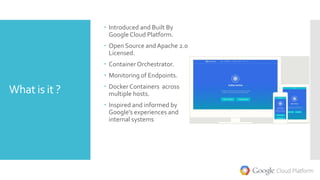
What is it ?
 Introduced and Built By
GoogleCloud Platform.
 Open Source andApache 2.0
Licensed.
 ContainerOrchestrator.
 Monitoring of Endpoints.
 Docker Containers across
multiple hosts.
 Inspired and informed by
Google’s experiences and
internal systems
Features
 Auto-restarting, re-
scheduling, and replicating
containers.
 Supports existing OSS apps.
 Manual/Auto Scaling.
 Manual/Auto Healing.
Basic
Terminologies
 Pods are the smallest deployable units that can be created, scheduled,
and managed. Its a logical collection of containers that belong to an
application.
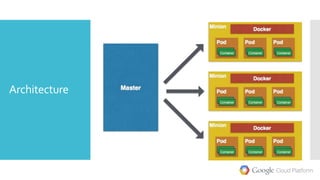
 Master is the central control point that provides a unified view of the
cluster.There is a single master node that control multiple minions.
 Minion is a worker node that run tasks as delegated by the master.
Minions can run one or more pods. It provides an application-specific
“virtual host” in a containerized environment.
 Selector: A query against labels, producing a set result
 Controller: A reconciliation loop that drives current state towards desired
state.
 Service:A set of pods that work together.
Architecture
Kubelet
 The primary "node agent" that runs on each node.The kubelet
works in terms of a PodSpec.
 PodSpec is aYAML or JSON object that describes a pod
 Kubelet takes a set of PodSpecs that are provided through various
mechanisms and ensures that the containers described in those
PodSpecs are running and healthy.
 Other than from an PodSpec from the apiserver, there are three
ways that a container manifest can be provided to the Kubelet.
File: Path passed as a flag on the command line.This file is
rechecked every 20 seconds (configurable with a flag).
HTTP endpoint: HTTP endpoint passed as a parameter on the
command line.This endpoint is checked every 20 seconds
HTTP server:The kubelet can also listen for HTTP and respond to a
simple API (underspec'd currently) to submit a new manifest.
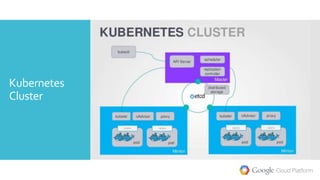
Kubernetes
Cluster
etcd
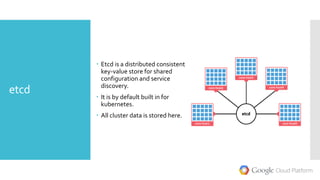
 Etcd is a distributed consistent
key-value store for shared
configuration and service
discovery.
 It is by default built in for
kubernetes.
 All cluster data is stored here.
Services
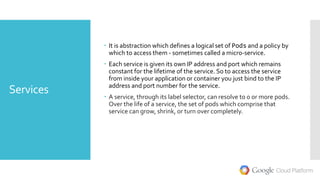
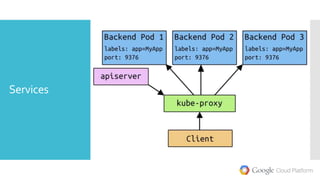
 It is abstraction which defines a logical set of Pods and a policy by
which to access them - sometimes called a micro-service.

 Each service is given its own IP address and port which remains
constant for the lifetime of the service. So to access the service
from inside your application or container you just bind to the IP
address and port number for the service.
 A service, through its label selector, can resolve to 0 or more pods.
Over the life of a service, the set of pods which comprise that
service can grow, shrink, or turn over completely.
Services
NameSpaces
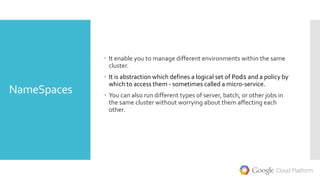
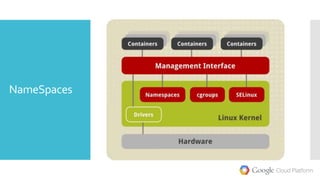
 It enable you to manage different environments within the same
cluster.
 It is abstraction which defines a logical set of Pods and a policy by
which to access them - sometimes called a micro-service.
 You can also run different types of server, batch, or other jobs in
the same cluster without worrying about them affecting each
other.
NameSpaces
Flannel
 Formerly known as Rudder.
 Etcd backed network fabric for
containers.
 It uses etcd to store the
network configuration,
allocated subnets, and
auxiliary data (such as host's
IP).
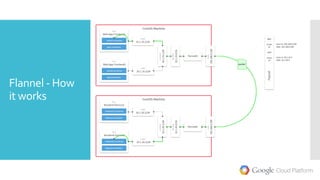
 The simplest backend is udp
and uses a TUN device to
encapsulate every IP fragment
in a UDP packet.
Flannel - How
it works
Replication
Counter
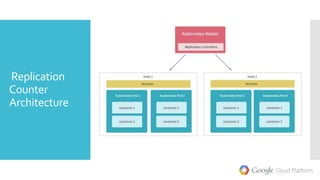
 Ensures that a specified
number of pod "replicas" are
running at any one time.
 If there are too many, the
replication controller kills
some pods. If there are too
few, it starts more.
 PodTemplate - Creates new
pods from a template.
 Labels -To remove a pod
from a replication controller's
target set, change the pod's
label.
 Deleting a replication
controller does not affect the
pods it created.
Replication
Counter
Architecture
Volumes
 Volume is just a directory, possibly with some data in it, which is
accessible to the containers in a pod.
 Volumes can not mount onto other volumes or have hard links to
other volumes.
 Each container in the Pod must independently specify where to
mount each volume.
 Kubernetes supports several types ofVolumes:
 EmptyDir,hostPath,gcePersistentDisk,awsElasticBlockStore,nfs,is
csi,glusterfs,rbd,gitRepo,secret,persistentVolumeClaimetc.
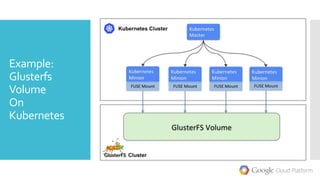
Example:
Glusterfs
Volume
On
Kubernetes
Monitoring on
CAdvisor
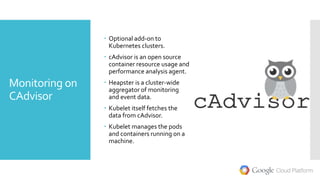
 Optional add-on to
Kubernetes clusters.
 cAdvisor is an open source
container resource usage and
performance analysis agent.
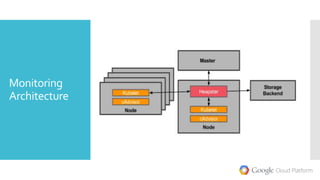
 Heapster is a cluster-wide
aggregator of monitoring
and event data.
 Kubelet itself fetches the
data from cAdvisor.
 Kubelet manages the pods
and containers running on a
machine.
Monitoring
Architecture
Labels and
Selectors
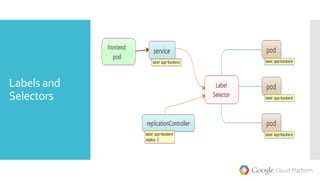
 Labels are the key/value pairs that are attached to objects, such as
pods. Labels are intended to be used to specify identifying
attributes of objects that are meaningful and relevant to users.
 A label selector, the client/user can identify a set of objects.The
label selector is the core grouping primitive in Kubernetes.
Labels and
Selectors
Securing
Kubernetes
 Optional add-on Kubernetes.
 A secret contains a set of
named byte arrays.
 Pods consume secrets in
volumes.
Setup
 First ensure these
packages are installed:
$apt-get update
$ apt-get install ssh
$ apt-get install docker.io
$ apt-get install curl
 wget
https://github.com/GoogleC
loudPlatform/kubernetes/re
leases/download/v1.0.1/kub
ernetes.tar.gz
 tar -xvf kubernetes.tar.gz
Setup
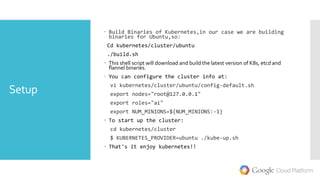
 Build Binaries of Kubernetes,in our case we are building
binaries for Ubuntu,so:
Cd kubernetes/cluster/ubuntu
./build.sh
 This shell script will download and build the latest version of K8s, etcd and
flannel binaries.
 You can configure the cluster info at:
vi kubernetes/cluster/ubuntu/config-default.sh
export nodes="root@127.0.0.1"
export roles="ai"
export NUM_MINIONS=${NUM_MINIONS:-1}
 To start up the cluster:
cd kubernetes/cluster
$ KUBERNETES_PROVIDER=ubuntu ./kube-up.sh
 That's it enjoy kubernetes!!
Kubectl
commands
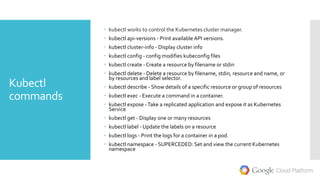
 kubectl works to control the Kubernetes cluster manager.
 kubectl api-versions - Print availableAPI versions.
 kubectl cluster-info - Display cluster info
 kubectl config - config modifies kubeconfig files
 kubectl create - Create a resource by filename or stdin
 kubectl delete - Delete a resource by filename, stdin, resource and name, or
by resources and label selector.
 kubectl describe - Show details of a specific resource or group of resources
 kubectl exec - Execute a command in a container.
 kubectl expose -Take a replicated application and expose it as Kubernetes
Service
 kubectl get - Display one or many resources
 kubectl label - Update the labels on a resource
 kubectl logs - Print the logs for a container in a pod.
 kubectl namespace - SUPERCEDED: Set and view the current Kubernetes
namespace
Kubectl
commands
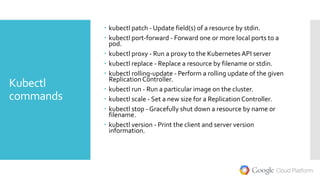
 kubectl patch - Update field(s) of a resource by stdin.
 kubectl port-forward - Forward one or more local ports to a
pod.
 kubectl proxy - Run a proxy to the Kubernetes API server
 kubectl replace - Replace a resource by filename or stdin.
 kubectl rolling-update - Perform a rolling update of the given
Replication Controller.
 kubectl run - Run a particular image on the cluster.
 kubectl scale - Set a new size for a Replication Controller.
 kubectl stop - Gracefully shut down a resource by name or
filename.
 kubectl version - Print the client and server version
information.
Please
Contribute ! googlecloudplatform/kubernetes
Works on
Questions ?
Ramit Surana
ramitsurana@gmail.com
Twitter : @ramitsurana
LinkedIn : /in/ramitsurana

A brief study on Kubernetes and its components

  • 1.
  • 2.
    Agenda  Introduction toKubernetes  Kubernetes Features  Some basic Concepts  Understanding Kubernetes Architecture  Understanding Key Concepts  Kubelet  Kubernetes cluster  etcd  Services  Namespaces  Flannel  Replication Controller  Volumes  Monitoring and much more
  • 3.
    Who am I?  Open Source Tech Enthusiastic .  Open Source Contributor.  Foodie,Traveler.  Join me Here :  Email:ramitsurana@gmail.com  Twitter: @ramitsurana  Linkedin: /in/ramitsurana  Github:ramitsurana
  • 4.
    Docker  Docker isa powerful build for your Linux containers.  Open platform for developers and sysadmins to build, ship, and run distributed applications.  Docker enables apps to be quickly assembled from components.  It eliminates the friction between development, QA, and production environments.
  • 5.
    What is it?  Introduced and Built By GoogleCloud Platform.  Open Source andApache 2.0 Licensed.  ContainerOrchestrator.  Monitoring of Endpoints.  Docker Containers across multiple hosts.  Inspired and informed by Google’s experiences and internal systems
  • 6.
    Features  Auto-restarting, re- scheduling,and replicating containers.  Supports existing OSS apps.  Manual/Auto Scaling.  Manual/Auto Healing.
  • 7.
    Basic Terminologies  Pods arethe smallest deployable units that can be created, scheduled, and managed. Its a logical collection of containers that belong to an application.  Master is the central control point that provides a unified view of the cluster.There is a single master node that control multiple minions.  Minion is a worker node that run tasks as delegated by the master. Minions can run one or more pods. It provides an application-specific “virtual host” in a containerized environment.  Selector: A query against labels, producing a set result  Controller: A reconciliation loop that drives current state towards desired state.  Service:A set of pods that work together.
  • 8.
  • 9.
    Kubelet  The primary"node agent" that runs on each node.The kubelet works in terms of a PodSpec.  PodSpec is aYAML or JSON object that describes a pod  Kubelet takes a set of PodSpecs that are provided through various mechanisms and ensures that the containers described in those PodSpecs are running and healthy.  Other than from an PodSpec from the apiserver, there are three ways that a container manifest can be provided to the Kubelet. File: Path passed as a flag on the command line.This file is rechecked every 20 seconds (configurable with a flag). HTTP endpoint: HTTP endpoint passed as a parameter on the command line.This endpoint is checked every 20 seconds HTTP server:The kubelet can also listen for HTTP and respond to a simple API (underspec'd currently) to submit a new manifest.
  • 10.
  • 11.
    etcd  Etcd isa distributed consistent key-value store for shared configuration and service discovery.  It is by default built in for kubernetes.  All cluster data is stored here.
  • 12.
    Services  It isabstraction which defines a logical set of Pods and a policy by which to access them - sometimes called a micro-service.  Each service is given its own IP address and port which remains constant for the lifetime of the service. So to access the service from inside your application or container you just bind to the IP address and port number for the service.  A service, through its label selector, can resolve to 0 or more pods. Over the life of a service, the set of pods which comprise that service can grow, shrink, or turn over completely.
  • 13.
  • 14.
    NameSpaces  It enableyou to manage different environments within the same cluster.  It is abstraction which defines a logical set of Pods and a policy by which to access them - sometimes called a micro-service.  You can also run different types of server, batch, or other jobs in the same cluster without worrying about them affecting each other.
  • 15.
  • 16.
    Flannel  Formerly knownas Rudder.  Etcd backed network fabric for containers.  It uses etcd to store the network configuration, allocated subnets, and auxiliary data (such as host's IP).  The simplest backend is udp and uses a TUN device to encapsulate every IP fragment in a UDP packet.
  • 17.
  • 18.
    Replication Counter  Ensures thata specified number of pod "replicas" are running at any one time.  If there are too many, the replication controller kills some pods. If there are too few, it starts more.  PodTemplate - Creates new pods from a template.  Labels -To remove a pod from a replication controller's target set, change the pod's label.  Deleting a replication controller does not affect the pods it created.
  • 19.
  • 20.
    Volumes  Volume isjust a directory, possibly with some data in it, which is accessible to the containers in a pod.  Volumes can not mount onto other volumes or have hard links to other volumes.  Each container in the Pod must independently specify where to mount each volume.  Kubernetes supports several types ofVolumes:  EmptyDir,hostPath,gcePersistentDisk,awsElasticBlockStore,nfs,is csi,glusterfs,rbd,gitRepo,secret,persistentVolumeClaimetc.
  • 21.
  • 22.
    Monitoring on CAdvisor  Optionaladd-on to Kubernetes clusters.  cAdvisor is an open source container resource usage and performance analysis agent.  Heapster is a cluster-wide aggregator of monitoring and event data.  Kubelet itself fetches the data from cAdvisor.  Kubelet manages the pods and containers running on a machine.
  • 23.
  • 24.
    Labels and Selectors  Labelsare the key/value pairs that are attached to objects, such as pods. Labels are intended to be used to specify identifying attributes of objects that are meaningful and relevant to users.  A label selector, the client/user can identify a set of objects.The label selector is the core grouping primitive in Kubernetes.
  • 25.
  • 26.
    Securing Kubernetes  Optional add-onKubernetes.  A secret contains a set of named byte arrays.  Pods consume secrets in volumes.
  • 27.
    Setup  First ensurethese packages are installed: $apt-get update $ apt-get install ssh $ apt-get install docker.io $ apt-get install curl  wget https://github.com/GoogleC loudPlatform/kubernetes/re leases/download/v1.0.1/kub ernetes.tar.gz  tar -xvf kubernetes.tar.gz
  • 28.
    Setup  Build Binariesof Kubernetes,in our case we are building binaries for Ubuntu,so: Cd kubernetes/cluster/ubuntu ./build.sh  This shell script will download and build the latest version of K8s, etcd and flannel binaries.  You can configure the cluster info at: vi kubernetes/cluster/ubuntu/config-default.sh export nodes="root@127.0.0.1" export roles="ai" export NUM_MINIONS=${NUM_MINIONS:-1}  To start up the cluster: cd kubernetes/cluster $ KUBERNETES_PROVIDER=ubuntu ./kube-up.sh  That's it enjoy kubernetes!!
  • 29.
    Kubectl commands  kubectl worksto control the Kubernetes cluster manager.  kubectl api-versions - Print availableAPI versions.  kubectl cluster-info - Display cluster info  kubectl config - config modifies kubeconfig files  kubectl create - Create a resource by filename or stdin  kubectl delete - Delete a resource by filename, stdin, resource and name, or by resources and label selector.  kubectl describe - Show details of a specific resource or group of resources  kubectl exec - Execute a command in a container.  kubectl expose -Take a replicated application and expose it as Kubernetes Service  kubectl get - Display one or many resources  kubectl label - Update the labels on a resource  kubectl logs - Print the logs for a container in a pod.  kubectl namespace - SUPERCEDED: Set and view the current Kubernetes namespace
  • 30.
    Kubectl commands  kubectl patch- Update field(s) of a resource by stdin.  kubectl port-forward - Forward one or more local ports to a pod.  kubectl proxy - Run a proxy to the Kubernetes API server  kubectl replace - Replace a resource by filename or stdin.  kubectl rolling-update - Perform a rolling update of the given Replication Controller.  kubectl run - Run a particular image on the cluster.  kubectl scale - Set a new size for a Replication Controller.  kubectl stop - Gracefully shut down a resource by name or filename.  kubectl version - Print the client and server version information.
  • 31.
  • 32.
  • 33.
  • 34.
    Ramit Surana ramitsurana@gmail.com Twitter :@ramitsurana LinkedIn : /in/ramitsurana