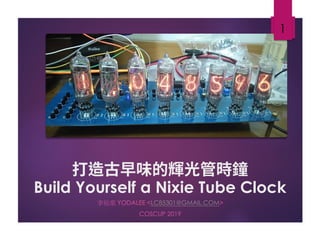
Build Yourself a Nixie Tube Clock
李祐棠 YODALEE <LC85301@GMAIL.COM>
COSCUP 2019
1
About Me
 Yodalee <lc85301@gmail.com>
 Study EE in college, Microwave in graduate school, now rookie
engineer in Synopsys.
2
Github: yodalee Blogger: http://yodalee.blogspot.tw
Why I Make This
2011 animation
Steins;Gate
3
2018 animation
Steins;Gate 0
The real reason:
Nixie Tube
4
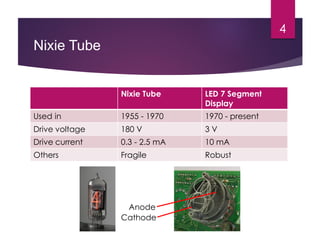
Nixie Tube LED 7 Segment
Display
Used in 1955 - 1970 1970 - present
Drive voltage 180 V 3 V
Drive current 0.3 - 2.5 mA 10 mA
Others Fragile Robust
Cathode
Anode
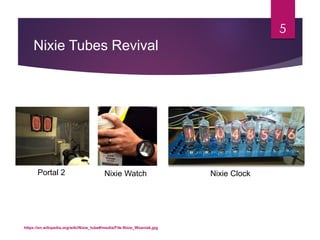
Nixie Tubes Revival
5
https://en.wikipedia.org/wiki/Nixie_tube#/media/File:Nixie_Wozniak.jpg
Nixie Watch Nixie ClockPortal 2
Challenges
1. Where to buy it?
2. How to get 180V power?
3. How to control it?
4. How to make custom PCB?
6
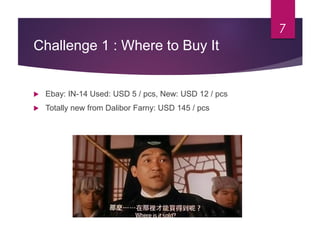
Challenge 1 : Where to Buy It
 Ebay: IN-14 Used: USD 5 / pcs, New: USD 12 / pcs
 Totally new from Dalibor Farny: USD 145 / pcs
7
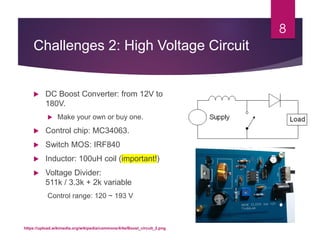
Challenges 2: High Voltage Circuit
 DC Boost Converter: from 12V to
180V.
 Make your own or buy one.
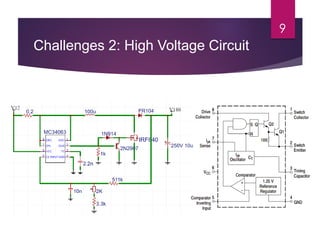
 Control chip: MC34063.
 Switch MOS: IRF840
 Inductor: 100uH coil (important!)
 Voltage Divider:
511k / 3.3k + 2k variable
Control range: 120 ~ 193 V
8
https://upload.wikimedia.org/wikipedia/commons/4/4a/Boost_circuit_2.png
Challenges 2: High Voltage Circuit
9
Challenges 2: High Voltage Circuit
10
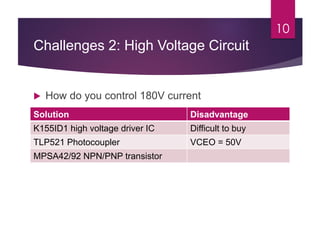
 How do you control 180V current
Solution Disadvantage
K155ID1 high voltage driver IC Difficult to buy
TLP521 Photocoupler VCEO = 50V
MPSA42/92 NPN/PNP transistor
Challenges 3: Controller
11
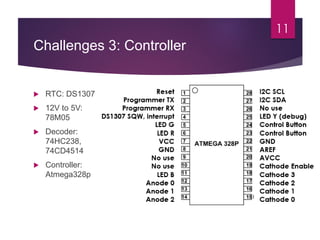
 RTC: DS1307
 12V to 5V:
78M05
 Decoder:
74HC238,
74CD4514
 Controller:
Atmega328p
Challenges 3: Controller
12
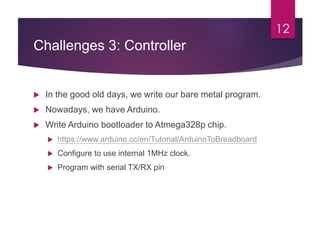
 In the good old days, we write our bare metal program.
 Nowadays, we have Arduino.
 Write Arduino bootloader to Atmega328p chip.
 https://www.arduino.cc/en/Tutorial/ArduinoToBreadboard
 Configure to use internal 1MHz clock.
 Program with serial TX/RX pin
Challenges 4: Custom PCB
14
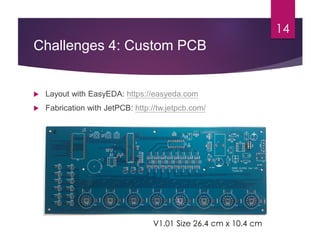
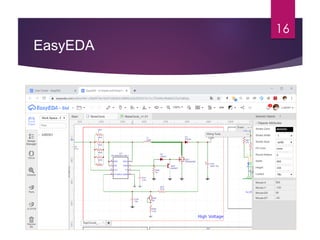
 Layout with EasyEDA: https://easyeda.com
 Fabrication with JetPCB: http://tw.jetpcb.com/
V1.01 Size 26.4 cm x 10.4 cm
Challenges 4: Custom PCB
 Software Choice: Protel, Altium (proprietary),
EasyEDA, Eagle (need register), Kicad (free)
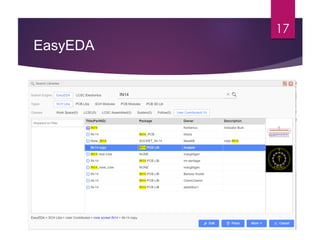
 EasyEDA advantage:
 Component/Layout are shared, easy to import other’s
component.
 EasyEDA disadvantage:
 Lag when edit a lot of components
 Some function are difficult to use
15
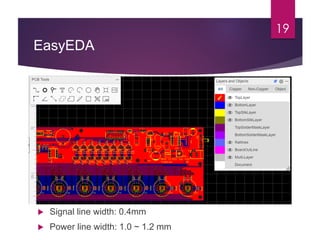
EasyEDA
16
EasyEDA
17
EasyEDA
18
EasyEDA
19
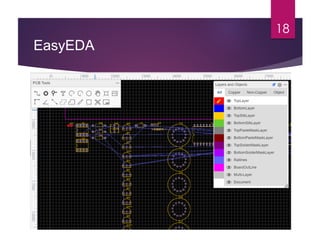
 Signal line width: 0.4mm
 Power line width: 1.0 ~ 1.2 mm
EasyEDA
1. Draw schematic
2. Convert to layout
3. Draw layout
4. Place copper layer
Easy right?
20
Nixie Tube
21
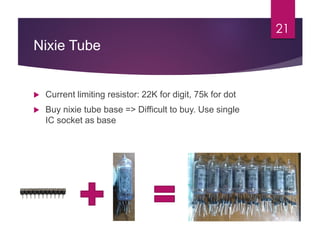
 Current limiting resistor: 22K for digit, 75k for dot
 Buy nixie tube base => Difficult to buy. Use single
IC socket as base
Programming
 Control DS1307 using Arduino Library
 https://playground.arduino.cc/Code/Time
 Write my own function to read/write 56
bytes NVRam on DS1307 to store
information.
 Do not light up single digit constantly.
Cathode poisoning on other cathode.
22
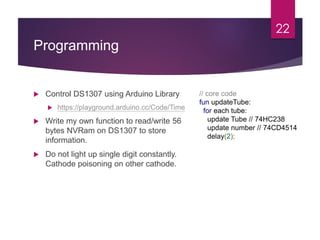
// core code
fun updateTube:
for each tube:
update Tube // 74HC238
update number // 74CD4514
delay(2);
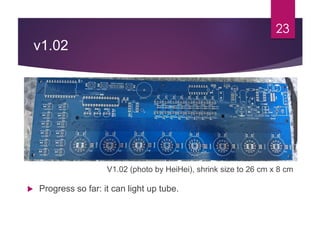
v1.02
23
V1.02 (photo by HeiHei), shrink size to 26 cm x 8 cm
 Progress so far: it can light up tube.
V2.0
24
• Split PCB to nixie tube PCB and control PCB
• New high voltage circuit
http://www.nixieclock.org/?p=1454
• Use SMT component.
• Replace DS1307 with DS3231
No schedule right now
Open Resource
 Note: https://yodalee.blogspot.com/2018/10/nixie-clock0-
introduction.html
 Source code: https://github.com/yodalee/NixieClock
 V1.01 Schematic and Layout:
https://easyeda.com/lc85301/nixieclock
 V1.02 Schematic and Layout:
https://easyeda.com/lc85301/nixieclock_v1-02
25
Reference
1. Wikipedia: https://en.wikipedia.org/wiki/Nixie_tube
2. Tube-Tester: http://www.tube-tester.com/
3. 復古咖啡 (Closed)
4. 工作狂人
26
Thank You for
Listening
EL PSY CONGROO
27

Build Yourself a Nixie Tube Clock

  • 1.
    Build Yourself aNixie Tube Clock 李祐棠 YODALEE <LC85301@GMAIL.COM> COSCUP 2019 1
  • 2.
    About Me  Yodalee<lc85301@gmail.com>  Study EE in college, Microwave in graduate school, now rookie engineer in Synopsys. 2 Github: yodalee Blogger: http://yodalee.blogspot.tw
  • 3.
    Why I MakeThis 2011 animation Steins;Gate 3 2018 animation Steins;Gate 0 The real reason:
  • 4.
    Nixie Tube 4 Nixie TubeLED 7 Segment Display Used in 1955 - 1970 1970 - present Drive voltage 180 V 3 V Drive current 0.3 - 2.5 mA 10 mA Others Fragile Robust Cathode Anode
  • 5.
  • 6.
    Challenges 1. Where tobuy it? 2. How to get 180V power? 3. How to control it? 4. How to make custom PCB? 6
  • 7.
    Challenge 1 :Where to Buy It  Ebay: IN-14 Used: USD 5 / pcs, New: USD 12 / pcs  Totally new from Dalibor Farny: USD 145 / pcs 7
  • 8.
    Challenges 2: HighVoltage Circuit  DC Boost Converter: from 12V to 180V.  Make your own or buy one.  Control chip: MC34063.  Switch MOS: IRF840  Inductor: 100uH coil (important!)  Voltage Divider: 511k / 3.3k + 2k variable Control range: 120 ~ 193 V 8 https://upload.wikimedia.org/wikipedia/commons/4/4a/Boost_circuit_2.png
  • 9.
    Challenges 2: HighVoltage Circuit 9
  • 10.
    Challenges 2: HighVoltage Circuit 10  How do you control 180V current Solution Disadvantage K155ID1 high voltage driver IC Difficult to buy TLP521 Photocoupler VCEO = 50V MPSA42/92 NPN/PNP transistor
  • 11.
    Challenges 3: Controller 11 RTC: DS1307  12V to 5V: 78M05  Decoder: 74HC238, 74CD4514  Controller: Atmega328p
  • 12.
    Challenges 3: Controller 12 In the good old days, we write our bare metal program.  Nowadays, we have Arduino.  Write Arduino bootloader to Atmega328p chip.  https://www.arduino.cc/en/Tutorial/ArduinoToBreadboard  Configure to use internal 1MHz clock.  Program with serial TX/RX pin
  • 13.
    Challenges 4: CustomPCB 14  Layout with EasyEDA: https://easyeda.com  Fabrication with JetPCB: http://tw.jetpcb.com/ V1.01 Size 26.4 cm x 10.4 cm
  • 14.
    Challenges 4: CustomPCB  Software Choice: Protel, Altium (proprietary), EasyEDA, Eagle (need register), Kicad (free)  EasyEDA advantage:  Component/Layout are shared, easy to import other’s component.  EasyEDA disadvantage:  Lag when edit a lot of components  Some function are difficult to use 15
  • 15.
  • 16.
  • 17.
  • 18.
    EasyEDA 19  Signal linewidth: 0.4mm  Power line width: 1.0 ~ 1.2 mm
  • 19.
    EasyEDA 1. Draw schematic 2.Convert to layout 3. Draw layout 4. Place copper layer Easy right? 20
  • 20.
    Nixie Tube 21  Currentlimiting resistor: 22K for digit, 75k for dot  Buy nixie tube base => Difficult to buy. Use single IC socket as base
  • 21.
    Programming  Control DS1307using Arduino Library  https://playground.arduino.cc/Code/Time  Write my own function to read/write 56 bytes NVRam on DS1307 to store information.  Do not light up single digit constantly. Cathode poisoning on other cathode. 22 // core code fun updateTube: for each tube: update Tube // 74HC238 update number // 74CD4514 delay(2);
  • 22.
    v1.02 23 V1.02 (photo byHeiHei), shrink size to 26 cm x 8 cm  Progress so far: it can light up tube.
  • 23.
    V2.0 24 • Split PCBto nixie tube PCB and control PCB • New high voltage circuit http://www.nixieclock.org/?p=1454 • Use SMT component. • Replace DS1307 with DS3231 No schedule right now
  • 24.
    Open Resource  Note:https://yodalee.blogspot.com/2018/10/nixie-clock0- introduction.html  Source code: https://github.com/yodalee/NixieClock  V1.01 Schematic and Layout: https://easyeda.com/lc85301/nixieclock  V1.02 Schematic and Layout: https://easyeda.com/lc85301/nixieclock_v1-02 25
  • 25.
    Reference 1. Wikipedia: https://en.wikipedia.org/wiki/Nixie_tube 2.Tube-Tester: http://www.tube-tester.com/ 3. 復古咖啡 (Closed) 4. 工作狂人 26
  • 26.