Build Gameboy Emulator in Rust and
WebAssembly
Author: Yodalee
<lc85301@gmail.com>
Outline
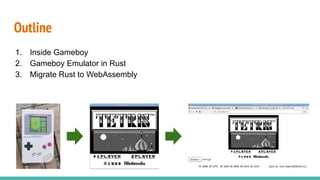
1. Inside Gameboy
2. Gameboy Emulator in Rust
3. Migrate Rust to WebAssembly
Star Me on Github!
Source Code
https://github.com/yodalee/ruGameboy
Note: (Traditional Chinese)
https://yodalee.me/tags/gameboy/
Inside Gameboy
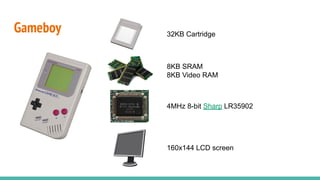
Gameboy
4MHz 8-bit Sharp LR35902
32KB Cartridge
8KB SRAM
8KB Video RAM
160x144 LCD screen
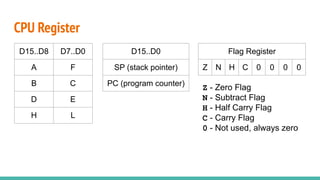
CPU Register
D15..D8 D7..D0
A F
B C
D E
H L
D15..D0
SP (stack pointer)
PC (program counter)
Flag Register
Z N H C 0 0 0 0
Z - Zero Flag
N - Subtract Flag
H - Half Carry Flag
C - Carry Flag
0 - Not used, always zero
CPU Instruction
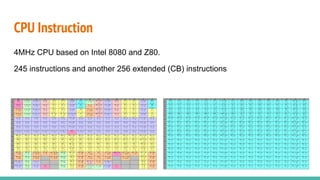
4MHz CPU based on Intel 8080 and Z80.
245 instructions and another 256 extended (CB) instructions
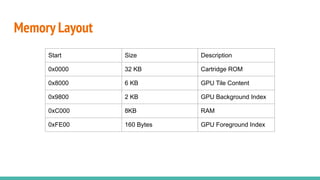
Memory Layout
Start Size Description
0x0000 32 KB Cartridge ROM
0x8000 6 KB GPU Tile Content
0x9800 2 KB GPU Background Index
0xC000 8KB RAM
0xFE00 160 Bytes GPU Foreground Index
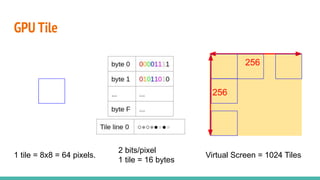
GPU Tile
1 tile = 8x8 = 64 pixels.
256
256
2 bits/pixel
1 tile = 16 bytes
Virtual Screen = 1024 Tiles
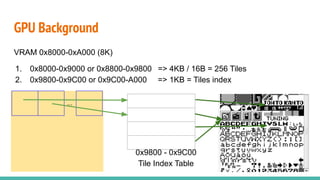
GPU Background
...
VRAM 0x8000-0xA000 (8K)
1. 0x8000-0x9000 or 0x8800-0x9800 => 4KB / 16B = 256 Tiles
2. 0x9800-0x9C00 or 0x9C00-A000 => 1KB = Tiles index
0x9800 - 0x9C00
Tile Index Table
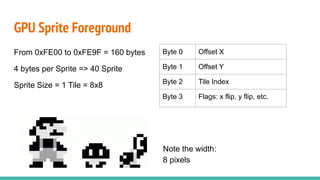
From 0xFE00 to 0xFE9F = 160 bytes
4 bytes per Sprite => 40 Sprite
Sprite Size = 1 Tile = 8x8
GPU Sprite Foreground
Byte 0 Offset X
Byte 1 Offset Y
Byte 2 Tile Index
Byte 3 Flags: x flip, y flip, etc.
Note the width:
8 pixels
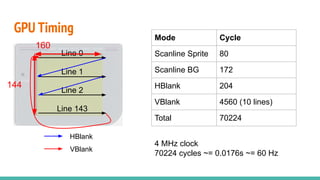
Line 0
Line 1
Line 2
Line 143
HBlank
VBlank
GPU Timing
160
144
Mode Cycle
Scanline Sprite 80
Scanline BG 172
HBlank 204
VBlank 4560 (10 lines)
Total 70224
4 MHz clock
70224 cycles ~= 0.0176s ~= 60 Hz
Gameboy Emulator in Rust
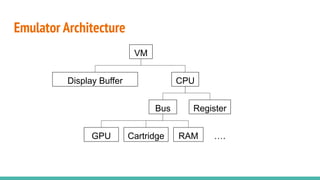
Emulator Architecture
GPU Cartridge RAM ….
Bus Register
VM
CPU
Display Buffer
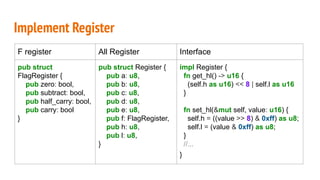
Implement Register
F register All Register Interface
pub struct
FlagRegister {
pub zero: bool,
pub subtract: bool,
pub half_carry: bool,
pub carry: bool
}
pub struct Register {
pub a: u8,
pub b: u8,
pub c: u8,
pub d: u8,
pub e: u8,
pub f: FlagRegister,
pub h: u8,
pub l: u8,
}
impl Register {
fn get_hl() -> u16 {
(self.h as u16) << 8 | self.l as u16
}
fn set_hl(&mut self, value: u16) {
self.h = ((value >> 8) & 0xff) as u8;
self.l = (value & 0xff) as u8;
}
//...
}
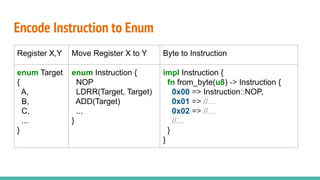
Encode Instruction to Enum
Register X,Y Move Register X to Y Byte to Instruction
enum Target
{
A,
B,
C,
...
}
enum Instruction {
NOP
LDRR(Target, Target)
ADD(Target)
...
}
impl Instruction {
fn from_byte(u8) -> Instruction {
0x00 => Instruction::NOP,
0x01 => //…
0x02 => //…
//…
}
}
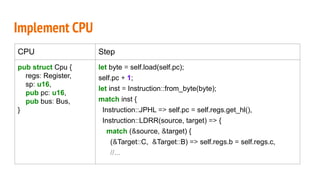
Implement CPU
CPU Step
pub struct Cpu {
regs: Register,
sp: u16,
pub pc: u16,
pub bus: Bus,
}
let byte = self.load(self.pc);
self.pc + 1;
let inst = Instruction::from_byte(byte);
match inst {
Instruction::JPHL => self.pc = self.regs.get_hl(),
Instruction::LDRR(source, target) => {
match (&source, &target) {
(&Target::C, &Target::B) => self.regs.b = self.regs.c,
//...
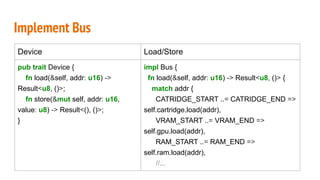
Implement Bus
Device Load/Store
pub trait Device {
fn load(&self, addr: u16) ->
Result<u8, ()>;
fn store(&mut self, addr: u16,
value: u8) -> Result<(), ()>;
}
impl Bus {
fn load(&self, addr: u16) -> Result<u8, ()> {
match addr {
CATRIDGE_START ..= CATRIDGE_END =>
self.cartridge.load(addr),
VRAM_START ..= VRAM_END =>
self.gpu.load(addr),
RAM_START ..= RAM_END =>
self.ram.load(addr),
//...
Implement Gpu
Sprite Gpu Render
struct Sprite {
tile_idx: u8,
x: isize,
y: isize,
// flag...
}
struct Gpu {
sprite: [Sprite:40]
vram: Vec<u8>,
oam: Vec<u8>,
//...
}
impl Device for Gpu {
//...
fn build_background(&mut self, buffer: &mut
Vec<u32>) {
for row in 0..HEIGHT {
for col in 0..WIDTH {
let tile_addr = row * 32 + col;
let tile_idx = self.vram[tile_addr];
let pixels = self.get_tile(tile_idx);
buffer.splice(start..end, pixels.iter()...);
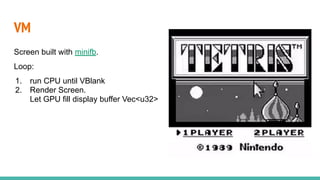
VM
Screen built with minifb.
Loop:
1. run CPU until VBlank
2. Render Screen.
Let GPU fill display buffer Vec<u32>
Migrate Rust to WebAssembly
Rust x WebAssembly
https://rustwasm.github.io/book/
Tool needed:
1. rustup install
wasm32-unknown-unknown
2. wasm-pack
3. cargo-generate
4. npm
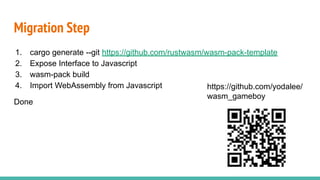
Migration Step
1. cargo generate --git https://github.com/rustwasm/wasm-pack-template
2. Expose Interface to Javascript
3. wasm-pack build
4. Import WebAssembly from Javascript
Done
https://github.com/yodalee/
wasm_gameboy
Expose Interface to Javascript
Magic Word
#[wasm_bindgen]
wasm_bindgen
// rust
#[wasm_bindgen]
pub struct Gameboy {
cartridge: Vec<u8>,
vm: Option<Vm>
}
// javascript
import Gameboy from "wasmgb"
Gameboy.new()
wasm_bindgen
// rust
#[wasm_bindgen]
impl Gameboy {
pub fn get_buffer(&self) -> *const u32 {
self.vm.buffer.as_ptr()
}
}
// javascript
import memory from "wasmgb_bg"
const buffer = gameboy.get_buffer();
const pixels = new
Uint32Array(memory.buffer, buffer,
width*height);
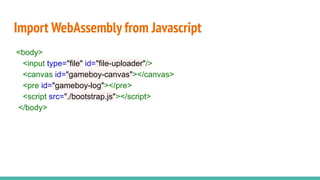
Import WebAssembly from Javascript
<body>
<input type="file" id="file-uploader"/>
<canvas id="gameboy-canvas"></canvas>
<pre id="gameboy-log"></pre>
<script src="./bootstrap.js"></script>
</body>
Import WebAssembly from Javascript
reader.onload = function() {
const cartridge = gameboy.get_cartridge();
var bytes = new Uint8Array(reader.result);
const m_cartridge = new Uint8Array(memory.buffer, cartridge, 0x8000);
// set cartridge
for (let idx = 0; idx < 0x8000; idx++) {
m_cartridge[idx] = bytes[idx];
}
gameboy.set_cartridge();
Import WebAssembly from Javascript
const renderLoop = () => {
drawPixels();
gameboy.step();
}
const drawPixels = () => {
const buffer = gameboy.get_buffer();
const pixels = new Uint32Array(memory.buffer, buffer, width * height);
for (let row = 0; row < height; row++) {
for (let col = 0; col < width; col++) {
if (pixels[row * width + col] == WHITE) { //...
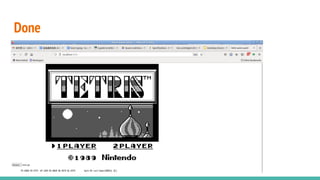
Done
Conclusion
Future Work
Features to implement:
● Right now only Tetris can work (゚д゚;)
● Implement Sound
Problem to solve:
● How to emulate program in correct timing?
● How to debug efficiently?
Conclusion
1. We learn how to build emulator by building it.
2. A Rust program can be migrated to WebAssembly really quick.
Thanks for Listening

Gameboy emulator in rust and web assembly

  • 1.
    Build Gameboy Emulatorin Rust and WebAssembly Author: Yodalee <lc85301@gmail.com>
  • 2.
    Outline 1. Inside Gameboy 2.Gameboy Emulator in Rust 3. Migrate Rust to WebAssembly
  • 3.
    Star Me onGithub! Source Code https://github.com/yodalee/ruGameboy Note: (Traditional Chinese) https://yodalee.me/tags/gameboy/
  • 4.
  • 5.
    Gameboy 4MHz 8-bit SharpLR35902 32KB Cartridge 8KB SRAM 8KB Video RAM 160x144 LCD screen
  • 6.
    CPU Register D15..D8 D7..D0 AF B C D E H L D15..D0 SP (stack pointer) PC (program counter) Flag Register Z N H C 0 0 0 0 Z - Zero Flag N - Subtract Flag H - Half Carry Flag C - Carry Flag 0 - Not used, always zero
  • 7.
    CPU Instruction 4MHz CPUbased on Intel 8080 and Z80. 245 instructions and another 256 extended (CB) instructions
  • 8.
    Memory Layout Start SizeDescription 0x0000 32 KB Cartridge ROM 0x8000 6 KB GPU Tile Content 0x9800 2 KB GPU Background Index 0xC000 8KB RAM 0xFE00 160 Bytes GPU Foreground Index
  • 9.
    GPU Tile 1 tile= 8x8 = 64 pixels. 256 256 2 bits/pixel 1 tile = 16 bytes Virtual Screen = 1024 Tiles
  • 10.
    GPU Background ... VRAM 0x8000-0xA000(8K) 1. 0x8000-0x9000 or 0x8800-0x9800 => 4KB / 16B = 256 Tiles 2. 0x9800-0x9C00 or 0x9C00-A000 => 1KB = Tiles index 0x9800 - 0x9C00 Tile Index Table
  • 11.
    From 0xFE00 to0xFE9F = 160 bytes 4 bytes per Sprite => 40 Sprite Sprite Size = 1 Tile = 8x8 GPU Sprite Foreground Byte 0 Offset X Byte 1 Offset Y Byte 2 Tile Index Byte 3 Flags: x flip, y flip, etc. Note the width: 8 pixels
  • 12.
    Line 0 Line 1 Line2 Line 143 HBlank VBlank GPU Timing 160 144 Mode Cycle Scanline Sprite 80 Scanline BG 172 HBlank 204 VBlank 4560 (10 lines) Total 70224 4 MHz clock 70224 cycles ~= 0.0176s ~= 60 Hz
  • 13.
  • 14.
    Emulator Architecture GPU CartridgeRAM …. Bus Register VM CPU Display Buffer
  • 15.
    Implement Register F registerAll Register Interface pub struct FlagRegister { pub zero: bool, pub subtract: bool, pub half_carry: bool, pub carry: bool } pub struct Register { pub a: u8, pub b: u8, pub c: u8, pub d: u8, pub e: u8, pub f: FlagRegister, pub h: u8, pub l: u8, } impl Register { fn get_hl() -> u16 { (self.h as u16) << 8 | self.l as u16 } fn set_hl(&mut self, value: u16) { self.h = ((value >> 8) & 0xff) as u8; self.l = (value & 0xff) as u8; } //... }
  • 16.
    Encode Instruction toEnum Register X,Y Move Register X to Y Byte to Instruction enum Target { A, B, C, ... } enum Instruction { NOP LDRR(Target, Target) ADD(Target) ... } impl Instruction { fn from_byte(u8) -> Instruction { 0x00 => Instruction::NOP, 0x01 => //… 0x02 => //… //… } }
  • 17.
    Implement CPU CPU Step pubstruct Cpu { regs: Register, sp: u16, pub pc: u16, pub bus: Bus, } let byte = self.load(self.pc); self.pc + 1; let inst = Instruction::from_byte(byte); match inst { Instruction::JPHL => self.pc = self.regs.get_hl(), Instruction::LDRR(source, target) => { match (&source, &target) { (&Target::C, &Target::B) => self.regs.b = self.regs.c, //...
  • 18.
    Implement Bus Device Load/Store pubtrait Device { fn load(&self, addr: u16) -> Result<u8, ()>; fn store(&mut self, addr: u16, value: u8) -> Result<(), ()>; } impl Bus { fn load(&self, addr: u16) -> Result<u8, ()> { match addr { CATRIDGE_START ..= CATRIDGE_END => self.cartridge.load(addr), VRAM_START ..= VRAM_END => self.gpu.load(addr), RAM_START ..= RAM_END => self.ram.load(addr), //...
  • 19.
    Implement Gpu Sprite GpuRender struct Sprite { tile_idx: u8, x: isize, y: isize, // flag... } struct Gpu { sprite: [Sprite:40] vram: Vec<u8>, oam: Vec<u8>, //... } impl Device for Gpu { //... fn build_background(&mut self, buffer: &mut Vec<u32>) { for row in 0..HEIGHT { for col in 0..WIDTH { let tile_addr = row * 32 + col; let tile_idx = self.vram[tile_addr]; let pixels = self.get_tile(tile_idx); buffer.splice(start..end, pixels.iter()...);
  • 20.
    VM Screen built withminifb. Loop: 1. run CPU until VBlank 2. Render Screen. Let GPU fill display buffer Vec<u32>
  • 21.
    Migrate Rust toWebAssembly
  • 22.
    Rust x WebAssembly https://rustwasm.github.io/book/ Toolneeded: 1. rustup install wasm32-unknown-unknown 2. wasm-pack 3. cargo-generate 4. npm
  • 23.
    Migration Step 1. cargogenerate --git https://github.com/rustwasm/wasm-pack-template 2. Expose Interface to Javascript 3. wasm-pack build 4. Import WebAssembly from Javascript Done https://github.com/yodalee/ wasm_gameboy
  • 24.
    Expose Interface toJavascript Magic Word #[wasm_bindgen]
  • 25.
    wasm_bindgen // rust #[wasm_bindgen] pub structGameboy { cartridge: Vec<u8>, vm: Option<Vm> } // javascript import Gameboy from "wasmgb" Gameboy.new()
  • 26.
    wasm_bindgen // rust #[wasm_bindgen] impl Gameboy{ pub fn get_buffer(&self) -> *const u32 { self.vm.buffer.as_ptr() } } // javascript import memory from "wasmgb_bg" const buffer = gameboy.get_buffer(); const pixels = new Uint32Array(memory.buffer, buffer, width*height);
  • 27.
    Import WebAssembly fromJavascript <body> <input type="file" id="file-uploader"/> <canvas id="gameboy-canvas"></canvas> <pre id="gameboy-log"></pre> <script src="./bootstrap.js"></script> </body>
  • 28.
    Import WebAssembly fromJavascript reader.onload = function() { const cartridge = gameboy.get_cartridge(); var bytes = new Uint8Array(reader.result); const m_cartridge = new Uint8Array(memory.buffer, cartridge, 0x8000); // set cartridge for (let idx = 0; idx < 0x8000; idx++) { m_cartridge[idx] = bytes[idx]; } gameboy.set_cartridge();
  • 29.
    Import WebAssembly fromJavascript const renderLoop = () => { drawPixels(); gameboy.step(); } const drawPixels = () => { const buffer = gameboy.get_buffer(); const pixels = new Uint32Array(memory.buffer, buffer, width * height); for (let row = 0; row < height; row++) { for (let col = 0; col < width; col++) { if (pixels[row * width + col] == WHITE) { //...
  • 30.
  • 31.
  • 32.
    Future Work Features toimplement: ● Right now only Tetris can work (゚д゚;) ● Implement Sound Problem to solve: ● How to emulate program in correct timing? ● How to debug efficiently?
  • 33.
    Conclusion 1. We learnhow to build emulator by building it. 2. A Rust program can be migrated to WebAssembly really quick.
  • 34.