ioning You r Code:
 Vers
  Git and Github™:
 Code Management and
Sharing for Researchers
                          using Git
         Eliezer Kanal
          10/24/2011     and Github
                             (™)
Slides available online!


!""#$%%"&'()*+,-./%-'0-1&"2
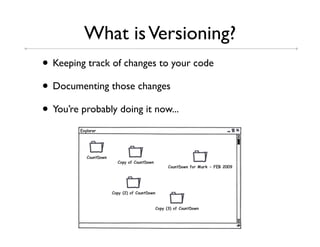
What is Versioning?
• Keeping track of changes to your code
• Documenting those changes
• You’re probably doing it now...
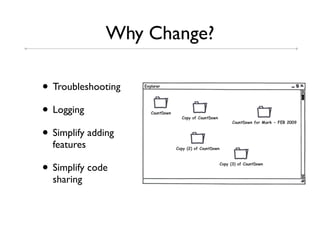
Why Change?

• Troubleshooting
• Logging
• Simplify adding
  features

• Simplify code
  sharing
What is Git?
• DVCS = Distributed Version Control System
• Technique for managing large/small coding projects

  Large


                 Me, >1 million other
   Small
                       people
What is Git?
• Two parts:
 1. “Database” (hidden folder) to hold project history

 2. Set of tools to interact with database

• Used via Command Line or GUI interfaces
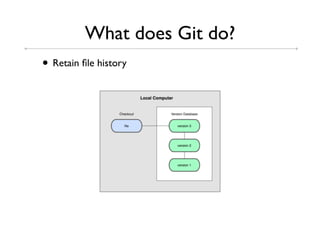
What does Git do?
• Retain file history
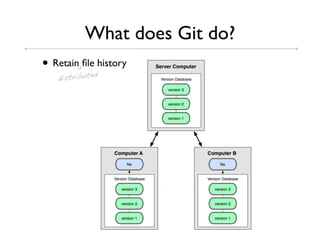
What does Git do?
• Retain^filedhistory
           e
   distribut
What does Git do?
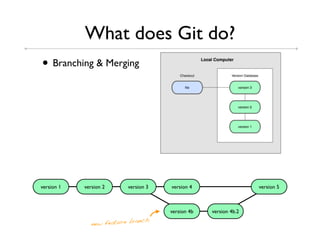
• Branching & Merging


version 1   version 2      version 3   version 4                   version 5


                                       version 4b   version 4b.2
                               nch
               new feature bra
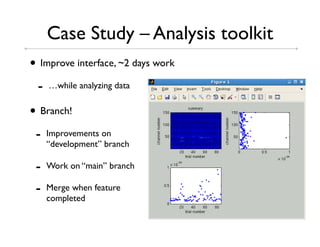
Case Study – Analysis toolkit
• Improve interface, ~2 days work
 -   …while analyzing data


• Branch!
 -   Improvements on
     “development” branch

 -   Work on “main” branch

 -   Merge when feature
     completed
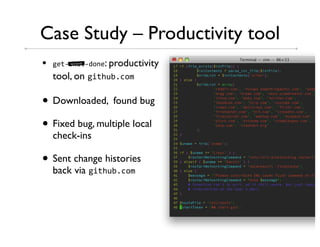
Case Study – Productivity tool
•   13"45!&"46.'3: productivity
        bad word!


    tool, on 1&"!)0,-./

• Downloaded, found bug
• Fixed bug, multiple local
    check-ins

• Sent change histories
    back via 1&"!)0,-./
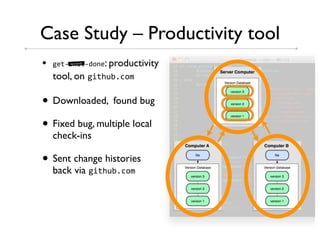
Case Study – Productivity tool
•   13"45!&"46.'3: productivity
        bad word!


    tool, on 1&"!)0,-./

• Downloaded, found bug
• Fixed bug, multiple local
    check-ins

• Sent change histories
    back via 1&"!)0,-./
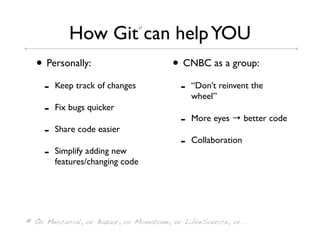
How Git can help YOU *


  • Personally:                         • CNBC as a group:
     -   Keep track of changes            -   “Don’t reinvent the
                                              wheel”
     -   Fix bugs quicker
                                          -   More eyes → better code
     -   Share code easier
                                          -   Collaboration
     -   Simplify adding new
         features/changing code


* Or Mercurial, or Bazaar, or Monotone, or LibreSource, or...
This slide intentionally left blank
Git Usage
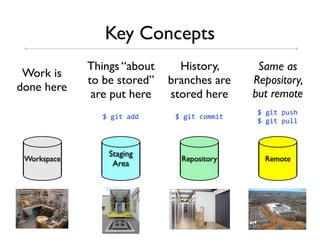
Key Concepts
             Things “about     History,       Same as
 Work is
             to be stored”   branches are    Repository,
done here
              are put here   stored here     but remote
                                              781&"8#)5!
               781&"8966      781&"8-.//&"
                                              781&"8#)++


                 Staging
 Workspace                     Repository      Remote
                  Area
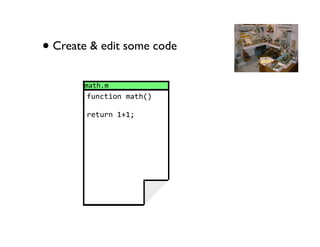
• Create & edit some code
       /9"!,/
        :)'-"&.'8/9"!;<

        *3")*'8=>=?
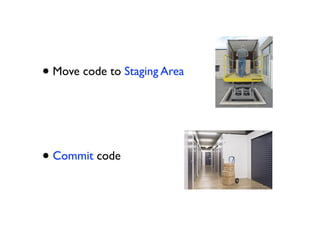
• Move code to Staging Area


• Commit code
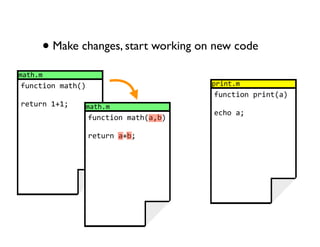
• Make changes, start working on new code
/9"!,/
:)'-"&.'8/9"!;<                        #*&'",/
                                       :)'-"&.'8#*&'";9<
*3")*'8=>=?       /9"!,/
                                       3-!.89?
                  :)'-"&.'8/9"!;9@0<

                  *3")*'89>0?
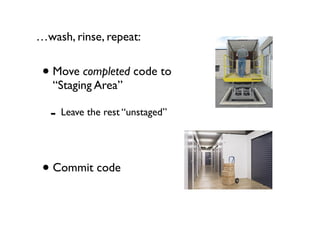
…wash, rinse, repeat:


 • Move completed code to
   “Staging Area”

  - Leave the rest “unstaged”


 • Commit code
Key Concepts
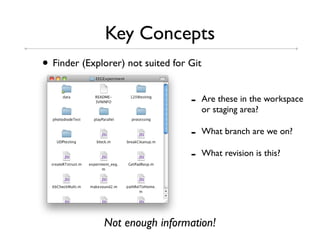
• Finder (Explorer) not suited for Git
                                   -     Are these in the workspace
                                         or staging area?

                                   -     What branch are we on?

                                   -     What revision is this?


              Not enough information!
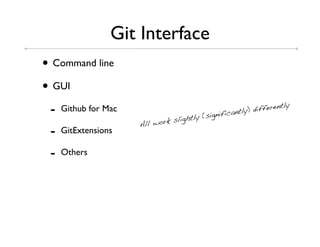
Git Interface
• Command line
• GUI
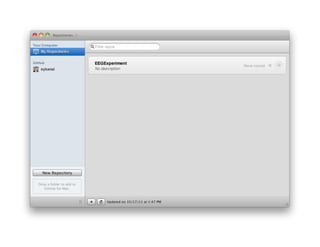
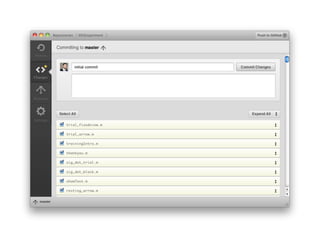
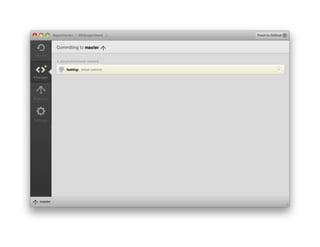
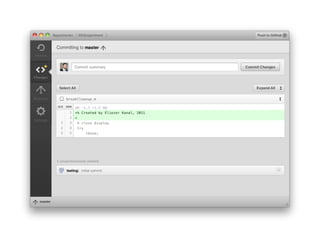
 -   Github for Mac
                                         (signific
                                                   antly ) differe
                                                                   ntly
                                  ightly
                      All work sl
 -   GitExtensions

 -   Others
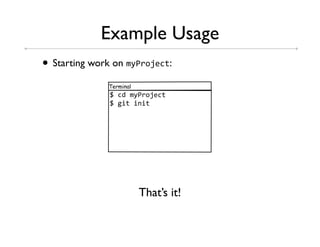
Example Usage
• Starting work on /(A*.B3-":
              Terminal
               78-68/(A*.B3-"
               781&"8&'&"8


                         That’s it!
Command Line Interface
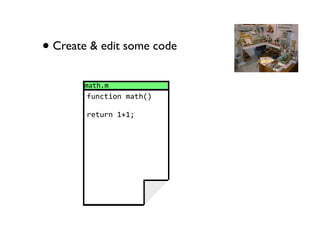
• Create & edit some code
       /9"!,/
        :)'-"&.'8/9"!;<

        *3")*'8=>=?
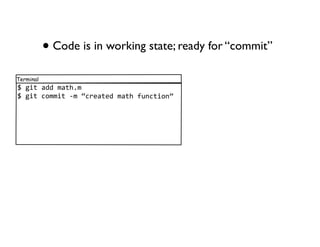
• Code is in working state; ready for “commit”
Terminal
781&"89668/9"!,/
781&"8-.//&"84/8C-*39"368/9"!8:)'-"&.'D
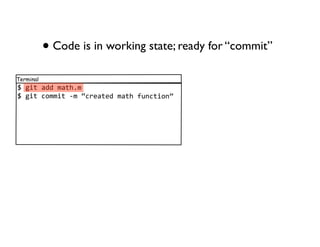
• Code is in working state; ready for “commit”
Terminal
781&"89668/9"!,/
781&"8-.//&"84/8C-*39"368/9"!8:)'-"&.'D
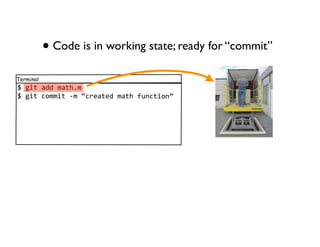
• Code is in working state; ready for “commit”
Terminal
781&"89668/9"!,/
781&"8-.//&"84/8C-*39"368/9"!8:)'-"&.'D
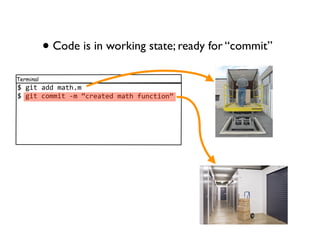
• Code is in working state; ready for “commit”
Terminal
781&"89668/9"!,/
781&"8-.//&"84/8C-*39"368/9"!8:)'-"&.'D
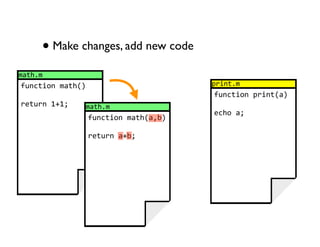
• Make changes, add new code
/9"!,/
:)'-"&.'8/9"!;<                        #*&'",/
                                       :)'-"&.'8#*&'";9<
*3")*'8=>=?       /9"!,/
                                       3-!.89?
                  :)'-"&.'8/9"!;9@0<

                  *3")*'89>0?
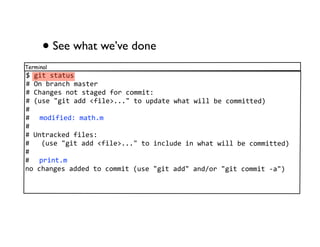
• See what we’ve done
Terminal
781&"85"9")5
E8F'80*9'-!8/95"3*
E8G!9'1358'."85"91368:.*8-.//&"$
E8;)538H1&"89668I:&+3J,,,H8".8)#69"38K!9"8K&++8038-.//&""36<
E
E8 /.6&:&36$8/9"!,/
E
E8L'"*9-M368:&+35$
E888;)538H1&"89668I:&+3J,,,H8".8&'-+)638&'8K!9"8K&++8038-.//&""36<
E
E8 #*&'",/
'.8-!9'1358966368".8-.//&"8;)538H1&"8966H89'6%.*8H1&"8-.//&"849H<
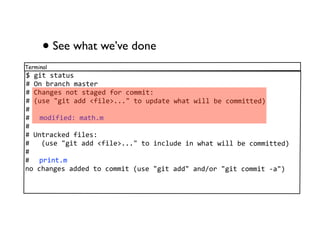
• See what we’ve done
Terminal
781&"85"9")5
E8F'80*9'-!8/95"3*
E8G!9'1358'."85"91368:.*8-.//&"$
E8;)538H1&"89668I:&+3J,,,H8".8)#69"38K!9"8K&++8038-.//&""36<
E
E8 /.6&:&36$8/9"!,/
E
E8L'"*9-M368:&+35$
E888;)538H1&"89668I:&+3J,,,H8".8&'-+)638&'8K!9"8K&++8038-.//&""36<
E
E8 #*&'",/
'.8-!9'1358966368".8-.//&"8;)538H1&"8966H89'6%.*8H1&"8-.//&"849H<
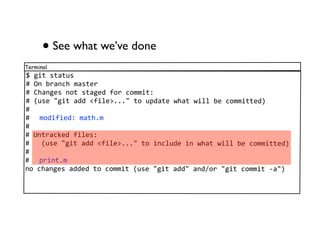
• See what we’ve done
Terminal
781&"85"9")5
E8F'80*9'-!8/95"3*
E8G!9'1358'."85"91368:.*8-.//&"$
E8;)538H1&"89668I:&+3J,,,H8".8)#69"38K!9"8K&++8038-.//&""36<
E
E8 /.6&:&36$8/9"!,/
E
E8L'"*9-M368:&+35$
E888;)538H1&"89668I:&+3J,,,H8".8&'-+)638&'8K!9"8K&++8038-.//&""36<
E
E8 #*&'",/
'.8-!9'1358966368".8-.//&"8;)538H1&"8966H89'6%.*8H1&"8-.//&"849H<
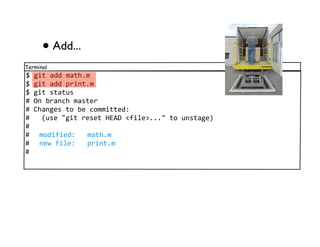
• Add...
Terminal
781&"89668/9"!,/
781&"89668#*&'",/
781&"85"9")5
E8F'80*9'-!8/95"3*
E8G!9'1358".8038-.//&""36$
E888;)538H1&"8*353"8NOPQ8I:&+3J,,,H8".8)'5"913<
E
E8 /.6&:&36$888/9"!,/
E8 '3K8:&+3$888#*&'",/
E
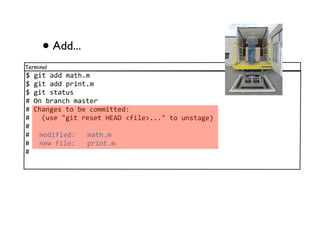
• Add...
Terminal
781&"89668/9"!,/
781&"89668#*&'",/
781&"85"9")5
E8F'80*9'-!8/95"3*
E8G!9'1358".8038-.//&""36$
E888;)538H1&"8*353"8NOPQ8I:&+3J,,,H8".8)'5"913<
E
E8 /.6&:&36$888/9"!,/
E8 '3K8:&+3$888#*&'",/
E
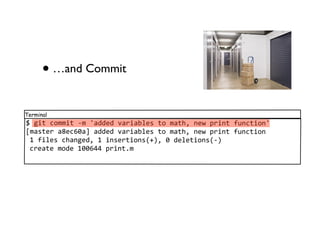
• …and Commit
Terminal
781&"8-.//&"84/8R966368S9*&90+358".8/9"!@8'3K8#*&'"8:)'-"&.'R
T/95"3*89U3-VW9X8966368S9*&90+358".8/9"!@8'3K8#*&'"8:)'-"&.'
8=8:&+358-!9'136@8=8&'53*"&.'5;><@8W863+3"&.'5;4<
8-*39"38/.638=WWVYY8#*&'",/
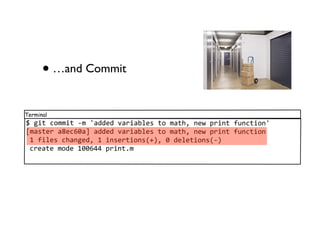
• …and Commit
Terminal
781&"8-.//&"84/8R966368S9*&90+358".8/9"!@8'3K8#*&'"8:)'-"&.'R
T/95"3*89U3-VW9X8966368S9*&90+358".8/9"!@8'3K8#*&'"8:)'-"&.'
8=8:&+358-!9'136@8=8&'53*"&.'5;><@8W863+3"&.'5;4<
8-*39"38/.638=WWVYY8#*&'",/
• Let’s see what we’ve done...
Terminal
781&"8+.1
-.//&"89U3-VW9ZVU:6VY3=[ZU9WVW=6U[2[03V]U:-U99
P)"!.*$8O+&3^3*8_9'9+8I3M9'9+`-/),36)J
Q9"3$888a!)8b)'8=V8=[$=$2=82W==84WYWW

8888966368S9*&90+358".8/9"!@8'3K8#*&'"8:)'-"&.'

-.//&"8603[]WW]9303V000[30:0-]9=]VY=6]2ZWW
P)"!.*$8O+&3^3*8_9'9+8I3M9'9+`-/),36)J
Q9"3$888a!)8b)'8=V8=[$==$WY82W==84WYWW

8888-*39"368/9"!8:)'-"&.'
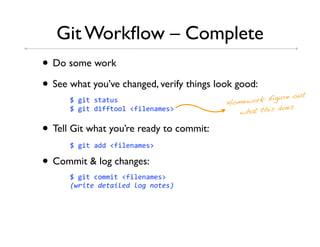
Git Workflow – Complete
• Do some work
• See what you’ve changed, verify things look good:
                                                           re out
      781&"85"9")5                         Home work: figu
                                                         does
      781&"86&::"..+8I:&+3'9/35J              what this

• Tell Git what you’re ready to commit:
      781&"89668I:&+3'9/35J

• Commit & log changes:
      781&"8-.//&"8I:&+3'9/35J
      !"#$%&'(&%)$*&('*+,'-+%&./
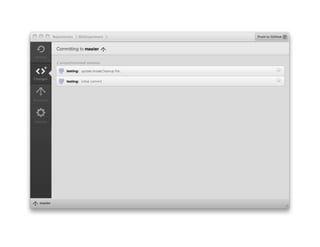
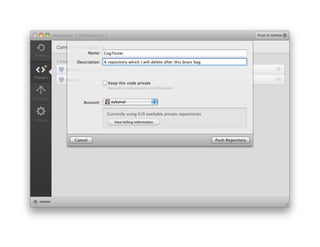
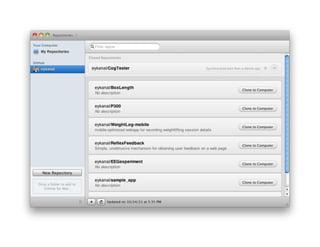
Github for Mac™
Branches
• Question: How can we integrate new features without
  messing up our current working code?

• Branches let us work in a “new directory” which we
  can later either delete or merge.
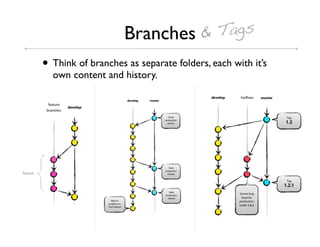
Branches & Tags
• Think of branches as separate folders, each with it’s
  own content and history.
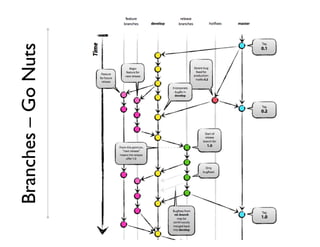
Branches – Go Nuts
Branches & Merges
• If a branch is a split in the graph, then merge is a
  merging of split branches

• One single command (SVN users rejoice!)
• Conflicts: Same code was changed in both branches
• Fix by hand, re-try the merge.
  -   !""#$%%KKK,M3*'3+,.*1%#)0%5.:"K9*3%5-/%1&"%6.-5%)53*4
      /9')9+,!"/+E*35.+S&'1494/3*13


  -   better idea: Google “fixing a git merge conflict”
Branches & Merges
• Conflicts: Same code was changed in both branches
• Merge fails!
• Fix by hand, re-try the merge
 -   !""#$%%KKK,M3*'3+,.*1%#)0%5.:"K9*3%5-/%1&"%6.-5%)53*4
     /9')9+,!"/+E*35.+S&'1494/3*13


 -   better idea: Search “fixing a git merge conflict”
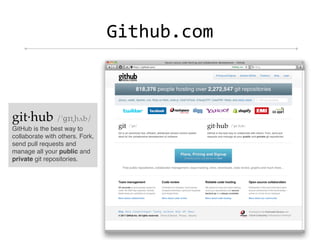
c&"!)0,-./


git·hub /'ɡɪtˌhʌb/
GitHub is the best way to
collaborate with others. Fork,
send pull requests and
manage all your public and
private git repositories.
c&"!)0,-./
• Very easy collaboration
• Clear, detailed setup instructions
  4 !""#$%%!3+#,1&"!)0,-./%
• Easy “forking” for Github projects
  -   Get your own copy of their code

  -   Contribute back with “pull requests”
Demo
SVN integration
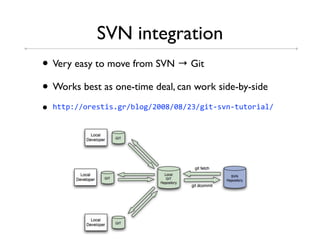
• Very easy to move from SVN → Git
• Works best as one-time deal, can work side-by-side
•   !""#$%%.*35"&5,1*%0+.1%2WWU%WU%2%1&"45S'4")".*&9+%
Good Git Practice
• Check in often!
  -   Rule of thumb… check in whenever code works

• Write detailed log notes! You’ll thank yourself for it
  later!

• Branch for new features
  -   Avoid working on the master branch, it should always be the
      “clean, working” code
References
•   Pro Git - free online:
    ! !""#$%%#*.1&",.*1%0..M%

•   Branching:
    ! !""#$%%'S&3,-./%#.5"5%945)--355:)+41&"40*9'-!&'14/.63+%

•   Git tutorials and useful FAQ links:
    ! !""#$%%5&d*3S&5&.'5,-./%*35.)*-35%1&"4")".*&9+54031&''3*5%

•   Github:
    ! !""#$%%1&"!)0,-./%

•   Git-SVN integration:
    ! !""#$%%.*35"&5,1*%0+.1%2WWU%WU%2%1&"45S'4")".*&9+%

•   Google:
    ! !""#$%%1..1+3,-./%

•   Bing:
    ! !""#$%%0&'1,-./%
Git Hands-On
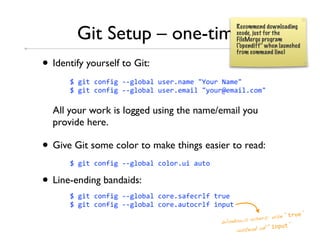
Git Setup – one-time
                                                   Recommend downloading
                                                   xcode, just for the
                                                   FileMerge program
                                                   (“opendiff” when launched
                                                   from command line)

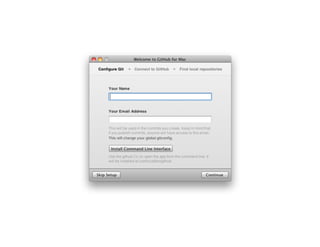
• Identify yourself to Git:
       781&"8-.':&18441+.09+8)53*,'9/38He.)*8f9/3H88
       781&"8-.':&18441+.09+8)53*,3/9&+8H(.)*`3/9&+,-./H8

  All your work is logged using the name/email you
  provide here.

• Give Git some color to make things easier to read:
       781&"8-.':&18441+.09+8-.+.*,)&89)".8

• Line-ending bandaids:
       781&"8-.':&18441+.09+8-.*3,59:3-*+:8"*)38
       781&"8-.':&18441+.09+8-.*3,9)".-*+:8&'#)"
                                                                  “"*)3”
                                              Windows  users: use
                                                             “&'#)"”
                                                  instead of
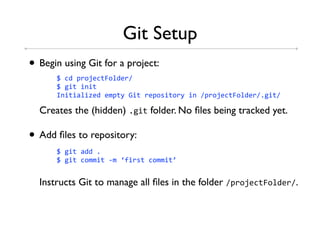
Git Setup
• Begin using Git for a project:
      78-68#*.B3-"g.+63*%
      781&"8&'&"
      h'&"&9+&^3683/#"(8c&"8*3#.5&".*(8&'8%#*.B3-"g.+63*%,1&"%

  Creates the (hidden) ,1&" folder. No files being tracked yet.

• Add files to repository:
      781&"89668,
      781&"8-.//&"84/8i:&*5"8-.//&"j


  Instructs Git to manage all files in the folder %#*.B3-"g.+63*%.

Git tutorial

  • 1.
    ioning You rCode: Vers Git and Github™: Code Management and Sharing for Researchers using Git Eliezer Kanal 10/24/2011 and Github (™)
  • 2.
  • 3.
    What is Versioning? •Keeping track of changes to your code • Documenting those changes • You’re probably doing it now...
  • 4.
    Why Change? • Troubleshooting •Logging • Simplify adding features • Simplify code sharing
  • 5.
    What is Git? •DVCS = Distributed Version Control System • Technique for managing large/small coding projects Large Me, >1 million other Small people
  • 6.
    What is Git? •Two parts: 1. “Database” (hidden folder) to hold project history 2. Set of tools to interact with database • Used via Command Line or GUI interfaces
  • 7.
    What does Gitdo? • Retain file history
  • 8.
    What does Gitdo? • Retain^filedhistory e distribut
  • 9.
    What does Gitdo? • Branching & Merging version 1 version 2 version 3 version 4 version 5 version 4b version 4b.2 nch new feature bra
  • 10.
    Case Study –Analysis toolkit • Improve interface, ~2 days work - …while analyzing data • Branch! - Improvements on “development” branch - Work on “main” branch - Merge when feature completed
  • 11.
    Case Study –Productivity tool • 13"45!&"46.'3: productivity bad word! tool, on 1&"!)0,-./ • Downloaded, found bug • Fixed bug, multiple local check-ins • Sent change histories back via 1&"!)0,-./
  • 12.
    Case Study –Productivity tool • 13"45!&"46.'3: productivity bad word! tool, on 1&"!)0,-./ • Downloaded, found bug • Fixed bug, multiple local check-ins • Sent change histories back via 1&"!)0,-./
  • 13.
    How Git canhelp YOU * • Personally: • CNBC as a group: - Keep track of changes - “Don’t reinvent the wheel” - Fix bugs quicker - More eyes → better code - Share code easier - Collaboration - Simplify adding new features/changing code * Or Mercurial, or Bazaar, or Monotone, or LibreSource, or...
  • 14.
  • 15.
  • 16.
    Key Concepts Things “about History, Same as Work is to be stored” branches are Repository, done here are put here stored here but remote 781&"8#)5! 781&"8966 781&"8-.//&" 781&"8#)++ Staging Workspace Repository Remote Area
  • 17.
    • Create &edit some code /9"!,/ :)'-"&.'8/9"!;< *3")*'8=>=?
  • 18.
    • Move codeto Staging Area • Commit code
  • 19.
    • Make changes,start working on new code /9"!,/ :)'-"&.'8/9"!;< #*&'",/ :)'-"&.'8#*&'";9< *3")*'8=>=? /9"!,/ 3-!.89? :)'-"&.'8/9"!;9@0< *3")*'89>0?
  • 20.
    …wash, rinse, repeat: • Move completed code to “Staging Area” - Leave the rest “unstaged” • Commit code
  • 21.
    Key Concepts • Finder(Explorer) not suited for Git - Are these in the workspace or staging area? - What branch are we on? - What revision is this? Not enough information!
  • 22.
    Git Interface • Commandline • GUI - Github for Mac (signific antly ) differe ntly ightly All work sl - GitExtensions - Others
  • 23.
    Example Usage • Startingwork on /(A*.B3-": Terminal 78-68/(A*.B3-" 781&"8&'&"8 That’s it!
  • 24.
  • 25.
    • Create &edit some code /9"!,/ :)'-"&.'8/9"!;< *3")*'8=>=?
  • 26.
    • Code isin working state; ready for “commit” Terminal 781&"89668/9"!,/ 781&"8-.//&"84/8C-*39"368/9"!8:)'-"&.'D
  • 27.
    • Code isin working state; ready for “commit” Terminal 781&"89668/9"!,/ 781&"8-.//&"84/8C-*39"368/9"!8:)'-"&.'D
  • 28.
    • Code isin working state; ready for “commit” Terminal 781&"89668/9"!,/ 781&"8-.//&"84/8C-*39"368/9"!8:)'-"&.'D
  • 29.
    • Code isin working state; ready for “commit” Terminal 781&"89668/9"!,/ 781&"8-.//&"84/8C-*39"368/9"!8:)'-"&.'D
  • 30.
    • Make changes,add new code /9"!,/ :)'-"&.'8/9"!;< #*&'",/ :)'-"&.'8#*&'";9< *3")*'8=>=? /9"!,/ 3-!.89? :)'-"&.'8/9"!;9@0< *3")*'89>0?
  • 31.
    • See whatwe’ve done Terminal 781&"85"9")5 E8F'80*9'-!8/95"3* E8G!9'1358'."85"91368:.*8-.//&"$ E8;)538H1&"89668I:&+3J,,,H8".8)#69"38K!9"8K&++8038-.//&""36< E E8 /.6&:&36$8/9"!,/ E E8L'"*9-M368:&+35$ E888;)538H1&"89668I:&+3J,,,H8".8&'-+)638&'8K!9"8K&++8038-.//&""36< E E8 #*&'",/ '.8-!9'1358966368".8-.//&"8;)538H1&"8966H89'6%.*8H1&"8-.//&"849H<
  • 32.
    • See whatwe’ve done Terminal 781&"85"9")5 E8F'80*9'-!8/95"3* E8G!9'1358'."85"91368:.*8-.//&"$ E8;)538H1&"89668I:&+3J,,,H8".8)#69"38K!9"8K&++8038-.//&""36< E E8 /.6&:&36$8/9"!,/ E E8L'"*9-M368:&+35$ E888;)538H1&"89668I:&+3J,,,H8".8&'-+)638&'8K!9"8K&++8038-.//&""36< E E8 #*&'",/ '.8-!9'1358966368".8-.//&"8;)538H1&"8966H89'6%.*8H1&"8-.//&"849H<
  • 33.
    • See whatwe’ve done Terminal 781&"85"9")5 E8F'80*9'-!8/95"3* E8G!9'1358'."85"91368:.*8-.//&"$ E8;)538H1&"89668I:&+3J,,,H8".8)#69"38K!9"8K&++8038-.//&""36< E E8 /.6&:&36$8/9"!,/ E E8L'"*9-M368:&+35$ E888;)538H1&"89668I:&+3J,,,H8".8&'-+)638&'8K!9"8K&++8038-.//&""36< E E8 #*&'",/ '.8-!9'1358966368".8-.//&"8;)538H1&"8966H89'6%.*8H1&"8-.//&"849H<
  • 34.
  • 35.
  • 36.
  • 37.
  • 38.
    • Let’s seewhat we’ve done... Terminal 781&"8+.1 -.//&"89U3-VW9ZVU:6VY3=[ZU9WVW=6U[2[03V]U:-U99 P)"!.*$8O+&3^3*8_9'9+8I3M9'9+`-/),36)J Q9"3$888a!)8b)'8=V8=[$=$2=82W==84WYWW 8888966368S9*&90+358".8/9"!@8'3K8#*&'"8:)'-"&.' -.//&"8603[]WW]9303V000[30:0-]9=]VY=6]2ZWW P)"!.*$8O+&3^3*8_9'9+8I3M9'9+`-/),36)J Q9"3$888a!)8b)'8=V8=[$==$WY82W==84WYWW 8888-*39"368/9"!8:)'-"&.'
  • 39.
    Git Workflow –Complete • Do some work • See what you’ve changed, verify things look good: re out 781&"85"9")5 Home work: figu does 781&"86&::"..+8I:&+3'9/35J what this • Tell Git what you’re ready to commit: 781&"89668I:&+3'9/35J • Commit & log changes: 781&"8-.//&"8I:&+3'9/35J !"#$%&'(&%)$*&('*+,'-+%&./
  • 40.
  • 48.
    Branches • Question: Howcan we integrate new features without messing up our current working code? • Branches let us work in a “new directory” which we can later either delete or merge.
  • 49.
    Branches & Tags •Think of branches as separate folders, each with it’s own content and history.
  • 50.
  • 51.
    Branches & Merges •If a branch is a split in the graph, then merge is a merging of split branches • One single command (SVN users rejoice!) • Conflicts: Same code was changed in both branches • Fix by hand, re-try the merge. - !""#$%%KKK,M3*'3+,.*1%#)0%5.:"K9*3%5-/%1&"%6.-5%)53*4 /9')9+,!"/+E*35.+S&'1494/3*13 - better idea: Google “fixing a git merge conflict”
  • 52.
    Branches & Merges •Conflicts: Same code was changed in both branches • Merge fails! • Fix by hand, re-try the merge - !""#$%%KKK,M3*'3+,.*1%#)0%5.:"K9*3%5-/%1&"%6.-5%)53*4 /9')9+,!"/+E*35.+S&'1494/3*13 - better idea: Search “fixing a git merge conflict”
  • 53.
    c&"!)0,-./ git·hub /'ɡɪtˌhʌb/ GitHub isthe best way to collaborate with others. Fork, send pull requests and manage all your public and private git repositories.
  • 54.
    c&"!)0,-./ • Very easycollaboration • Clear, detailed setup instructions 4 !""#$%%!3+#,1&"!)0,-./% • Easy “forking” for Github projects - Get your own copy of their code - Contribute back with “pull requests”
  • 57.
  • 58.
    SVN integration • Veryeasy to move from SVN → Git • Works best as one-time deal, can work side-by-side • !""#$%%.*35"&5,1*%0+.1%2WWU%WU%2%1&"45S'4")".*&9+%
  • 59.
    Good Git Practice •Check in often! - Rule of thumb… check in whenever code works • Write detailed log notes! You’ll thank yourself for it later! • Branch for new features - Avoid working on the master branch, it should always be the “clean, working” code
  • 60.
    References • Pro Git - free online: ! !""#$%%#*.1&",.*1%0..M% • Branching: ! !""#$%%'S&3,-./%#.5"5%945)--355:)+41&"40*9'-!&'14/.63+% • Git tutorials and useful FAQ links: ! !""#$%%5&d*3S&5&.'5,-./%*35.)*-35%1&"4")".*&9+54031&''3*5% • Github: ! !""#$%%1&"!)0,-./% • Git-SVN integration: ! !""#$%%.*35"&5,1*%0+.1%2WWU%WU%2%1&"45S'4")".*&9+% • Google: ! !""#$%%1..1+3,-./% • Bing: ! !""#$%%0&'1,-./%
  • 61.
  • 62.
    Git Setup –one-time Recommend downloading xcode, just for the FileMerge program (“opendiff” when launched from command line) • Identify yourself to Git: 781&"8-.':&18441+.09+8)53*,'9/38He.)*8f9/3H88 781&"8-.':&18441+.09+8)53*,3/9&+8H(.)*`3/9&+,-./H8 All your work is logged using the name/email you provide here. • Give Git some color to make things easier to read: 781&"8-.':&18441+.09+8-.+.*,)&89)".8 • Line-ending bandaids: 781&"8-.':&18441+.09+8-.*3,59:3-*+:8"*)38 781&"8-.':&18441+.09+8-.*3,9)".-*+:8&'#)" “"*)3” Windows users: use “&'#)"” instead of
  • 63.
    Git Setup • Beginusing Git for a project: 78-68#*.B3-"g.+63*% 781&"8&'&" h'&"&9+&^3683/#"(8c&"8*3#.5&".*(8&'8%#*.B3-"g.+63*%,1&"% Creates the (hidden) ,1&" folder. No files being tracked yet. • Add files to repository: 781&"89668, 781&"8-.//&"84/8i:&*5"8-.//&"j Instructs Git to manage all files in the folder %#*.B3-"g.+63*%.