FSC 632 
Library & Research 
Basics 
Linda Galloway 
2014
Today’s agenda 
• Who I am, what I do 
• SU Library 
– Locations, hours, how to get help 
– Where to study/work in the libraries 
– Remote access to library resources 
• Finding materials @ the libraries 
– Books, articles, other items 
• Library services 
– ILL 
– Avoiding plagiarism & citing sources 
– Research & Reference help
About me… 
• Librarian/subject specialist for Biology, 
Chemistry & Forensic Science, STEM 
bibliographer 
• Help people access the content they need, 
teach (guest lectures and classes), 
purchase books/other material for the 
library, create web content, etc. 
• Email: galloway@syr.edu
Locations & Hours Open 
• Carnegie Library (Science & Technology) 
• Geology Library (in Heroy Hall) 
• Bird Library 
– Technology Loans 
– Private study rooms 
– Team rooms 
– Computers, printers, scanners 
• Hours open online: check library.syr.edu
Finding Quiet Spaces 
• Carnegie Library – “silent reading room” 
• Quiet areas in Bird: 
– Check on first floor, it’s currently under 
construction 
– Private study rooms & team rooms (you sign 
the room out and can reserve rooms for 3 
hour time slots)
Help!! 
• Contact your subject specialist, Linda 
Galloway – galloway@syr.edu 
• General help: 
http://library.syr.edu/research/askus
Why?? 
Find 
Evaluate 
Synthesize 
Ethically use 
Information
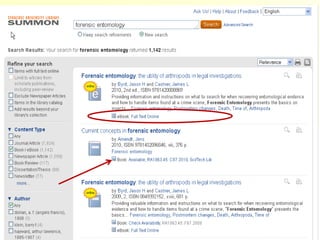
Finding Books 
Electronic Book 
In print: HV8073 .H77 2010 
In print: QA276 .A264 2010
Finding Articles
Finding Articles 
• Library search tool 
–SUMMON 
• Use Subject Guides 
– Chemistry 
– Chemical engineering 
– Plus hundreds of others 
• Databases Main Menu 
– Search through subject categories for links to 
our 500+ databases!
Full text, no 
newspapers 
Journal articles only 
Set date range 2006-present
think before (and while) you 
search…. 
What types of articles do you want? 
Newspaper 
Magazine print 
Journal 
Website 
and
Recognize the difference 
between a magazine and a 
journal….. 
Peer review: 
 suitability for publication 
 credibility 
 quality control
Primary Sources 
& Peer Review 
Primary Source - Original document 
containing firsthand information 
– Lab notebooks, interviews 
– Original research including journal articles 
and preprints 
A peer reviewed primary source is a work that is 
evaluated by experts in the field of study prior to 
publication. Serves as a measure of quality.
Finding Articles 
• Library search tool 
–SUMMON 
• Use Subject Guides 
–Forensics 
–Chemistry 
–Plus hundreds of others 
• Databases Main Menu 
– Search through subject categories for links to 
our 500+ databases!
http://researchguides.library.syr.edu/forensics
Search
Finding Articles 
• Library search tool 
–SUMMON 
• Use Subject Guides 
– Chemistry 
– Chemical engineering 
– Plus hundreds of others 
• Databases Main Menu 
– Search through subject categories for 
links to our 500+ databases!
When searching databases… 
Remember: RATS 
• Key words 
• Synonyms 
• Subjects 
• Suggested topics 
• Types of materials 
Read All The Screens! 
– Scholarly Journals, Magazines, etc.
Remote Access to 
Library Resources 
• Almost all resources are available off 
campus via our proxy server 
• Log on once and until you close your 
browser are recognized as an SU student 
• Get to databases/resources via the SU 
Library web site so you are recognized as 
a student; http://library.syr.edu
Primary Forensic Scientific 
Literature 
• Find citations to articles in databases 
• Find full text of articles in journals 
• Original scientific research articles 
– Not review articles 
– Not books 
• Check for scholarly status (you want a 
peer-reviewed or refereed journal) by 
consulting ULRICH’S database
Is the journal peer-reviewed?
Questions??
Start with your research 
assignment… 
• Develop a research topic by: 
– Evaluating topic 
– Background reading/ review literature 
– Developing a list of search terms 
– Writing a clarifying paragraph, thesis 
statement (something to prove or disprove) 
OR a research question
Choose a topic you are interested in. 
Carefully define and develop your topic. 
A well defined topic is easier to search.
Developing your Topic 
1. Choose a topic that interests you. 
2. Evaluate your topic. 
3. Get a working knowledge of your 
topic. (develop keyword list) 
4. Identify controversies or questions. 
5. Develop your research question. 
6. Write your clarifying paragraph.
Let’s develop our topic 
1. Choose a topic that interests you (false confessions) 
2. Evaluate your topic (Too broad or narrow?) 
3. Get a working knowledge of your topic. (develop 
keyword list) (How to do this??) 
4. Identify controversies or questions (Background 
reading) 
5. Develop your research question (Why?) 
6. Write your clarifying paragraph (Or introduction, or 
abstract)
Background Information 
• Google 
• Encyclopedias 
–Encyclopedia of Forensic Sciences 
–Other print and online 
–Big “W” 
• Books and other media
Legal & News Resources
http://researchguides.library.syr.edu/forensics
Search for: 
confession AND false AND interrogation 
in “Look up a Legal Case” 
yielded 300+ results
Web Resources
Research Methods & Guidance
Before you begin your 
research… 
• Define your topic 
• Gain a working knowledge of your topic – 
background info, keywords, controversies 
• Write your abstract/introduction AND your 
outline 
• Make sure you know what you are looking 
for 
• Find articles in the…. 
• Check peer-reviewed status in…
Avoiding Plagiarism and 
Citing Sources
What is Plagiarism? 
• Copy from published sources without 
adequate documentation 
• Paraphrase from a written source 
without giving credit to the author 
• Paraphrase from the web without 
giving credit
Final tips…
Forensic Science Resources 
• Wealth of resources at SU! 
– However….we don’t have everything 
• Interlibrary Loan Services 
– Try to get you what you need asap 
– Journal articles, books, chapters, etc. 
– Service is free – register here: 
• https://illiad.syr.edu/
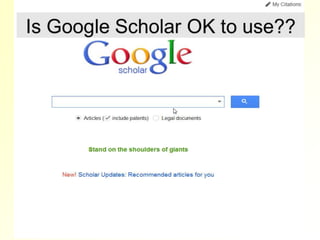
Google 
Google 
Scholar 
Summon 
Specialized 
databases 
Broad, 
Interdisciplinary 
search Tools 
Focused, subject-specific 
search engines
RSS Alerts 
• Set up RSS feeds in databases to be 
alerted when new articles in your field of 
interest are published. (I use Scopus to do 
this). 
• Can set up alerts from most databases – 
by author, subject or receive citation alerts
Search Tips 
• Most search tools insert AND between 
words. 
– Criminal AND profiling 
• To search for an exact phrase, use 
quotation marks 
“criminal profiling” 
• Use advanced search or read help 
sections for further assistance
Determine what you need: 
• Book 
– Background information 
– In depth review or overviews 
• Article 
– General (review articles) 
– More narrowly focused 
– Peer-reviewed, scientific 
Think before you search
http://researchguides.library.syr.edu/biology
Need help? 
Come visit – 
Sci-Tech Library 
(Carnegie) 
galloway@syr.edu 
OR 
http://library.syr.edu/research 
/askus/
Questions???

FSC 632; Library & Research Basics

  • 1.
    FSC 632 Library& Research Basics Linda Galloway 2014
  • 2.
    Today’s agenda •Who I am, what I do • SU Library – Locations, hours, how to get help – Where to study/work in the libraries – Remote access to library resources • Finding materials @ the libraries – Books, articles, other items • Library services – ILL – Avoiding plagiarism & citing sources – Research & Reference help
  • 3.
    About me… •Librarian/subject specialist for Biology, Chemistry & Forensic Science, STEM bibliographer • Help people access the content they need, teach (guest lectures and classes), purchase books/other material for the library, create web content, etc. • Email: galloway@syr.edu
  • 4.
    Locations & HoursOpen • Carnegie Library (Science & Technology) • Geology Library (in Heroy Hall) • Bird Library – Technology Loans – Private study rooms – Team rooms – Computers, printers, scanners • Hours open online: check library.syr.edu
  • 5.
    Finding Quiet Spaces • Carnegie Library – “silent reading room” • Quiet areas in Bird: – Check on first floor, it’s currently under construction – Private study rooms & team rooms (you sign the room out and can reserve rooms for 3 hour time slots)
  • 6.
    Help!! • Contactyour subject specialist, Linda Galloway – galloway@syr.edu • General help: http://library.syr.edu/research/askus
  • 7.
    Why?? Find Evaluate Synthesize Ethically use Information
  • 8.
    Finding Books ElectronicBook In print: HV8073 .H77 2010 In print: QA276 .A264 2010
  • 12.
  • 13.
    Finding Articles •Library search tool –SUMMON • Use Subject Guides – Chemistry – Chemical engineering – Plus hundreds of others • Databases Main Menu – Search through subject categories for links to our 500+ databases!
  • 15.
    Full text, no newspapers Journal articles only Set date range 2006-present
  • 16.
    think before (andwhile) you search…. What types of articles do you want? Newspaper Magazine print Journal Website and
  • 18.
    Recognize the difference between a magazine and a journal….. Peer review:  suitability for publication  credibility  quality control
  • 19.
    Primary Sources &Peer Review Primary Source - Original document containing firsthand information – Lab notebooks, interviews – Original research including journal articles and preprints A peer reviewed primary source is a work that is evaluated by experts in the field of study prior to publication. Serves as a measure of quality.
  • 20.
    Finding Articles •Library search tool –SUMMON • Use Subject Guides –Forensics –Chemistry –Plus hundreds of others • Databases Main Menu – Search through subject categories for links to our 500+ databases!
  • 21.
  • 23.
  • 24.
    Finding Articles •Library search tool –SUMMON • Use Subject Guides – Chemistry – Chemical engineering – Plus hundreds of others • Databases Main Menu – Search through subject categories for links to our 500+ databases!
  • 27.
    When searching databases… Remember: RATS • Key words • Synonyms • Subjects • Suggested topics • Types of materials Read All The Screens! – Scholarly Journals, Magazines, etc.
  • 28.
    Remote Access to Library Resources • Almost all resources are available off campus via our proxy server • Log on once and until you close your browser are recognized as an SU student • Get to databases/resources via the SU Library web site so you are recognized as a student; http://library.syr.edu
  • 29.
    Primary Forensic Scientific Literature • Find citations to articles in databases • Find full text of articles in journals • Original scientific research articles – Not review articles – Not books • Check for scholarly status (you want a peer-reviewed or refereed journal) by consulting ULRICH’S database
  • 30.
    Is the journalpeer-reviewed?
  • 31.
  • 32.
    Start with yourresearch assignment… • Develop a research topic by: – Evaluating topic – Background reading/ review literature – Developing a list of search terms – Writing a clarifying paragraph, thesis statement (something to prove or disprove) OR a research question
  • 33.
    Choose a topicyou are interested in. Carefully define and develop your topic. A well defined topic is easier to search.
  • 34.
    Developing your Topic 1. Choose a topic that interests you. 2. Evaluate your topic. 3. Get a working knowledge of your topic. (develop keyword list) 4. Identify controversies or questions. 5. Develop your research question. 6. Write your clarifying paragraph.
  • 35.
    Let’s develop ourtopic 1. Choose a topic that interests you (false confessions) 2. Evaluate your topic (Too broad or narrow?) 3. Get a working knowledge of your topic. (develop keyword list) (How to do this??) 4. Identify controversies or questions (Background reading) 5. Develop your research question (Why?) 6. Write your clarifying paragraph (Or introduction, or abstract)
  • 36.
    Background Information •Google • Encyclopedias –Encyclopedia of Forensic Sciences –Other print and online –Big “W” • Books and other media
  • 39.
    Legal & NewsResources
  • 40.
  • 44.
    Search for: confessionAND false AND interrogation in “Look up a Legal Case” yielded 300+ results
  • 45.
  • 48.
  • 49.
    Before you beginyour research… • Define your topic • Gain a working knowledge of your topic – background info, keywords, controversies • Write your abstract/introduction AND your outline • Make sure you know what you are looking for • Find articles in the…. • Check peer-reviewed status in…
  • 50.
    Avoiding Plagiarism and Citing Sources
  • 51.
    What is Plagiarism? • Copy from published sources without adequate documentation • Paraphrase from a written source without giving credit to the author • Paraphrase from the web without giving credit
  • 54.
  • 55.
    Forensic Science Resources • Wealth of resources at SU! – However….we don’t have everything • Interlibrary Loan Services – Try to get you what you need asap – Journal articles, books, chapters, etc. – Service is free – register here: • https://illiad.syr.edu/
  • 60.
    Google Google Scholar Summon Specialized databases Broad, Interdisciplinary search Tools Focused, subject-specific search engines
  • 61.
    RSS Alerts •Set up RSS feeds in databases to be alerted when new articles in your field of interest are published. (I use Scopus to do this). • Can set up alerts from most databases – by author, subject or receive citation alerts
  • 62.
    Search Tips •Most search tools insert AND between words. – Criminal AND profiling • To search for an exact phrase, use quotation marks “criminal profiling” • Use advanced search or read help sections for further assistance
  • 63.
    Determine what youneed: • Book – Background information – In depth review or overviews • Article – General (review articles) – More narrowly focused – Peer-reviewed, scientific Think before you search
  • 65.
  • 66.
    Need help? Comevisit – Sci-Tech Library (Carnegie) galloway@syr.edu OR http://library.syr.edu/research /askus/
  • 67.