Buley Library Research Basics
Winnie Shyam
Shyamw1@southernct.edu
(203) 392-5762
BU 122G
Fall 2015
What’s Where
• Ground Floor
Periodicals (Magazines, Journals, Newspapers), Theses, Microfilm,
Microfiche, Special Collections
• First Floor
Reference Books, Maps, Videos, DVDs, Music CDs,
Leisure Reading
• Second Floor
Circulating Books (Call numbers A-PN2924)
• Third Floor
Circulating Books (Call numbers PN2924-Z), Juvenile Collection, Oversize
Collection, Curriculum Lab Collection
Finding Books, DVDs, eBooks, etc.
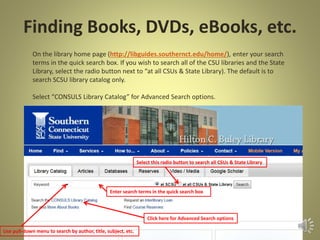
• On the library home page (http://libguides.southernct.edu/home/), enter your search
terms in the quick search box. If you wish to search all of the CSU libraries and the State
Library, select the radio button next to “at all CSUs & State Library). The default is to search
SCSU library catalog only.
• Select “CONSULS Library Catalog” for Advanced Search options.
How Books Are Arranged
• Books are arranged by the Library of Congress
Call Number System.
• Each book has a call number which consists of
letters and numbers.
Example: Z733.U6G86 1981
• The letter in a call number represents a major
subject area. Books on a subject are grouped
together.
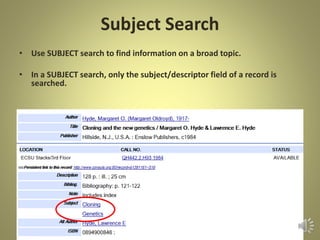
Subject Search
• Use SUBJECT search to find information on a broad topic.
• In a SUBJECT search, only the subject/descriptor field of a record is
searched.
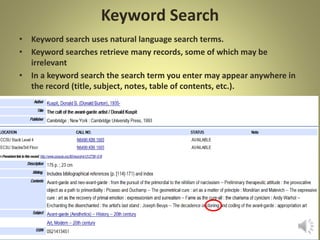
Keyword Search
• Keyword search uses natural language search terms.
• Keyword searches retrieve many records, some of which may be
irrelevant
• In a keyword search the search term you enter may appear anywhere in
the record (title, subject, notes, table of contents, etc.).
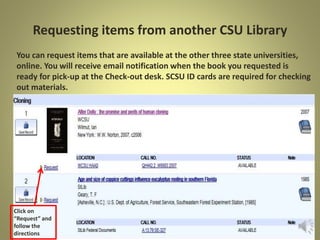
Requesting items from another CSU Library
You can request items that are available at the other three state
universities, online.
Click on
“Request” and
follow the
directions
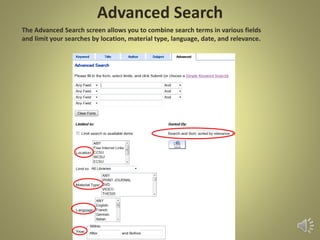
Advanced Search
Search Strategies
• Combine your main search concepts with operators
such as “and”, “or” or “not” to give your search focus
• Do not use phrase words in a search
• To search an exact phrase type the phrase in
quotations
Example: “Stand your ground”
• Look at the subject headings or descriptors in the
records in your results list to see what search terms are
being used in the database for your topic
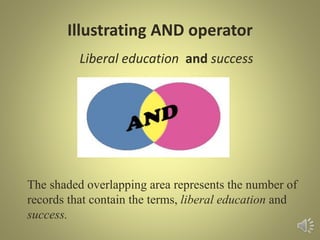
Illustrating AND operator
Liberal education and success
The shaded overlapping area represents the number of
records that contain the terms, liberal education and
success.
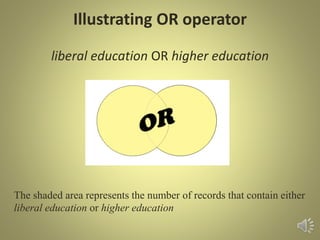
Illustrating OR operator
liberal education OR higher education
The shaded area represents the number of records that contain either
liberal education or higher education
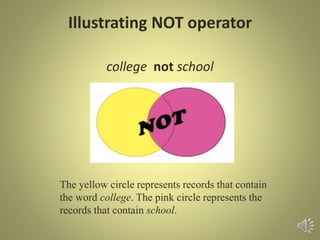
Illustrating NOT operator
college not school
The yellow circle represents records that contain
the word college. The pink circle represents the
records that contain school.
Using Parentheses
Parentheses are used to group search words
for more complex or focused searches.
Example: higher education and
(success or failure)
In this search, documents that contain the
word higher education and either the word
success or the word failure ,or both, are
retrieved.
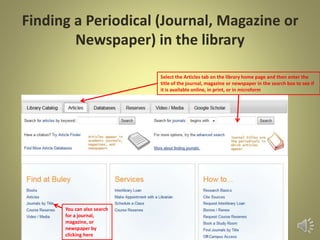
Finding Periodicals in the Library
Enter your journal title in the search box to see if we have the
periodical in print, online, microfilm, or microfiche.
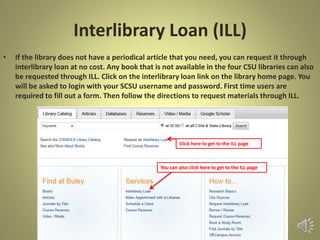
Interlibrary Loan (ILL)
• If the library does not have the periodical you need we can
get the article for you through interlibrary loan at no cost.
Select the ILL tab and follow
directions to request items
Finding Journal, Magazine, and Newspaper Articles
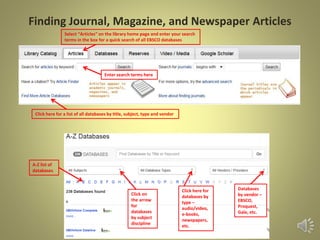
• Search Databases to find periodical articles.
• Databases can be accessed from the “Articles” tab on the library home page.
• From the “Articles” page select “All Databases”
Click on the articles tab and
select “all databases” for an
alphabetical listing of databases
by title
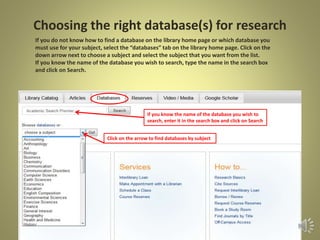
Click on the down arrow to
get a listing of databases by
subject. Select the subject
you need and click on go.
Databases
Clicking on “All Databases” in the Articles page will
retrieve an alphabetical list of databases (A-Z).
Select the alphabet you want and then select the
relevant database from that list.
You can also search for databases by subject.
Database types will retrieve newspaper databases,
e-books, etc.
Vendors/Providers will retrieve databases provided
by vendors such as Ebsco, Gale, Proquest, etc.
Databases vs. Internet
Why use Databases?
• Databases, not internet search engines, should be the
first stop for any academic research assignment.
• Information in databases goes through a peer-review
process and is therefore more reliable
Why not the Internet?
• You may use the internet for browsing or getting
acquainted with your topic but use library databases to
find quality information for your papers.
• Information on the web needs to be evaluated
Scholarly or Peer-reviewed Journals
• Articles are written by a scholar or researcher in the field and are most
often published by a specific organization
• The language is that of the discipline covered and usually requires the
reader to have some knowledge of the subject.
• May often contain graphs and charts.
• Cite sources in the form of bibliographies
Some Scholarly Journal Titles
Energy and Environment
Journal of Social Issues
Nineteenth Century Literature
Social Justice Research
Workforce Management
Popular and Other Periodicals
• Usually written by a member of the editorial staff, a scholar, or a free-lance
writer and generally published by commercial enterprises or an individual though
some may be published by a professional organization.
• Contain general interest articles aimed at a broad audience.
• Articles have illustrations or photographs.
• Articles usually do not cite sources.
Some Popular Periodical Titles
Ebony
Newsweek
Rolling Stone
Sports Illustrated
Time
Evaluating Information in Print and on the
Web with the CRAP Test
• Currency
When was the information published? When was it last updated? Is the
source current or out of date for your topic?
• Reliability
Is the information well researched? Is there supporting evidence?
Is the information too elementary, technical or advanced? Who is the
audience?
• Authority
What are the author’s credentials? Is the author well known in
her/his field? Is there contact information? What are the
publisher’s credentials?
• Purpose or Point of View
Is the information fact, opinion or propaganda? Is it free from bias?
Is the author objective and impartial?
CRAP Video
Dr. Chad Bauman has created an excellent music video which
explains CRAP.
The video is available at http://youtu.be/R5NbTBXddrwPro
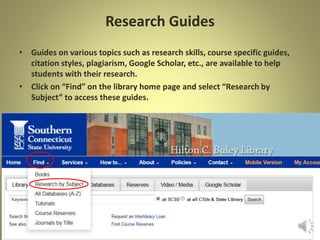
Research Guides
• Guides on various topics such as research skills, course specific guides,
citation styles, plagiarism, Google Scholar, etc., are available to help
students with their research.
• Click on “Research at Buley” on the library home page and select
“Research Guides” to access these guides.
Access database tutorials and help guides on Google Scholar, citation styles, and much more
Learn how to borrow and renew books, access course reserves, etc.
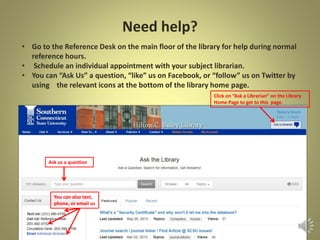
Need help?
• Go to the Reference Desk on the main floor of the library for help during normal
reference hours.
• Schedule an individual appointment with your subject librarian.
• You can “Ask Us” a question, “like” us on Facebook, or “follow” us on Twitter by
using the relevant icons at the bottom of the library home page.
Schedule an appointment with a librarian
More ways to get help

Buley Library Research Basics

  • 1.
    Buley Library ResearchBasics Winnie Shyam Shyamw1@southernct.edu (203) 392-5762 BU 122G Fall 2015
  • 2.
    What’s Where • GroundFloor Periodicals (Magazines, Journals, Newspapers), Theses, Microfilm, Microfiche, Special Collections • First Floor Reference Books, Maps, Videos, DVDs, Music CDs, Leisure Reading • Second Floor Circulating Books (Call numbers A-PN2924) • Third Floor Circulating Books (Call numbers PN2924-Z), Juvenile Collection, Oversize Collection, Curriculum Lab Collection
  • 3.
    Finding Books, DVDs,eBooks, etc. • On the library home page (http://libguides.southernct.edu/home/), enter your search terms in the quick search box. If you wish to search all of the CSU libraries and the State Library, select the radio button next to “at all CSUs & State Library). The default is to search SCSU library catalog only. • Select “CONSULS Library Catalog” for Advanced Search options.
  • 4.
    How Books AreArranged • Books are arranged by the Library of Congress Call Number System. • Each book has a call number which consists of letters and numbers. Example: Z733.U6G86 1981 • The letter in a call number represents a major subject area. Books on a subject are grouped together.
  • 5.
    Subject Search • UseSUBJECT search to find information on a broad topic. • In a SUBJECT search, only the subject/descriptor field of a record is searched.
  • 6.
    Keyword Search • Keywordsearch uses natural language search terms. • Keyword searches retrieve many records, some of which may be irrelevant • In a keyword search the search term you enter may appear anywhere in the record (title, subject, notes, table of contents, etc.).
  • 7.
    Requesting items fromanother CSU Library You can request items that are available at the other three state universities, online. Click on “Request” and follow the directions
  • 8.
  • 9.
    Search Strategies • Combineyour main search concepts with operators such as “and”, “or” or “not” to give your search focus • Do not use phrase words in a search • To search an exact phrase type the phrase in quotations Example: “Stand your ground” • Look at the subject headings or descriptors in the records in your results list to see what search terms are being used in the database for your topic
  • 10.
    Illustrating AND operator Liberaleducation and success The shaded overlapping area represents the number of records that contain the terms, liberal education and success.
  • 11.
    Illustrating OR operator liberaleducation OR higher education The shaded area represents the number of records that contain either liberal education or higher education
  • 12.
    Illustrating NOT operator collegenot school The yellow circle represents records that contain the word college. The pink circle represents the records that contain school.
  • 13.
    Using Parentheses Parentheses areused to group search words for more complex or focused searches. Example: higher education and (success or failure) In this search, documents that contain the word higher education and either the word success or the word failure ,or both, are retrieved.
  • 14.
    Finding Periodicals inthe Library Enter your journal title in the search box to see if we have the periodical in print, online, microfilm, or microfiche.
  • 15.
    Interlibrary Loan (ILL) •If the library does not have the periodical you need we can get the article for you through interlibrary loan at no cost. Select the ILL tab and follow directions to request items
  • 16.
    Finding Journal, Magazine,and Newspaper Articles • Search Databases to find periodical articles. • Databases can be accessed from the “Articles” tab on the library home page. • From the “Articles” page select “All Databases” Click on the articles tab and select “all databases” for an alphabetical listing of databases by title Click on the down arrow to get a listing of databases by subject. Select the subject you need and click on go.
  • 17.
    Databases Clicking on “AllDatabases” in the Articles page will retrieve an alphabetical list of databases (A-Z). Select the alphabet you want and then select the relevant database from that list. You can also search for databases by subject. Database types will retrieve newspaper databases, e-books, etc. Vendors/Providers will retrieve databases provided by vendors such as Ebsco, Gale, Proquest, etc.
  • 18.
    Databases vs. Internet Whyuse Databases? • Databases, not internet search engines, should be the first stop for any academic research assignment. • Information in databases goes through a peer-review process and is therefore more reliable Why not the Internet? • You may use the internet for browsing or getting acquainted with your topic but use library databases to find quality information for your papers. • Information on the web needs to be evaluated
  • 19.
    Scholarly or Peer-reviewedJournals • Articles are written by a scholar or researcher in the field and are most often published by a specific organization • The language is that of the discipline covered and usually requires the reader to have some knowledge of the subject. • May often contain graphs and charts. • Cite sources in the form of bibliographies Some Scholarly Journal Titles Energy and Environment Journal of Social Issues Nineteenth Century Literature Social Justice Research Workforce Management
  • 20.
    Popular and OtherPeriodicals • Usually written by a member of the editorial staff, a scholar, or a free-lance writer and generally published by commercial enterprises or an individual though some may be published by a professional organization. • Contain general interest articles aimed at a broad audience. • Articles have illustrations or photographs. • Articles usually do not cite sources. Some Popular Periodical Titles Ebony Newsweek Rolling Stone Sports Illustrated Time
  • 21.
    Evaluating Information inPrint and on the Web with the CRAP Test • Currency When was the information published? When was it last updated? Is the source current or out of date for your topic? • Reliability Is the information well researched? Is there supporting evidence? Is the information too elementary, technical or advanced? Who is the audience? • Authority What are the author’s credentials? Is the author well known in her/his field? Is there contact information? What are the publisher’s credentials? • Purpose or Point of View Is the information fact, opinion or propaganda? Is it free from bias? Is the author objective and impartial?
  • 22.
    CRAP Video Dr. ChadBauman has created an excellent music video which explains CRAP. The video is available at http://youtu.be/R5NbTBXddrwPro
  • 23.
    Research Guides • Guideson various topics such as research skills, course specific guides, citation styles, plagiarism, Google Scholar, etc., are available to help students with their research. • Click on “Research at Buley” on the library home page and select “Research Guides” to access these guides. Access database tutorials and help guides on Google Scholar, citation styles, and much more Learn how to borrow and renew books, access course reserves, etc.
  • 24.
    Need help? • Goto the Reference Desk on the main floor of the library for help during normal reference hours. • Schedule an individual appointment with your subject librarian. • You can “Ask Us” a question, “like” us on Facebook, or “follow” us on Twitter by using the relevant icons at the bottom of the library home page. Schedule an appointment with a librarian More ways to get help