Finding research materials in LOIS and library databases ENGWR 300 (Gary), Spring 2008 Jeff Karlsen, LRC Librarian [email_address]
Doing research in LOIS and library databases: Getting started What is your  topic ?  You should be able to summarize it in a single phrase The effect of cell phones on leisure 24-hour cable news and the decline of newspapers The stock market crash of 1987 and “grunge” music *** What are  keywords ? Ideas, phrases, topics When you search for information, you can combine them
Topic    Keywords Topic : social effects of cell phones Keywords : cell phones, cellular phones, mobile phones privacy work, leisure communication, community individuality, isolation consumption, conspicuous consumption
Research Materials What  kind  of information are you trying to find? Background information Statistics Evidence of how people reacted to an event Scholarly studies of a particular phenomenon Images associated with a person Artistic representations of an event or phenomenon
Research Materials 3 basic types: Reference Secondary Sources Primary Sources
Reference Materials early in the process; whenever you need to know more about the “big picture” When to consult discover context; get ideas; learn “common wisdom”; check facts; collect references for further reading Purpose LOIS; browse 2 nd  floor; databases (e.g. Oxford Reference Online); web directories How to find encyclopedias (including subject-specific); dictionaries; atlases; books of statistics (e.g. Statistical Abstract of the United States) Examples
Scholarly Secondary Sources when you have a topic but are still working on the argument When to consult tie disparate ideas together;  model analysis; give you something to set your argument against Purpose Databases (esp. Research Library); LOIS How to find article from academic journal; book (often on university press) Examples
Primary Sources when you already have an argument that you are hoping to “flesh out”; when you want to find very specific information about a particular event;  when you need to complicate arguments from secondary sources When to consult shows you how an event or phenomenon was viewed at the time; allows you to speculate from “raw material”;  provide you with individual perspectives Purpose library databases; LOIS; web directories How to find newspaper or magazine articles; letters; speeches; memoirs; images Examples
Library Website Link on the SCC website http://scc.losrios.edu Library home page http://scc.losrios.edu/~library
LOIS : Books, audio/visual media, reserve materials, e-books
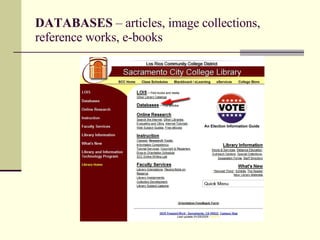
DATABASES  – articles, image collections, reference works, e-books
Using LOIS When searching for books on a particular topic, you have a choice of searching by  keyword  or by  subject Keyword searching Ideas, words, phrases—can be in title, subject, author, chapter titles Lots of results Not very precise Subject searching Subject terms are in a particular form—not intuitive Fewer results—you might miss some relevant books More precise
LOIS Keywords    Subject Enter keywords Skim results for promising books Click on the title to see the full record Look at subject Good subject headings; click on one to see more books on the same topic
Important search tips: Boolean logic AND  finds only those materials that contain BOTH terms OR  finds materials that use EITHER term (more results) NOT  (sometimes  AND NOT ) finds articles that contain one term, but not the other. white supremacists  AND  aryan white supremacists  OR  militia groups white supremacists  NOT  photography
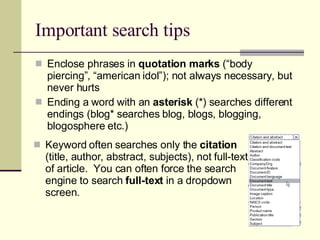
Important search tips Enclose phrases in  quotation marks  (“body piercing”, “american idol”); not always necessary, but never hurts Ending a word with an  asterisk  (*) searches different endings (blog* searches blog, blogs, blogging, blogosphere etc.) Keyword often searches only the  citation  (title, author, abstract, subjects), not full-text of article.  You can often force the search engine to search  full-text  in a dropdown screen.
ProQuest Research Library scholarly journals, general interest magazines, a few newspapers select “document text” for more results keywords here important!   OR, AND NOT, other options also available
Important search tips Enclose phrases in  quotation marks  (“body piercing”, “american idol”); not always necessary, but never hurts Ending a word with an  asterisk  (*) searches different endings (blog* searches blog, blogs, blogging, blogosphere etc.) Keyword often searches only the  citation  (title, author, abstract, subjects), not full-text of article.  You can often force the search engine to search  full-text  in a dropdown screen.
ProQuest Research Library: Refine search
ProQuest Research Library: Collecting materials “ Mark” documents to review later Use “My Research” tab to view marked documents E-mail, print, or save full text PDF generally better for preserving images—they don’t always display correctly in “Text+Graphics” Choose citation format—beware, sometimes format is not done correctly
CQ Researcher: In-depth reports reasonably current  information Start with simple  keyword search
JSTOR : Advanced Search Screen JSTOR contains lots of book reviews; exclude unless you want them Journals go back to the late 1800s! Limit your search to specific disciplines (useful if your keywords have several possible meanings) No subject searching; “near” connectors can help
World Wide Web Who creates the content on the Web? What are the advantages? Disadvantages? How do you find more reliable information on the Web? Is Wikipedia a good resource?
Analyzing URLS http:// scc . losrios . edu http:// www . google . com http:// mail . google . com http:// www . google . com/ reader subdomain 2 nd -level domain top-level domain directory (folder) “domain name”
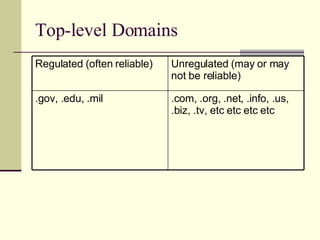
Top-level Domains .com, .org, .net, .info, .us, .biz, .tv, etc etc etc etc .gov, .edu, .mil Unregulated (may or may not be reliable) Regulated (often reliable)
Evaluating Websites Who is responsible for it? When was it last updated? Does it contain a lot of ads? What sorts of other sites does it link to? Does it show obvious bias? Does it cite references for the information it contains?
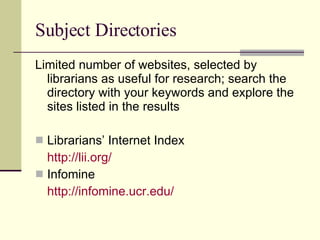
Subject Directories Limited number of websites, selected by librarians as useful for research; search the directory with your keywords and explore the sites listed in the results Librarians’ Internet Index http://lii.org/   Infomine http://infomine.ucr.edu/
Questions? Need more help? Reference Desk, 2 nd  floor of Learning Resource Center Phone: 558-2461 E-mail me:  [email_address] Find the page for this course at: http://scc.losrios.edu/~karlsej/instruction

EngWri 300 (Gary)

  • 1.
    Finding research materialsin LOIS and library databases ENGWR 300 (Gary), Spring 2008 Jeff Karlsen, LRC Librarian [email_address]
  • 2.
    Doing research inLOIS and library databases: Getting started What is your topic ? You should be able to summarize it in a single phrase The effect of cell phones on leisure 24-hour cable news and the decline of newspapers The stock market crash of 1987 and “grunge” music *** What are keywords ? Ideas, phrases, topics When you search for information, you can combine them
  • 3.
    Topic  Keywords Topic : social effects of cell phones Keywords : cell phones, cellular phones, mobile phones privacy work, leisure communication, community individuality, isolation consumption, conspicuous consumption
  • 4.
    Research Materials What kind of information are you trying to find? Background information Statistics Evidence of how people reacted to an event Scholarly studies of a particular phenomenon Images associated with a person Artistic representations of an event or phenomenon
  • 5.
    Research Materials 3basic types: Reference Secondary Sources Primary Sources
  • 6.
    Reference Materials earlyin the process; whenever you need to know more about the “big picture” When to consult discover context; get ideas; learn “common wisdom”; check facts; collect references for further reading Purpose LOIS; browse 2 nd floor; databases (e.g. Oxford Reference Online); web directories How to find encyclopedias (including subject-specific); dictionaries; atlases; books of statistics (e.g. Statistical Abstract of the United States) Examples
  • 7.
    Scholarly Secondary Sourceswhen you have a topic but are still working on the argument When to consult tie disparate ideas together; model analysis; give you something to set your argument against Purpose Databases (esp. Research Library); LOIS How to find article from academic journal; book (often on university press) Examples
  • 8.
    Primary Sources whenyou already have an argument that you are hoping to “flesh out”; when you want to find very specific information about a particular event; when you need to complicate arguments from secondary sources When to consult shows you how an event or phenomenon was viewed at the time; allows you to speculate from “raw material”; provide you with individual perspectives Purpose library databases; LOIS; web directories How to find newspaper or magazine articles; letters; speeches; memoirs; images Examples
  • 9.
    Library Website Linkon the SCC website http://scc.losrios.edu Library home page http://scc.losrios.edu/~library
  • 10.
    LOIS : Books,audio/visual media, reserve materials, e-books
  • 11.
    DATABASES –articles, image collections, reference works, e-books
  • 12.
    Using LOIS Whensearching for books on a particular topic, you have a choice of searching by keyword or by subject Keyword searching Ideas, words, phrases—can be in title, subject, author, chapter titles Lots of results Not very precise Subject searching Subject terms are in a particular form—not intuitive Fewer results—you might miss some relevant books More precise
  • 13.
    LOIS Keywords  Subject Enter keywords Skim results for promising books Click on the title to see the full record Look at subject Good subject headings; click on one to see more books on the same topic
  • 14.
    Important search tips:Boolean logic AND finds only those materials that contain BOTH terms OR finds materials that use EITHER term (more results) NOT (sometimes AND NOT ) finds articles that contain one term, but not the other. white supremacists AND aryan white supremacists OR militia groups white supremacists NOT photography
  • 15.
    Important search tipsEnclose phrases in quotation marks (“body piercing”, “american idol”); not always necessary, but never hurts Ending a word with an asterisk (*) searches different endings (blog* searches blog, blogs, blogging, blogosphere etc.) Keyword often searches only the citation (title, author, abstract, subjects), not full-text of article. You can often force the search engine to search full-text in a dropdown screen.
  • 16.
    ProQuest Research Libraryscholarly journals, general interest magazines, a few newspapers select “document text” for more results keywords here important! OR, AND NOT, other options also available
  • 17.
    Important search tipsEnclose phrases in quotation marks (“body piercing”, “american idol”); not always necessary, but never hurts Ending a word with an asterisk (*) searches different endings (blog* searches blog, blogs, blogging, blogosphere etc.) Keyword often searches only the citation (title, author, abstract, subjects), not full-text of article. You can often force the search engine to search full-text in a dropdown screen.
  • 18.
  • 19.
    ProQuest Research Library:Collecting materials “ Mark” documents to review later Use “My Research” tab to view marked documents E-mail, print, or save full text PDF generally better for preserving images—they don’t always display correctly in “Text+Graphics” Choose citation format—beware, sometimes format is not done correctly
  • 20.
    CQ Researcher: In-depthreports reasonably current information Start with simple keyword search
  • 21.
    JSTOR : AdvancedSearch Screen JSTOR contains lots of book reviews; exclude unless you want them Journals go back to the late 1800s! Limit your search to specific disciplines (useful if your keywords have several possible meanings) No subject searching; “near” connectors can help
  • 22.
    World Wide WebWho creates the content on the Web? What are the advantages? Disadvantages? How do you find more reliable information on the Web? Is Wikipedia a good resource?
  • 23.
    Analyzing URLS http://scc . losrios . edu http:// www . google . com http:// mail . google . com http:// www . google . com/ reader subdomain 2 nd -level domain top-level domain directory (folder) “domain name”
  • 24.
    Top-level Domains .com,.org, .net, .info, .us, .biz, .tv, etc etc etc etc .gov, .edu, .mil Unregulated (may or may not be reliable) Regulated (often reliable)
  • 25.
    Evaluating Websites Whois responsible for it? When was it last updated? Does it contain a lot of ads? What sorts of other sites does it link to? Does it show obvious bias? Does it cite references for the information it contains?
  • 26.
    Subject Directories Limitednumber of websites, selected by librarians as useful for research; search the directory with your keywords and explore the sites listed in the results Librarians’ Internet Index http://lii.org/ Infomine http://infomine.ucr.edu/
  • 27.
    Questions? Need morehelp? Reference Desk, 2 nd floor of Learning Resource Center Phone: 558-2461 E-mail me: [email_address] Find the page for this course at: http://scc.losrios.edu/~karlsej/instruction