Fragments
PREPARED BY: SUDHANSHU VOHRA
What are Fragments ?
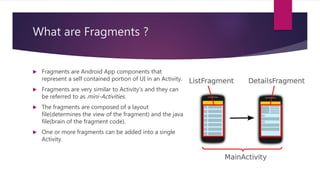
 Fragments are Android App components that
represent a self contained portion of UI in an Activity.
 Fragments are very similar to Activity’s and they can
be referred to as mini-Activities.
 The fragments are composed of a layout
file(determines the view of the fragment) and the java
file(brain of the fragment code).
 One or more fragments can be added into a single
Activity.
Fragment v/s Activity
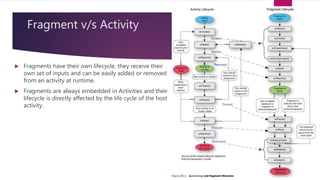
 Fragments have their own lifecycle, they receive their
own set of inputs and can be easily added or removed
from an activity at runtime.
 Fragments are always embedded in Activities and their
lifecycle is directly affected by the life cycle of the host
activity.
Why are Fragments used ?
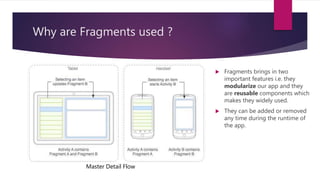
 Fragments brings in two
important features i.e. they
modularize our app and they
are reusable components which
makes they widely used.
 They can be added or removed
any time during the runtime of
the app.
Master Detail Flow
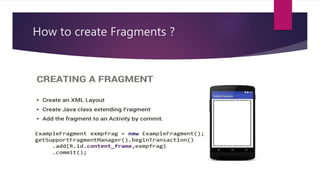
How to create Fragments ?
How are fragments added and removed
from activities ?
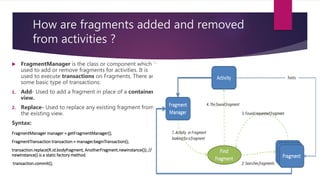
 FragmentManager is the class or component which is
used to add or remove fragments for activities. It is
used to execute transactions on Fragments. There are
some basic type of transactions:
1. Add- Used to add a fragment in place of a container
view.
2. Replace- Used to replace any existing fragment from
the existing view.
Syntax:
FragmentManager manager = getFragmentManager();
FragmentTransaction transaction = manager.beginTransaction();
transaction.replace(R.id.bodyfragment, AnotherFragment.newInstance()); //
newInstance() is a static factory method.
transaction.commit();
When to use fragments ?
 Deciding between using activities and fragments is the problem with
most new Android programmers:
1. Reusability: Think of using fragments whenever you need some
reusable components (UI + Java Code = UX). Who likes rewriting code
?
2. Modular: Fragments code is cleanly separated from the parent
activities code so using them is easy as they as bring in the code
property of modularity.
3. Changing UI instantly and data passing is also easier.
4. When coding for a variety of devices like mobiles, tablets, smart
watches etc. then using fragments is always a safe bet as their look
and feel can be easily changed.
Any Questions ?
Thank You
 Thanks for being a great audience and for your
valuable time.

Fragments

  • 1.
  • 2.
    What are Fragments?  Fragments are Android App components that represent a self contained portion of UI in an Activity.  Fragments are very similar to Activity’s and they can be referred to as mini-Activities.  The fragments are composed of a layout file(determines the view of the fragment) and the java file(brain of the fragment code).  One or more fragments can be added into a single Activity.
  • 3.
    Fragment v/s Activity Fragments have their own lifecycle, they receive their own set of inputs and can be easily added or removed from an activity at runtime.  Fragments are always embedded in Activities and their lifecycle is directly affected by the life cycle of the host activity.
  • 4.
    Why are Fragmentsused ?  Fragments brings in two important features i.e. they modularize our app and they are reusable components which makes they widely used.  They can be added or removed any time during the runtime of the app. Master Detail Flow
  • 5.
    How to createFragments ?
  • 6.
    How are fragmentsadded and removed from activities ?  FragmentManager is the class or component which is used to add or remove fragments for activities. It is used to execute transactions on Fragments. There are some basic type of transactions: 1. Add- Used to add a fragment in place of a container view. 2. Replace- Used to replace any existing fragment from the existing view. Syntax: FragmentManager manager = getFragmentManager(); FragmentTransaction transaction = manager.beginTransaction(); transaction.replace(R.id.bodyfragment, AnotherFragment.newInstance()); // newInstance() is a static factory method. transaction.commit();
  • 7.
    When to usefragments ?  Deciding between using activities and fragments is the problem with most new Android programmers: 1. Reusability: Think of using fragments whenever you need some reusable components (UI + Java Code = UX). Who likes rewriting code ? 2. Modular: Fragments code is cleanly separated from the parent activities code so using them is easy as they as bring in the code property of modularity. 3. Changing UI instantly and data passing is also easier. 4. When coding for a variety of devices like mobiles, tablets, smart watches etc. then using fragments is always a safe bet as their look and feel can be easily changed.
  • 8.
  • 9.
    Thank You  Thanksfor being a great audience and for your valuable time.