Compiled by Adrian Olszewski: https://www.linkedin.com/in/adrianolszewski/
The ultimate tools to produce rich
complex, template based, high-quality
tables and Word/Power Point documents with R
with application to the Clinical Research Study Reports
officer ● flextable ● rvg ● devEMF ● mschart
by David Gohel: https://github.com/davidgohel
flextable – the new standard of drawing tables
The flextable package allows you to create rich, complex tables in MS Word. You can control
almost everything: fonts (face, size, style - bold/italic/sub-/superscript/underline, colour), cell
background, cell margins, cell alignment, cell merge (works in headers, footers and table
body), conditional formatting and merging, frames around cells/tables (line stile, width,
colour), embedding pictures, Word special field.
When necessary, you can also modify the underlying XML document.
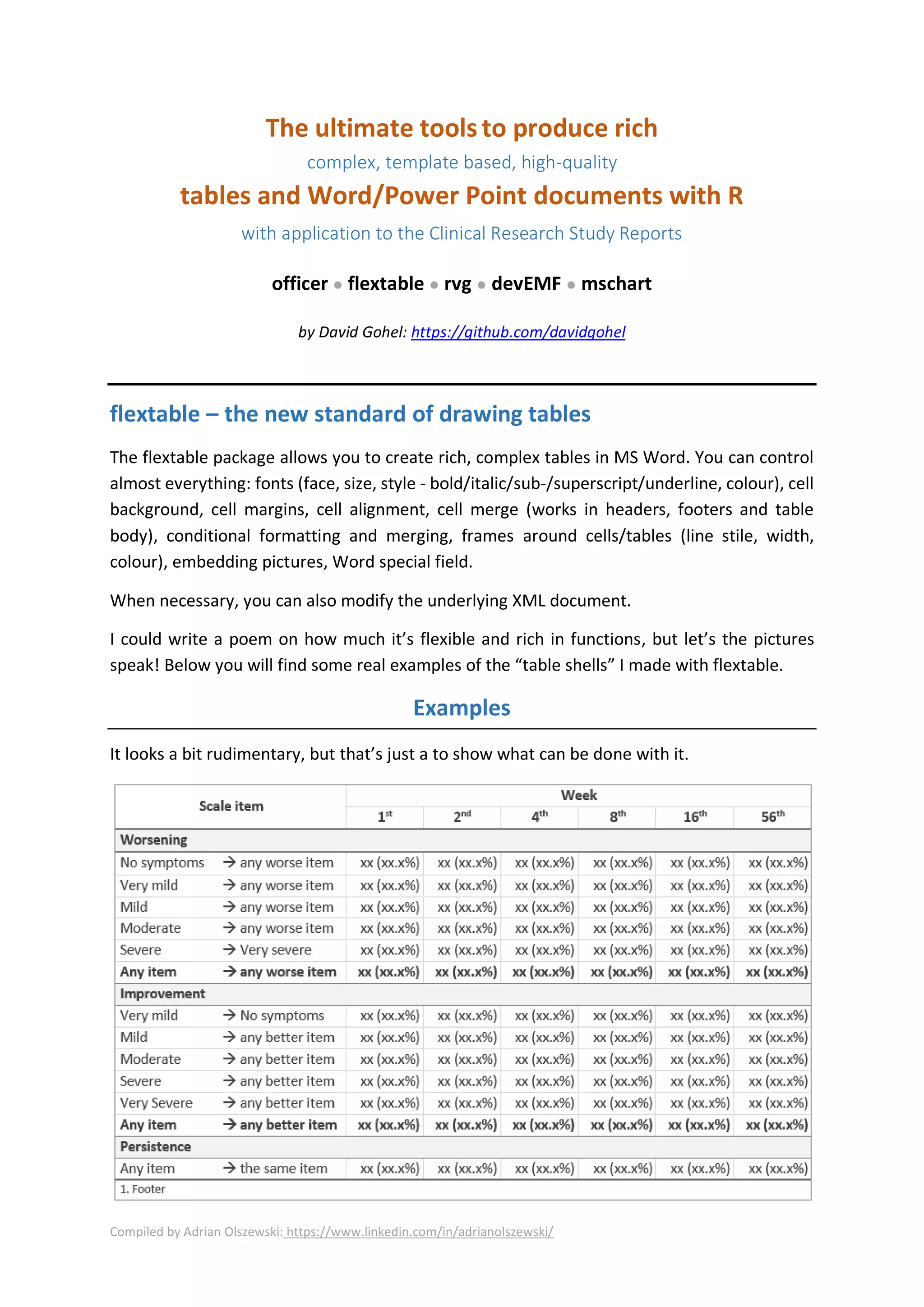
I could write a poem on how much it’s flexible and rich in functions, but let’s the pictures
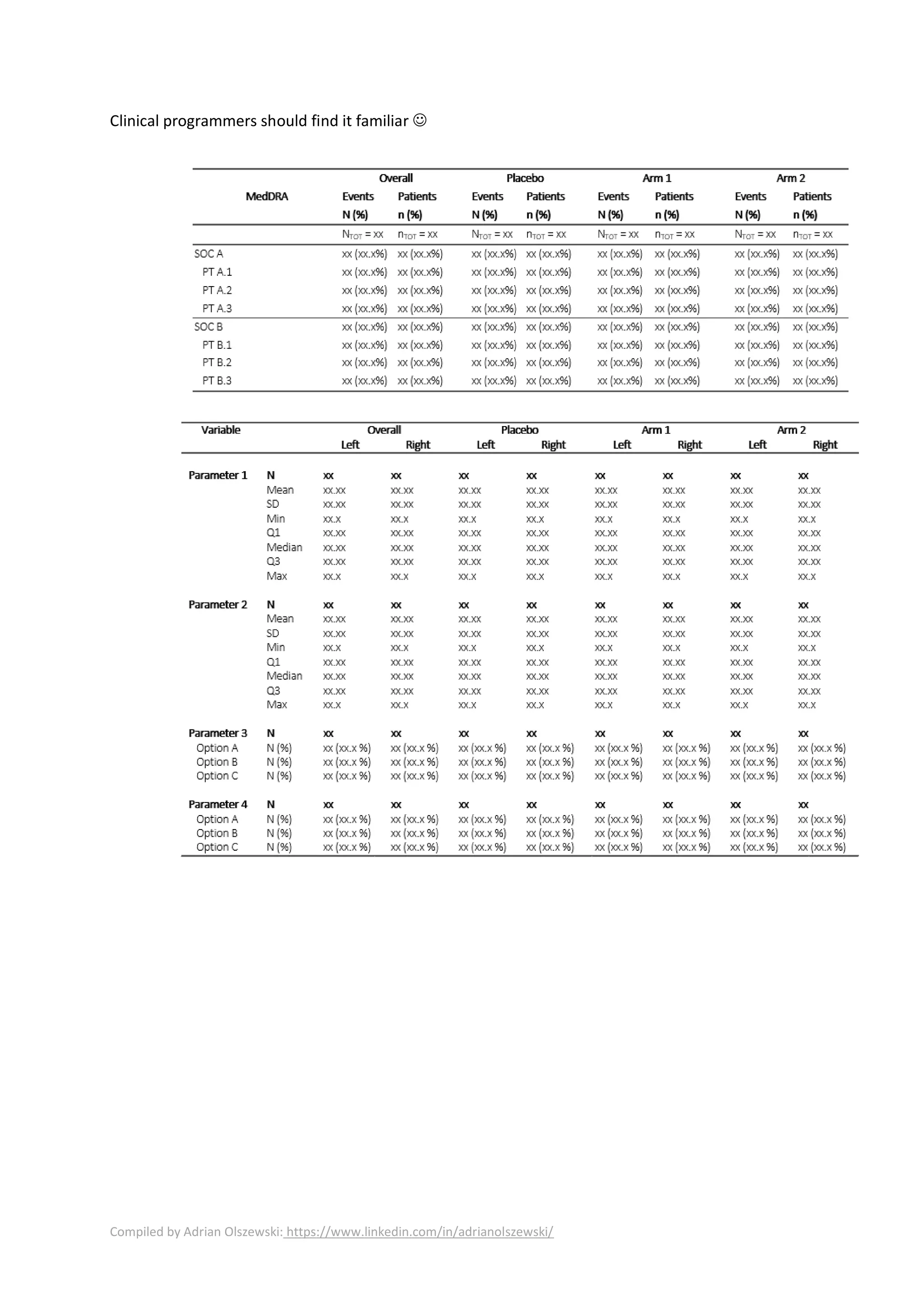
speak! Below you will find some real examples of the “table shells” I made with flextable.
Examples
It looks a bit rudimentary, but that’s just a to show what can be done with it.
Compiled by Adrian Olszewski: https://www.linkedin.com/in/adrianolszewski/
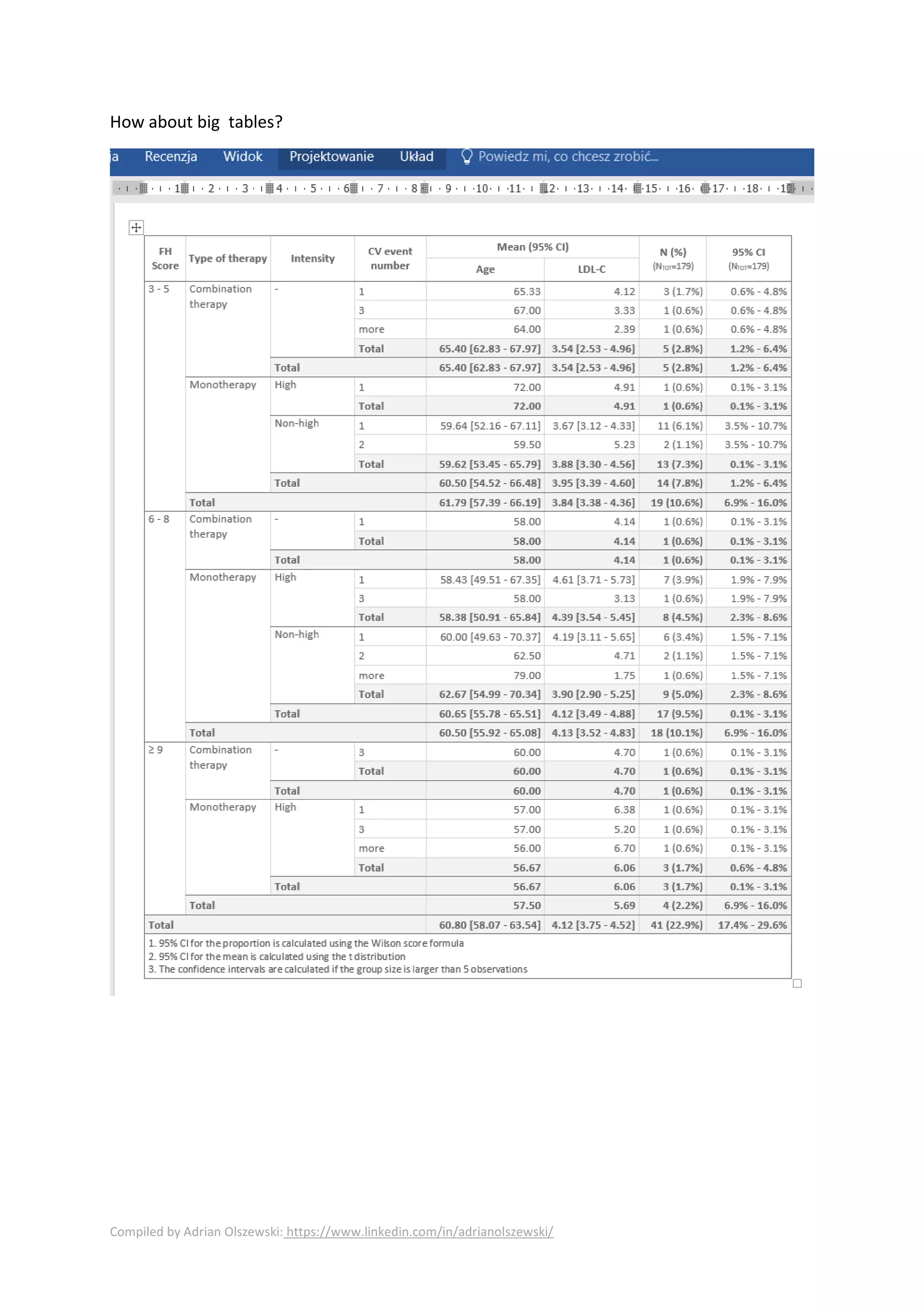
How about big tables?
Compiled by Adrian Olszewski: https://www.linkedin.com/in/adrianolszewski/
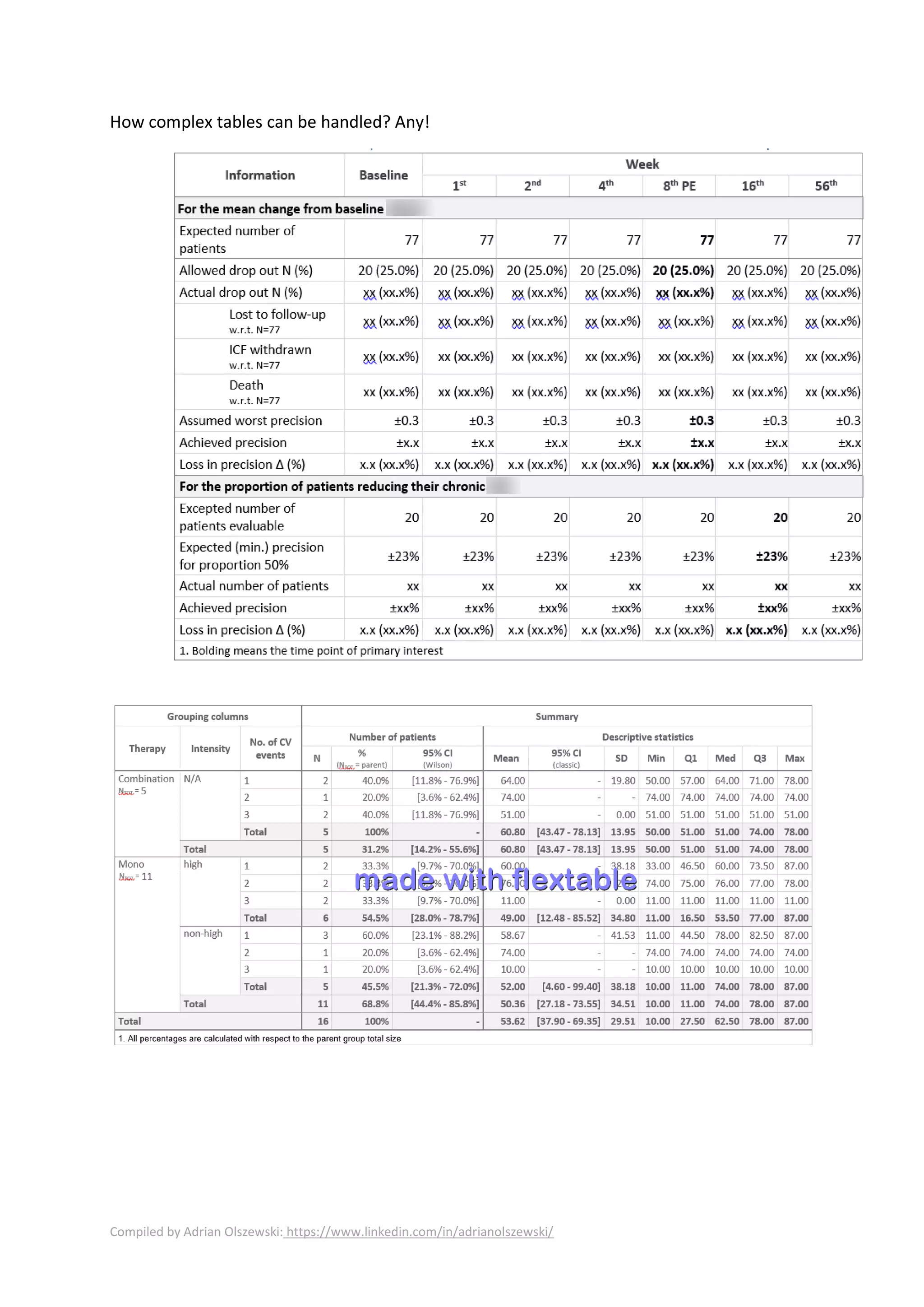
How complex tables can be handled? Any!
Compiled by Adrian Olszewski: https://www.linkedin.com/in/adrianolszewski/
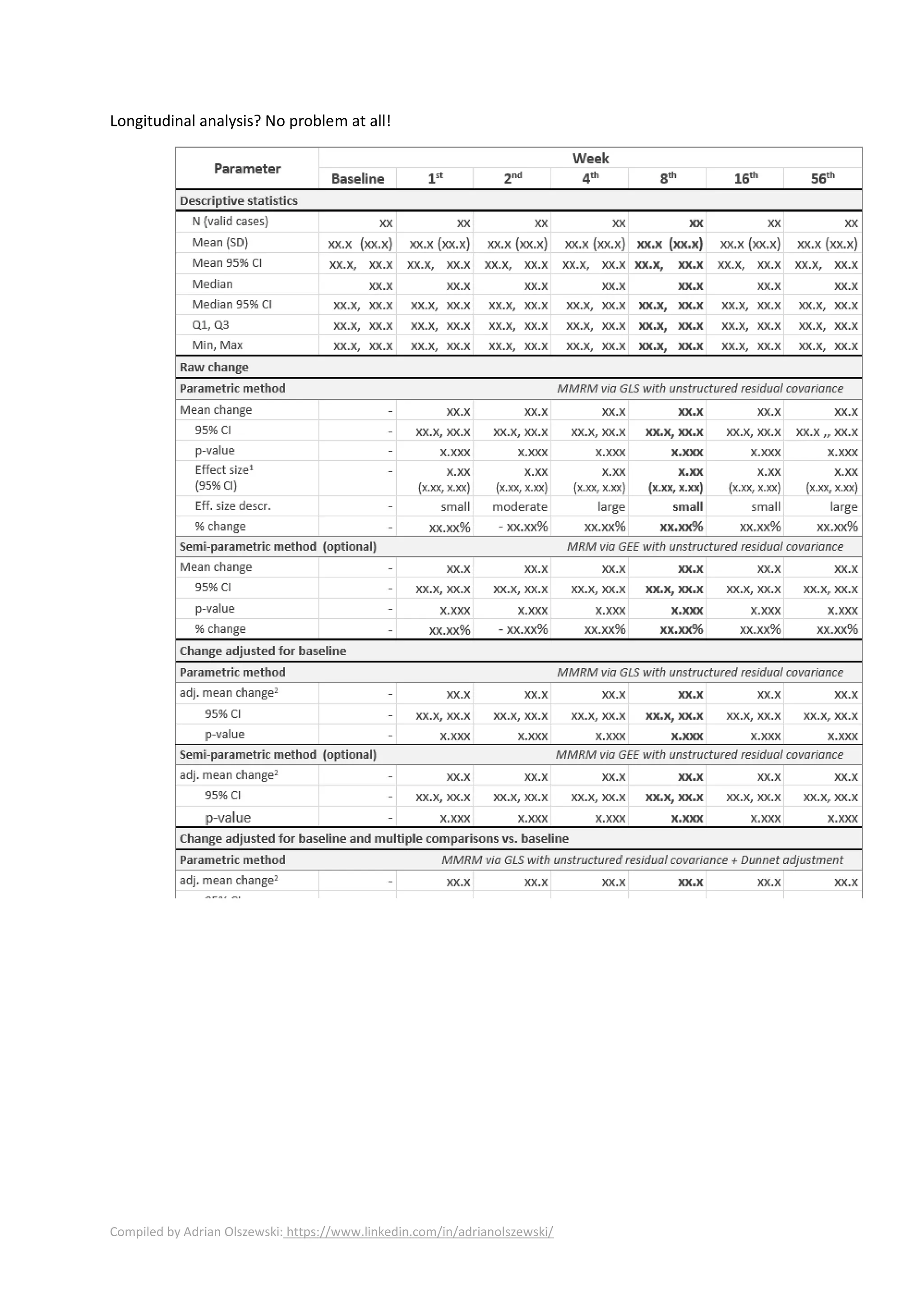
Longitudinal analysis? No problem at all!
Compiled by Adrian Olszewski: https://www.linkedin.com/in/adrianolszewski/
Clinical programmers should find it familiar ☺
Compiled by Adrian Olszewski: https://www.linkedin.com/in/adrianolszewski/
officer – R meets Word and Power Point
officer is the workhorse of the suite. Briefly – it can generate complete Word and Power Point
documents, paragraph by paragraph, page by page. With officer you can search and replace
the content using regular expressions or bookmarks. You can adjust paragraph and font styles,
change fonts and colors. You can insert sections and page breaks. Operate in headers and
footers. Embed pictures from file bitmaps and metafiles or generated ggplot2 graphs.
But that’s not all! The officer package allows one to use templates with pre-defined styles.
Now you should have the “a-ha!” moment.
Templates – what a powerful mechanism!
Templates allow you to create complex reports with pre-defined structure, which also re-used
pre-defined styles (e.g. corporate layout, colors).
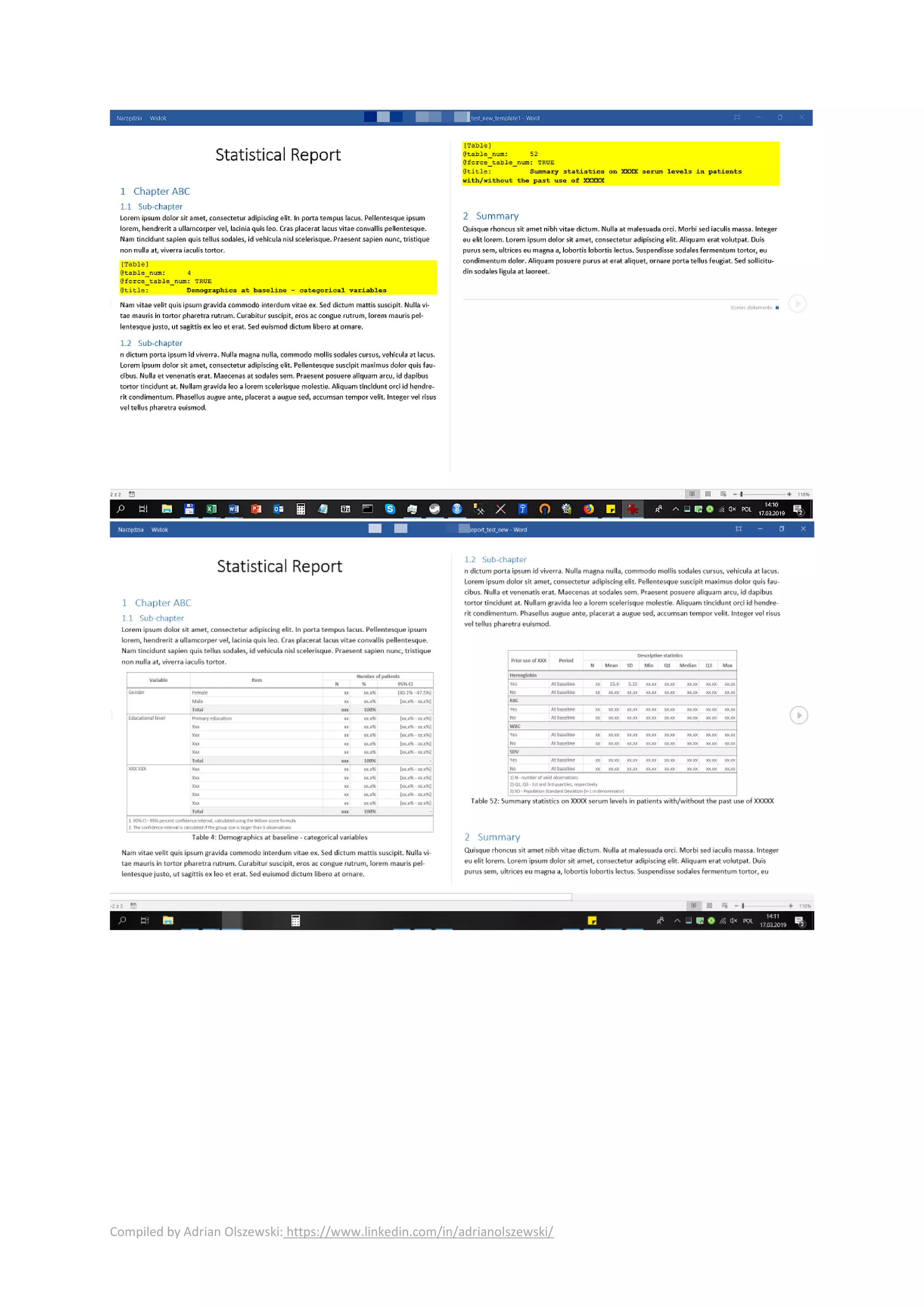
Look at the picture below. There are placeholders for the content (tables, listings, figures)
marked in yellow. I added some content, but it doesn’t matter now. You will add your own. R
can access them via officer: it parses the document, finds all those paragraphs (e.g. by style)
so you can interpret their content.
You could employ some naming convention (or some Excel file with mapping, maybe a even a
database – it’s up to you) to determine which R file should be called, run it and embed the
output right here.
This way you can define analysis scenario (at least its automated part) in the Word report
directly, and pre-populate it with initial stuff (the first page content, TOC (for chapters, tables,
figures), initial chapters) interleaved with the "scenario" of the analysis.
Then, you can programmatically replace the placeholders (everywhere: in the document body,
page headers, footers, and even in... tables) with actual values, which produces the final
Sounds good!
Compiled by Adrian Olszewski: https://www.linkedin.com/in/adrianolszewski/
Want more fun?
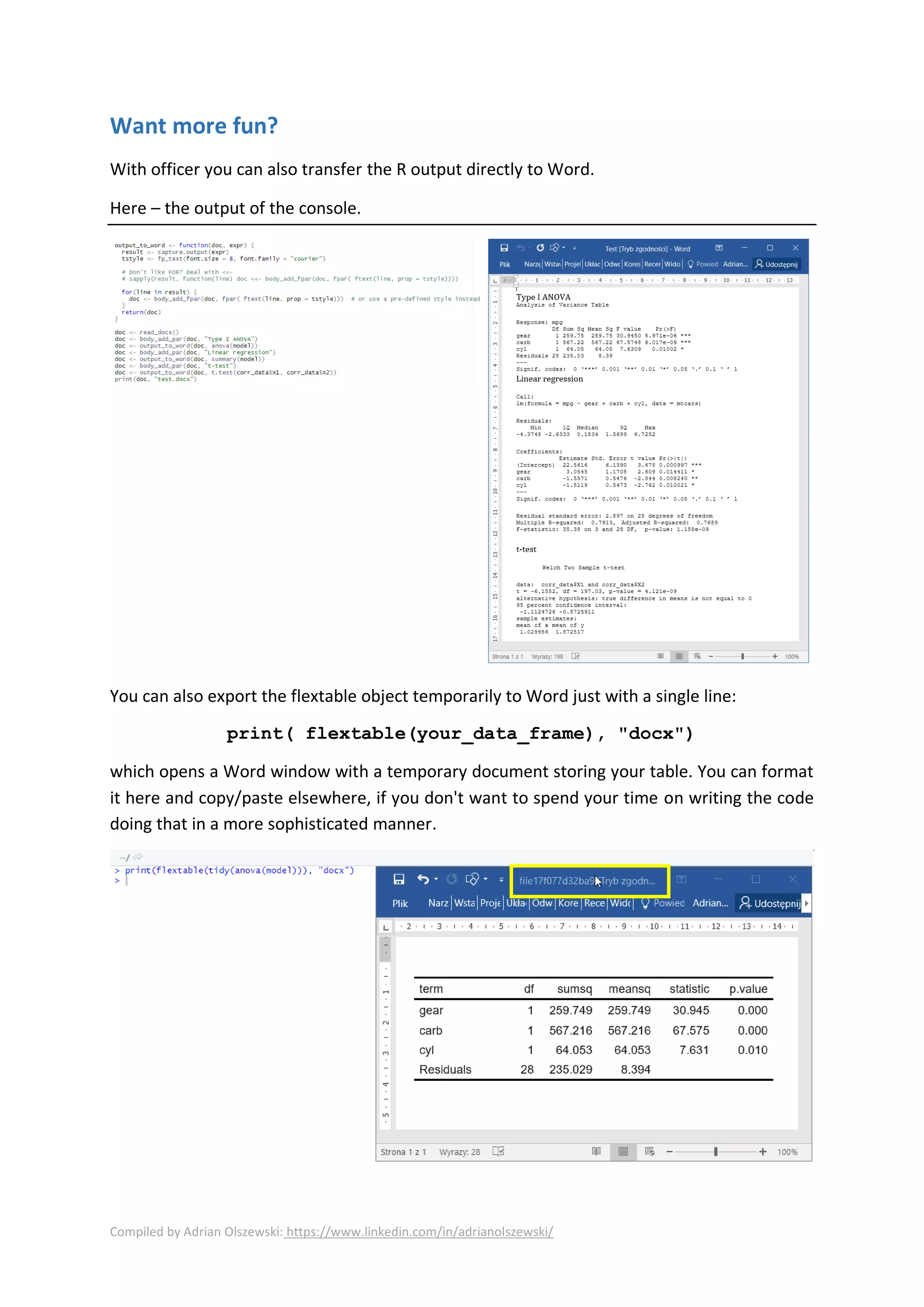
With officer you can also transfer the R output directly to Word.
Here – the output of the console.
You can also export the flextable object temporarily to Word just with a single line:
print( flextable(your_data_frame), "docx")
which opens a Word window with a temporary document storing your table. You can format
it here and copy/paste elsewhere, if you don't want to spend your time on writing the code
doing that in a more sophisticated manner.
Compiled by Adrian Olszewski: https://www.linkedin.com/in/adrianolszewski/
This way you can transfer your model coefficients directly to R (with broom package), which
minimizes the risk of making typos and saving your time.
Look below for some examples:
devEMF – no more raster graphics!
You know this pain – you copy/paste a graph into Word as a bitmap. Then you want to scale
(resize) it. And what do you get? Well, it may look OK on your screen, but when you print it, it
often looks just ugly and blurred.
With devEMF you can transform ggplot2 charts directly into metafiles and embed them in
Word. Being a vector graphics, they are resizable without losing the quality.
Look below. I resized the plot enormously. See? No blur at all! It’s a vector drawing.
Compiled by Adrian Olszewski: https://www.linkedin.com/in/adrianolszewski/
But hold on, there’s more fun with the “rvg”!
rvg – ggplot2 meets PowerPoint!
With the rvg package you can convert ggplot2 graphs into PPTx presentations, where the
graph will be also editable. Yes! You read correctly! The vector graphics is converted to a set
of MS Office drawings:: lines, arcs, labels, circles, rectangles - so you can modify any part of
the chart.
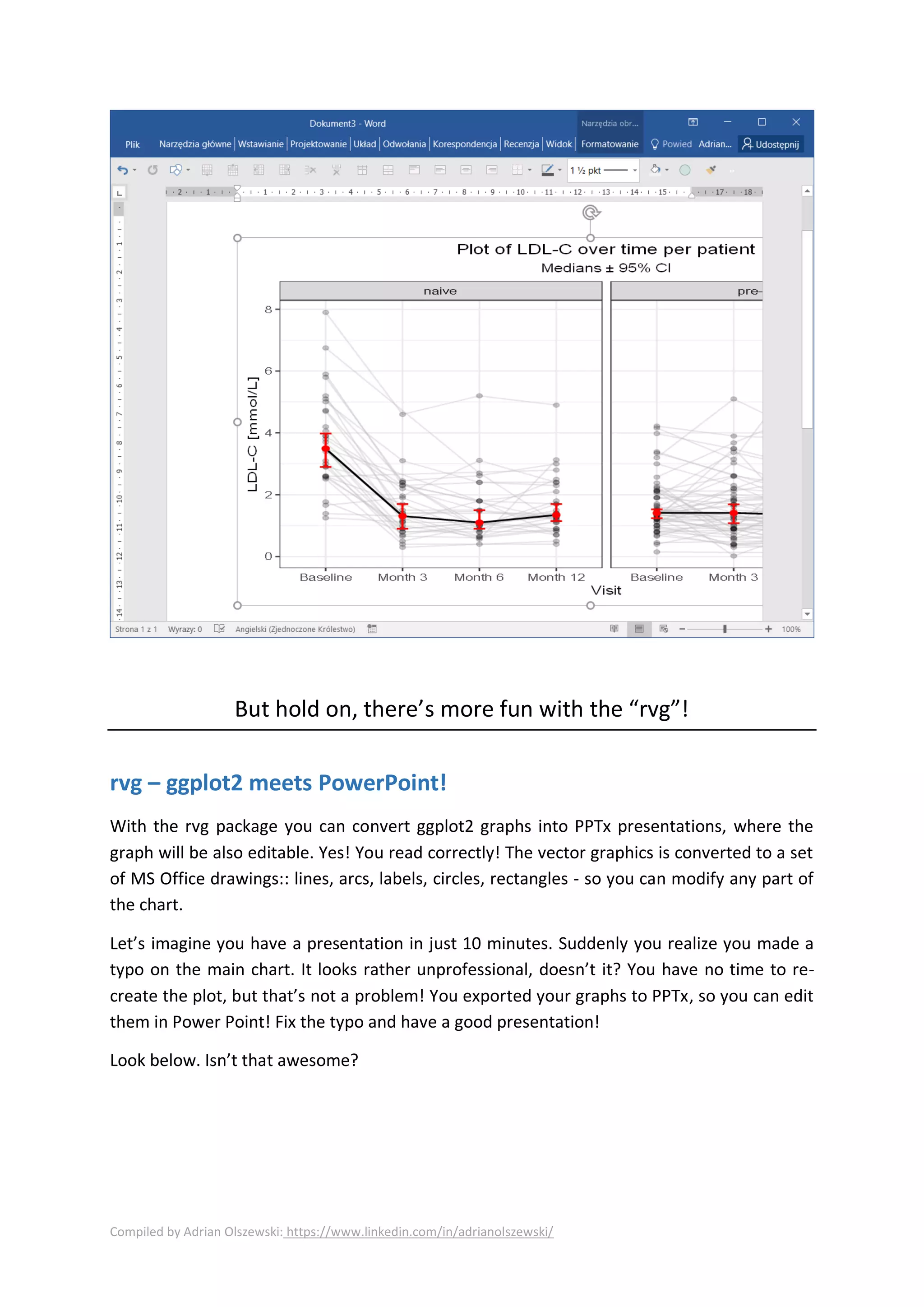
Let’s imagine you have a presentation in just 10 minutes. Suddenly you realize you made a
typo on the main chart. It looks rather unprofessional, doesn’t it? You have no time to re-
create the plot, but that’s not a problem! You exported your graphs to PPTx, so you can edit
them in Power Point! Fix the typo and have a good presentation!
Look below. Isn’t that awesome?
Compiled by Adrian Olszewski: https://www.linkedin.com/in/adrianolszewski/
mschart – R meets Excel charts allows you to insert basic Excel charts (editable in
the Office way, not just a drawing). I don’t use this option yet, but maybe you find it useful.
https://github.com/ardata-fr/mschart
With officer you can also fill up CONSORT diagrams made in Word (Word drawings) by
replacing the placeholders in the shapes. Yes, it’s so simple – I added a bookmark to each text
I wanted to replace. For example, in “Active treatment n= XX I bookmarked the “XX”.
Then I replaced it with the code, by iterating through the bookmarks found by the officer. This
way I was able to transform the template into the final diagram with actual numbers.
Compiled by Adrian Olszewski: https://www.linkedin.com/in/adrianolszewski/
What about the HTML?
Lots of R packages can deal with complex tables in HTML and office is not an exception here. Even, if
the flextable + officer is mainly about the Office documents, it’s capable of producing HTML as well.
Useful links:
• https://davidgohel.github.io/officer/
• https://davidgohel.github.io/flextable/
• https://davidgohel.github.io/rvg/
• https://ardata-fr.github.io/mschart/
Compiled by Adrian Olszewski: https://www.linkedin.com/in/adrianolszewski/
Want to experiment a bit?
Transfer model summary directly to Word
> (model <- lm(mpg~ as.factor(cyl) + as.factor(gear), data=mtcars))
Call:
lm(formula = mpg ~ as.factor(cyl) + as.factor(gear), data = mtcars)
Coefficients:
(Intercept) as.factor(cyl)6 as.factor(cyl)8 as.factor(gear)4 as.factor(gear)5
25.428 -6.656 -10.542 1.324 1.500
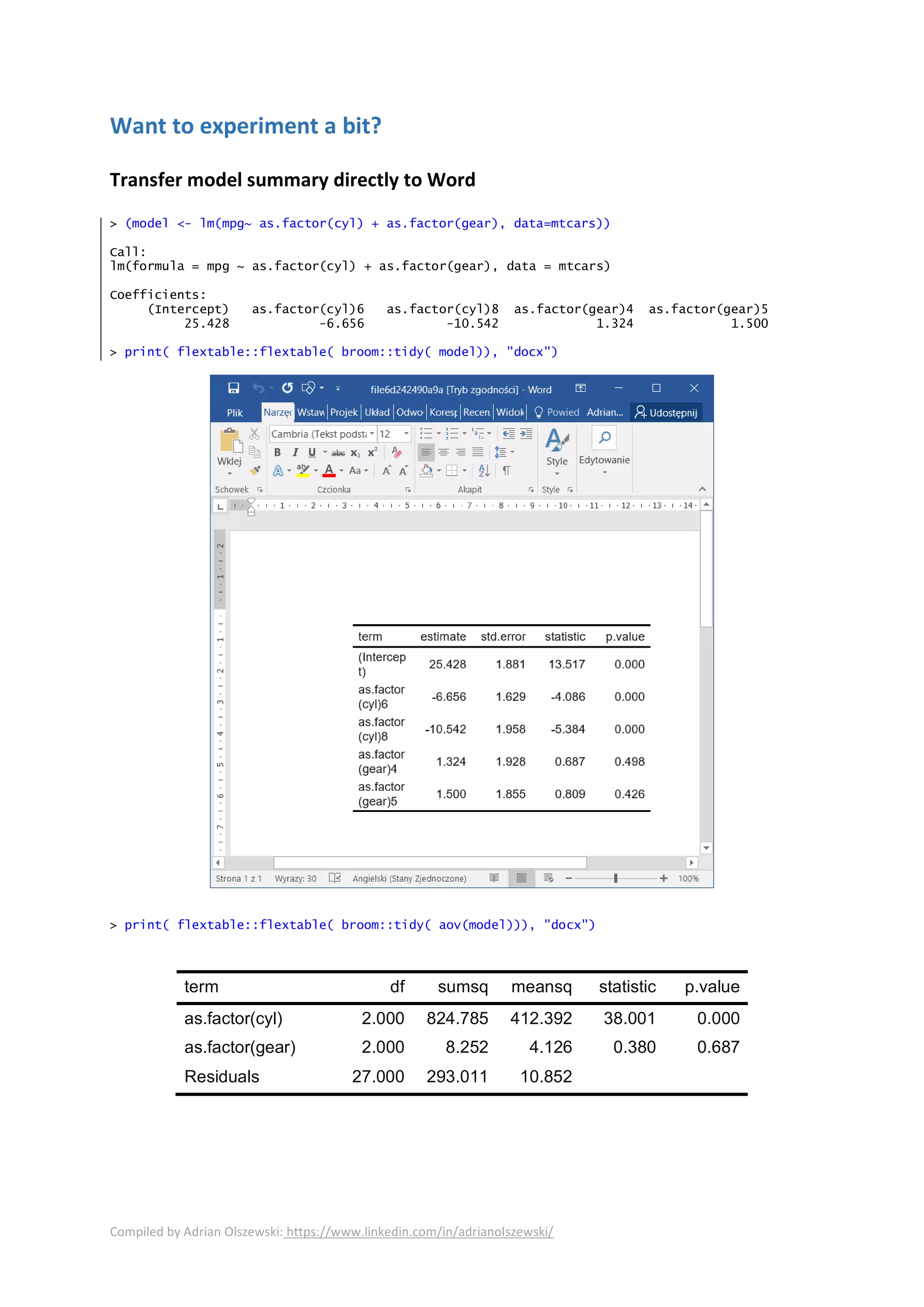
> print( flextable::flextable( broom::tidy( model)), "docx")
> print( flextable::flextable( broom::tidy( aov(model))), "docx")
term df sumsq meansq statistic p.value
as.factor(cyl) 2.000 824.785 412.392 38.001 0.000
as.factor(gear) 2.000 8.252 4.126 0.380 0.687
Residuals 27.000 293.011 10.852
Compiled by Adrian Olszewski: https://www.linkedin.com/in/adrianolszewski/
Export R drawings to a vector graphics you can resize without blur
ggplot2_to_Word <- function(plot, where){
filename <- tempfile(fileext = ".emf")
devEMF::emf(file = filename, width = 6, height = 7)
print(plot)
dev.off()
officer::read_docx() %>%
officer::body_add_img(src = filename, width = 6, height = 7) %>%
print(target = where)
}
ggplot2_to_Word( ggplot2::qplot(mtcars$mpg), "test.docx")
`stat_bin()` using `bins = 30`. Pick better value with `binwidth`.
[1] "C:/tmp/test.docx"
Export ggplot2 to an editable MS Office® drawing (in PowerPoint®)
ggplot2_to_pptx <- function(plots, where){
doc <- officer::read_pptx()
for(plot in plots){
if(ggplot2::is.ggplot(plot)) {
doc <- officer::add_slide(doc,
layout = "Title and Content",
master = "Office Theme") %>%
officer::ph_with(rvg::dml(ggobj = plot),
location = officer::ph_location_type(type = "body"))
}
}
print(doc, target = where)
}
ggplot2_to_pptx( list(ggplot2::qplot(mtcars$mpg)), "test.pptx")
`stat_bin()` using `bins = 30`. Pick better value with `binwidth`.
[1] "C:/tmp/test.pptx"
0
1
2
3
4
5
10 15 20 25 30 35
mtcars$mpg

Flextable and Officer

  • 1.
    Compiled by AdrianOlszewski: https://www.linkedin.com/in/adrianolszewski/ The ultimate tools to produce rich complex, template based, high-quality tables and Word/Power Point documents with R with application to the Clinical Research Study Reports officer ● flextable ● rvg ● devEMF ● mschart by David Gohel: https://github.com/davidgohel flextable – the new standard of drawing tables The flextable package allows you to create rich, complex tables in MS Word. You can control almost everything: fonts (face, size, style - bold/italic/sub-/superscript/underline, colour), cell background, cell margins, cell alignment, cell merge (works in headers, footers and table body), conditional formatting and merging, frames around cells/tables (line stile, width, colour), embedding pictures, Word special field. When necessary, you can also modify the underlying XML document. I could write a poem on how much it’s flexible and rich in functions, but let’s the pictures speak! Below you will find some real examples of the “table shells” I made with flextable. Examples It looks a bit rudimentary, but that’s just a to show what can be done with it.
  • 2.
    Compiled by AdrianOlszewski: https://www.linkedin.com/in/adrianolszewski/ How about big tables?
  • 3.
    Compiled by AdrianOlszewski: https://www.linkedin.com/in/adrianolszewski/ How complex tables can be handled? Any!
  • 4.
    Compiled by AdrianOlszewski: https://www.linkedin.com/in/adrianolszewski/ Longitudinal analysis? No problem at all!
  • 5.
    Compiled by AdrianOlszewski: https://www.linkedin.com/in/adrianolszewski/ Clinical programmers should find it familiar ☺
  • 6.
    Compiled by AdrianOlszewski: https://www.linkedin.com/in/adrianolszewski/ officer – R meets Word and Power Point officer is the workhorse of the suite. Briefly – it can generate complete Word and Power Point documents, paragraph by paragraph, page by page. With officer you can search and replace the content using regular expressions or bookmarks. You can adjust paragraph and font styles, change fonts and colors. You can insert sections and page breaks. Operate in headers and footers. Embed pictures from file bitmaps and metafiles or generated ggplot2 graphs. But that’s not all! The officer package allows one to use templates with pre-defined styles. Now you should have the “a-ha!” moment. Templates – what a powerful mechanism! Templates allow you to create complex reports with pre-defined structure, which also re-used pre-defined styles (e.g. corporate layout, colors). Look at the picture below. There are placeholders for the content (tables, listings, figures) marked in yellow. I added some content, but it doesn’t matter now. You will add your own. R can access them via officer: it parses the document, finds all those paragraphs (e.g. by style) so you can interpret their content. You could employ some naming convention (or some Excel file with mapping, maybe a even a database – it’s up to you) to determine which R file should be called, run it and embed the output right here. This way you can define analysis scenario (at least its automated part) in the Word report directly, and pre-populate it with initial stuff (the first page content, TOC (for chapters, tables, figures), initial chapters) interleaved with the "scenario" of the analysis. Then, you can programmatically replace the placeholders (everywhere: in the document body, page headers, footers, and even in... tables) with actual values, which produces the final Sounds good!
  • 7.
    Compiled by AdrianOlszewski: https://www.linkedin.com/in/adrianolszewski/
  • 8.
    Compiled by AdrianOlszewski: https://www.linkedin.com/in/adrianolszewski/ Want more fun? With officer you can also transfer the R output directly to Word. Here – the output of the console. You can also export the flextable object temporarily to Word just with a single line: print( flextable(your_data_frame), "docx") which opens a Word window with a temporary document storing your table. You can format it here and copy/paste elsewhere, if you don't want to spend your time on writing the code doing that in a more sophisticated manner.
  • 9.
    Compiled by AdrianOlszewski: https://www.linkedin.com/in/adrianolszewski/ This way you can transfer your model coefficients directly to R (with broom package), which minimizes the risk of making typos and saving your time. Look below for some examples: devEMF – no more raster graphics! You know this pain – you copy/paste a graph into Word as a bitmap. Then you want to scale (resize) it. And what do you get? Well, it may look OK on your screen, but when you print it, it often looks just ugly and blurred. With devEMF you can transform ggplot2 charts directly into metafiles and embed them in Word. Being a vector graphics, they are resizable without losing the quality. Look below. I resized the plot enormously. See? No blur at all! It’s a vector drawing.
  • 10.
    Compiled by AdrianOlszewski: https://www.linkedin.com/in/adrianolszewski/ But hold on, there’s more fun with the “rvg”! rvg – ggplot2 meets PowerPoint! With the rvg package you can convert ggplot2 graphs into PPTx presentations, where the graph will be also editable. Yes! You read correctly! The vector graphics is converted to a set of MS Office drawings:: lines, arcs, labels, circles, rectangles - so you can modify any part of the chart. Let’s imagine you have a presentation in just 10 minutes. Suddenly you realize you made a typo on the main chart. It looks rather unprofessional, doesn’t it? You have no time to re- create the plot, but that’s not a problem! You exported your graphs to PPTx, so you can edit them in Power Point! Fix the typo and have a good presentation! Look below. Isn’t that awesome?
  • 11.
    Compiled by AdrianOlszewski: https://www.linkedin.com/in/adrianolszewski/ mschart – R meets Excel charts allows you to insert basic Excel charts (editable in the Office way, not just a drawing). I don’t use this option yet, but maybe you find it useful. https://github.com/ardata-fr/mschart With officer you can also fill up CONSORT diagrams made in Word (Word drawings) by replacing the placeholders in the shapes. Yes, it’s so simple – I added a bookmark to each text I wanted to replace. For example, in “Active treatment n= XX I bookmarked the “XX”. Then I replaced it with the code, by iterating through the bookmarks found by the officer. This way I was able to transform the template into the final diagram with actual numbers.
  • 12.
    Compiled by AdrianOlszewski: https://www.linkedin.com/in/adrianolszewski/ What about the HTML? Lots of R packages can deal with complex tables in HTML and office is not an exception here. Even, if the flextable + officer is mainly about the Office documents, it’s capable of producing HTML as well. Useful links: • https://davidgohel.github.io/officer/ • https://davidgohel.github.io/flextable/ • https://davidgohel.github.io/rvg/ • https://ardata-fr.github.io/mschart/
  • 13.
    Compiled by AdrianOlszewski: https://www.linkedin.com/in/adrianolszewski/ Want to experiment a bit? Transfer model summary directly to Word > (model <- lm(mpg~ as.factor(cyl) + as.factor(gear), data=mtcars)) Call: lm(formula = mpg ~ as.factor(cyl) + as.factor(gear), data = mtcars) Coefficients: (Intercept) as.factor(cyl)6 as.factor(cyl)8 as.factor(gear)4 as.factor(gear)5 25.428 -6.656 -10.542 1.324 1.500 > print( flextable::flextable( broom::tidy( model)), "docx") > print( flextable::flextable( broom::tidy( aov(model))), "docx") term df sumsq meansq statistic p.value as.factor(cyl) 2.000 824.785 412.392 38.001 0.000 as.factor(gear) 2.000 8.252 4.126 0.380 0.687 Residuals 27.000 293.011 10.852
  • 14.
    Compiled by AdrianOlszewski: https://www.linkedin.com/in/adrianolszewski/ Export R drawings to a vector graphics you can resize without blur ggplot2_to_Word <- function(plot, where){ filename <- tempfile(fileext = ".emf") devEMF::emf(file = filename, width = 6, height = 7) print(plot) dev.off() officer::read_docx() %>% officer::body_add_img(src = filename, width = 6, height = 7) %>% print(target = where) } ggplot2_to_Word( ggplot2::qplot(mtcars$mpg), "test.docx") `stat_bin()` using `bins = 30`. Pick better value with `binwidth`. [1] "C:/tmp/test.docx" Export ggplot2 to an editable MS Office® drawing (in PowerPoint®) ggplot2_to_pptx <- function(plots, where){ doc <- officer::read_pptx() for(plot in plots){ if(ggplot2::is.ggplot(plot)) { doc <- officer::add_slide(doc, layout = "Title and Content", master = "Office Theme") %>% officer::ph_with(rvg::dml(ggobj = plot), location = officer::ph_location_type(type = "body")) } } print(doc, target = where) } ggplot2_to_pptx( list(ggplot2::qplot(mtcars$mpg)), "test.pptx") `stat_bin()` using `bins = 30`. Pick better value with `binwidth`. [1] "C:/tmp/test.pptx" 0 1 2 3 4 5 10 15 20 25 30 35 mtcars$mpg