R markdown and
Rmdformats
Samantha L Wilson
Hoffman Lab Meeting
March 31st, 2021
R markdown
▪ R package
▪ Connects data, to code, and allows many outputs
▪ Allows you to save code, figures, text as reports, notebooks,
slide presentations, dashboards, websites, interactive
documents and more
▪ You can put this together in Rstudio or R*, but allows you to
specify and change to the language (You can use this with
python or bash code as well)
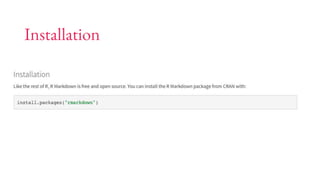
Installation
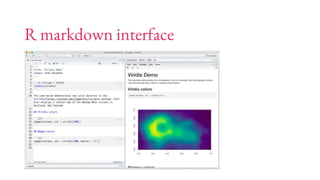
R markdown interface
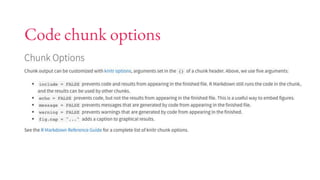
Code chunk options
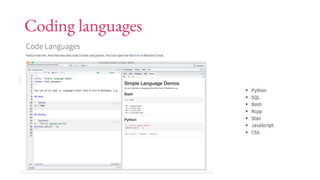
Coding languages
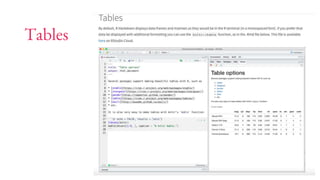
Tables
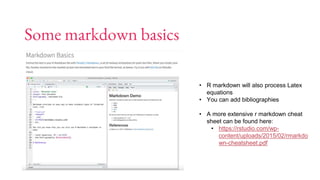
Some markdown basics
• R markdown will also process Latex
equations
• You can add bibliographies
• A more extensive r markdown cheat
sheet can be found here:
• https://rstudio.com/wp-
content/uploads/2015/02/rmarkdo
wn-cheatsheet.pdf
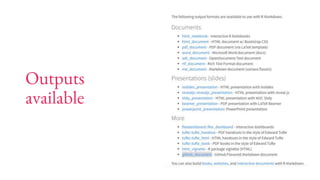
Outputs
available
Rmdformats
▪ An R package that creates clean, ready to use HTML
documents
▪ Many different templates available
▪ Easy to integrate code into documents
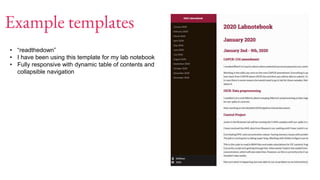
Example templates
• “readthedown”
• I have been using this template for my lab notebook
• Fully responsive with dynamic table of contents and
collapsible navigation
Example templates
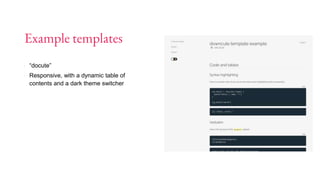
▪ “docute”
▪ Responsive, with a dynamic table of
contents and a dark theme switcher
Example templates
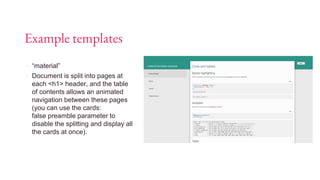
▪ “material”
▪ Document is split into pages at
each <h1> header, and the table
of contents allows an animated
navigation between these pages
(you can use the cards:
false preamble parameter to
disable the splitting and display all
the cards at once).
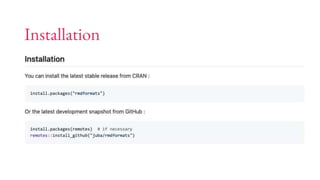
Installation
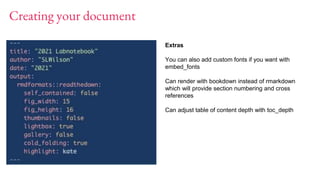
Creating your document
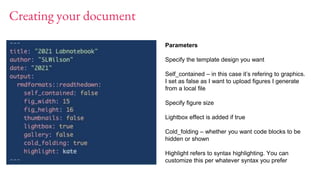
Parameters
Specify the template design you want
Self_contained – in this case it’s refering to graphics.
I set as false as I want to upload figures I generate
from a local file
Specify figure size
Lightbox effect is added if true
Cold_folding – whether you want code blocks to be
hidden or shown
Highlight refers to syntax highlighting. You can
customize this per whatever syntax you prefer
Creating your document
Extras
You can also add custom fonts if you want with
embed_fonts
Can render with bookdown instead of rmarkdown
which will provide section numbering and cross
references
Can adjust table of content depth with toc_depth
Resources – R markdown
▪ https://rmarkdown.rstudio.com/
Resources - RmdFormats
▪ https://cran.r-
project.org/web/packages/rmdformats/rmdformats.pdf
▪ https://github.com/juba/rmdformats

R markdown and Rmdformats

  • 1.
    R markdown and Rmdformats SamanthaL Wilson Hoffman Lab Meeting March 31st, 2021
  • 2.
    R markdown ▪ Rpackage ▪ Connects data, to code, and allows many outputs ▪ Allows you to save code, figures, text as reports, notebooks, slide presentations, dashboards, websites, interactive documents and more ▪ You can put this together in Rstudio or R*, but allows you to specify and change to the language (You can use this with python or bash code as well)
  • 3.
  • 4.
  • 5.
  • 6.
  • 7.
  • 8.
    Some markdown basics •R markdown will also process Latex equations • You can add bibliographies • A more extensive r markdown cheat sheet can be found here: • https://rstudio.com/wp- content/uploads/2015/02/rmarkdo wn-cheatsheet.pdf
  • 9.
  • 10.
    Rmdformats ▪ An Rpackage that creates clean, ready to use HTML documents ▪ Many different templates available ▪ Easy to integrate code into documents
  • 11.
    Example templates • “readthedown” •I have been using this template for my lab notebook • Fully responsive with dynamic table of contents and collapsible navigation
  • 12.
    Example templates ▪ “docute” ▪Responsive, with a dynamic table of contents and a dark theme switcher
  • 13.
    Example templates ▪ “material” ▪Document is split into pages at each <h1> header, and the table of contents allows an animated navigation between these pages (you can use the cards: false preamble parameter to disable the splitting and display all the cards at once).
  • 14.
  • 15.
    Creating your document Parameters Specifythe template design you want Self_contained – in this case it’s refering to graphics. I set as false as I want to upload figures I generate from a local file Specify figure size Lightbox effect is added if true Cold_folding – whether you want code blocks to be hidden or shown Highlight refers to syntax highlighting. You can customize this per whatever syntax you prefer
  • 16.
    Creating your document Extras Youcan also add custom fonts if you want with embed_fonts Can render with bookdown instead of rmarkdown which will provide section numbering and cross references Can adjust table of content depth with toc_depth
  • 17.
    Resources – Rmarkdown ▪ https://rmarkdown.rstudio.com/
  • 18.
    Resources - RmdFormats ▪https://cran.r- project.org/web/packages/rmdformats/rmdformats.pdf ▪ https://github.com/juba/rmdformats