SQL Server 2008 for DevelopersUTS Short Course
Peter GfaderSpecializes in C# and .NET (Java not anymore)TestingAutomated testsAgile, ScrumCertified Scrum TrainerTechnology aficionado SilverlightASP.NETWindows Forms
Course Websitehttp://sharepoint.ssw.com.au/Training/UTSSQL/Pages/Course TimetableCourse Materials
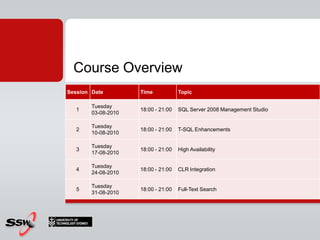
Course Overview
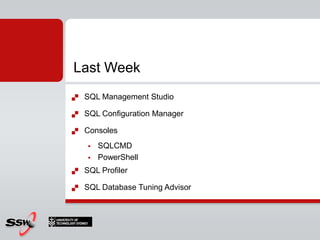
SQL Management StudioSQL Configuration ManagerConsolesSQLCMDPowerShellSQL ProfilerSQL Database Tuning AdvisorLast Week
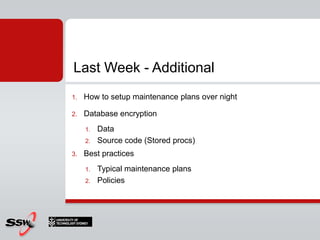
How to setup maintenance plans over nightDatabase encryptionDataSource code (Stored procs)Best practicesTypical maintenance plansPoliciesLast Week - Additional
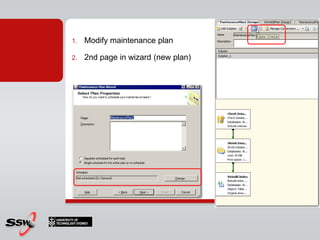
Modify maintenance plan2nd page in wizard (new plan)
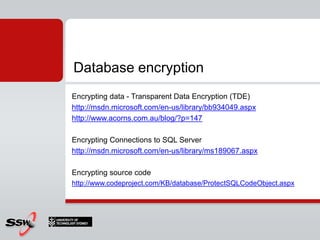
Encrypting data - Transparent Data Encryption (TDE)http://msdn.microsoft.com/en-us/library/bb934049.aspxhttp://www.acorns.com.au/blog/?p=147Encrypting Connections to SQL Serverhttp://msdn.microsoft.com/en-us/library/ms189067.aspxEncrypting source codehttp://www.codeproject.com/KB/database/ProtectSQLCodeObject.aspxDatabase encryption
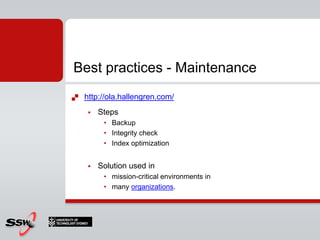
http://ola.hallengren.com/StepsBackupIntegrity check Index optimizationSolution used inmission-critical environments in many organizations.Best practices - Maintenance
Security Best Practices http://download.microsoft.com/download/8/5/e/85eea4fa-b3bb-4426-97d0-7f7151b2011c/SQL2005SecBestPract.docSecurity Best Practices Checklisthttp://technet.microsoft.com/en-us/library/cc966456.aspx Best practices - Security
Create a schema called SalaryCreate a table called Employees in SchemaCreate a user called ManagerGive only manager permission to update/insert/delete in schemaCreate a user called PeterGive Peter only read to schema (=salary)Create a user AliceDeny everything for Alice in SalaryHomework?
AgendaNew Data TypesInline variable assignmentTable Value ParametersDDL TriggersCTE (Common Table Expressions)TOP %, XML QueriesPIVOT/UNPIVOTADO.NET
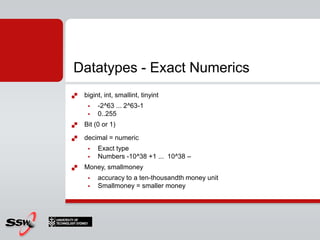
Datatypes - Exact Numericsbigint, int, smallint, tinyint-2^63 ... 2^63-10..255Bit (0 or 1)decimal = numericExact typeNumbers -10^38 +1 ...  10^38 –Money, smallmoneyaccuracy to a ten-thousandth money unitSmallmoney = smaller money
Datatypes – Approximate NumericsFloating point numeric datafloatreal
Datatypes - textcharFixed lengthvarcharVariable length
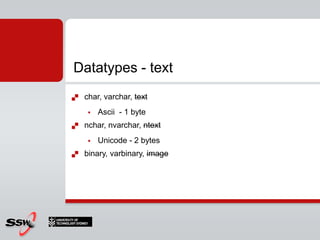
Datatypes - textchar, varchar, textAscii  - 1 bytenchar, nvarchar, ntextUnicode - 2 bytesbinary, varbinary, image
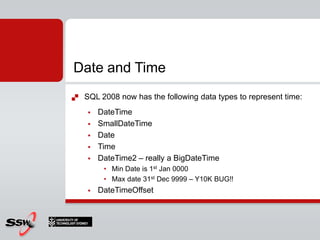
Date and TimeSQL 2008 now has the following data types to represent time:DateTimeSmallDateTimeDateTimeDateTime2 – really a BigDateTimeMin Date is 1st Jan 0000Max date 31st Dec 9999 – Y10K BUG!!DateTimeOffset
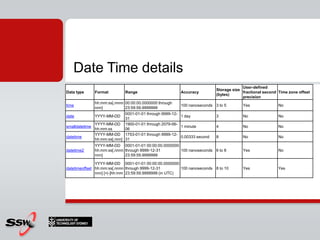
Date Time details
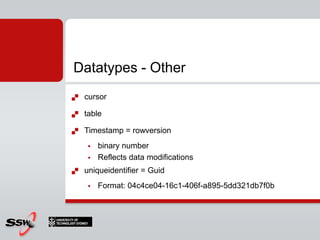
Datatypes - OthercursortableTimestamp = rowversionbinary number Reflects data modificationsuniqueidentifier = GuidFormat: 04c4ce04-16c1-406f-a895-5dd321db7f0b
New Data TypesFilestreamSparse ColumnsFiltered IndexesSpatial DataHierarchyIDDATE and TIME data types
Example: Storing imagesI am designing an Employee table that needs to cater for employee photographs. What should I do?
blob vs. file systemI am designing an Employee table that needs to cater for employee photographs. What should I do?You can store the image in the database (blob)You can store a URL to the image in the database (Recommended for SQL2005)http://www.ssw.com.au/ssw/standards/Rules/RulestoBetterSQLServerdatabases.aspx#ImageReplaceWithURL
blobYou can store the image in the database (blob)Database grows really bigBackups take longerYour code needs to convert the bytes back into an imageYour images are in sync with your data
File systemYou can store a URL to the image in the database (Recommended for SQL2005)Database is smallerEasily validate or change the image (you can look at it on the file system)Data could become out of sync with the file systemNeed to backup the database and the file system
FilestreamFilestream to the rescueImplemented as a special varbinary(max) where data is stored as a blob on the file systemAllows you to have transactionally consistentIntegrated backup and restore of your binary imagesSize limitation is the size of your hard drive’s free space
ProblemQ:\ I’ve got an Contacts table with 200,000 rows. To support the latest Web 2.0 trends we want to also record the contact’s blog address. What should I do?
Solution?A:\ Just add a new BlogUrl column in
Solution?A:\ Just add a new BlogUrl column inQ:\ What’s the problem with that?A:\ Most of the entries in your table will be null, it wastes a lot of database space
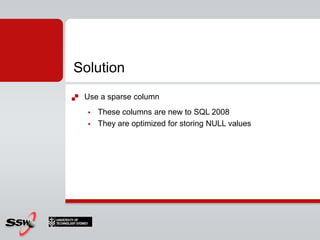
SolutionUse a sparse columnThese columns are new to SQL 2008They are optimized for storing NULL values
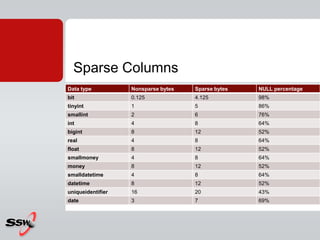
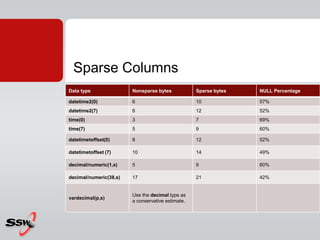
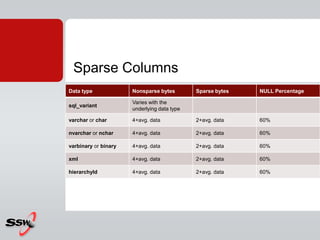
Sparse Columns
Sparse Columns
Sparse Columns
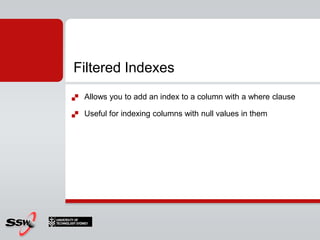
Filtered IndexesAllows you to add an index to a column with a where clauseUseful for indexing columns with null values in them
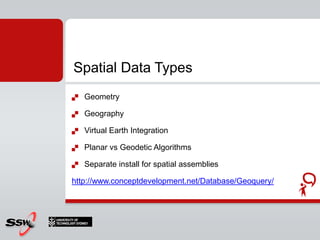
Spatial Data TypesGeometryGeographyVirtual Earth IntegrationPlanar vs Geodetic AlgorithmsSeparate install for spatial assemblieshttp://www.conceptdevelopment.net/Database/Geoquery/
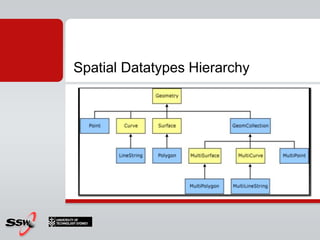
Spatial Datatypes Hierarchy
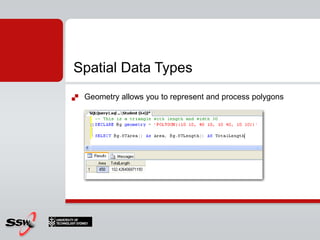
Spatial Data TypesGeometry allows you to represent and process polygons
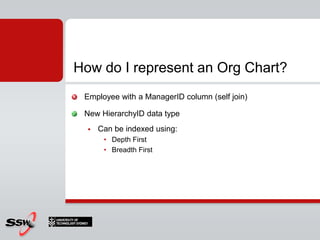
How do I represent an Org Chart?Employee with a ManagerID column (self join)New HierarchyID data typeCan be indexed using:Depth First Breadth First
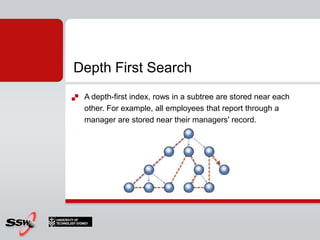
Depth First SearchA depth-first index, rows in a subtree are stored near each other. For example, all employees that report through a manager are stored near their managers' record.
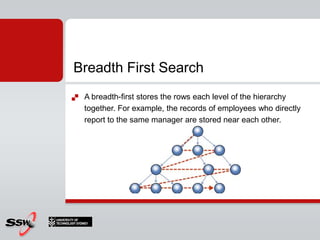
Breadth First SearchA breadth-first stores the rows each level of the hierarchy together. For example, the records of employees who directly report to the same manager are stored near each other.
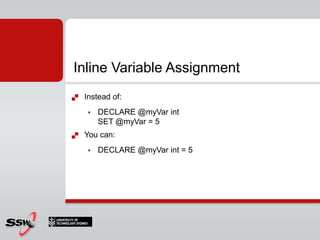
Inline Variable AssignmentInstead of:DECLARE @myVar intSET @myVar = 5You can:DECLARE @myVar int = 5
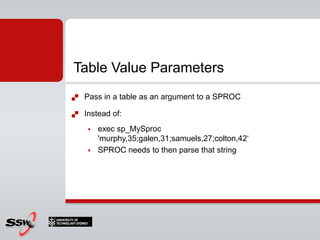
Table Value ParametersPass in a table as an argument to a SPROCInstead of:exec sp_MySproc 'murphy,35;galen,31;samuels,27;colton,42‘	SPROC needs to then parse that string
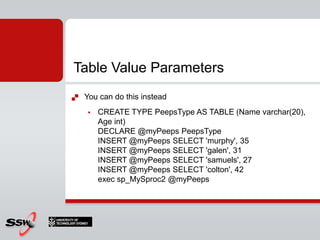
Table Value ParametersYou can do this insteadCREATE TYPE PeepsType AS TABLE (Name varchar(20), Age int) DECLARE @myPeeps PeepsType INSERT @myPeeps SELECT 'murphy', 35 INSERT @myPeeps SELECT 'galen', 31 INSERT @myPeeps SELECT 'samuels', 27 INSERT @myPeeps SELECT 'colton', 42exec sp_MySproc2 @myPeeps
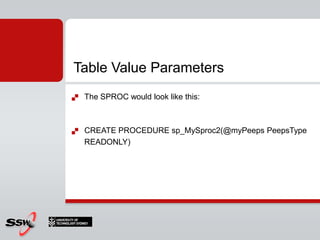
Table Value ParametersThe SPROC would look like this:CREATE PROCEDURE sp_MySproc2(@myPeeps PeepsType READONLY)
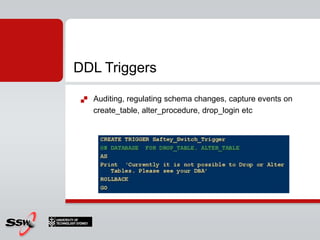
DDL TriggersAuditing, regulating schema changes, capture events on create_table, alter_procedure, drop_login etc
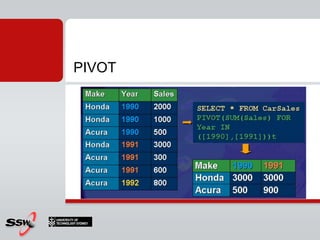
PIVOT
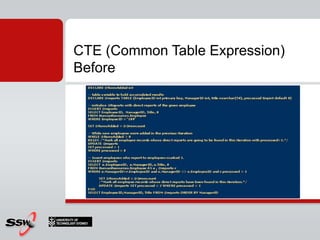
CTE (Common Table Expression) Before
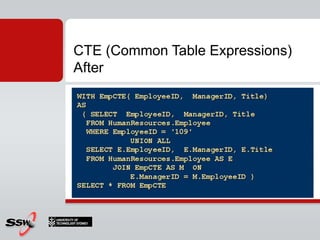
CTE (Common Table Expressions) After
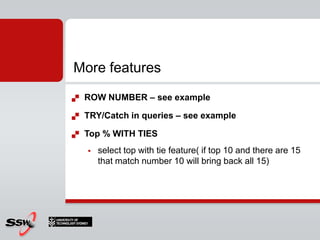
More featuresROW NUMBER – see exampleTRY/Catch in queries – see exampleTop % WITH TIESselect top with tie feature( if top 10 and there are 15 that match number 10 will bring back all 15)
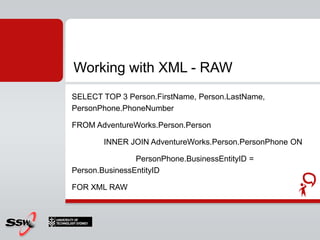
Working with XML - RAWSELECT TOP 3 Person.FirstName, Person.LastName, PersonPhone.PhoneNumberFROM AdventureWorks.Person.Person	INNER JOIN AdventureWorks.Person.PersonPhone ONPersonPhone.BusinessEntityID = Person.BusinessEntityIDFOR XML RAW
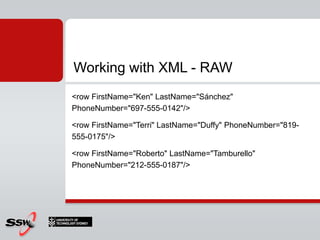
Working with XML - RAW<row FirstName="Ken" LastName="Sánchez" PhoneNumber="697-555-0142"/><row FirstName="Terri" LastName="Duffy" PhoneNumber="819-555-0175"/><row FirstName="Roberto" LastName="Tamburello" PhoneNumber="212-555-0187"/>
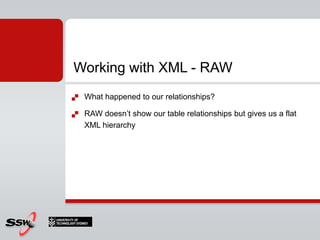
Working with XML - RAWWhat happened to our relationships?RAW doesn’t show our table relationships but gives us a flat XML hierarchy
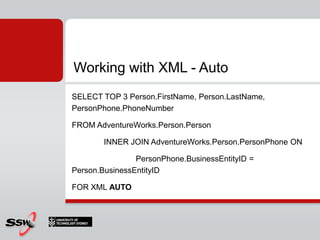
Working with XML - AutoSELECT TOP 3 Person.FirstName, Person.LastName, PersonPhone.PhoneNumberFROM AdventureWorks.Person.Person	INNER JOIN AdventureWorks.Person.PersonPhone ONPersonPhone.BusinessEntityID = Person.BusinessEntityIDFOR XML AUTO
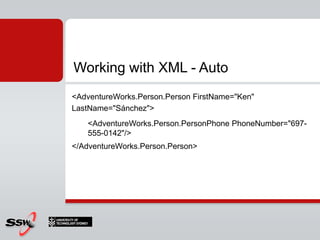
Working with XML - Auto<AdventureWorks.Person.PersonFirstName="Ken" LastName="Sánchez"><AdventureWorks.Person.PersonPhonePhoneNumber="697-555-0142"/></AdventureWorks.Person.Person>
Working with XML - AutoGreat, but what if I needed to format the XML to output into a certain schema
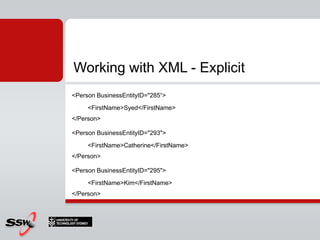
Working with XML - ExplicitSELECT TOP 3 	1 AS TAG,	NULL AS PARENT,BusinessEntityID AS [Person!1!BusinessEntityID],FirstName AS [Person!1!FirstName!ELEMENT]FROM AdventureWorks.Person.PersonFOR XML EXPLICIT
Working with XML - Explicit<Person BusinessEntityID="285“><FirstName>Syed</FirstName></Person><Person BusinessEntityID="293"><FirstName>Catherine</FirstName></Person><Person BusinessEntityID="295"><FirstName>Kim</FirstName></Person>
Working with XML - ExplicitCan control how the XML gets outputUgly queryIs there a better way?
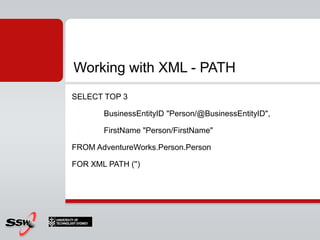
Working with XML - PATHSELECT TOP 3BusinessEntityID "Person/@BusinessEntityID",FirstName "Person/FirstName"FROM AdventureWorks.Person.PersonFOR XML PATH ('')
Working with XML - XQueryXQuery is a query language for XML Data
XQuery – Declaring our XML stringDECLARE @x XMLSET @x = '<christmaslist><person name = "betty" gift = "camera"/><person name = "zach" gift = "elmo doll"/><person name = "brad" gift = "socks"/></christmaslist>'
XQuery - QueryingSELECT @x.exist('/christmaslist/person[@gift="socks"]')SELECT @x.exist('/christmaslist/person[@gift="lump of coal"]')SELECT @x.exist('/christmaslist/person[@gift="Socks"]‘)SELECT @x.value('/christmaslist[1]/person[1]/@name', 'VARCHAR(20)‘)SELECT @x.query('/christmaslist/person')
XQuery - Queryingquery()value()exist()nodes()modify()
XQuery - Resourceshttp://msdn.microsoft.com/en-us/library/ms345117.aspx
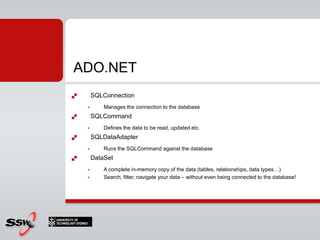
ADO.NETADO.NET gives you full control over how you access and retrieve data from the data sourceStrongly typed data setsWork in disconnected mode
ADO.NETSQLConnectionManages the connection to the databaseSQLCommandDefines the data to be read, updated etc.SQLDataAdapterRuns the SQLCommand against the databaseDataSetA complete in-memory copy of the data (tables, relationships, data types…)Search, filter, navigate your data – without even being connected to the database!
TSQL TricksRandomize Select outputRepeat statements with GO x
Resources 1/2Spatial Data playgroundhttp://www.conceptdevelopment.net/Database/Geoquery/Hidden Features in SQL Serverhttp://stackoverflow.com/questions/121243/hidden-features-of-sql-serverTop 10 Hidden Gems in SQL Serverhttp://technet.microsoft.com/en-au/library/cc917696.aspx
What to do when you take over a new SQL Server box?http://www.brentozar.com/sql/blitz-minute-sql-server-takeovers/Resources 2/2
Session 2 Lab T-SQL EnhancementsDownload from Course Materials Site (to copy/paste scripts) or type manuallyhttp://sharepoint.ssw.com.au/training/UTSSQL/
Where Else Can I Get Help?Where else can I get help?Free chats and webcastsList of newsgroupsMicrosoft community sitesCommunity events and columnswww.microsoft.com/technet/community
3things…PeterGfader@ssw.com.auhttp://peitor.blogspot.comtwitter.com/peitor
Thank You!Gateway Court Suite 10 81 - 91 Military Road Neutral Bay, Sydney NSW 2089 AUSTRALIA ABN: 21 069 371 900 Phone: + 61 2 9953 3000 Fax: + 61 2 9953 3105 info@ssw.com.auwww.ssw.com.au

SQL Server - Introduction to TSQL

  • 1.
    SQL Server 2008for DevelopersUTS Short Course
  • 2.
    Peter GfaderSpecializes inC# and .NET (Java not anymore)TestingAutomated testsAgile, ScrumCertified Scrum TrainerTechnology aficionado SilverlightASP.NETWindows Forms
  • 3.
  • 4.
  • 5.
    SQL Management StudioSQLConfiguration ManagerConsolesSQLCMDPowerShellSQL ProfilerSQL Database Tuning AdvisorLast Week
  • 6.
    How to setupmaintenance plans over nightDatabase encryptionDataSource code (Stored procs)Best practicesTypical maintenance plansPoliciesLast Week - Additional
  • 7.
    Modify maintenance plan2ndpage in wizard (new plan)
  • 8.
    Encrypting data -Transparent Data Encryption (TDE)http://msdn.microsoft.com/en-us/library/bb934049.aspxhttp://www.acorns.com.au/blog/?p=147Encrypting Connections to SQL Serverhttp://msdn.microsoft.com/en-us/library/ms189067.aspxEncrypting source codehttp://www.codeproject.com/KB/database/ProtectSQLCodeObject.aspxDatabase encryption
  • 9.
    http://ola.hallengren.com/StepsBackupIntegrity check IndexoptimizationSolution used inmission-critical environments in many organizations.Best practices - Maintenance
  • 10.
    Security Best Practiceshttp://download.microsoft.com/download/8/5/e/85eea4fa-b3bb-4426-97d0-7f7151b2011c/SQL2005SecBestPract.docSecurity Best Practices Checklisthttp://technet.microsoft.com/en-us/library/cc966456.aspx Best practices - Security
  • 11.
    Create a schemacalled SalaryCreate a table called Employees in SchemaCreate a user called ManagerGive only manager permission to update/insert/delete in schemaCreate a user called PeterGive Peter only read to schema (=salary)Create a user AliceDeny everything for Alice in SalaryHomework?
  • 12.
    AgendaNew Data TypesInlinevariable assignmentTable Value ParametersDDL TriggersCTE (Common Table Expressions)TOP %, XML QueriesPIVOT/UNPIVOTADO.NET
  • 13.
    Datatypes - ExactNumericsbigint, int, smallint, tinyint-2^63 ... 2^63-10..255Bit (0 or 1)decimal = numericExact typeNumbers -10^38 +1 ... 10^38 –Money, smallmoneyaccuracy to a ten-thousandth money unitSmallmoney = smaller money
  • 14.
    Datatypes – ApproximateNumericsFloating point numeric datafloatreal
  • 15.
    Datatypes - textcharFixedlengthvarcharVariable length
  • 16.
    Datatypes - textchar,varchar, textAscii - 1 bytenchar, nvarchar, ntextUnicode - 2 bytesbinary, varbinary, image
  • 17.
    Date and TimeSQL2008 now has the following data types to represent time:DateTimeSmallDateTimeDateTimeDateTime2 – really a BigDateTimeMin Date is 1st Jan 0000Max date 31st Dec 9999 – Y10K BUG!!DateTimeOffset
  • 18.
  • 19.
    Datatypes - OthercursortableTimestamp= rowversionbinary number Reflects data modificationsuniqueidentifier = GuidFormat: 04c4ce04-16c1-406f-a895-5dd321db7f0b
  • 20.
    New Data TypesFilestreamSparseColumnsFiltered IndexesSpatial DataHierarchyIDDATE and TIME data types
  • 21.
    Example: Storing imagesIam designing an Employee table that needs to cater for employee photographs. What should I do?
  • 22.
    blob vs. filesystemI am designing an Employee table that needs to cater for employee photographs. What should I do?You can store the image in the database (blob)You can store a URL to the image in the database (Recommended for SQL2005)http://www.ssw.com.au/ssw/standards/Rules/RulestoBetterSQLServerdatabases.aspx#ImageReplaceWithURL
  • 23.
    blobYou can storethe image in the database (blob)Database grows really bigBackups take longerYour code needs to convert the bytes back into an imageYour images are in sync with your data
  • 24.
    File systemYou canstore a URL to the image in the database (Recommended for SQL2005)Database is smallerEasily validate or change the image (you can look at it on the file system)Data could become out of sync with the file systemNeed to backup the database and the file system
  • 25.
    FilestreamFilestream to therescueImplemented as a special varbinary(max) where data is stored as a blob on the file systemAllows you to have transactionally consistentIntegrated backup and restore of your binary imagesSize limitation is the size of your hard drive’s free space
  • 26.
    ProblemQ:\ I’ve gotan Contacts table with 200,000 rows. To support the latest Web 2.0 trends we want to also record the contact’s blog address. What should I do?
  • 27.
    Solution?A:\ Just adda new BlogUrl column in
  • 28.
    Solution?A:\ Just adda new BlogUrl column inQ:\ What’s the problem with that?A:\ Most of the entries in your table will be null, it wastes a lot of database space
  • 29.
    SolutionUse a sparsecolumnThese columns are new to SQL 2008They are optimized for storing NULL values
  • 30.
  • 31.
  • 32.
  • 33.
    Filtered IndexesAllows youto add an index to a column with a where clauseUseful for indexing columns with null values in them
  • 34.
    Spatial Data TypesGeometryGeographyVirtualEarth IntegrationPlanar vs Geodetic AlgorithmsSeparate install for spatial assemblieshttp://www.conceptdevelopment.net/Database/Geoquery/
  • 35.
  • 36.
    Spatial Data TypesGeometryallows you to represent and process polygons
  • 37.
    How do Irepresent an Org Chart?Employee with a ManagerID column (self join)New HierarchyID data typeCan be indexed using:Depth First Breadth First
  • 38.
    Depth First SearchAdepth-first index, rows in a subtree are stored near each other. For example, all employees that report through a manager are stored near their managers' record.
  • 39.
    Breadth First SearchAbreadth-first stores the rows each level of the hierarchy together. For example, the records of employees who directly report to the same manager are stored near each other.
  • 40.
    Inline Variable AssignmentInsteadof:DECLARE @myVar intSET @myVar = 5You can:DECLARE @myVar int = 5
  • 41.
    Table Value ParametersPassin a table as an argument to a SPROCInstead of:exec sp_MySproc 'murphy,35;galen,31;samuels,27;colton,42‘ SPROC needs to then parse that string
  • 42.
    Table Value ParametersYoucan do this insteadCREATE TYPE PeepsType AS TABLE (Name varchar(20), Age int) DECLARE @myPeeps PeepsType INSERT @myPeeps SELECT 'murphy', 35 INSERT @myPeeps SELECT 'galen', 31 INSERT @myPeeps SELECT 'samuels', 27 INSERT @myPeeps SELECT 'colton', 42exec sp_MySproc2 @myPeeps
  • 43.
    Table Value ParametersTheSPROC would look like this:CREATE PROCEDURE sp_MySproc2(@myPeeps PeepsType READONLY)
  • 44.
    DDL TriggersAuditing, regulatingschema changes, capture events on create_table, alter_procedure, drop_login etc
  • 45.
  • 46.
    CTE (Common TableExpression) Before
  • 47.
    CTE (Common TableExpressions) After
  • 48.
    More featuresROW NUMBER– see exampleTRY/Catch in queries – see exampleTop % WITH TIESselect top with tie feature( if top 10 and there are 15 that match number 10 will bring back all 15)
  • 49.
    Working with XML- RAWSELECT TOP 3 Person.FirstName, Person.LastName, PersonPhone.PhoneNumberFROM AdventureWorks.Person.Person INNER JOIN AdventureWorks.Person.PersonPhone ONPersonPhone.BusinessEntityID = Person.BusinessEntityIDFOR XML RAW
  • 50.
    Working with XML- RAW<row FirstName="Ken" LastName="Sánchez" PhoneNumber="697-555-0142"/><row FirstName="Terri" LastName="Duffy" PhoneNumber="819-555-0175"/><row FirstName="Roberto" LastName="Tamburello" PhoneNumber="212-555-0187"/>
  • 51.
    Working with XML- RAWWhat happened to our relationships?RAW doesn’t show our table relationships but gives us a flat XML hierarchy
  • 52.
    Working with XML- AutoSELECT TOP 3 Person.FirstName, Person.LastName, PersonPhone.PhoneNumberFROM AdventureWorks.Person.Person INNER JOIN AdventureWorks.Person.PersonPhone ONPersonPhone.BusinessEntityID = Person.BusinessEntityIDFOR XML AUTO
  • 53.
    Working with XML- Auto<AdventureWorks.Person.PersonFirstName="Ken" LastName="Sánchez"><AdventureWorks.Person.PersonPhonePhoneNumber="697-555-0142"/></AdventureWorks.Person.Person>
  • 54.
    Working with XML- AutoGreat, but what if I needed to format the XML to output into a certain schema
  • 55.
    Working with XML- ExplicitSELECT TOP 3 1 AS TAG, NULL AS PARENT,BusinessEntityID AS [Person!1!BusinessEntityID],FirstName AS [Person!1!FirstName!ELEMENT]FROM AdventureWorks.Person.PersonFOR XML EXPLICIT
  • 56.
    Working with XML- Explicit<Person BusinessEntityID="285“><FirstName>Syed</FirstName></Person><Person BusinessEntityID="293"><FirstName>Catherine</FirstName></Person><Person BusinessEntityID="295"><FirstName>Kim</FirstName></Person>
  • 57.
    Working with XML- ExplicitCan control how the XML gets outputUgly queryIs there a better way?
  • 58.
    Working with XML- PATHSELECT TOP 3BusinessEntityID "Person/@BusinessEntityID",FirstName "Person/FirstName"FROM AdventureWorks.Person.PersonFOR XML PATH ('')
  • 59.
    Working with XML- XQueryXQuery is a query language for XML Data
  • 60.
    XQuery – Declaringour XML stringDECLARE @x XMLSET @x = '<christmaslist><person name = "betty" gift = "camera"/><person name = "zach" gift = "elmo doll"/><person name = "brad" gift = "socks"/></christmaslist>'
  • 61.
    XQuery - QueryingSELECT@x.exist('/christmaslist/person[@gift="socks"]')SELECT @x.exist('/christmaslist/person[@gift="lump of coal"]')SELECT @x.exist('/christmaslist/person[@gift="Socks"]‘)SELECT @x.value('/christmaslist[1]/person[1]/@name', 'VARCHAR(20)‘)SELECT @x.query('/christmaslist/person')
  • 62.
  • 63.
  • 64.
    ADO.NETADO.NET gives youfull control over how you access and retrieve data from the data sourceStrongly typed data setsWork in disconnected mode
  • 65.
    ADO.NETSQLConnectionManages the connectionto the databaseSQLCommandDefines the data to be read, updated etc.SQLDataAdapterRuns the SQLCommand against the databaseDataSetA complete in-memory copy of the data (tables, relationships, data types…)Search, filter, navigate your data – without even being connected to the database!
  • 66.
    TSQL TricksRandomize SelectoutputRepeat statements with GO x
  • 67.
    Resources 1/2Spatial Dataplaygroundhttp://www.conceptdevelopment.net/Database/Geoquery/Hidden Features in SQL Serverhttp://stackoverflow.com/questions/121243/hidden-features-of-sql-serverTop 10 Hidden Gems in SQL Serverhttp://technet.microsoft.com/en-au/library/cc917696.aspx
  • 68.
    What to dowhen you take over a new SQL Server box?http://www.brentozar.com/sql/blitz-minute-sql-server-takeovers/Resources 2/2
  • 69.
    Session 2 LabT-SQL EnhancementsDownload from Course Materials Site (to copy/paste scripts) or type manuallyhttp://sharepoint.ssw.com.au/training/UTSSQL/
  • 70.
    Where Else CanI Get Help?Where else can I get help?Free chats and webcastsList of newsgroupsMicrosoft community sitesCommunity events and columnswww.microsoft.com/technet/community
  • 71.
  • 72.
    Thank You!Gateway CourtSuite 10 81 - 91 Military Road Neutral Bay, Sydney NSW 2089 AUSTRALIA ABN: 21 069 371 900 Phone: + 61 2 9953 3000 Fax: + 61 2 9953 3105 info@ssw.com.auwww.ssw.com.au

Editor's Notes

  • #3 Java current version 1.6 Update 171.7 released next year 2010Dynamic languages Parallel computingMaybe closures
  • #12 TEST that I will do:1. Create a new table called Bonus in schema Salary2. Login as Alice and try to access Bonus (with all permissions on Bonus)--&gt; Should not be able to
  • #14 decimalFixed precision and scale numeric data from -10^38 +1 through 10^38 –1. numericFunctionally equivalent to decimal.moneyMonetary data values from -2^63 (-922,337,203,685,477.5808) through 2^63 - 1 (+922,337,203,685,477.5807), with accuracy to a ten-thousandth of a monetary unit.smallmoneyMonetary data values from -214,748.3648 through +214,748.3647, with accuracy to a ten-thousandth of a monetary unit.
  • #18 Date = 3 bytes only DateDate– Enthält nur den Datumswert– Feste Größe von 3 byte– Spanne: 01.01.0001 – 31.12.9999– Bsp: 13-11-2008 oder 2008-11-13Time(n)– Enthält nur den Zeitwert– Variable Größe von 3-5 byte–Genauigkeit bis zu 100 Nanosekunden möglich– Bsp: 08:15:30.11223DateTimeOffset(n)– Enthält Datum und Uhrzeit inklusive der Zeitzonenverschiebung– Variable Größe von 8-10 byte–Genauigkeit bis zu 100 Nanosekunden möglich– Bsp: 2008-11-13 08:15:30.11223 01:00DateTime2(n)– Kombination aus Date und Time Datentyp– Variable Größe von 6-8 byte–Genauigkeit bis zu 100 Nanosekunden möglich– Spanne: 01.01.0001 – 31.12.9999– Bsp: 13-11-2008 08:15:30.11223
  • #26 Needs NTFSTransaction saveNo datasize limitBackup works
  • #30 USE AdventureWorksGO CREATE TABLE DocumentStore(DocIDint PRIMARY KEY, Title varchar(200) NOT NULL,ProductionSpecificationvarchar(20) SPARSE NULL,ProductionLocationsmallintSPARSE NULL,MarketingSurveyGroupvarchar(20) SPARSE NULL ) ;GO
  • #31 Sparse columns require more storage space for nonnull values than the space required for identical data that is not marked SPARSE. The following tables show the space usage for each data type. The NULL Percentage column indicates what percent of the data must be NULL for a net space savings of 40 percent.
  • #34 Clustered Index – Index that configures internal sorting of table(Can be only one on table)
  • #35 Points LinesPolygonsMultipoints
  • #36 http://www.conceptdevelopment.net/Database/Geoquery/
  • #38 http://technet.microsoft.com/en-us/magazine/cc434692(TechNet.10).aspxhttp://msdn.microsoft.com/en-us/library/bb630263.aspxSELECT OrgNode.ToString() AS LogicalNode, * FROM NewOrgORDER BY LogicalNode;GO
  • #47 A Common Table Expression (CTE) is a temporary result set derived from a simple query. A CTE can be used in many of the same ways you use a derived table. CTEs can also contain references to themselves. This allows database developers to write recursive queries. CTEs can also be used in place of views.
  • #49 XML Output – see exampleselect TOP 10 WITH TIES * from AdventureWorks.Person.ContactORDER BY Titleselect ROW_NUMBER() over(order by FirstName), *from AdventureWorksLT.SalesLT.Customerorder by FirstName
  • #63  * The query() method is useful for extracting parts of an XML instance. The XQuery expression evaluates to a list of XML nodes. The subtree rooted at each of these nodes is returned in document order. The result type is untyped XML. * The value() method extracts a scalar value from an XML instance. It returns the value of the node the XQuery expression evaluates to. This value is converted to a Transact-SQL type specified as the second argument of the value() method. * The exist() method is useful for existential checks on an XML instance. It returns 1 if the XQuery expression evaluates to non-null node list; otherwise it returns 0. * The nodes() method yields instances of a special XML data type, each of which has its context set to a different node that the XQuery expression evaluates to. The special XML data type supports the query(), value(), nodes(), and exist() methods, and can be used in count(*) aggregations and NULL checks. All other uses result in an error. * The modify() method permits modifying parts of an XML instance, such as adding or deleting subtrees, or replacing scalar values such as the price of a book from 9.99 to a 39.99.
  • #67 -- Return rows in a random orderSELECT     SomeColumnFROM     SomeTableORDER BY     NEWID()-- repeat 10 timesPRINT &apos;X&apos;GO 10