File System
Management
Prepared by: Janki Kansagra
File-System Interface
 File Concept
 Access Methods
 Directory Structure
 File-System Mounting
 File Sharing
 Protection
Objectives
 To explain the function of file systems
 To describe the interfaces to file systems
 To discuss file-system design tradeoffs, including access
methods, file sharing, file locking, and directory structures
 To explore file-system protection
File Attributes
 Name – only information kept in human-readable form
 Identifier – unique tag (number) identifies file within file system
 Type – needed for systems that support different types
 Location – pointer to file location on device
 Size – current file size
 Protection – controls who can do reading, writing, executing
 Time, date, and user identification – data for protection,
security, and usage monitoring
 Information about files are kept in the directory structure, which
is maintained on the disk
File Operations
 Create
 Write
 Read
 Reposition within file
 Delete
 Truncate
 Open(Fi) – search the directory structure on disk for
entry Fi, and move the content of entry to memory
 Close (Fi) – move the content of entry Fi in memory
to directory structure on disk
Open Files
 Several pieces of data are needed to manage open files:
File pointer: pointer to last read/write location, per
process that has the file open
File-open count: counter of number of times a file is
open – to allow removal of data from open-file table
when last processes closes it
Disk location of the file: cache of data access
information
Access rights: per-process access mode information
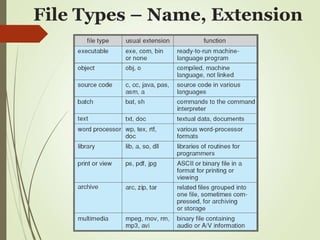
File Types – Name, Extension
Access Methods
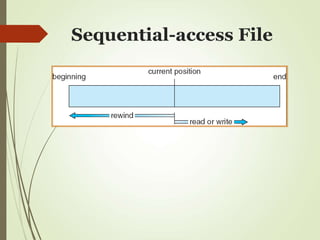
 Sequential Access
read next
write next
reset
no read after last write
(rewrite)
 Direct Access
read n
write n
position to n
read next
write next
rewrite n
n = relative block number
Sequential-access File
Directory Structure
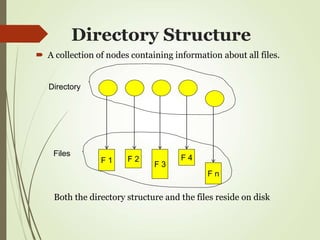
 A collection of nodes containing information about all files.
F 1 F 2
F 3
F 4
F n
Directory
Files
Both the directory structure and the files reside on disk
Operations Performed on
Directory
 List directory contents
 Search for a file
 Create a file
 Delete a file
 Rename a file
 Traverse the file system
Single-Level Directory
 A single directory for all user called the root
directory
 Pros: Simple, easy to quickly locate files
 Cons: inconvenient naming (uniqueness), no
grouping
Two-Level Directory
 Separate directory for each user
 Introduces the notion of a path name
 Can have the same file name for different user
 Efficient searching
 No grouping capability
Tree-Structured
Directories
 Directories can now contain files and
subdirectories
 Efficient searching, allows grouping
Path Names
 To access a file, the user should either:
 Go to the directory where file resides, or Specify the
path where the file is
 Path names are either absolute or relative
 Absolute: path of file from the root directory
 Relative: path from the current working directory
 Most OSes have two special entries in each directory:
 “.” for current directory and “..” for parent
Acyclic-Graph Directories
 Allow sharing of subdirectories and files
Protection
 File owner/creator should be able to control:
 what can be done
 by whom
Types of access
 Read
 Write
 Execute
 Append
 Delete
 List
Categories of Users
Individual user
 Log in establishes a user-id
 Might be just local on the computer or could be
through interaction with a network service
Groups to which the user belongs
 For example, “nahum” is in “w4118”
 Again could just be automatic or could involve
talking to a service that might assign, say, a
temporary cryptographic key
UNIX Access Rights
 Mode of access: read, write, execute
 Three classes of users
RWX
a) owner access 7  1 1 1
RWX
b) group access 6  1 1 0
RWX
c) public access 1  0 0 1
 Ask manager to create a group (unique name), say
G, and add some users to the group.
 For a particular file (say game) or subdirectory,
define an appropriate access.
owner group public
chmod 761 game
Issues with Access Rights
 Just a single owner, a single group and the public
 Pro: Compact enough to fit in just a few bytes
 Con: Not very expressive
 Access Control List: This is a per-file list that tells
who can access that file
 Pro: Highly expressive
 Con: Harder to represent in a compact way
Disk Scheduling
 The operating system is responsible for using
hardware efficiently — for the disk drives, this means
having a fast access time and disk bandwidth.
 Access time has two major components
 Seek time is the time for the disk are to move the
heads to the cylinder containing the desired sector.
 Rotational latency is the additional time waiting
for the disk to rotate the desired sector to the disk
head.
Disk Scheduling
 Minimize seek time
 Seek time  seek distance
 Disk bandwidth is the total number of bytes
transferred, divided by the total time between the
first request for service and the completion of the last
transfer.
Disk Scheduling
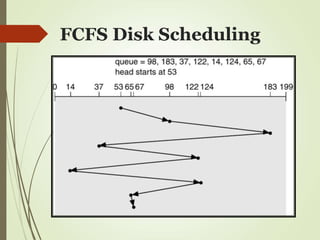
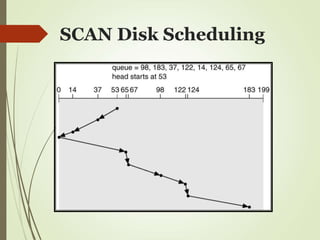
 Several algorithms exist to schedule the servicing of
disk I/O requests.
 We illustrate them with a request queue (0-199).

98, 183, 37, 122, 14, 124, 65, 67
 Head pointer 53
FCFS Disk Scheduling
SSTF Disk Scheduling
 Selects the request with the minimum seek time from
the current head position.
 SSTF scheduling is a form of SJF scheduling; may
cause starvation of some requests.
 Illustration shows total head movement of 236
cylinders.
SSTF Disk Scheduling
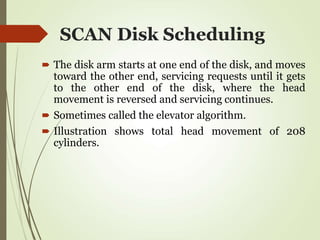
SCAN Disk Scheduling
 The disk arm starts at one end of the disk, and moves
toward the other end, servicing requests until it gets
to the other end of the disk, where the head
movement is reversed and servicing continues.
 Sometimes called the elevator algorithm.
 Illustration shows total head movement of 208
cylinders.
SCAN Disk Scheduling
C-SCAN Disk Scheduling
 Provides a more uniform wait time than SCAN.
 The head moves from one end of the disk to the
other. servicing requests as it goes. When it reaches
the other end, however, it immediately returns to the
beginning of the disk, without servicing any requests
on the return trip.
 Treats the cylinders as a circular list that wraps
around from the last cylinder to the first one.
C-SCAN Disk Scheduling
LOOK and C-LOOK Disk
Scheduling
 In LOOK and C-LOOK the arm goes as far as the final
request in each direction then reverses direction
immediately without first going all the way to the end
of the disk.
 Versions of SCAN and C-SCAN that follow this
pattern are called LOOK and C-LOOK.
LOOK Disk Scheduling
C-LOOK Disk Scheduling
Disk Allocation Methods
Three allocation methods:
 Contiguous allocation
 Linked allocation
 Indexed allocation
Contiguous Allocation
 Each file occupies a set of contiguous blocks on the
disk
 Pros:
Simple – only starting location (block #) and
length (number of blocks) are required
Random access
 Cons:
Wasteful of space (dynamic storage-allocation
problem)
External fragmentation: may need to compact
space
Files cannot grow
Contiguous Allocation
 Some newer file systems (i.e. high-performance
Veritas File System) use a modified contiguous
allocation scheme
 Extent-based file systems allocate disk blocks in
extents
 An extent is a contiguous chunk of blocks (similar to
clusters)
 Extents are allocated when the file grows
 Extents are linked
 A file consists of one or more extents
 Extent size can be set by owner of file
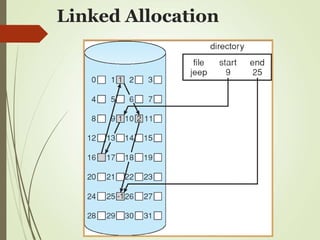
Linked Allocation
 Each file is a linked list of disk blocks
 Blocks may be scattered anywhere on the disk
 Pros:
Simple – need only starting address
Free-space management system – no waste of
space
 Cons:
No efficient random access
Linked Allocation
File Allocation Table
 Variation on linked list allocation.
 FAT is located in contiguous space on disk
 Each entry corresponds to disk block number
 Each entry contains a pointer to the next block or 0
 Used by MS-DOS and OS/2
Linked Allocation
Indexed Allocation
 Brings all pointers together into the index block
 Pros:
 Efficient random access
 Dynamic access without external fragmentation
 Cons:
 Index table storage overhead
Indexed Allocation
Indexed Allocation
 Linked Scheme: If the size of index block is too
large link several index blocks together.
 Last pointer in the block points next index block.
 Nil indicates the end of index file.
Indexed Allocation
 Multi level Index: First level index block points to
second level index blocks which point to file blocks.

outer-index
index table file
Indexed Allocation
 Combined Scheme: first n-3 pointers point to data
blocks, last three are multilevel indexes.
 First block points to single level index, second block
points to second level. Third block points to third
level.
Indexed Allocation

File Management.ppt

  • 1.
  • 2.
    File-System Interface  FileConcept  Access Methods  Directory Structure  File-System Mounting  File Sharing  Protection
  • 3.
    Objectives  To explainthe function of file systems  To describe the interfaces to file systems  To discuss file-system design tradeoffs, including access methods, file sharing, file locking, and directory structures  To explore file-system protection
  • 4.
    File Attributes  Name– only information kept in human-readable form  Identifier – unique tag (number) identifies file within file system  Type – needed for systems that support different types  Location – pointer to file location on device  Size – current file size  Protection – controls who can do reading, writing, executing  Time, date, and user identification – data for protection, security, and usage monitoring  Information about files are kept in the directory structure, which is maintained on the disk
  • 5.
    File Operations  Create Write  Read  Reposition within file  Delete  Truncate  Open(Fi) – search the directory structure on disk for entry Fi, and move the content of entry to memory  Close (Fi) – move the content of entry Fi in memory to directory structure on disk
  • 6.
    Open Files  Severalpieces of data are needed to manage open files: File pointer: pointer to last read/write location, per process that has the file open File-open count: counter of number of times a file is open – to allow removal of data from open-file table when last processes closes it Disk location of the file: cache of data access information Access rights: per-process access mode information
  • 7.
    File Types –Name, Extension
  • 8.
    Access Methods  SequentialAccess read next write next reset no read after last write (rewrite)  Direct Access read n write n position to n read next write next rewrite n n = relative block number
  • 9.
  • 10.
    Directory Structure  Acollection of nodes containing information about all files. F 1 F 2 F 3 F 4 F n Directory Files Both the directory structure and the files reside on disk
  • 11.
    Operations Performed on Directory List directory contents  Search for a file  Create a file  Delete a file  Rename a file  Traverse the file system
  • 12.
    Single-Level Directory  Asingle directory for all user called the root directory  Pros: Simple, easy to quickly locate files  Cons: inconvenient naming (uniqueness), no grouping
  • 13.
    Two-Level Directory  Separatedirectory for each user  Introduces the notion of a path name  Can have the same file name for different user  Efficient searching  No grouping capability
  • 14.
    Tree-Structured Directories  Directories cannow contain files and subdirectories  Efficient searching, allows grouping
  • 15.
    Path Names  Toaccess a file, the user should either:  Go to the directory where file resides, or Specify the path where the file is  Path names are either absolute or relative  Absolute: path of file from the root directory  Relative: path from the current working directory  Most OSes have two special entries in each directory:  “.” for current directory and “..” for parent
  • 16.
    Acyclic-Graph Directories  Allowsharing of subdirectories and files
  • 17.
    Protection  File owner/creatorshould be able to control:  what can be done  by whom Types of access  Read  Write  Execute  Append  Delete  List
  • 18.
    Categories of Users Individualuser  Log in establishes a user-id  Might be just local on the computer or could be through interaction with a network service Groups to which the user belongs  For example, “nahum” is in “w4118”  Again could just be automatic or could involve talking to a service that might assign, say, a temporary cryptographic key
  • 19.
    UNIX Access Rights Mode of access: read, write, execute  Three classes of users RWX a) owner access 7  1 1 1 RWX b) group access 6  1 1 0 RWX c) public access 1  0 0 1  Ask manager to create a group (unique name), say G, and add some users to the group.  For a particular file (say game) or subdirectory, define an appropriate access. owner group public chmod 761 game
  • 20.
    Issues with AccessRights  Just a single owner, a single group and the public  Pro: Compact enough to fit in just a few bytes  Con: Not very expressive  Access Control List: This is a per-file list that tells who can access that file  Pro: Highly expressive  Con: Harder to represent in a compact way
  • 21.
    Disk Scheduling  Theoperating system is responsible for using hardware efficiently — for the disk drives, this means having a fast access time and disk bandwidth.  Access time has two major components  Seek time is the time for the disk are to move the heads to the cylinder containing the desired sector.  Rotational latency is the additional time waiting for the disk to rotate the desired sector to the disk head.
  • 22.
    Disk Scheduling  Minimizeseek time  Seek time  seek distance  Disk bandwidth is the total number of bytes transferred, divided by the total time between the first request for service and the completion of the last transfer.
  • 23.
    Disk Scheduling  Severalalgorithms exist to schedule the servicing of disk I/O requests.  We illustrate them with a request queue (0-199).  98, 183, 37, 122, 14, 124, 65, 67  Head pointer 53
  • 24.
  • 25.
    SSTF Disk Scheduling Selects the request with the minimum seek time from the current head position.  SSTF scheduling is a form of SJF scheduling; may cause starvation of some requests.  Illustration shows total head movement of 236 cylinders.
  • 26.
  • 27.
    SCAN Disk Scheduling The disk arm starts at one end of the disk, and moves toward the other end, servicing requests until it gets to the other end of the disk, where the head movement is reversed and servicing continues.  Sometimes called the elevator algorithm.  Illustration shows total head movement of 208 cylinders.
  • 28.
  • 29.
    C-SCAN Disk Scheduling Provides a more uniform wait time than SCAN.  The head moves from one end of the disk to the other. servicing requests as it goes. When it reaches the other end, however, it immediately returns to the beginning of the disk, without servicing any requests on the return trip.  Treats the cylinders as a circular list that wraps around from the last cylinder to the first one.
  • 30.
  • 31.
    LOOK and C-LOOKDisk Scheduling  In LOOK and C-LOOK the arm goes as far as the final request in each direction then reverses direction immediately without first going all the way to the end of the disk.  Versions of SCAN and C-SCAN that follow this pattern are called LOOK and C-LOOK.
  • 32.
  • 33.
  • 34.
    Disk Allocation Methods Threeallocation methods:  Contiguous allocation  Linked allocation  Indexed allocation
  • 35.
    Contiguous Allocation  Eachfile occupies a set of contiguous blocks on the disk  Pros: Simple – only starting location (block #) and length (number of blocks) are required Random access  Cons: Wasteful of space (dynamic storage-allocation problem) External fragmentation: may need to compact space Files cannot grow
  • 36.
  • 37.
    Contiguous Allocation  Somenewer file systems (i.e. high-performance Veritas File System) use a modified contiguous allocation scheme  Extent-based file systems allocate disk blocks in extents  An extent is a contiguous chunk of blocks (similar to clusters)  Extents are allocated when the file grows  Extents are linked  A file consists of one or more extents  Extent size can be set by owner of file
  • 38.
    Linked Allocation  Eachfile is a linked list of disk blocks  Blocks may be scattered anywhere on the disk  Pros: Simple – need only starting address Free-space management system – no waste of space  Cons: No efficient random access
  • 39.
  • 40.
    File Allocation Table Variation on linked list allocation.  FAT is located in contiguous space on disk  Each entry corresponds to disk block number  Each entry contains a pointer to the next block or 0  Used by MS-DOS and OS/2
  • 41.
  • 42.
    Indexed Allocation  Bringsall pointers together into the index block  Pros:  Efficient random access  Dynamic access without external fragmentation  Cons:  Index table storage overhead
  • 43.
  • 44.
    Indexed Allocation  LinkedScheme: If the size of index block is too large link several index blocks together.  Last pointer in the block points next index block.  Nil indicates the end of index file.
  • 45.
    Indexed Allocation  Multilevel Index: First level index block points to second level index blocks which point to file blocks.  outer-index index table file
  • 46.
    Indexed Allocation  CombinedScheme: first n-3 pointers point to data blocks, last three are multilevel indexes.  First block points to single level index, second block points to second level. Third block points to third level.
  • 47.