File Systems
2
File systems
 Files
 Directories & naming
 File system implementation
 Example file systems
3
Long-term information storage
 Must store large amounts of data
 Gigabytes -> terabytes -> petabytes
 Stored information must survive the termination of
the process using it
 Lifetime can be seconds to years
 Must have some way of finding it!
 Multiple processes must be able to access the
information concurrently
4
Naming files
 Important to be able to find files after they’re created
 Every file has at least one name
 Name can be
 Human-accessible: “foo.c”, “my photo”, “Go Panthers!”, “Go Banana
Slugs!”
 Machine-usable: 4502, 33481
 Case may or may not matter
 Depends on the file system
 Name may include information about the file’s contents
 Certainly does for the user (the name should make it easy to figure out
what’s in it!)
 Computer may use part of the name to determine the file type
5
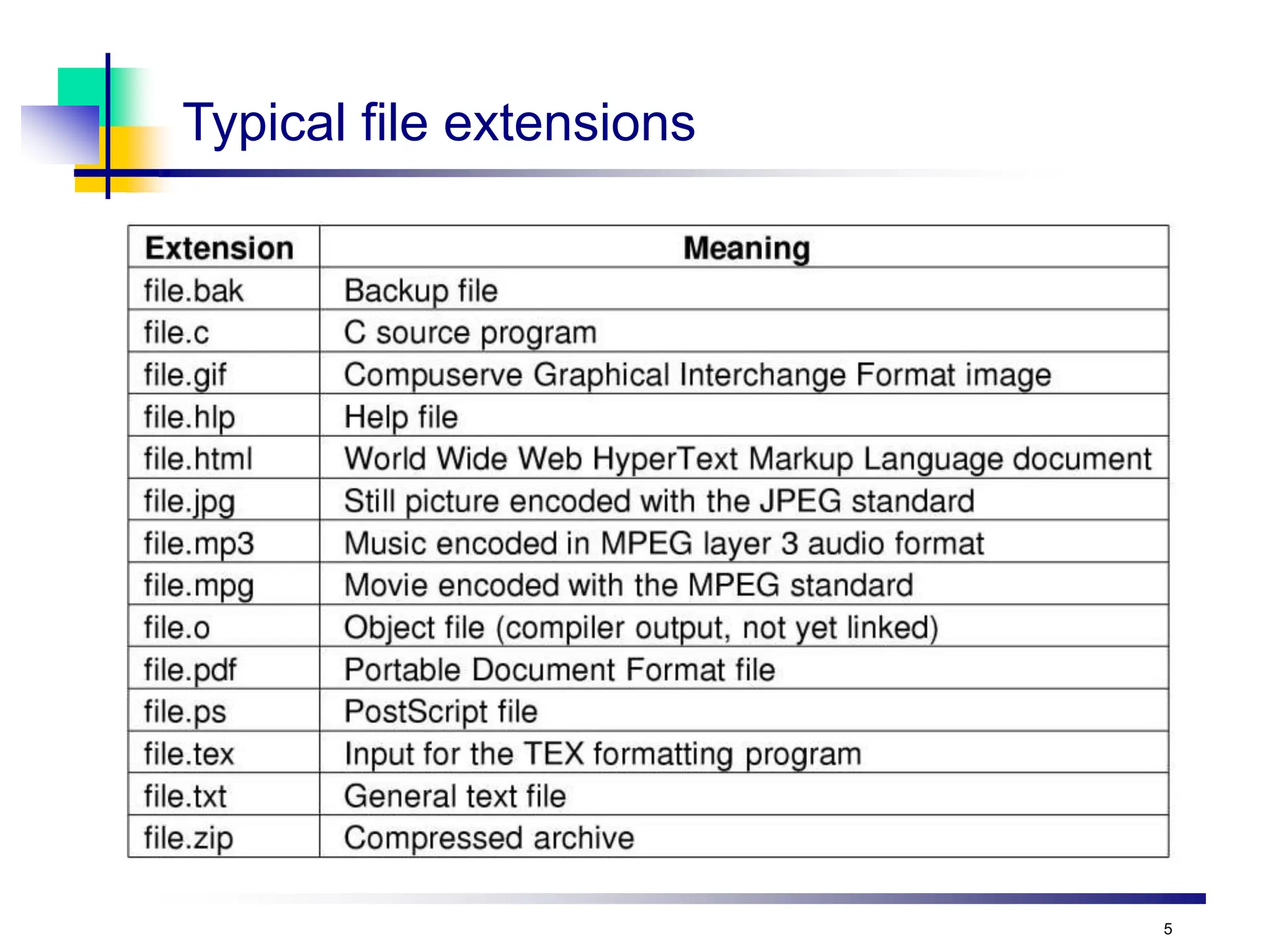
Typical file extensions
6
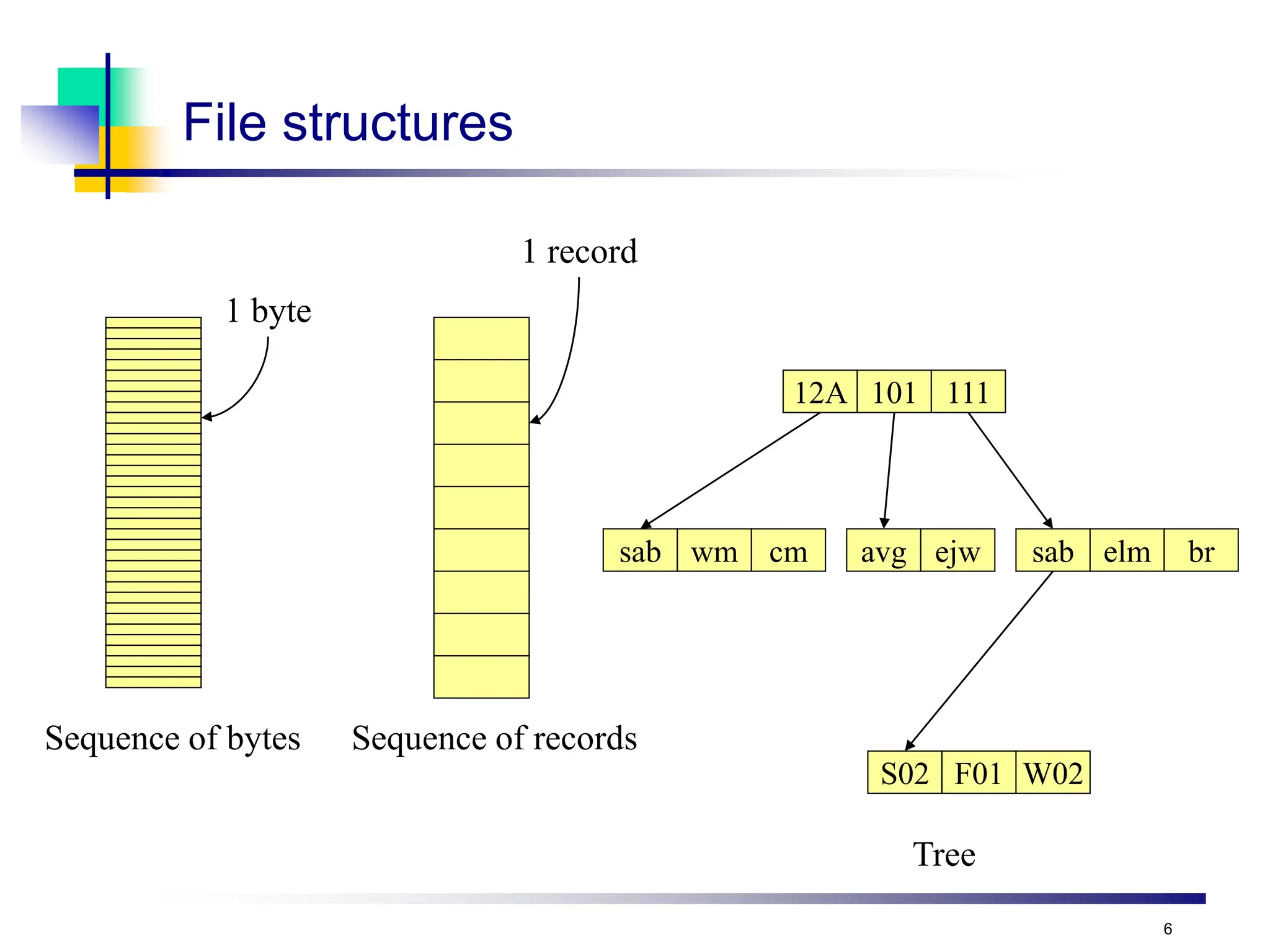
File structures
Sequence of bytes Sequence of records
1 byte
1 record
12A 101 111
sab wm cm avg ejw sab elm br
S02 F01 W02
Tree
7
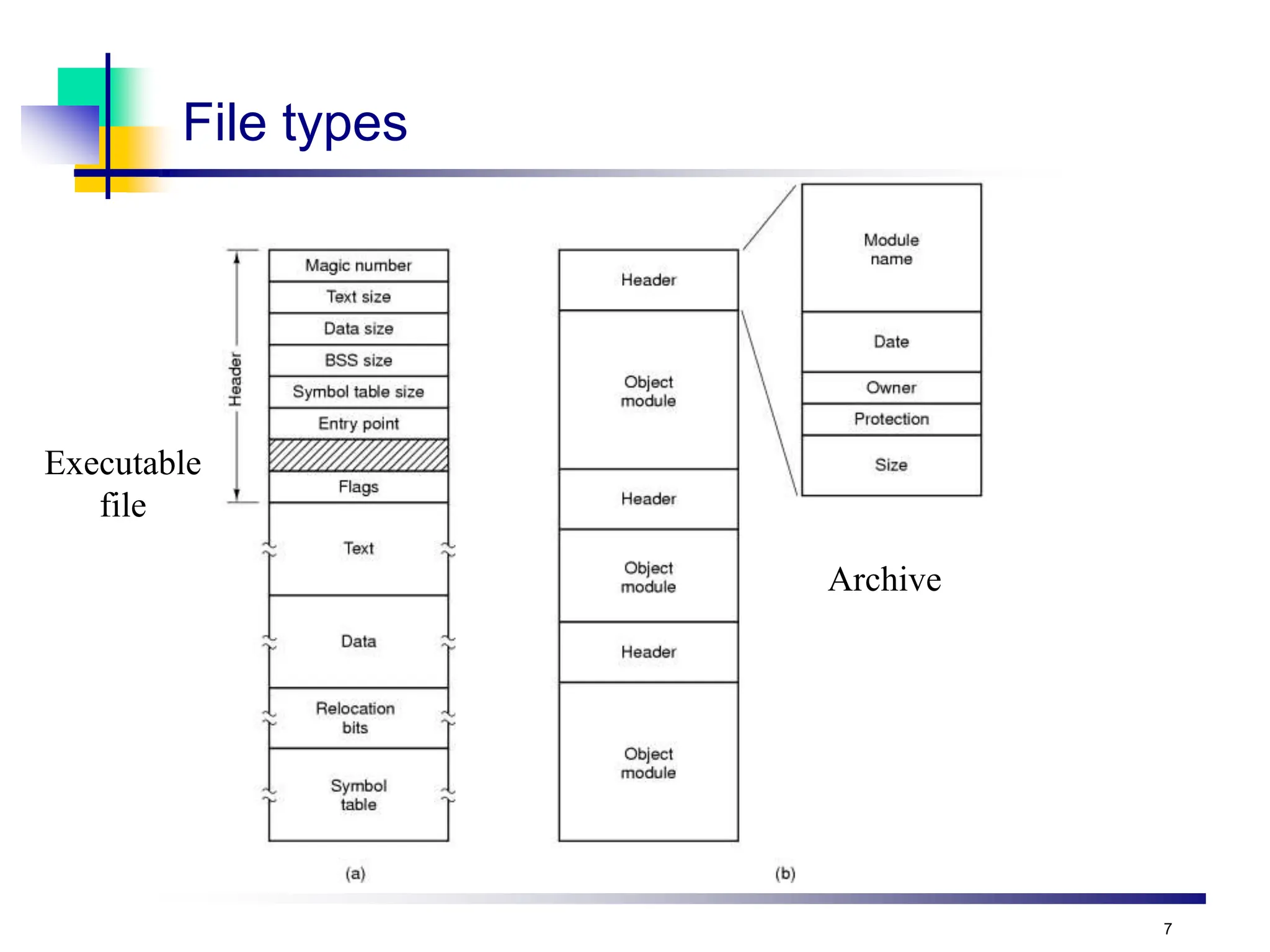
File types
Executable
file
Archive
8
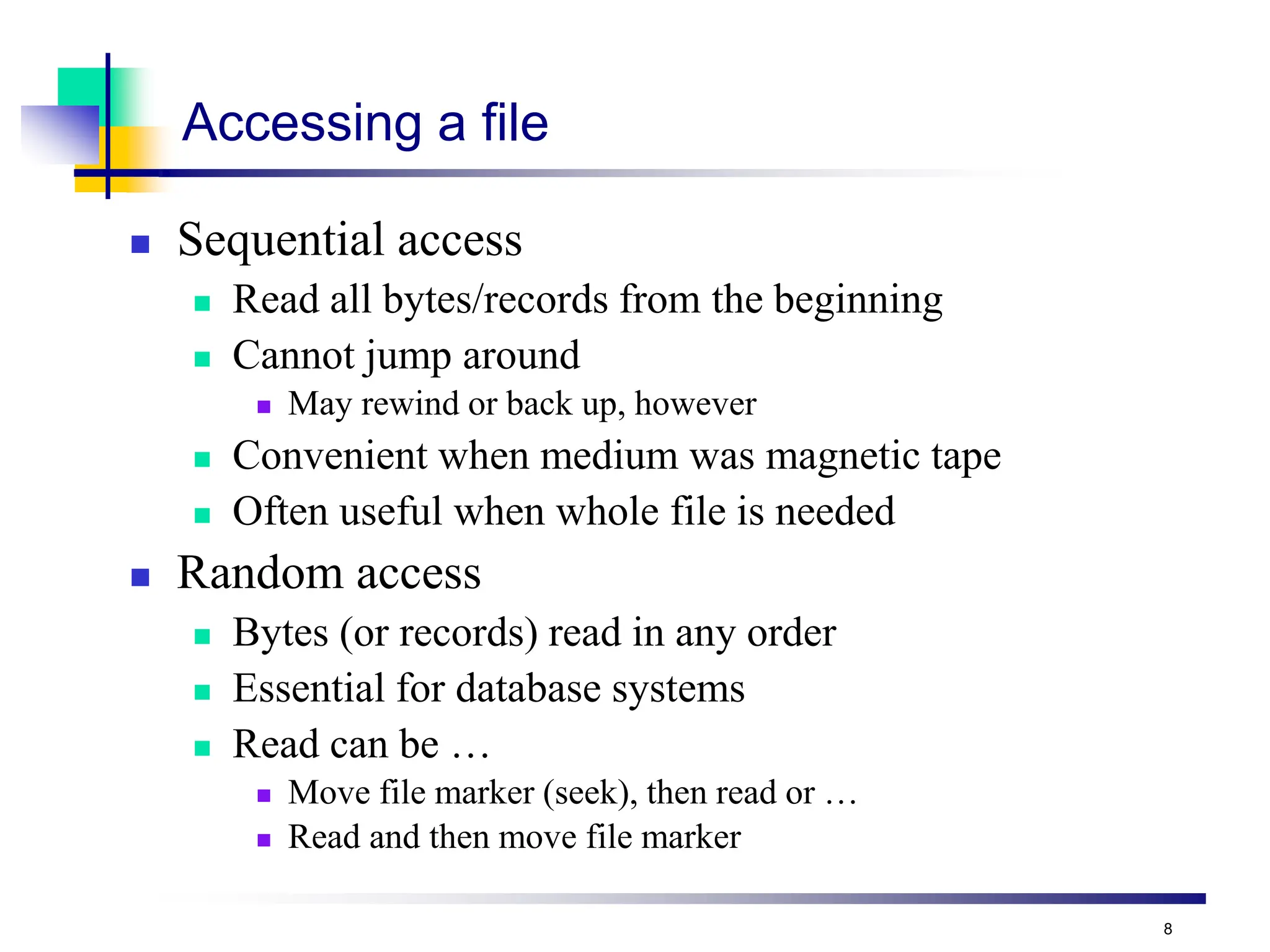
Accessing a file
 Sequential access
 Read all bytes/records from the beginning
 Cannot jump around
 May rewind or back up, however
 Convenient when medium was magnetic tape
 Often useful when whole file is needed
 Random access
 Bytes (or records) read in any order
 Essential for database systems
 Read can be …
 Move file marker (seek), then read or …
 Read and then move file marker
9
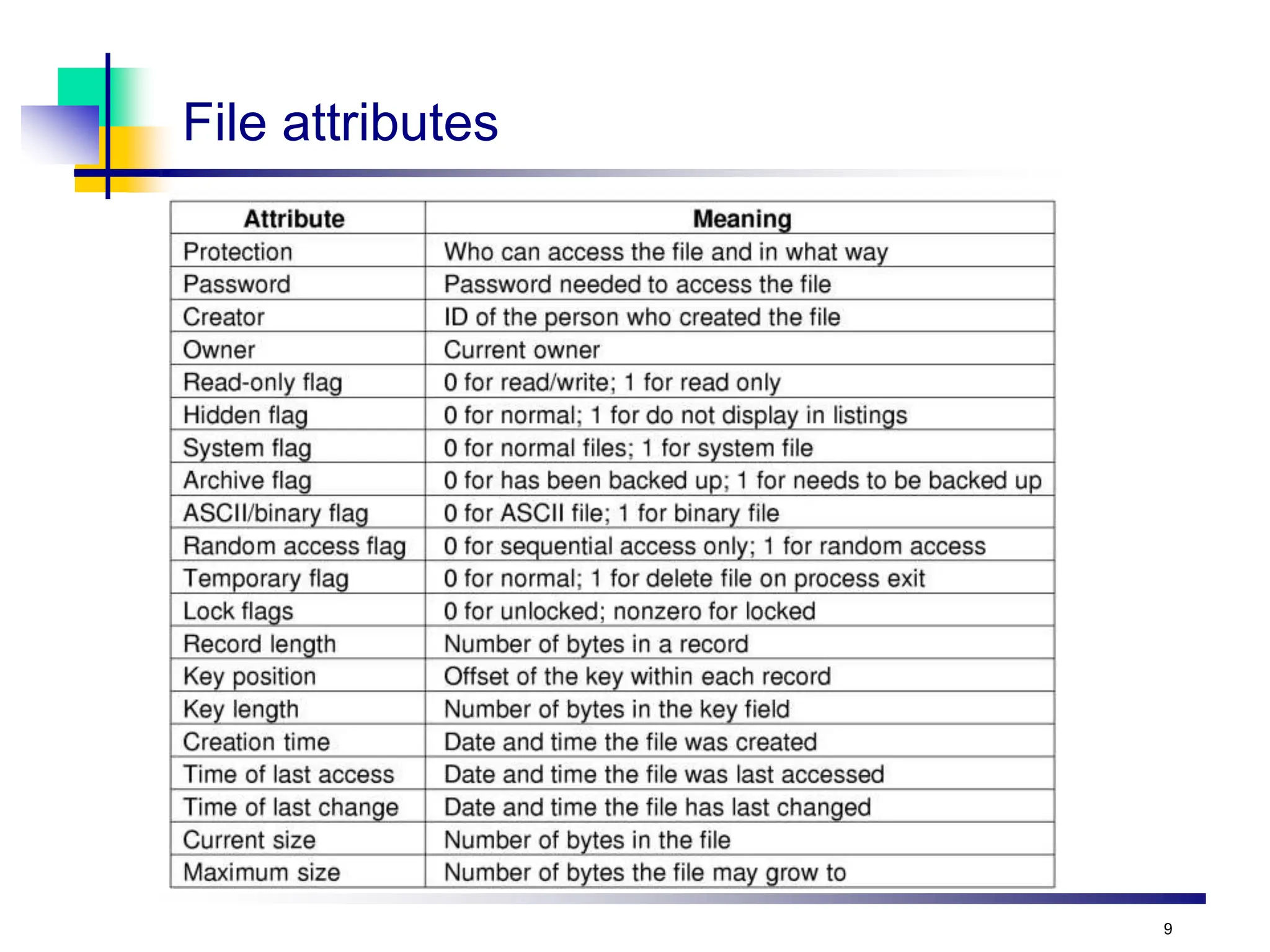
File attributes
10
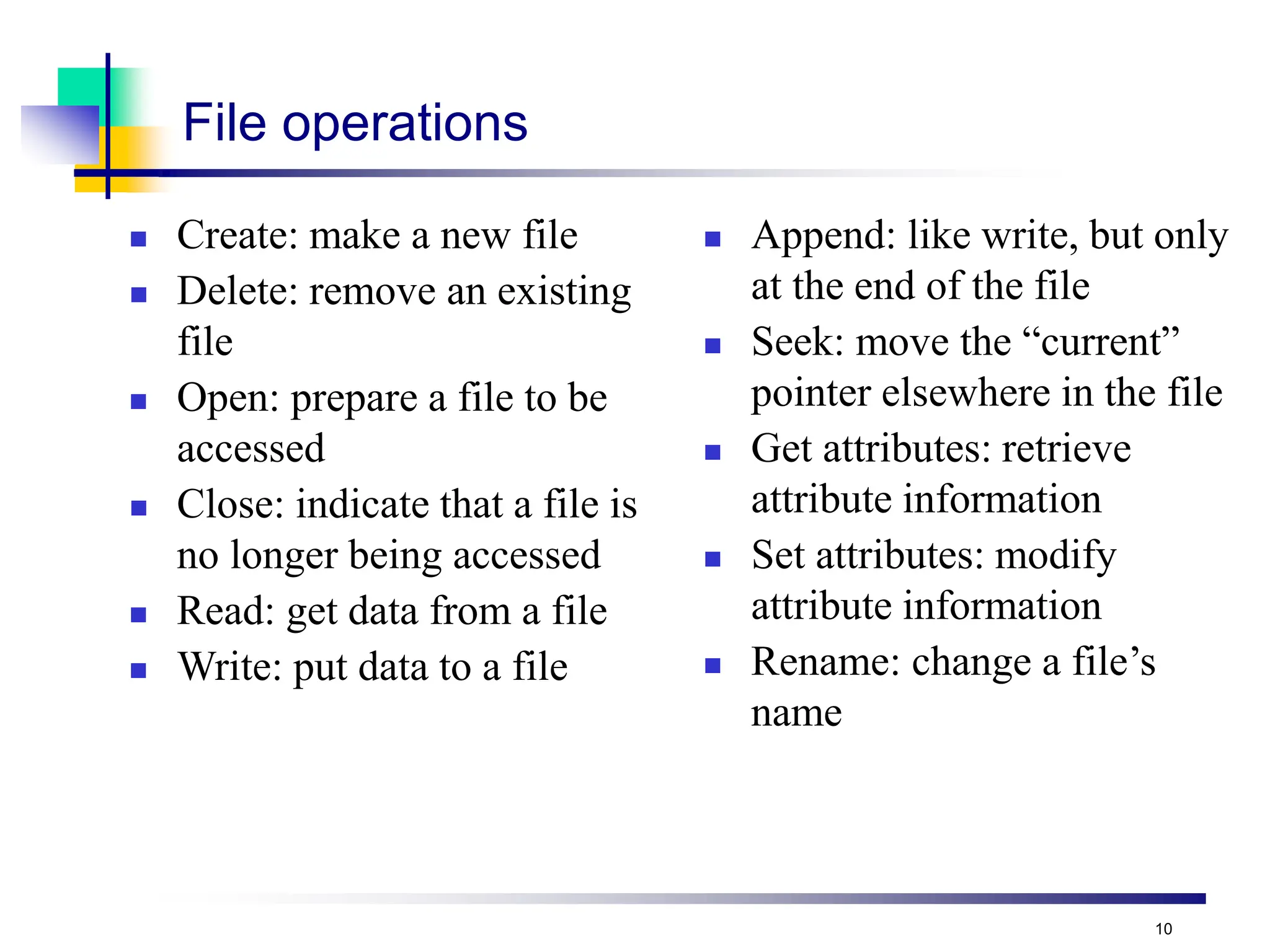
File operations
 Create: make a new file
 Delete: remove an existing
file
 Open: prepare a file to be
accessed
 Close: indicate that a file is
no longer being accessed
 Read: get data from a file
 Write: put data to a file
 Append: like write, but only
at the end of the file
 Seek: move the “current”
pointer elsewhere in the file
 Get attributes: retrieve
attribute information
 Set attributes: modify
attribute information
 Rename: change a file’s
name
11
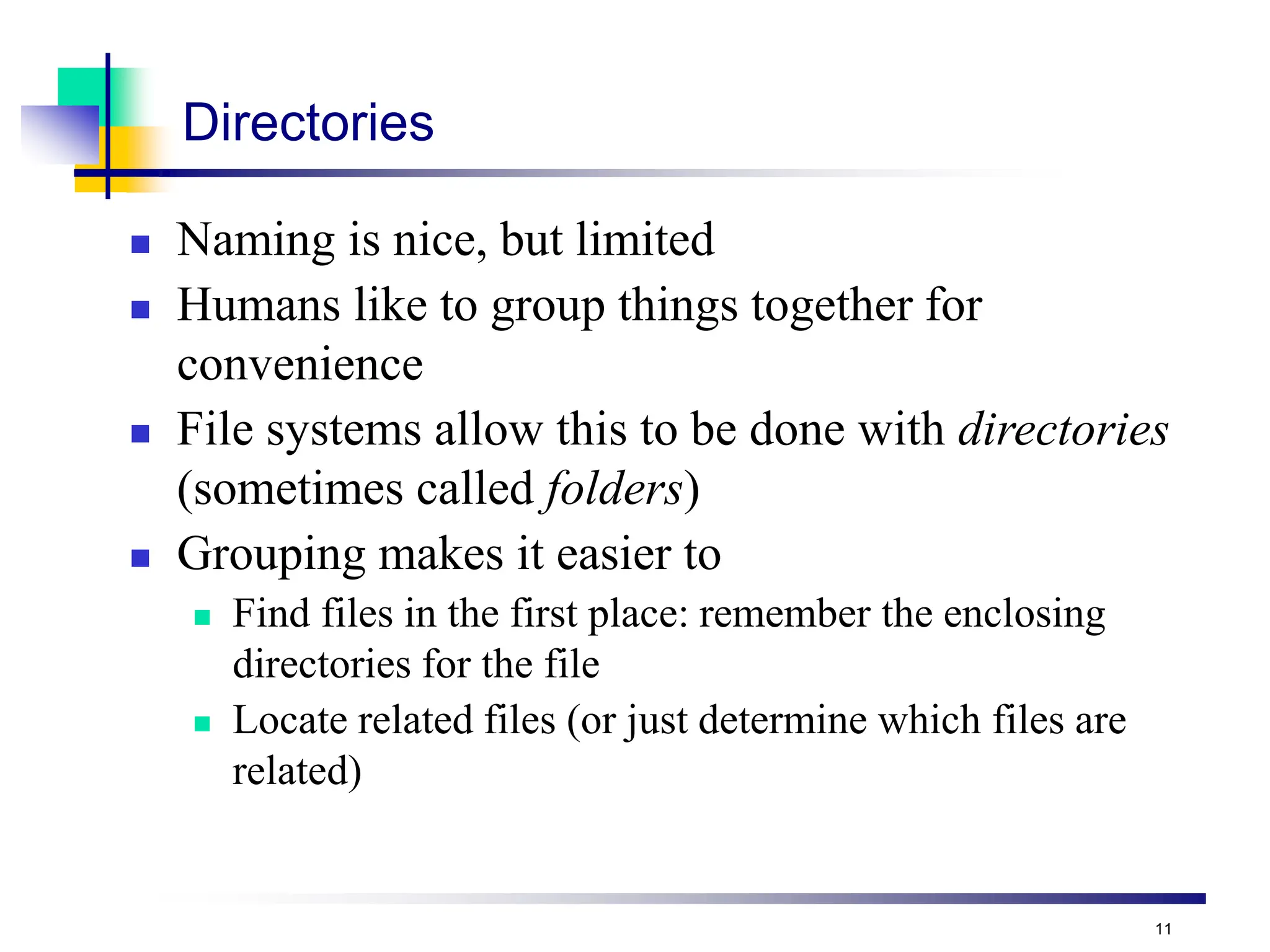
Directories
 Naming is nice, but limited
 Humans like to group things together for
convenience
 File systems allow this to be done with directories
(sometimes called folders)
 Grouping makes it easier to
 Find files in the first place: remember the enclosing
directories for the file
 Locate related files (or just determine which files are
related)
12
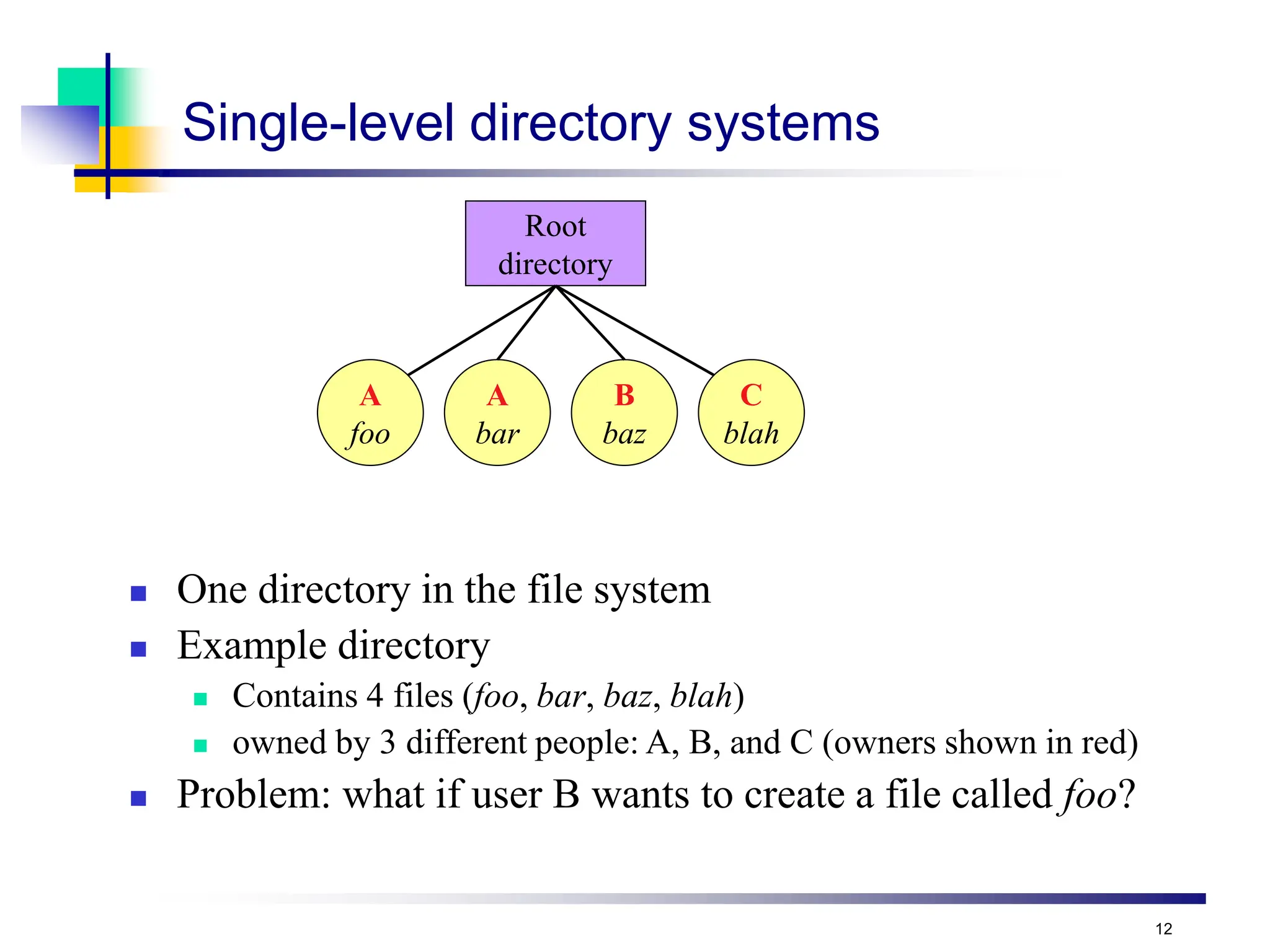
Single-level directory systems
 One directory in the file system
 Example directory
 Contains 4 files (foo, bar, baz, blah)
 owned by 3 different people: A, B, and C (owners shown in red)
 Problem: what if user B wants to create a file called foo?
Root
directory
A
foo
A
bar
B
baz
C
blah
13
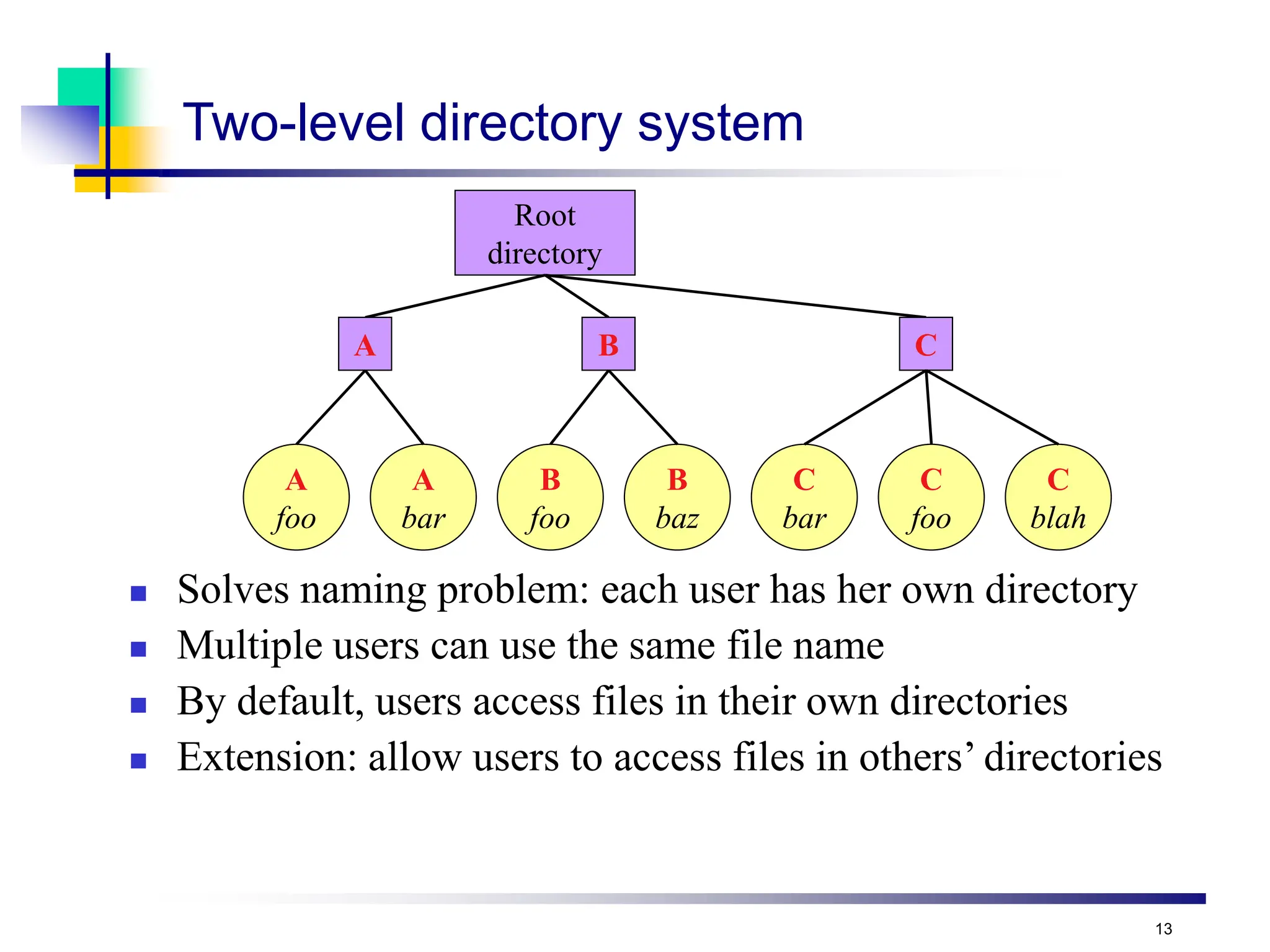
Two-level directory system
 Solves naming problem: each user has her own directory
 Multiple users can use the same file name
 By default, users access files in their own directories
 Extension: allow users to access files in others’ directories
Root
directory
A
foo
A
bar
B
foo
B
baz
A B C
C
bar
C
foo
C
blah
14
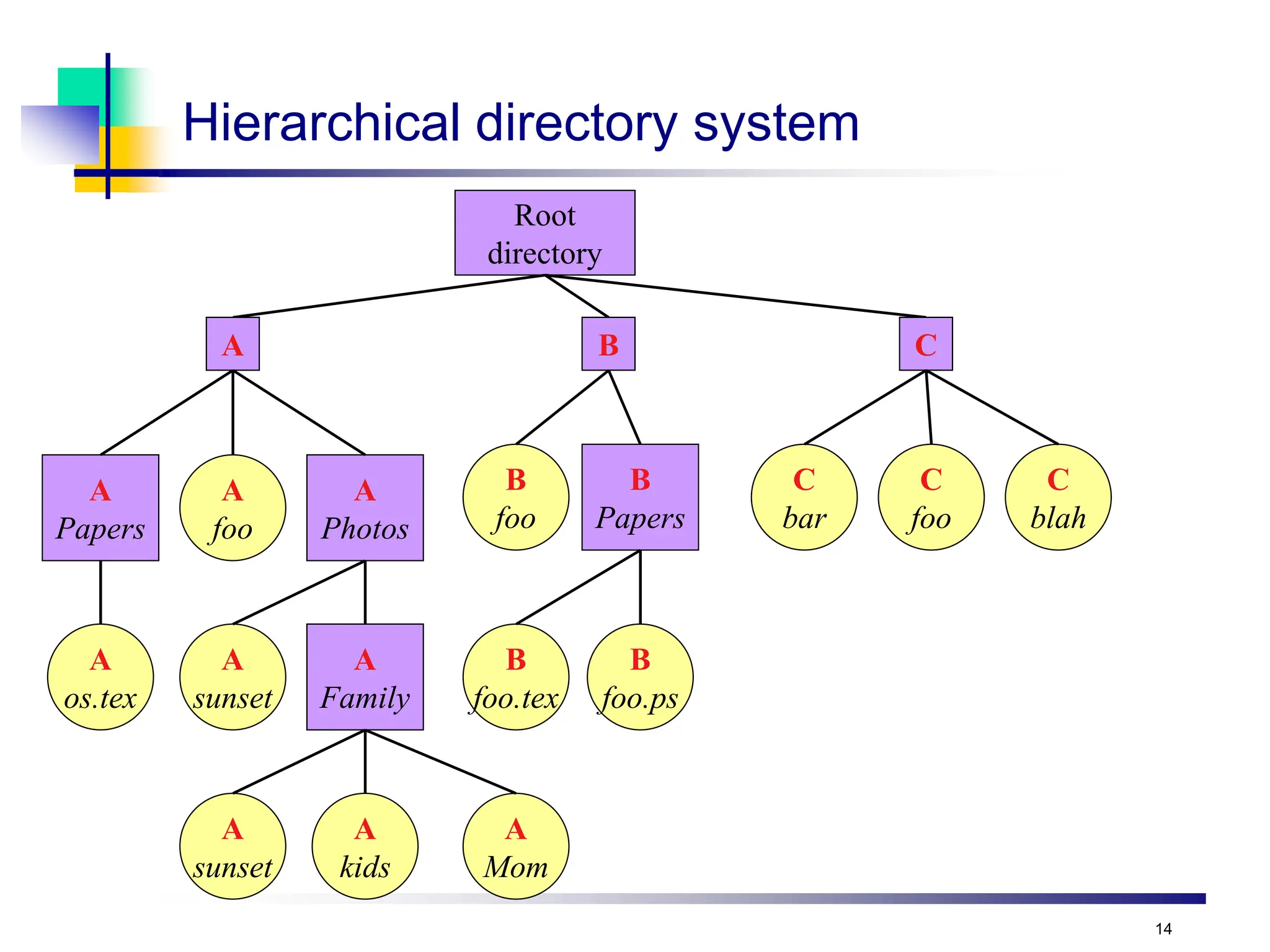
Hierarchical directory system
Root
directory
A
foo
A
Mom
B
foo
B
foo.tex
A B C
C
bar
C
foo
C
blah
A
Papers
A
Photos
A
Family
A
sunset
A
sunset
A
os.tex
A
kids
B
Papers
B
foo.ps
15
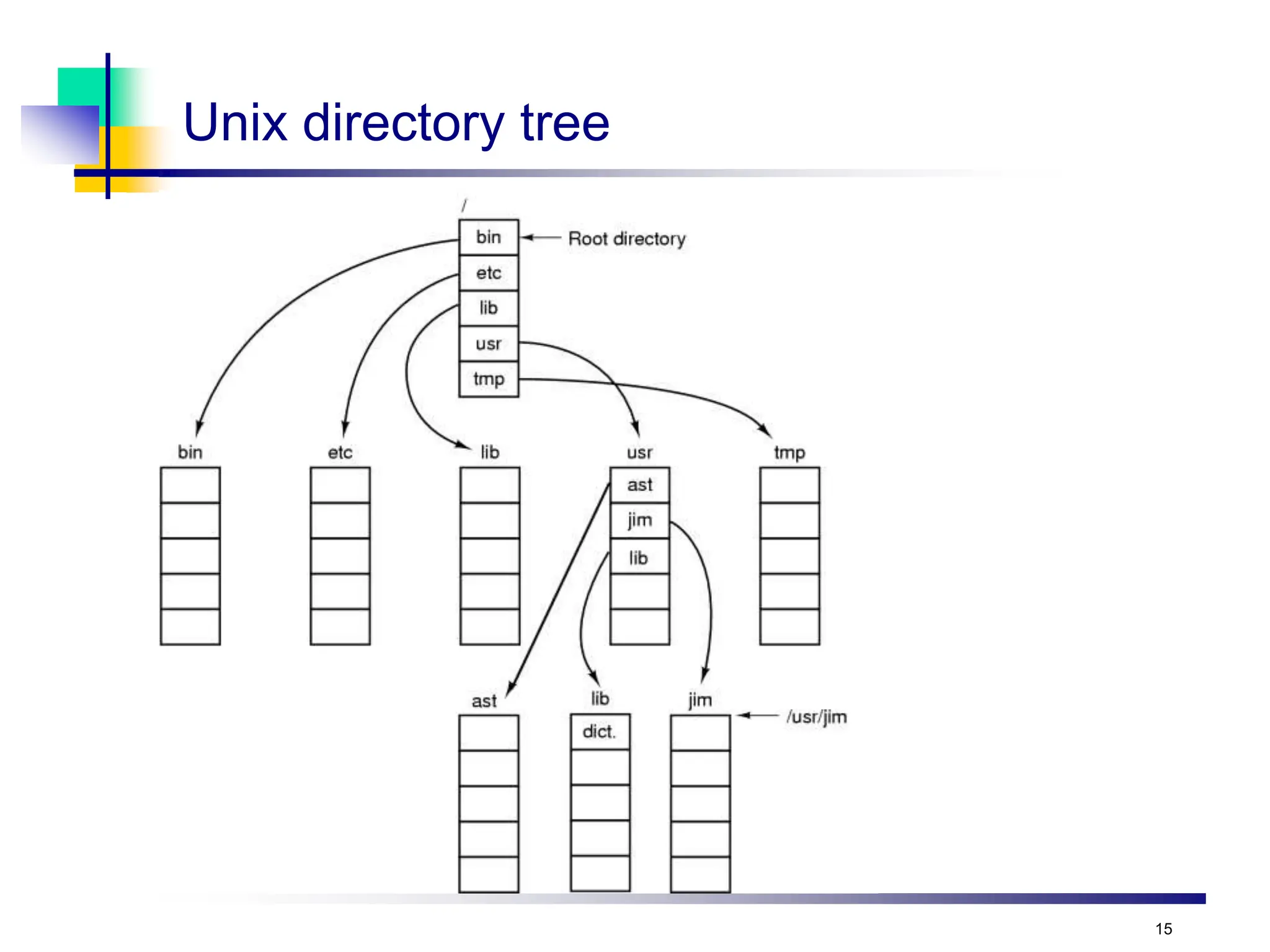
Unix directory tree
16
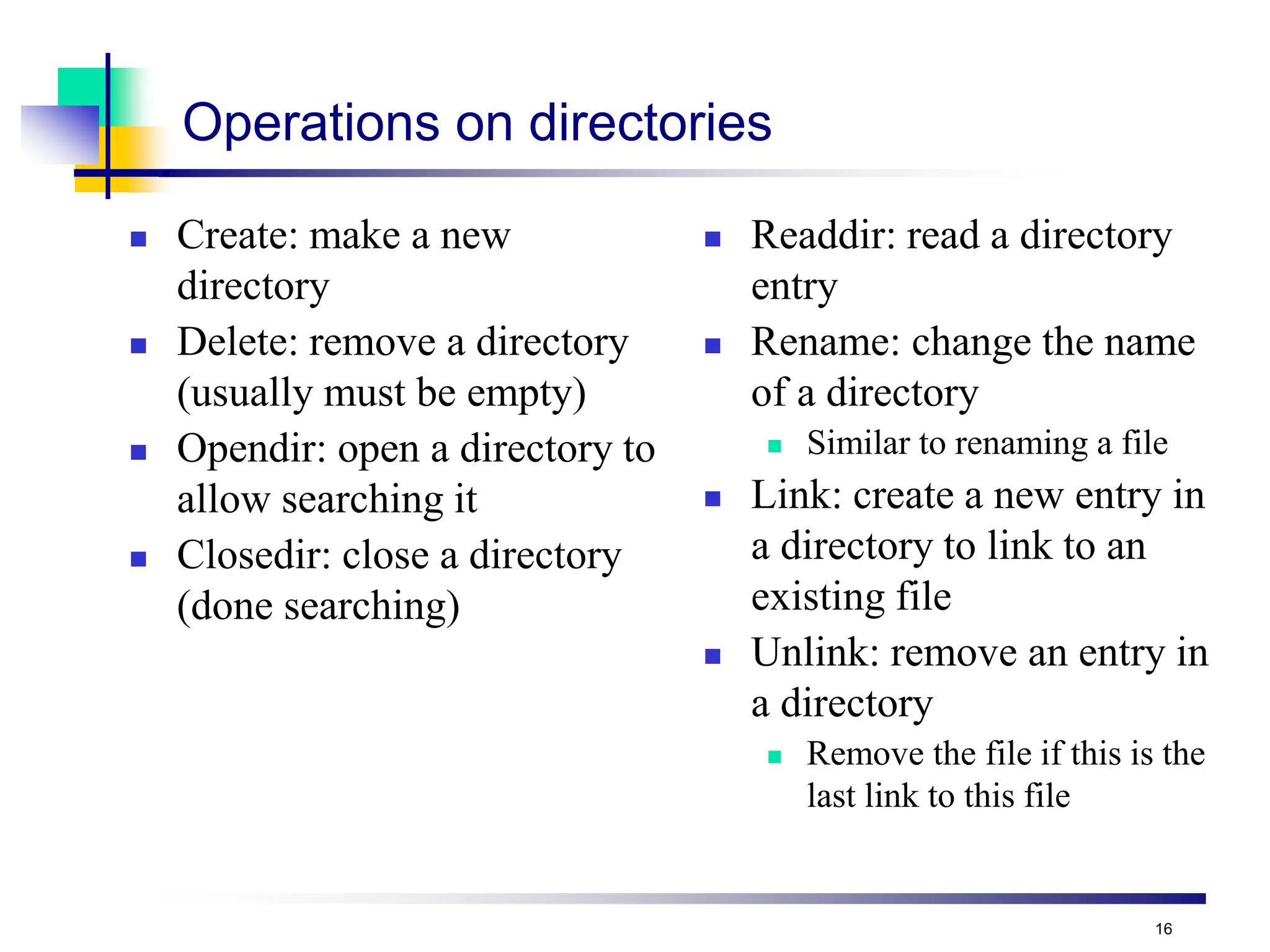
Operations on directories
 Create: make a new
directory
 Delete: remove a directory
(usually must be empty)
 Opendir: open a directory to
allow searching it
 Closedir: close a directory
(done searching)
 Readdir: read a directory
entry
 Rename: change the name
of a directory
 Similar to renaming a file
 Link: create a new entry in
a directory to link to an
existing file
 Unlink: remove an entry in
a directory
 Remove the file if this is the
last link to this file
17
File system implementation issues
 How are disks divided up into file systems?
 How does the file system allocate blocks to files?
 How does the file system manage free space?
 How are directories handled?
 How can the file system improve…
 Performance?
 Reliability?
18
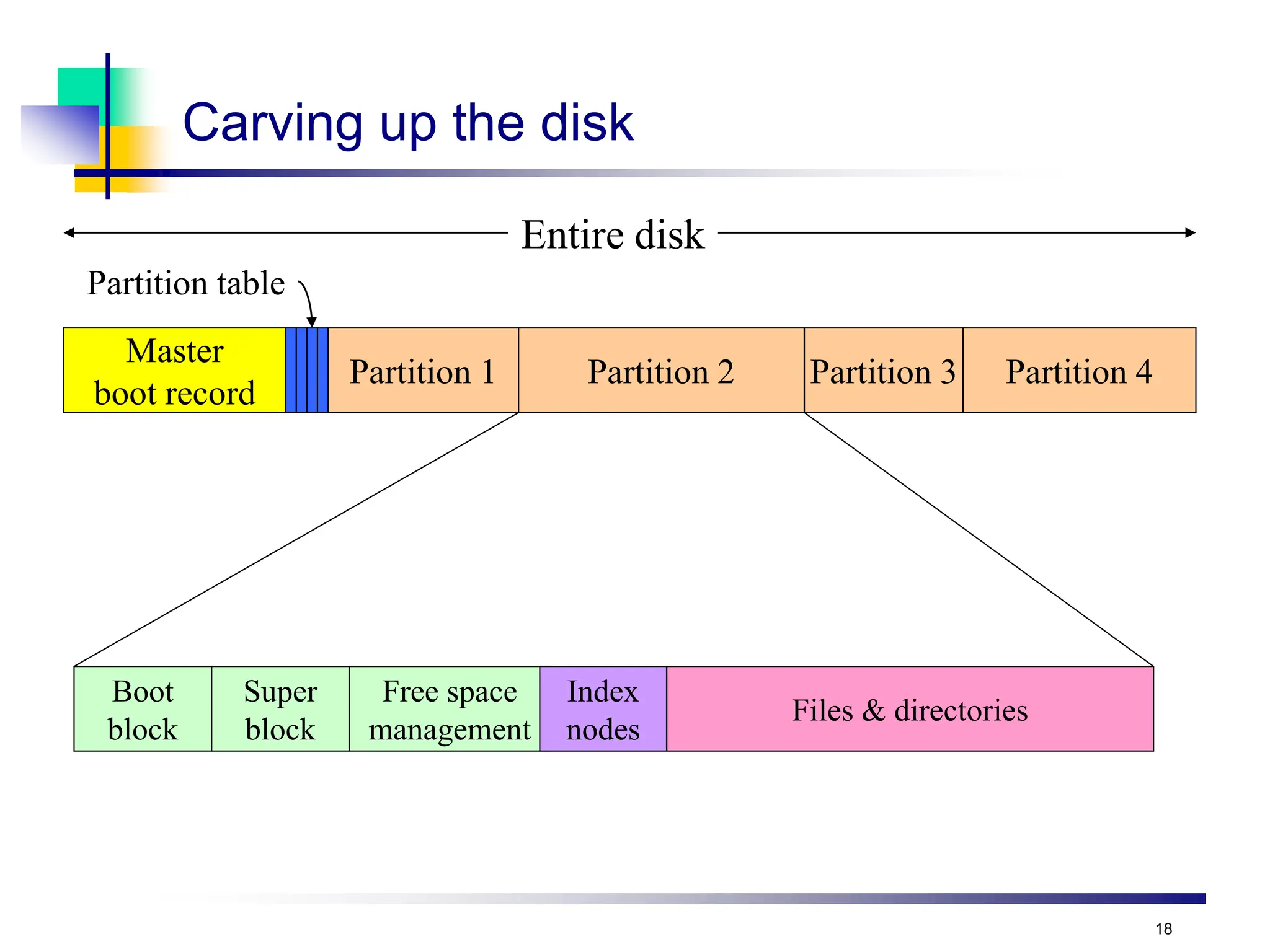
Carving up the disk
Master
boot record
Partition table
Partition 1 Partition 2 Partition 3 Partition 4
Entire disk
Boot
block
Super
block
Free space
management
Index
nodes
Files & directories
19
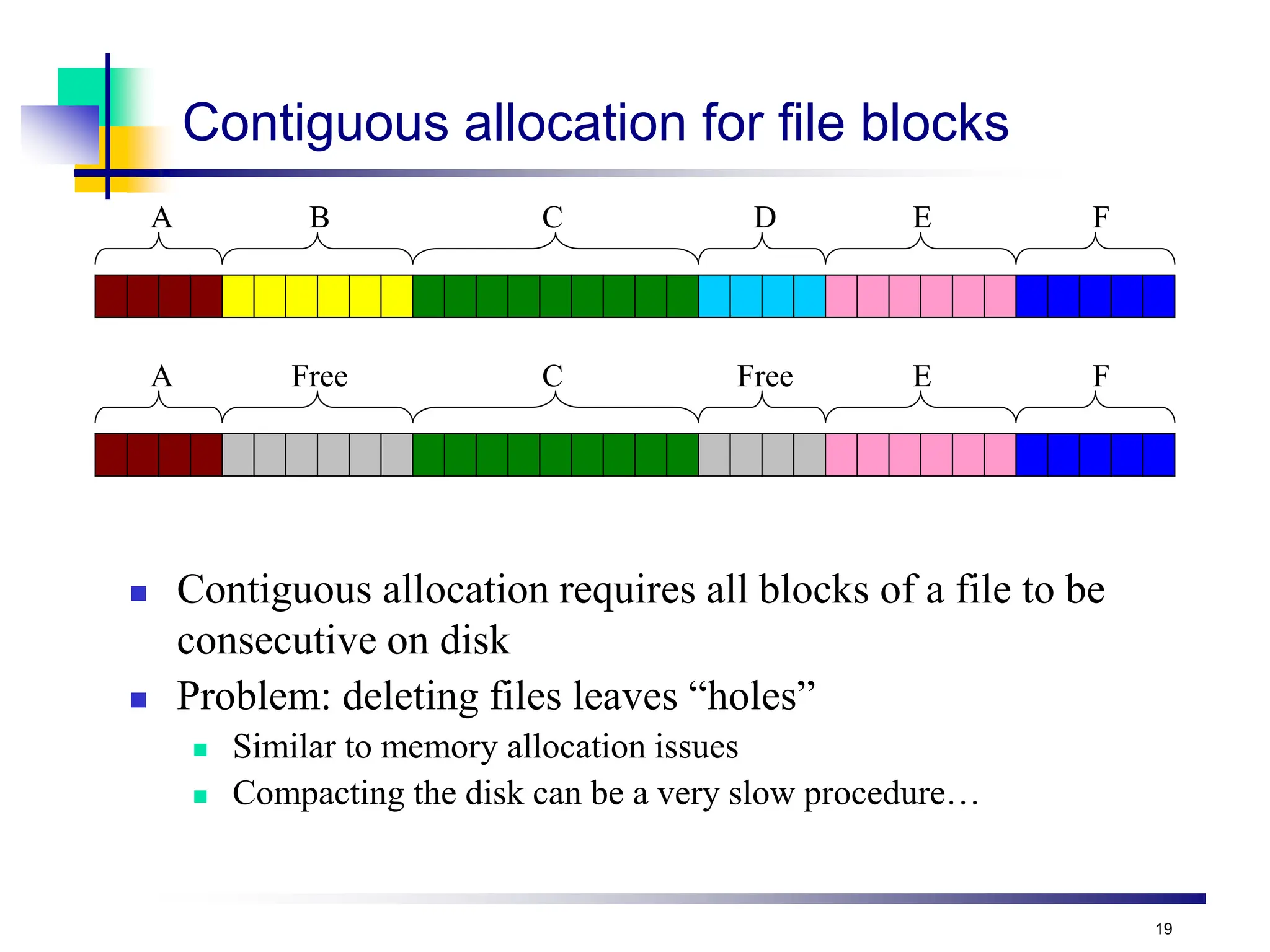
A B C D E F
A Free C Free E F
Contiguous allocation for file blocks
 Contiguous allocation requires all blocks of a file to be
consecutive on disk
 Problem: deleting files leaves “holes”
 Similar to memory allocation issues
 Compacting the disk can be a very slow procedure…
20
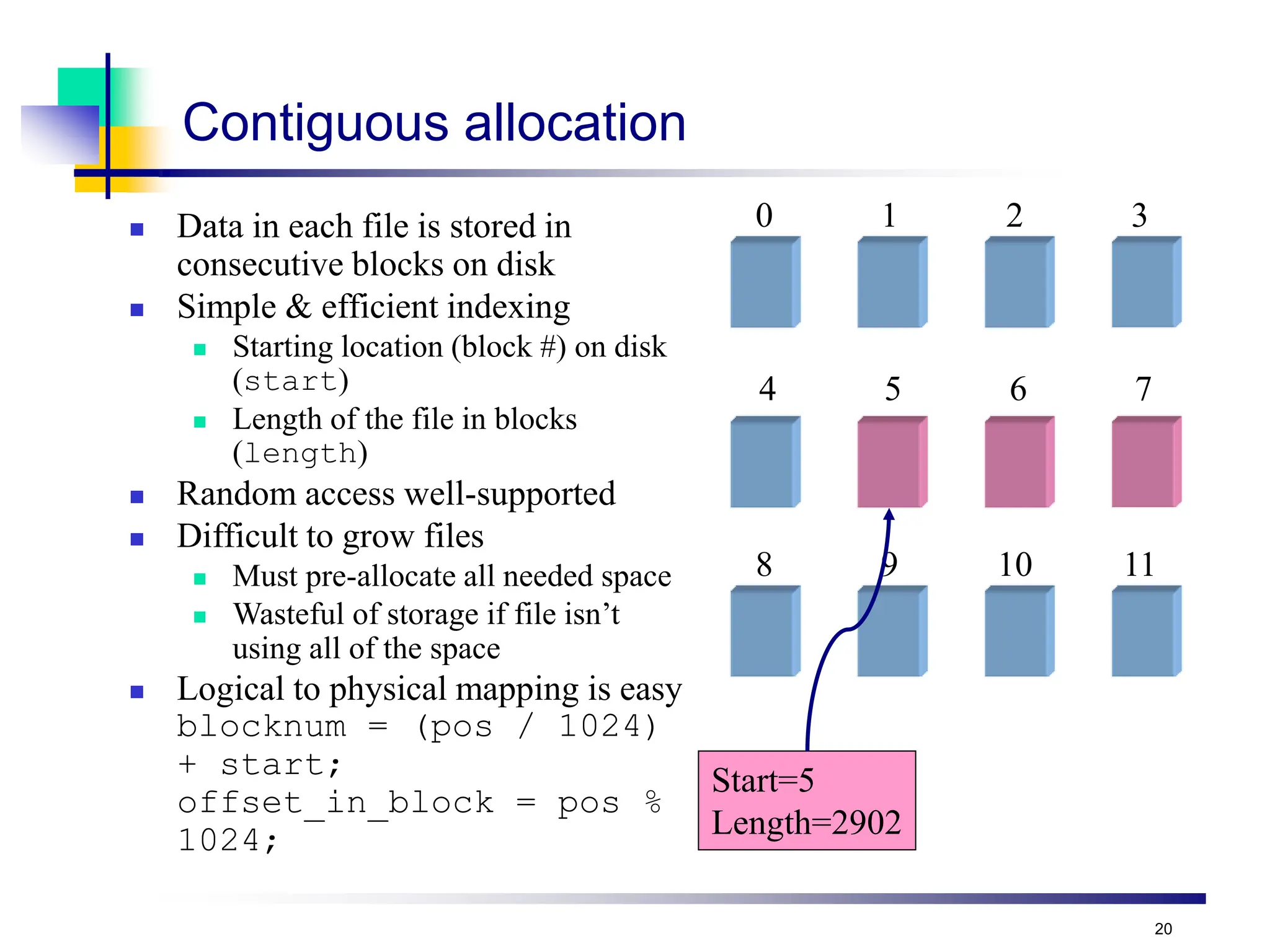
Contiguous allocation
 Data in each file is stored in
consecutive blocks on disk
 Simple & efficient indexing
 Starting location (block #) on disk
(start)
 Length of the file in blocks
(length)
 Random access well-supported
 Difficult to grow files
 Must pre-allocate all needed space
 Wasteful of storage if file isn’t
using all of the space
 Logical to physical mapping is easy
blocknum = (pos / 1024)
+ start;
offset_in_block = pos %
1024;
Start=5
Length=2902
0 1 2 3
4 5 6 7
8 9 10 11
21
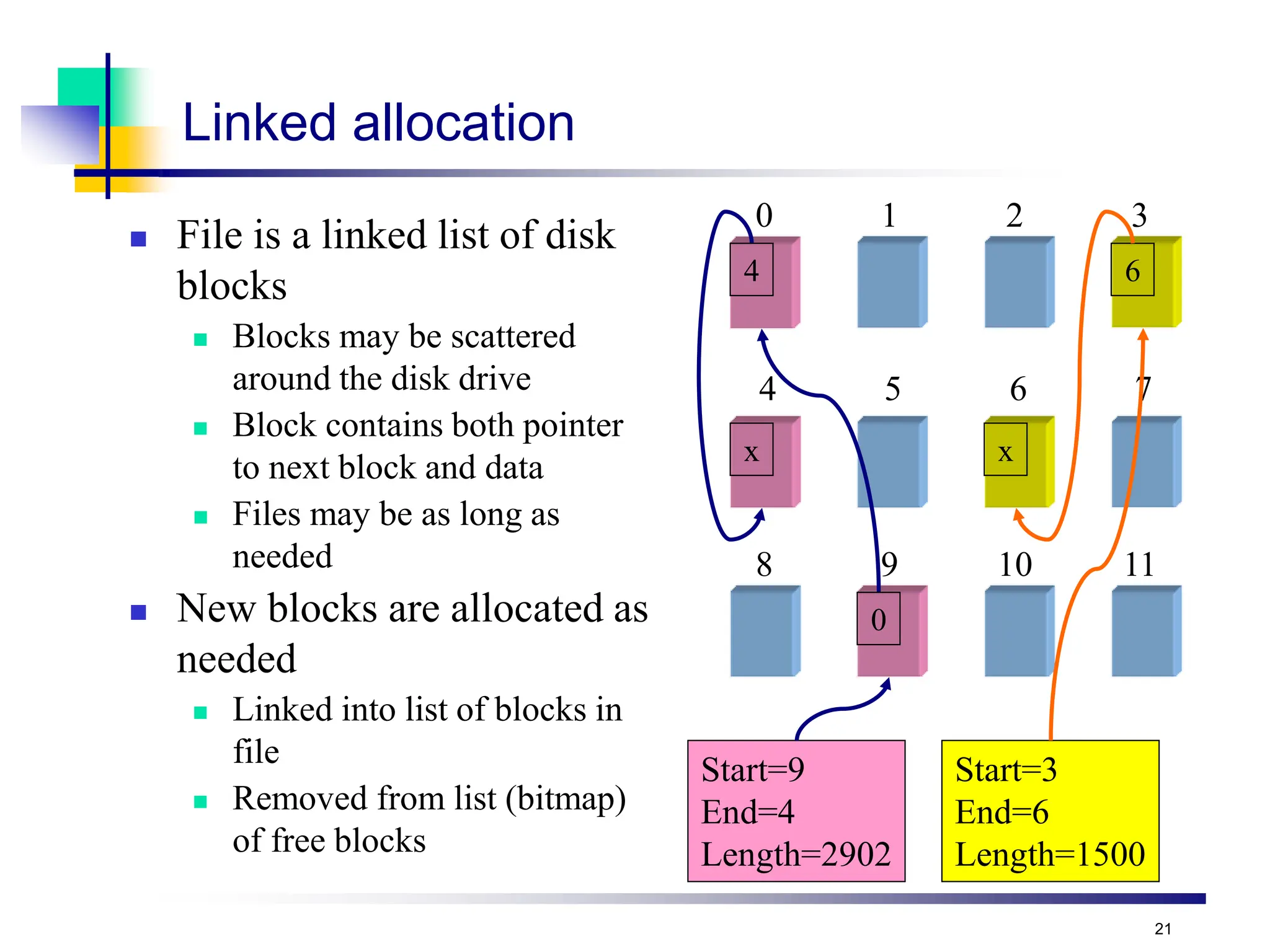
Linked allocation
 File is a linked list of disk
blocks
 Blocks may be scattered
around the disk drive
 Block contains both pointer
to next block and data
 Files may be as long as
needed
 New blocks are allocated as
needed
 Linked into list of blocks in
file
 Removed from list (bitmap)
of free blocks
0 1 2 3
4 5 6 7
8 9 10 11
Start=9
End=4
Length=2902
Start=3
End=6
Length=1500
0
x
4 6
x
22
Issues with free space management
 OS must protect data structures used for free space
management
 OS must keep in-memory and on-disk structures consistent
 Update free list when block is removed: change a pointer in the
previous block in the free list
 Update bit map when block is allocated
 Caution: on-disk map must never indicate that a block is free when it’s
part of a file
 Solution: set bit[j] in free map to 1 on disk before using block[j] in a file
and setting bit[j] to 1 in memory
 New problem: OS crash may leave bit[j] == 1 when block isn’t actually
used in a file
 New solution: OS checks the file system when it boots up…
 Managing free space is a big source of slowdown in file
systems
23
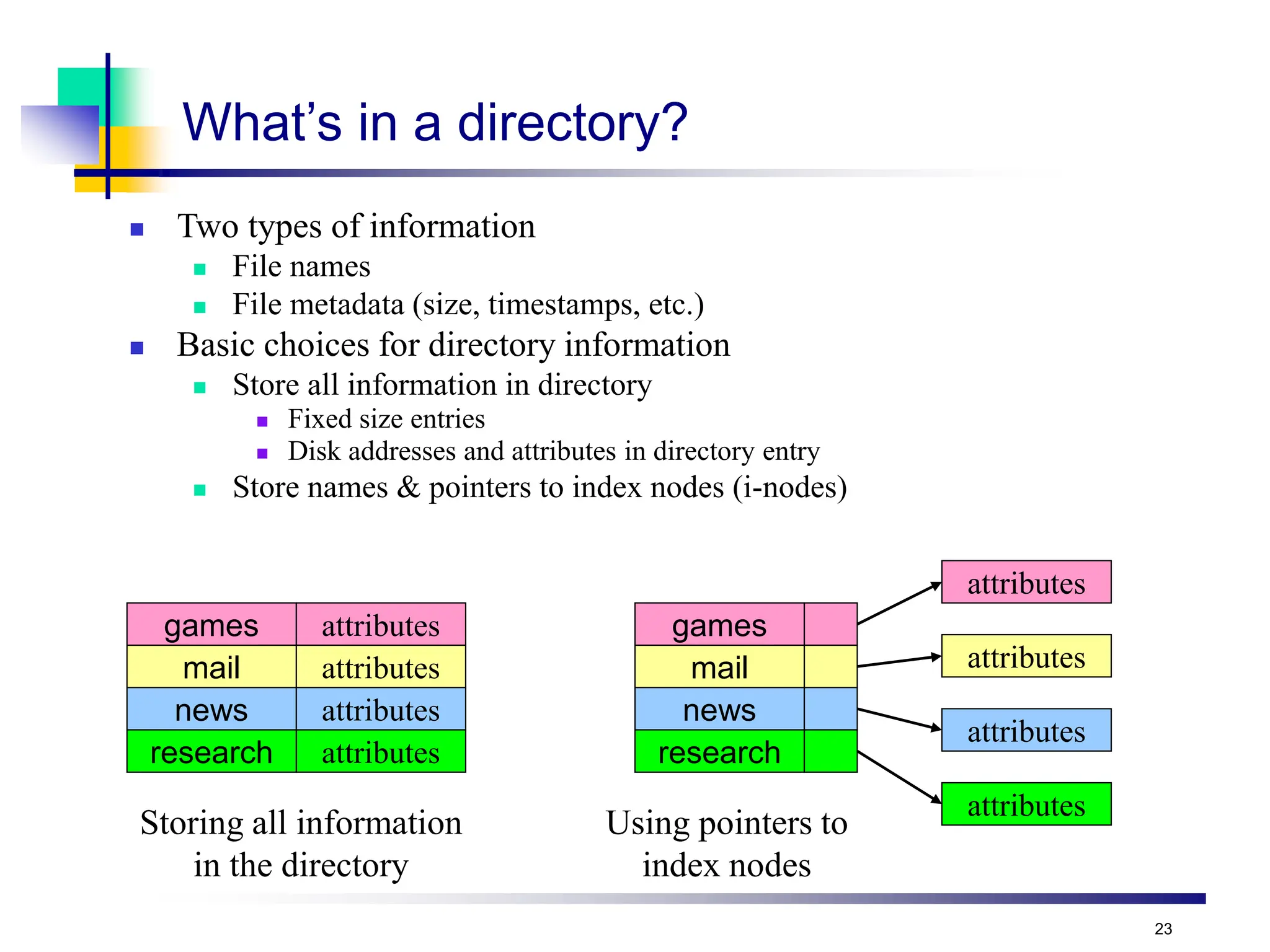
What’s in a directory?
 Two types of information
 File names
 File metadata (size, timestamps, etc.)
 Basic choices for directory information
 Store all information in directory
 Fixed size entries
 Disk addresses and attributes in directory entry
 Store names & pointers to index nodes (i-nodes)
games attributes
mail attributes
news attributes
research attributes
games
mail
news
research
attributes
attributes
attributes
attributes
Storing all information
in the directory
Using pointers to
index nodes
24
Directory structure
 Structure
 Linear list of files (often itself stored in a file)
 Simple to program
 Slow to run
 Increase speed by keeping it sorted (insertions are slower!)
 Hash table: name hashed and looked up in file
 Decreases search time: no linear searches!
 May be difficult to expand
 Can result in collisions (two files hash to same location)
 Tree
 Fast for searching
 Easy to expand
 Difficult to do in on-disk directory
 Name length
 Fixed: easy to program
 Variable: more flexible, better for users
25
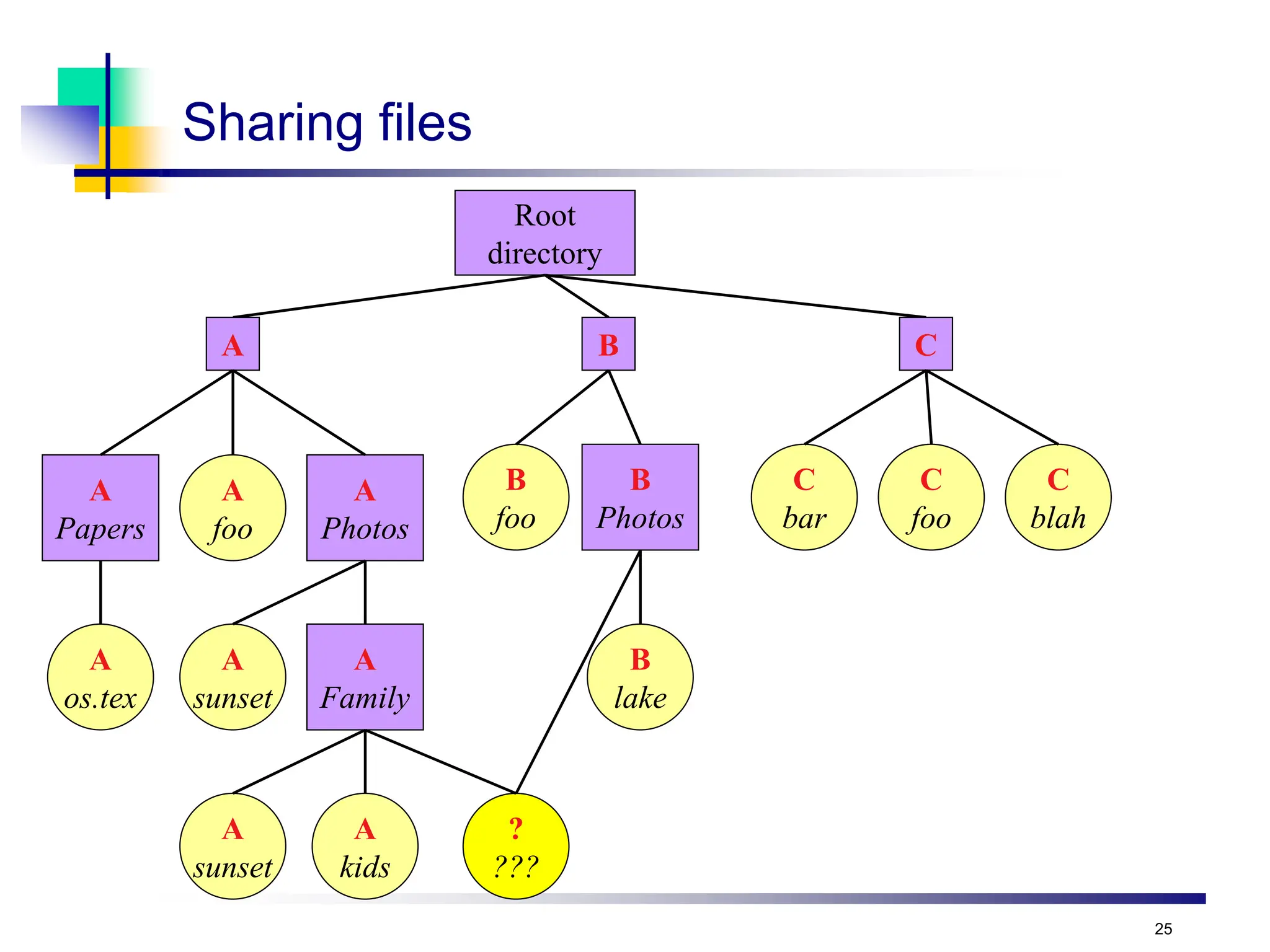
Sharing files
Root
directory
A
foo
?
???
B
foo
A B C
C
bar
C
foo
C
blah
A
Papers
A
Photos
A
Family
A
sunset
A
sunset
A
os.tex
A
kids
B
Photos
B
lake
26
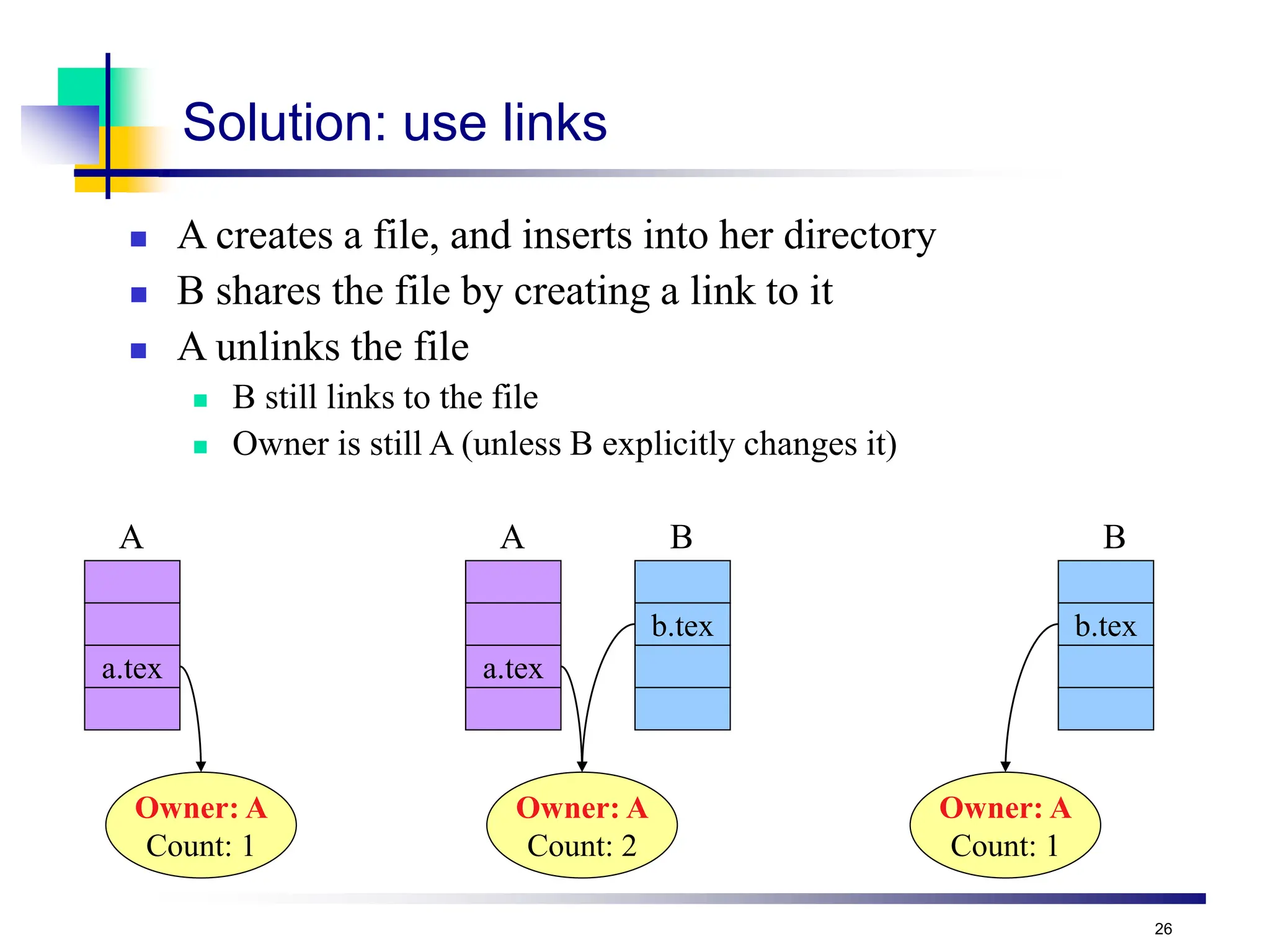
Solution: use links
 A creates a file, and inserts into her directory
 B shares the file by creating a link to it
 A unlinks the file
 B still links to the file
 Owner is still A (unless B explicitly changes it)
a.tex
Owner: A
Count: 1
a.tex
Owner: A
Count: 2
b.tex
Owner: A
Count: 1
b.tex
A A B B
27
File that has
not changed
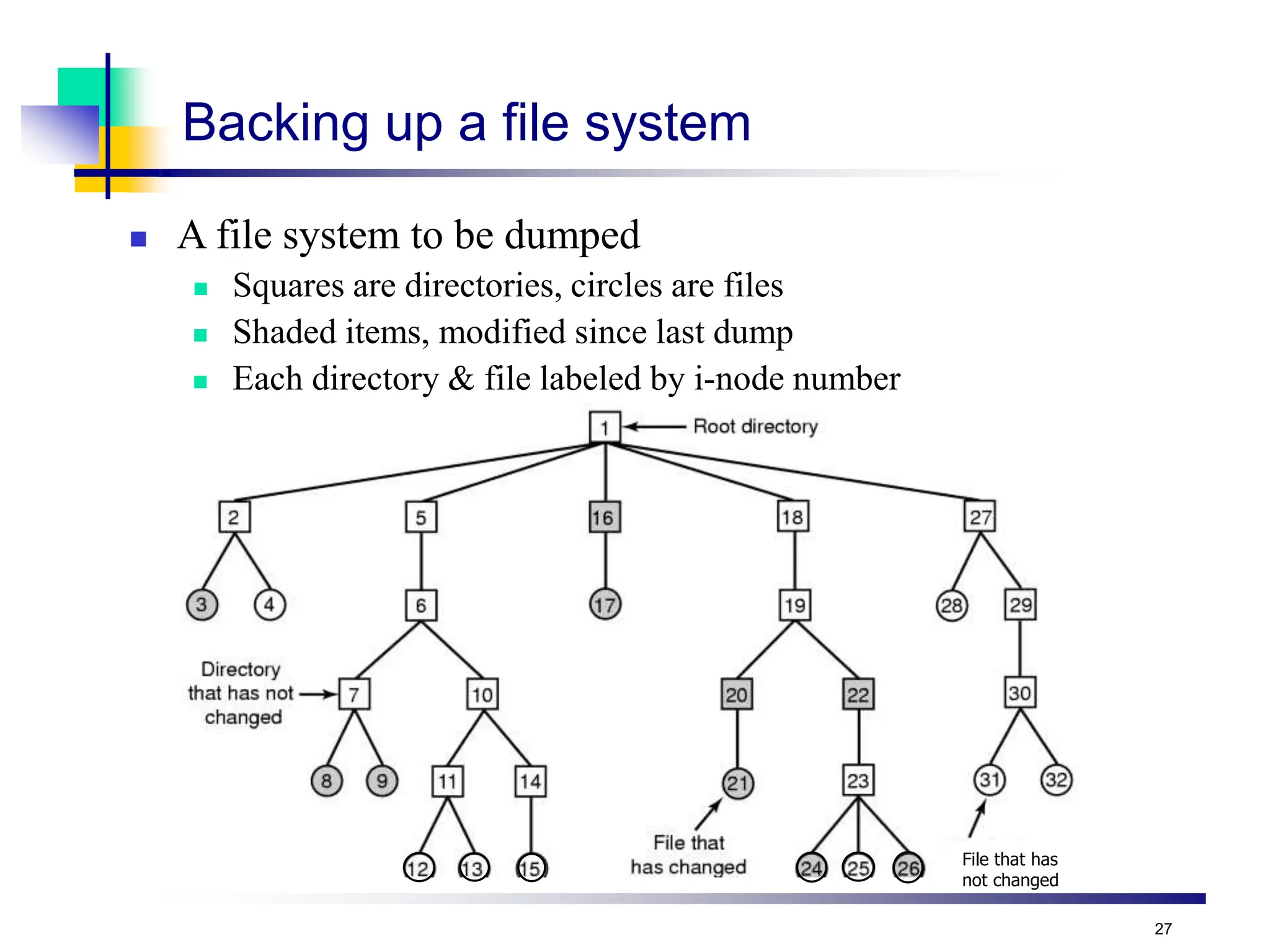
Backing up a file system
 A file system to be dumped
 Squares are directories, circles are files
 Shaded items, modified since last dump
 Each directory & file labeled by i-node number
28
File system cache
 Many files are used repeatedly
 Option: read it each time from disk
 Better: keep a copy in memory
 File system cache
 Set of recently used file blocks
 Keep blocks just referenced
 Throw out old, unused blocks
 Same kinds of algorithms as for virtual memory
 More effort per reference is OK: file references are a lot less
frequent than memory references
 Goal: eliminate as many disk accesses as possible!
 Repeated reads & writes
 Files deleted before they’re ever written to disk
29
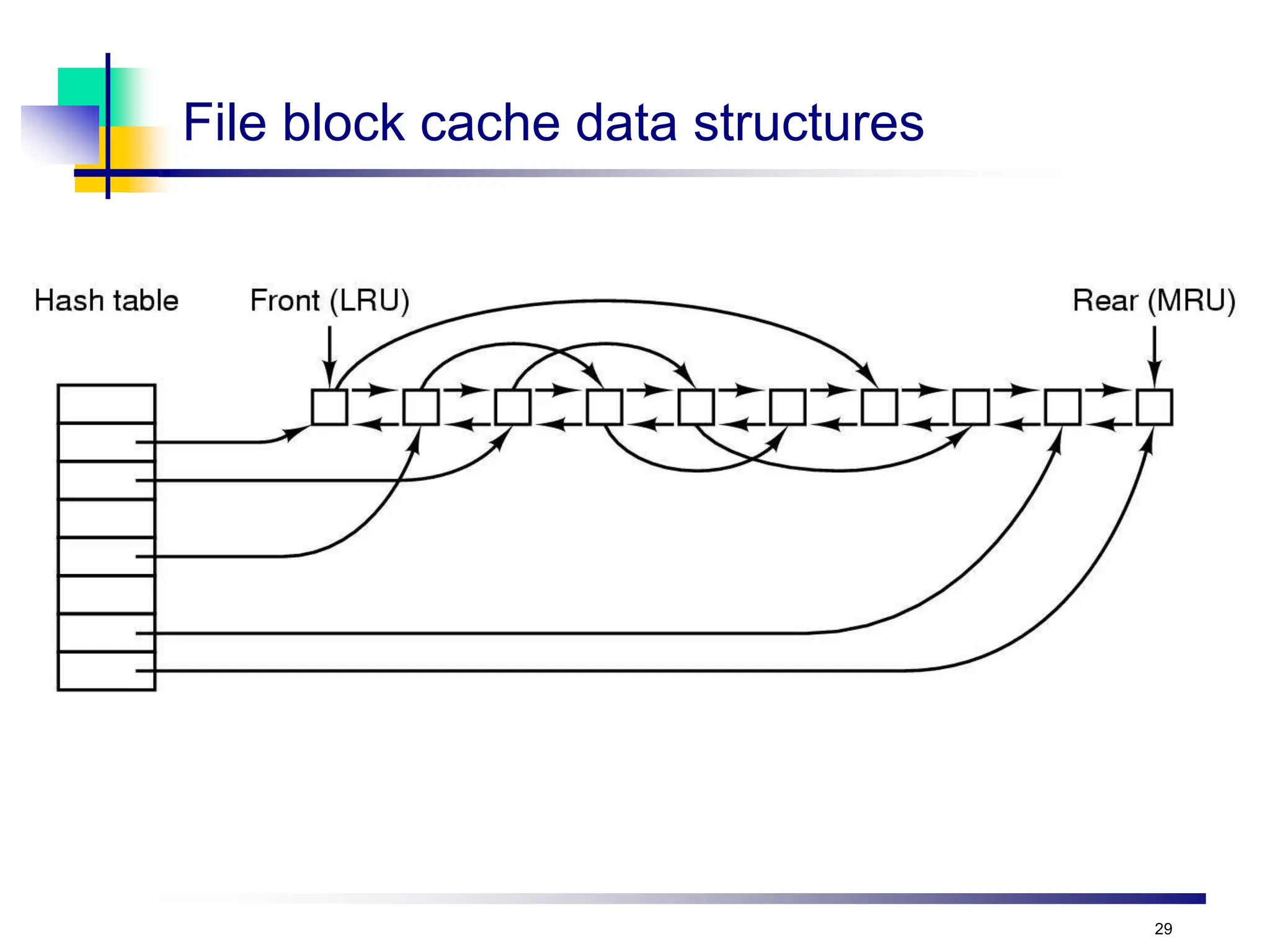
File block cache data structures
30
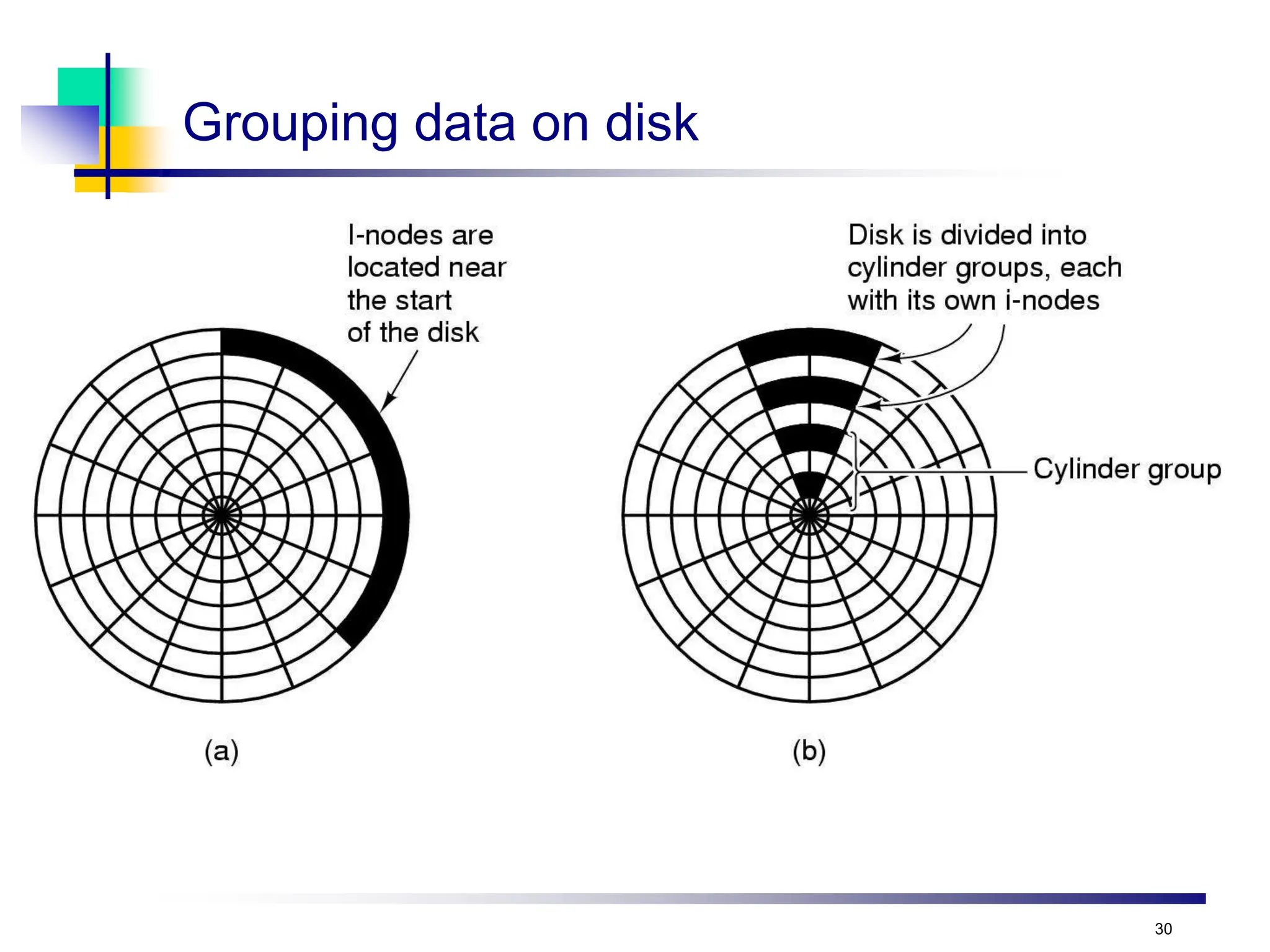
Grouping data on disk
Log Structured File Systems
 Log structured (or journaling) file systems record each
metadata update to the file system as a transaction
 All transactions are written to a log
 A transaction is considered committed once it is written to the
log (sequentially)
 Sometimes to a separate device or section of disk
 However, the file system may not yet be updated
 The transactions in the log are asynchronously written to the file
system structures
 When the file system structures are modified, the transaction
is removed from the log
 If the file system crashes, all remaining transactions in the log
must still be performed
 Faster recovery from crash, removes chance of inconsistency of
metadata
32
Log-structured file systems
 Trends in disk & memory
 Faster CPUs
 Larger memories
 Result
 More memory  disk caches can also be larger
 Increasing number of read requests can come from cache
 Thus, most disk accesses will be writes
 LFS structures entire disk as a log
 All writes initially buffered in memory
 Periodically write these to the end of the disk log
 When file opened, locate i-node, then find blocks
 Issue: what happens when blocks are deleted?
Protection
 File owner/creator should be able to manage
controlled access:
 What can be done
 By whom
 But never forget physical security
 Types of access
 Read, Write, Execute, Append, Delete, List
 Others can include renaming, copying, editing, etc
 System calls then check for valid rights before allowing
operations: Another reason for open()
 Many solutions proposed and implemented
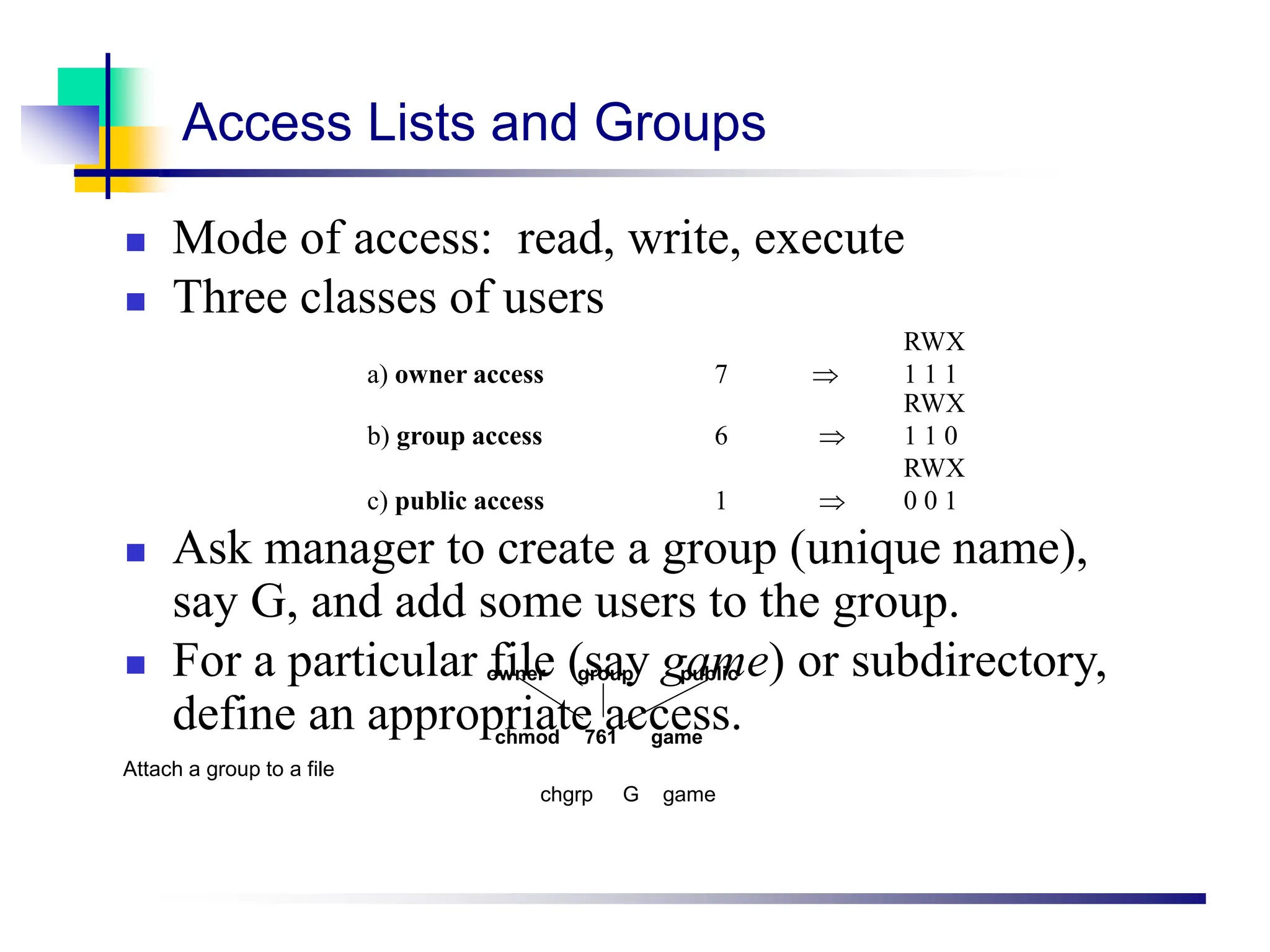
Access Lists and Groups
 Mode of access: read, write, execute
 Three classes of users
RWX
a) owner access 7  1 1 1
RWX
b) group access 6  1 1 0
RWX
c) public access 1  0 0 1
 Ask manager to create a group (unique name),
say G, and add some users to the group.
 For a particular file (say game) or subdirectory,
define an appropriate access.
owner group public
chmod 761 game
Attach a group to a file
chgrp G game
Distributed File Systems
 A distributed file system is a file system that is stored locally on one system (server)
but is accessible by processes on many systems (clients)
 Multiple processes access multiple files simultaneously
 Other attributes of a DFS may include:
 Access control lists (ACLs)
 Client-side file replication
 Server- and client- side caching
 Some examples of DFSes:
 NFS (Sun)
 AFS (CMU)
 DCE/DFS (Transarc / IBM)
 CIFS (Microsoft)
 Distributed file systems can be used by parallel programs, but they have significant
disadvantages:
 The network bandwidth of the server system is a limiting factor on performance
 To retain UNIX-style file consistency, the DFS software must implement some form of
locking which has significant performance implications
36

distributed SYSTEMS FSnewBBIT305KCAU.ppt

  • 1.
  • 2.
    2 File systems  Files Directories & naming  File system implementation  Example file systems
  • 3.
    3 Long-term information storage Must store large amounts of data  Gigabytes -> terabytes -> petabytes  Stored information must survive the termination of the process using it  Lifetime can be seconds to years  Must have some way of finding it!  Multiple processes must be able to access the information concurrently
  • 4.
    4 Naming files  Importantto be able to find files after they’re created  Every file has at least one name  Name can be  Human-accessible: “foo.c”, “my photo”, “Go Panthers!”, “Go Banana Slugs!”  Machine-usable: 4502, 33481  Case may or may not matter  Depends on the file system  Name may include information about the file’s contents  Certainly does for the user (the name should make it easy to figure out what’s in it!)  Computer may use part of the name to determine the file type
  • 5.
  • 6.
    6 File structures Sequence ofbytes Sequence of records 1 byte 1 record 12A 101 111 sab wm cm avg ejw sab elm br S02 F01 W02 Tree
  • 7.
  • 8.
    8 Accessing a file Sequential access  Read all bytes/records from the beginning  Cannot jump around  May rewind or back up, however  Convenient when medium was magnetic tape  Often useful when whole file is needed  Random access  Bytes (or records) read in any order  Essential for database systems  Read can be …  Move file marker (seek), then read or …  Read and then move file marker
  • 9.
  • 10.
    10 File operations  Create:make a new file  Delete: remove an existing file  Open: prepare a file to be accessed  Close: indicate that a file is no longer being accessed  Read: get data from a file  Write: put data to a file  Append: like write, but only at the end of the file  Seek: move the “current” pointer elsewhere in the file  Get attributes: retrieve attribute information  Set attributes: modify attribute information  Rename: change a file’s name
  • 11.
    11 Directories  Naming isnice, but limited  Humans like to group things together for convenience  File systems allow this to be done with directories (sometimes called folders)  Grouping makes it easier to  Find files in the first place: remember the enclosing directories for the file  Locate related files (or just determine which files are related)
  • 12.
    12 Single-level directory systems One directory in the file system  Example directory  Contains 4 files (foo, bar, baz, blah)  owned by 3 different people: A, B, and C (owners shown in red)  Problem: what if user B wants to create a file called foo? Root directory A foo A bar B baz C blah
  • 13.
    13 Two-level directory system Solves naming problem: each user has her own directory  Multiple users can use the same file name  By default, users access files in their own directories  Extension: allow users to access files in others’ directories Root directory A foo A bar B foo B baz A B C C bar C foo C blah
  • 14.
    14 Hierarchical directory system Root directory A foo A Mom B foo B foo.tex AB C C bar C foo C blah A Papers A Photos A Family A sunset A sunset A os.tex A kids B Papers B foo.ps
  • 15.
  • 16.
    16 Operations on directories Create: make a new directory  Delete: remove a directory (usually must be empty)  Opendir: open a directory to allow searching it  Closedir: close a directory (done searching)  Readdir: read a directory entry  Rename: change the name of a directory  Similar to renaming a file  Link: create a new entry in a directory to link to an existing file  Unlink: remove an entry in a directory  Remove the file if this is the last link to this file
  • 17.
    17 File system implementationissues  How are disks divided up into file systems?  How does the file system allocate blocks to files?  How does the file system manage free space?  How are directories handled?  How can the file system improve…  Performance?  Reliability?
  • 18.
    18 Carving up thedisk Master boot record Partition table Partition 1 Partition 2 Partition 3 Partition 4 Entire disk Boot block Super block Free space management Index nodes Files & directories
  • 19.
    19 A B CD E F A Free C Free E F Contiguous allocation for file blocks  Contiguous allocation requires all blocks of a file to be consecutive on disk  Problem: deleting files leaves “holes”  Similar to memory allocation issues  Compacting the disk can be a very slow procedure…
  • 20.
    20 Contiguous allocation  Datain each file is stored in consecutive blocks on disk  Simple & efficient indexing  Starting location (block #) on disk (start)  Length of the file in blocks (length)  Random access well-supported  Difficult to grow files  Must pre-allocate all needed space  Wasteful of storage if file isn’t using all of the space  Logical to physical mapping is easy blocknum = (pos / 1024) + start; offset_in_block = pos % 1024; Start=5 Length=2902 0 1 2 3 4 5 6 7 8 9 10 11
  • 21.
    21 Linked allocation  Fileis a linked list of disk blocks  Blocks may be scattered around the disk drive  Block contains both pointer to next block and data  Files may be as long as needed  New blocks are allocated as needed  Linked into list of blocks in file  Removed from list (bitmap) of free blocks 0 1 2 3 4 5 6 7 8 9 10 11 Start=9 End=4 Length=2902 Start=3 End=6 Length=1500 0 x 4 6 x
  • 22.
    22 Issues with freespace management  OS must protect data structures used for free space management  OS must keep in-memory and on-disk structures consistent  Update free list when block is removed: change a pointer in the previous block in the free list  Update bit map when block is allocated  Caution: on-disk map must never indicate that a block is free when it’s part of a file  Solution: set bit[j] in free map to 1 on disk before using block[j] in a file and setting bit[j] to 1 in memory  New problem: OS crash may leave bit[j] == 1 when block isn’t actually used in a file  New solution: OS checks the file system when it boots up…  Managing free space is a big source of slowdown in file systems
  • 23.
    23 What’s in adirectory?  Two types of information  File names  File metadata (size, timestamps, etc.)  Basic choices for directory information  Store all information in directory  Fixed size entries  Disk addresses and attributes in directory entry  Store names & pointers to index nodes (i-nodes) games attributes mail attributes news attributes research attributes games mail news research attributes attributes attributes attributes Storing all information in the directory Using pointers to index nodes
  • 24.
    24 Directory structure  Structure Linear list of files (often itself stored in a file)  Simple to program  Slow to run  Increase speed by keeping it sorted (insertions are slower!)  Hash table: name hashed and looked up in file  Decreases search time: no linear searches!  May be difficult to expand  Can result in collisions (two files hash to same location)  Tree  Fast for searching  Easy to expand  Difficult to do in on-disk directory  Name length  Fixed: easy to program  Variable: more flexible, better for users
  • 25.
    25 Sharing files Root directory A foo ? ??? B foo A BC C bar C foo C blah A Papers A Photos A Family A sunset A sunset A os.tex A kids B Photos B lake
  • 26.
    26 Solution: use links A creates a file, and inserts into her directory  B shares the file by creating a link to it  A unlinks the file  B still links to the file  Owner is still A (unless B explicitly changes it) a.tex Owner: A Count: 1 a.tex Owner: A Count: 2 b.tex Owner: A Count: 1 b.tex A A B B
  • 27.
    27 File that has notchanged Backing up a file system  A file system to be dumped  Squares are directories, circles are files  Shaded items, modified since last dump  Each directory & file labeled by i-node number
  • 28.
    28 File system cache Many files are used repeatedly  Option: read it each time from disk  Better: keep a copy in memory  File system cache  Set of recently used file blocks  Keep blocks just referenced  Throw out old, unused blocks  Same kinds of algorithms as for virtual memory  More effort per reference is OK: file references are a lot less frequent than memory references  Goal: eliminate as many disk accesses as possible!  Repeated reads & writes  Files deleted before they’re ever written to disk
  • 29.
    29 File block cachedata structures
  • 30.
  • 31.
    Log Structured FileSystems  Log structured (or journaling) file systems record each metadata update to the file system as a transaction  All transactions are written to a log  A transaction is considered committed once it is written to the log (sequentially)  Sometimes to a separate device or section of disk  However, the file system may not yet be updated  The transactions in the log are asynchronously written to the file system structures  When the file system structures are modified, the transaction is removed from the log  If the file system crashes, all remaining transactions in the log must still be performed  Faster recovery from crash, removes chance of inconsistency of metadata
  • 32.
    32 Log-structured file systems Trends in disk & memory  Faster CPUs  Larger memories  Result  More memory  disk caches can also be larger  Increasing number of read requests can come from cache  Thus, most disk accesses will be writes  LFS structures entire disk as a log  All writes initially buffered in memory  Periodically write these to the end of the disk log  When file opened, locate i-node, then find blocks  Issue: what happens when blocks are deleted?
  • 33.
    Protection  File owner/creatorshould be able to manage controlled access:  What can be done  By whom  But never forget physical security  Types of access  Read, Write, Execute, Append, Delete, List  Others can include renaming, copying, editing, etc  System calls then check for valid rights before allowing operations: Another reason for open()  Many solutions proposed and implemented
  • 34.
    Access Lists andGroups  Mode of access: read, write, execute  Three classes of users RWX a) owner access 7  1 1 1 RWX b) group access 6  1 1 0 RWX c) public access 1  0 0 1  Ask manager to create a group (unique name), say G, and add some users to the group.  For a particular file (say game) or subdirectory, define an appropriate access. owner group public chmod 761 game Attach a group to a file chgrp G game
  • 35.
    Distributed File Systems A distributed file system is a file system that is stored locally on one system (server) but is accessible by processes on many systems (clients)  Multiple processes access multiple files simultaneously  Other attributes of a DFS may include:  Access control lists (ACLs)  Client-side file replication  Server- and client- side caching  Some examples of DFSes:  NFS (Sun)  AFS (CMU)  DCE/DFS (Transarc / IBM)  CIFS (Microsoft)  Distributed file systems can be used by parallel programs, but they have significant disadvantages:  The network bandwidth of the server system is a limiting factor on performance  To retain UNIX-style file consistency, the DFS software must implement some form of locking which has significant performance implications 36