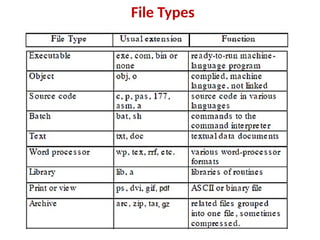
Unit 4 -Part 2 operating system 3bca madras university.pptx
1.
File management
• Afile is a named collection of related
information that is recorded on secondary
storage such as magnetic disks, magnetic
tapes and optical disks.
• A file is a sequence of bits, bytes, lines or
records whose meaning is defined by the files
creator and user.
2.
Attributes of aFile
• Name . It is the only information which is in human-
readable form.
• Identifier. The file is identified by a unique
tag(number) within file system.
• Type. It is needed for systems that support different
types of files.
• Location. Pointer to file location on device.
• Size. The current size of the file.
• Protection. This controls and assigns the power of
reading, writing, executing.
• Time, date, and user identification. This is the data for
protection, security, and usage monitoring.
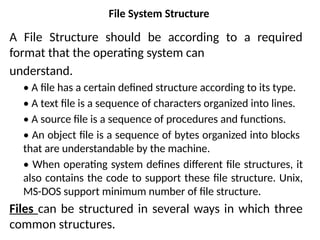
File System Structure
AFile Structure should be according to a required
format that the operating system can
understand.
• A file has a certain defined structure according to its type.
• A text file is a sequence of characters organized into lines.
• A source file is a sequence of procedures and functions.
• An object file is a sequence of bytes organized into blocks
that are understandable by the machine.
• When operating system defines different file structures, it
also contains the code to support these file structure. Unix,
MS-DOS support minimum number of file structure.
Files can be structured in several ways in which three
common structures.
6.
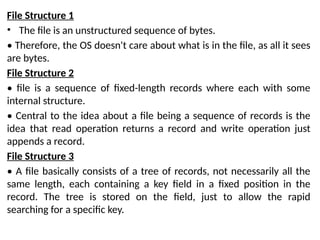
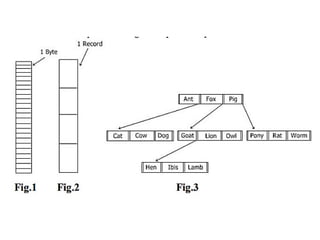
File Structure 1
•The file is an unstructured sequence of bytes.
• Therefore, the OS doesn't care about what is in the file, as all it sees
are bytes.
File Structure 2
• file is a sequence of fixed-length records where each with some
internal structure.
• Central to the idea about a file being a sequence of records is the
idea that read operation returns a record and write operation just
appends a record.
File Structure 3
• A file basically consists of a tree of records, not necessarily all the
same length, each containing a key field in a fixed position in the
record. The tree is stored on the field, just to allow the rapid
searching for a specific key.
8.
File Access method
•File access mechanism refers to the manner in
which the records of a file may be accessed.
There are several ways to access files
• Sequential access
• Direct/Random access
• Indexed sequential access
9.
1. Sequential Access
•Data is accessed one record right after another is an order.
• Read command cause a pointer to be moved ahead by one.
• Write command allocate space for the record and move the
pointer to the new End of File.
• Such a method is reasonable for tape.
Advantages of sequential access
• It is simple to program and easy to design.
• Sequential file is best use if storage space.
Disadvantages of sequential access
• Sequential file is time consuming process.
• It has high data redundancy.
• Random searching is not possible.
10.
2. Direct Access
•This method is useful for disks.
• The file is viewed as a numbered sequence of blocks or records
There are no restrictions on which blocks are read/written, it can be
fix in any order.
Advantages:
• Direct access file helps in online transaction processing system
(OLTP) like online railway reservation system.
• In direct access file, sorting of the records are not required.
• It accesses the desired records immediately.
• It updates several files quickly.
• Disadvantages:
• Direct access file does not provide backup facility.
• It is expensive.
• It has less storage space as compared to sequential file.
11.
3.Indexed Sequential Access
•The main idea of this method is to first access the
file directly and then it accesses sequentially.
• In this access method, it is necessary for
maintaining an index.
• The index is nothing but a pointer to a block.
• The direct access of the index is made to access a
record in a file.
• The information which is obtained from this
access is used to access the file.
• Sometimes the indexes are very big.
12.
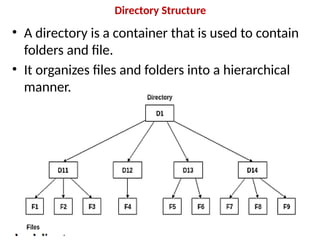
Directory Structure
• Adirectory is a container that is used to contain
folders and file.
• It organizes files and folders into a hierarchical
manner.
13.
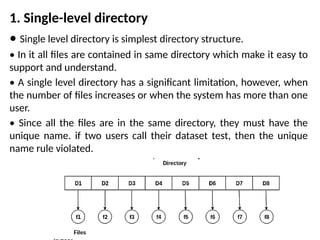
1. Single-level directory
•Single level directory is simplest directory structure.
• In it all files are contained in same directory which make it easy to
support and understand.
• A single level directory has a significant limitation, however, when
the number of files increases or when the system has more than one
user.
• Since all the files are in the same directory, they must have the
unique name. if two users call their dataset test, then the unique
name rule violated.
14.
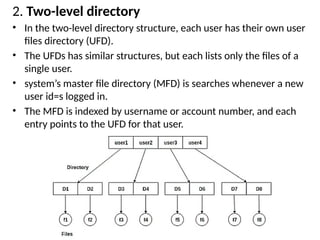
2. Two-level directory
•In the two-level directory structure, each user has their own user
files directory (UFD).
• The UFDs has similar structures, but each lists only the files of a
single user.
• system’s master file directory (MFD) is searches whenever a new
user id=s logged in.
• The MFD is indexed by username or account number, and each
entry points to the UFD for that user.
15.
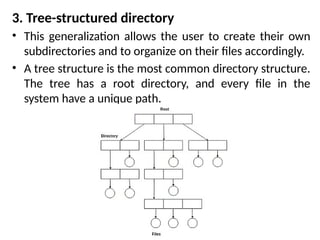
3. Tree-structured directory
•This generalization allows the user to create their own
subdirectories and to organize on their files accordingly.
• A tree structure is the most common directory structure.
The tree has a root directory, and every file in the
system have a unique path.
16.
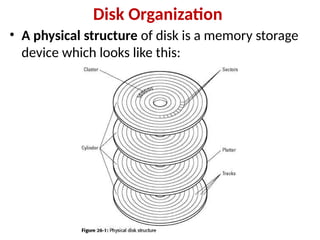
Disk Organization
• Aphysical structure of disk is a memory storage
device which looks like this:
17.
• Hard diskconsists of a number of platters
• The platters rotate at a very high speed (5400 RPM
to 10,000 RPM)
• Disk (read/write) heads move over the platter
surface to read and write (magnetize) data bits.
• The disk head can read or write data only when the
desired disk surface area is under the disk head.
• Read-Write(R-W) head moves over the rotating
hard disk.
18.
• To performa read or write operation on a memory location, we
need to place the R-W head over that position.
1. Seek time – The time taken by the R-W head to reach the
desired track from it’s current position.
2. Rotational latency – Time taken by the sector to come under
the R-W head.
3. Data transfer time – Time taken to transfer the required
amount of data. It depends upon the rotational speed.
4. Controller time – The processing time taken by the controller.
5. Average Access time – seek time + Average Rotational latency
+ data transfer time + controller time.
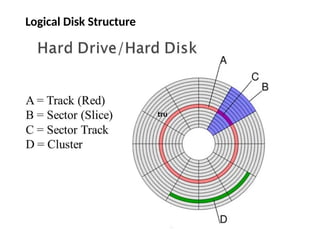
• Logical DiskStructure:
• The disk is divided into tracks.
• Each track is further divided into sectors.
• Basically, hard disk can be divided in the logical
structure in the following five logical terms:
• MBR (Master Boot Record)
• DBR (DOS Boot Record)
• FAT (File Allocation Tables)
• Root Directory
• Data Area
21.
Free-Space Management
• Filesystem maintains free-space list to track
available blocks/clusters Linked list (free list)
– Cannot get contiguous space easily
– No waste of space
– No need to traverse the entire list
22.
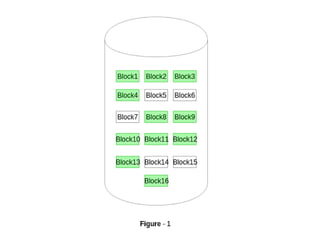
1. Bitmap orBit vector – A Bitmap or Bit Vector is
series or collection of bits where each bit
corresponds to a disk block.
The bit can take two values: 0 and 1: 0 indicates that
the block is allocated and 1 indicates a free block.
Advantages
• Simple to understand.
• Finding the first free block is efficient. It requires
scanning the words (a group of 8 bits) in a bitmap
for a non-zero word. (A 0-valued word has all bits
0). The first free block is then found by scanning
for the first 1 bit in the non-zero word.
24.
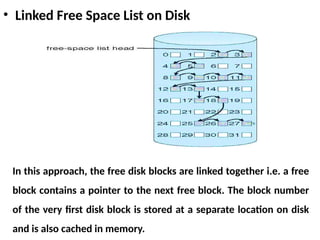
• Linked FreeSpace List on Disk
In this approach, the free disk blocks are linked together i.e. a free
block contains a pointer to the next free block. The block number
of the very first disk block is stored at a separate location on disk
and is also cached in memory.