C H A P T E R 4
Record Storage and
Primary File Organization
Introduction to Database Management Systems
1
Sahaj Computer Solutions
Contents
Introduction to Database Management SystemsSahaj Computer Solutions
2
 Introduction
 Secondary Storage Devices
 Buffering of Blocks
 Placing File Records on Disk
 Operations on Files
 Files of Unordered Records [ Heap Files ]
 Files of Ordered Records [ Sorted Files ]
 Hashing Techniques
 Other Organization Techniques
Introduction
Introduction to Database Management SystemsSahaj Computer Solutions
3
 Primary storage:
 This category includes storage media that can be operated on
directly by the computer central processing unit (CPU), such
as the computer main memory and smaller but faster cache
memories. Primary storage usually provides fast access to data
but is of limited storage capacity.
 Secondary storage:
 This category includes magnetic disks, optical disks, and tapes.
These devices usually have a larger capacity, cost less, and
provide slower access to data than do primary storage devices.
Data in secondary storage cannot be processed directly by the
CPU; it must first be copied into primary storage.
SECONDARY STORAGE DEVICES
Introduction to Database Management SystemsSahaj Computer Solutions
4
 Hardware Description of Disk Devices
 The most basic unit of data on the disk is a single bit of
information. By magnetizing an area on disk in certain ways,
one can make it represent a bit value of either 0 (zero) or 1
(one).
 To code information, bits are grouped into bytes (or
characters). Byte sizes are typically 4 to 8 bits, depending on
the computer and the device.
 The capacity of a disk is the number of bytes it can store,
which is usually very large.
SECONDARY STORAGE DEVICES
Introduction to Database Management SystemsSahaj Computer Solutions
5
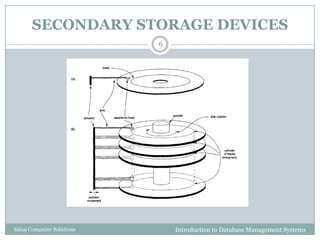
 Whatever their capacity, disks are all made of magnetic
material shaped as a thin circular disk (Figure 1 a) and
protected by a plastic or acrylic cover.
 A disk is single sided if it stores information on only one
of its surfaces and double-sided if both surfaces are used.
 To increase storage capacity, disks are assembled into a
disk pack (Figure 1 b), which may include many disks
and hence many surfaces.
 Information is stored on a disk surface in concentric
circles of small width,4 each having a distinct diameter.
 Each circle is called a track.
SECONDARY STORAGE DEVICES
Introduction to Database Management SystemsSahaj Computer Solutions
6
SECONDARY STORAGE DEVICES
Introduction to Database Management SystemsSahaj Computer Solutions
7
 For disk packs, the tracks with the same diameter on the
various surfaces are called a cylinder because of the
shape they would form if connected in space.
 The number of tracks on a disk ranges from a few
hundred to a few thousand, and the capacity of each
track typically ranges from tens of Kbytes to 150 Kbytes.
 Because a track usually contains a large amount of
information, it is divided into smaller blocks or sectors.
 The division of a track into sectors is hard-coded on the
disk surface and cannot be changed.
SECONDARY STORAGE DEVICES
Introduction to Database Management SystemsSahaj Computer Solutions
8
 The division of a track into equal-sized disk blocks (or
pages) is set by the operating system during disk
formatting (or initialization).
 Typical disk block sizes range from 512 to 4096 bytes.
 Blocks are separated by fixed-size interblock gaps,
which include specially coded control information
written during disk initialization.
 A disk is a random access addressable device.
 The hardware address of a block is a combination of a
cylinder number, track number (surface number within
the cylinder on which the track is located), and block
number (within the track) is supplied to the disk i/o
hardware.
SECONDARY STORAGE DEVICES
Introduction to Database Management SystemsSahaj Computer Solutions
9
 In many modern disk drives, a single number called
LBA (Logical Block Address) which is a number
between 0 and n (assuming the total capacity of the
disk is n+1 blocks), is mapped automatically to the
right block by the disk drive controller.
 For a read command, the block from disk is copied
into the buffer; whereas for a write command, the
contents of the buffer are copied into the disk block.
SECONDARY STORAGE DEVICES
Introduction to Database Management SystemsSahaj Computer Solutions
10
 Sometimes several contiguous blocks, called a cluster,
may be transferred as a unit.
 The actual hardware mechanism that reads or writes a
block is the disk read/write head, which is part of a
system called a disk drive.
 A disk or disk pack is mounted in the disk drive, which
includes a motor that rotates the disks.
 A read/write head includes an electronic component
attached to a mechanical arm.
 All arms are connected to an actuator attached to
another electrical motor, which moves the read/write
heads in unison and positions them precisely over the
cylinder of tracks specified in a block address.
Magnetic Tape Storage Devices
Introduction to Database Management SystemsSahaj Computer Solutions
11
 Magnetic tapes are sequential access devices; to
access the nth block on tape, we must first scan over the
preceding n –1 block.
 Data is stored on reels of high-capacity magnetic tape,
somewhat similar to audio or videotapes.
 A tape drive is required to read the data from or to write
the data to a tape reel.
 A read/write head is used to read or write data on tape.
 Data records on tape are also stored in blocks-although
the blocks may be substantially larger than those for
disks, and interblock gaps are also quite large.
Magnetic Tape Storage Devices
Introduction to Database Management SystemsSahaj Computer Solutions
12
 The main characteristic of a tape is its requirement
that we access the data blocks in sequential order.
 To get to a block in the middle of a reel of tape, the
tape is mounted and then scanned until the required
block gets under the read/write head.
 For this reason, tape access can be slow and tapes
are not used to store online data, except for some
specialized applications.
 However, tapes serve a very important function-that
of backing up the database.
BUFFERING OF BLOCKS
Introduction to Database Management SystemsSahaj Computer Solutions
13
 When several blocks need to be transferred from disk
to main memory and all the block addresses are
known, several buffers can be reserved in main
memory to speed up the transfer.
 While one buffer is being read or written, the CPU
can process data in the other buffer.
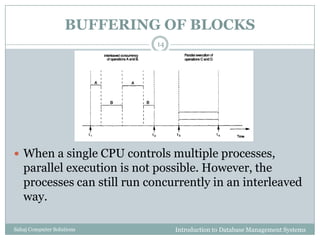
 Figure illustrates how two processes can proceed in
parallel. Processes A and B are running concurrently
in an interleaved fashion, whereas processes C and
Dare running concurrently in a parallel fashion.
BUFFERING OF BLOCKS
Introduction to Database Management SystemsSahaj Computer Solutions
14
 When a single CPU controls multiple processes,
parallel execution is not possible. However, the
processes can still run concurrently in an interleaved
way.
Introduction to Database Management SystemsSahaj Computer Solutions
15
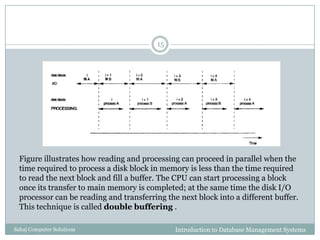
Figure illustrates how reading and processing can proceed in parallel when the
time required to process a disk block in memory is less than the time required
to read the next block and fill a buffer. The CPU can start processing a block
once its transfer to main memory is completed; at the same time the disk I/O
processor can be reading and transferring the next block into a different buffer.
This technique is called double buffering .
PLACING FILE RECORDS ON DISK
Introduction to Database Management SystemsSahaj Computer Solutions
16
 Records and Record Types
 Data is usually stored in the form of records.
 Each record consists of a collection of related data values or
items, where each value is formed of one or more bytes and
corresponds to a particular field of the record.
 Records usually describe entities and their attributes.
 A collection of field names and their corresponding data types
constitutes a record type or record format definition
 A data type, associated with each field, specifies the types of
values a field can take.
 The data type of a field is usually one of the standard data
types used in programming.
PLACING FILE RECORDS ON DISK
Introduction to Database Management SystemsSahaj Computer Solutions
17
 Files, Fixed-length Records, and Variable-
length Records
 A file is a sequence of records.
 If every record in the file has exactly the same size (in bytes),
the file is said to be made up of fixed-length records.
 If different records in the file have different sizes, the file is
said to be made up of variable-length records.
PLACING FILE RECORDS ON DISK
Introduction to Database Management SystemsSahaj Computer Solutions
18
 A file may have variable-length records for several
reasons:
 The file records are of the same record type, but one or more of
the fields are of varying size (variable-length fields).
 The file records are of the same record type, but one or more of
the fields may have multiple values for individual records; such a
field is called a repeating field and a group of values for the field
is often called a repeating group.
 The file records are of the same record type, but one or more of
the fields are optional; that is, they may have values for some but
not all of the file records (optional fields).
 The file contains records of different record types and hence of
varying size (mixed file).
PLACING FILE RECORDS ON DISK
Introduction to Database Management SystemsSahaj Computer Solutions
19
 Files, Fixed-length Records, and Variable-
length Records
 The fixed-length record has the same fields, and field
lengths are fixed, so the system can identify the starting
byte position of each field relative to the starting position
of the record.
 This facilitates locating field values by programs that
access such files.
PLACING FILE RECORDS ON DISK
Introduction to Database Management SystemsSahaj Computer Solutions
20
 Record Blocking and Spanned Versus
Unspanned Records
 The records of a file must be allocated to disk blocks because a
block is the unit of data transfer between disk and memory.
 When the block size is larger than the record size, each block
will contain numerous records, although some files may have
unusually large records that cannot fit in one block.
 Suppose that the block size is B bytes for a file of fixed-length
records of size R bytes, with B ≥R, we can fit bfr = |B/R
|records per block, where the |(x)| (floor function) rounds
down the number x to an integer. The value bfr is called the
blocking factor for the file.
PLACING FILE RECORDS ON DISK
Introduction to Database Management SystemsSahaj Computer Solutions
21
 Record Blocking and Spanned Versus
Unspanned Records
 To utilize this unused space, we can store part of a record on
one block and the rest on another.
 A pointer at the end of the first block points to the block
containing the remainder of the record in case it is not the next
consecutive block on disk.
 This organization is called spanned, because records can
span more than one block.
 Whenever a record is larger than a block, we must use a
spanned organization. If records are not allowed to cross block
boundaries, the organization is called unspanned.
PLACING FILE RECORDS ON DISK
Introduction to Database Management SystemsSahaj Computer Solutions
22
 Allocating File Blocks on Disk
 There are several standard techniques for allocating the blocks
of a file on disk.
 In contiguous allocation the file blocks are allocated to
consecutive disk blocks. This makes reading the whole file very
fast using double buffering, but it makes expanding the file
difficult.
 In linked allocation each file block contains a pointer to the
next file block. This makes it easy to expand the file but makes
it slow to read the whole file.
 Another possibility is to use indexed allocation, where one
or more index blocks contain pointers to the actual file blocks.
It is also common to use combinations of these techniques.
PLACING FILE RECORDS ON DISK
Introduction to Database Management SystemsSahaj Computer Solutions
23
 File Headers
 A file header or file descriptor contains information about a
file that is needed by the system programs that access the file
records.
 The header includes information to determine the disk
addresses of the file blocks as well as to record format
descriptions.
OPERATIONS ON FILES
Introduction to Database Management SystemsSahaj Computer Solutions
24
 Operations on files are usually grouped into retrieval
operations and update operations.
 The former do not change any data in the file, but
only locate certain records so that their field values
can be examined and processed.
 The latter change the file by insertion or deletion of
records or by modification of field values.
 In either case, we may have to select one or more
records for retrieval, deletion, or modification based
on a selection condition (or filtering condition).
OPERATIONS ON FILES
Introduction to Database Management SystemsSahaj Computer Solutions
25
 Open: Prepares the file for reading or writing.
Allocates appropriate buffers to hold file blocks from
disk, and retrieves the file header. Sets the file
pointer to the beginning of the file.
 Reset: Sets the file pointer of an open file to the
beginning of the file.
 Find (or Locate): Searches for the first record that
satisfies a search condition. Transfers the block
containing that record into a main memory buffer .
 Read (or Get): Copies the current record from the
buffer to a program variable in the user program.
OPERATIONS ON FILES
Introduction to Database Management SystemsSahaj Computer Solutions
26
 FindNext: Searches for the next record in the file that
satisfies the search condition. Transfers the block containing
that record into a main memory buffer.
 Delete: Deletes the current record and (eventually) updates
the file on disk to reflect the deletion.
 Modify: Modifies some field values for the current record
and (eventually) updates the file on disk to reflect the
modification.
 Insert: Inserts a new record in the file by locating the block
where the record is to be inserted, transferring that block into
a main memory buffer, writing the record into the buffer, and
(eventually) writing the buffer to disk to reflect the insertion.
 Close: Completes the file access by releasing the buffers and
performing any other needed cleanup operations.
OPERATIONS ON FILES
Introduction to Database Management SystemsSahaj Computer Solutions
27
 FindAll: Locates all the records in the file that
satisfy a search condition.
 Find (or Locate) n: Searches for the first record
that satisfies a search condition and then continues
to locate the next n - 1 records satisfying the same
condition.
 FindOrdered: Retrieves all the records in the file
in some specified order.
 Reorganize: Starts the reorganization process.
FILES OF UNORDERED RECORDS (HEAP FILES)
Introduction to Database Management SystemsSahaj Computer Solutions
28
 In this simplest and most basic type of organization,
records are placed in the file in the order in which
they are inserted, so new records are inserted at the
end of the file.
 Such an organization is called a heap or pile file.
 Inserting a new record is very efficient: the last disk
block of the file is copied into a buffer; the new
record is added; and the block is then rewritten back
to disk.
FILES OF UNORDERED RECORDS (HEAP FILES)
Introduction to Database Management SystemsSahaj Computer Solutions
29
 To delete a record, a program must first find its
block, copy the block into a buffer, then delete the
record from the buffer, and finally rewrite the block
back to the disk.
 This leaves unused space in the disk block.
 During reorganization, the file blocks are accessed
consecutively, and records are packed by removing
deleted records.
 To read all records in order of the values of some
field, we create a sorted copy of the file.
FILES OF ORDERED RECORDS (SORTED FILES)
Introduction to Database Management SystemsSahaj Computer Solutions
30
 We can physically order the records of a file on disk
based on the values of one of their fields-called the
ordering field.
 This leads to an ordered or sequential file.
 If the ordering field is also a key field of the file-a
field guaranteed to have a unique value in each
record-then the field is called the ordering key for
the file.
 Ordered records have some advantages over
unordered files.
FILES OF ORDERED RECORDS (SORTED FILES)
Introduction to Database Management SystemsSahaj Computer Solutions
31
 First, reading the records in order of the ordering key
values becomes extremely efficient, because no sorting is
required.
 Second, finding the next record from the current one in
order of the ordering key usually requires no additional
block accesses, because the next record is in the same
block as the current one (unless the current record is the
last one in the block).
 Third, using a search condition based on the value of an
ordering key field results in faster access when the binary
search technique is used, which constitutes an
improvement over linear searches, although it is not
often used for disk files.
Hashing Technique
Introduction to Database Management SystemsSahaj Computer Solutions
32
 Another type of primary file organization is based on
hashing, which provides very fast access to records on
certain search conditions. This organization is usually
called a hash file.
 The search condition must be an equality condition on a
single field, called the hash field of the file.
 In most cases, the hash field is also a key field of the file,
in which case it is called the hash key.
 The idea behind hashing is to provide a function h, called
a hash function or randomizing function, which is
applied to the hash field value of a record and yields the
address of the disk block in which the record is stored.
Internal Hashing
Introduction to Database Management SystemsSahaj Computer Solutions
33
 For internal files, hashing is typically implemented as a
hash table through the use of an array of records.
 Suppose that the array index range is from 0 to M - 1
then we have M slots whose addresses correspond to the
array indexes.
 We choose a hash function that transforms the hash field
value into an integer between 0 and M - 1.
 One common hash function is the h(K) = K mod M
function, which returns the remainder of an integer hash
field value K after division by M; this value is then used
for the record address.
Internal Hashing
Introduction to Database Management SystemsSahaj Computer Solutions
34
 Other hashing functions can be used.
 One technique, called folding, involves applying an
arithmetic function such as addition or a logical
function such as exclusive or to different portions of
the hash field value to calculate the hash address.
 Another technique involves picking some digits of
the hash field value-for example, the third, fifth, and
eighth digits-to form the hash address.
 The problem with most hashing functions is that
they do not guarantee that distinct values will hash
to distinct addresses
Internal Hashing
Introduction to Database Management SystemsSahaj Computer Solutions
35
 A collision occurs when the hash field value of a
record that is being inserted hashes to an address
that already contains a different record.
 In this situation, we must insert the new record in
some other position, since its hash address is
occupied.
 The process of finding another position is called
collision resolution.
 There are numerous methods for collision resolution,
including the following:
Internal Hashing
Introduction to Database Management SystemsSahaj Computer Solutions
36
 Open addressing: Proceeding from the occupied position
specified by the hash address, the program checks the
subsequent positions in order until an unused (empty)
position is found.
 Chaining: For this method, various overflow locations are
kept, usually by extending the array with a number of overflow
positions. In addition, a pointer field is added to each record
location. A collision is resolved by placing the new record in an
unused overflow location and setting the pointer of the
occupied hash address location to the address of that overflow
location
Internal Hashing
Introduction to Database Management SystemsSahaj Computer Solutions
37
 Multiple hashing: The program applies a second hash
function if the first results in a collision. If another collision
results, the program uses open addressing or applies a third
hash function and then uses open addressing if necessary.

Chapter 4 record storage and primary file organization

  • 1.
    C H AP T E R 4 Record Storage and Primary File Organization Introduction to Database Management Systems 1 Sahaj Computer Solutions
  • 2.
    Contents Introduction to DatabaseManagement SystemsSahaj Computer Solutions 2  Introduction  Secondary Storage Devices  Buffering of Blocks  Placing File Records on Disk  Operations on Files  Files of Unordered Records [ Heap Files ]  Files of Ordered Records [ Sorted Files ]  Hashing Techniques  Other Organization Techniques
  • 3.
    Introduction Introduction to DatabaseManagement SystemsSahaj Computer Solutions 3  Primary storage:  This category includes storage media that can be operated on directly by the computer central processing unit (CPU), such as the computer main memory and smaller but faster cache memories. Primary storage usually provides fast access to data but is of limited storage capacity.  Secondary storage:  This category includes magnetic disks, optical disks, and tapes. These devices usually have a larger capacity, cost less, and provide slower access to data than do primary storage devices. Data in secondary storage cannot be processed directly by the CPU; it must first be copied into primary storage.
  • 4.
    SECONDARY STORAGE DEVICES Introductionto Database Management SystemsSahaj Computer Solutions 4  Hardware Description of Disk Devices  The most basic unit of data on the disk is a single bit of information. By magnetizing an area on disk in certain ways, one can make it represent a bit value of either 0 (zero) or 1 (one).  To code information, bits are grouped into bytes (or characters). Byte sizes are typically 4 to 8 bits, depending on the computer and the device.  The capacity of a disk is the number of bytes it can store, which is usually very large.
  • 5.
    SECONDARY STORAGE DEVICES Introductionto Database Management SystemsSahaj Computer Solutions 5  Whatever their capacity, disks are all made of magnetic material shaped as a thin circular disk (Figure 1 a) and protected by a plastic or acrylic cover.  A disk is single sided if it stores information on only one of its surfaces and double-sided if both surfaces are used.  To increase storage capacity, disks are assembled into a disk pack (Figure 1 b), which may include many disks and hence many surfaces.  Information is stored on a disk surface in concentric circles of small width,4 each having a distinct diameter.  Each circle is called a track.
  • 6.
    SECONDARY STORAGE DEVICES Introductionto Database Management SystemsSahaj Computer Solutions 6
  • 7.
    SECONDARY STORAGE DEVICES Introductionto Database Management SystemsSahaj Computer Solutions 7  For disk packs, the tracks with the same diameter on the various surfaces are called a cylinder because of the shape they would form if connected in space.  The number of tracks on a disk ranges from a few hundred to a few thousand, and the capacity of each track typically ranges from tens of Kbytes to 150 Kbytes.  Because a track usually contains a large amount of information, it is divided into smaller blocks or sectors.  The division of a track into sectors is hard-coded on the disk surface and cannot be changed.
  • 8.
    SECONDARY STORAGE DEVICES Introductionto Database Management SystemsSahaj Computer Solutions 8  The division of a track into equal-sized disk blocks (or pages) is set by the operating system during disk formatting (or initialization).  Typical disk block sizes range from 512 to 4096 bytes.  Blocks are separated by fixed-size interblock gaps, which include specially coded control information written during disk initialization.  A disk is a random access addressable device.  The hardware address of a block is a combination of a cylinder number, track number (surface number within the cylinder on which the track is located), and block number (within the track) is supplied to the disk i/o hardware.
  • 9.
    SECONDARY STORAGE DEVICES Introductionto Database Management SystemsSahaj Computer Solutions 9  In many modern disk drives, a single number called LBA (Logical Block Address) which is a number between 0 and n (assuming the total capacity of the disk is n+1 blocks), is mapped automatically to the right block by the disk drive controller.  For a read command, the block from disk is copied into the buffer; whereas for a write command, the contents of the buffer are copied into the disk block.
  • 10.
    SECONDARY STORAGE DEVICES Introductionto Database Management SystemsSahaj Computer Solutions 10  Sometimes several contiguous blocks, called a cluster, may be transferred as a unit.  The actual hardware mechanism that reads or writes a block is the disk read/write head, which is part of a system called a disk drive.  A disk or disk pack is mounted in the disk drive, which includes a motor that rotates the disks.  A read/write head includes an electronic component attached to a mechanical arm.  All arms are connected to an actuator attached to another electrical motor, which moves the read/write heads in unison and positions them precisely over the cylinder of tracks specified in a block address.
  • 11.
    Magnetic Tape StorageDevices Introduction to Database Management SystemsSahaj Computer Solutions 11  Magnetic tapes are sequential access devices; to access the nth block on tape, we must first scan over the preceding n –1 block.  Data is stored on reels of high-capacity magnetic tape, somewhat similar to audio or videotapes.  A tape drive is required to read the data from or to write the data to a tape reel.  A read/write head is used to read or write data on tape.  Data records on tape are also stored in blocks-although the blocks may be substantially larger than those for disks, and interblock gaps are also quite large.
  • 12.
    Magnetic Tape StorageDevices Introduction to Database Management SystemsSahaj Computer Solutions 12  The main characteristic of a tape is its requirement that we access the data blocks in sequential order.  To get to a block in the middle of a reel of tape, the tape is mounted and then scanned until the required block gets under the read/write head.  For this reason, tape access can be slow and tapes are not used to store online data, except for some specialized applications.  However, tapes serve a very important function-that of backing up the database.
  • 13.
    BUFFERING OF BLOCKS Introductionto Database Management SystemsSahaj Computer Solutions 13  When several blocks need to be transferred from disk to main memory and all the block addresses are known, several buffers can be reserved in main memory to speed up the transfer.  While one buffer is being read or written, the CPU can process data in the other buffer.  Figure illustrates how two processes can proceed in parallel. Processes A and B are running concurrently in an interleaved fashion, whereas processes C and Dare running concurrently in a parallel fashion.
  • 14.
    BUFFERING OF BLOCKS Introductionto Database Management SystemsSahaj Computer Solutions 14  When a single CPU controls multiple processes, parallel execution is not possible. However, the processes can still run concurrently in an interleaved way.
  • 15.
    Introduction to DatabaseManagement SystemsSahaj Computer Solutions 15 Figure illustrates how reading and processing can proceed in parallel when the time required to process a disk block in memory is less than the time required to read the next block and fill a buffer. The CPU can start processing a block once its transfer to main memory is completed; at the same time the disk I/O processor can be reading and transferring the next block into a different buffer. This technique is called double buffering .
  • 16.
    PLACING FILE RECORDSON DISK Introduction to Database Management SystemsSahaj Computer Solutions 16  Records and Record Types  Data is usually stored in the form of records.  Each record consists of a collection of related data values or items, where each value is formed of one or more bytes and corresponds to a particular field of the record.  Records usually describe entities and their attributes.  A collection of field names and their corresponding data types constitutes a record type or record format definition  A data type, associated with each field, specifies the types of values a field can take.  The data type of a field is usually one of the standard data types used in programming.
  • 17.
    PLACING FILE RECORDSON DISK Introduction to Database Management SystemsSahaj Computer Solutions 17  Files, Fixed-length Records, and Variable- length Records  A file is a sequence of records.  If every record in the file has exactly the same size (in bytes), the file is said to be made up of fixed-length records.  If different records in the file have different sizes, the file is said to be made up of variable-length records.
  • 18.
    PLACING FILE RECORDSON DISK Introduction to Database Management SystemsSahaj Computer Solutions 18  A file may have variable-length records for several reasons:  The file records are of the same record type, but one or more of the fields are of varying size (variable-length fields).  The file records are of the same record type, but one or more of the fields may have multiple values for individual records; such a field is called a repeating field and a group of values for the field is often called a repeating group.  The file records are of the same record type, but one or more of the fields are optional; that is, they may have values for some but not all of the file records (optional fields).  The file contains records of different record types and hence of varying size (mixed file).
  • 19.
    PLACING FILE RECORDSON DISK Introduction to Database Management SystemsSahaj Computer Solutions 19  Files, Fixed-length Records, and Variable- length Records  The fixed-length record has the same fields, and field lengths are fixed, so the system can identify the starting byte position of each field relative to the starting position of the record.  This facilitates locating field values by programs that access such files.
  • 20.
    PLACING FILE RECORDSON DISK Introduction to Database Management SystemsSahaj Computer Solutions 20  Record Blocking and Spanned Versus Unspanned Records  The records of a file must be allocated to disk blocks because a block is the unit of data transfer between disk and memory.  When the block size is larger than the record size, each block will contain numerous records, although some files may have unusually large records that cannot fit in one block.  Suppose that the block size is B bytes for a file of fixed-length records of size R bytes, with B ≥R, we can fit bfr = |B/R |records per block, where the |(x)| (floor function) rounds down the number x to an integer. The value bfr is called the blocking factor for the file.
  • 21.
    PLACING FILE RECORDSON DISK Introduction to Database Management SystemsSahaj Computer Solutions 21  Record Blocking and Spanned Versus Unspanned Records  To utilize this unused space, we can store part of a record on one block and the rest on another.  A pointer at the end of the first block points to the block containing the remainder of the record in case it is not the next consecutive block on disk.  This organization is called spanned, because records can span more than one block.  Whenever a record is larger than a block, we must use a spanned organization. If records are not allowed to cross block boundaries, the organization is called unspanned.
  • 22.
    PLACING FILE RECORDSON DISK Introduction to Database Management SystemsSahaj Computer Solutions 22  Allocating File Blocks on Disk  There are several standard techniques for allocating the blocks of a file on disk.  In contiguous allocation the file blocks are allocated to consecutive disk blocks. This makes reading the whole file very fast using double buffering, but it makes expanding the file difficult.  In linked allocation each file block contains a pointer to the next file block. This makes it easy to expand the file but makes it slow to read the whole file.  Another possibility is to use indexed allocation, where one or more index blocks contain pointers to the actual file blocks. It is also common to use combinations of these techniques.
  • 23.
    PLACING FILE RECORDSON DISK Introduction to Database Management SystemsSahaj Computer Solutions 23  File Headers  A file header or file descriptor contains information about a file that is needed by the system programs that access the file records.  The header includes information to determine the disk addresses of the file blocks as well as to record format descriptions.
  • 24.
    OPERATIONS ON FILES Introductionto Database Management SystemsSahaj Computer Solutions 24  Operations on files are usually grouped into retrieval operations and update operations.  The former do not change any data in the file, but only locate certain records so that their field values can be examined and processed.  The latter change the file by insertion or deletion of records or by modification of field values.  In either case, we may have to select one or more records for retrieval, deletion, or modification based on a selection condition (or filtering condition).
  • 25.
    OPERATIONS ON FILES Introductionto Database Management SystemsSahaj Computer Solutions 25  Open: Prepares the file for reading or writing. Allocates appropriate buffers to hold file blocks from disk, and retrieves the file header. Sets the file pointer to the beginning of the file.  Reset: Sets the file pointer of an open file to the beginning of the file.  Find (or Locate): Searches for the first record that satisfies a search condition. Transfers the block containing that record into a main memory buffer .  Read (or Get): Copies the current record from the buffer to a program variable in the user program.
  • 26.
    OPERATIONS ON FILES Introductionto Database Management SystemsSahaj Computer Solutions 26  FindNext: Searches for the next record in the file that satisfies the search condition. Transfers the block containing that record into a main memory buffer.  Delete: Deletes the current record and (eventually) updates the file on disk to reflect the deletion.  Modify: Modifies some field values for the current record and (eventually) updates the file on disk to reflect the modification.  Insert: Inserts a new record in the file by locating the block where the record is to be inserted, transferring that block into a main memory buffer, writing the record into the buffer, and (eventually) writing the buffer to disk to reflect the insertion.  Close: Completes the file access by releasing the buffers and performing any other needed cleanup operations.
  • 27.
    OPERATIONS ON FILES Introductionto Database Management SystemsSahaj Computer Solutions 27  FindAll: Locates all the records in the file that satisfy a search condition.  Find (or Locate) n: Searches for the first record that satisfies a search condition and then continues to locate the next n - 1 records satisfying the same condition.  FindOrdered: Retrieves all the records in the file in some specified order.  Reorganize: Starts the reorganization process.
  • 28.
    FILES OF UNORDEREDRECORDS (HEAP FILES) Introduction to Database Management SystemsSahaj Computer Solutions 28  In this simplest and most basic type of organization, records are placed in the file in the order in which they are inserted, so new records are inserted at the end of the file.  Such an organization is called a heap or pile file.  Inserting a new record is very efficient: the last disk block of the file is copied into a buffer; the new record is added; and the block is then rewritten back to disk.
  • 29.
    FILES OF UNORDEREDRECORDS (HEAP FILES) Introduction to Database Management SystemsSahaj Computer Solutions 29  To delete a record, a program must first find its block, copy the block into a buffer, then delete the record from the buffer, and finally rewrite the block back to the disk.  This leaves unused space in the disk block.  During reorganization, the file blocks are accessed consecutively, and records are packed by removing deleted records.  To read all records in order of the values of some field, we create a sorted copy of the file.
  • 30.
    FILES OF ORDEREDRECORDS (SORTED FILES) Introduction to Database Management SystemsSahaj Computer Solutions 30  We can physically order the records of a file on disk based on the values of one of their fields-called the ordering field.  This leads to an ordered or sequential file.  If the ordering field is also a key field of the file-a field guaranteed to have a unique value in each record-then the field is called the ordering key for the file.  Ordered records have some advantages over unordered files.
  • 31.
    FILES OF ORDEREDRECORDS (SORTED FILES) Introduction to Database Management SystemsSahaj Computer Solutions 31  First, reading the records in order of the ordering key values becomes extremely efficient, because no sorting is required.  Second, finding the next record from the current one in order of the ordering key usually requires no additional block accesses, because the next record is in the same block as the current one (unless the current record is the last one in the block).  Third, using a search condition based on the value of an ordering key field results in faster access when the binary search technique is used, which constitutes an improvement over linear searches, although it is not often used for disk files.
  • 32.
    Hashing Technique Introduction toDatabase Management SystemsSahaj Computer Solutions 32  Another type of primary file organization is based on hashing, which provides very fast access to records on certain search conditions. This organization is usually called a hash file.  The search condition must be an equality condition on a single field, called the hash field of the file.  In most cases, the hash field is also a key field of the file, in which case it is called the hash key.  The idea behind hashing is to provide a function h, called a hash function or randomizing function, which is applied to the hash field value of a record and yields the address of the disk block in which the record is stored.
  • 33.
    Internal Hashing Introduction toDatabase Management SystemsSahaj Computer Solutions 33  For internal files, hashing is typically implemented as a hash table through the use of an array of records.  Suppose that the array index range is from 0 to M - 1 then we have M slots whose addresses correspond to the array indexes.  We choose a hash function that transforms the hash field value into an integer between 0 and M - 1.  One common hash function is the h(K) = K mod M function, which returns the remainder of an integer hash field value K after division by M; this value is then used for the record address.
  • 34.
    Internal Hashing Introduction toDatabase Management SystemsSahaj Computer Solutions 34  Other hashing functions can be used.  One technique, called folding, involves applying an arithmetic function such as addition or a logical function such as exclusive or to different portions of the hash field value to calculate the hash address.  Another technique involves picking some digits of the hash field value-for example, the third, fifth, and eighth digits-to form the hash address.  The problem with most hashing functions is that they do not guarantee that distinct values will hash to distinct addresses
  • 35.
    Internal Hashing Introduction toDatabase Management SystemsSahaj Computer Solutions 35  A collision occurs when the hash field value of a record that is being inserted hashes to an address that already contains a different record.  In this situation, we must insert the new record in some other position, since its hash address is occupied.  The process of finding another position is called collision resolution.  There are numerous methods for collision resolution, including the following:
  • 36.
    Internal Hashing Introduction toDatabase Management SystemsSahaj Computer Solutions 36  Open addressing: Proceeding from the occupied position specified by the hash address, the program checks the subsequent positions in order until an unused (empty) position is found.  Chaining: For this method, various overflow locations are kept, usually by extending the array with a number of overflow positions. In addition, a pointer field is added to each record location. A collision is resolved by placing the new record in an unused overflow location and setting the pointer of the occupied hash address location to the address of that overflow location
  • 37.
    Internal Hashing Introduction toDatabase Management SystemsSahaj Computer Solutions 37  Multiple hashing: The program applies a second hash function if the first results in a collision. If another collision results, the program uses open addressing or applies a third hash function and then uses open addressing if necessary.

Editor's Notes

  • #36 There are numerous methods for collision resolution, including the following: