Optimizing computer vision problems on mobile platforms
Looksery.com
Fedor Polyakov
Software Engineer, CIO
Looksery, INC
fedor@looksery.com
+380 97 5900009 (mobile)
www.looksery.com
Optimize algorithm first
• If your algorithm is suboptimal, “technical” optimizations won’t
be as effective as just algo fixes
• When you optimize the algorithm, you’d probably have to
change your technical optimizations too
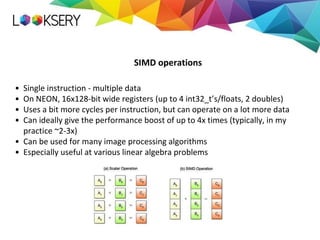
• Single instruction - multiple data
• On NEON, 16x128-bit wide registers (up to 4 int32_t’s/floats, 2 doubles)
• Uses a bit more cycles per instruction, but can operate on a lot more data
• Can ideally give the performance boost of up to 4x times (typically, in my
practice ~2-3x)
• Can be used for many image processing algorithms
• Especially useful at various linear algebra problems
SIMD operations
• The easiest way - you just use the library and it does everything for you
• Eigen - great header-only library for linear algebra
• Ne10 - neon-optimized library for some image processing/DSP on android
• Accelerate.framework - lots of image processing/DSP on iOS
• OpenCV, unfortunately, is quite weakly optimized for ARM SIMD (though,
they’ve optimized ~40 low-level functions in OpenCV 3.0)
• There are also some commercial libraries
• + Everything is done without any your efforts
• - You should still profile and analyze the ASM code to verify that everything
is vectorized as you expect
Using computer vision/algebra/DSP libraries
using v4si = int __attribute__ ((vector_size (VECTOR_SIZE_IN_BYTES)));
v4si x, y;
• All common operations with x are now vectorized
• Written once and for all architectures
• Operations supported +, -, *, /, unary minus, ^, |, &, ~, %, <<, >>, comparisons
• Loading from memory in a way like this x = *((v4si*)ptr);
• Loading back to memory in a way like this *((v4si*)ptr) = x;
• Supports subscript operator for accessing individual elements
• Not all SIMD operations supported
• May produce suboptimal code
GCC/clang vector extensions
• Provide a custom data types and a set of c functions to vectorize code
• Example: float32x4_t vrsqrtsq_f32(float32x4_t a, float32x4_t b);
• Generally, are similar to previous approach though give you a better control and
full instruction set.
• Cons:
• Have to write separate code for each platform
• In all the above approaches, compiler may inject some instructions which
can be avoided in hand-crafted code
• Compiler might generate code that won’t use the pipeline efficiently
SIMD intrinsics
• Gives you the most control - you know what code will be generated
• So, if created carefully, can sometimes be up to 2 times faster than the code
generated by compiler using previous approaches (usually 10-15% though)
• You need to write separate code for each architecture :(
• Need to learn
• Harder to create
• In order to get the maximum performance possible, some additional steps may
be required
Handcrafted ASM code
• Reduce data types to as small as possible
• If you can change double to int16_t, you’ll get more than 4x performance boost
• Try using pld intrinsic - it “hints” CPU to load some data into caches which will be
used in a near future (can be used as __builtin_prefetch)
• If you use intrinsics, watch out for some extra loads/stores which you may be
able to get rid of
• Use loop unrolling
• Interleave load/store instructions and arithmetical operations
• Use proper memory alignment - can cause crashes/slow down performance
Some other tricks
• Sum of matrix rows
• Matrices are 128x128, test is repeated 10^5 times
Some benchmarks
// Non-vectorized code
for (int i = 0; i < matSize; i++) {
for (int j = 0; j < matSize; j++) {
rowSum[j] += testMat[i][j];
}
}
// Vectorized code
for (int i = 0; i < matSize; i++) {
for (int j = 0; j < matSize; j += vectorSize) {
VectorType x = *(VectorType*)(testMat[i] + j);
VectorType y = *(VectorType*)(rowSum + j);
y += x;
*(VectorType*)(rowSum + j) = y;
}
}
Some benchmarks
Tested on iPhone 5, results on other phones show pretty much the same
0
1
2
3
4
5
6
7
8
9
10
Simple Vectorized
Time,s int float short
Got more than 2x performance boost, mission completed?
Some benchmarks
0
1
2
3
4
5
6
7
8
9
10
Simple Vectorized Loop unroll
Time,s
int float short
Got another ~15%
for (int i = 0; i < matSize; i++) {
auto ptr = testMat[i];
for (int j = 0; j < matSize; j += 4 * xSize) {
auto ptrStart = ptr + j;
VT x1 = *(VT*)(ptrStart + 0 * xSize);
VT y1 = *(VT*)(rowSum + j + 0 * xSize);
y1 += x1;
VT x2 = *(VT*)(ptrStart + 1 * xSize);
VT y2 = *(VT*)(rowSum + j + 1 * xSize);
y2 += x2;
VT x3 = *(VT*)(ptrStart + 2 * xSize);
VT y3 = *(VT*)(rowSum + j + 2 * xSize);
y3 += x3;
VT x4 = *(VT*)(ptrStart + 3 * xSize);
VT y4 = *(VT*)(rowSum + j + 3 * xSize);
y4 += x4;
*(VT*)(rowSum + j + 0 * xSize) = y1;
*(VT*)(rowSum + j + 1 * xSize) = y2;
*(VT*)(rowSum + j + 2 * xSize) = y3;
*(VT*)(rowSum + j + 3 * xSize) = y4;
}
}
Some benchmarks
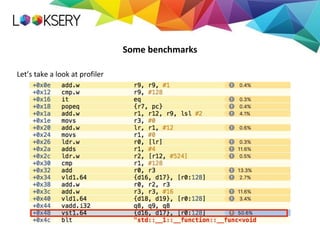
Let’s take a look at profiler
Some benchmarks
// Non-vectorized code
for (int i = 0; i < matSize; i++) {
for (int j = 0; j < matSize; j++) {
rowSum[i] += testMat[j][i];
}
}
// Vectorized, loop-unrolled code
for (int i = 0; i < matSize; i+=4 * xSize) {
VT y1 = *(VT*)(rowSum + i);
VT y2 = *(VT*)(rowSum + i + xSize);
VT y3 = *(VT*)(rowSum + i + 2*xSize);
VT y4 = *(VT*)(rowSum + i + 3*xSize);
for (int j = 0; j < matSize; j ++) {
x1 = *(VT*)(testMat[j] + i);
x2 = *(VT*)(testMat[j] + i + xSize);
x3 = *(VT*)(testMat[j] + i + 2*xSize);
x4 = *(VT*)(testMat[j] + i + 3*xSize);
y1 += x1;
y2 += x2;
y3 += x3;
y4 += x4;
}
*(VT*)(rowSum + i) = y1;
*(VT*)(rowSum + i + xSize) = y2;
*(VT*)(rowSum + i + 2*xSize) = y3;
*(VT*)(rowSum + i + 3*xSize) = y4;
}
Some benchmarks
0
1
2
3
4
5
6
7
8
9
10
Simple Vect + Loop
Time,s
int float Short
Some benchmarks
0
1
2
3
4
5
6
7
8
9
10
Simple Vectorized Vect + Loop Eigen SumOrder Asm
Time,s
float
Using GPGPU
• Around 1.5 orders of magnitude bigger theoretical performance
• On iPhone 5, CPU has like ~800 MFlops, GPU has 28.8 GFlops
• On iPhone 5S, CPU has 1.5~ GFlops, GPU has 76.4 GFlops !
• Can be very hard to utilize efficiently
• CUDA, obviously, isn’t available on mobile devices
• OpenCL isn’t available on iOS and is hardly available on android
• On iOS, Metal is available for GPGPU but only starting with iPhone 5S
• On Android, Google promotes Renderscript for GPGPU
• So, the only cross-platform way is to use OpenGL ES (2.0)
Common usage of shaders for GPGPU
Shader 1
Image
Data
Texture containing processed data
Shader 2
…
Data
Results
Display on screen
Read back to cpu
Common problems
• Textures were designed to hold RGBA8 data
• On almost all phones starting 2012, half-float and float textures are supported as
input
• Effective bilinear filtering for float textures may be unsupported or ineffective
• On many devices, writing from fragment shader to half-float (16 bit) textures is
supported.
• Emulating the fixed-point arithmetic is pretty straightforward
• Emulating floating-point is possible, but a bit tricky and requires more operations
• Change of OpenGL states may be expensive
• For-loops with non-const number of iterations not supported on older devices
• Reading from GPU to CPU is very expensive
• There are some platform-dependent way to make it faster
Tasks that can be solved on OpenGL ES
• Image processing
• Image binarization
• Edge detection (Sobel, Canny)
• Hough transform (though, some parts can’t be implemented on GPU)
• Histogram equalization
• Gaussian blur/other convolutions
• Colorspace conversions
• Much more examples in GPUImage library for iOS
• For other tasks, it depends on many factors
• We tried to implement our tracking on GPU, but didn’t get the expected
performance boost
Questions?
Thanks for attention!

Fedor Polyakov - Optimizing computer vision problems on mobile platforms

  • 1.
    Optimizing computer visionproblems on mobile platforms Looksery.com
  • 2.
    Fedor Polyakov Software Engineer,CIO Looksery, INC fedor@looksery.com +380 97 5900009 (mobile) www.looksery.com
  • 3.
    Optimize algorithm first •If your algorithm is suboptimal, “technical” optimizations won’t be as effective as just algo fixes • When you optimize the algorithm, you’d probably have to change your technical optimizations too
  • 4.
    • Single instruction- multiple data • On NEON, 16x128-bit wide registers (up to 4 int32_t’s/floats, 2 doubles) • Uses a bit more cycles per instruction, but can operate on a lot more data • Can ideally give the performance boost of up to 4x times (typically, in my practice ~2-3x) • Can be used for many image processing algorithms • Especially useful at various linear algebra problems SIMD operations
  • 5.
    • The easiestway - you just use the library and it does everything for you • Eigen - great header-only library for linear algebra • Ne10 - neon-optimized library for some image processing/DSP on android • Accelerate.framework - lots of image processing/DSP on iOS • OpenCV, unfortunately, is quite weakly optimized for ARM SIMD (though, they’ve optimized ~40 low-level functions in OpenCV 3.0) • There are also some commercial libraries • + Everything is done without any your efforts • - You should still profile and analyze the ASM code to verify that everything is vectorized as you expect Using computer vision/algebra/DSP libraries
  • 6.
    using v4si =int __attribute__ ((vector_size (VECTOR_SIZE_IN_BYTES))); v4si x, y; • All common operations with x are now vectorized • Written once and for all architectures • Operations supported +, -, *, /, unary minus, ^, |, &, ~, %, <<, >>, comparisons • Loading from memory in a way like this x = *((v4si*)ptr); • Loading back to memory in a way like this *((v4si*)ptr) = x; • Supports subscript operator for accessing individual elements • Not all SIMD operations supported • May produce suboptimal code GCC/clang vector extensions
  • 7.
    • Provide acustom data types and a set of c functions to vectorize code • Example: float32x4_t vrsqrtsq_f32(float32x4_t a, float32x4_t b); • Generally, are similar to previous approach though give you a better control and full instruction set. • Cons: • Have to write separate code for each platform • In all the above approaches, compiler may inject some instructions which can be avoided in hand-crafted code • Compiler might generate code that won’t use the pipeline efficiently SIMD intrinsics
  • 8.
    • Gives youthe most control - you know what code will be generated • So, if created carefully, can sometimes be up to 2 times faster than the code generated by compiler using previous approaches (usually 10-15% though) • You need to write separate code for each architecture :( • Need to learn • Harder to create • In order to get the maximum performance possible, some additional steps may be required Handcrafted ASM code
  • 9.
    • Reduce datatypes to as small as possible • If you can change double to int16_t, you’ll get more than 4x performance boost • Try using pld intrinsic - it “hints” CPU to load some data into caches which will be used in a near future (can be used as __builtin_prefetch) • If you use intrinsics, watch out for some extra loads/stores which you may be able to get rid of • Use loop unrolling • Interleave load/store instructions and arithmetical operations • Use proper memory alignment - can cause crashes/slow down performance Some other tricks
  • 10.
    • Sum ofmatrix rows • Matrices are 128x128, test is repeated 10^5 times Some benchmarks // Non-vectorized code for (int i = 0; i < matSize; i++) { for (int j = 0; j < matSize; j++) { rowSum[j] += testMat[i][j]; } } // Vectorized code for (int i = 0; i < matSize; i++) { for (int j = 0; j < matSize; j += vectorSize) { VectorType x = *(VectorType*)(testMat[i] + j); VectorType y = *(VectorType*)(rowSum + j); y += x; *(VectorType*)(rowSum + j) = y; } }
  • 11.
    Some benchmarks Tested oniPhone 5, results on other phones show pretty much the same 0 1 2 3 4 5 6 7 8 9 10 Simple Vectorized Time,s int float short Got more than 2x performance boost, mission completed?
  • 12.
    Some benchmarks 0 1 2 3 4 5 6 7 8 9 10 Simple VectorizedLoop unroll Time,s int float short Got another ~15% for (int i = 0; i < matSize; i++) { auto ptr = testMat[i]; for (int j = 0; j < matSize; j += 4 * xSize) { auto ptrStart = ptr + j; VT x1 = *(VT*)(ptrStart + 0 * xSize); VT y1 = *(VT*)(rowSum + j + 0 * xSize); y1 += x1; VT x2 = *(VT*)(ptrStart + 1 * xSize); VT y2 = *(VT*)(rowSum + j + 1 * xSize); y2 += x2; VT x3 = *(VT*)(ptrStart + 2 * xSize); VT y3 = *(VT*)(rowSum + j + 2 * xSize); y3 += x3; VT x4 = *(VT*)(ptrStart + 3 * xSize); VT y4 = *(VT*)(rowSum + j + 3 * xSize); y4 += x4; *(VT*)(rowSum + j + 0 * xSize) = y1; *(VT*)(rowSum + j + 1 * xSize) = y2; *(VT*)(rowSum + j + 2 * xSize) = y3; *(VT*)(rowSum + j + 3 * xSize) = y4; } }
  • 13.
    Some benchmarks Let’s takea look at profiler
  • 14.
    Some benchmarks // Non-vectorizedcode for (int i = 0; i < matSize; i++) { for (int j = 0; j < matSize; j++) { rowSum[i] += testMat[j][i]; } } // Vectorized, loop-unrolled code for (int i = 0; i < matSize; i+=4 * xSize) { VT y1 = *(VT*)(rowSum + i); VT y2 = *(VT*)(rowSum + i + xSize); VT y3 = *(VT*)(rowSum + i + 2*xSize); VT y4 = *(VT*)(rowSum + i + 3*xSize); for (int j = 0; j < matSize; j ++) { x1 = *(VT*)(testMat[j] + i); x2 = *(VT*)(testMat[j] + i + xSize); x3 = *(VT*)(testMat[j] + i + 2*xSize); x4 = *(VT*)(testMat[j] + i + 3*xSize); y1 += x1; y2 += x2; y3 += x3; y4 += x4; } *(VT*)(rowSum + i) = y1; *(VT*)(rowSum + i + xSize) = y2; *(VT*)(rowSum + i + 2*xSize) = y3; *(VT*)(rowSum + i + 3*xSize) = y4; }
  • 15.
  • 16.
    Some benchmarks 0 1 2 3 4 5 6 7 8 9 10 Simple VectorizedVect + Loop Eigen SumOrder Asm Time,s float
  • 17.
    Using GPGPU • Around1.5 orders of magnitude bigger theoretical performance • On iPhone 5, CPU has like ~800 MFlops, GPU has 28.8 GFlops • On iPhone 5S, CPU has 1.5~ GFlops, GPU has 76.4 GFlops ! • Can be very hard to utilize efficiently • CUDA, obviously, isn’t available on mobile devices • OpenCL isn’t available on iOS and is hardly available on android • On iOS, Metal is available for GPGPU but only starting with iPhone 5S • On Android, Google promotes Renderscript for GPGPU • So, the only cross-platform way is to use OpenGL ES (2.0)
  • 18.
    Common usage ofshaders for GPGPU Shader 1 Image Data Texture containing processed data Shader 2 … Data Results Display on screen Read back to cpu
  • 19.
    Common problems • Textureswere designed to hold RGBA8 data • On almost all phones starting 2012, half-float and float textures are supported as input • Effective bilinear filtering for float textures may be unsupported or ineffective • On many devices, writing from fragment shader to half-float (16 bit) textures is supported. • Emulating the fixed-point arithmetic is pretty straightforward • Emulating floating-point is possible, but a bit tricky and requires more operations • Change of OpenGL states may be expensive • For-loops with non-const number of iterations not supported on older devices • Reading from GPU to CPU is very expensive • There are some platform-dependent way to make it faster
  • 20.
    Tasks that canbe solved on OpenGL ES • Image processing • Image binarization • Edge detection (Sobel, Canny) • Hough transform (though, some parts can’t be implemented on GPU) • Histogram equalization • Gaussian blur/other convolutions • Colorspace conversions • Much more examples in GPUImage library for iOS • For other tasks, it depends on many factors • We tried to implement our tracking on GPU, but didn’t get the expected performance boost
  • 21.
  • 22.