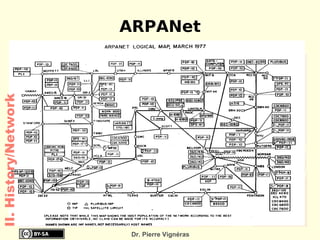
History of Computing http://www.vigneras.name/pierre Dr. Pierre Vignéras  This work is licensed under a Creative Commons Attribution-Share Alike 2.0 France. See http://creativecommons.org/licenses/by-sa/2.0/fr/   for details
Text Books Books Reference Book: New Perspectives On Computer Concepts Parsons and Oja National Book Foundation The Web:  http://wikipedia.org C- How to program (Third Edition) Introduction C++ and Java Deitel & Deitel Prentice Hall
No entry after the first 10 minutes
No exit before the end of the class
Unannounced Quiz Weekly, at the beginning of a class
Fixed timing (you may suffer if you arrive late)
Spread Out (do it quickly to save your time)
Papers that are not strictly  in front of you  will be considered as done
Cheaters will get '-1' mark
Your head should be in front of your paper! Class, Quiz & Exam Rules Rules
Grading Policy Quiz: 20 %
Mid: 30 %
Final: 50 %
A final average below 50/100 will be assigned a failed mark: F. Grading Policy
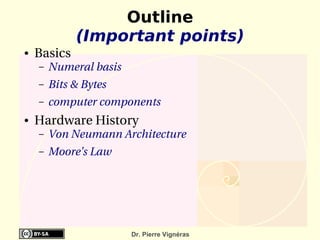
Outline (Important points) Basics Numeral basis
Bits & Bytes
computer components Hardware History Von Neumann Architecture
Moore's Law
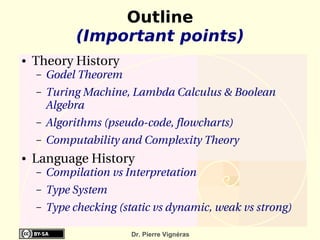
Theory History Godel Theorem
Turing Machine, Lambda Calculus & Boolean Algebra
Algorithms (pseudo-code, flowcharts)
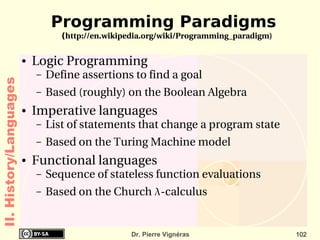
Computability and Complexity Theory Language History Compilation vs Interpretation
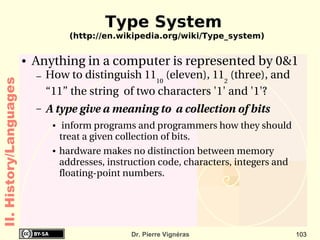
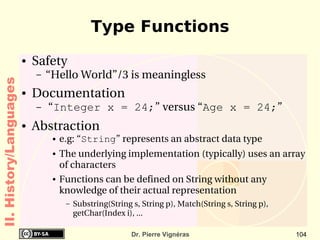
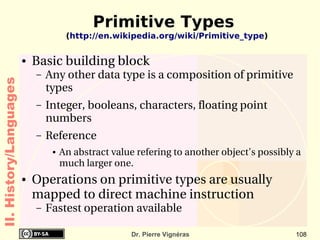
Type System
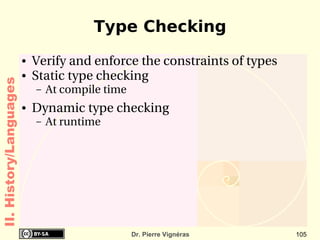
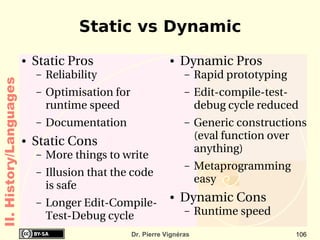
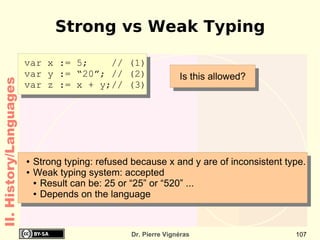
Type checking (static vs dynamic, weak vs strong) Outline (Important points)
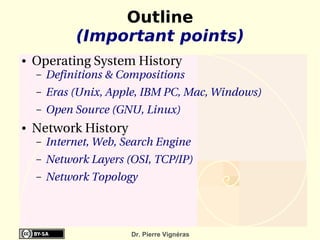
Operating System History Definitions & Compositions
Eras (Unix, Apple, IBM PC, Mac, Windows)
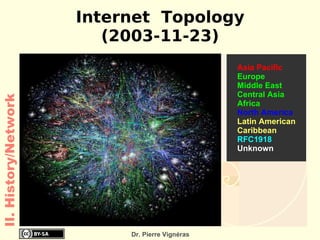
Open Source (GNU, Linux) Network History Internet, Web, Search Engine
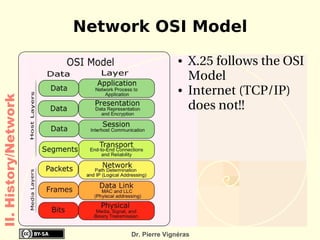
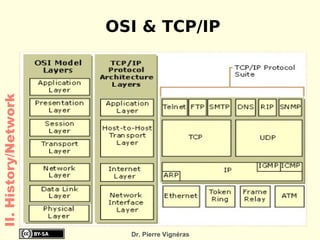
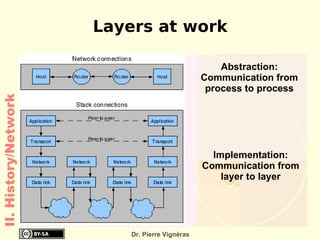
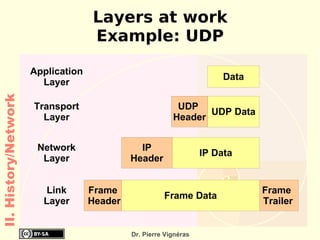
Network Layers (OSI, TCP/IP)
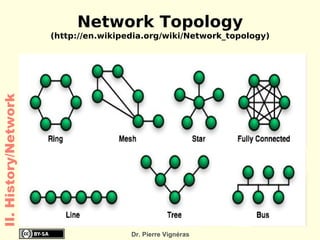
Network Topology Outline (Important points)
Outline
Computer: definition (http://en.wikipedia.org/wiki/Computer) Origin Person who performed numerical calculations, often with the aid of a mechanical calculating device Today Machine for manipulating  data  according to a  list of instructions  known as a  program . Various sort Supercomputer, Mainframe, Servers
Personal Computers, Laptop
PDA, Cellular Phones, Smart cards I. Basics
Vocabulary (http://en.wikipedia.org/wiki/Digital http://en.wikipedia.org/wiki/Bit) Digital = discrete Comes from digits (Latin origin = fingers) Analogue  = continuous (real life)
Bit = 1 binary digit  Can have either the value 1 or 0
Used to represent (almost) everything
Physical representation:  1 == electricity is present
0 == no electricity  A byte is a collection of 8 bits Unit for storage capacity I. Basics
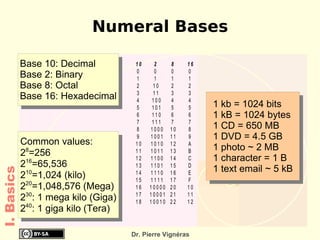
Numeral Bases I. Basics
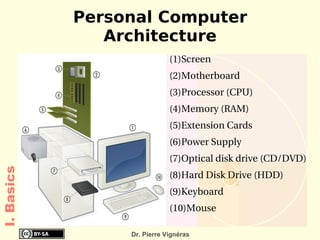
Personal Computer Architecture Screen
Motherboard
Processor (CPU)
Memory (RAM)
Extension Cards
Power Supply
Optical disk drive (CD/DVD)
Hard Disk Drive (HDD)
Keyboard
Mouse I. Basics
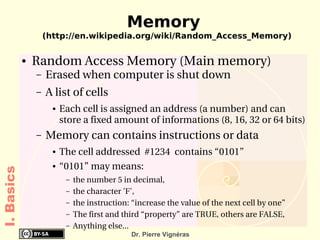
Memory (http://en.wikipedia.org/wiki/Random_Access_Memory) Random Access Memory (Main memory) Erased when computer is shut down
A list of cells Each cell is assigned an address (a number) and can store a fixed amount of informations (8, 16, 32 or 64 bits) Memory can contains instructions or data The cell addressed  #1234  contains “0101”
“0101” may means:  the number 5 in decimal,
the character 'F',
the instruction: “increase the value of the next cell by one”
The first and third “property” are TRUE, others are FALSE,
Anything else... I. Basics
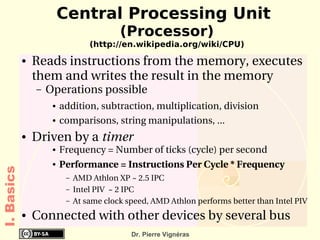
Central Processing Unit  (Processor) (http://en.wikipedia.org/wiki/CPU) Reads instructions from the memory, executes them and writes the result in the memory Operations possible addition, subtraction, multiplication, division
comparisons, string manipulations, ... Driven by a  timer  Frequency = Number of ticks (cycle) per second
Performance = Instructions Per Cycle * Frequency AMD Athlon XP ~ 2.5 IPC
Intel PIV  ~ 2 IPC
At same clock speed, AMD Athlon performs better than Intel PIV Connected with other devices by several bus I. Basics
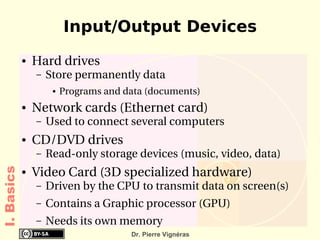
Input/Output Devices Hard drives Store permanently data Programs and data (documents) Network cards (Ethernet card) Used to connect several computers CD/DVD drives Read-only storage devices (music, video, data) Video Card (3D specialized hardware) Driven by the CPU to transmit data on screen(s)
Contains a Graphic processor (GPU)
Needs its own memory I. Basics
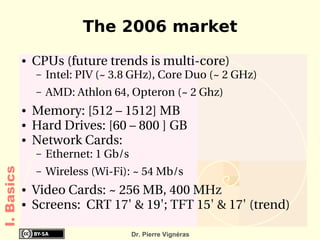
The 2006 market CPUs (future trends is multi-core) Intel: PIV (~ 3.8 GHz), Core Duo (~ 2 GHz)
AMD: Athlon 64, Opteron (~ 2 Ghz) Memory: [512 – 1512] MB
Hard Drives: [60 – 800 ] GB
Network Cards:  Ethernet: 1 Gb/s
Wireless (Wi-Fi): ~ 54 Mb/s Video Cards: ~ 256 MB, 400 MHz
Screens:  CRT 17' & 19'; TFT 15' & 17' (trend) I. Basics
Internet (http://en.wikipedia.org/wiki/Internet) Worldwide, publicly accessible network of  interconnected computer networks  that transmit data using the IP protocol (language)
World Wide Web (WWW): collection of interconnected documents, linked by  Hyperlinks  and URLs
accessible via the Internet, as are many other services
www != Internet
You need a  client application  (called a web browser) URL: protocol://address[:port]/ressource http://images.google.com/preferences  (www)
fish://192.168.1.1/documents (SSH) I. Basics
Searching on the web Search Engines Google: http:// www.google.pk
Yahoo:  http://www.yahoo.com How does it work? During the night, a  robot  scans the web and indexes web pages making pairs [word, {URLs}]
When you enter a keyword, the search engine look in its table for a matching [word, {URLs}]
It then present the set of {URLs} Internet does not provide true informations Anyone can write what he wants! I. Basics
E-Mail Works over the Internet like the normal (slow) mail system (also called snail)
You need a  client application  Can be a web browser (webmail)
Can be a dedicated mail reader You should follow the netiquette (Internet Etiquette) Catch-all term for the conventions of politeness
See:   http://tools.ietf.org/html/rfc1855  - RFC1855 (standard)   http://www.penmachine.com/techie/emailtrouble_2003-07.html  (short)  I. Basics
Outline
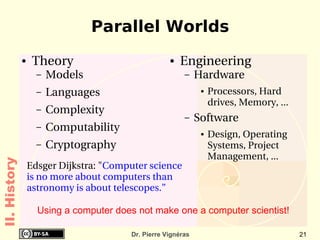
Parallel Worlds Theory Models
Languages
Complexity
Computability
Cryptography Engineering Hardware Processors, Hard drives, Memory, ... Software Design, Operating Systems, Project Management, ... Edsger Dijkstra: " Computer science is no more about computers than astronomy is about telescopes.” Using a computer does not make one a computer scientist! II. History
http://www.eingang.org/Lecture/ II. History
Counting From the very beginning, men started off by counting on their digits for various reasons Sharing food items fairly
Religion & ceremonies according to time
etc. Many possibilities (base):  10, 16, 12, 6, ...
Some attempts to create counting machines  Help counting up to big numbers
Abacus (China), Pascaline (Blaise Pascal, 1642), The Difference Engine (Charles Babbage, 1812) II. History/Hardware
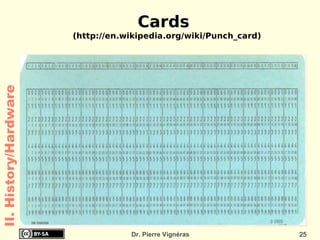
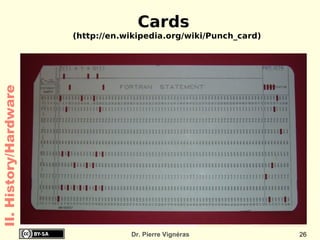
Cards 1890: Herman Hollerith presents Punched Cards & Tabulating Machine
For U.S. Census Bureau
Used until the highly controversial United States presidential election of 2000
Tabulating Machine is a great success: creation of IBM by Herman Hollerith Limited to tabulation II. History/Hardware
Cards (http://en.wikipedia.org/wiki/Punch_card) II. History/Hardware
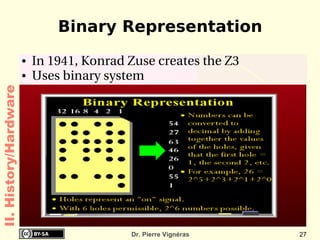
Binary Representation In 1941, Konrad Zuse creates the Z3
Uses binary system II. History/Hardware
Engineering Improvements Mark I (IBM, 1930-1959) Fully automatic  machine
Four operations on 23 decimals numbers
Subroutines (logarithm & trigonometric functions)
3 to 5 seconds per multiplication
In use at Harvard until 1959 ENIAC (Mauchly and Eckert, 1946-1955) 10 decimal-digits words
“Wire your own“ instruction technique II. History/Hardware
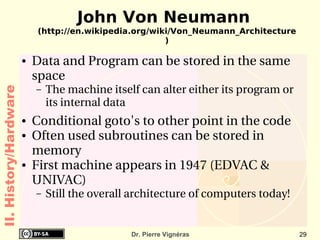
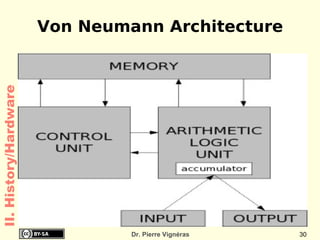
John Von Neumann (http://en.wikipedia.org/wiki/Von_Neumann_Architecture) Data and Program can be stored in the same space The machine itself can alter either its program or its internal data Conditional goto's to other point in the code
Often used subroutines can be stored in memory
First machine appears in 1947 (EDVAC & UNIVAC) Still the overall architecture of computers today! II. History/Hardware
Von Neumann Architecture II. History/Hardware
Major engineering advances Transistors (Shockley, Bardeen, Walter; 1947) Freedom from vacuum tubes, which were extremely bulky Integrated Circuits (Kilby, 1959) Aka “chip”
collection of tiny transistors which are connected together
only connections were needed to other electronic components Machines becomes smaller and more economical to build and maintain. II. History/Hardware
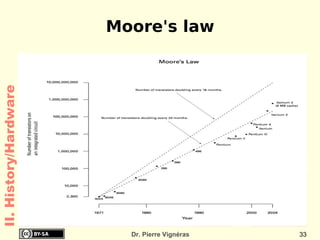
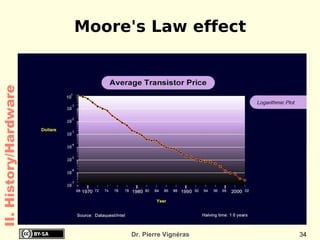
Moore's Law (http://en.wikipedia.org/wiki/Moore's_law) 1965: Moore, a co-founder of Intel. The complexity of integrated circuits doubles every 24 months
Quoted as “[...] doubles every  18 months ”! Empirical Observations and prediction goal for an entire industry. Moore's law means an average performance improvement in the industry as a whole of over 1% a week. A new product that is expected to take three years to develop and is just two or three months late is 10 to 15% slower, bulkier, or lower in storage capacity! II. History/Hardware
Moore's law II. History/Hardware
Moore's Law effect II. History/Hardware
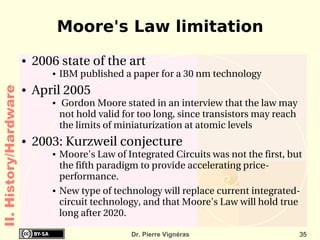
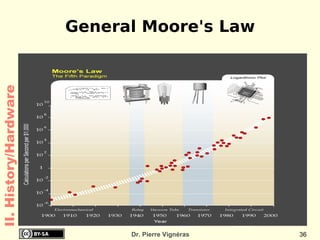
Moore's Law limitation 2006 state of the art IBM published a paper for a 30 nm technology April 2005 Gordon Moore stated in an interview that the law may not hold valid for too long, since transistors may reach the limits of miniaturization at atomic levels 2003: Kurzweil conjecture Moore's Law of Integrated Circuits was not the first, but the fifth paradigm to provide accelerating price-performance.
New type of technology will replace current integrated-circuit technology, and that Moore's Law will hold true long after 2020.  II. History/Hardware
General Moore's Law II. History/Hardware
2006 Trends (http://en.wikipedia.org/wiki/Multicore_CPU) Major misunderstanding: Performance is not equivalent to clock speed !
Moore's law is not about doubling performance anyway! Doubling the number of transistors: Put two CPUs on the same silicon die: dual-core The future is multi-core systems Intel, AMD, IBM, Sun are focusing on this
No need for a new CPU design: less risk Major issue at the software level How to deal with concurrency?
II. History
The Godel Theorem (1931) (http://en.wikipedia.org/wiki/Gödel's_incompleteness_theorems) In some cases, it is possible to prove something and its contrary (inconsistency).
Some mathematical truth are impossible to prove (incompleteness) Idea: “Any French is a  lier  has said by a French”
Sketch of the proof:  suppose a program 'P' can tell if a proposition is TRUE or FALSE without error.
Proposition: “The program 'P' does not reply TRUE to this proposition”. Can the program reply TRUE or FALSE? Neither!
And what about us? Is the proposition TRUE? Yes! II. History/Theory
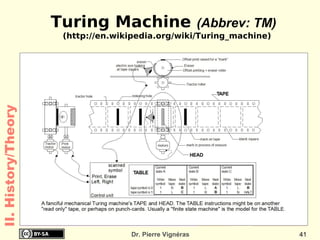
Alan Turing Machine (1936) (http://en.wikipedia.org/wiki/Turing_machine) Infinite tape (divided into adjacent cells) Each cell contains a symbol from some finite alphabet: {a, ..., z}; {0,...,9}; {0,1} Head read/write symbols
move the tape left and right one cell at a time. Table of instructions that tells the machine: what symbol to write
how to move the head
what its new state will be State register that stores the (finite) state of the table.  One special start state  II. History/Theory
Turing Machine  (Abbrev: TM) (http://en.wikipedia.org/wiki/Turing_machine) II. History/Theory
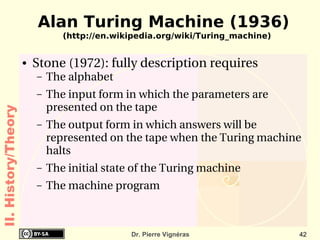
Alan Turing Machine (1936) (http://en.wikipedia.org/wiki/Turing_machine) Stone (1972): fully description requires The alphabet
The input form in which the parameters are presented on the tape
The output form in which answers will be represented on the tape when the Turing machine halts
The initial state of the Turing machine
The machine program II. History/Theory
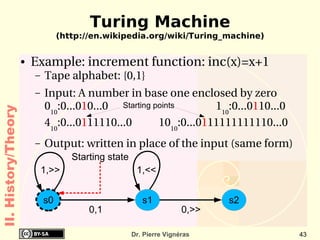
Turing Machine (http://en.wikipedia.org/wiki/Turing_machine) Example: increment function: inc(x)=x+1 Tape alphabet: {0,1}
Input: A number in base one enclosed by zero 0 10 :0...0 1 0...0  1 10 :0...0 1 10...0 4 10 :0...0 1 11110...0 10 10 :0...0 1 11111111110...0
Output: written in place of the input (same form) 1,>> 0,1 0,>> 1,<< Starting points Starting state II. History/Theory
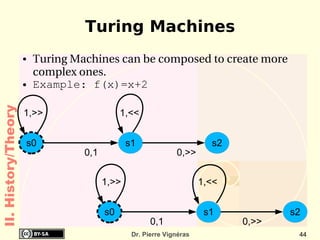
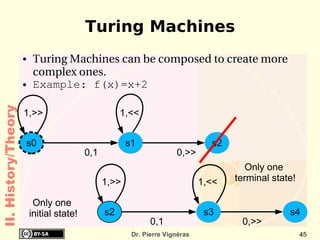
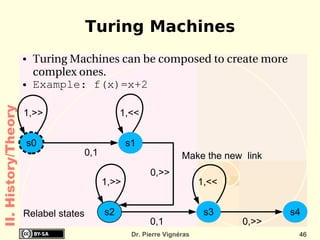
Turing Machines Turing Machines can be composed to create more complex ones.
Example: f(x)=x+2 II. History/Theory 1,>> 0,1 0,>> 1,<< 1,>> 0,1 0,>> 1,<<
Turing Machines Turing Machines can be composed to create more complex ones.
Example: f(x)=x+2 II. History/Theory 1,>> 0,1 0,>> 1,<< 1,>> 0,1 0,>> 1,<< Only one  initial state! Only one  terminal state! Only one  initial state!
Turing Machines Turing Machines can be composed to create more complex ones.
Example: f(x)=x+2 II. History/Theory 1,>> 0,1 0,>> 1,<< 1,>> 0,1 0,>> 1,<< Relabel states Make the new  link
Turing Machines and Algorithms A Turing Machine describes a  “mechanical procedure”   Sort of  recipe
Each step is  simple  and  well defined  so it can be followed by any human using a paper and a pencil Very complex procedures can be described using Turing machines Addition, multiplication, ... (anything?) A Turing machine provides an easy to understand abstraction of how computers (humans or machines) are actually working
Turing Machines are the actual formalisation of what is called  algorithms II. History/Theory
Algorithms (http://en.wikipedia.org/wiki/Algorithm) From the famous Arab scientist Al-khwarizmi Solving problems in an ordered step-by-step sequence An algorithm is a  finite set   of   well-defined instructions  for accomplishing some task which,  given an initial state , will  terminate in a defined end-state . Order of computation is usually critical to the functioning of the algorithm.
Instructions are usually listed explicitly starting 'from the top' and going 'down to the bottom': this is what is formally called the  flow of control . II. History/Theory
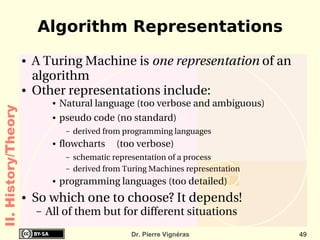
Algorithm Representations A Turing Machine is  one representation  of an algorithm
Other representations include: Natural language (too verbose and ambiguous)
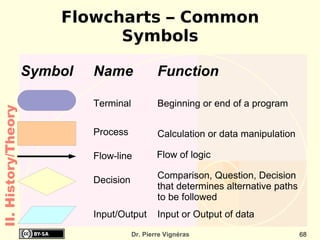
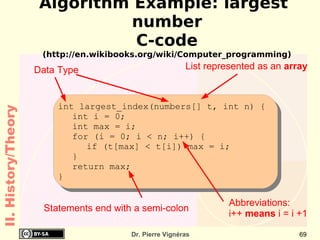
pseudo code (no standard) derived from programming languages flowcharts  (too verbose) schematic representation of a process
derived from Turing Machines representation programming languages (too detailed) So which one to choose? It depends! All of them but for different situations II. History/Theory
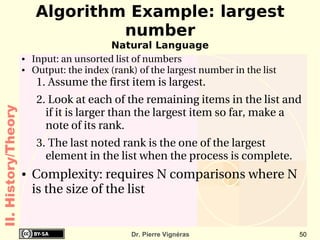
Algorithm Example: largest number Natural Language Input: an unsorted list of numbers
Output: the index (rank) of the largest number in the list Assume the first item is largest.
Look at each of the remaining items in the list and if it is larger than the largest item so far, make a note of its rank.
The last noted rank is the one of the largest element in the list when the process is complete. Complexity: requires N comparisons where N is the size of the list II. History/Theory
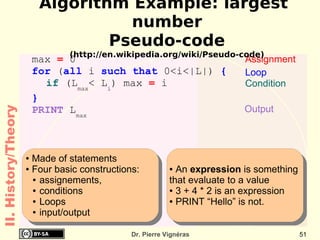
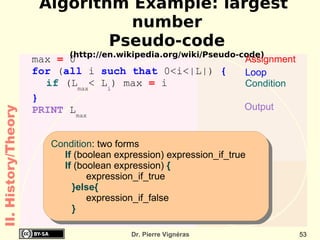
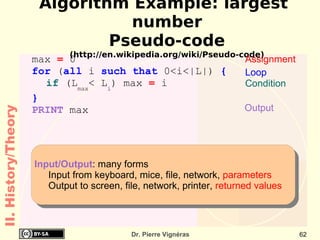
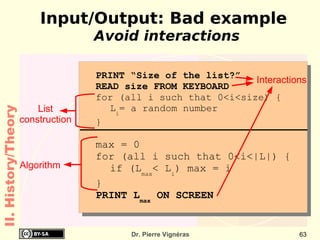
max  =  0 for  ( all  i  such that  0<i<|L|)  { if  ( L max < L i ) max  =  i } PRINT  L m ax   Loop Condition Assignment Output Algorithm Example: largest number Pseudo-code (http://en.wikipedia.org/wiki/Pseudo-code) II. History/Theory Made of statements
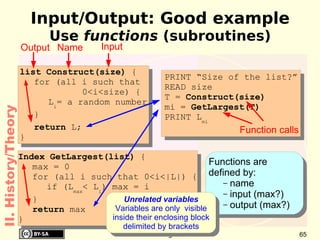
Four basic constructions:  assignements,
conditions
Loops
input/output An  expression  is something  that evaluate to a value
3 + 4 * 2 is an expression
PRINT “Hello” is not.
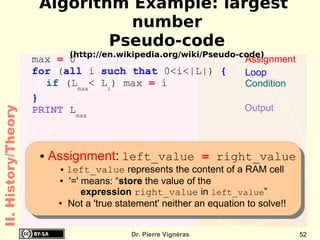
max  =  0 for  ( all  i  such that  0<i<|L|)  { if  ( L max < L i ) max  =  i } PRINT  L m ax   Loop Condition Assignment Output Algorithm Example: largest number Pseudo-code (http://en.wikipedia.org/wiki/Pseudo-code) II. History/Theory Assignment :   left_value  =  right_value left_value  represents the content of a RAM cell '=' means: “ store  the value of the  expression  right_value  in  left_value ” Not a 'true statement' neither an equation to solve!!
Algorithm Example: largest number Pseudo-code (http://en.wikipedia.org/wiki/Pseudo-code) max  =  0 for  ( all  i  such that  0<i<|L|)  { if  ( L max < L i ) max  =  i } PRINT  L m ax   Loop Condition Assignment Output II. History/Theory Condition : two forms If   (boolean expression)   expression_if_true If  (boolean expression)  { expression_if_true }else{ expression_if_false }
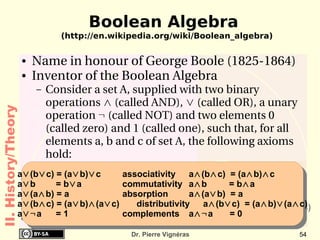
Boolean Algebra (http://en.wikipedia.org/wiki/Boolean_algebra) Name in  honour  of George Boole (1825-1864)
Inventor of the Boolean Algebra Consider a set A, supplied with two binary operations  ∧  (called AND),  ∨  (called OR), a unary operation  ¬  (called NOT) and two elements 0 (called zero) and 1 (called one), such that, for all elements a, b and c of set A, the following axioms hold: II. History/Theory a ∨ (b ∨ c) = (a ∨ b) ∨ c   associativity  a ∧ (b ∧ c)  = (a ∧ b) ∧ c a ∨ b    = b ∨ a   commutativity a ∧ b  = b ∧ a  a ∨ (a ∧ b) = a   absorption a ∧ (a ∨ b)  = a a ∨ (b ∧ c) = (a ∨ b) ∧ (a ∨ c)   distributivity a ∧ (b ∨ c)  = (a ∧ b) ∨ (a ∧ c) a ∨¬ a    = 1   complements a ∧¬ a    = 0
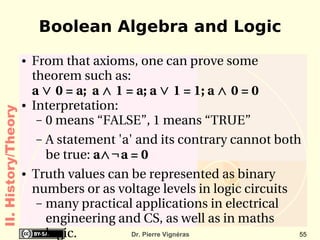
Boolean Algebra and Logic From that axioms, one can prove some theorem such as: a  ∨  0 = a;  a  ∧  1 = a; a  ∨  1 = 1; a  ∧  0 = 0
Interpretation: 0 means “FALSE”, 1 means “TRUE”
A statement 'a' and its contrary cannot both be true:  a ∧¬ a = 0 Truth values can be represented as binary numbers or as voltage levels in logic circuits many practical applications in electrical engineering and CS, as well as in  maths  logic. II. History/Theory
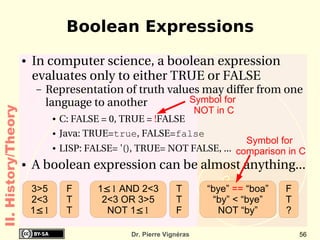
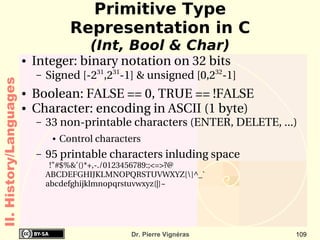
Boolean Expressions In computer science, a boolean expression evaluates only to either TRUE or FALSE  Representation of truth values may differ from one language to another C: FALSE = 0, TRUE =  ! FALSE
Java: TRUE= true , FALSE= false
LISP: FALSE= '(), TRUE= NOT FALSE, ... A boolean expression can be almost anything... II. History/Theory 3>5 2<3 1 ≤ 1 F T T 1 ≤ 1  AND 2<3 2<3 OR 3>5 NOT 1 ≤ 1 T T F “bye”  ==  “boa” “by” < “bye” NOT “by” F T ? Symbol for  comparison in C Symbol for  NOT in C
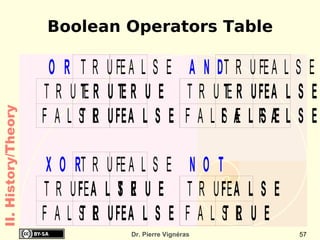
Boolean Operators Table II. History/Theory
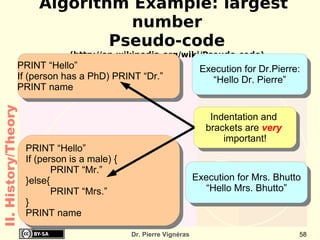
Algorithm Example: largest number Pseudo-code (http://en.wikipedia.org/wiki/Pseudo-code) II. History/Theory PRINT “Hello” If (person has a PhD) PRINT “Dr.” PRINT name PRINT “Hello” If (person is a male) { PRINT “Mr.” }else{ PRINT “Mrs.” } PRINT name Execution for Dr.Pierre: “Hello Dr. Pierre” Execution for Mrs. Bhutto “Hello Mrs. Bhutto” Indentation and  brackets are  very   important!
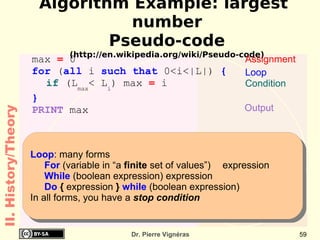
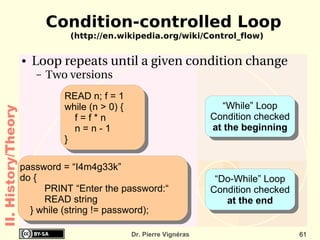
Algorithm Example: largest number Pseudo-code (http://en.wikipedia.org/wiki/Pseudo-code) max  =  0 for  ( all  i  such that  0<i<|L|)  { if  ( L max < L i ) max  =  i } PRINT   m ax  Loop Condition Assignment Output II. History/Theory Loop : many forms For   (variable in “a  finite  set of values”)  expression While  (boolean expression) expression Do  {  expression  }  while  (boolean expression)  In all forms, you have a  stop condition

History of Computing

  • 1.
    History of Computinghttp://www.vigneras.name/pierre Dr. Pierre Vignéras This work is licensed under a Creative Commons Attribution-Share Alike 2.0 France. See http://creativecommons.org/licenses/by-sa/2.0/fr/ for details
  • 2.
    Text Books BooksReference Book: New Perspectives On Computer Concepts Parsons and Oja National Book Foundation The Web: http://wikipedia.org C- How to program (Third Edition) Introduction C++ and Java Deitel & Deitel Prentice Hall
  • 3.
    No entry afterthe first 10 minutes
  • 4.
    No exit beforethe end of the class
  • 5.
    Unannounced Quiz Weekly,at the beginning of a class
  • 6.
    Fixed timing (youmay suffer if you arrive late)
  • 7.
    Spread Out (doit quickly to save your time)
  • 8.
    Papers that arenot strictly in front of you will be considered as done
  • 9.
  • 10.
    Your head shouldbe in front of your paper! Class, Quiz & Exam Rules Rules
  • 11.
  • 12.
  • 13.
  • 14.
    A final averagebelow 50/100 will be assigned a failed mark: F. Grading Policy
  • 15.
    Outline (Important points)Basics Numeral basis
  • 16.
  • 17.
    computer components HardwareHistory Von Neumann Architecture
  • 18.
  • 19.
  • 20.
    Turing Machine, LambdaCalculus & Boolean Algebra
  • 21.
  • 22.
    Computability and ComplexityTheory Language History Compilation vs Interpretation
  • 23.
  • 24.
    Type checking (staticvs dynamic, weak vs strong) Outline (Important points)
  • 25.
    Operating System HistoryDefinitions & Compositions
  • 26.
    Eras (Unix, Apple,IBM PC, Mac, Windows)
  • 27.
    Open Source (GNU,Linux) Network History Internet, Web, Search Engine
  • 28.
  • 29.
    Network Topology Outline(Important points)
  • 30.
  • 31.
    Computer: definition (http://en.wikipedia.org/wiki/Computer)Origin Person who performed numerical calculations, often with the aid of a mechanical calculating device Today Machine for manipulating data according to a list of instructions known as a program . Various sort Supercomputer, Mainframe, Servers
  • 32.
  • 33.
    PDA, Cellular Phones,Smart cards I. Basics
  • 34.
    Vocabulary (http://en.wikipedia.org/wiki/Digital http://en.wikipedia.org/wiki/Bit)Digital = discrete Comes from digits (Latin origin = fingers) Analogue = continuous (real life)
  • 35.
    Bit = 1binary digit Can have either the value 1 or 0
  • 36.
    Used to represent(almost) everything
  • 37.
    Physical representation: 1 == electricity is present
  • 38.
    0 == noelectricity A byte is a collection of 8 bits Unit for storage capacity I. Basics
  • 39.
  • 40.
  • 41.
  • 42.
  • 43.
  • 44.
  • 45.
  • 46.
  • 47.
  • 48.
  • 49.
  • 50.
    Memory (http://en.wikipedia.org/wiki/Random_Access_Memory) RandomAccess Memory (Main memory) Erased when computer is shut down
  • 51.
    A list ofcells Each cell is assigned an address (a number) and can store a fixed amount of informations (8, 16, 32 or 64 bits) Memory can contains instructions or data The cell addressed #1234 contains “0101”
  • 52.
    “0101” may means: the number 5 in decimal,
  • 53.
  • 54.
    the instruction: “increasethe value of the next cell by one”
  • 55.
    The first andthird “property” are TRUE, others are FALSE,
  • 56.
  • 57.
    Central Processing Unit (Processor) (http://en.wikipedia.org/wiki/CPU) Reads instructions from the memory, executes them and writes the result in the memory Operations possible addition, subtraction, multiplication, division
  • 58.
    comparisons, string manipulations,... Driven by a timer Frequency = Number of ticks (cycle) per second
  • 59.
    Performance = InstructionsPer Cycle * Frequency AMD Athlon XP ~ 2.5 IPC
  • 60.
    Intel PIV ~ 2 IPC
  • 61.
    At same clockspeed, AMD Athlon performs better than Intel PIV Connected with other devices by several bus I. Basics
  • 62.
    Input/Output Devices Harddrives Store permanently data Programs and data (documents) Network cards (Ethernet card) Used to connect several computers CD/DVD drives Read-only storage devices (music, video, data) Video Card (3D specialized hardware) Driven by the CPU to transmit data on screen(s)
  • 63.
    Contains a Graphicprocessor (GPU)
  • 64.
    Needs its ownmemory I. Basics
  • 65.
    The 2006 marketCPUs (future trends is multi-core) Intel: PIV (~ 3.8 GHz), Core Duo (~ 2 GHz)
  • 66.
    AMD: Athlon 64,Opteron (~ 2 Ghz) Memory: [512 – 1512] MB
  • 67.
    Hard Drives: [60– 800 ] GB
  • 68.
    Network Cards: Ethernet: 1 Gb/s
  • 69.
    Wireless (Wi-Fi): ~54 Mb/s Video Cards: ~ 256 MB, 400 MHz
  • 70.
    Screens: CRT17' & 19'; TFT 15' & 17' (trend) I. Basics
  • 71.
    Internet (http://en.wikipedia.org/wiki/Internet) Worldwide,publicly accessible network of interconnected computer networks that transmit data using the IP protocol (language)
  • 72.
    World Wide Web(WWW): collection of interconnected documents, linked by Hyperlinks and URLs
  • 73.
    accessible via theInternet, as are many other services
  • 74.
  • 75.
    You need a client application (called a web browser) URL: protocol://address[:port]/ressource http://images.google.com/preferences (www)
  • 76.
  • 77.
    Searching on theweb Search Engines Google: http:// www.google.pk
  • 78.
    Yahoo: http://www.yahoo.comHow does it work? During the night, a robot scans the web and indexes web pages making pairs [word, {URLs}]
  • 79.
    When you entera keyword, the search engine look in its table for a matching [word, {URLs}]
  • 80.
    It then presentthe set of {URLs} Internet does not provide true informations Anyone can write what he wants! I. Basics
  • 81.
    E-Mail Works overthe Internet like the normal (slow) mail system (also called snail)
  • 82.
    You need a client application Can be a web browser (webmail)
  • 83.
    Can be adedicated mail reader You should follow the netiquette (Internet Etiquette) Catch-all term for the conventions of politeness
  • 84.
    See: http://tools.ietf.org/html/rfc1855 - RFC1855 (standard) http://www.penmachine.com/techie/emailtrouble_2003-07.html (short) I. Basics
  • 85.
  • 86.
  • 87.
  • 88.
  • 89.
  • 90.
    Cryptography Engineering HardwareProcessors, Hard drives, Memory, ... Software Design, Operating Systems, Project Management, ... Edsger Dijkstra: &quot; Computer science is no more about computers than astronomy is about telescopes.” Using a computer does not make one a computer scientist! II. History
  • 91.
  • 92.
    Counting From thevery beginning, men started off by counting on their digits for various reasons Sharing food items fairly
  • 93.
    Religion & ceremoniesaccording to time
  • 94.
    etc. Many possibilities(base): 10, 16, 12, 6, ...
  • 95.
    Some attempts tocreate counting machines Help counting up to big numbers
  • 96.
    Abacus (China), Pascaline(Blaise Pascal, 1642), The Difference Engine (Charles Babbage, 1812) II. History/Hardware
  • 97.
    Cards 1890: HermanHollerith presents Punched Cards & Tabulating Machine
  • 98.
  • 99.
    Used until thehighly controversial United States presidential election of 2000
  • 100.
    Tabulating Machine isa great success: creation of IBM by Herman Hollerith Limited to tabulation II. History/Hardware
  • 101.
  • 102.
  • 103.
    Binary Representation In1941, Konrad Zuse creates the Z3
  • 104.
    Uses binary systemII. History/Hardware
  • 105.
    Engineering Improvements MarkI (IBM, 1930-1959) Fully automatic machine
  • 106.
    Four operations on23 decimals numbers
  • 107.
    Subroutines (logarithm &trigonometric functions)
  • 108.
    3 to 5seconds per multiplication
  • 109.
    In use atHarvard until 1959 ENIAC (Mauchly and Eckert, 1946-1955) 10 decimal-digits words
  • 110.
    “Wire your own“instruction technique II. History/Hardware
  • 111.
    John Von Neumann(http://en.wikipedia.org/wiki/Von_Neumann_Architecture) Data and Program can be stored in the same space The machine itself can alter either its program or its internal data Conditional goto's to other point in the code
  • 112.
    Often used subroutinescan be stored in memory
  • 113.
    First machine appearsin 1947 (EDVAC & UNIVAC) Still the overall architecture of computers today! II. History/Hardware
  • 114.
    Von Neumann ArchitectureII. History/Hardware
  • 115.
    Major engineering advancesTransistors (Shockley, Bardeen, Walter; 1947) Freedom from vacuum tubes, which were extremely bulky Integrated Circuits (Kilby, 1959) Aka “chip”
  • 116.
    collection of tinytransistors which are connected together
  • 117.
    only connections wereneeded to other electronic components Machines becomes smaller and more economical to build and maintain. II. History/Hardware
  • 118.
    Moore's Law (http://en.wikipedia.org/wiki/Moore's_law)1965: Moore, a co-founder of Intel. The complexity of integrated circuits doubles every 24 months
  • 119.
    Quoted as “[...]doubles every 18 months ”! Empirical Observations and prediction goal for an entire industry. Moore's law means an average performance improvement in the industry as a whole of over 1% a week. A new product that is expected to take three years to develop and is just two or three months late is 10 to 15% slower, bulkier, or lower in storage capacity! II. History/Hardware
  • 120.
    Moore's law II.History/Hardware
  • 121.
    Moore's Law effectII. History/Hardware
  • 122.
    Moore's Law limitation2006 state of the art IBM published a paper for a 30 nm technology April 2005 Gordon Moore stated in an interview that the law may not hold valid for too long, since transistors may reach the limits of miniaturization at atomic levels 2003: Kurzweil conjecture Moore's Law of Integrated Circuits was not the first, but the fifth paradigm to provide accelerating price-performance.
  • 123.
    New type oftechnology will replace current integrated-circuit technology, and that Moore's Law will hold true long after 2020. II. History/Hardware
  • 124.
    General Moore's LawII. History/Hardware
  • 125.
    2006 Trends (http://en.wikipedia.org/wiki/Multicore_CPU)Major misunderstanding: Performance is not equivalent to clock speed !
  • 126.
    Moore's law isnot about doubling performance anyway! Doubling the number of transistors: Put two CPUs on the same silicon die: dual-core The future is multi-core systems Intel, AMD, IBM, Sun are focusing on this
  • 127.
    No need fora new CPU design: less risk Major issue at the software level How to deal with concurrency?
  • 128.
  • 129.
    The Godel Theorem(1931) (http://en.wikipedia.org/wiki/Gödel's_incompleteness_theorems) In some cases, it is possible to prove something and its contrary (inconsistency).
  • 130.
    Some mathematical truthare impossible to prove (incompleteness) Idea: “Any French is a lier has said by a French”
  • 131.
    Sketch of theproof: suppose a program 'P' can tell if a proposition is TRUE or FALSE without error.
  • 132.
    Proposition: “The program'P' does not reply TRUE to this proposition”. Can the program reply TRUE or FALSE? Neither!
  • 133.
    And what aboutus? Is the proposition TRUE? Yes! II. History/Theory
  • 134.
    Alan Turing Machine(1936) (http://en.wikipedia.org/wiki/Turing_machine) Infinite tape (divided into adjacent cells) Each cell contains a symbol from some finite alphabet: {a, ..., z}; {0,...,9}; {0,1} Head read/write symbols
  • 135.
    move the tapeleft and right one cell at a time. Table of instructions that tells the machine: what symbol to write
  • 136.
    how to movethe head
  • 137.
    what its newstate will be State register that stores the (finite) state of the table. One special start state II. History/Theory
  • 138.
    Turing Machine (Abbrev: TM) (http://en.wikipedia.org/wiki/Turing_machine) II. History/Theory
  • 139.
    Alan Turing Machine(1936) (http://en.wikipedia.org/wiki/Turing_machine) Stone (1972): fully description requires The alphabet
  • 140.
    The input formin which the parameters are presented on the tape
  • 141.
    The output formin which answers will be represented on the tape when the Turing machine halts
  • 142.
    The initial stateof the Turing machine
  • 143.
    The machine programII. History/Theory
  • 144.
    Turing Machine (http://en.wikipedia.org/wiki/Turing_machine)Example: increment function: inc(x)=x+1 Tape alphabet: {0,1}
  • 145.
    Input: A numberin base one enclosed by zero 0 10 :0...0 1 0...0 1 10 :0...0 1 10...0 4 10 :0...0 1 11110...0 10 10 :0...0 1 11111111110...0
  • 146.
    Output: written inplace of the input (same form) 1,>> 0,1 0,>> 1,<< Starting points Starting state II. History/Theory
  • 147.
    Turing Machines TuringMachines can be composed to create more complex ones.
  • 148.
    Example: f(x)=x+2 II.History/Theory 1,>> 0,1 0,>> 1,<< 1,>> 0,1 0,>> 1,<<
  • 149.
    Turing Machines TuringMachines can be composed to create more complex ones.
  • 150.
    Example: f(x)=x+2 II.History/Theory 1,>> 0,1 0,>> 1,<< 1,>> 0,1 0,>> 1,<< Only one initial state! Only one terminal state! Only one initial state!
  • 151.
    Turing Machines TuringMachines can be composed to create more complex ones.
  • 152.
    Example: f(x)=x+2 II.History/Theory 1,>> 0,1 0,>> 1,<< 1,>> 0,1 0,>> 1,<< Relabel states Make the new link
  • 153.
    Turing Machines andAlgorithms A Turing Machine describes a “mechanical procedure” Sort of recipe
  • 154.
    Each step is simple and well defined so it can be followed by any human using a paper and a pencil Very complex procedures can be described using Turing machines Addition, multiplication, ... (anything?) A Turing machine provides an easy to understand abstraction of how computers (humans or machines) are actually working
  • 155.
    Turing Machines arethe actual formalisation of what is called algorithms II. History/Theory
  • 156.
    Algorithms (http://en.wikipedia.org/wiki/Algorithm) Fromthe famous Arab scientist Al-khwarizmi Solving problems in an ordered step-by-step sequence An algorithm is a finite set of well-defined instructions for accomplishing some task which, given an initial state , will terminate in a defined end-state . Order of computation is usually critical to the functioning of the algorithm.
  • 157.
    Instructions are usuallylisted explicitly starting 'from the top' and going 'down to the bottom': this is what is formally called the flow of control . II. History/Theory
  • 158.
    Algorithm Representations ATuring Machine is one representation of an algorithm
  • 159.
    Other representations include:Natural language (too verbose and ambiguous)
  • 160.
    pseudo code (nostandard) derived from programming languages flowcharts (too verbose) schematic representation of a process
  • 161.
    derived from TuringMachines representation programming languages (too detailed) So which one to choose? It depends! All of them but for different situations II. History/Theory
  • 162.
    Algorithm Example: largestnumber Natural Language Input: an unsorted list of numbers
  • 163.
    Output: the index(rank) of the largest number in the list Assume the first item is largest.
  • 164.
    Look at eachof the remaining items in the list and if it is larger than the largest item so far, make a note of its rank.
  • 165.
    The last notedrank is the one of the largest element in the list when the process is complete. Complexity: requires N comparisons where N is the size of the list II. History/Theory
  • 166.
    max = 0 for ( all i such that 0<i<|L|) { if ( L max < L i ) max = i } PRINT L m ax Loop Condition Assignment Output Algorithm Example: largest number Pseudo-code (http://en.wikipedia.org/wiki/Pseudo-code) II. History/Theory Made of statements
  • 167.
  • 168.
  • 169.
  • 170.
    input/output An expression is something that evaluate to a value
  • 171.
    3 + 4* 2 is an expression
  • 172.
  • 173.
    max = 0 for ( all i such that 0<i<|L|) { if ( L max < L i ) max = i } PRINT L m ax Loop Condition Assignment Output Algorithm Example: largest number Pseudo-code (http://en.wikipedia.org/wiki/Pseudo-code) II. History/Theory Assignment : left_value = right_value left_value represents the content of a RAM cell '=' means: “ store the value of the expression right_value in left_value ” Not a 'true statement' neither an equation to solve!!
  • 174.
    Algorithm Example: largestnumber Pseudo-code (http://en.wikipedia.org/wiki/Pseudo-code) max = 0 for ( all i such that 0<i<|L|) { if ( L max < L i ) max = i } PRINT L m ax Loop Condition Assignment Output II. History/Theory Condition : two forms If (boolean expression) expression_if_true If (boolean expression) { expression_if_true }else{ expression_if_false }
  • 175.
    Boolean Algebra (http://en.wikipedia.org/wiki/Boolean_algebra)Name in honour of George Boole (1825-1864)
  • 176.
    Inventor of theBoolean Algebra Consider a set A, supplied with two binary operations ∧ (called AND), ∨ (called OR), a unary operation ¬ (called NOT) and two elements 0 (called zero) and 1 (called one), such that, for all elements a, b and c of set A, the following axioms hold: II. History/Theory a ∨ (b ∨ c) = (a ∨ b) ∨ c associativity a ∧ (b ∧ c) = (a ∧ b) ∧ c a ∨ b = b ∨ a commutativity a ∧ b = b ∧ a a ∨ (a ∧ b) = a absorption a ∧ (a ∨ b) = a a ∨ (b ∧ c) = (a ∨ b) ∧ (a ∨ c) distributivity a ∧ (b ∨ c) = (a ∧ b) ∨ (a ∧ c) a ∨¬ a = 1 complements a ∧¬ a = 0
  • 177.
    Boolean Algebra andLogic From that axioms, one can prove some theorem such as: a ∨ 0 = a; a ∧ 1 = a; a ∨ 1 = 1; a ∧ 0 = 0
  • 178.
    Interpretation: 0 means“FALSE”, 1 means “TRUE”
  • 179.
    A statement 'a'and its contrary cannot both be true: a ∧¬ a = 0 Truth values can be represented as binary numbers or as voltage levels in logic circuits many practical applications in electrical engineering and CS, as well as in maths logic. II. History/Theory
  • 180.
    Boolean Expressions Incomputer science, a boolean expression evaluates only to either TRUE or FALSE Representation of truth values may differ from one language to another C: FALSE = 0, TRUE = ! FALSE
  • 181.
    Java: TRUE= true, FALSE= false
  • 182.
    LISP: FALSE= '(),TRUE= NOT FALSE, ... A boolean expression can be almost anything... II. History/Theory 3>5 2<3 1 ≤ 1 F T T 1 ≤ 1 AND 2<3 2<3 OR 3>5 NOT 1 ≤ 1 T T F “bye” == “boa” “by” < “bye” NOT “by” F T ? Symbol for comparison in C Symbol for NOT in C
  • 183.
    Boolean Operators TableII. History/Theory
  • 184.
    Algorithm Example: largestnumber Pseudo-code (http://en.wikipedia.org/wiki/Pseudo-code) II. History/Theory PRINT “Hello” If (person has a PhD) PRINT “Dr.” PRINT name PRINT “Hello” If (person is a male) { PRINT “Mr.” }else{ PRINT “Mrs.” } PRINT name Execution for Dr.Pierre: “Hello Dr. Pierre” Execution for Mrs. Bhutto “Hello Mrs. Bhutto” Indentation and brackets are very important!
  • 185.
    Algorithm Example: largestnumber Pseudo-code (http://en.wikipedia.org/wiki/Pseudo-code) max = 0 for ( all i such that 0<i<|L|) { if ( L max < L i ) max = i } PRINT m ax Loop Condition Assignment Output II. History/Theory Loop : many forms For (variable in “a finite set of values”) expression While (boolean expression) expression Do { expression } while (boolean expression) In all forms, you have a stop condition

Editor's Notes

  • #14 0101: first bit: you like CS101 second bit: you know CS101 third bit: you want to know CS101 four bit: you will repeat CS101