Evaluation Q6

  What have you learnt about
technologies from the process of
   constructing this product?
Photoshoot
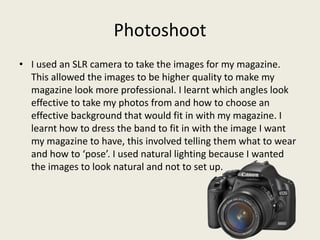
• I used an SLR camera to take the images for my magazine.
  This allowed the images to be higher quality to make my
  magazine look more professional. I learnt which angles look
  effective to take my photos from and how to choose an
  effective background that would fit in with my magazine. I
  learnt how to dress the band to fit in with the image I want
  my magazine to have, this involved telling them what to wear
  and how to ‘pose’. I used natural lighting because I wanted
  the images to look natural and not to set up.
Slideshare and Prezi
• Slideshare.net was a simple and effective way to allow me to easily
  share powerpoints I have created on the internet or on my blog. To
  do this I uploaded my powerpoint and then got the ‘embed’ code
  and copied and pasted it into my blog post while on the html
  setting. This allowed the powerpoint to be presented onto my
  magazine.
• I learnt how to use prezi.com which is another way of presenting
  work on my blog. Prezi had preset templates which you type up
  your work into, then when you look at what you have typed up the
  screen will move around the template and zoom in and spin on
  certain areas of information. It’s just a fun and effective way to
  present information. It was similar to slideshare as I had to get the
  embed code and paste it into the html on my blog.
Photoshop
•   I used Photoshop to produce the front cover of my magazine. This gave me the
    tools I needed to create an effective and realistic magazine cover. I used layers
    to put text and extra images over the main centre image. I also used Photoshop
    to edit the images to remove any over exposure and to make the images look
    more professional. I used many different tools in Photoshop and gained a larger
    knowledge of what I can create. I used text tools to create the relevant text I
    needed on the front cover and it allowed me to mastheads that stood out
    against the background. I also used a tool that allowed me to cut out images
    and place them against a background of my choice. I used the shape tool to
    create boxes and put text on them to make the text stand out against the
    background. I also used the boxes to create lines to separate out the text.
Quark
• I used Quark to create my contents page and double page spread.
  This allowed me to create a professional looking contents
  page/double page spread because quark was created for print
  media, so this allowed me to create columns and set the page up to
  an appropriate size. Photoshop is used more for picture
  manipulation where as quark allows me to professionally set up a
  page with text. I used a text tool to allow me to create appropriate
  text boxes and a picture tool to allow me to create images to a
  specific size. I also used a shape tool to create boxes for adverts and
  to create lines that separate the text.

Evaluation q6

  • 1.
    Evaluation Q6 What have you learnt about technologies from the process of constructing this product?
  • 2.
    Photoshoot • I usedan SLR camera to take the images for my magazine. This allowed the images to be higher quality to make my magazine look more professional. I learnt which angles look effective to take my photos from and how to choose an effective background that would fit in with my magazine. I learnt how to dress the band to fit in with the image I want my magazine to have, this involved telling them what to wear and how to ‘pose’. I used natural lighting because I wanted the images to look natural and not to set up.
  • 3.
    Slideshare and Prezi •Slideshare.net was a simple and effective way to allow me to easily share powerpoints I have created on the internet or on my blog. To do this I uploaded my powerpoint and then got the ‘embed’ code and copied and pasted it into my blog post while on the html setting. This allowed the powerpoint to be presented onto my magazine. • I learnt how to use prezi.com which is another way of presenting work on my blog. Prezi had preset templates which you type up your work into, then when you look at what you have typed up the screen will move around the template and zoom in and spin on certain areas of information. It’s just a fun and effective way to present information. It was similar to slideshare as I had to get the embed code and paste it into the html on my blog.
  • 4.
    Photoshop • I used Photoshop to produce the front cover of my magazine. This gave me the tools I needed to create an effective and realistic magazine cover. I used layers to put text and extra images over the main centre image. I also used Photoshop to edit the images to remove any over exposure and to make the images look more professional. I used many different tools in Photoshop and gained a larger knowledge of what I can create. I used text tools to create the relevant text I needed on the front cover and it allowed me to mastheads that stood out against the background. I also used a tool that allowed me to cut out images and place them against a background of my choice. I used the shape tool to create boxes and put text on them to make the text stand out against the background. I also used the boxes to create lines to separate out the text.
  • 5.
    Quark • I usedQuark to create my contents page and double page spread. This allowed me to create a professional looking contents page/double page spread because quark was created for print media, so this allowed me to create columns and set the page up to an appropriate size. Photoshop is used more for picture manipulation where as quark allows me to professionally set up a page with text. I used a text tool to allow me to create appropriate text boxes and a picture tool to allow me to create images to a specific size. I also used a shape tool to create boxes for adverts and to create lines that separate the text.