Quark Processes

How I created my double page
           spread
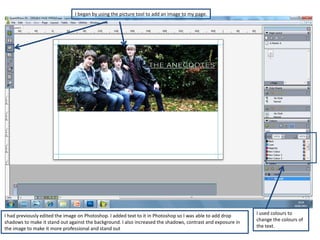
I began by using the picture tool to add an image to my page.


I had previously edited the image on Photoshop. I added text to it in Photoshop so I was able to add drop     I used colours to
shadows to make it stand out against the background. I also increased the shadows, contrast and exposure in   change the colours of
the image to make it more professional and stand out                                                          the text.
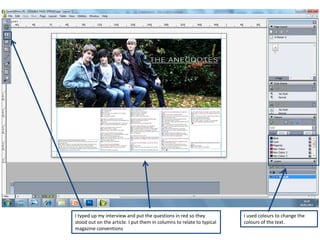
I typed up my interview and put the questions in red so they           I used colours to change the
stood out on the article. I put them in columns to relate to typical   colours of the text.
magazine conventions
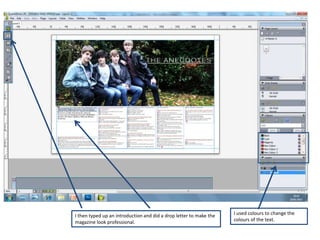
I then typed up an introduction and did a drop letter to make the   I used colours to change the
magazine look professional.                                         colours of the text.
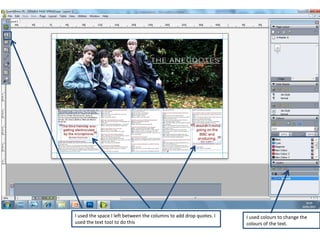
I used the space I left between the columns to add drop quotes. I   I used colours to change the
used the text tool to do this                                       colours of the text.
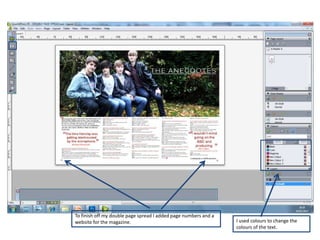
To finish off my double page spread I added page numbers and a
website for the magazine.                                        I used colours to change the
                                                                 colours of the text.

Quark processes dps

  • 1.
    Quark Processes How Icreated my double page spread
  • 2.
    I began byusing the picture tool to add an image to my page. I had previously edited the image on Photoshop. I added text to it in Photoshop so I was able to add drop I used colours to shadows to make it stand out against the background. I also increased the shadows, contrast and exposure in change the colours of the image to make it more professional and stand out the text.
  • 3.
    I typed upmy interview and put the questions in red so they I used colours to change the stood out on the article. I put them in columns to relate to typical colours of the text. magazine conventions
  • 4.
    I then typedup an introduction and did a drop letter to make the I used colours to change the magazine look professional. colours of the text.
  • 5.
    I used thespace I left between the columns to add drop quotes. I I used colours to change the used the text tool to do this colours of the text.
  • 6.
    To finish offmy double page spread I added page numbers and a website for the magazine. I used colours to change the colours of the text.