Quark processes

How I created my contents page
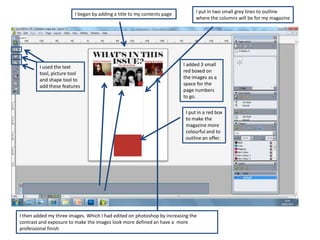
I began by adding a title to my contents page         I put in two small grey lines to outline
                                                                              where the columns will be for my magazine


        I used the text                                                  I added 3 small
        tool, picture tool                                               red boxed on
        and shape tool to                                                the images as a
        add these features                                               space for the
                                                                         page numbers
                                                                         to go.

                                                                          I put in a red box
                                                                          to make the
                                                                          magazine more
                                                                          colourful and to
                                                                          outline an offer.


I then added my three images. Which I had edited on photoshop by increasing the
contrast and exposure to make the images look more defined an have a more
professional finish
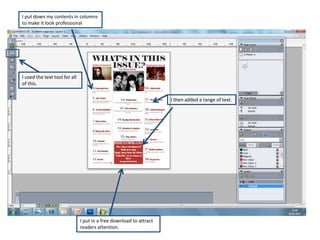
I put down my contents in columns
to make it look professional


I used the text tool for all
of this.


                                                                     I then added a range of text.


                               I put in a free download to attract
                               readers attention.
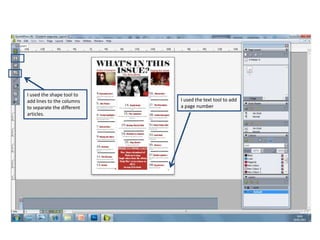
I used the shape tool to
add lines to the columns    I used the text tool to add
to separate the different   a page number
articles.
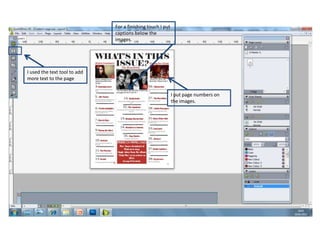
For a finishing touch I put
                              captions below the
                              images.


I used the text tool to add
more text to the page


                                                            I put page numbers on
                                                            the images.

Quark processes

  • 1.
    Quark processes How Icreated my contents page
  • 2.
    I began byadding a title to my contents page I put in two small grey lines to outline where the columns will be for my magazine I used the text I added 3 small tool, picture tool red boxed on and shape tool to the images as a add these features space for the page numbers to go. I put in a red box to make the magazine more colourful and to outline an offer. I then added my three images. Which I had edited on photoshop by increasing the contrast and exposure to make the images look more defined an have a more professional finish
  • 3.
    I put downmy contents in columns to make it look professional I used the text tool for all of this. I then added a range of text. I put in a free download to attract readers attention.
  • 4.
    I used theshape tool to add lines to the columns I used the text tool to add to separate the different a page number articles.
  • 5.
    For a finishingtouch I put captions below the images. I used the text tool to add more text to the page I put page numbers on the images.