Photoshop Processes
 How I created my magazine front cover.
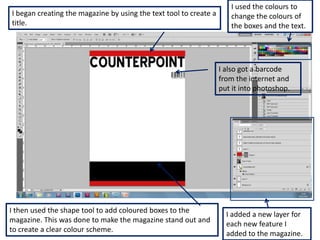
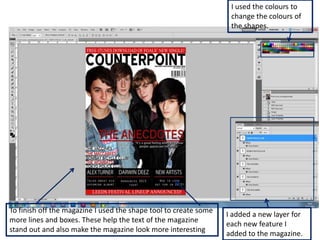
I used the colours to
I began creating the magazine by using the text tool to create a      change the colours of
title.                                                                the boxes and the text.


                                                                   I also got a barcode
                                                                   from the internet and
                                                                   put it into photoshop.


I then used the shape tool to add coloured boxes to the
                                                                     I added a new layer for
magazine. This was done to make the magazine stand out and
                                                                     each new feature I
to create a clear colour scheme.
                                                                     added to the magazine.
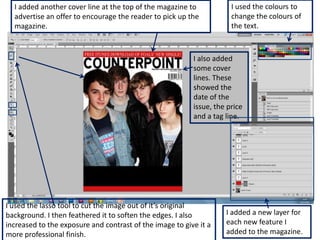
I added another cover line at the top of the magazine to            I used the colours to
  advertise an offer to encourage the reader to pick up the           change the colours of
  magazine.                                                           the text.


                                                          I also added
                                                          some cover
                                                          lines. These
                                                          showed the
                                                          date of the
                                                          issue, the price
                                                          and a tag line.


I used the lasso tool to cut the image out of it’s original
background. I then feathered it to soften the edges. I also         I added a new layer for
increased to the exposure and contrast of the image to give it a    each new feature I
more professional finish.                                           added to the magazine.
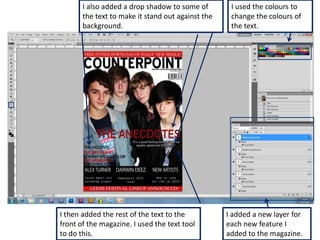
I also added a drop shadow to some of        I used the colours to
       the text to make it stand out against the    change the colours of
       background.                                  the text.


I then added the rest of the text to the           I added a new layer for
front of the magazine. I used the text tool        each new feature I
to do this.                                        added to the magazine.
I used the colours to
                                                                   change the colours of
                                                                   the shapes.


To finish off the magazine I used the shape tool to create some
                                                                  I added a new layer for
more lines and boxes. These help the text of the magazine
                                                                  each new feature I
stand out and also make the magazine look more interesting
                                                                  added to the magazine.

Photoshop processes

  • 1.
    Photoshop Processes HowI created my magazine front cover.
  • 2.
    I used thecolours to I began creating the magazine by using the text tool to create a change the colours of title. the boxes and the text. I also got a barcode from the internet and put it into photoshop. I then used the shape tool to add coloured boxes to the I added a new layer for magazine. This was done to make the magazine stand out and each new feature I to create a clear colour scheme. added to the magazine.
  • 3.
    I added anothercover line at the top of the magazine to I used the colours to advertise an offer to encourage the reader to pick up the change the colours of magazine. the text. I also added some cover lines. These showed the date of the issue, the price and a tag line. I used the lasso tool to cut the image out of it’s original background. I then feathered it to soften the edges. I also I added a new layer for increased to the exposure and contrast of the image to give it a each new feature I more professional finish. added to the magazine.
  • 4.
    I also addeda drop shadow to some of I used the colours to the text to make it stand out against the change the colours of background. the text. I then added the rest of the text to the I added a new layer for front of the magazine. I used the text tool each new feature I to do this. added to the magazine.
  • 5.
    I used thecolours to change the colours of the shapes. To finish off the magazine I used the shape tool to create some I added a new layer for more lines and boxes. These help the text of the magazine each new feature I stand out and also make the magazine look more interesting added to the magazine.