






Enhancing Relevancy & User Experience
with SharePoint Search
Gina Montgomery, V-TSP, MCTS, MCSA, MCP
Microsoft Strategic Director - Softmart
www.TriStateSharePoint.org
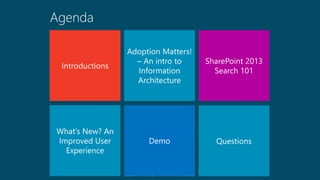
Introductions:
www.ginamontgomery.com
Gina.Montgomery@Softmart.com
/in/ginaMMontgomery
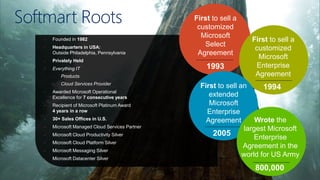
Softmart Roots
• Founded in 1982
• Headquarters in USA:
Outside Philadelphia, Pennsylvania
• Privately Held
• Everything IT
- Products
- Cloud Services Provider
• Awarded Microsoft Operational
Excellence for 7 consecutive years
• Recipient of Microsoft Platinum Award
4 years in a row
• 30+ Sales Offices in U.S.
• Microsoft Managed Cloud Services Partner
• Microsoft Cloud Productivity Silver
• Microsoft Cloud Platform Silver
• Microsoft Messaging Silver
• Microsoft Datacenter Silver
First to sell a
customized
Microsoft
Select
Agreement
1993
First to sell a
customized
Microsoft
Enterprise
Agreement
1994First to sell an
extended
Microsoft
Enterprise
Agreement
2005
Wrote the
largest Microsoft
Enterprise
Agreement in the
world for US Army
800,000
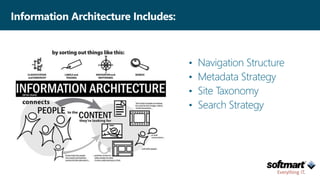
• Navigation Structure
• Metadata Strategy
• Site Taxonomy
• Search Strategy
Information Architecture Includes:
The Institute of Information Architecture defines IA as
the art and science of organizing and labeling
websites, intranets, online communities and software
to support usability.
IA defines the way your company describes, organizes
and discovers content
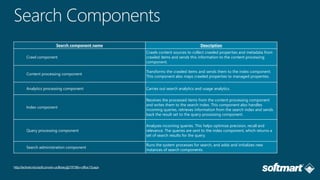
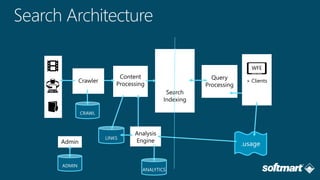
Search component name Description
Crawl component
Crawls content sources to collect crawled properties and metadata from
crawled items and sends this information to the content processing
component.
Content processing component
Transforms the crawled items and sends them to the index component.
This component also maps crawled properties to managed properties.
Analytics processing component Carries out search analytics and usage analytics.
Index component
Receives the processed items from the content processing component
and writes them to the search index. This component also handles
incoming queries, retrieves information from the search index and sends
back the result set to the query processing component.
Query processing component
Analyzes incoming queries. This helps optimize precision, recall and
relevance. The queries are sent to the index component, which returns a
set of search results for the query.
Search administration component
Runs the system processes for search, and adds and initializes new
instances of search components.
http://technet.microsoft.com/en-us/library/jj219738(v=office.15).aspx
CRAWL
ADMIN
ANALYTICS
LINKS
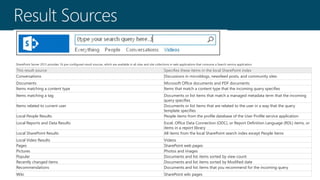
This result source Specifies these items in the local SharePoint index
Conversations Discussions in microblogs, newsfeed posts, and community sites
Documents Microsoft Office documents and PDF documents
Items matching a content type Items that match a content type that the incoming query specifies
Items matching a tag Documents or list items that match a managed metadata term that the incoming
query specifies
Items related to current user Documents or list items that are related to the user in a way that the query
template specifies
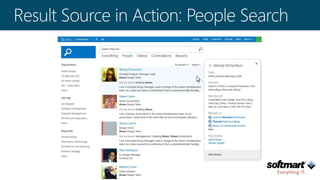
Local People Results People items from the profile database of the User Profile service application
Local Reports and Data Results Excel, Office Data Connection (ODC), or Report Definition Language (RDL) items, or
items in a report library
Local SharePoint Results All items from the local SharePoint search index except People items
Local Video Results Videos
Pages SharePoint web pages
Pictures Photos and images
Popular Documents and list items sorted by view count
Recently changed items Documents and list items sorted by Modified date
Recommendations Documents and list items that you recommend for the incoming query
Wiki SharePoint wiki pages
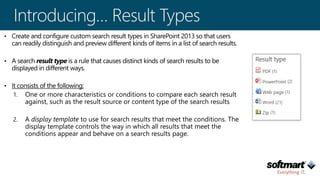
SharePoint Server 2013 provides 16 pre-configured result sources, which are available in all sites and site collections in web applications that consume a Search service application.
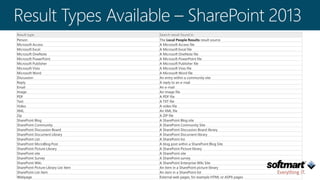
Result type Search result found in
Person The Local People Results result source
Microsoft Access A Microsoft Access file
Microsoft Excel A Microsoft Excel file
Microsoft OneNote A Microsoft OneNote file
Microsoft PowerPoint A Microsoft PowerPoint file
Microsoft Publisher A Microsoft Publisher file
Microsoft Visio A Microsoft Visio file
Microsoft Word A Microsoft Word file
Discussion An entry within a community site
Reply A reply to an e-mail
Email An e-mail
Image An image file
PDF A PDF file
Text A TXT file
Video A video file
XML An XML file
Zip A ZIP file
SharePoint Blog A SharePoint Blog site
SharePoint Community A SharePoint Community Site
SharePoint Discussion Board A SharePoint Discussion Board library
SharePoint Document Library A SharePoint Document library
SharePoint List A SharePoint list
SharePoint MicroBlog Post A blog post within a SharePoint Blog Site
SharePoint Picture Library A SharePoint Picture library
SharePoint site A SharePoint site
SharePoint Survey A SharePoint survey
SharePoint Wiki A SharePoint Enterprise Wiki Site
SharePoint Picture Library List Item An item in a SharePoint picture library
SharePoint List Item An item in a SharePoint list
Webpage External web pages, for example HTML or ASPX pages
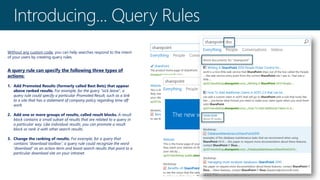
Without any custom code, you can help searches respond to the intent
of your users by creating query rules.
A query rule can specify the following three types of
actions:
1. Add Promoted Results (formerly called Best Bets) that appear
above ranked results. For example, for the query "sick leave", a
query rule could specify a particular Promoted Result, such as a link
to a site that has a statement of company policy regarding time off
work.
2. Add one or more groups of results, called result blocks. A result
block contains a small subset of results that are related to a query in
a particular way. Like individual results, you can promote a result
block or rank it with other search results.
3. Change the ranking of results. For example, for a query that
contains “download toolbox”, a query rule could recognize the word
“download” as an action term and boost search results that point to a
particular download site on your intranet.
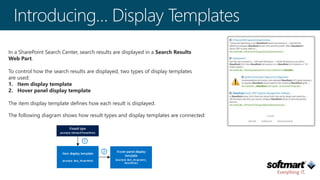
In a SharePoint Search Center, search results are displayed in a Search Results
Web Part.
To control how the search results are displayed, two types of display templates
are used:
1. Item display template
2. Hover panel display template
The item display template defines how each result is displayed.
The following diagram shows how result types and display templates are connected:
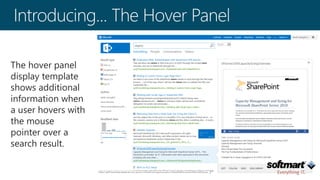
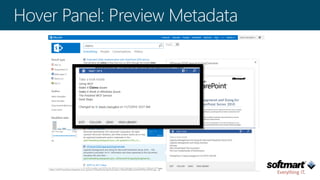
The hover panel
display template
shows additional
information when
a user hovers with
the mouse
pointer over a
search result.
@ginaMmontgomery
www.ginamontgomery.com
Questions?

Enhancing Relevancy & User Experience with #SharePoint Search sps-philly 2015

  • 1.
    Enhancing Relevancy &User Experience with SharePoint Search Gina Montgomery, V-TSP, MCTS, MCSA, MCP Microsoft Strategic Director - Softmart
  • 4.
  • 6.
  • 7.
    Softmart Roots • Foundedin 1982 • Headquarters in USA: Outside Philadelphia, Pennsylvania • Privately Held • Everything IT - Products - Cloud Services Provider • Awarded Microsoft Operational Excellence for 7 consecutive years • Recipient of Microsoft Platinum Award 4 years in a row • 30+ Sales Offices in U.S. • Microsoft Managed Cloud Services Partner • Microsoft Cloud Productivity Silver • Microsoft Cloud Platform Silver • Microsoft Messaging Silver • Microsoft Datacenter Silver First to sell a customized Microsoft Select Agreement 1993 First to sell a customized Microsoft Enterprise Agreement 1994First to sell an extended Microsoft Enterprise Agreement 2005 Wrote the largest Microsoft Enterprise Agreement in the world for US Army 800,000
  • 9.
    • Navigation Structure •Metadata Strategy • Site Taxonomy • Search Strategy Information Architecture Includes:
  • 10.
    The Institute ofInformation Architecture defines IA as the art and science of organizing and labeling websites, intranets, online communities and software to support usability. IA defines the way your company describes, organizes and discovers content
  • 13.
    Search component nameDescription Crawl component Crawls content sources to collect crawled properties and metadata from crawled items and sends this information to the content processing component. Content processing component Transforms the crawled items and sends them to the index component. This component also maps crawled properties to managed properties. Analytics processing component Carries out search analytics and usage analytics. Index component Receives the processed items from the content processing component and writes them to the search index. This component also handles incoming queries, retrieves information from the search index and sends back the result set to the query processing component. Query processing component Analyzes incoming queries. This helps optimize precision, recall and relevance. The queries are sent to the index component, which returns a set of search results for the query. Search administration component Runs the system processes for search, and adds and initializes new instances of search components. http://technet.microsoft.com/en-us/library/jj219738(v=office.15).aspx
  • 14.
  • 20.
    This result sourceSpecifies these items in the local SharePoint index Conversations Discussions in microblogs, newsfeed posts, and community sites Documents Microsoft Office documents and PDF documents Items matching a content type Items that match a content type that the incoming query specifies Items matching a tag Documents or list items that match a managed metadata term that the incoming query specifies Items related to current user Documents or list items that are related to the user in a way that the query template specifies Local People Results People items from the profile database of the User Profile service application Local Reports and Data Results Excel, Office Data Connection (ODC), or Report Definition Language (RDL) items, or items in a report library Local SharePoint Results All items from the local SharePoint search index except People items Local Video Results Videos Pages SharePoint web pages Pictures Photos and images Popular Documents and list items sorted by view count Recently changed items Documents and list items sorted by Modified date Recommendations Documents and list items that you recommend for the incoming query Wiki SharePoint wiki pages SharePoint Server 2013 provides 16 pre-configured result sources, which are available in all sites and site collections in web applications that consume a Search service application.
  • 23.
    Result type Searchresult found in Person The Local People Results result source Microsoft Access A Microsoft Access file Microsoft Excel A Microsoft Excel file Microsoft OneNote A Microsoft OneNote file Microsoft PowerPoint A Microsoft PowerPoint file Microsoft Publisher A Microsoft Publisher file Microsoft Visio A Microsoft Visio file Microsoft Word A Microsoft Word file Discussion An entry within a community site Reply A reply to an e-mail Email An e-mail Image An image file PDF A PDF file Text A TXT file Video A video file XML An XML file Zip A ZIP file SharePoint Blog A SharePoint Blog site SharePoint Community A SharePoint Community Site SharePoint Discussion Board A SharePoint Discussion Board library SharePoint Document Library A SharePoint Document library SharePoint List A SharePoint list SharePoint MicroBlog Post A blog post within a SharePoint Blog Site SharePoint Picture Library A SharePoint Picture library SharePoint site A SharePoint site SharePoint Survey A SharePoint survey SharePoint Wiki A SharePoint Enterprise Wiki Site SharePoint Picture Library List Item An item in a SharePoint picture library SharePoint List Item An item in a SharePoint list Webpage External web pages, for example HTML or ASPX pages
  • 24.
    Without any customcode, you can help searches respond to the intent of your users by creating query rules. A query rule can specify the following three types of actions: 1. Add Promoted Results (formerly called Best Bets) that appear above ranked results. For example, for the query "sick leave", a query rule could specify a particular Promoted Result, such as a link to a site that has a statement of company policy regarding time off work. 2. Add one or more groups of results, called result blocks. A result block contains a small subset of results that are related to a query in a particular way. Like individual results, you can promote a result block or rank it with other search results. 3. Change the ranking of results. For example, for a query that contains “download toolbox”, a query rule could recognize the word “download” as an action term and boost search results that point to a particular download site on your intranet.
  • 25.
    In a SharePointSearch Center, search results are displayed in a Search Results Web Part. To control how the search results are displayed, two types of display templates are used: 1. Item display template 2. Hover panel display template The item display template defines how each result is displayed. The following diagram shows how result types and display templates are connected:
  • 26.
    The hover panel displaytemplate shows additional information when a user hovers with the mouse pointer over a search result.
  • 32.

Editor's Notes

  • #8 The Softmart Story – Pioneers in IT Logistics For as long as Softmart has been in business – since 1982 – we have helped organizations manage their Microsoft investments. Softmart is credited with a list of firsts and recognitions in the Microsoft LAR (Large Account Reseller) world: Eight-Time Consecutive Recipient of the Microsoft Operational Excellence Award. The award is for excellence in license management. Four-Time Consecutive Recipient of the Microsoft Platinum Award. The award is for delivering market-leading operational excellence supporting Microsoft technology.  Softmart managed the largest Enterprise Agreement in the world for nine years – for the U.S. Army, more than 800,000 seats (licenses). We also manage Enterprise Agreements for companies with as few as 250 seats. Softmart was the first LAR to sign a Microsoft Enterprise Agreement in 1997. Softmart was the first LAR to sign a Microsoft Extended Enterprise Agreement in 2005. Softmart is the first and only LAR to sign two Academic Enterprise Agreements.   Softmart employs one of the most experienced and knowledgeable Microsoft dedicated staffs in the I.T. industry. More than 90% of our Sales Force is Microsoft Certified Professionals.
  • #15 Crawl = SharePoint crawler CPC = Content Processing Index = Search core QPC = Query Processing APC = Analytics Engine
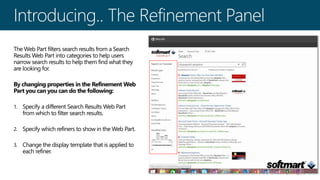
  • #19 By default, the Refinement Web Part is used on all search vertical pages (results.aspx, peopleresults.aspx, conversationresults.aspx, videoresults.aspx).
  • #25 In a query rule, you specify conditions and correlated actions. When a query meets the conditions, the search system performs the actions to improve the relevance of the search results.