Welcome to
SharePoint/O365
Saturday
Kansas City!
Thank you SPONSORS!
Diamond
Gold
Web & Prize
KC O365 User Group
2nd Monday of every month
Water One in Lenexa, KS
https://kco365.wordpress.com
11924 W 119th St
Overland Park, KS 66213
How did you find that?!
Optimizing your content for search
Smarter Consulting – CEO
Adjunct Professor/Trainer:
MS SharePoint, MS Office, BA, Six Sigma, Leadership
20+ years designing, developing, and managing software
13+ years SharePoint experience
Six Sigma Black Belt, BSAC Certified
sweaver@smarter-consulting.com
www.sharoneweaver.com
@sharoneweaver
Sharon Weaver, MOS, BSAC, SSBB
How do you find stuff?
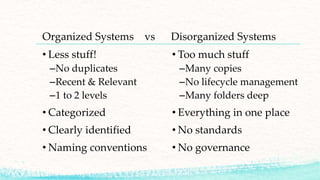
Organized Systems vs Disorganized Systems
• Less stuff!
–No duplicates
–Recent & Relevant
–1 to 2 levels
• Categorized
• Clearly identified
• Naming conventions
• Too much stuff
–Many copies
–No lifecycle management
–Many folders deep
• Everything in one place
• No standards
• No governance
Taxonomy/Folksonomy
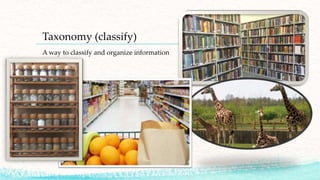
Taxonomy (classify)
A way to classify and organize information
Folksonomy (tags, behavior)
Properties (a.k.a. Metadata)
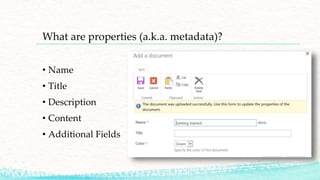
What are properties (a.k.a. metadata)?
• Name
• Title
• Description
• Content
• Additional Fields
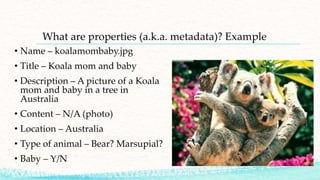
What are properties (a.k.a. metadata)? Example
• Name – koalamombaby.jpg
• Title – Koala mom and baby
• Description – A picture of a Koala
mom and baby in a tree in
Australia
• Content – N/A (photo)
• Location – Australia
• Type of animal – Bear? Marsupial?
• Baby – Y/N
Metadata (Properties) –
How it applies to search
Metadata (Properties) and how it applies to search?
Ranking!
• Everything is given a value (score) that is used by the
search engine to determine which items show up where on
the search results list.
• As content attributes/properties/metadata is added or
updated, the score for each item changes based on
information and user behavior.
• For example: the more users search for a certain term, the
higher it shows up on the list of results!
• Hint – This is how google makes LOTS of money!
How do you “manage” them? (Managed Properties)
SP 2016/Online
• Create field/column
• Wait for it to be crawled
• Voila!
SharePoint creates a managed
property for you 
• Manually create a managed
property field and value
• Create/Manage Query Rules
• Create Custom Ranking
Model
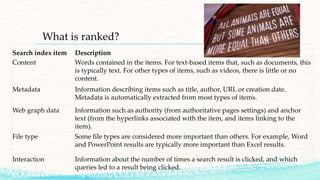
What is ranked?
Search index item Description
Content Words contained in the items. For text-based items that, such as documents, this
is typically text. For other types of items, such as videos, there is little or no
content.
Metadata Information describing items such as title, author, URL or creation date.
Metadata is automatically extracted from most types of items.
Web graph data Information such as authority (from authoritative pages settings) and anchor
text (from the hyperlinks associated with the item, and items linking to the
item).
File type Some file types are considered more important than others. For example, Word
and PowerPoint results are typically more important than Excel results.
Interaction Information about the number of times a search result is clicked, and which
queries led to a result being clicked.
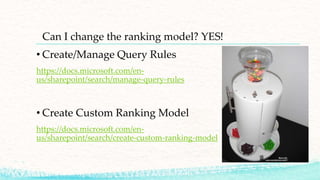
Can I change the ranking model? YES!
• Create/Manage Query Rules
https://docs.microsoft.com/en-
us/sharepoint/search/manage-query-rules
• Create Custom Ranking Model
https://docs.microsoft.com/en-
us/sharepoint/search/create-custom-ranking-model
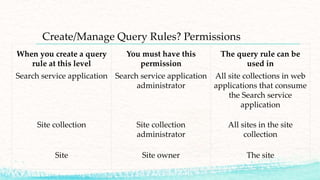
Create/Manage Query Rules? Permissions
When you create a query
rule at this level
You must have this
permission
The query rule can be
used in
Search service application Search service application
administrator
All site collections in web
applications that consume
the Search service
application
Site collection Site collection
administrator
All sites in the site
collection
Site Site owner The site
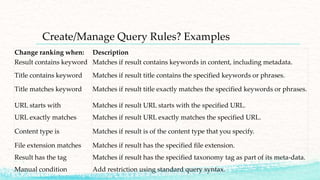
Create/Manage Query Rules? Examples
Change ranking when: Description
Result contains keyword Matches if result contains keywords in content, including metadata.
Title contains keyword Matches if result title contains the specified keywords or phrases.
Title matches keyword Matches if result title exactly matches the specified keywords or phrases.
URL starts with Matches if result URL starts with the specified URL.
URL exactly matches Matches if result URL exactly matches the specified URL.
Content type is Matches if result is of the content type that you specify.
File extension matches Matches if result has the specified file extension.
Result has the tag Matches if result has the specified taxonomy tag as part of its meta-data.
Manual condition Add restriction using standard query syntax.
Optimize your content!
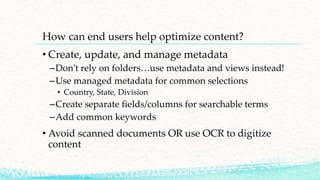
How can end users help optimize content?
• Create, update, and manage metadata
–Don’t rely on folders…use metadata and views instead!
–Use managed metadata for common selections
• Country, State, Division
–Create separate fields/columns for searchable terms
–Add common keywords
• Avoid scanned documents OR use OCR to digitize
content
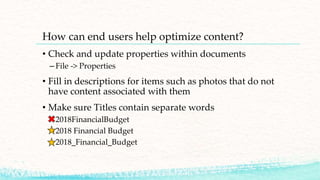
How can end users help optimize content?
• Check and update properties within documents
– File -> Properties
• Fill in descriptions for items such as photos that do not
have content associated with them
• Make sure Titles contain separate words
– 2018FinancialBudget
– 2018 Financial Budget
– 2018_Financial_Budget
sweaver@smarter-consulting.com
www.sharoneweaver.com
@sharoneweaver
Sharon Weaver

How did you find that?! Optimizing your SharePoint content for search

  • 1.
  • 2.
  • 3.
    KC O365 UserGroup 2nd Monday of every month Water One in Lenexa, KS https://kco365.wordpress.com
  • 4.
    11924 W 119thSt Overland Park, KS 66213
  • 5.
    How did youfind that?! Optimizing your content for search
  • 6.
    Smarter Consulting –CEO Adjunct Professor/Trainer: MS SharePoint, MS Office, BA, Six Sigma, Leadership 20+ years designing, developing, and managing software 13+ years SharePoint experience Six Sigma Black Belt, BSAC Certified sweaver@smarter-consulting.com www.sharoneweaver.com @sharoneweaver Sharon Weaver, MOS, BSAC, SSBB
  • 7.
    How do youfind stuff?
  • 8.
    Organized Systems vsDisorganized Systems • Less stuff! –No duplicates –Recent & Relevant –1 to 2 levels • Categorized • Clearly identified • Naming conventions • Too much stuff –Many copies –No lifecycle management –Many folders deep • Everything in one place • No standards • No governance
  • 10.
  • 11.
    Taxonomy (classify) A wayto classify and organize information
  • 12.
  • 13.
  • 14.
    What are properties(a.k.a. metadata)? • Name • Title • Description • Content • Additional Fields
  • 15.
    What are properties(a.k.a. metadata)? Example • Name – koalamombaby.jpg • Title – Koala mom and baby • Description – A picture of a Koala mom and baby in a tree in Australia • Content – N/A (photo) • Location – Australia • Type of animal – Bear? Marsupial? • Baby – Y/N
  • 16.
    Metadata (Properties) – Howit applies to search
  • 17.
    Metadata (Properties) andhow it applies to search? Ranking! • Everything is given a value (score) that is used by the search engine to determine which items show up where on the search results list. • As content attributes/properties/metadata is added or updated, the score for each item changes based on information and user behavior. • For example: the more users search for a certain term, the higher it shows up on the list of results! • Hint – This is how google makes LOTS of money!
  • 18.
    How do you“manage” them? (Managed Properties) SP 2016/Online • Create field/column • Wait for it to be crawled • Voila! SharePoint creates a managed property for you  • Manually create a managed property field and value • Create/Manage Query Rules • Create Custom Ranking Model
  • 19.
    What is ranked? Searchindex item Description Content Words contained in the items. For text-based items that, such as documents, this is typically text. For other types of items, such as videos, there is little or no content. Metadata Information describing items such as title, author, URL or creation date. Metadata is automatically extracted from most types of items. Web graph data Information such as authority (from authoritative pages settings) and anchor text (from the hyperlinks associated with the item, and items linking to the item). File type Some file types are considered more important than others. For example, Word and PowerPoint results are typically more important than Excel results. Interaction Information about the number of times a search result is clicked, and which queries led to a result being clicked.
  • 20.
    Can I changethe ranking model? YES! • Create/Manage Query Rules https://docs.microsoft.com/en- us/sharepoint/search/manage-query-rules • Create Custom Ranking Model https://docs.microsoft.com/en- us/sharepoint/search/create-custom-ranking-model
  • 21.
    Create/Manage Query Rules?Permissions When you create a query rule at this level You must have this permission The query rule can be used in Search service application Search service application administrator All site collections in web applications that consume the Search service application Site collection Site collection administrator All sites in the site collection Site Site owner The site
  • 22.
    Create/Manage Query Rules?Examples Change ranking when: Description Result contains keyword Matches if result contains keywords in content, including metadata. Title contains keyword Matches if result title contains the specified keywords or phrases. Title matches keyword Matches if result title exactly matches the specified keywords or phrases. URL starts with Matches if result URL starts with the specified URL. URL exactly matches Matches if result URL exactly matches the specified URL. Content type is Matches if result is of the content type that you specify. File extension matches Matches if result has the specified file extension. Result has the tag Matches if result has the specified taxonomy tag as part of its meta-data. Manual condition Add restriction using standard query syntax.
  • 23.
  • 24.
    How can endusers help optimize content? • Create, update, and manage metadata –Don’t rely on folders…use metadata and views instead! –Use managed metadata for common selections • Country, State, Division –Create separate fields/columns for searchable terms –Add common keywords • Avoid scanned documents OR use OCR to digitize content
  • 25.
    How can endusers help optimize content? • Check and update properties within documents – File -> Properties • Fill in descriptions for items such as photos that do not have content associated with them • Make sure Titles contain separate words – 2018FinancialBudget – 2018 Financial Budget – 2018_Financial_Budget
  • 26.