Logical Volume Manager An Introduction
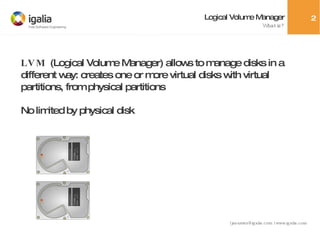
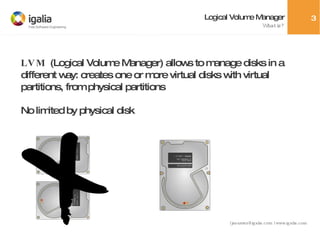
Logical Volume Manager What is? LVM  (Logical Volume Manager) allows to manage disks in a different way: creates one or more virtual disks with virtual partitions, from physical partitions No limited by physical disk
Logical Volume Manager Concepts Physical Volume  (PV) : physical partition from real disk Volume Group  (VG) : like a virtual disk Logical Volume  (LV) : a partition in a Volume Group Physical Extent  (PE) : like a 'cluster' in PV Logical Extent  (LE) : like a 'cluster' in LV
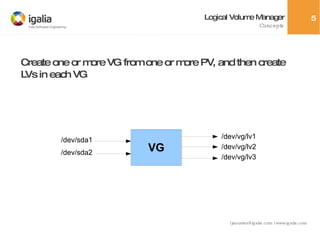
Logical Volume Manager Concepts Create one or more VG from one or more PV, and then create LVs in each VG VG /dev/sda1 /dev/vg/lv1 /dev/sda2 /dev/vg/lv2 /dev/vg/lv3
Logical Volume Manager PVs pvcreate: creates a PV pvremove: removes a PV pvdisplay: shows information about a PV pvscan: scan all PVs in the system pvck: check a PV for errors (1) Create one or more partitions with fdisk, with type LVM (2)  pvcreate /dev/<partition>
Logical Volume Manager VGs vgcreate: creates a VG vgremove: removes a VG vgextend: extend a VG with more PVs vgreduce: drops PVs from a VG vgdisplay: shows info about VG vgscan: scan for all VGs in system vgchange: change VG properties vgck, vgexport, vgmerge, vgsplit, vgrename
Logical Volume Manager VGs (1) Create one or more partitions with fdisk, with type LVM (2)  pvcreate /dev/sda1 (3)  pvcreate /dev/hdb2 (4)  pvcreate /dev/hdc3 (5)  vgcreate myvg /dev/sda1 /dev/hdb2 /dev/hdc3
Logical Volume Manager LVs lvcreate: creates a LV lvremove: removes a LV lvscan: scan for all LVs in a system lvdisplay: shows info about a LV lvrename, lvresize, lvreduce, lvchange
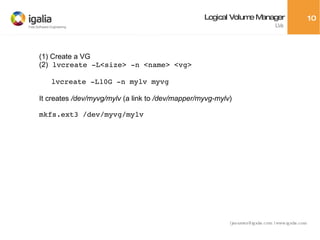
Logical Volume Manager LVs (1) Create a VG (2)  lvcreate -L<size> -n <name> <vg> lvcreate -L10G -n mylv myvg It creates  /dev/myvg/mylv  (a link to  /dev/mapper/myvg-mylv ) mkfs.ext3 /dev/myvg/mylv
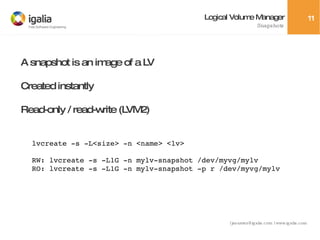
Logical Volume Manager Snapshots A snapshot is an image of a LV Created instantly Read-only / read-write (LVM2) lvcreate -s -L<size> -n <name> <lv> RW: lvcreate -s -L1G -n mylv-snapshot /dev/myvg/mylv RO: lvcreate -s -L1G -n mylv-snapshot -p r /dev/myvg/mylv
Logical Volume Manager Snapshots Snapshot is like a 'pointer' to the same data in original LV Each time data in original LV is modified (or in snapshot if it was created as RW), a copy is done previously in exception table When it becomes full it is automatically disabled
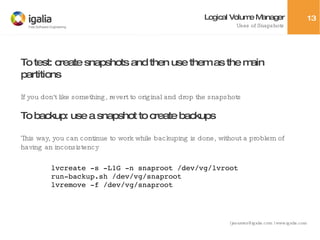
Logical Volume Manager Uses of Snapshots To test: create snapshots and then use them as the main partitions If you don't like something, revert to original and drop the snapshots To backup: use a snapshot to create backups This way, you can continue to work while backuping is done, without a problem of having an inconsistency lvcreate -s -L1G -n snaproot /dev/vg/lvroot run-backup.sh /dev/vg/snaproot lvremove -f /dev/vg/snaproot
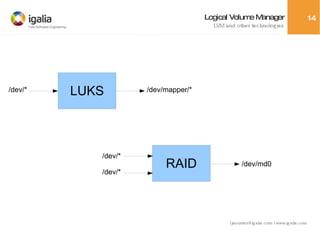
Logical Volume Manager LVM and other technologies /dev/* /dev/mapper/* /dev/* /dev/* /dev/md0 LUKS RAID
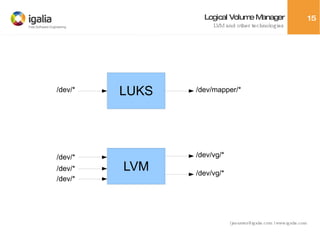
Logical Volume Manager LVM and other technologies /dev/* /dev/mapper/* /dev/* /dev/vg/* /dev/* /dev/* /dev/vg/* LUKS LVM
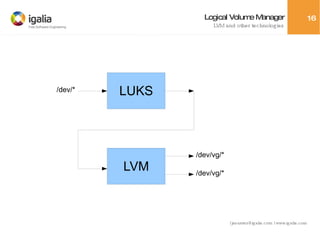
Logical Volume Manager LVM and other technologies /dev/* /dev/vg/* /dev/vg/* LUKS LVM
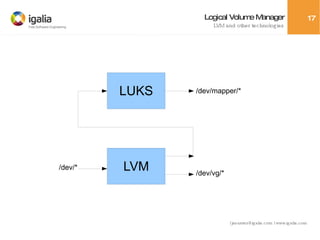
Logical Volume Manager LVM and other technologies /dev/vg/* /dev/* /dev/mapper/* LUKS LVM
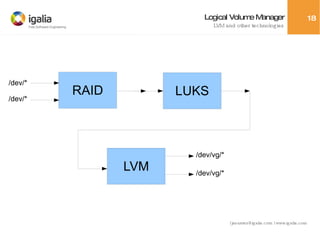
Logical Volume Manager LVM and other technologies /dev/vg/* /dev/vg/* /dev/* /dev/* LUKS LVM RAID
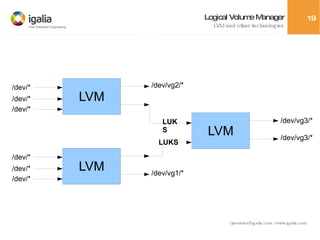
Logical Volume Manager LVM and other technologies /dev/* /dev/* /dev/* /dev/vg1/* /dev/* /dev/* /dev/* /dev/vg2/* /dev/vg3/* /dev/vg3/* LUKS LUKS LVM LVM LVM
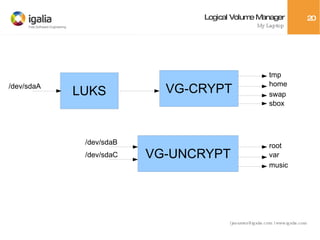
Logical Volume Manager My Laptop /dev/sdaA tmp home swap sbox root var music /dev/sdaB /dev/sdaC LUKS VG-CRYPT VG-UNCRYPT
Logical Volume Manager The End That's all, folks!

Logical Volume Manager. An Introduction

  • 1.
    Logical Volume ManagerAn Introduction
  • 2.
    Logical Volume ManagerWhat is? LVM (Logical Volume Manager) allows to manage disks in a different way: creates one or more virtual disks with virtual partitions, from physical partitions No limited by physical disk
  • 3.
    Logical Volume ManagerWhat is? LVM (Logical Volume Manager) allows to manage disks in a different way: creates one or more virtual disks with virtual partitions, from physical partitions No limited by physical disk
  • 4.
    Logical Volume ManagerConcepts Physical Volume (PV) : physical partition from real disk Volume Group (VG) : like a virtual disk Logical Volume (LV) : a partition in a Volume Group Physical Extent (PE) : like a 'cluster' in PV Logical Extent (LE) : like a 'cluster' in LV
  • 5.
    Logical Volume ManagerConcepts Create one or more VG from one or more PV, and then create LVs in each VG VG /dev/sda1 /dev/vg/lv1 /dev/sda2 /dev/vg/lv2 /dev/vg/lv3
  • 6.
    Logical Volume ManagerPVs pvcreate: creates a PV pvremove: removes a PV pvdisplay: shows information about a PV pvscan: scan all PVs in the system pvck: check a PV for errors (1) Create one or more partitions with fdisk, with type LVM (2) pvcreate /dev/<partition>
  • 7.
    Logical Volume ManagerVGs vgcreate: creates a VG vgremove: removes a VG vgextend: extend a VG with more PVs vgreduce: drops PVs from a VG vgdisplay: shows info about VG vgscan: scan for all VGs in system vgchange: change VG properties vgck, vgexport, vgmerge, vgsplit, vgrename
  • 8.
    Logical Volume ManagerVGs (1) Create one or more partitions with fdisk, with type LVM (2) pvcreate /dev/sda1 (3) pvcreate /dev/hdb2 (4) pvcreate /dev/hdc3 (5) vgcreate myvg /dev/sda1 /dev/hdb2 /dev/hdc3
  • 9.
    Logical Volume ManagerLVs lvcreate: creates a LV lvremove: removes a LV lvscan: scan for all LVs in a system lvdisplay: shows info about a LV lvrename, lvresize, lvreduce, lvchange
  • 10.
    Logical Volume ManagerLVs (1) Create a VG (2) lvcreate -L<size> -n <name> <vg> lvcreate -L10G -n mylv myvg It creates /dev/myvg/mylv (a link to /dev/mapper/myvg-mylv ) mkfs.ext3 /dev/myvg/mylv
  • 11.
    Logical Volume ManagerSnapshots A snapshot is an image of a LV Created instantly Read-only / read-write (LVM2) lvcreate -s -L<size> -n <name> <lv> RW: lvcreate -s -L1G -n mylv-snapshot /dev/myvg/mylv RO: lvcreate -s -L1G -n mylv-snapshot -p r /dev/myvg/mylv
  • 12.
    Logical Volume ManagerSnapshots Snapshot is like a 'pointer' to the same data in original LV Each time data in original LV is modified (or in snapshot if it was created as RW), a copy is done previously in exception table When it becomes full it is automatically disabled
  • 13.
    Logical Volume ManagerUses of Snapshots To test: create snapshots and then use them as the main partitions If you don't like something, revert to original and drop the snapshots To backup: use a snapshot to create backups This way, you can continue to work while backuping is done, without a problem of having an inconsistency lvcreate -s -L1G -n snaproot /dev/vg/lvroot run-backup.sh /dev/vg/snaproot lvremove -f /dev/vg/snaproot
  • 14.
    Logical Volume ManagerLVM and other technologies /dev/* /dev/mapper/* /dev/* /dev/* /dev/md0 LUKS RAID
  • 15.
    Logical Volume ManagerLVM and other technologies /dev/* /dev/mapper/* /dev/* /dev/vg/* /dev/* /dev/* /dev/vg/* LUKS LVM
  • 16.
    Logical Volume ManagerLVM and other technologies /dev/* /dev/vg/* /dev/vg/* LUKS LVM
  • 17.
    Logical Volume ManagerLVM and other technologies /dev/vg/* /dev/* /dev/mapper/* LUKS LVM
  • 18.
    Logical Volume ManagerLVM and other technologies /dev/vg/* /dev/vg/* /dev/* /dev/* LUKS LVM RAID
  • 19.
    Logical Volume ManagerLVM and other technologies /dev/* /dev/* /dev/* /dev/vg1/* /dev/* /dev/* /dev/* /dev/vg2/* /dev/vg3/* /dev/vg3/* LUKS LUKS LVM LVM LVM
  • 20.
    Logical Volume ManagerMy Laptop /dev/sdaA tmp home swap sbox root var music /dev/sdaB /dev/sdaC LUKS VG-CRYPT VG-UNCRYPT
  • 21.
    Logical Volume ManagerThe End That's all, folks!