FINDING SCHOLARLY ARTICLES
By searching the Library databases
GENERAL INFORMATION
 Peer-reviewed, juried, or scholarly articles can
  most easily be found through the Library’s
  online databases.
 You may need to broaden or narrow your
  topic to find the information you need for your
  research. A librarian can help with this.
 The Library has both general and discipline-
  specific databases. Be sure to choose the
  one(s) that best suits your topic. Again, a
  librarian is a great resource for this.
CHOOSING SEARCH TERMS
   The Library’s databases work differently than
    Google or other search engines.
     You will not get good results if you use natural
      language searching. (The electoral college should
      be eliminated; presidential elections should be
      decided by popular vote)
     Instead, you should do a keyword search.
           Do this by selecting the most important words from your
            thesis statement. (“electoral college” “popular vote”
            “presidential elections”)
              Keep phrases together by putting them in quotes, as

               above.
ADVANCED SEARCHING
(USING THE BOOLEAN TERMS AND & OR)

EXAMPLE THESIS STATEMENT:     THE ELECTORAL COLLEGE SHOULD BE ELIMINATED; PRESIDENTIAL ELECTIONS SHOULD
BE DECIDED BY POPULAR VOTE.


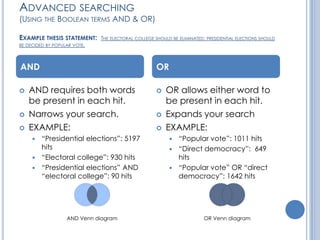
AND                                                  OR

   AND requires both words                             OR allows either word to
    be present in each hit.                              be present in each hit.
   Narrows your search.                                Expands your search
   EXAMPLE:                                            EXAMPLE:
      “Presidential elections”: 5197                      “Popular vote”: 1011 hits
       hits                                                “Direct democracy”: 649
      “Electoral college”: 930 hits                        hits
      “Presidential elections” AND                        “Popular vote” OR “direct
       “electoral college”: 90 hits                         democracy”: 1642 hits


                   AND Venn diagram                                      OR Venn diagram
   Some things to keep in mind:
       Scholarly (or peer-reviewed) journals
           Your professors will often expect you to use scholarly journal articles
            in your research.
           Most of the Library’s databases will allow you to limit your search to
            only this type of journal.
       Basic/Simple Search vs. Advanced Search
           Basic Search is best used when searching for one keyword or phrase.
           Advanced Search can be used for any type of search.
       Abstract vs. Full Text
           Not all of the articles that come up in your search will be full text.
            Many will be abstracts only.
           An abstract is a brief summary of an article, kind of like a movie
            trailer.
           Full-text means that you can access the entire article in either PDF or
            HTML format.
           If the Library only has the abstract for an article you want, we can
            get it for you from another library. Talk to a librarian about Interlibrary
            Loan.
               This usually takes at least day or two, so plan in advance.
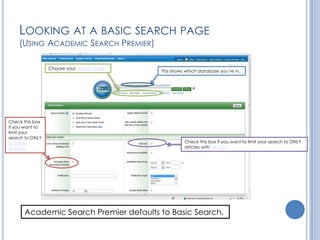
LOOKING AT A BASIC SEARCH PAGE
    (USING ACADEMIC SEARCH PREMIER)

                 Choose your search type.
                                            This shows which database you’re in.


Check this box
if you want to
limit your
search to ONLY
scholarly                                             Check this box if you want to limit your search to ONLY
articles.                                             articles with full text.


      Academic Search Premier defaults to Basic Search.
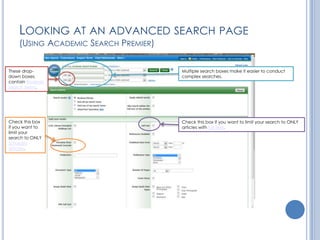
LOOKING AT AN ADVANCED SEARCH PAGE
    (USING ACADEMIC SEARCH PREMIER)

These drop-                           Multiple search boxes make it easier to conduct
down boxes                            complex searches.
contain Boolean
search terms.


Check this box                        Check this box if you want to limit your search to ONLY
if you want to                        articles with full text.
limit your
search to ONLY
scholarly
articles.
Contact the Information Desk:
                   Phone: 208-792-2236
                   Email: refdesk@lcsc.edu
                   IM: click the meebo link on our
                   homepage:
                   http://www.lcsc.edu/library/


NEED MORE HELP?
Ask a librarian!

Finding scholarly articles

  • 1.
    FINDING SCHOLARLY ARTICLES Bysearching the Library databases
  • 2.
    GENERAL INFORMATION  Peer-reviewed,juried, or scholarly articles can most easily be found through the Library’s online databases.  You may need to broaden or narrow your topic to find the information you need for your research. A librarian can help with this.  The Library has both general and discipline- specific databases. Be sure to choose the one(s) that best suits your topic. Again, a librarian is a great resource for this.
  • 3.
    CHOOSING SEARCH TERMS  The Library’s databases work differently than Google or other search engines.  You will not get good results if you use natural language searching. (The electoral college should be eliminated; presidential elections should be decided by popular vote)  Instead, you should do a keyword search.  Do this by selecting the most important words from your thesis statement. (“electoral college” “popular vote” “presidential elections”)  Keep phrases together by putting them in quotes, as above.
  • 4.
    ADVANCED SEARCHING (USING THEBOOLEAN TERMS AND & OR) EXAMPLE THESIS STATEMENT: THE ELECTORAL COLLEGE SHOULD BE ELIMINATED; PRESIDENTIAL ELECTIONS SHOULD BE DECIDED BY POPULAR VOTE. AND OR  AND requires both words  OR allows either word to be present in each hit. be present in each hit.  Narrows your search.  Expands your search  EXAMPLE:  EXAMPLE:  “Presidential elections”: 5197  “Popular vote”: 1011 hits hits  “Direct democracy”: 649  “Electoral college”: 930 hits hits  “Presidential elections” AND  “Popular vote” OR “direct “electoral college”: 90 hits democracy”: 1642 hits AND Venn diagram OR Venn diagram
  • 5.
    Some things to keep in mind:  Scholarly (or peer-reviewed) journals  Your professors will often expect you to use scholarly journal articles in your research.  Most of the Library’s databases will allow you to limit your search to only this type of journal.  Basic/Simple Search vs. Advanced Search  Basic Search is best used when searching for one keyword or phrase.  Advanced Search can be used for any type of search.  Abstract vs. Full Text  Not all of the articles that come up in your search will be full text. Many will be abstracts only.  An abstract is a brief summary of an article, kind of like a movie trailer.  Full-text means that you can access the entire article in either PDF or HTML format.  If the Library only has the abstract for an article you want, we can get it for you from another library. Talk to a librarian about Interlibrary Loan.  This usually takes at least day or two, so plan in advance.
  • 6.
    LOOKING AT ABASIC SEARCH PAGE (USING ACADEMIC SEARCH PREMIER) Choose your search type. This shows which database you’re in. Check this box if you want to limit your search to ONLY scholarly Check this box if you want to limit your search to ONLY articles. articles with full text. Academic Search Premier defaults to Basic Search.
  • 7.
    LOOKING AT ANADVANCED SEARCH PAGE (USING ACADEMIC SEARCH PREMIER) These drop- Multiple search boxes make it easier to conduct down boxes complex searches. contain Boolean search terms. Check this box Check this box if you want to limit your search to ONLY if you want to articles with full text. limit your search to ONLY scholarly articles.
  • 8.
    Contact the InformationDesk: Phone: 208-792-2236 Email: refdesk@lcsc.edu IM: click the meebo link on our homepage: http://www.lcsc.edu/library/ NEED MORE HELP? Ask a librarian!