Internet and World Wide Web
By:
Dr. Poonam Panwar
Associate Professor
Faculty of Agriculture
MM(DU), Mullana, Ambala, Haryana
Internet
• The Internet is a giant network of networks.
• A network may include PCs, and other devices like servers or printers.
• A network is connected through a communication channel.
• Early research was performed by the US Department of Defense in 1962.
This research group established ARPAnet (Advanced Research Project
Agency) in order to connect the US Defense Department network.
2
What did the Internet come from?
• Original aim was to create a network that would allow users of a research computer
at one university to be able to ‘talk to’ research computers at other universities.
• A side benefit of ARPAnet’s design was that, because messages could be routed or
rerouted in more than one direction, the network could continue to function even if
parts of it were destroyed in the event of a military attack or other disaster.
• The users of the Internet took a direction of their own.
• The first long distance communication took place in 1965 between a computer in
MIT and California.
• In 1969, four computers clients were connected together via ARPAnet.
05/06/23 By: Dr. Poonam Panwar 3
The Internet
The simplest
definition
of the
Internet is
that it's a
network of
computer
networks
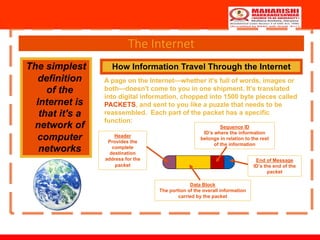
How Information Travel Through the Internet
A page on the Internet—whether it's full of words, images or
both—doesn't come to you in one shipment. It's translated
into digital information, chopped into 1500 byte pieces called
PACKETS, and sent to you like a puzzle that needs to be
reassembled. Each part of the packet has a specific
function:
Header
Provides the
complete
destination
address for the
packet
Data Block
The portion of the overall information
carried by the packet
Sequence ID
ID’s where the information
belongs in relation to the rest
of the information
End of Message
ID’s the end of the
packet
The Internet
How Information Travel Through the Internet
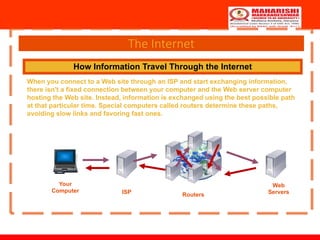
When you connect to a Web site through an ISP and start exchanging information,
there isn't a fixed connection between your computer and the Web server computer
hosting the Web site. Instead, information is exchanged using the best possible path
at that particular time. Special computers called routers determine these paths,
avoiding slow links and favoring fast ones.
Your
Computer ISP Routers
Web
Servers
History of Internet
• Leonard Kleinrock is accredited with the idea of packet switching, which describes how data can be
sent across a network. The Ethernet was developed by Xerox during this period. This was inspired
by Robert Metcalfe’s PhD on ‘packet networks’.
• An Ethernet is a protocol for describing how computers can be connected in a LAN (Local Area
network).
• Through the use of Ethernet and ARPAnet the US were able to develop a working network.
• In the late 1970s and early 1980s other networks were developed, e.g. CSNET, USNET and
• BITNET. In 1973 Vint Cerf and Bob Kahn created the TCP/IP communication protocols.
• TCP/IP: Transfer Control Protocol/Internet Protocol is a set of rules that describe how computers
can communicate over a network.
• To send information over the Internet, a computer packs data into Internet Protocol (IP) packets and
labels them with the correct address. They are then sent across a packet switched interconnected
network.
6
Applications of Internet
• Communication
• Job search
• Online Shopping
• Stock market updates
• Travel
• Research
• Video Conferencing
• E-Commerce
• On-line payments
• Social networking
05/06/23 By: Dr. Poonam Panwar 7
Communication
• Computer users around the world extensively use the email service on
internet to communicate with each other. Pictures, documents and other
files are sent as email attachments. Emails can be cc-ed to multiple email
addresses
• Internet telephony is another common communications service made
possible by the creation of the Internet. VoIP stands for Voice-over-Internet
Protocol, referring to the protocol that underlies all Internet
communication.
05/06/23 By: Dr. Poonam Panwar 8
Job Search
Nowadays, many people search for their jobs online as it is quicker and there
is a larger variety of job vacancies present. People can publish resume online
for prospective job. Some of the web sites providing this service are
naukri.com, monster.com, summerjob.com, recuritmentindia.com etc.
05/06/23 By: Dr. Poonam Panwar 9
Online Shopping
The internet has also facilitated the introduction of a new market concept
consisting of virtual shops. They provide information about products or
services for sale through www servers. Using the internet services customers
can submit specific product queries and request specific sales quotes. For
example amazon.com is a www based bookshop on the internet where
information on all types of international books can be found and books can be
ordered online.
05/06/23 By: Dr. Poonam Panwar 10
Stock market updates
You can sell or buy shares while sitting on computer through internet. Several
websites like ndtvprofit.com, moneypore.com, provide information regarding
investment
05/06/23 By: Dr. Poonam Panwar 11
Travel
One can use internet to gather information about various tourist place . it can
be used forbooking Holiday tours , hotels, train,bus, flights and cabs. Some of
the web sites providing this service are goibibo.com, makemytrip.com,
olacabs.com.
05/06/23 By: Dr. Poonam Panwar 12
Research
Research papers are present online which helps in the
researcher doing a literature review.
05/06/23 By: Dr. Poonam Panwar 13
Video Conferencing
• It enables direct face-to-face communication across networks via web
cameras, microphones, and other communication tools. Video conferencing
can enable individuals in distant locations to participate in meetings on
short notice, with time and money savings.
• The technology is also used for telecommuting, in which employees work
from home. When video Conferencing is used in education, it is easier to
have interactive communications between teacher to teacher, teacher to
classroom, or classroom to classroom with students in different places.
05/06/23 By: Dr. Poonam Panwar 14
E-Commerce
E–commerce (electronic commerce or EC) is the buying and selling of goods
and services, or the transmitting of funds or data, over an electronic network,
primarily the Internet. These business transactions occur either business-to-
business, business-to-consumer, consumer-to-consumer or consumer-to-
business. Largest e-commerce companies in India are Flipkart, Snapdeal,
Amazon India, Paytm.
05/06/23 By: Dr. Poonam Panwar 15
On-line Payments
The rising boom of online payments in India has given way to many new
entrants in the industry such as Paytm, Mobikwik, oxigen etc who are majorly
wallet driven payment companies. this growth has been driven by rapid
adoption led by the increasing use of smartphones, tablets and speedy access to
internet through broadband, 3G etc
05/06/23 By: Dr. Poonam Panwar 16
Social Networking
Social networking is the use of internet-based social media programs to make
connections with friends, family, classmates, customers and clients. Social
networking can be done for social purposes, business purposes or both. The
programs show the associations between individuals and facilitate the
acquisition of new contacts. Examples of social networking have included
Facebook, LinkedIn, Classmates.com and Yelp.
05/06/23 By: Dr. Poonam Panwar 17
World Wide Web
World Wide Web, which is also known as a Web, is a collection of websites or
web pages stored in web servers and connected to local computers through the
internet. These websites contain text pages, digital images, audios, videos, etc.
Users can access the content of these sites from any part of the world over the
internet using their devices such as computers, laptops, cell phones, etc. The
WWW, along with internet, enables the retrieval and display of text and media
to your device.
05/06/23 By: Dr. Poonam Panwar 18
World Wide Web
• The building blocks of the Web are web pages which are formatted in HTML and connected
by links called "hypertext" or hyperlinks and accessed by HTTP. These links are electronic
connections that link related pieces of information so that users can access the desired
information quickly. Hypertext offers the advantage to select a word or phrase from text and
thus to access other pages that provide additional information related to that word or phrase.
• A web page is given an online address called a Uniform Resource Locator (URL). A
particular collection of web pages that belong to a specific URL is called a website,
e.g., www.facebook.com, www.google.com, etc. So, the World Wide Web is like a huge
electronic book whose pages are stored on multiple servers across the world.
• Small websites store all of their WebPages on a single server, but big websites or
organizations place their WebPages on different servers in different countries so that when
users of a country search their site they could get the information quickly from the nearest
server.
• So, the web provides a communication platform for users to retrieve and exchange
information over the internet. Unlike a book, where we move from one page to another in a
sequence, on World Wide Web we follow a web of hypertext links to visit a web page and
from that web page to move to other web pages. You need a browser, which is installed on
your computer, to access the Web.
05/06/23 By: Dr. Poonam Panwar 19
Difference between World Wide Web and
Internet
• Some people use the terms 'internet' and 'World Wide Web' interchangeably. They
think they are the same thing, but it is not so. Internet is entirely different from WWW.
It is a worldwide network of devices like computers, laptops, tablets, etc. It enables
users to send emails to other users and chat with them online. For example, when you
send an email or chatting with someone online, you are using the internet.
• But, when you have opened a website like google.com for information, you are using
the World Wide Web; a network of servers over the internet. You request a webpage
from your computer using a browser, and the server renders that page to your browser.
Your computer is called a client who runs a program (web browser), and asks the other
computer (server) for the information it needs.
05/06/23 By: Dr. Poonam Panwar 20
History of the World Wide Web
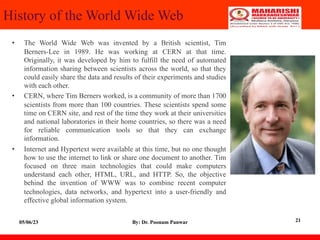
• The World Wide Web was invented by a British scientist, Tim
Berners-Lee in 1989. He was working at CERN at that time.
Originally, it was developed by him to fulfill the need of automated
information sharing between scientists across the world, so that they
could easily share the data and results of their experiments and studies
with each other.
• CERN, where Tim Berners worked, is a community of more than 1700
scientists from more than 100 countries. These scientists spend some
time on CERN site, and rest of the time they work at their universities
and national laboratories in their home countries, so there was a need
for reliable communication tools so that they can exchange
information.
• Internet and Hypertext were available at this time, but no one thought
how to use the internet to link or share one document to another. Tim
focused on three main technologies that could make computers
understand each other, HTML, URL, and HTTP. So, the objective
behind the invention of WWW was to combine recent computer
technologies, data networks, and hypertext into a user-friendly and
effective global information system.
05/06/23 By: Dr. Poonam Panwar 21
How the World Wide Web Works?
• Now, we have understood that WWW is a collection of websites connected
to the internet so that people can search and share information. Now, let us
understand how it works!
• The Web works as per the internet's basic client-server format as shown in
the following image. The servers store and transfer web pages or information
to user's computers on the network when requested by the users. A web
server is a software program which serves the web pages requested by web
users using a browser. The computer of a user who requests documents from
a server is known as a client. Browser, which is installed on the user'
computer, allows users to view the retrieved documents.
05/06/23 By: Dr. Poonam Panwar 22
How the World Wide Web Works?
05/06/23 By: Dr. Poonam Panwar 23
How the World Wide Web Works?
05/06/23 By: Dr. Poonam Panwar 24
How the World Wide Web Works?
• All the websites are stored in web servers. Just as someone lives on rent in
a house, a website occupies a space in a server and remains stored in it. The
server hosts the website whenever a user requests its WebPages, and the
website owner has to pay the hosting price for the same.
• The moment you open the browser and type a URL in the address bar or
search something on Google, the WWW starts working. There are three
main technologies involved in transferring information (web pages) from
servers to clients (computers of users). These technologies include
Hypertext Markup Language (HTML), Hypertext Transfer Protocol
(HTTP) and Web browsers.
05/06/23 By: Dr. Poonam Panwar 25
Hypertext Markup Language (HTML)
HTML is a standard markup language which is
used for creating web pages. It describes the
structure of web pages through HTML elements
or tags. These tags are used to organize the pieces
of content such as 'heading,' 'paragraph,' 'table,'
'Image,' and more. You don't see HTML tags
when you open a webpage as browsers don't
display the tags and use them only to render the
content of a web page. In simple words, HTML is
used to display text, images, and other resources
through a Web browser.
05/06/23 By: Dr. Poonam Panwar 26
Web Browser
• A web browser, which is commonly known as a browser, is a program that
displays text, data, pictures, videos, animation, and more. It provides a
software interface that allows you to click hyperlinked resources on the
World Wide Web. When you double click the Browser icon installed on
your computer to launch it, you get connected to the World Wide Web and
can search Google or type a URL into the address bar.
• In the beginning, browsers were used only for browsing due to their limited
potential. Today, they are more advanced; along with browsing you can use
them for e-mailing, transferring multimedia files, using social media sites,
and participating in online discussion groups and more. Some of the
commonly used browsers include Google Chrome, Mozilla Firefox,
Internet Explorer, Safari, and more.
05/06/23 By: Dr. Poonam Panwar 27
Hypertext Transfer Protocol (HTTP)
• Hyper Text Transfer Protocol (HTTP) is an application layer protocol which enables
WWW to work smoothly and effectively. It is based on a client-server model. The
client is a web browser which communicates with the web server which hosts the
website. This protocol defines how messages are formatted and transmitted and what
actions the Web Server and browser should take in response to different commands.
When you enter a URL in the browser, an HTTP command is sent to the Web server,
and it transmits the requested Web Page.
• When we open a website using a browser, a connection to the web server is opened,
and the browser communicates with the server through HTTP and sends a request.
HTTP is carried over TCP/IP to communicate with the server. The server processes
the browser's request and sends a response, and then the connection is closed. Thus,
the browser retrieves content from the server for the user.
05/06/23 By: Dr. Poonam Panwar 28
Search Engine
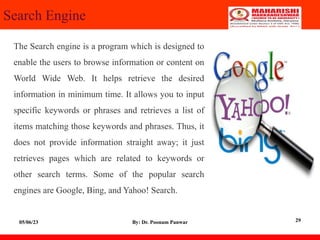
The Search engine is a program which is designed to
enable the users to browse information or content on
World Wide Web. It helps retrieve the desired
information in minimum time. It allows you to input
specific keywords or phrases and retrieves a list of
items matching those keywords and phrases. Thus, it
does not provide information straight away; it just
retrieves pages which are related to keywords or
other search terms. Some of the popular search
engines are Google, Bing, and Yahoo! Search.
05/06/23 By: Dr. Poonam Panwar 29
Portal
Portal is a private location on the internet
which acts as a point of access to the
information available on the World Wide
Web. A portal is accessed through a
unique URL, unique username and
password, i.e. apart from URL, personal
login is required to see the content on a
portal. Some of the popular portals are
facebook.com, gmail.com and
twitter.com.
05/06/23 By: Dr. Poonam Panwar 30
Understanding URL
• Every document on the Web has a unique address. This address is
known as Uniform Resource Locator (URL).
• Several HTML/XHTML tags include a URL attribute value,
including hyperlinks, inline images, and forms. All of them use the
same syntax to specify the location of a web resource, regardless of
the type or content of that resource. That's why it is known a
Uniform Resource Locator.
05/06/23 By: Dr. Poonam Panwar 31
URL Elements
A URL is made of up several parts, each of which offers information to
the web browser to help find the page. It is easier to learn the parts of a
URL, if you look at the example URL given below, there are three key
parts: the scheme, the host address, and the file path. The following
section will discuss each of them:
http://www.tutorialspoint.com/index.htm
05/06/23 By: Dr. Poonam Panwar 32
The Scheme
• The scheme identifies the type of protocol
and URL you are linking to and therefore,
how the resource should be retrieved. For
example, most web browsers use
Hypertext Transfer Protocol (HTTP) to
pass information to communicate with the
web servers and this is the reason a URL
starts with http://.
• There are other schemes available and you
can use either of them based on your
requirement.
05/06/23 By: Dr. Poonam Panwar 33
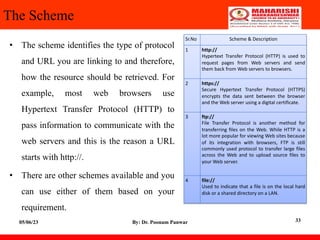
Sr.No Scheme & Description
1 http://
Hypertext Transfer Protocol (HTTP) is used to
request pages from Web servers and send
them back from Web servers to browsers.
2 https://
Secure Hypertext Transfer Protocol (HTTPS)
encrypts the data sent between the browser
and the Web server using a digital certificate.
3 ftp://
File Transfer Protocol is another method for
transferring files on the Web. While HTTP is a
lot more popular for viewing Web sites because
of its integration with browsers, FTP is still
commonly used protocol to transfer large files
across the Web and to upload source files to
your Web server.
4 file://
Used to indicate that a file is on the local hard
disk or a shared directory on a LAN.
The Host Address
The host address is where a website can be found, either the IP address (four
sets of numbers between 0 and 255, for example 68.178.157.132 ) or more
commonly the domain name for a site such as www.tutorialspoint.com. Note
that "www" is not actually part of the domain name although it is often used in
the host address.
05/06/23 By: Dr. Poonam Panwar 34
The File Path
The filepath always begins with a forward slash character, and may
consist of one or more directory or folder names. Each directory name
is separated by forward slash characters and the filepath may end with a
filename at the end. Here index.htm is the filename which is available
in html directory:
https://www.tutorialspoint.com/html/index.htm
05/06/23 By: Dr. Poonam Panwar 35
Other Parts of the URL
• Using credentials is a way of specifying a username and password for a password-
protected part of a site. The credentials come before the host address, and they are
separated from the host address by an @ sign. Note how the username is separated
from the password by a colon. The following URL shows the username admin and
the password admin123:
• https://admin:admin123@tutorialspoint.com/admin/index.htm Using the above
URL, you can authenticate administrator and if provided ID and Password are
correct then administrator will have access on index.htm file available in admin
directory.
• You can use a telnet URL to connect to a server as follows :
• telnet://user:password@tutorialspoint.com:port/ Another important information is
Web Server Port Number. By default HTTP Server runs on port number 80. But if
you are running a server on any other port number then it can be porvided as
follows, assuming server is running on port 8080:
• https://www.tutorialspoint.com:8080/index.htm
05/06/23 By: Dr. Poonam Panwar 36
• Fragment identifiers can be used after a filename to indicate a specific part of the
page that a browser should go immediately. Following is an example to reach to the
top of page html_text_links.htm.
• https://www.tutorialspoint.com/html/html_text_links.htm#top You can pass some
information to the server using URL. When you use a form on a webpage, such as a
search form or an online order form, the browser can append the information you
supply to the URL to pass information from your browser to the server as follows −
• https://www.tutorialspoint.com/cgi-bin/search.cgi?searchTerm=HTML
Here, searchTerm=HTML is passed to the server where search.cgi script is used to
parse this passed information and take further action.
05/06/23 By: Dr. Poonam Panwar 37
Absolute and Relative URLs
• You may address a URL in one of the following two ways:
• Absolute − An absolute URL is the complete address of a resource.
For example
http://www.tutorialspoint.com/html/html_text_links.htm
• Relative − A relative URL indicates where the resource is in relation
to the current page. Given URL is added with the <base> element to
form a complete URL. For example /html/html_text_links.htm
05/06/23 By: Dr. Poonam Panwar 38
Reserved and Unsafe Characters
• Reserved characters are those have a specific meaning within the URL.
For example, the slash character separates elements of a pathname
within a URL. If you need to include a slash in a URL that is not
intended to be an element separator then you need to encode it as
%2F:
• Unsafe characters are those have no special meaning within the URL
but may have a special meaning in the context the URL is written. For
example, double quotes ("") delimit URL attribute values in tags. If you
need to include a double quotation mark directly in a URL, you would
probably confuse the browser. Instead, you should encode the double
quotation mark to avoid any possible conflict.
05/06/23 By: Dr. Poonam Panwar 39
Thank You
05/06/23 By: Dr. Poonam Panwar 40

8_Internet.pdf

  • 1.
    Internet and WorldWide Web By: Dr. Poonam Panwar Associate Professor Faculty of Agriculture MM(DU), Mullana, Ambala, Haryana
  • 2.
    Internet • The Internetis a giant network of networks. • A network may include PCs, and other devices like servers or printers. • A network is connected through a communication channel. • Early research was performed by the US Department of Defense in 1962. This research group established ARPAnet (Advanced Research Project Agency) in order to connect the US Defense Department network. 2
  • 3.
    What did theInternet come from? • Original aim was to create a network that would allow users of a research computer at one university to be able to ‘talk to’ research computers at other universities. • A side benefit of ARPAnet’s design was that, because messages could be routed or rerouted in more than one direction, the network could continue to function even if parts of it were destroyed in the event of a military attack or other disaster. • The users of the Internet took a direction of their own. • The first long distance communication took place in 1965 between a computer in MIT and California. • In 1969, four computers clients were connected together via ARPAnet. 05/06/23 By: Dr. Poonam Panwar 3
  • 4.
    The Internet The simplest definition ofthe Internet is that it's a network of computer networks How Information Travel Through the Internet A page on the Internet—whether it's full of words, images or both—doesn't come to you in one shipment. It's translated into digital information, chopped into 1500 byte pieces called PACKETS, and sent to you like a puzzle that needs to be reassembled. Each part of the packet has a specific function: Header Provides the complete destination address for the packet Data Block The portion of the overall information carried by the packet Sequence ID ID’s where the information belongs in relation to the rest of the information End of Message ID’s the end of the packet
  • 5.
    The Internet How InformationTravel Through the Internet When you connect to a Web site through an ISP and start exchanging information, there isn't a fixed connection between your computer and the Web server computer hosting the Web site. Instead, information is exchanged using the best possible path at that particular time. Special computers called routers determine these paths, avoiding slow links and favoring fast ones. Your Computer ISP Routers Web Servers
  • 6.
    History of Internet •Leonard Kleinrock is accredited with the idea of packet switching, which describes how data can be sent across a network. The Ethernet was developed by Xerox during this period. This was inspired by Robert Metcalfe’s PhD on ‘packet networks’. • An Ethernet is a protocol for describing how computers can be connected in a LAN (Local Area network). • Through the use of Ethernet and ARPAnet the US were able to develop a working network. • In the late 1970s and early 1980s other networks were developed, e.g. CSNET, USNET and • BITNET. In 1973 Vint Cerf and Bob Kahn created the TCP/IP communication protocols. • TCP/IP: Transfer Control Protocol/Internet Protocol is a set of rules that describe how computers can communicate over a network. • To send information over the Internet, a computer packs data into Internet Protocol (IP) packets and labels them with the correct address. They are then sent across a packet switched interconnected network. 6
  • 7.
    Applications of Internet •Communication • Job search • Online Shopping • Stock market updates • Travel • Research • Video Conferencing • E-Commerce • On-line payments • Social networking 05/06/23 By: Dr. Poonam Panwar 7
  • 8.
    Communication • Computer usersaround the world extensively use the email service on internet to communicate with each other. Pictures, documents and other files are sent as email attachments. Emails can be cc-ed to multiple email addresses • Internet telephony is another common communications service made possible by the creation of the Internet. VoIP stands for Voice-over-Internet Protocol, referring to the protocol that underlies all Internet communication. 05/06/23 By: Dr. Poonam Panwar 8
  • 9.
    Job Search Nowadays, manypeople search for their jobs online as it is quicker and there is a larger variety of job vacancies present. People can publish resume online for prospective job. Some of the web sites providing this service are naukri.com, monster.com, summerjob.com, recuritmentindia.com etc. 05/06/23 By: Dr. Poonam Panwar 9
  • 10.
    Online Shopping The internethas also facilitated the introduction of a new market concept consisting of virtual shops. They provide information about products or services for sale through www servers. Using the internet services customers can submit specific product queries and request specific sales quotes. For example amazon.com is a www based bookshop on the internet where information on all types of international books can be found and books can be ordered online. 05/06/23 By: Dr. Poonam Panwar 10
  • 11.
    Stock market updates Youcan sell or buy shares while sitting on computer through internet. Several websites like ndtvprofit.com, moneypore.com, provide information regarding investment 05/06/23 By: Dr. Poonam Panwar 11
  • 12.
    Travel One can useinternet to gather information about various tourist place . it can be used forbooking Holiday tours , hotels, train,bus, flights and cabs. Some of the web sites providing this service are goibibo.com, makemytrip.com, olacabs.com. 05/06/23 By: Dr. Poonam Panwar 12
  • 13.
    Research Research papers arepresent online which helps in the researcher doing a literature review. 05/06/23 By: Dr. Poonam Panwar 13
  • 14.
    Video Conferencing • Itenables direct face-to-face communication across networks via web cameras, microphones, and other communication tools. Video conferencing can enable individuals in distant locations to participate in meetings on short notice, with time and money savings. • The technology is also used for telecommuting, in which employees work from home. When video Conferencing is used in education, it is easier to have interactive communications between teacher to teacher, teacher to classroom, or classroom to classroom with students in different places. 05/06/23 By: Dr. Poonam Panwar 14
  • 15.
    E-Commerce E–commerce (electronic commerceor EC) is the buying and selling of goods and services, or the transmitting of funds or data, over an electronic network, primarily the Internet. These business transactions occur either business-to- business, business-to-consumer, consumer-to-consumer or consumer-to- business. Largest e-commerce companies in India are Flipkart, Snapdeal, Amazon India, Paytm. 05/06/23 By: Dr. Poonam Panwar 15
  • 16.
    On-line Payments The risingboom of online payments in India has given way to many new entrants in the industry such as Paytm, Mobikwik, oxigen etc who are majorly wallet driven payment companies. this growth has been driven by rapid adoption led by the increasing use of smartphones, tablets and speedy access to internet through broadband, 3G etc 05/06/23 By: Dr. Poonam Panwar 16
  • 17.
    Social Networking Social networkingis the use of internet-based social media programs to make connections with friends, family, classmates, customers and clients. Social networking can be done for social purposes, business purposes or both. The programs show the associations between individuals and facilitate the acquisition of new contacts. Examples of social networking have included Facebook, LinkedIn, Classmates.com and Yelp. 05/06/23 By: Dr. Poonam Panwar 17
  • 18.
    World Wide Web WorldWide Web, which is also known as a Web, is a collection of websites or web pages stored in web servers and connected to local computers through the internet. These websites contain text pages, digital images, audios, videos, etc. Users can access the content of these sites from any part of the world over the internet using their devices such as computers, laptops, cell phones, etc. The WWW, along with internet, enables the retrieval and display of text and media to your device. 05/06/23 By: Dr. Poonam Panwar 18
  • 19.
    World Wide Web •The building blocks of the Web are web pages which are formatted in HTML and connected by links called "hypertext" or hyperlinks and accessed by HTTP. These links are electronic connections that link related pieces of information so that users can access the desired information quickly. Hypertext offers the advantage to select a word or phrase from text and thus to access other pages that provide additional information related to that word or phrase. • A web page is given an online address called a Uniform Resource Locator (URL). A particular collection of web pages that belong to a specific URL is called a website, e.g., www.facebook.com, www.google.com, etc. So, the World Wide Web is like a huge electronic book whose pages are stored on multiple servers across the world. • Small websites store all of their WebPages on a single server, but big websites or organizations place their WebPages on different servers in different countries so that when users of a country search their site they could get the information quickly from the nearest server. • So, the web provides a communication platform for users to retrieve and exchange information over the internet. Unlike a book, where we move from one page to another in a sequence, on World Wide Web we follow a web of hypertext links to visit a web page and from that web page to move to other web pages. You need a browser, which is installed on your computer, to access the Web. 05/06/23 By: Dr. Poonam Panwar 19
  • 20.
    Difference between WorldWide Web and Internet • Some people use the terms 'internet' and 'World Wide Web' interchangeably. They think they are the same thing, but it is not so. Internet is entirely different from WWW. It is a worldwide network of devices like computers, laptops, tablets, etc. It enables users to send emails to other users and chat with them online. For example, when you send an email or chatting with someone online, you are using the internet. • But, when you have opened a website like google.com for information, you are using the World Wide Web; a network of servers over the internet. You request a webpage from your computer using a browser, and the server renders that page to your browser. Your computer is called a client who runs a program (web browser), and asks the other computer (server) for the information it needs. 05/06/23 By: Dr. Poonam Panwar 20
  • 21.
    History of theWorld Wide Web • The World Wide Web was invented by a British scientist, Tim Berners-Lee in 1989. He was working at CERN at that time. Originally, it was developed by him to fulfill the need of automated information sharing between scientists across the world, so that they could easily share the data and results of their experiments and studies with each other. • CERN, where Tim Berners worked, is a community of more than 1700 scientists from more than 100 countries. These scientists spend some time on CERN site, and rest of the time they work at their universities and national laboratories in their home countries, so there was a need for reliable communication tools so that they can exchange information. • Internet and Hypertext were available at this time, but no one thought how to use the internet to link or share one document to another. Tim focused on three main technologies that could make computers understand each other, HTML, URL, and HTTP. So, the objective behind the invention of WWW was to combine recent computer technologies, data networks, and hypertext into a user-friendly and effective global information system. 05/06/23 By: Dr. Poonam Panwar 21
  • 22.
    How the WorldWide Web Works? • Now, we have understood that WWW is a collection of websites connected to the internet so that people can search and share information. Now, let us understand how it works! • The Web works as per the internet's basic client-server format as shown in the following image. The servers store and transfer web pages or information to user's computers on the network when requested by the users. A web server is a software program which serves the web pages requested by web users using a browser. The computer of a user who requests documents from a server is known as a client. Browser, which is installed on the user' computer, allows users to view the retrieved documents. 05/06/23 By: Dr. Poonam Panwar 22
  • 23.
    How the WorldWide Web Works? 05/06/23 By: Dr. Poonam Panwar 23
  • 24.
    How the WorldWide Web Works? 05/06/23 By: Dr. Poonam Panwar 24
  • 25.
    How the WorldWide Web Works? • All the websites are stored in web servers. Just as someone lives on rent in a house, a website occupies a space in a server and remains stored in it. The server hosts the website whenever a user requests its WebPages, and the website owner has to pay the hosting price for the same. • The moment you open the browser and type a URL in the address bar or search something on Google, the WWW starts working. There are three main technologies involved in transferring information (web pages) from servers to clients (computers of users). These technologies include Hypertext Markup Language (HTML), Hypertext Transfer Protocol (HTTP) and Web browsers. 05/06/23 By: Dr. Poonam Panwar 25
  • 26.
    Hypertext Markup Language(HTML) HTML is a standard markup language which is used for creating web pages. It describes the structure of web pages through HTML elements or tags. These tags are used to organize the pieces of content such as 'heading,' 'paragraph,' 'table,' 'Image,' and more. You don't see HTML tags when you open a webpage as browsers don't display the tags and use them only to render the content of a web page. In simple words, HTML is used to display text, images, and other resources through a Web browser. 05/06/23 By: Dr. Poonam Panwar 26
  • 27.
    Web Browser • Aweb browser, which is commonly known as a browser, is a program that displays text, data, pictures, videos, animation, and more. It provides a software interface that allows you to click hyperlinked resources on the World Wide Web. When you double click the Browser icon installed on your computer to launch it, you get connected to the World Wide Web and can search Google or type a URL into the address bar. • In the beginning, browsers were used only for browsing due to their limited potential. Today, they are more advanced; along with browsing you can use them for e-mailing, transferring multimedia files, using social media sites, and participating in online discussion groups and more. Some of the commonly used browsers include Google Chrome, Mozilla Firefox, Internet Explorer, Safari, and more. 05/06/23 By: Dr. Poonam Panwar 27
  • 28.
    Hypertext Transfer Protocol(HTTP) • Hyper Text Transfer Protocol (HTTP) is an application layer protocol which enables WWW to work smoothly and effectively. It is based on a client-server model. The client is a web browser which communicates with the web server which hosts the website. This protocol defines how messages are formatted and transmitted and what actions the Web Server and browser should take in response to different commands. When you enter a URL in the browser, an HTTP command is sent to the Web server, and it transmits the requested Web Page. • When we open a website using a browser, a connection to the web server is opened, and the browser communicates with the server through HTTP and sends a request. HTTP is carried over TCP/IP to communicate with the server. The server processes the browser's request and sends a response, and then the connection is closed. Thus, the browser retrieves content from the server for the user. 05/06/23 By: Dr. Poonam Panwar 28
  • 29.
    Search Engine The Searchengine is a program which is designed to enable the users to browse information or content on World Wide Web. It helps retrieve the desired information in minimum time. It allows you to input specific keywords or phrases and retrieves a list of items matching those keywords and phrases. Thus, it does not provide information straight away; it just retrieves pages which are related to keywords or other search terms. Some of the popular search engines are Google, Bing, and Yahoo! Search. 05/06/23 By: Dr. Poonam Panwar 29
  • 30.
    Portal Portal is aprivate location on the internet which acts as a point of access to the information available on the World Wide Web. A portal is accessed through a unique URL, unique username and password, i.e. apart from URL, personal login is required to see the content on a portal. Some of the popular portals are facebook.com, gmail.com and twitter.com. 05/06/23 By: Dr. Poonam Panwar 30
  • 31.
    Understanding URL • Everydocument on the Web has a unique address. This address is known as Uniform Resource Locator (URL). • Several HTML/XHTML tags include a URL attribute value, including hyperlinks, inline images, and forms. All of them use the same syntax to specify the location of a web resource, regardless of the type or content of that resource. That's why it is known a Uniform Resource Locator. 05/06/23 By: Dr. Poonam Panwar 31
  • 32.
    URL Elements A URLis made of up several parts, each of which offers information to the web browser to help find the page. It is easier to learn the parts of a URL, if you look at the example URL given below, there are three key parts: the scheme, the host address, and the file path. The following section will discuss each of them: http://www.tutorialspoint.com/index.htm 05/06/23 By: Dr. Poonam Panwar 32
  • 33.
    The Scheme • Thescheme identifies the type of protocol and URL you are linking to and therefore, how the resource should be retrieved. For example, most web browsers use Hypertext Transfer Protocol (HTTP) to pass information to communicate with the web servers and this is the reason a URL starts with http://. • There are other schemes available and you can use either of them based on your requirement. 05/06/23 By: Dr. Poonam Panwar 33 Sr.No Scheme & Description 1 http:// Hypertext Transfer Protocol (HTTP) is used to request pages from Web servers and send them back from Web servers to browsers. 2 https:// Secure Hypertext Transfer Protocol (HTTPS) encrypts the data sent between the browser and the Web server using a digital certificate. 3 ftp:// File Transfer Protocol is another method for transferring files on the Web. While HTTP is a lot more popular for viewing Web sites because of its integration with browsers, FTP is still commonly used protocol to transfer large files across the Web and to upload source files to your Web server. 4 file:// Used to indicate that a file is on the local hard disk or a shared directory on a LAN.
  • 34.
    The Host Address Thehost address is where a website can be found, either the IP address (four sets of numbers between 0 and 255, for example 68.178.157.132 ) or more commonly the domain name for a site such as www.tutorialspoint.com. Note that "www" is not actually part of the domain name although it is often used in the host address. 05/06/23 By: Dr. Poonam Panwar 34
  • 35.
    The File Path Thefilepath always begins with a forward slash character, and may consist of one or more directory or folder names. Each directory name is separated by forward slash characters and the filepath may end with a filename at the end. Here index.htm is the filename which is available in html directory: https://www.tutorialspoint.com/html/index.htm 05/06/23 By: Dr. Poonam Panwar 35
  • 36.
    Other Parts ofthe URL • Using credentials is a way of specifying a username and password for a password- protected part of a site. The credentials come before the host address, and they are separated from the host address by an @ sign. Note how the username is separated from the password by a colon. The following URL shows the username admin and the password admin123: • https://admin:admin123@tutorialspoint.com/admin/index.htm Using the above URL, you can authenticate administrator and if provided ID and Password are correct then administrator will have access on index.htm file available in admin directory. • You can use a telnet URL to connect to a server as follows : • telnet://user:password@tutorialspoint.com:port/ Another important information is Web Server Port Number. By default HTTP Server runs on port number 80. But if you are running a server on any other port number then it can be porvided as follows, assuming server is running on port 8080: • https://www.tutorialspoint.com:8080/index.htm 05/06/23 By: Dr. Poonam Panwar 36
  • 37.
    • Fragment identifierscan be used after a filename to indicate a specific part of the page that a browser should go immediately. Following is an example to reach to the top of page html_text_links.htm. • https://www.tutorialspoint.com/html/html_text_links.htm#top You can pass some information to the server using URL. When you use a form on a webpage, such as a search form or an online order form, the browser can append the information you supply to the URL to pass information from your browser to the server as follows − • https://www.tutorialspoint.com/cgi-bin/search.cgi?searchTerm=HTML Here, searchTerm=HTML is passed to the server where search.cgi script is used to parse this passed information and take further action. 05/06/23 By: Dr. Poonam Panwar 37
  • 38.
    Absolute and RelativeURLs • You may address a URL in one of the following two ways: • Absolute − An absolute URL is the complete address of a resource. For example http://www.tutorialspoint.com/html/html_text_links.htm • Relative − A relative URL indicates where the resource is in relation to the current page. Given URL is added with the <base> element to form a complete URL. For example /html/html_text_links.htm 05/06/23 By: Dr. Poonam Panwar 38
  • 39.
    Reserved and UnsafeCharacters • Reserved characters are those have a specific meaning within the URL. For example, the slash character separates elements of a pathname within a URL. If you need to include a slash in a URL that is not intended to be an element separator then you need to encode it as %2F: • Unsafe characters are those have no special meaning within the URL but may have a special meaning in the context the URL is written. For example, double quotes ("") delimit URL attribute values in tags. If you need to include a double quotation mark directly in a URL, you would probably confuse the browser. Instead, you should encode the double quotation mark to avoid any possible conflict. 05/06/23 By: Dr. Poonam Panwar 39
  • 40.
    Thank You 05/06/23 By:Dr. Poonam Panwar 40