



GL

BAL

Institute of Information Technology
A Presentation on
Domain Name System
Group Name :-

G2

Group Members :- Gaurav Kumar

Rohitash kumar
Nitesh Kumar
Rahul Baghla
 Key terms
 What is internet
 How do they connect
 History of the DNS

 Introduction to the DNS

 Components of the DNS
 The namespace
 The servers
 The resolvers

 Conclusion
 The internet is a global system of interconnected

computer networks . It is a network of networks that
consists of millions of private and public , academic ,
business and government networks of local to global
space that are linked by transmission media such as
copper wires , fiber optic cables , wireless connections
and other technologies .
 A network of computers connected to each other

is called internet and these computers needed to
know which computer they were connecting to, so
each computer was given a unique number – an IP
(Internet Protocol) number. E.g. 121.245.078.2
 There was the ARPANET’s HOSTS.TXT file
 Each computer on the network retrieved a file called HOSTS.TXT
 HOSTS.TXT mapped every ARPANET host’s name to its IP address.
 The HOSTS.TXT file mapped numerical addresses to names.
 Allows users to specify an IP address (e.g. 192.0.34.166) to use for a
host name (e.g. www.google.com) without checking DNS.


Systems based on a hosts file have inherent limitations
 The obvious requirement that every time a given computer's address

changed, every computer that seeks to communicate with it would
need an update to its hosts file.
 Consistency
 The network changed more quickly than the file was updated

 Name collisions
 No two hosts could have the same name
 “Good” names quickly exhausted
 There was no good method to prevent duplicate names
 Human intervention was required

 Traffic and load
 The traffic generated by downloading the file became

significant
 Download time sometimes longer than update period

 The model didn't scale well
 ARPANET powers-that-were launched an investigation into

replacement for HOSTS.TXT
 Requirements:
 Decentralized administration
 With data updated locally, but available globally
 A hierarchical name space
 To guarantee unique names

 Paul V. Mockapetris, American computer scientist and

Internet pioneer, together with Jon Postel, invented the
Internet Domain Name System (DNS).
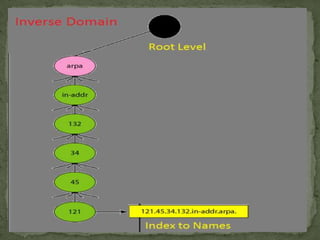
 The domain name system is usually used to translate a

host name into an IP address and vice versa.
 Domain names comprise a hierarchy so that names are
unique, yet easy to remember.
 DNS implements a distributed database to store
domain name and address information for all public
hosts on the Internet.
 Defines a hierarchical namespace where each level

of the namespace is separated by a “.”
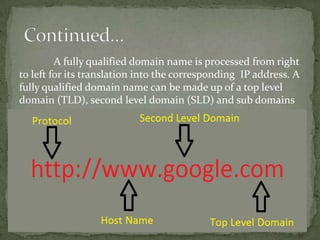
A fully qualified domain name is processed from right
to left for its translation into the corresponding IP address. A
fully qualified domain name can be made up of a top level
domain (TLD), second level domain (SLD) and sub domains
 The Name Space
 The Servers
 The Resolver
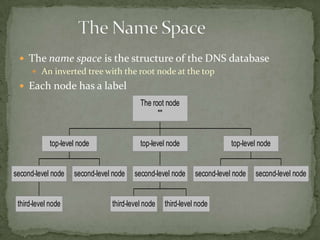
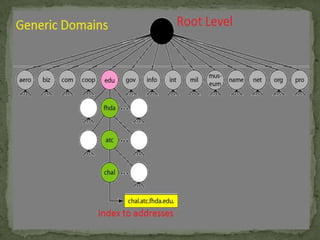
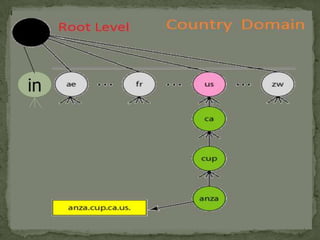
 The name space is the structure of the DNS database
 An inverted tree with the root node at the top
 Each node has a label
The root node
""

top-level node

second-level node

third-level node

top-level node

second-level node

second-level node

third-level node

top-level node

second-level node

third-level node

second-level node
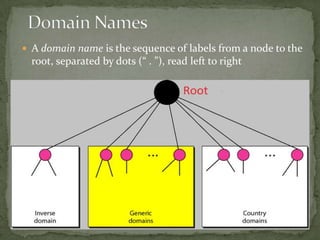
 A domain name is the sequence of labels from a node to the

root, separated by dots (“ . ”), read left to right
in
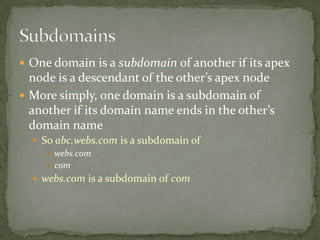
 One domain is a subdomain of another if its apex

node is a descendant of the other’s apex node
 More simply, one domain is a subdomain of
another if its domain name ends in the other’s
domain name
 So abc.webs.com is a subdomain of
 webs.com
 com
 webs.com is a subdomain of com
 The Name Space
 The Servers
 The Resolver
 Name servers store information about the name

space in units called “zones”
 The name servers that load a complete zone are said to

“have authority for” or “be authoritative for” the zone
 Usually, more than one name server are

authoritative for the same zone
 This ensures redundancy and spreads the load

 Also, a single name server may be authoritative for

many zones
Two main types of servers
 Local name servers:

Each ISP, company has local (default) name server

Host DNS query first goes to local name server
 Authoritative name server:

For a host: stores that host’s IP address, name

Can perform name/address translation for that host’s name
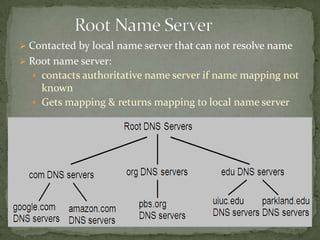
 Contacted by local name server that can not resolve name
 Root name server:
 contacts authoritative name server if name mapping not

known
 Gets mapping & returns mapping to local name server
 The Name Space
 The Servers
 The Resolver
 Name resolution is the process by which client and

Local name servers cooperate to find data in the
name space.
 A Local name server receives a query from a client ,
looks for the answer in its database
 If the answer isn’t in the database and the server isn’t

authoritative for the answer, the answer must be
looked up.
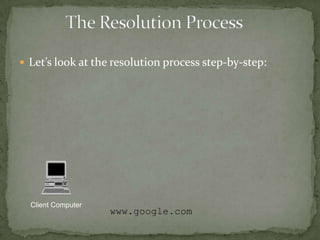
 Let’s look at the resolution process step-by-step:

Client Computer

www.google.com
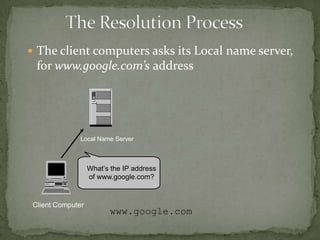
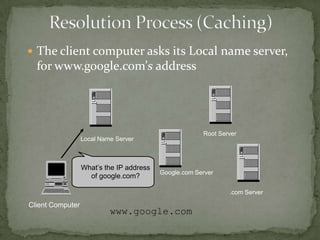
 The client computers asks its Local name server,

for www.google.com’s address

Local Name Server

What’s the IP address
of www.google.com?

Client Computer

www.google.com
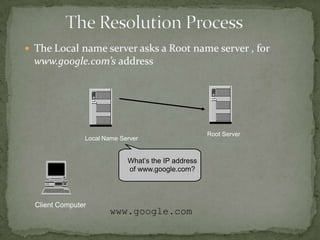
 The Local name server asks a Root name server , for

www.google.com’s address

Local Name Server

What’s the IP address
of www.google.com?

Client Computer

www.google.com

Root Server
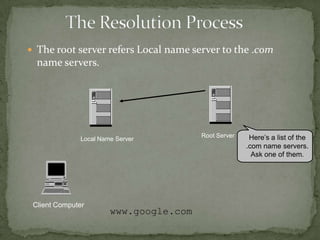
 The root server refers Local name server to the .com

name servers.

Local Name Server

Client Computer

www.google.com

Root Server

Here’s a list of the
.com name servers.
Ask one of them.
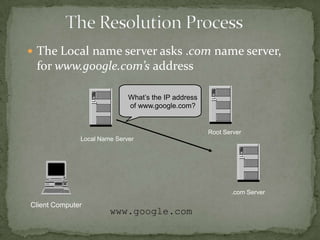
 The Local name server asks .com name server,

for www.google.com’s address
What’s the IP address
of www.google.com?

Root Server

Local Name Server

.com Server

Client Computer

www.google.com
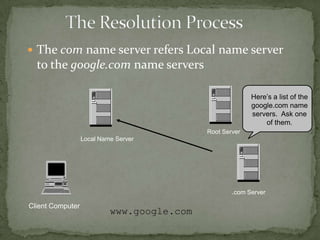
 The com name server refers Local name server

to the google.com name servers
Here’s a list of the
google.com name
servers. Ask one
of them.
Root Server

Local Name Server

.com Server

Client Computer

www.google.com
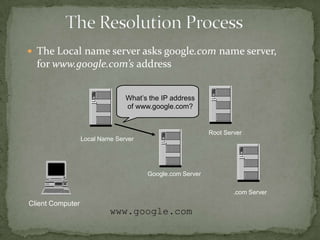
 The Local name server asks google.com name server,

for www.google.com’s address
What’s the IP address
of www.google.com?

Root Server

Local Name Server

Google.com Server

.com Server

Client Computer

www.google.com
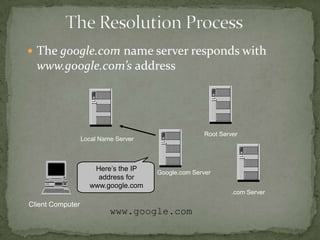
 The google.com name server responds with

www.google.com’s address

Root Server

Local Name Server

Here’s the IP
address for
www.google.com

Google.com Server

.com Server

Client Computer

www.google.com
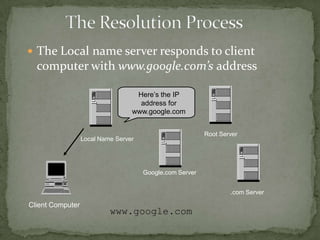
 The Local name server responds to client

computer with www.google.com’s address
Here’s the IP
address for
www.google.com
Root Server

Local Name Server

Google.com Server

.com Server

Client Computer

www.google.com
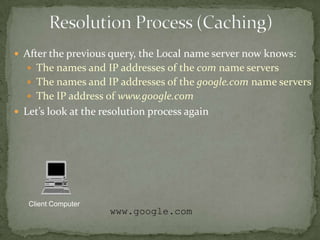
 After the previous query, the Local name server now knows:
 The names and IP addresses of the com name servers

 The names and IP addresses of the google.com name servers
 The IP address of www.google.com
 Let’s look at the resolution process again

Client Computer

www.google.com
 The client computer asks its Local name server,

for www.google.com’s address

Root Server

Local Name Server

What’s the IP address
of google.com?

Google.com Server

.com Server

Client Computer

www.google.com
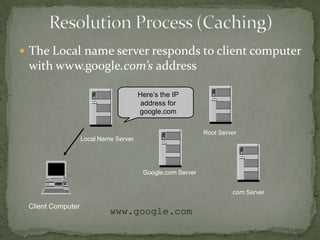
 The Local name server responds to client computer

with www.google.com’s address
Here’s the IP
address for
google.com
Root Server

Local Name Server

Google.com Server

.com Server

Client Computer

www.google.com
 DNS is like a phone book for the Internet. If we know a

person’s name but don’t know his mobile number, we
can simply look it up in a phone book. DNS provides
this same service to the Internet.
 When we visit www.google.com in a browser, our

computer uses DNS to retrieve the website’s IP address
of 173.194.69.147 .
Domain name system
Domain name system

Domain name system

  • 1.
  • 2.
    A Presentation on DomainName System Group Name :- G2 Group Members :- Gaurav Kumar Rohitash kumar Nitesh Kumar Rahul Baghla
  • 3.
     Key terms What is internet  How do they connect  History of the DNS  Introduction to the DNS  Components of the DNS  The namespace  The servers  The resolvers  Conclusion
  • 4.
     The internetis a global system of interconnected computer networks . It is a network of networks that consists of millions of private and public , academic , business and government networks of local to global space that are linked by transmission media such as copper wires , fiber optic cables , wireless connections and other technologies .
  • 5.
     A networkof computers connected to each other is called internet and these computers needed to know which computer they were connecting to, so each computer was given a unique number – an IP (Internet Protocol) number. E.g. 121.245.078.2
  • 6.
     There wasthe ARPANET’s HOSTS.TXT file  Each computer on the network retrieved a file called HOSTS.TXT  HOSTS.TXT mapped every ARPANET host’s name to its IP address.  The HOSTS.TXT file mapped numerical addresses to names.  Allows users to specify an IP address (e.g. 192.0.34.166) to use for a host name (e.g. www.google.com) without checking DNS.  Systems based on a hosts file have inherent limitations  The obvious requirement that every time a given computer's address changed, every computer that seeks to communicate with it would need an update to its hosts file.
  • 7.
     Consistency  Thenetwork changed more quickly than the file was updated  Name collisions  No two hosts could have the same name  “Good” names quickly exhausted  There was no good method to prevent duplicate names  Human intervention was required  Traffic and load  The traffic generated by downloading the file became significant  Download time sometimes longer than update period  The model didn't scale well
  • 8.
     ARPANET powers-that-werelaunched an investigation into replacement for HOSTS.TXT  Requirements:  Decentralized administration  With data updated locally, but available globally  A hierarchical name space  To guarantee unique names  Paul V. Mockapetris, American computer scientist and Internet pioneer, together with Jon Postel, invented the Internet Domain Name System (DNS).
  • 9.
     The domainname system is usually used to translate a host name into an IP address and vice versa.  Domain names comprise a hierarchy so that names are unique, yet easy to remember.  DNS implements a distributed database to store domain name and address information for all public hosts on the Internet.  Defines a hierarchical namespace where each level of the namespace is separated by a “.”
  • 10.
    A fully qualifieddomain name is processed from right to left for its translation into the corresponding IP address. A fully qualified domain name can be made up of a top level domain (TLD), second level domain (SLD) and sub domains
  • 11.
     The NameSpace  The Servers  The Resolver
  • 12.
     The namespace is the structure of the DNS database  An inverted tree with the root node at the top  Each node has a label The root node "" top-level node second-level node third-level node top-level node second-level node second-level node third-level node top-level node second-level node third-level node second-level node
  • 13.
     A domainname is the sequence of labels from a node to the root, separated by dots (“ . ”), read left to right
  • 15.
  • 17.
     One domainis a subdomain of another if its apex node is a descendant of the other’s apex node  More simply, one domain is a subdomain of another if its domain name ends in the other’s domain name  So abc.webs.com is a subdomain of  webs.com  com  webs.com is a subdomain of com
  • 18.
     The NameSpace  The Servers  The Resolver
  • 19.
     Name serversstore information about the name space in units called “zones”  The name servers that load a complete zone are said to “have authority for” or “be authoritative for” the zone  Usually, more than one name server are authoritative for the same zone  This ensures redundancy and spreads the load  Also, a single name server may be authoritative for many zones
  • 20.
    Two main typesof servers  Local name servers:  Each ISP, company has local (default) name server  Host DNS query first goes to local name server  Authoritative name server:  For a host: stores that host’s IP address, name  Can perform name/address translation for that host’s name
  • 21.
     Contacted bylocal name server that can not resolve name  Root name server:  contacts authoritative name server if name mapping not known  Gets mapping & returns mapping to local name server
  • 22.
     The NameSpace  The Servers  The Resolver
  • 23.
     Name resolutionis the process by which client and Local name servers cooperate to find data in the name space.  A Local name server receives a query from a client , looks for the answer in its database  If the answer isn’t in the database and the server isn’t authoritative for the answer, the answer must be looked up.
  • 24.
     Let’s lookat the resolution process step-by-step: Client Computer www.google.com
  • 25.
     The clientcomputers asks its Local name server, for www.google.com’s address Local Name Server What’s the IP address of www.google.com? Client Computer www.google.com
  • 26.
     The Localname server asks a Root name server , for www.google.com’s address Local Name Server What’s the IP address of www.google.com? Client Computer www.google.com Root Server
  • 27.
     The rootserver refers Local name server to the .com name servers. Local Name Server Client Computer www.google.com Root Server Here’s a list of the .com name servers. Ask one of them.
  • 28.
     The Localname server asks .com name server, for www.google.com’s address What’s the IP address of www.google.com? Root Server Local Name Server .com Server Client Computer www.google.com
  • 29.
     The comname server refers Local name server to the google.com name servers Here’s a list of the google.com name servers. Ask one of them. Root Server Local Name Server .com Server Client Computer www.google.com
  • 30.
     The Localname server asks google.com name server, for www.google.com’s address What’s the IP address of www.google.com? Root Server Local Name Server Google.com Server .com Server Client Computer www.google.com
  • 31.
     The google.comname server responds with www.google.com’s address Root Server Local Name Server Here’s the IP address for www.google.com Google.com Server .com Server Client Computer www.google.com
  • 32.
     The Localname server responds to client computer with www.google.com’s address Here’s the IP address for www.google.com Root Server Local Name Server Google.com Server .com Server Client Computer www.google.com
  • 33.
     After theprevious query, the Local name server now knows:  The names and IP addresses of the com name servers  The names and IP addresses of the google.com name servers  The IP address of www.google.com  Let’s look at the resolution process again Client Computer www.google.com
  • 34.
     The clientcomputer asks its Local name server, for www.google.com’s address Root Server Local Name Server What’s the IP address of google.com? Google.com Server .com Server Client Computer www.google.com
  • 35.
     The Localname server responds to client computer with www.google.com’s address Here’s the IP address for google.com Root Server Local Name Server Google.com Server .com Server Client Computer www.google.com
  • 36.
     DNS islike a phone book for the Internet. If we know a person’s name but don’t know his mobile number, we can simply look it up in a phone book. DNS provides this same service to the Internet.  When we visit www.google.com in a browser, our computer uses DNS to retrieve the website’s IP address of 173.194.69.147 .