Structured Naming 
Internet Naming Service: DNS* 
*referred to slides by David Conrad at nominum.com
Overview 
• Introduction to the DNS 
• DNS Components 
• DNS Structure and Hierarchy 
• The DNS in Context
DNS History (1) 
• ARPANET utilized a central file HOSTS.TXT 
– Contains names to addresses mapping 
– Maintained by SRI’s NIC (Stanford-Research- 
Institute: Network-Information-Center) 
• Administrators email changes to NIC 
– NIC updates HOSTS.TXT periodically 
• Administrators FTP (download) HOSTS.TXT
DNS History (2) 
• As the system grew, HOSTS.TXT had 
problems with: 
– Scalability (traffic and load) 
– Name collisions 
– Consistency 
• In 1984, Paul Mockapetris released the first 
version (RFCs 882 and 883, superseded by 
1034 and 1035 …)
The DNS is… 
• The “Domain Name System” 
• What Internet users use to reference 
anything by name on the Internet 
• The mechanism by which Internet software 
translates names to attributes such as 
addresses
The DNS is also… 
• A globally distributed, scalable, reliable database 
• Comprised of three components 
– A “name space” 
– Servers making that name space available 
– Resolvers (clients) which query the servers about the 
name space
DNS as a Lookup Mechanism 
• Users generally prefer names to numbers 
• Computers prefer numbers to names 
• DNS provides the mapping between the two 
– I have “x”, give me “y”
DNS as a Database 
• Keys to the database are “domain names” 
– www.foo.com, 18.in-addr.arpa, 6.4.e164.arpa 
• Over 200,000,000 domain names stored 
• Each domain name contains one or more 
attributes 
– Known as “resource records” 
• Each attribute individually retrievable
Global Distribution 
• Data is maintained locally, but retrievable 
globally 
– No single computer has all DNS data 
• DNS lookups can be performed by any 
device 
• Remote DNS data is locally cachable to 
improve performance
Loose Coherency 
• Each version of a subset of the database (a zone) 
has a serial number 
– The serial number is incremented on each database change 
• Changes to the master copy of the database are 
propagated to replicas according to timing set by 
the zone administrator 
• Cached data expires according to timeout set by 
zone administrator
Scalability 
• No limit to the size of the database 
• No limit to the number of queries 
– Tens of thousands of queries handled easily 
every second 
• Queries distributed among masters, slaves, 
and caches
Reliability 
• Data is replicated 
– Data from master is copied to multiple slaves 
• Clients can query 
– Master server 
– Any of the copies at slave servers 
• Clients will typically query local caches 
• DNS protocols can use either UDP or TCP 
– If UDP, DNS protocol handles retransmission, 
sequencing, etc.
Dynamicity 
• Database can be updated dynamically 
– Add/delete/modify of any record 
– Only master can be dynamically updated 
• Modification of the master database triggers 
replication
Overview 
• Introduction to the DNS 
• DNS Components 
– The name space 
– The servers 
– The resolvers 
• DNS Structure and Hierarchy 
• The DNS in Context
The Name Space 
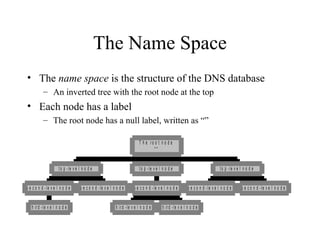
• The name space is the structure of the DNS database 
– An inverted tree with the root node at the top 
• Each node has a label 
– The root node has a null label, written as “” 
t o p - l e v e l n o d e 
s e c o n d - le v e l n o d e s e c o n d - le v e l n o d e 
t h i r d - l e v e l n o d e 
t o p - l e v e l n o d e 
s e c o n d - l e v e l n o d e 
s e c o n d - l e v e l n o d e s e c o n d - l e v e l n o d e 
t h i r d - l e v e l n o d e t h i r d - l e v e l n o d e 
t o p - le v e l n o d e 
T h e r o o t n o d e 
" "
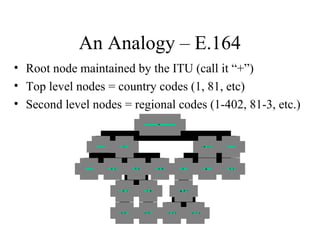
An Analogy – E.164 
• Root node maintained by the ITU (call it “+”) 
• Top level nodes = country codes (1, 81, etc) 
• Second level nodes = regional codes (1-402, 81-3, etc.) 
. . . 
. . . 2 0 2 
3 8 1 
6 0 0 3 
6 5 0 8 0 8 
7 7 9 
6 0 0 3 
1 
3 4 8 5 2 
3 4 8 9 
5 2 2 6 2 0 2 4 
8 1 . . . 
" + "
to p -1 
fo o fo o 
to p -2 
fo o a t& t 
to p -3 
b a r b a z 
" " 
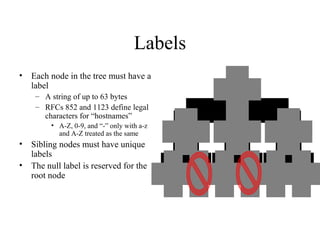
Labels 
• Each node in the tree must have a 
label 
– A string of up to 63 bytes 
– RFCs 852 and 1123 define legal 
characters for “hostnames” 
• A-Z, 0-9, and “-” only with a-z 
and A-Z treated as the same 
• Sibling nodes must have unique 
labels 
• The null label is reserved for the 
root node
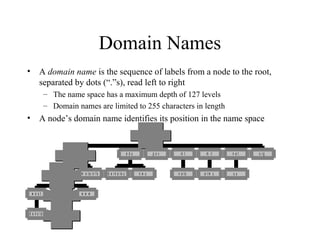
Domain Names 
• A domain name is the sequence of labels from a node to the root, 
separated by dots (“.”s), read left to right 
– The name space has a maximum depth of 127 levels 
– Domain names are limited to 255 characters in length 
• A node’s domain name identifies its position in the name space 
w e s t 
d a k o t a 
n o m i n u m m e t a i n f o 
e a s t w w w 
t o r n a d o 
c o m 
e d u g o v 
b e r k e l e y n w u 
in t 
n a t o 
m i l 
a r m y 
n e t o r g 
u u 
" "
Subdomains 
• One domain is a subdomain of another if its 
domain name ends in the other’s domain name 
– So sales.nominum.com is a subdomain of 
• nominum.com & com 
– nominum.com is a subdomain of com
Delegation 
• Administrators can create subdomains to group hosts 
– According to geography, organizational affiliation etc. 
• An administrator of a domain can delegate responsibility 
for managing a subdomain to someone else 
• The parent domain retains links to the delegated 
subdomains
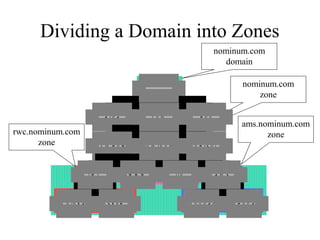
Delegation Creates Zones 
• Each time an administrator delegates a subdomain, 
a new unit of administration is created 
– The subdomain and its parent domain can now be 
administered independently 
– These units are called zones 
– The boundary between zones is a point of delegation in 
the name space 
• Delegation is good: it is the key to scalability
Dividing a Domain into Zones 
nominum.com 
domain 
nominum.com 
zone 
ams.nominum.com 
. c o m . e d u 
rwc.nominum.com zone 
zone 
. a r p a 
a c m e b w 
n o m i n u m n e t s o l 
r w c w w w f t p 
m o l o k a i s k y e 
a m s 
g o u d a c h e d d a r 
" "
Overview 
• Introduction to the DNS 
• DNS Components 
– The name space 
– The servers 
– The resolvers 
• DNS Structure and Hierarchy 
• The DNS in Context
Name Servers 
• Name servers store information about the name 
space in units called “zones” 
– The name servers that load a complete zone are said to 
“have authority for” or “be authoritative for” the zone 
• Usually, more than one name server are 
authoritative for the same zone 
– This ensures redundancy and spreads the load 
• Also, a single name server may be authoritative 
for many zones
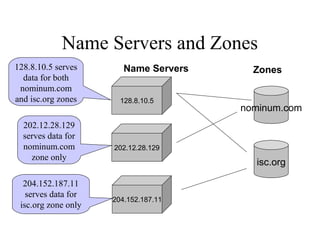
Name Servers and Zones 
128.8.10.5 serves Name Servers 
Zones 
data for both 
nominum.com 
and isc.org zones 
128.8.10.5 
nominum.com 
202.12.28.129 
204.152.187.11 
isc.org 
202.12.28.129 
serves data for 
nominum.com 
zone only 
204.152.187.11 
serves data for 
isc.org zone only
Types of Name Servers 
• Two main types of servers 
– Authoritative – maintains the data 
• Master – where the data is edited 
• Slave – where data is replicated to 
– Caching – stores data obtained from an authoritative 
server 
• No special hardware necessary
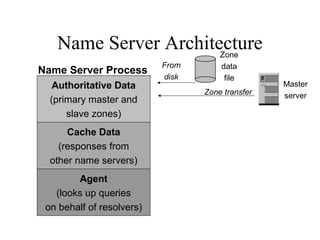
Name Server Architecture 
• You can think of a name server as part of: 
– database server, answering queries about the 
parts of the name space it knows about (i.e., is 
authoritative for), 
– cache, temporarily storing data it learns from 
other name servers, and 
– agent, helping resolvers and other name servers 
find data
Name Server Architecture 
Master 
Zone 
data 
file 
Zone transfer server 
From 
disk 
Name Server Process 
Authoritative Data 
(primary master and 
slave zones) 
Cache Data 
(responses from 
other name servers) 
Agent 
(looks up queries 
on behalf of resolvers)
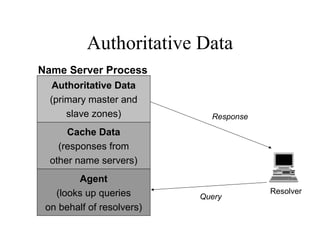
Authoritative Data 
Resolver 
Response 
Query 
Name Server Process 
Authoritative Data 
(primary master and 
slave zones) 
Cache Data 
(responses from 
other name servers) 
Agent 
(looks up queries 
on behalf of resolvers)
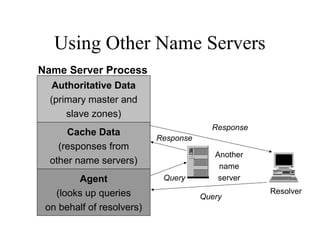
Using Other Name Servers 
Another 
name 
server 
Response 
Resolver 
Query 
Query 
Name Server Process 
Authoritative Data 
(primary master and 
slave zones) 
Cache Data 
(responses from 
other name servers) 
Agent 
(looks up queries 
on behalf of resolvers) 
Response
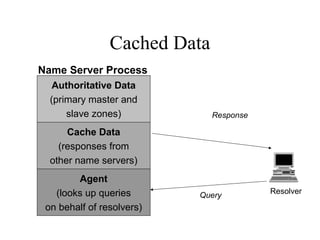
Cached Data 
Response 
Query 
Name Server Process 
Authoritative Data 
(primary master and 
slave zones) 
Cache Data 
(responses from 
other name servers) 
Agent 
(looks up queries 
on behalf of resolvers) 
Resolver
Overview 
• Introduction to the DNS 
• DNS Components 
– The name space 
– The servers 
– The resolvers 
• DNS Structure and Hierarchy 
• The DNS in Context
Name Resolution 
• Name resolution is the process by which resolvers 
and name servers cooperate to find data in the 
name space 
• Closure mechanism for DNS? 
– Starting point: the names and IP addresses of the name 
servers for the root zone (the “root name servers”) 
– The root name servers know about the top-level zones 
and can tell name servers whom to contact for all TLDs
Name Resolution 
• A DNS query has three parameters: 
– A domain name (e.g., www.nominum.com), 
• Remember, every node has a domain name! 
– A class (e.g., IN), and 
– A type (e.g., A) 
– http://network-tools.com/nslook/ 
• Upon receiving a query from a resolver, a name 
server 
– 1) looks for the answer in its authoritative data and its 
cache 
– 2) If step 1 fails, the answer must be looked up
The Resolution Process 
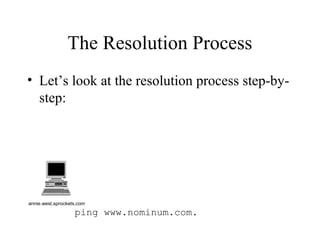
• Let’s look at the resolution process step-by-step: 
annie.west.sprockets.com 
ping www.nominum.com.
The Resolution Process 
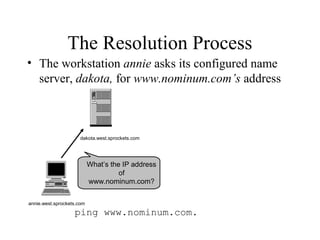
• The workstation annie asks its configured name 
server, dakota, for www.nominum.com’s address 
dakota.west.sprockets.com 
What’s the IP address 
of 
www.nominum.com? 
annie.west.sprockets.com 
ping www.nominum.com.
The Resolution Process 
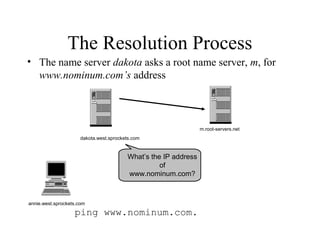
• The name server dakota asks a root name server, m, for 
www.nominum.com’s address 
annie.west.sprockets.com 
ping www.nominum.com. 
m.root-servers.net 
dakota.west.sprockets.com 
What’s the IP address 
of 
www.nominum.com?
The Resolution Process 
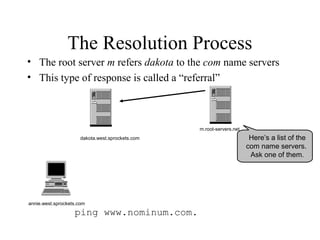
• The root server m refers dakota to the com name servers 
• This type of response is called a “referral” 
annie.west.sprockets.com 
ping www.nominum.com. 
m.root-servers.net 
dakota.west.sprockets.com Here’s a list of the 
com name servers. 
Ask one of them.
The Resolution Process 
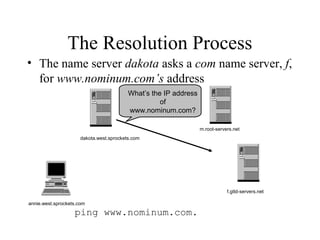
• The name server dakota asks a com name server, f, 
for www.nominum.com’s address 
annie.west.sprockets.com 
What’s the IP address 
ping www.nominum.com. 
m.root-servers.net 
dakota.west.sprockets.com 
of 
www.nominum.com? 
f.gtld-servers.net
The Resolution Process 
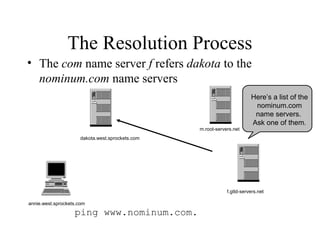
• The com name server f refers dakota to the 
nominum.com name servers 
annie.west.sprockets.com 
ping www.nominum.com. 
m.root-servers.net 
f.gtld-servers.net 
dakota.west.sprockets.com 
Here’s a list of the 
nominum.com 
name servers. 
Ask one of them.
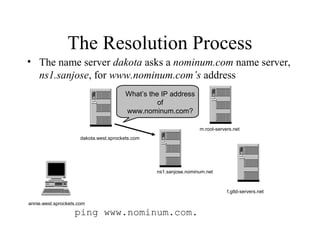
The Resolution Process 
• The name server dakota asks a nominum.com name server, 
ns1.sanjose, for www.nominum.com’s address 
annie.west.sprockets.com 
What’s the IP address 
of 
www.nominum.com? 
ping www.nominum.com. 
m.root-servers.net 
f.gtld-servers.net 
dakota.west.sprockets.com 
ns1.sanjose.nominum.net
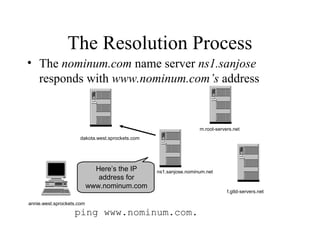
The Resolution Process 
• The nominum.com name server ns1.sanjose 
responds with www.nominum.com’s address 
annie.west.sprockets.com 
ping www.nominum.com. 
m.root-servers.net 
f.gtld-servers.net 
dakota.west.sprockets.com 
Here’s the IP ns1.sanjose.nominum.net 
address for 
www.nominum.com
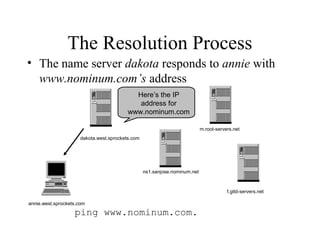
The Resolution Process 
• The name server dakota responds to annie with 
www.nominum.com’s address 
Here’s the IP 
address for 
www.nominum.com 
annie.west.sprockets.com 
ping www.nominum.com. 
m.root-servers.net 
f.gtld-servers.net 
dakota.west.sprockets.com 
ns1.sanjose.nominum.net
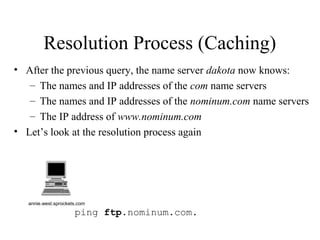
Resolution Process (Caching) 
• After the previous query, the name server dakota now knows: 
– The names and IP addresses of the com name servers 
– The names and IP addresses of the nominum.com name servers 
– The IP address of www.nominum.com 
• Let’s look at the resolution process again 
annie.west.sprockets.com 
ping ftp.nominum.com.
Resolution Process (Caching) 
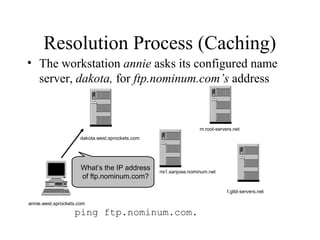
• The workstation annie asks its configured name 
server, dakota, for ftp.nominum.com’s address 
What’s the IP address 
of ftp.nominum.com? 
annie.west.sprockets.com 
ping ftp.nominum.com. 
m.root-servers.net 
f.gtld-servers.net 
dakota.west.sprockets.com 
ns1.sanjose.nominum.net
Resolution Process (Caching) 
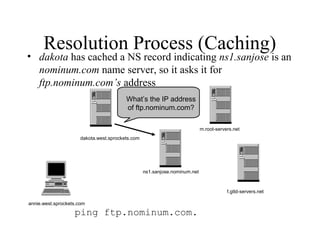
• dakota has cached a NS record indicating ns1.sanjose is an 
nominum.com name server, so it asks it for 
ftp.nominum.com’s address 
What’s the IP address 
of ftp.nominum.com? 
annie.west.sprockets.com 
ping ftp.nominum.com. 
m.root-servers.net 
f.gtld-servers.net 
dakota.west.sprockets.com 
ns1.sanjose.nominum.net
Resolution Process (Caching) 
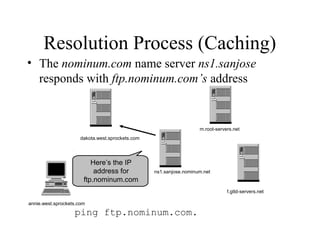
• The nominum.com name server ns1.sanjose 
responds with ftp.nominum.com’s address 
Here’s the IP 
address for 
ftp.nominum.com 
annie.west.sprockets.com 
ping ftp.nominum.com. 
m.root-servers.net 
f.gtld-servers.net 
dakota.west.sprockets.com 
ns1.sanjose.nominum.net
Resolution Process (Caching) 
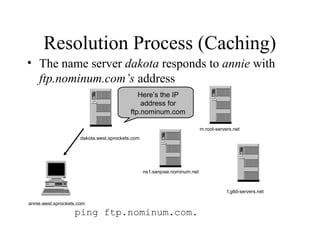
• The name server dakota responds to annie with 
ftp.nominum.com’s address 
Here’s the IP 
address for 
ftp.nominum.com 
annie.west.sprockets.com 
ping ftp.nominum.com. 
m.root-servers.net 
f.gtld-servers.net 
dakota.west.sprockets.com 
ns1.sanjose.nominum.net
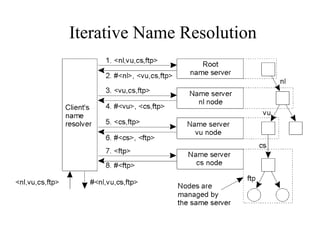
Iterative Name Resolution 
• The principle of iterative name resolution.
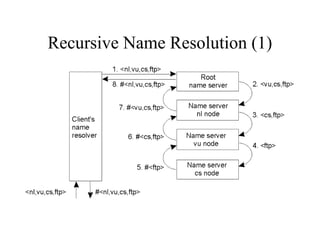
Recursive Name Resolution (1) 
• The principle of recursive name resolution.
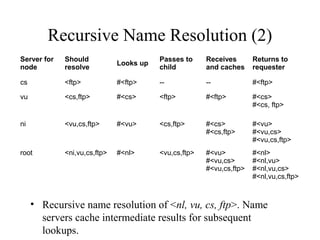
Recursive Name Resolution (2) 
Server for 
node 
Should 
resolve Looks up Passes to 
child 
Receives 
and caches 
Returns to 
requester 
cs <ftp> #<ftp> -- -- #<ftp> 
vu <cs,ftp> #<cs> <ftp> #<ftp> #<cs> 
#<cs, ftp> 
ni <vu,cs,ftp> #<vu> <cs,ftp> #<cs> 
#<cs,ftp> 
#<vu> 
#<vu,cs> 
#<vu,cs,ftp> 
root <ni,vu,cs,ftp> #<nl> <vu,cs,ftp> #<vu> 
#<vu,cs> 
#<vu,cs,ftp> 
#<nl> 
#<nl,vu> 
#<nl,vu,cs> 
#<nl,vu,cs,ftp> 
• Recursive name resolution of <nl, vu, cs, ftp>. Name 
servers cache intermediate results for subsequent 
lookups.
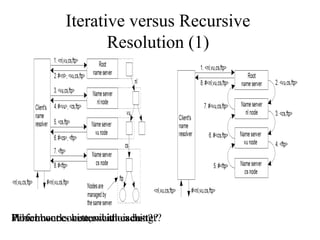
Iterative versus Recursive 
Resolution (1) 
Performance-WHohwic hab woourt kcso wbmiesmteteu, rnw wihciaitcthiho cnias c cbhoeistntt?ger??
Iterative versus Recursive 
Resolution (2) 
• Performance-wise, which is better? 
– Recursive method puts higher performance demand 
on each name server 
• Which works better with caching? 
– Recursive method works better with caching 
• How about communication cost? 
– Recursive method can reduce communication cost
Iterative versus Recursive 
Resolution (3) 
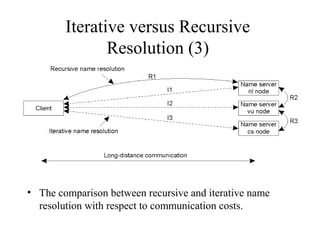
• The comparison between recursive and iterative name 
resolution with respect to communication costs.
Overview 
• Introduction to the DNS 
• DNS Components 
• DNS Structure and Hierarchy 
• The DNS in Context
DNS Structure and Hierarchy 
• The DNS imposes no constraints on how the DNS 
hierarchy is implemented except: 
– A single root 
– The label restrictions 
– So, can we create a host with a name a.wonderful.world? 
• If a site is not connected to the Internet, it can use any 
domain hierarchy it chooses 
– Can make up whatever TLDs (top level domains) you want 
• Connecting to the Internet implies use of the existing 
DNS hierarchy
Top-level Domain (TLD) Structure 
• In 1983 (RFC 881), the idea was to have TLDs correspond 
to network service providers 
– e.g., ARPA, DDN, CSNET, etc. 
• Bad idea: if your network changes, your name changes 
• By 1984 (RFC 920), functional domains was established 
– e.g., GOV for Government, COM for commercial, EDU for 
education, etc. 
• RFC 920 also 
– Provided country domains 
– Provided “Multiorganizations” 
• Large, composed of other (particularly international) organizations 
– Provided a stable TLD structure until 1996 or so
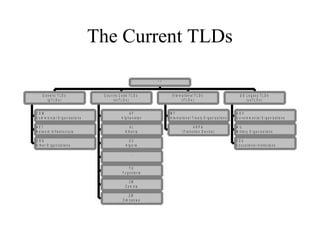
The Current TLDs 
G e n e r i c T L D s 
( g T L D s ) 
C O M 
C o m m e r c ia l O r g a n iz a t io n s 
N E T 
N e t w o r k I n f r a s t r u c t u r e 
O R G 
O t h e r O r g a n i z a t i o n s 
C o u n t r y C o d e T L D s 
A F 
( c c T L D s ) 
A f g h a n i s t a n 
A L 
A l b a n ia 
D Z 
A l g e r ia 
. . . 
Y U 
Y u g o s la v ia 
Z M 
Z a m b ia 
Z W 
Z i m b a b w e 
I n t e r n a t i o n a l T L D s 
( iT L D s ) 
I N T 
I n t e r n a t io n a l T r e a t y O r g a n i z a t i o n s 
A R P A 
( T r a n s i t i o n D e v i c e ) 
U S L e g a c y T L D s 
( u s T L D s ) 
G O V 
G o v e r n m e n t a l O r g a n iz a t i o n s 
M I L 
M i l it a r y O r g a n iz a t io n s 
E D U 
E d u c a t io n a l I n s t i t u t i o n s 
" . "
Internet Corporation for Assigned 
Names and Numbers (ICANN) 
• ICANN’s role: to oversee the management of 
Internet resources including 
– Addresses 
• Delegating blocks of addresses to the regional registries 
– Protocol identifiers and parameters 
• Allocating port numbers, etc. 
– Names 
• Administration of the root zone file 
• Oversee the operation of the root name servers
The Root Nameservers 
• The root zone file lists the names and IP addresses 
of the authoritative DNS servers for all top-level 
domains (TLDs) 
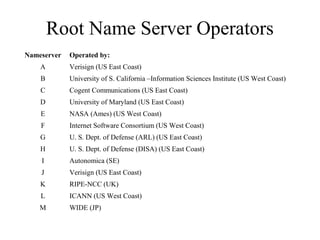
• The root zone file is published on 13 servers, “A” 
through “M”, around the Internet 
• Root name server operations currently provided 
by volunteer efforts by a very diverse set of 
organizations
Root Name Server Operators 
Nameserver Operated by: 
A Verisign (US East Coast) 
B University of S. California –Information Sciences Institute (US West Coast) 
C Cogent Communications (US East Coast) 
D University of Maryland (US East Coast) 
E NASA (Ames) (US West Coast) 
F Internet Software Consortium (US West Coast) 
G U. S. Dept. of Defense (ARL) (US East Coast) 
H U. S. Dept. of Defense (DISA) (US East Coast) 
I Autonomica (SE) 
J Verisign (US East Coast) 
K RIPE-NCC (UK) 
L ICANN (US West Coast) 
M WIDE (JP)
Registries, Registrars, and Registrants 
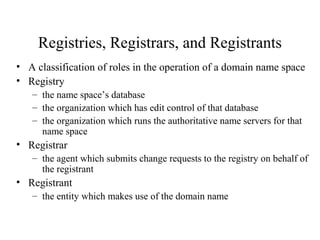
• A classification of roles in the operation of a domain name space 
• Registry 
– the name space’s database 
– the organization which has edit control of that database 
– the organization which runs the authoritative name servers for that 
name space 
• Registrar 
– the agent which submits change requests to the registry on behalf of 
the registrant 
• Registrant 
– the entity which makes use of the domain name
Registries, Registrars, and Registrants 
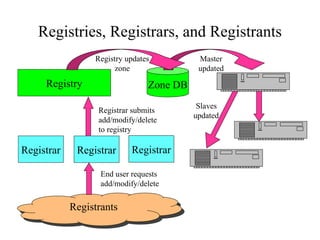
Registry Zone DB 
Registrar submits 
add/modify/delete 
to registry 
Registrar Registrar Registrar 
End user requests 
add/modify/delete 
RReeggiissttrraannttss 
Master 
updated 
Registry updates 
zone 
Slaves 
updated
Verisign: the registry and 
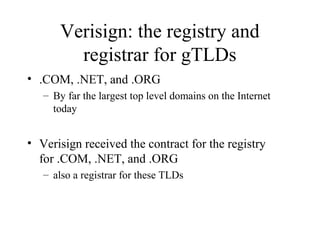
registrar for gTLDs 
• .COM, .NET, and .ORG 
– By far the largest top level domains on the Internet 
today 
• Verisign received the contract for the registry 
for .COM, .NET, and .ORG 
– also a registrar for these TLDs
Overview 
• Introduction to the DNS 
• DNS Components 
• DNS Hierarchy 
• The DNS in Context
Load Concerns 
• DNS can handle the load 
– DNS root servers get approximately 3000 
queries per second 
• Empirical proofs (DDoS attacks) show root name 
servers can handle 50,000 queries per second 
– Limitation is network bandwidth, not the DNS protocol 
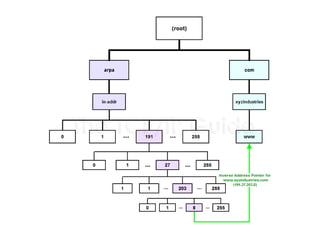
– in-addr.arpa zone, which translates numbers to 
names, gets about 2000 queries per second
Performance Concerns 
• DNS is a very lightweight protocol 
– Simple query – response 
• Any performance limitations are the result 
of network limitations 
– Speed of light 
– Network congestion 
– Switching/forwarding latencies
Security Concerns 
• Base DNS protocol (RFC 1034, 1035) is insecure 
– DNS spoofing (cache poisoning) attacks are possible 
• DNS Security Enhancements (DNSSEC, RFC 
2565) remedies this flaw 
– But creates new ones 
• DoS attacks 
• Amplification attacks 
• DNSSEC strongly discourages large flat zones 
– Hierarchy (delegation) is good

Dns

  • 1.
    Structured Naming InternetNaming Service: DNS* *referred to slides by David Conrad at nominum.com
  • 2.
    Overview • Introductionto the DNS • DNS Components • DNS Structure and Hierarchy • The DNS in Context
  • 3.
    DNS History (1) • ARPANET utilized a central file HOSTS.TXT – Contains names to addresses mapping – Maintained by SRI’s NIC (Stanford-Research- Institute: Network-Information-Center) • Administrators email changes to NIC – NIC updates HOSTS.TXT periodically • Administrators FTP (download) HOSTS.TXT
  • 4.
    DNS History (2) • As the system grew, HOSTS.TXT had problems with: – Scalability (traffic and load) – Name collisions – Consistency • In 1984, Paul Mockapetris released the first version (RFCs 882 and 883, superseded by 1034 and 1035 …)
  • 5.
    The DNS is… • The “Domain Name System” • What Internet users use to reference anything by name on the Internet • The mechanism by which Internet software translates names to attributes such as addresses
  • 6.
    The DNS isalso… • A globally distributed, scalable, reliable database • Comprised of three components – A “name space” – Servers making that name space available – Resolvers (clients) which query the servers about the name space
  • 7.
    DNS as aLookup Mechanism • Users generally prefer names to numbers • Computers prefer numbers to names • DNS provides the mapping between the two – I have “x”, give me “y”
  • 8.
    DNS as aDatabase • Keys to the database are “domain names” – www.foo.com, 18.in-addr.arpa, 6.4.e164.arpa • Over 200,000,000 domain names stored • Each domain name contains one or more attributes – Known as “resource records” • Each attribute individually retrievable
  • 9.
    Global Distribution •Data is maintained locally, but retrievable globally – No single computer has all DNS data • DNS lookups can be performed by any device • Remote DNS data is locally cachable to improve performance
  • 10.
    Loose Coherency •Each version of a subset of the database (a zone) has a serial number – The serial number is incremented on each database change • Changes to the master copy of the database are propagated to replicas according to timing set by the zone administrator • Cached data expires according to timeout set by zone administrator
  • 11.
    Scalability • Nolimit to the size of the database • No limit to the number of queries – Tens of thousands of queries handled easily every second • Queries distributed among masters, slaves, and caches
  • 12.
    Reliability • Datais replicated – Data from master is copied to multiple slaves • Clients can query – Master server – Any of the copies at slave servers • Clients will typically query local caches • DNS protocols can use either UDP or TCP – If UDP, DNS protocol handles retransmission, sequencing, etc.
  • 13.
    Dynamicity • Databasecan be updated dynamically – Add/delete/modify of any record – Only master can be dynamically updated • Modification of the master database triggers replication
  • 14.
    Overview • Introductionto the DNS • DNS Components – The name space – The servers – The resolvers • DNS Structure and Hierarchy • The DNS in Context
  • 15.
    The Name Space • The name space is the structure of the DNS database – An inverted tree with the root node at the top • Each node has a label – The root node has a null label, written as “” t o p - l e v e l n o d e s e c o n d - le v e l n o d e s e c o n d - le v e l n o d e t h i r d - l e v e l n o d e t o p - l e v e l n o d e s e c o n d - l e v e l n o d e s e c o n d - l e v e l n o d e s e c o n d - l e v e l n o d e t h i r d - l e v e l n o d e t h i r d - l e v e l n o d e t o p - le v e l n o d e T h e r o o t n o d e " "
  • 16.
    An Analogy –E.164 • Root node maintained by the ITU (call it “+”) • Top level nodes = country codes (1, 81, etc) • Second level nodes = regional codes (1-402, 81-3, etc.) . . . . . . 2 0 2 3 8 1 6 0 0 3 6 5 0 8 0 8 7 7 9 6 0 0 3 1 3 4 8 5 2 3 4 8 9 5 2 2 6 2 0 2 4 8 1 . . . " + "
  • 17.
    to p -1 fo o fo o to p -2 fo o a t& t to p -3 b a r b a z " " Labels • Each node in the tree must have a label – A string of up to 63 bytes – RFCs 852 and 1123 define legal characters for “hostnames” • A-Z, 0-9, and “-” only with a-z and A-Z treated as the same • Sibling nodes must have unique labels • The null label is reserved for the root node
  • 18.
    Domain Names •A domain name is the sequence of labels from a node to the root, separated by dots (“.”s), read left to right – The name space has a maximum depth of 127 levels – Domain names are limited to 255 characters in length • A node’s domain name identifies its position in the name space w e s t d a k o t a n o m i n u m m e t a i n f o e a s t w w w t o r n a d o c o m e d u g o v b e r k e l e y n w u in t n a t o m i l a r m y n e t o r g u u " "
  • 19.
    Subdomains • Onedomain is a subdomain of another if its domain name ends in the other’s domain name – So sales.nominum.com is a subdomain of • nominum.com & com – nominum.com is a subdomain of com
  • 20.
    Delegation • Administratorscan create subdomains to group hosts – According to geography, organizational affiliation etc. • An administrator of a domain can delegate responsibility for managing a subdomain to someone else • The parent domain retains links to the delegated subdomains
  • 21.
    Delegation Creates Zones • Each time an administrator delegates a subdomain, a new unit of administration is created – The subdomain and its parent domain can now be administered independently – These units are called zones – The boundary between zones is a point of delegation in the name space • Delegation is good: it is the key to scalability
  • 22.
    Dividing a Domaininto Zones nominum.com domain nominum.com zone ams.nominum.com . c o m . e d u rwc.nominum.com zone zone . a r p a a c m e b w n o m i n u m n e t s o l r w c w w w f t p m o l o k a i s k y e a m s g o u d a c h e d d a r " "
  • 23.
    Overview • Introductionto the DNS • DNS Components – The name space – The servers – The resolvers • DNS Structure and Hierarchy • The DNS in Context
  • 24.
    Name Servers •Name servers store information about the name space in units called “zones” – The name servers that load a complete zone are said to “have authority for” or “be authoritative for” the zone • Usually, more than one name server are authoritative for the same zone – This ensures redundancy and spreads the load • Also, a single name server may be authoritative for many zones
  • 25.
    Name Servers andZones 128.8.10.5 serves Name Servers Zones data for both nominum.com and isc.org zones 128.8.10.5 nominum.com 202.12.28.129 204.152.187.11 isc.org 202.12.28.129 serves data for nominum.com zone only 204.152.187.11 serves data for isc.org zone only
  • 26.
    Types of NameServers • Two main types of servers – Authoritative – maintains the data • Master – where the data is edited • Slave – where data is replicated to – Caching – stores data obtained from an authoritative server • No special hardware necessary
  • 27.
    Name Server Architecture • You can think of a name server as part of: – database server, answering queries about the parts of the name space it knows about (i.e., is authoritative for), – cache, temporarily storing data it learns from other name servers, and – agent, helping resolvers and other name servers find data
  • 28.
    Name Server Architecture Master Zone data file Zone transfer server From disk Name Server Process Authoritative Data (primary master and slave zones) Cache Data (responses from other name servers) Agent (looks up queries on behalf of resolvers)
  • 29.
    Authoritative Data Resolver Response Query Name Server Process Authoritative Data (primary master and slave zones) Cache Data (responses from other name servers) Agent (looks up queries on behalf of resolvers)
  • 30.
    Using Other NameServers Another name server Response Resolver Query Query Name Server Process Authoritative Data (primary master and slave zones) Cache Data (responses from other name servers) Agent (looks up queries on behalf of resolvers) Response
  • 31.
    Cached Data Response Query Name Server Process Authoritative Data (primary master and slave zones) Cache Data (responses from other name servers) Agent (looks up queries on behalf of resolvers) Resolver
  • 32.
    Overview • Introductionto the DNS • DNS Components – The name space – The servers – The resolvers • DNS Structure and Hierarchy • The DNS in Context
  • 33.
    Name Resolution •Name resolution is the process by which resolvers and name servers cooperate to find data in the name space • Closure mechanism for DNS? – Starting point: the names and IP addresses of the name servers for the root zone (the “root name servers”) – The root name servers know about the top-level zones and can tell name servers whom to contact for all TLDs
  • 34.
    Name Resolution •A DNS query has three parameters: – A domain name (e.g., www.nominum.com), • Remember, every node has a domain name! – A class (e.g., IN), and – A type (e.g., A) – http://network-tools.com/nslook/ • Upon receiving a query from a resolver, a name server – 1) looks for the answer in its authoritative data and its cache – 2) If step 1 fails, the answer must be looked up
  • 35.
    The Resolution Process • Let’s look at the resolution process step-by-step: annie.west.sprockets.com ping www.nominum.com.
  • 36.
    The Resolution Process • The workstation annie asks its configured name server, dakota, for www.nominum.com’s address dakota.west.sprockets.com What’s the IP address of www.nominum.com? annie.west.sprockets.com ping www.nominum.com.
  • 37.
    The Resolution Process • The name server dakota asks a root name server, m, for www.nominum.com’s address annie.west.sprockets.com ping www.nominum.com. m.root-servers.net dakota.west.sprockets.com What’s the IP address of www.nominum.com?
  • 38.
    The Resolution Process • The root server m refers dakota to the com name servers • This type of response is called a “referral” annie.west.sprockets.com ping www.nominum.com. m.root-servers.net dakota.west.sprockets.com Here’s a list of the com name servers. Ask one of them.
  • 39.
    The Resolution Process • The name server dakota asks a com name server, f, for www.nominum.com’s address annie.west.sprockets.com What’s the IP address ping www.nominum.com. m.root-servers.net dakota.west.sprockets.com of www.nominum.com? f.gtld-servers.net
  • 40.
    The Resolution Process • The com name server f refers dakota to the nominum.com name servers annie.west.sprockets.com ping www.nominum.com. m.root-servers.net f.gtld-servers.net dakota.west.sprockets.com Here’s a list of the nominum.com name servers. Ask one of them.
  • 41.
    The Resolution Process • The name server dakota asks a nominum.com name server, ns1.sanjose, for www.nominum.com’s address annie.west.sprockets.com What’s the IP address of www.nominum.com? ping www.nominum.com. m.root-servers.net f.gtld-servers.net dakota.west.sprockets.com ns1.sanjose.nominum.net
  • 42.
    The Resolution Process • The nominum.com name server ns1.sanjose responds with www.nominum.com’s address annie.west.sprockets.com ping www.nominum.com. m.root-servers.net f.gtld-servers.net dakota.west.sprockets.com Here’s the IP ns1.sanjose.nominum.net address for www.nominum.com
  • 43.
    The Resolution Process • The name server dakota responds to annie with www.nominum.com’s address Here’s the IP address for www.nominum.com annie.west.sprockets.com ping www.nominum.com. m.root-servers.net f.gtld-servers.net dakota.west.sprockets.com ns1.sanjose.nominum.net
  • 44.
    Resolution Process (Caching) • After the previous query, the name server dakota now knows: – The names and IP addresses of the com name servers – The names and IP addresses of the nominum.com name servers – The IP address of www.nominum.com • Let’s look at the resolution process again annie.west.sprockets.com ping ftp.nominum.com.
  • 45.
    Resolution Process (Caching) • The workstation annie asks its configured name server, dakota, for ftp.nominum.com’s address What’s the IP address of ftp.nominum.com? annie.west.sprockets.com ping ftp.nominum.com. m.root-servers.net f.gtld-servers.net dakota.west.sprockets.com ns1.sanjose.nominum.net
  • 46.
    Resolution Process (Caching) • dakota has cached a NS record indicating ns1.sanjose is an nominum.com name server, so it asks it for ftp.nominum.com’s address What’s the IP address of ftp.nominum.com? annie.west.sprockets.com ping ftp.nominum.com. m.root-servers.net f.gtld-servers.net dakota.west.sprockets.com ns1.sanjose.nominum.net
  • 47.
    Resolution Process (Caching) • The nominum.com name server ns1.sanjose responds with ftp.nominum.com’s address Here’s the IP address for ftp.nominum.com annie.west.sprockets.com ping ftp.nominum.com. m.root-servers.net f.gtld-servers.net dakota.west.sprockets.com ns1.sanjose.nominum.net
  • 48.
    Resolution Process (Caching) • The name server dakota responds to annie with ftp.nominum.com’s address Here’s the IP address for ftp.nominum.com annie.west.sprockets.com ping ftp.nominum.com. m.root-servers.net f.gtld-servers.net dakota.west.sprockets.com ns1.sanjose.nominum.net
  • 49.
    Iterative Name Resolution • The principle of iterative name resolution.
  • 50.
    Recursive Name Resolution(1) • The principle of recursive name resolution.
  • 51.
    Recursive Name Resolution(2) Server for node Should resolve Looks up Passes to child Receives and caches Returns to requester cs <ftp> #<ftp> -- -- #<ftp> vu <cs,ftp> #<cs> <ftp> #<ftp> #<cs> #<cs, ftp> ni <vu,cs,ftp> #<vu> <cs,ftp> #<cs> #<cs,ftp> #<vu> #<vu,cs> #<vu,cs,ftp> root <ni,vu,cs,ftp> #<nl> <vu,cs,ftp> #<vu> #<vu,cs> #<vu,cs,ftp> #<nl> #<nl,vu> #<nl,vu,cs> #<nl,vu,cs,ftp> • Recursive name resolution of <nl, vu, cs, ftp>. Name servers cache intermediate results for subsequent lookups.
  • 52.
    Iterative versus Recursive Resolution (1) Performance-WHohwic hab woourt kcso wbmiesmteteu, rnw wihciaitcthiho cnias c cbhoeistntt?ger??
  • 53.
    Iterative versus Recursive Resolution (2) • Performance-wise, which is better? – Recursive method puts higher performance demand on each name server • Which works better with caching? – Recursive method works better with caching • How about communication cost? – Recursive method can reduce communication cost
  • 54.
    Iterative versus Recursive Resolution (3) • The comparison between recursive and iterative name resolution with respect to communication costs.
  • 55.
    Overview • Introductionto the DNS • DNS Components • DNS Structure and Hierarchy • The DNS in Context
  • 56.
    DNS Structure andHierarchy • The DNS imposes no constraints on how the DNS hierarchy is implemented except: – A single root – The label restrictions – So, can we create a host with a name a.wonderful.world? • If a site is not connected to the Internet, it can use any domain hierarchy it chooses – Can make up whatever TLDs (top level domains) you want • Connecting to the Internet implies use of the existing DNS hierarchy
  • 57.
    Top-level Domain (TLD)Structure • In 1983 (RFC 881), the idea was to have TLDs correspond to network service providers – e.g., ARPA, DDN, CSNET, etc. • Bad idea: if your network changes, your name changes • By 1984 (RFC 920), functional domains was established – e.g., GOV for Government, COM for commercial, EDU for education, etc. • RFC 920 also – Provided country domains – Provided “Multiorganizations” • Large, composed of other (particularly international) organizations – Provided a stable TLD structure until 1996 or so
  • 58.
    The Current TLDs G e n e r i c T L D s ( g T L D s ) C O M C o m m e r c ia l O r g a n iz a t io n s N E T N e t w o r k I n f r a s t r u c t u r e O R G O t h e r O r g a n i z a t i o n s C o u n t r y C o d e T L D s A F ( c c T L D s ) A f g h a n i s t a n A L A l b a n ia D Z A l g e r ia . . . Y U Y u g o s la v ia Z M Z a m b ia Z W Z i m b a b w e I n t e r n a t i o n a l T L D s ( iT L D s ) I N T I n t e r n a t io n a l T r e a t y O r g a n i z a t i o n s A R P A ( T r a n s i t i o n D e v i c e ) U S L e g a c y T L D s ( u s T L D s ) G O V G o v e r n m e n t a l O r g a n iz a t i o n s M I L M i l it a r y O r g a n iz a t io n s E D U E d u c a t io n a l I n s t i t u t i o n s " . "
  • 59.
    Internet Corporation forAssigned Names and Numbers (ICANN) • ICANN’s role: to oversee the management of Internet resources including – Addresses • Delegating blocks of addresses to the regional registries – Protocol identifiers and parameters • Allocating port numbers, etc. – Names • Administration of the root zone file • Oversee the operation of the root name servers
  • 60.
    The Root Nameservers • The root zone file lists the names and IP addresses of the authoritative DNS servers for all top-level domains (TLDs) • The root zone file is published on 13 servers, “A” through “M”, around the Internet • Root name server operations currently provided by volunteer efforts by a very diverse set of organizations
  • 61.
    Root Name ServerOperators Nameserver Operated by: A Verisign (US East Coast) B University of S. California –Information Sciences Institute (US West Coast) C Cogent Communications (US East Coast) D University of Maryland (US East Coast) E NASA (Ames) (US West Coast) F Internet Software Consortium (US West Coast) G U. S. Dept. of Defense (ARL) (US East Coast) H U. S. Dept. of Defense (DISA) (US East Coast) I Autonomica (SE) J Verisign (US East Coast) K RIPE-NCC (UK) L ICANN (US West Coast) M WIDE (JP)
  • 62.
    Registries, Registrars, andRegistrants • A classification of roles in the operation of a domain name space • Registry – the name space’s database – the organization which has edit control of that database – the organization which runs the authoritative name servers for that name space • Registrar – the agent which submits change requests to the registry on behalf of the registrant • Registrant – the entity which makes use of the domain name
  • 63.
    Registries, Registrars, andRegistrants Registry Zone DB Registrar submits add/modify/delete to registry Registrar Registrar Registrar End user requests add/modify/delete RReeggiissttrraannttss Master updated Registry updates zone Slaves updated
  • 64.
    Verisign: the registryand registrar for gTLDs • .COM, .NET, and .ORG – By far the largest top level domains on the Internet today • Verisign received the contract for the registry for .COM, .NET, and .ORG – also a registrar for these TLDs
  • 65.
    Overview • Introductionto the DNS • DNS Components • DNS Hierarchy • The DNS in Context
  • 66.
    Load Concerns •DNS can handle the load – DNS root servers get approximately 3000 queries per second • Empirical proofs (DDoS attacks) show root name servers can handle 50,000 queries per second – Limitation is network bandwidth, not the DNS protocol – in-addr.arpa zone, which translates numbers to names, gets about 2000 queries per second
  • 68.
    Performance Concerns •DNS is a very lightweight protocol – Simple query – response • Any performance limitations are the result of network limitations – Speed of light – Network congestion – Switching/forwarding latencies
  • 69.
    Security Concerns •Base DNS protocol (RFC 1034, 1035) is insecure – DNS spoofing (cache poisoning) attacks are possible • DNS Security Enhancements (DNSSEC, RFC 2565) remedies this flaw – But creates new ones • DoS attacks • Amplification attacks • DNSSEC strongly discourages large flat zones – Hierarchy (delegation) is good

Editor's Notes

  • #4 Advanced Research Projects Agency Network (ARPANET) was the world&amp;apos;s first operational packet switching network, the first network to implement TCP/IP
  • #5 RFC: Request for Comments RFC 882 - Domain names: Concepts and facilities
  • #17 ITU: International Telecommunication Union 1: US/CA 81: JP
  • #27 BIND: Berkeley Internet Name Domain
  • #28 Also, the caching resolver can insert data into the cache, and can &amp;quot;query&amp;quot; the cache and the database server.
  • #58 ARPA: Advanced Research Projects Agency
  • #59 ARPA: originally was the acronym for the Advanced Research Projects Agency (ARPA), the funding organization in the United States that developed the precursor of the Internet (ARPANET), it now stands for Address and Routing Parameter Area.
  • #60 Root zone file lists the names and numeric IP addresses of the authoritative DNS servers for all top-level domains (TLDs)
  • #70 a spoofing attack is a situation in which one person or program successfully masquerades as another by falsifying data