
GL

BAL

Institute of Information Technology
Sixth Sense Technology
Presented By:Rahul Baghla
Rohitash Sharma
CONTENTS
 INTRODUCTION

 EVOLUTION OF THE TECHNOLOGY
 COMPONENTS
 WORKING
 APPLICATIONS
 ADVANTAGES
 CONCLUSION
INTRODUCTION
 Sixth sense is a wearable gesture interface that augments the physical
world around us with the digital world.

 This technology is developed by Pranav Mistry ,a PhD student of MIT
Media Lab.
 It lets us use natural hand gestures to interact with the digital world.
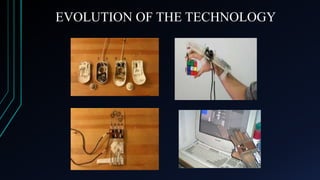
EVOLUTION OF THE TECHNOLOGY
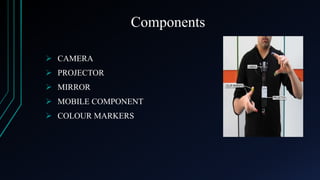
Components
 CAMERA
 PROJECTOR
 MIRROR
 MOBILE COMPONENT
 COLOUR MARKERS
CAMERA

 Captures an object in view and tracks the users hand gestures.
 Can recognize individuals, pictures, books etc.
 Acts as an digital eye, connecting you to the world of digital information.
 Sends data to the mobile device for processing.
PROJECTOR

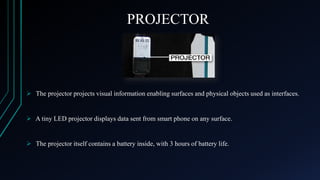
 The projector projects visual information enabling surfaces and physical objects used as interfaces.

 A tiny LED projector displays data sent from smart phone on any surface.

 The projector itself contains a battery inside, with 3 hours of battery life.
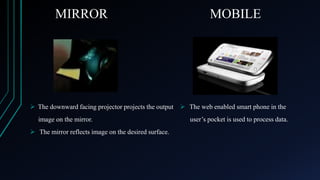
MIRROR

MOBILE

 The downward facing projector projects the output  The web enabled smart phone in the
image on the mirror.
 The mirror reflects image on the desired surface.

user’s pocket is used to process data.
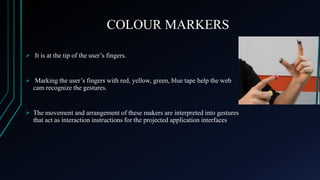
COLOUR MARKERS
 It is at the tip of the user’s fingers.

 Marking the user’s fingers with red, yellow, green, blue tape help the web
cam recognize the gestures.

 The movement and arrangement of these makers are interpreted into gestures
that act as interaction instructions for the projected application interfaces
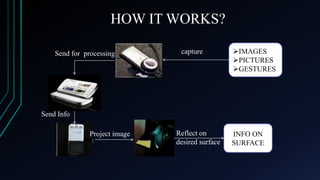
HOW IT WORKS?
Send for processing

capture

IMAGES
PICTURES
GESTURES

Send Info
Project image

Reflect on
desired surface

INFO ON
SURFACE
APPLICATIONS
TAKE PICTURES
 If you fashion your index fingers and thumbs into a
square ( “framing” gesture) we can take a snap.

ORGANIZE PICTURES
 After taking the photos, we can project them onto a
surface, and use gestures to sort through the photos,
and organize and resize them.
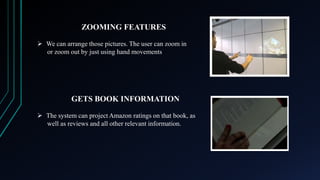
ZOOMING FEATURES
 We can arrange those pictures. The user can zoom in
or zoom out by just using hand movements

GETS BOOK INFORMATION
 The system can project Amazon ratings on that book, as
well as reviews and all other relevant information.
FEED INFORMATION ON PEOPLE
 The system will project some relevant information about a person
such what he/she does, where they work, and so on.

GET FLIGHT UPDATES
 The system will recognize your boarding pass and you know
whether your flight is on time and if the gate has changed.
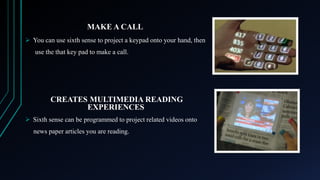
MAKE A CALL
 You can use sixth sense to project a keypad onto your hand, then
use the that key pad to make a call.

CREATES MULTIMEDIA READING
EXPERIENCES
 Sixth sense can be programmed to project related videos onto
news paper articles you are reading.
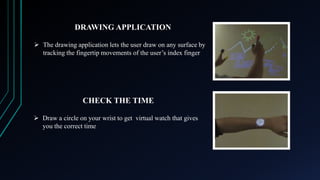
DRAWING APPLICATION
 The drawing application lets the user draw on any surface by
tracking the fingertip movements of the user’s index finger

CHECK THE TIME
 Draw a circle on your wrist to get virtual watch that gives
you the correct time
GETS PRODUCT INFORMATION

 Sixth sense uses image recognition or marker technology to recognize products we pick up and feed
us information on those products
ADVANTAGES
Portable
Supports multi-touch and multi-user interaction

Connectedness between world and information
Cost effective
Data access directly from machine in real time
Mind map the idea anywhere
CONCLUSION
 Sixth Sense recognizes the objects around us , displaying information
automatically and letting us to access it in any way we need.
 The Sixth Sense prototype implements several applications that
demonstrate the usefulness, viability and flexibility of the system.
Thank You !!

Any Queries ??

Sixth sense technology

  • 1.
  • 2.
    Sixth Sense Technology PresentedBy:Rahul Baghla Rohitash Sharma
  • 3.
    CONTENTS  INTRODUCTION  EVOLUTIONOF THE TECHNOLOGY  COMPONENTS  WORKING  APPLICATIONS  ADVANTAGES  CONCLUSION
  • 4.
    INTRODUCTION  Sixth senseis a wearable gesture interface that augments the physical world around us with the digital world.  This technology is developed by Pranav Mistry ,a PhD student of MIT Media Lab.  It lets us use natural hand gestures to interact with the digital world.
  • 5.
    EVOLUTION OF THETECHNOLOGY
  • 6.
    Components  CAMERA  PROJECTOR MIRROR  MOBILE COMPONENT  COLOUR MARKERS
  • 7.
    CAMERA  Captures anobject in view and tracks the users hand gestures.  Can recognize individuals, pictures, books etc.  Acts as an digital eye, connecting you to the world of digital information.  Sends data to the mobile device for processing.
  • 8.
    PROJECTOR  The projectorprojects visual information enabling surfaces and physical objects used as interfaces.  A tiny LED projector displays data sent from smart phone on any surface.  The projector itself contains a battery inside, with 3 hours of battery life.
  • 9.
    MIRROR MOBILE  The downwardfacing projector projects the output  The web enabled smart phone in the image on the mirror.  The mirror reflects image on the desired surface. user’s pocket is used to process data.
  • 10.
    COLOUR MARKERS  Itis at the tip of the user’s fingers.  Marking the user’s fingers with red, yellow, green, blue tape help the web cam recognize the gestures.  The movement and arrangement of these makers are interpreted into gestures that act as interaction instructions for the projected application interfaces
  • 11.
    HOW IT WORKS? Sendfor processing capture IMAGES PICTURES GESTURES Send Info Project image Reflect on desired surface INFO ON SURFACE
  • 12.
    APPLICATIONS TAKE PICTURES  Ifyou fashion your index fingers and thumbs into a square ( “framing” gesture) we can take a snap. ORGANIZE PICTURES  After taking the photos, we can project them onto a surface, and use gestures to sort through the photos, and organize and resize them.
  • 13.
    ZOOMING FEATURES  Wecan arrange those pictures. The user can zoom in or zoom out by just using hand movements GETS BOOK INFORMATION  The system can project Amazon ratings on that book, as well as reviews and all other relevant information.
  • 14.
    FEED INFORMATION ONPEOPLE  The system will project some relevant information about a person such what he/she does, where they work, and so on. GET FLIGHT UPDATES  The system will recognize your boarding pass and you know whether your flight is on time and if the gate has changed.
  • 15.
    MAKE A CALL You can use sixth sense to project a keypad onto your hand, then use the that key pad to make a call. CREATES MULTIMEDIA READING EXPERIENCES  Sixth sense can be programmed to project related videos onto news paper articles you are reading.
  • 16.
    DRAWING APPLICATION  Thedrawing application lets the user draw on any surface by tracking the fingertip movements of the user’s index finger CHECK THE TIME  Draw a circle on your wrist to get virtual watch that gives you the correct time
  • 17.
    GETS PRODUCT INFORMATION Sixth sense uses image recognition or marker technology to recognize products we pick up and feed us information on those products
  • 18.
    ADVANTAGES Portable Supports multi-touch andmulti-user interaction Connectedness between world and information Cost effective Data access directly from machine in real time Mind map the idea anywhere
  • 19.
    CONCLUSION  Sixth Senserecognizes the objects around us , displaying information automatically and letting us to access it in any way we need.  The Sixth Sense prototype implements several applications that demonstrate the usefulness, viability and flexibility of the system.
  • 21.
    Thank You !! AnyQueries ??