





GL

BAL

Institute of Information Technology
A Presentation on
Domain Name System
Group Name :-

G2

Group Members :- Gaurav Kumar
Sahil Sardana
Contents :

Key terms


What is internet



How do they connect
History of the DNS



Introduction to the DNS



Components of the DNS






The servers




The namespace
The resolvers

Conclusion
What is the internet?


The internet is a global system of interconnected
computer networks . It is a network of networks that
consists of millions of private and public , academic ,
business and government networks of local to global
space that are linked by transmission media such as
copper wires , fiber optic cables , wireless connections
and other technologies .
How do they Connect?


A network of computers connected to each
other is called internet and these computers
needed to know which computer they were
connecting to, so each computer was given a
unique number – an IP (Internet Protocol)
number. E.g. 121.245.078.2
In the Beginning...


There was the ARPANET’s HOSTS.TXT file





Each computer on the network retrieved a file called
HOSTS.TXT
HOSTS.TXT mapped every ARPANET host’s name to its
IP address.

The HOSTS.TXT file mapped numerical addresses to
names.




Allows users to specify an IP address (e.g. 192.0.34.166)
to use for a host name (e.g. www.google.com)
without checking DNS.

Systems based on a hosts file have inherent limitations
The Problems with
HOSTS.TXT


Consistency
 The

network changed more quickly
than the file was updated



Name collisions
 No

two hosts could have the same
name
 “Good”

names quickly exhausted

 There

was no good method to prevent
duplicate names
 Human



intervention was required

Traffic and load
Solving the Problem


ARPANET powers-that-were launched an
investigation into replacement for
HOSTS.TXT



Requirements:
 Decentralized

administration

 With

data updated locally, but
available globally

A

hierarchical name space

 To

guarantee unique names
Domain Name System ?


The domain name system is usually used
to translate a host name into an IP
address and vice versa.



Domain names comprise a hierarchy so
that names are unique, yet easy to
remember.



DNS implements a distributed database to
store domain name and address
information for all public hosts on the
Internet.



Defines a hierarchical namespace where
each level of the namespace is separated
by a “.”
Continued…
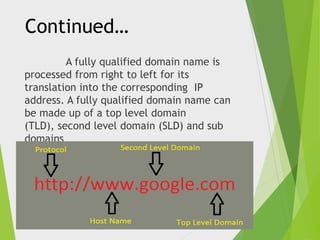
A fully qualified domain name is
processed from right to left for its
translation into the corresponding IP
address. A fully qualified domain name can
be made up of a top level domain
(TLD), second level domain (SLD) and sub
domains
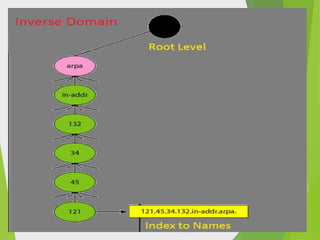
Domain Names


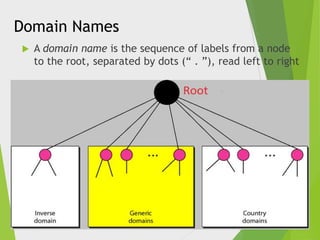
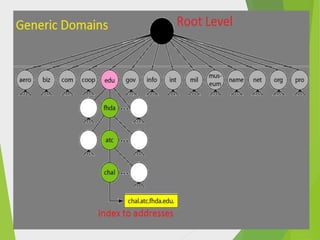
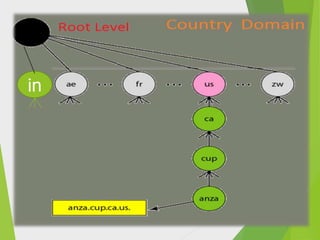
A domain name is the sequence of labels from a node
to the root, separated by dots (“ . ”), read left to right
in
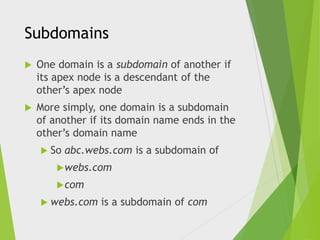
Subdomains


One domain is a subdomain of another if
its apex node is a descendant of the
other’s apex node



More simply, one domain is a subdomain
of another if its domain name ends in the
other’s domain name
 So

abc.webs.com is a subdomain of

 webs.com
 com
 webs.com

is a subdomain of com
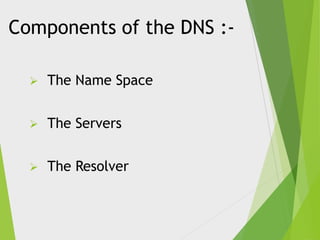
Components of the DNS :

The Name Space



The Servers



The Resolver
The Name Space


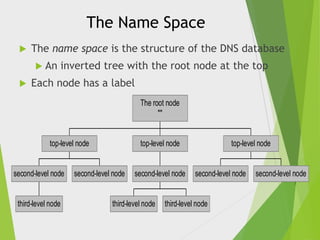
The name space is the structure of the DNS database
 An



inverted tree with the root node at the top

Each node has a label
The root node
""

top-level node

second-level node

third-level node

top-level node

second-level node

second-level node

third-level node

top-level node

second-level node

third-level node

second-level node
Name Servers


Name servers store information about the
name space in units called “zones”
 The

name servers that load a complete
zone are said to “have authority for”
or “be authoritative for” the zone



Usually, more than one name server are
authoritative for the same zone
 This

ensures redundancy and spreads
the load



Also, a single name server may be
authoritative for many zones
Types of Name Servers :Two main types of servers


Local name servers:


Each ISP, company has local (default)
name server



Host DNS query first goes to local
name server
Authoritative name server:



For a host: stores that host’s IP
address, name



Can perform name/address translation
for that host’s name
Root Name Server


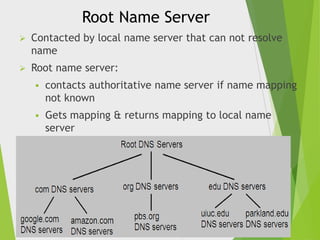
Contacted by local name server that can not resolve
name



Root name server:


contacts authoritative name server if name mapping
not known



Gets mapping & returns mapping to local name
server
Name Resolution




Name resolution is the process by which client and
Local name servers cooperate to find data in the name
space.
A Local name server receives a query from a client ,
looks for the answer in its database
 If

the answer isn’t in the database and the server
isn’t authoritative for the answer, the answer must
be
looked up.
The Resolution Process


Let’s look at the resolution process stepby-step:

Client Computer

www.google.com
The Resolution Process


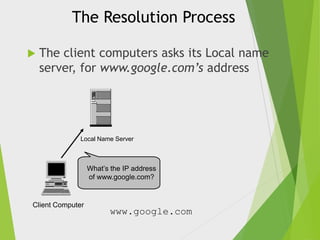
The client computers asks its Local name
server, for www.google.com’s address

Local Name Server

What’s the IP address
of www.google.com?

Client Computer

www.google.com
The Resolution Process


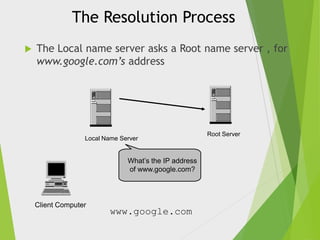
The Local name server asks a Root name server , for
www.google.com’s address

Local Name Server

What’s the IP address
of www.google.com?

Client Computer

www.google.com

Root Server
The Resolution Process


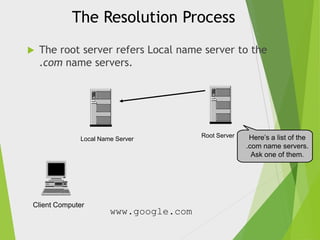
The root server refers Local name server to the
.com name servers.

Local Name Server

Client Computer

www.google.com

Root Server

Here’s a list of the
.com name servers.
Ask one of them.
The Resolution Process


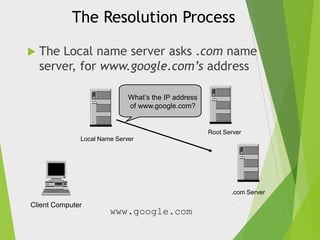
The Local name server asks .com name
server, for www.google.com’s address
What’s the IP address
of www.google.com?

Root Server

Local Name Server

.com Server

Client Computer

www.google.com
The Resolution Process


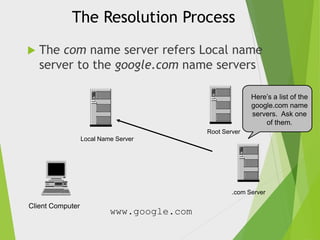
The com name server refers Local name
server to the google.com name servers
Here’s a list of the
google.com name
servers. Ask one
of them.
Root Server

Local Name Server

.com Server

Client Computer

www.google.com
The Resolution Process


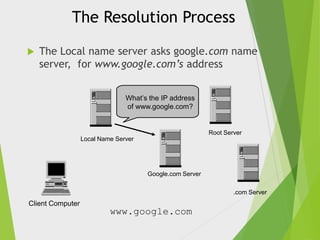
The Local name server asks google.com name
server, for www.google.com’s address
What’s the IP address
of www.google.com?

Root Server

Local Name Server

Google.com Server

.com Server

Client Computer

www.google.com
The Resolution Process


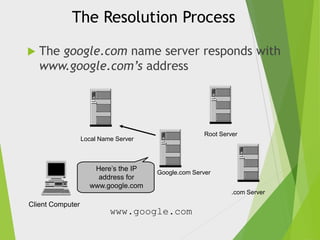
The google.com name server responds with
www.google.com’s address

Root Server

Local Name Server

Here’s the IP
address for
www.google.com

Google.com Server

.com Server

Client Computer

www.google.com
The Resolution Process


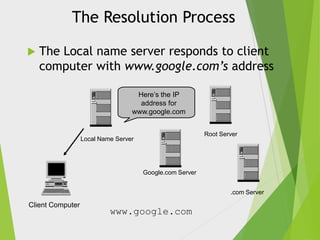
The Local name server responds to client
computer with www.google.com’s address
Here’s the IP
address for
www.google.com
Root Server

Local Name Server

Google.com Server

.com Server

Client Computer

www.google.com
Resolution Process (Caching)


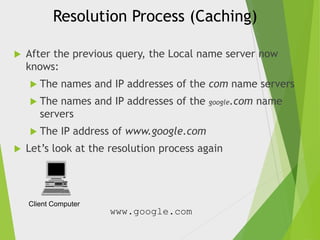
After the previous query, the Local name server now
knows:
 The

names and IP addresses of the com name servers

 The

names and IP addresses of the
servers

 The


google.com

IP address of www.google.com

Let’s look at the resolution process again

Client Computer

www.google.com

name
Resolution Process (Caching)


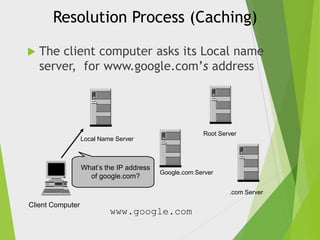
The client computer asks its Local name
server, for www.google.com’s address

Root Server

Local Name Server

What’s the IP address
of google.com?

Google.com Server

.com Server

Client Computer

www.google.com
Resolution Process (Caching)


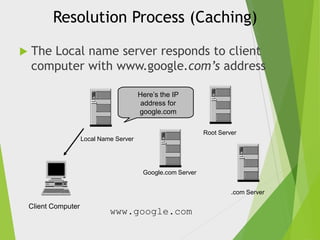
The Local name server responds to client
computer with www.google.com’s address
Here’s the IP
address for
google.com
Root Server

Local Name Server

Google.com Server

.com Server

Client Computer

www.google.com
Conclusion


DNS is like a phone book for the Internet.
If we know a person’s name but don’t
know his mobile number, we can simply
look it up in a phone book. DNS provides
this same service to the Internet.



When we visit www.google.com in a
browser, our computer uses DNS to
retrieve the website’s IP address
of 173.194.69.147 .
Dns
Dns

Dns

  • 1.
  • 2.
    A Presentation on DomainName System Group Name :- G2 Group Members :- Gaurav Kumar Sahil Sardana
  • 3.
    Contents : Key terms  Whatis internet  How do they connect History of the DNS  Introduction to the DNS  Components of the DNS    The servers   The namespace The resolvers Conclusion
  • 4.
    What is theinternet?  The internet is a global system of interconnected computer networks . It is a network of networks that consists of millions of private and public , academic , business and government networks of local to global space that are linked by transmission media such as copper wires , fiber optic cables , wireless connections and other technologies .
  • 5.
    How do theyConnect?  A network of computers connected to each other is called internet and these computers needed to know which computer they were connecting to, so each computer was given a unique number – an IP (Internet Protocol) number. E.g. 121.245.078.2
  • 6.
    In the Beginning...  Therewas the ARPANET’s HOSTS.TXT file    Each computer on the network retrieved a file called HOSTS.TXT HOSTS.TXT mapped every ARPANET host’s name to its IP address. The HOSTS.TXT file mapped numerical addresses to names.   Allows users to specify an IP address (e.g. 192.0.34.166) to use for a host name (e.g. www.google.com) without checking DNS. Systems based on a hosts file have inherent limitations
  • 7.
    The Problems with HOSTS.TXT  Consistency The network changed more quickly than the file was updated  Name collisions  No two hosts could have the same name  “Good” names quickly exhausted  There was no good method to prevent duplicate names  Human  intervention was required Traffic and load
  • 8.
    Solving the Problem  ARPANETpowers-that-were launched an investigation into replacement for HOSTS.TXT  Requirements:  Decentralized administration  With data updated locally, but available globally A hierarchical name space  To guarantee unique names
  • 9.
    Domain Name System?  The domain name system is usually used to translate a host name into an IP address and vice versa.  Domain names comprise a hierarchy so that names are unique, yet easy to remember.  DNS implements a distributed database to store domain name and address information for all public hosts on the Internet.  Defines a hierarchical namespace where each level of the namespace is separated by a “.”
  • 10.
    Continued… A fully qualifieddomain name is processed from right to left for its translation into the corresponding IP address. A fully qualified domain name can be made up of a top level domain (TLD), second level domain (SLD) and sub domains
  • 11.
    Domain Names  A domainname is the sequence of labels from a node to the root, separated by dots (“ . ”), read left to right
  • 13.
  • 15.
    Subdomains  One domain isa subdomain of another if its apex node is a descendant of the other’s apex node  More simply, one domain is a subdomain of another if its domain name ends in the other’s domain name  So abc.webs.com is a subdomain of  webs.com  com  webs.com is a subdomain of com
  • 17.
    Components of theDNS : The Name Space  The Servers  The Resolver
  • 18.
    The Name Space  Thename space is the structure of the DNS database  An  inverted tree with the root node at the top Each node has a label The root node "" top-level node second-level node third-level node top-level node second-level node second-level node third-level node top-level node second-level node third-level node second-level node
  • 19.
    Name Servers  Name serversstore information about the name space in units called “zones”  The name servers that load a complete zone are said to “have authority for” or “be authoritative for” the zone  Usually, more than one name server are authoritative for the same zone  This ensures redundancy and spreads the load  Also, a single name server may be authoritative for many zones
  • 20.
    Types of NameServers :Two main types of servers  Local name servers:  Each ISP, company has local (default) name server  Host DNS query first goes to local name server Authoritative name server:  For a host: stores that host’s IP address, name  Can perform name/address translation for that host’s name
  • 21.
    Root Name Server  Contactedby local name server that can not resolve name  Root name server:  contacts authoritative name server if name mapping not known  Gets mapping & returns mapping to local name server
  • 22.
    Name Resolution   Name resolutionis the process by which client and Local name servers cooperate to find data in the name space. A Local name server receives a query from a client , looks for the answer in its database  If the answer isn’t in the database and the server isn’t authoritative for the answer, the answer must be looked up.
  • 23.
    The Resolution Process  Let’slook at the resolution process stepby-step: Client Computer www.google.com
  • 24.
    The Resolution Process  Theclient computers asks its Local name server, for www.google.com’s address Local Name Server What’s the IP address of www.google.com? Client Computer www.google.com
  • 25.
    The Resolution Process  TheLocal name server asks a Root name server , for www.google.com’s address Local Name Server What’s the IP address of www.google.com? Client Computer www.google.com Root Server
  • 26.
    The Resolution Process  Theroot server refers Local name server to the .com name servers. Local Name Server Client Computer www.google.com Root Server Here’s a list of the .com name servers. Ask one of them.
  • 27.
    The Resolution Process  TheLocal name server asks .com name server, for www.google.com’s address What’s the IP address of www.google.com? Root Server Local Name Server .com Server Client Computer www.google.com
  • 28.
    The Resolution Process  Thecom name server refers Local name server to the google.com name servers Here’s a list of the google.com name servers. Ask one of them. Root Server Local Name Server .com Server Client Computer www.google.com
  • 29.
    The Resolution Process  TheLocal name server asks google.com name server, for www.google.com’s address What’s the IP address of www.google.com? Root Server Local Name Server Google.com Server .com Server Client Computer www.google.com
  • 30.
    The Resolution Process  Thegoogle.com name server responds with www.google.com’s address Root Server Local Name Server Here’s the IP address for www.google.com Google.com Server .com Server Client Computer www.google.com
  • 31.
    The Resolution Process  TheLocal name server responds to client computer with www.google.com’s address Here’s the IP address for www.google.com Root Server Local Name Server Google.com Server .com Server Client Computer www.google.com
  • 32.
    Resolution Process (Caching)  Afterthe previous query, the Local name server now knows:  The names and IP addresses of the com name servers  The names and IP addresses of the servers  The  google.com IP address of www.google.com Let’s look at the resolution process again Client Computer www.google.com name
  • 33.
    Resolution Process (Caching)  Theclient computer asks its Local name server, for www.google.com’s address Root Server Local Name Server What’s the IP address of google.com? Google.com Server .com Server Client Computer www.google.com
  • 34.
    Resolution Process (Caching)  TheLocal name server responds to client computer with www.google.com’s address Here’s the IP address for google.com Root Server Local Name Server Google.com Server .com Server Client Computer www.google.com
  • 35.
    Conclusion  DNS is likea phone book for the Internet. If we know a person’s name but don’t know his mobile number, we can simply look it up in a phone book. DNS provides this same service to the Internet.  When we visit www.google.com in a browser, our computer uses DNS to retrieve the website’s IP address of 173.194.69.147 .