DNS (Domain Name
System)
Unit - 3
DNS(Domain Name System)
● TCP/IP protocols uses IP address.
● Identifies connection of a host to the internet.
● System maps a name to an address
● Host file – only two columns (name, address)
● Single host file – maps the names to address
● Host file would be large to store in every host.
● Impossible to update the changes happens
every time to the host file.
Solution 1
● Store the host file in a single system and allow the centralized information access to every system that
needs mapping.
Disadvantage
● Huge amount of traffic to the internet.
Solution 2
● Divide the huge amount of information into smaller parts and store on different systems.
● Host which needs mapping can communicate to the closest system that holds the information.
● This solution is called Domain Name System.
2
Purpose of DNS
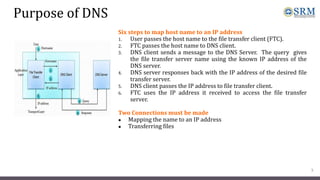
Six steps to map host name to an IP address
1. User passes the host name to the file transfer client (FTC).
2. FTC passes the host name to DNS client.
3. DNS client sends a message to the DNS Server. The query gives
the file transfer server name using the known IP address of the
DNS server.
4. DNS server responses back with the IP address of the desired file
transfer server.
5. DNS client passes the IP address to file transfer client.
6. FTC uses the IP address it received to access the file transfer
server.
Two Connections must be made
● Mapping the name to an IP address
● Transferring files
3
Namespace
● Maps the address to the unique names.
● Organized in two ways flat or hierarchical.
Flat Name Space
● Name is assigned to an address, name is the sequence of characters without structures.
Disadvantage
● Cannot used in large system.
● Centrally controlled to avoid ambiguity and duplications.
Hierarchical Name Space
● Each name is made up of several parts.
● First part – nature of organization
● Second part – name of an organization
● Third part – departments in the organization
● Namespace can be decentralized.
● Suffixes (or prefixes) are added to the name that defines the host or system.
4
Domain Name Space
 Hierarchical name space – DNS was designed.
 Names are defined in inverted tree structure with
root at top.
 Tree have 128 levels – 0 (root) to 127.
Label
 Each node in a tree has a label – max of 63
characters.
 Root label is a null string.
 Children node should have different labels that
will ensure uniqueness in domain names.
Domain Name
 Full domain name is the sequence of labels
separated by dots.
 Domain names read from nodes up to the root.
 Full domain name always ends in a null label.
5
Domain Name System
Domain names and labels
Fully Qualified Domain Names (FQDN)
Partially Qualified Domain Names (PQDN)
Fully Qualified Domain Names (FQDN)
● If the label is terminated by null string it is called fully qualified domain names.
● Contains the full name of the host, contains all labels from most specific to
most general.
● DNS server can match an FQDN to an address.
Eg: challenger.atc.fhda.edu.
Partially Qualified Domain Names (PQDN)
● If the label is not terminated by null string it is called partially qualified
domain name.
● PQDN starts from the node but does not reach the root.
● The resolver will supply the missing part called the suffix to create a PQDN.
● User at fhda.edu site wants to get the IP address of the challenger computer,
has to mention the partial name.
Eg: challenger
● The DNS client adds the suffix before parsing the address to the DNS server.
Eg: act.fhda.edu
6
FQDN and PQDN
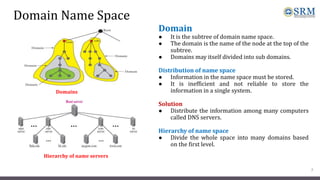
Domain
● It is the subtree of domain name space.
● The domain is the name of the node at the top of the
subtree.
● Domains may itself divided into sub domains.
Distribution of name space
● Information in the name space must be stored.
● It is inefficient and not reliable to store the
information in a single system.
Solution
● Distribute the information among many computers
called DNS servers.
Hierarchy of name space
● Divide the whole space into many domains based
on the first level.
7
Domain Name Space
Domains
Hierarchy of name servers
Domain Name Space
Zone
● What a server is responsible for or has authority over is
called zones.
● Zone is the contiguous part of the entire tree.
● If server accepts the responsibility for a domain and does
not divide the domain into smaller domains then “domain”
and “zone” refers the same thing.
Root server
● It is the server whose zone consists of the whole tree.
● It does not store any information about the domains but
delegates the authority to other servers, keeping
references to those servers.
8
Zones and Domains
Domain Name Space
Primary and Secondary Servers
Primary Server
● Server that stores the file about the zone for which it is in authority.
● It is responsible for creating, maintaining and updating the zone files.
● It stores zone file on a local disk.
Secondary Servers
● Server that transfers the complete information about zone from another server and stores the file on its
local disk.
● Secondary server neither creates nor updates the zone files.
9
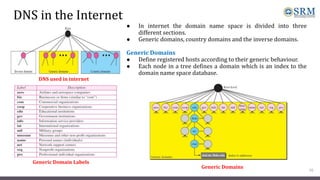
DNS in the Internet
● In internet the domain name space is divided into three
different sections.
● Generic domains, country domains and the inverse domains.
Generic Domains
● Define registered hosts according to their generic behaviour.
● Each node in a tree defines a domain which is an index to the
domain name space database.
10
DNS used in internet
Generic Domains
Generic Domain Labels
DNS in the Internet
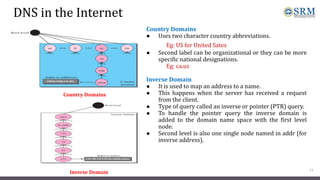
Country Domains
● Uses two character country abbreviations.
Eg: US for United Sates
● Second label can be organizational or they can be more
specific national designations.
Eg: ca.us
Inverse Domain
● It is used to map an address to a name.
● This happens when the server has received a request
from the client.
● Type of query called an inverse or pointer (PTR) query.
● To handle the pointer query the inverse domain is
added to the domain name space with the first level
node.
● Second level is also one single node named in addr (for
inverse address).
11
Country Domains
Inverse Domain
Resolution
Mapping a name to an address or an address to a name is called name address
resolution.
Resolver
● DNS is designed as a client – server application.
● Host that needs to map an address to a name or a name to an address calls a
DNS client called a resolver.
● After the resolver receives the mapping, it interprets the response to see if it
is a real resolution or an error and finally delivers the results to the process
that requested it.
Mapping Names to Addresses
● The resolver gives a domain name to the server and asks for the
corresponding address.
● If the domain name is from the generic domain the resolver receives a
domain name such as “chal.atc.fhda.edu.
● If the domain name is from the country domain the resolver receives a
domain name such as “ch.fhda.cu.ca.us.
12
Resolution
Mapping Addresses to Names
● A client can send an IP address to a server to be mapped to a
domain name.
● To answer the PTR query DNS uses the inverse domain.
● in the request the IP address is reversed and two labels in-
addr and arpa are appended to create a domain acceptable by
the inverse domain.
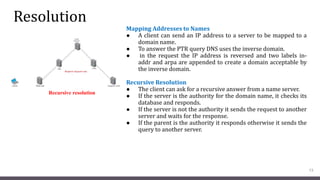
Recursive Resolution
● The client can ask for a recursive answer from a name server.
● If the server is the authority for the domain name, it checks its
database and responds.
● If the server is not the authority it sends the request to another
server and waits for the response.
● If the parent is the authority it responds otherwise it sends the
query to another server.
13
Recursive resolution
Resolution
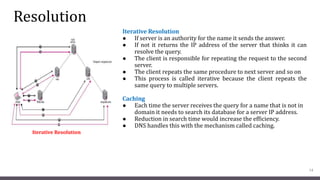
Iterative Resolution
● If server is an authority for the name it sends the answer.
● If not it returns the IP address of the server that thinks it can
resolve the query.
● The client is responsible for repeating the request to the second
server.
● The client repeats the same procedure to next server and so on
● This process is called iterative because the client repeats the
same query to multiple servers.
Caching
● Each time the server receives the query for a name that is not in
domain it needs to search its database for a server IP address.
● Reduction in search time would increase the efficiency.
● DNS handles this with the mechanism called caching.
14
Iterative Resolution
Resolution
● Reduction of search time would increase the efficiency.
● DNS handles this with the mechanism called catching.
● Caching speeds up resolution but it can also be problematic.
● If the server caches the mapping for a long time it may send an outdated mapping to the client.
Two counter techniques are used
 The authoritative server always adds information to the mapping called time to live.
 DNS requires each server keep a TTL counter for each mapping it caches.
15
DNS Messages
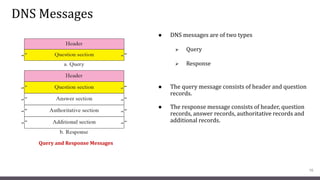
● DNS messages are of two types
 Query
 Response
● The query message consists of header and question
records.
● The response message consists of header, question
records, answer records, authoritative records and
additional records.
16
Query and Response Messages
DNS Messages
Header
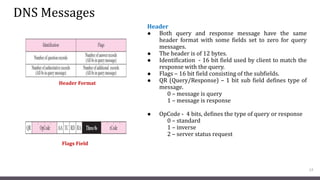
● Both query and response message have the same
header format with some fields set to zero for query
messages.
● The header is of 12 bytes.
● Identification - 16 bit field used by client to match the
response with the query.
● Flags – 16 bit field consisting of the subfields.
● QR (Query/Response) – 1 bit sub field defines type of
message.
0 – message is query
1 – message is response
● OpCode - 4 bits, defines the type of query or response
0 – standard
1 – inverse
2 – server status request
17
Header Format
Flags Field
DNS Messages
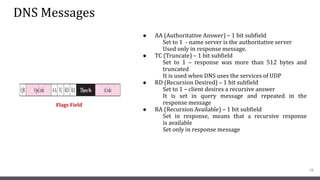
● AA (Authoritative Answer) – 1 bit subfield
Set to 1 - name server is the authoritative server
Used only in response message.
● TC (Truncate) – 1 bit subfield
Set to 1 – response was more than 512 bytes and
truncated
It is used when DNS uses the services of UDP
● RD (Recursion Desired) – 1 bit subfield
Set to 1 – client desires a recursive answer
It is set in query message and repeated in the
response message
● RA (Recursion Available) – 1 bit subfield
Set in response, means that a recursive response
is available
Set only in response message
18
Flags Field
DNS Messages
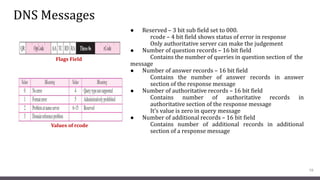
● Reserved – 3 bit sub field set to 000.
rcode – 4 bit field shows status of error in response
Only authoritative server can make the judgement
● Number of question records – 16 bit field
Contains the number of queries in question section of the
message
● Number of answer records – 16 bit field
Contains the number of answer records in answer
section of the response message
● Number of authoritative records – 16 bit field
Contains number of authoritative records in
authoritative section of the response message
It’s value is zero in query message
● Number of additional records – 16 bit field
Contains number of additional records in additional
section of a response message
19
Flags Field
Values of rcode
DNS Messages
● Question Section
Consists of one or more question records
It is present in both query and response messages
● Answer Section
Consists of two or more resource records
It is present only on response messages
● Authoritative Section
Consists of two or more resource records
It is present only on response messages
Gives information (domain name) about one or more authoritative servers for the query
● Additional Information Section
Consists of two or more resource records
It is present only on response messages
Gives additional information that helps the resolver
20
TELNET
Time Sharing Environment
● TELNET was designed at a time when most OS were operating in a time – sharing environment.
● The interaction between a user and the computer occurs through a terminal which is usually a
combinations of keyboard, monitor and mouse.
● When a user types a character on the keyboard, the character is usually sent to the computer and echoed
to the monitor.
Login
● In time sharing environment users are part of the system with come right to access resources.
● Each authorized user has an identification and probably a password.
● To access the system, the user logs into the system with a user id or login name.
● The system also includes password checking to prevent unauthorized user from accessing the
resources.
Local login
● When the user logs into a local time sharing it is called local login.
21
TELNET
22
TELNET
23
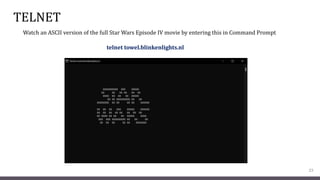
telnet towel.blinkenlights.nl
Watch an ASCII version of the full Star Wars Episode IV movie by entering this in Command Prompt
WWW Architecture
Unit - 3
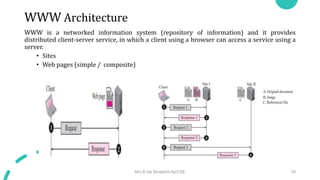
WWW Architecture
WWW is a networked information system (repository of information) and it provides
distributed client-server service, in which a client using a browser can access a service using a
server.
• Sites
• Web pages (simple / composite)
Mrs.B.Ida Seraphim Ap/CSE 25
Hypertext and Hypermedia
Hypertext
• Hypertext – creating a document that in turn
refer to another document.
• In a hypertext document, a part of text can be
defined as a link to another document.
Hypermedia
• Hypermedia is a term applied to document that
contains links to other textual document or
documents containing graphics, video, or audio.
Mrs.B.Ida Seraphim Ap/CSE 26
Web Client (Browser)
• It is an application software that allows us to view and
explore information on the web. User can request for any
web page by just entering a URL into address bar.
• Web browser can show text, audio, video, animation and
more. It is the responsibility of a web browser to interpret
text and commands contained in the web page.
• A variety of vendors offer commercial browsers that
interpret and display a Web document, and all of them use
nearly the same architecture. Each browser usually
consists of three parts:
 A controller – receives input from keyboard
 Client protocol – access the document
 Interpreters – display document on screen
Mrs.B.Ida Seraphim Ap/CSE 27
Web Server
• Web site is collection of web pages while web server is a
software that respond to the request for web resources.
• When client sends request for a web page, the web server
search for the requested page if requested page is found then it
will send it to client with an HTTP response.
• If the requested web page is not found, web server will the
send an HTTP response
Error 404 Not found
• A server can also become more efficient through
multithreading or multiprocessing. In this case, a server can
answer more than one request at a time.
• Some popular Web servers include Apache and Microsoft
Internet Information Server.
Mrs.B.Ida Seraphim Ap/CSE 28
Uniform Resource Locator (URL)
• A URL (Uniform Resource Locator) is a unique identifier
used to locate a resource on the internet.
 Protocol - client-server application program used to
retrieve the document (http)
 Host - domain name of the computer on which the
information is located (www)
 Port – (optional) If the port is included, it is inserted
between the host and the path, and it is separated
from the host by a colon.
 Path - pathname of the file where the information is
located.
Mrs.B.Ida Seraphim Ap/CSE 29
Web Documents
Unit - 3
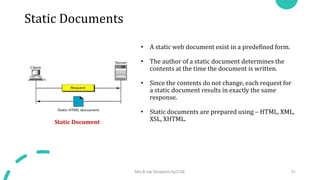
Static Documents
• A static web document exist in a predefined form.
• The author of a static document determines the
contents at the time the document is written.
• Since the contents do not change, each request for
a static document results in exactly the same
response.
• Static documents are prepared using – HTML, XML,
XSL, XHTML.
Static Document
Mrs.B.Ida Seraphim Ap/CSE 31
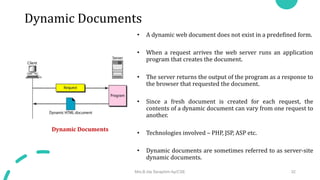
Dynamic Documents
• A dynamic web document does not exist in a predefined form.
• When a request arrives the web server runs an application
program that creates the document.
• The server returns the output of the program as a response to
the browser that requested the document.
• Since a fresh document is created for each request, the
contents of a dynamic document can vary from one request to
another.
• Technologies involved – PHP, JSP, ASP etc.
• Dynamic documents are sometimes referred to as server-site
dynamic documents.
Dynamic Documents
Mrs.B.Ida Seraphim Ap/CSE 32
Active Documents
• An active web document consists of a computer
program that the server sends to the browser and
that the browser must run locally.
• When it runs, the active document program can
interact with the user and change the display
continuously.
• Active documents are sometimes referred to as
client-site dynamic documents.
Active Documents
Mrs.B.Ida Seraphim Ap/CSE 33
HTTP
Unit - 3
HTTP Transaction
• The Hypertext Transfer Protocol (HTTP) is a
protocol used mainly to access data on the World
Wide Web.
• HTTP functions as a combination of FTP and SMTP.
• HTTP uses the services of TCP on well-known port
80.
 Request message
 Request Line
HTTP Transaction
Mrs.B.Ida Seraphim Ap/CSE 35
HTTP Transaction
• Format of request message and response message
Format of the request message
Mrs.B.Ida Seraphim Ap/CSE 36
Conditional Request
• Request based on condition is possible.
• If condition is met, server sends it; else
client is informed about it.
• Example conditions - time and date the
Web page is modified.
Mrs.B.Ida Seraphim Ap/CSE 37
Persistence
• HTTP version 1.1 specifies a persistent connection by
default.
• Connection is left open for more requests.
• Connection will be closed only after a request or if a time-
out is reached.
• Length of data is sent by the sender on each response, but if
it is unknown (Dynamic documents) then the server informs
client and closes the connection.
Mrs.B.Ida Seraphim Ap/CSE 38
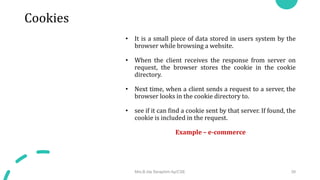
Cookies
• It is a small piece of data stored in users system by the
browser while browsing a website.
• When the client receives the response from server on
request, the browser stores the cookie in the cookie
directory.
• Next time, when a client sends a request to a server, the
browser looks in the cookie directory to.
• see if it can find a cookie sent by that server. If found, the
cookie is included in the request.
Example – e-commerce
Mrs.B.Ida Seraphim Ap/CSE 39
Web caching: Proxy server
• Proxy server acts as a gateway between client and server.
• It keeps copies of responses to recent requests.
• On receiving the request from client, proxy server checks its cache and if
it is not found then the request is sent to corresponding server.
• This reduces the load on the original server, decreases traffic, and
improves latency.
• However, to use the proxy server, the client must be configured to access
the proxy instead of the target server.
Mrs.B.Ida Seraphim Ap/CSE 40
HTTP security
• HTTP does not provide security.
• HTTP can run over Secure Socket Layer (SSL).
• In this case HTTP is referred to as HTTPS.
• HTTPS provides confidentiality, client and server authentication,
and data integrity.
Mrs.B.Ida Seraphim Ap/CSE 41
DHCP
Unit - 3
DHCP
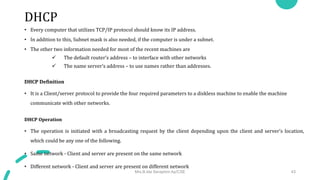
• Every computer that utilizes TCP/IP protocol should know its IP address.
• In addition to this, Subnet mask is also needed, if the computer is under a subnet.
• The other two information needed for most of the recent machines are
 The default router’s address – to interface with other networks
 The name server’s address – to use names rather than addresses.
DHCP Definition
• It is a Client/server protocol to provide the four required parameters to a diskless machine to enable the machine
communicate with other networks.
DHCP Operation
• The operation is initiated with a broadcasting request by the client depending upon the client and server’s location,
which could be any one of the following.
• Same network - Client and server are present on the same network
• Different network - Client and server are present on different network
Mrs.B.Ida Seraphim Ap/CSE 43
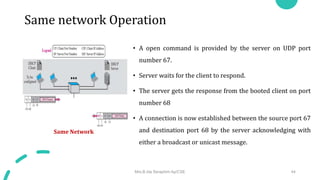
Same network Operation
• A open command is provided by the server on UDP port
number 67.
• Server waits for the client to respond.
• The server gets the response from the booted client on port
number 68
• A connection is now established between the source port 67
and destination port 68 by the server acknowledging with
either a broadcast or unicast message.
Same Network
Mrs.B.Ida Seraphim Ap/CSE 44
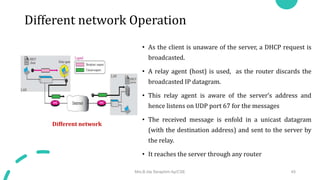
Different network Operation
• As the client is unaware of the server, a DHCP request is
broadcasted.
• A relay agent (host) is used, as the router discards the
broadcasted IP datagram.
• This relay agent is aware of the server’s address and
hence listens on UDP port 67 for the messages
• The received message is enfold in a unicast datagram
(with the destination address) and sent to the server by
the relay.
• It reaches the server through any router
Different network
Mrs.B.Ida Seraphim Ap/CSE 45
UDP Ports
• Port 67 - used by server (Common)
• Port 68 - used by client (to overcome the demultiplexing issue)
• Consider the below scenario
• Host A uses DHCP client
• Host B uses DAYTIME client
• (both are in the same network and uses ephermal port
2017)
• A broadcast message is sent from the server as an
acknowledgement
Mrs.B.Ida Seraphim Ap/CSE 46
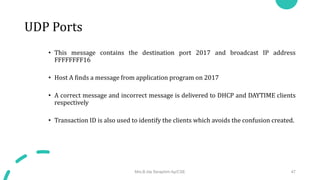
UDP Ports
• This message contains the destination port 2017 and broadcast IP address
FFFFFFFF16
• Host A finds a message from application program on 2017
• A correct message and incorrect message is delivered to DHCP and DAYTIME clients
respectively
• Transaction ID is also used to identify the clients which avoids the confusion created.
Mrs.B.Ida Seraphim Ap/CSE 47
TFTP
• It is an acknowledgement from the server, containing the pathname of a file which has the
complete booting information.
Mrs.B.Ida Seraphim Ap/CSE 48
Error control
• To take a control over the lost or damaged response, DHCP requires
• Checksum
• Retransmission
• To prevent traffic jam (Created by retransmission)
• Random numbers for timers are used
Mrs.B.Ida Seraphim Ap/CSE 49
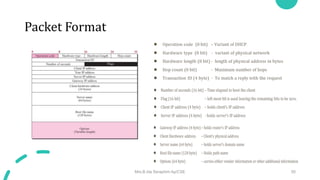
Packet Format
Mrs.B.Ida Seraphim Ap/CSE 50
DHCP
CONFIGURATION
Unit - 3
Static address allocation
• DHCP server has a database that statically binds physical address to IP address.
• DHCP is backward compatible with BOOTP protocol.
Mrs.B.Ida Seraphim Ap/CSE 52
Dynamic address allocation
• An additional database containing the unused IP addresses. This database makes DHCP dynamic.
• On request from a client, an IP address (temporary ) from this database is allocated to the requesting client
on lease for a negotiable period of time.
• When a DHCP client sends a request to a DHCP server, the server first checks its static database. If an entry
with the requested physical address exists in the static database, the permanent IP address of the client is
returned.
• If the entry does not exist in the static database, the server selects an IP address from the available pool,
assigns the address to the client, and adds the entry to the dynamic database.
• The addresses assigned from the pool are temporary addresses. The DHCP server issues a lease for a specific
period of time.
• When the lease expires, the client must either stop using the IP address or renew the lease.
• This allocation is essential when there is a transfer of host from one network to another.
Mrs.B.Ida Seraphim Ap/CSE 53
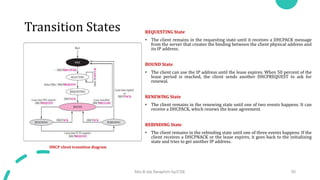
Transition States
• To provide dynamic address allocation, the DHCP client acts as a state
machine that performs transitions from one state to another depending
on the messages it receives or sends.
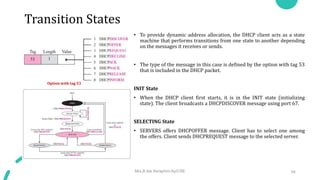
• The type of the message in this case is defined by the option with tag 53
that is included in the DHCP packet.
INIT State
• When the DHCP client first starts, it is in the INIT state (initializing
state). The client broadcasts a DHCPDISCOVER message using port 67.
SELECTING State
• SERVERS offers DHCPOFFER message. Client has to select one among
the offers. Client sends DHCPREQUEST message to the selected server.
Mrs.B.Ida Seraphim Ap/CSE 54
Option with tag 53
Transition States REQUESTING State
• The client remains in the requesting state until it receives a DHCPACK message
from the server that creates the binding between the client physical address and
its IP address.
BOUND State
• The client can use the IP address until the lease expires. When 50 percent of the
lease period is reached, the client sends another DHCPREQUEST to ask for
renewal.
RENEWING State
• The client remains in the renewing state until one of two events happens. It can
receive a DHCPACK, which renews the lease agreement.
REBINDING State
• The client remains in the rebinding state until one of three events happens. If the
client receives a DHCPNACK or the lease expires, it goes back to the initializing
state and tries to get another IP address.
Mrs.B.Ida Seraphim Ap/CSE 55
DHCP client transition diagram
E - Mail: SMTP, POP,
IMAP, and MIME
Unit - 3
Architecture
We have 4 scenarios in explain the architecture of e-mail.
• First Scenario
• Second Scenario
• Third Scenario
• Fourth Scenario
Mrs.B.Ida Seraphim Ap/CSE 57
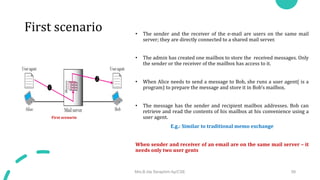
First scenario • The sender and the receiver of the e-mail are users on the same mail
server; they are directly connected to a shared mail server.
• The admin has created one mailbox to store the received messages. Only
the sender or the receiver of the mailbox has access to it.
• When Alice needs to send a message to Bob, she runs a user agent( is a
program) to prepare the message and store it in Bob’s mailbox.
• The message has the sender and recipient mailbox addresses. Bob can
retrieve and read the contents of his mailbox at his convenience using a
user agent.
E.g.: Similar to traditional memo exchange
When sender and receiver of an email are on the same mail server – it
needs only two user gents
Mrs.B.Ida Seraphim Ap/CSE 58
1
2
First scenario
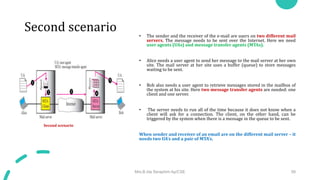
Second scenario • The sender and the receiver of the e-mail are users on two different mail
servers. The message needs to be sent over the Internet. Here we need
user agents (UAs) and message transfer agents (MTAs).
• Alice needs a user agent to send her message to the mail server at her own
site. The mail server at her site uses a buffer (queue) to store messages
waiting to be sent.
• Bob also needs a user agent to retrieve messages stored in the mailbox of
the system at his site. Here two message transfer agents are needed: one
client and one server.
• The server needs to run all of the time because it does not know when a
client will ask for a connection. The client, on the other hand, can be
triggered by the system when there is a message in the queue to be sent.
When sender and receiver of an email are on the different mail server – it
needs two UA’s and a pair of MTA’s.
Mrs.B.Ida Seraphim Ap/CSE 59
1
2 3 4
5
Second scenario
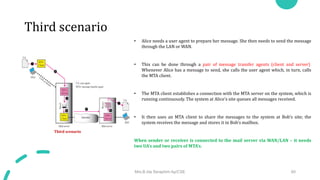
Third scenario
• Alice needs a user agent to prepare her message. She then needs to send the message
through the LAN or WAN.
• This can be done through a pair of message transfer agents (client and server).
Whenever Alice has a message to send, she calls the user agent which, in turn, calls
the MTA client.
• The MTA client establishes a connection with the MTA server on the system, which is
running continuously. The system at Alice’s site queues all messages received.
• It then uses an MTA client to share the messages to the system at Bob’s site; the
system receives the message and stores it in Bob’s mailbox.
When sender or receiver is connected to the mail server via WAN/LAN – it needs
two UA’s and two pairs of MTA’s.
Mrs.B.Ida Seraphim Ap/CSE 60
1
2
3
4
5 6
7
Third scenario
Fourth scenario • Bob is also connected to his mail server by a WAN or a LAN. After the
message has arrived at Bob’s mail server, Bob needs to retrieve it.
• we need another set of client-server agents, which we call message access
agents (MAAs).
• Bob uses an MAA client to retrieve his messages. The client sends a request
to the MAA server, which is running all the time, and requests the transfer of
the messages.
• Bob cannot bias the mail server to use the MTA server directly. To use the
MTA server directly, Bob would need to run the MTA server all the time
because he does not know when a message will arrive.
Mrs.B.Ida Seraphim Ap/CSE 61
1
2
3
4
5
6
8
9
Fourth scenario
When both sender and receiver are connected to the mail server via WAN/LAN –
it needs two UA’s, two pairs of MTA’s and a pair of MAA’s.
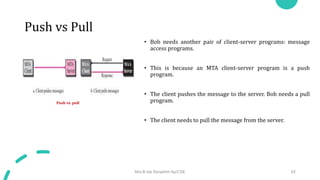
Push vs Pull
• Bob needs another pair of client-server programs: message
access programs.
• This is because an MTA client-server program is a push
program.
• The client pushes the message to the server. Bob needs a pull
program.
• The client needs to pull the message from the server.
Mrs.B.Ida Seraphim Ap/CSE 62
Push vs. pull
User Agent
The first component of an electronic mail system is the user agent (UA). It provides
service to the user to make the process of sending and receiving a message easier.
Services Provided by a User Agent
• A user agent is a software package (program) that composes, reads, replies to, and
forwards messages.
• It also handles local mailboxes on the user computers.
User Agent Types
• There are two types of user agents: command-driven and GUI-based
• A command-driven user agent normally accepts a one character command from the
keyboard to perform its task.
E.g.: User can type the character r, at the command prompt, to reply to the
sender of the message
The character R to reply to the sender and all recipients.
Examples of command-driven user agents are mail, pine, and elm.
• The graphical user interface (GUI) components that allow the user to interact with the
software by using both the keyboard and the mouse.
Examples of GUI-based user agents are Eudora, Outlook, and Netscap.
Sending Mail
• To send mail, the user, through the UA, creates mail that looks very similar to postal
mail. It has an envelope and a message
Mrs.B.Ida Seraphim Ap/CSE 63
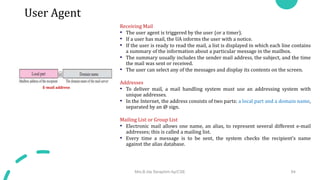
Format of an e-mail
User Agent
Receiving Mail
• The user agent is triggered by the user (or a timer).
• If a user has mail, the UA informs the user with a notice.
• If the user is ready to read the mail, a list is displayed in which each line contains
a summary of the information about a particular message in the mailbox.
• The summary usually includes the sender mail address, the subject, and the time
the mail was sent or received.
• The user can select any of the messages and display its contents on the screen.
Addresses
• To deliver mail, a mail handling system must use an addressing system with
unique addresses.
• In the Internet, the address consists of two parts: a local part and a domain name,
separated by an @ sign.
Mailing List or Group List
• Electronic mail allows one name, an alias, to represent several different e-mail
addresses; this is called a mailing list.
• Every time a message is to be sent, the system checks the recipient’s name
against the alias database.
Mrs.B.Ida Seraphim Ap/CSE 64
E-mail address
MESSAGE TRANSFER AGENT: SMTP
• The actual mail transfer is done through message transfer agents
(MTAs). To send mail, a system must have the client MTA, and to
receive mail, a system must have a server MTA.
• The formal protocol that defines the MTA client and server in the
Internet is called Simple Mail Transfer Protocol (SMTP).
• SMTP is used two times, between the sender and the sender’s
mail server and between the two mail servers.
• SMTP defines how commands and responses must be sent back
and forth
Mrs.B.Ida Seraphim Ap/CSE 65
SMTP range
Commands and Responses
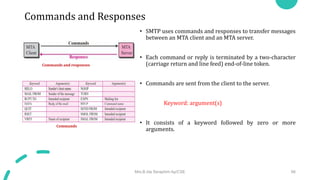
• SMTP uses commands and responses to transfer messages
between an MTA client and an MTA server.
• Each command or reply is terminated by a two-character
(carriage return and line feed) end-of-line token.
• Commands are sent from the client to the server.
Keyword: argument(s)
• It consists of a keyword followed by zero or more
arguments.
Mrs.B.Ida Seraphim Ap/CSE 66
Commands and responses
Commands
Commands and Responses
• Responses are sent from the server to the client.
• A response is a three-digit code that may be followed
by additional textual information.
Mrs.B.Ida Seraphim Ap/CSE 67
Responses
Mail Transfer Phases
• The process of transferring a mail message occurs in three phases:
connection establishment, mail transfer, and connection termination.
Connection Establishment
• The server sends code 220 to tell the client that it is ready to receive mail.
• The client sends the HELO message to identify itself using its domain
name address. This step is necessary to inform the server of the domain
name of the client.
• The server responds with code 250.
Mrs.B.Ida Seraphim Ap/CSE 68
Connection Establishment
Mail Transfer Phases
Message Transfer
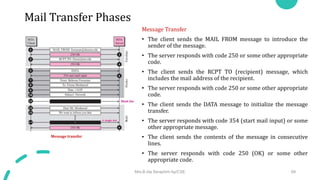
• The client sends the MAIL FROM message to introduce the
sender of the message.
• The server responds with code 250 or some other appropriate
code.
• The client sends the RCPT TO (recipient) message, which
includes the mail address of the recipient.
• The server responds with code 250 or some other appropriate
code.
• The client sends the DATA message to initialize the message
transfer.
• The server responds with code 354 (start mail input) or some
other appropriate message.
• The client sends the contents of the message in consecutive
lines.
• The server responds with code 250 (OK) or some other
appropriate code.
Mrs.B.Ida Seraphim Ap/CSE 69
Message transfer
Mail Transfer Phases
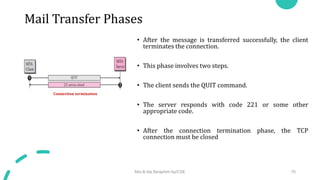
• After the message is transferred successfully, the client
terminates the connection.
• This phase involves two steps.
• The client sends the QUIT command.
• The server responds with code 221 or some other
appropriate code.
• After the connection termination phase, the TCP
connection must be closed
Mrs.B.Ida Seraphim Ap/CSE 70
Connection termination
Message access agent
• The first and the second stages of mail delivery use SMTP.
• SMTP is not involved in the third stage because SMTP is a push protocol;
it pushes the message from the client to the server.
• The third stage needs a pull protocol; the client must pull messages from
the server. The direction of the bulk data are from the server to the client.
• The third stage uses a message access agent. Currently two message
access protocols are available: Post Office Protocol, version 3 (POP3) and
Internet Mail Access Protocol, version 4 (IMAP4).
Mrs.B.Ida Seraphim Ap/CSE 71
POP3 and IMAP4
POP3 - Post Office Protocol, version 3
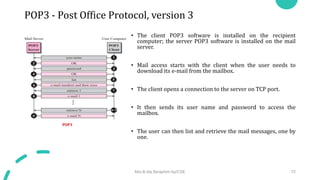
• The client POP3 software is installed on the recipient
computer; the server POP3 software is installed on the mail
server.
• Mail access starts with the client when the user needs to
download its e-mail from the mailbox.
• The client opens a connection to the server on TCP port.
• It then sends its user name and password to access the
mailbox.
• The user can then list and retrieve the mail messages, one by
one.
Mrs.B.Ida Seraphim Ap/CSE 72
POP3
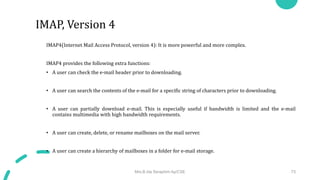
IMAP4(Internet Mail Access Protocol, version 4): It is more powerful and more complex.
IMAP4 provides the following extra functions:
• A user can check the e-mail header prior to downloading.
• A user can search the contents of the e-mail for a specific string of characters prior to downloading.
• A user can partially download e-mail. This is especially useful if bandwidth is limited and the e-mail
contains multimedia with high bandwidth requirements.
• A user can create, delete, or rename mailboxes on the mail server.
• A user can create a hierarchy of mailboxes in a folder for e-mail storage.
Mrs.B.Ida Seraphim Ap/CSE 73
IMAP, Version 4
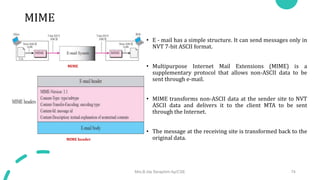
MIME
• E - mail has a simple structure. It can send messages only in
NVT 7-bit ASCII format.
• Multipurpose Internet Mail Extensions (MIME) is a
supplementary protocol that allows non-ASCII data to be
sent through e-mail.
• MIME transforms non-ASCII data at the sender site to NVT
ASCII data and delivers it to the client MTA to be sent
through the Internet.
• The message at the receiving site is transformed back to the
original data.
Mrs.B.Ida Seraphim Ap/CSE 74
MIME
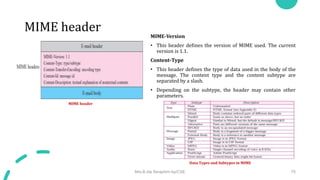
MIME header
MIME header
MIME-Version
• This header defines the version of MIME used. The current
version is 1.1.
Content-Type
• This header defines the type of data used in the body of the
message. The content type and the content subtype are
separated by a slash.
• Depending on the subtype, the header may contain other
parameters.
Mrs.B.Ida Seraphim Ap/CSE 75
MIME header
Data Types and Subtypes in MIME
Content Transfer Encoding
• Content-Transfer-Encoding: This header defines the method
used to encode the messages into 0s and 1s for transport
• The five types of encoding methods are listed
Mrs.B.Ida Seraphim Ap/CSE 76
Content-Transfer-Encoding
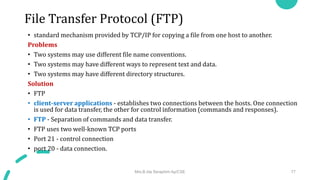
File Transfer Protocol (FTP)
• standard mechanism provided by TCP/IP for copying a file from one host to another.
Problems
• Two systems may use different file name conventions.
• Two systems may have different ways to represent text and data.
• Two systems may have different directory structures.
Solution
• FTP
• client-server applications - establishes two connections between the hosts. One connection
is used for data transfer, the other for control information (commands and responses).
• FTP - Separation of commands and data transfer.
• FTP uses two well-known TCP ports
• Port 21 - control connection
• port 20 - data connection.
Mrs.B.Ida Seraphim Ap/CSE 77
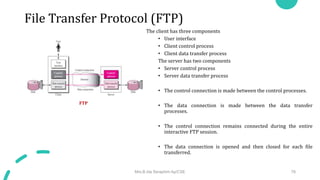
File Transfer Protocol (FTP)
The client has three components
• User interface
• Client control process
• Client data transfer process
The server has two components
• Server control process
• Server data transfer process
• The control connection is made between the control processes.
• The data connection is made between the data transfer
processes.
• The control connection remains connected during the entire
interactive FTP session.
• The data connection is opened and then closed for each file
transferred.
Mrs.B.Ida Seraphim Ap/CSE 78
FTP
File Transfer Protocol (FTP)
Control Connection
• There are two steps
1. The server issues a passive open on the well-known
port 21 and waits for a client.
2. The client uses an ephemeral port and issues an
active open.
• The connection remains open during the entire process.
Data Connection
a. The client, not the server, issues a passive open using an
ephemeral port.
b. The client sends this port number to the server using the
PORT command.
c. The server receives the port number and issues an active
open using the well known port 20 and the received
ephemeral port number.
Mrs.B.Ida Seraphim Ap/CSE 79
Opening the control connection
Creating the Data Connection
File Transfer Protocol (FTP)
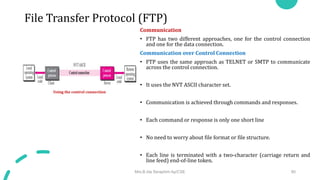
Communication
• FTP has two different approaches, one for the control connection
and one for the data connection.
Communication over Control Connection
• FTP uses the same approach as TELNET or SMTP to communicate
across the control connection.
• It uses the NVT ASCII character set.
• Communication is achieved through commands and responses.
• Each command or response is only one short line
• No need to worry about file format or file structure.
• Each line is terminated with a two-character (carriage return and
line feed) end-of-line token.
Mrs.B.Ida Seraphim Ap/CSE 80
Using the control connection
File Transfer Protocol (FTP)
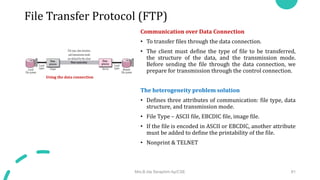
Communication over Data Connection
• To transfer files through the data connection.
• The client must define the type of file to be transferred,
the structure of the data, and the transmission mode.
Before sending the file through the data connection, we
prepare for transmission through the control connection.
The heterogeneity problem solution
• Defines three attributes of communication: file type, data
structure, and transmission mode.
• File Type – ASCII file, EBCDIC file, image file.
• If the file is encoded in ASCII or EBCDIC, another attribute
must be added to define the printability of the file.
• Nonprint & TELNET
Mrs.B.Ida Seraphim Ap/CSE 81
Using the data connection
File Transfer Protocol (FTP)
Data Structure
• File structure (default). The file has no structure. It is a continuous stream of bytes.
• Record structure. The file is divided into records. This can be used only with text files.
• Page structure. The file is divided into pages, with each page having a page number and a page
header.
Transmission Mode
• Stream mode - This is the default mode. Data are delivered from FTP to TCP as a continuous
stream of bytes.
• Block mode - Data can be delivered from FTP to TCP in blocks. In this case, each block is
preceded by a 3-byte header.
• Compressed mode - If the file is big, the data can be compressed. The compression method
normally used is run-length encoding.
Mrs.B.Ida Seraphim Ap/CSE 82
File Transfer Protocol (FTP)
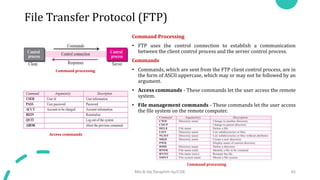
Command Processing
• FTP uses the control connection to establish a communication
between the client control process and the server control process.
Commands
• Commands, which are sent from the FTP client control process, are in
the form of ASCII uppercase, which may or may not be followed by an
argument.
• Access commands - These commands let the user access the remote
system.
• File management commands - These commands let the user access
the file system on the remote computer.
Mrs.B.Ida Seraphim Ap/CSE 83
Access commands
Command processing
Command processing
File Transfer Protocol (FTP)
• Data formatting commands - These commands let the
user define the data structure, file type, and
transmission mode.
• Port defining commands - These commands define the
port number for the data connection on the client site.
• File transfer commands - These commands actually let
the user transfer files.
Mrs.B.Ida Seraphim Ap/CSE 84
Data formatting commands
Port defining commands
File transfer commands
File Transfer Protocol (FTP)
• Miscellaneous commands - These commands deliver information to
the FTP user at the client site.
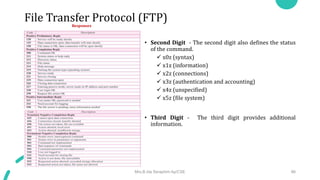
Responses
• Every FTP command generates at least one response.
• A response has two parts: a three digit number followed by text.
• The numeric part defines the code; the text part defines needed
parameters or extra explanations.
• First Digit - The first digit defines the status of the command.
• 1yz (positive preliminary reply) - The action has started. The server will send
another reply before accepting another command.
• 2yz (positive completion reply) - The action has been completed. The server will
accept another command.
• 3yz (positive intermediate reply) - The command has been accepted, but further
information is needed.
• 4yz (transient negative completion reply) - The action did not take place, but
the error is temporary. The same command can be sent later.
• 5yz (permanent negative completion reply) - The command was not accepted
and should not be retried again.
Mrs.B.Ida Seraphim Ap/CSE 85
Miscellaneous commands
File Transfer Protocol (FTP)
• Second Digit - The second digit also defines the status
of the command.
 x0z (syntax)
 x1z (information)
 x2z (connections)
 x3z (authentication and accounting)
 x4z (unspecified)
 x5z (file system)
• Third Digit - The third digit provides additional
information.
Mrs.B.Ida Seraphim Ap/CSE 86
Responses
File Transfer Protocol (FTP)
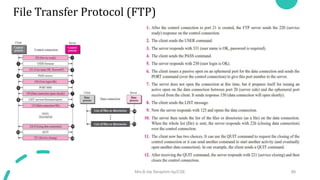
• File Transfer occurs over the data connection under the control
of the commands sent over the control connection.
• A file is to be copied from the server to the client (download).
This is called retrieving a file. It is done under the supervision
of the RETR command.
• A file is to be copied from the client to the server (upload).
This is called storing a file. It is done under the supervision of
the STOR command.
• A list of directories or file names is to be sent from the server
to the client. This is done under the supervision of the LIST
command.
Mrs.B.Ida Seraphim Ap/CSE 87
File transfer
File Transfer Protocol (FTP)
Mrs.B.Ida Seraphim Ap/CSE 88
TFTP
• There are occasions when we need to simply copy a file
without the need for all of the features of the FTP protocol.
• Trivial File Transfer Protocol (TFTP) is designed for these
types of file transfer.
• It is so simple that the software package can fit into the read-
only memory of a diskless workstation.
• It can be used at bootstrap time.
• TFTP uses the services of UDP on the well-known port 69.
Messages
• There are five types of TFTP messages, RRQ, WRQ, DATA, ACK,
and ERROR
Mrs.B.Ida Seraphim Ap/CSE 89
Message categories
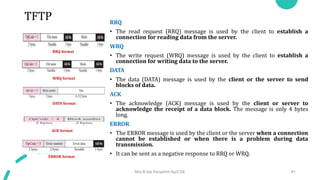
TFTP RRQ
• The read request (RRQ) message is used by the client to establish a
connection for reading data from the server.
WRQ
• The write request (WRQ) message is used by the client to establish a
connection for writing data to the server.
DATA
• The data (DATA) message is used by the client or the server to send
blocks of data.
ACK
• The acknowledge (ACK) message is used by the client or server to
acknowledge the receipt of a data block. The message is only 4 bytes
long.
ERROR
• The ERROR message is used by the client or the server when a connection
cannot be established or when there is a problem during data
transmission.
• It can be sent as a negative response to RRQ or WRQ.
Mrs.B.Ida Seraphim Ap/CSE 91
RRQ format
WRQ format
DATA format
ACK format
ERROR format
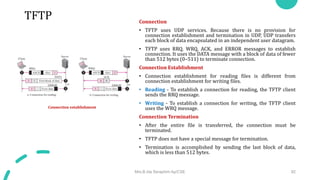
TFTP Connection
• TFTP uses UDP services. Because there is no provision for
connection establishment and termination in UDP, UDP transfers
each block of data encapsulated in an independent user datagram.
• TFTP uses RRQ, WRQ, ACK, and ERROR messages to establish
connection. It uses the DATA message with a block of data of fewer
than 512 bytes (0–511) to terminate connection.
Connection Establishment
• Connection establishment for reading files is different from
connection establishment for writing files.
• Reading - To establish a connection for reading, the TFTP client
sends the RRQ message.
• Writing - To establish a connection for writing, the TFTP client
uses the WRQ message.
Connection Termination
• After the entire file is transferred, the connection must be
terminated.
• TFTP does not have a special message for termination.
• Termination is accomplished by sending the last block of data,
which is less than 512 bytes.
Mrs.B.Ida Seraphim Ap/CSE 92
Connection establishment
TFTP
Data Transfer
• The data transfer phase occurs between connection establishment and termination.
• TFTP uses the services of UDP, which is unreliable.
Flow Control
• TFTP sends a block of data using the DATA message and waits for an ACK message.
• If the sender receives an acknowledgment before the time-out, it sends the next block.
Retrieve a File
• When the client wants to retrieve (read) a file, it sends the RRQ message.
• The server responds with a DATA message sending the first block of data (if there is no problem) with a block
number of 1.
Store a File
• When the client wants to store (write) a file, it sends the WRQ message.
• The server responds with an ACK message (if there is no problem) using 0 for the block number.
Mrs.B.Ida Seraphim Ap/CSE 93
TFTP
Error Control
• The TFTP error-control mechanism is different from those of other protocols. It is symmetric, which means
that the sender and the receiver both use time-outs.
• Error control is needed in four situations
 A damaged message
 A lost message
 A lost acknowledgment
 A duplicated message
Damaged Message
• There is no negative acknowledgment. If a block of data is damaged, it is detected by the receiver and the
block is discarded.
Lost Message
• If a block is lost, it never reaches the receiver and no acknowledgment is sent. The sender resends the block
after the time-out.
Lost Acknowledgment
• If the timer of the receiver matures before the timer of the sender, the receiver retransmits the
acknowledgment
• otherwise, the sender retransmits the data.
Mrs.B.Ida Seraphim Ap/CSE 94
TFTP
Duplicate Message
• Duplication of blocks can be detected by the receiver through block number. If a block is duplicated, it is
simply discarded by the receiver.
Applications
• TFTP is very useful for basic file transfer where security is not a big issue.
• It can be used to initialize devices such as bridges or routers.
• Its main application is in conjunction with the DHCP.
• TFTP requires only a small amount of memory and uses only the services of UDP and IP.
• It can easily be configured in ROM (or PROM).
Mrs.B.Ida Seraphim Ap/CSE 95
TELNET • TErminaL NETwork –remote login
• standard TCP/IP protocol for virtual terminal service as proposed by
ISO.
• TELNET enables the establishment of a connection to a remote system
in such a way that the local terminal appears to be a terminal at the
remote system.
• TELNET is a general-purpose client-server application program
Concepts
Timesharing Environment
• All of the processing must be done by the central computer.
• When a user types a character on the keyboard, the character is usually
sent to the computer and echoed to the monitor.
• It creates an environment in which each user has the illusion of a
dedicated computer.
Mrs.B.Ida Seraphim Ap/CSE 96
Local login
Remote Login
TELNET
• Network Virtual Terminal (NVT)
• Heterogeneous systems
• Want to access Remote computer- type of the computer to be
known
• The client TELNET translates characters (data or commands)
that come from the local terminal into NVT form and delivers
them to the network.
• The server TELNET, on the other hand, translates data and
commands from NVT form into the form acceptable by the
remote computer.
Mrs.B.Ida Seraphim Ap/CSE 97
Concept of NVT
TELNET
NVT Character Set
• Data Characters called NVT ASCII.
• This is an 8-bit character set in which the seven lowest order
bits are the same as US ASCII and the highest order bit is 0
• Although it is possible to send an 8-bit ASCII (with the highest
order bit set to be 0 or 1)-must first be agreed upon between
the client and the server using option negotiation.
• To send control characters between computers (from client
to server or vice versa), NVT uses an 8-bit character set in
which the highest order bit is set to 1
Mrs.B.Ida Seraphim Ap/CSE 98
Format of data and control characters
Some NVT control characters
TELNET
Embedding
• TELNET uses only one TCP connection.
• The server uses the well-known port 23 and the client uses an ephemeral
port. Same connection is used for sending both data and control characters.
• TELNET accomplishes this by embedding the control characters in the data
stream.
• To distinguish data from control characters, each sequence of control
characters is preceded by a special control character called interpret as
control (IAC).
For example, imagine a user wants a server to display a file (file1) on a
remote server.
 cat file1
 cat filea <backspace>1
Mrs.B.Ida Seraphim Ap/CSE 99
An example of embedding
TELNET
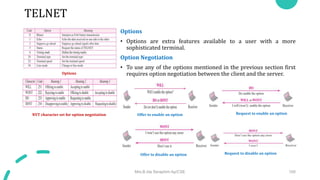
Options
• Options are extra features available to a user with a more
sophisticated terminal.
Option Negotiation
• To use any of the options mentioned in the previous section first
requires option negotiation between the client and the server.
Mrs.B.Ida Seraphim Ap/CSE 100
Options
NVT character set for option negotiation Offer to enable an option Request to enable an option
Offer to disable an option Request to disable an option
TELNET
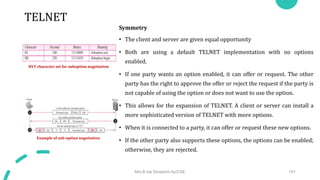
Symmetry
• The client and server are given equal opportunity
• Both are using a default TELNET implementation with no options
enabled.
• If one party wants an option enabled, it can offer or request. The other
party has the right to approve the offer or reject the request if the party is
not capable of using the option or does not want to use the option.
• This allows for the expansion of TELNET. A client or server can install a
more sophisticated version of TELNET with more options.
• When it is connected to a party, it can offer or request these new options.
• If the other party also supports these options, the options can be enabled;
otherwise, they are rejected.
Mrs.B.Ida Seraphim Ap/CSE 101
NVT character set for suboption negotiation
Example of sub-option negotiation
TELNET Controlling Server
• Some control characters can be used to control the remote server.
• When an application program is running on the local computer,
special characters are used to interrupt (abort) the program (for
example, Ctrl+c), or erase the last character typed (for example, delete
key or backspace key), and so on.
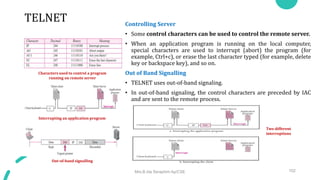
Out of Band Signalling
• TELNET uses out-of-band signaling.
• In out-of-band signaling, the control characters are preceded by IAC
and are sent to the remote process.
Mrs.B.Ida Seraphim Ap/CSE 102
Characters used to control a program
running on remote server
Interrupting an application program
Out-of-band signalling
Two different
interruptions
TELNET
Mode of Operation
Character Mode- overhead created
• The user enters a character that is sent to the server
• The server acknowledges the received character and echoes the character back (in one segment).
• The client acknowledges the receipt of the echoed character.
Line Mode
• Echoing, character erasing, line erasing, and so on are done by the client.
• The client then sends TELNET AND SSH 623 the whole line to the server. Although the line mode looks like the
default mode, it is not.
• The default mode operates in the half-duplex mode; the line mode is full-duplex with the client sending one
line after another, without the need for an intervening GA (go ahead) character from the server.
Mrs.B.Ida Seraphim Ap/CSE 103
TELNET
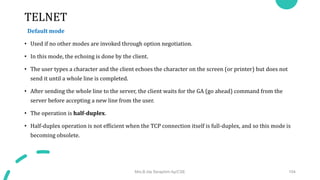
Default mode
• Used if no other modes are invoked through option negotiation.
• In this mode, the echoing is done by the client.
• The user types a character and the client echoes the character on the screen (or printer) but does not
send it until a whole line is completed.
• After sending the whole line to the server, the client waits for the GA (go ahead) command from the
server before accepting a new line from the user.
• The operation is half-duplex.
• Half-duplex operation is not efficient when the TCP connection itself is full-duplex, and so this mode is
becoming obsolete.
Mrs.B.Ida Seraphim Ap/CSE 104
TELNET
User Interface
• TELNET suffers from security problems.
• Although TELNET requires only a login name and password
(when exchanging text)
For instance: A microcomputer connected to a broadcast LAN
can easily eavesdrop using snooper software and capture a
login name and the corresponding password (even if it is
encrypted)
Mrs.B.Ida Seraphim Ap/CSE 105
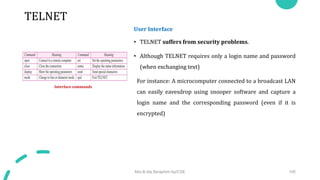
Interface commands
Secure Shell (SSH)
• Remote login application program
• Like TELNET, uses TCP as the underlying transport protocol
• SSH is more secure and provides more services than TELNET
• Versions - two versions of SSH
• SSH-1 and SSH-2, which are totally incompatible.
• SSH-1 is now deprecated because of security flaws in it. Now
SSH-2 only used.
Mrs.B.Ida Seraphim Ap/CSE 106
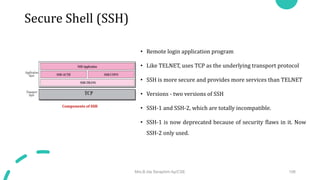
Components of SSH
Secure Shell (SSH)
Port Forwarding
• Use the secured channels available in SSH to access an application
program that does not provide security services.
SSH Packet Format
• Length - This 4-byte field defines the length of the packet including the type,
the data, and the CRC field, but not the padding and the length field.
• Padding - One to eight bytes of padding is added to the packet to make the
attack on the security provision more difficult.
• Type - This one-byte field defines the type of packet used by SSH protocols.
• Data - This field is of variable length. The length of the data can be found by
deducting the five bytes from the value of the length field.
• CRC - The cyclic redundancy check filed is used for error detection
Mrs.B.Ida Seraphim Ap/CSE 107
Port Forwarding
SSH Packet Format
Problems
Mrs.B.Ida Seraphim Ap/CSE 108
• In a connection, the value of cwnd is 3000 and the value of rwnd is 5000. The host has sent 2000 bytes,
which have not been acknowledged. How many more bytes can be sent?​
• Given that cwnd or congestion window size =3000 and the receiver window size is =5000
• Sender window size = minimum( congestion window, receiver window)
• Therefore the sender window size = min(3000, 5000)= 3000.
• The sender can send 3000 bytes of data through the channel.

c5c1db8d-8375-4f17-bf6a-56ea5342e58d.pptx

  • 1.
  • 2.
    DNS(Domain Name System) ●TCP/IP protocols uses IP address. ● Identifies connection of a host to the internet. ● System maps a name to an address ● Host file – only two columns (name, address) ● Single host file – maps the names to address ● Host file would be large to store in every host. ● Impossible to update the changes happens every time to the host file. Solution 1 ● Store the host file in a single system and allow the centralized information access to every system that needs mapping. Disadvantage ● Huge amount of traffic to the internet. Solution 2 ● Divide the huge amount of information into smaller parts and store on different systems. ● Host which needs mapping can communicate to the closest system that holds the information. ● This solution is called Domain Name System. 2
  • 3.
    Purpose of DNS Sixsteps to map host name to an IP address 1. User passes the host name to the file transfer client (FTC). 2. FTC passes the host name to DNS client. 3. DNS client sends a message to the DNS Server. The query gives the file transfer server name using the known IP address of the DNS server. 4. DNS server responses back with the IP address of the desired file transfer server. 5. DNS client passes the IP address to file transfer client. 6. FTC uses the IP address it received to access the file transfer server. Two Connections must be made ● Mapping the name to an IP address ● Transferring files 3
  • 4.
    Namespace ● Maps theaddress to the unique names. ● Organized in two ways flat or hierarchical. Flat Name Space ● Name is assigned to an address, name is the sequence of characters without structures. Disadvantage ● Cannot used in large system. ● Centrally controlled to avoid ambiguity and duplications. Hierarchical Name Space ● Each name is made up of several parts. ● First part – nature of organization ● Second part – name of an organization ● Third part – departments in the organization ● Namespace can be decentralized. ● Suffixes (or prefixes) are added to the name that defines the host or system. 4
  • 5.
    Domain Name Space Hierarchical name space – DNS was designed.  Names are defined in inverted tree structure with root at top.  Tree have 128 levels – 0 (root) to 127. Label  Each node in a tree has a label – max of 63 characters.  Root label is a null string.  Children node should have different labels that will ensure uniqueness in domain names. Domain Name  Full domain name is the sequence of labels separated by dots.  Domain names read from nodes up to the root.  Full domain name always ends in a null label. 5 Domain Name System Domain names and labels
  • 6.
    Fully Qualified DomainNames (FQDN) Partially Qualified Domain Names (PQDN) Fully Qualified Domain Names (FQDN) ● If the label is terminated by null string it is called fully qualified domain names. ● Contains the full name of the host, contains all labels from most specific to most general. ● DNS server can match an FQDN to an address. Eg: challenger.atc.fhda.edu. Partially Qualified Domain Names (PQDN) ● If the label is not terminated by null string it is called partially qualified domain name. ● PQDN starts from the node but does not reach the root. ● The resolver will supply the missing part called the suffix to create a PQDN. ● User at fhda.edu site wants to get the IP address of the challenger computer, has to mention the partial name. Eg: challenger ● The DNS client adds the suffix before parsing the address to the DNS server. Eg: act.fhda.edu 6 FQDN and PQDN
  • 7.
    Domain ● It isthe subtree of domain name space. ● The domain is the name of the node at the top of the subtree. ● Domains may itself divided into sub domains. Distribution of name space ● Information in the name space must be stored. ● It is inefficient and not reliable to store the information in a single system. Solution ● Distribute the information among many computers called DNS servers. Hierarchy of name space ● Divide the whole space into many domains based on the first level. 7 Domain Name Space Domains Hierarchy of name servers
  • 8.
    Domain Name Space Zone ●What a server is responsible for or has authority over is called zones. ● Zone is the contiguous part of the entire tree. ● If server accepts the responsibility for a domain and does not divide the domain into smaller domains then “domain” and “zone” refers the same thing. Root server ● It is the server whose zone consists of the whole tree. ● It does not store any information about the domains but delegates the authority to other servers, keeping references to those servers. 8 Zones and Domains
  • 9.
    Domain Name Space Primaryand Secondary Servers Primary Server ● Server that stores the file about the zone for which it is in authority. ● It is responsible for creating, maintaining and updating the zone files. ● It stores zone file on a local disk. Secondary Servers ● Server that transfers the complete information about zone from another server and stores the file on its local disk. ● Secondary server neither creates nor updates the zone files. 9
  • 10.
    DNS in theInternet ● In internet the domain name space is divided into three different sections. ● Generic domains, country domains and the inverse domains. Generic Domains ● Define registered hosts according to their generic behaviour. ● Each node in a tree defines a domain which is an index to the domain name space database. 10 DNS used in internet Generic Domains Generic Domain Labels
  • 11.
    DNS in theInternet Country Domains ● Uses two character country abbreviations. Eg: US for United Sates ● Second label can be organizational or they can be more specific national designations. Eg: ca.us Inverse Domain ● It is used to map an address to a name. ● This happens when the server has received a request from the client. ● Type of query called an inverse or pointer (PTR) query. ● To handle the pointer query the inverse domain is added to the domain name space with the first level node. ● Second level is also one single node named in addr (for inverse address). 11 Country Domains Inverse Domain
  • 12.
    Resolution Mapping a nameto an address or an address to a name is called name address resolution. Resolver ● DNS is designed as a client – server application. ● Host that needs to map an address to a name or a name to an address calls a DNS client called a resolver. ● After the resolver receives the mapping, it interprets the response to see if it is a real resolution or an error and finally delivers the results to the process that requested it. Mapping Names to Addresses ● The resolver gives a domain name to the server and asks for the corresponding address. ● If the domain name is from the generic domain the resolver receives a domain name such as “chal.atc.fhda.edu. ● If the domain name is from the country domain the resolver receives a domain name such as “ch.fhda.cu.ca.us. 12
  • 13.
    Resolution Mapping Addresses toNames ● A client can send an IP address to a server to be mapped to a domain name. ● To answer the PTR query DNS uses the inverse domain. ● in the request the IP address is reversed and two labels in- addr and arpa are appended to create a domain acceptable by the inverse domain. Recursive Resolution ● The client can ask for a recursive answer from a name server. ● If the server is the authority for the domain name, it checks its database and responds. ● If the server is not the authority it sends the request to another server and waits for the response. ● If the parent is the authority it responds otherwise it sends the query to another server. 13 Recursive resolution
  • 14.
    Resolution Iterative Resolution ● Ifserver is an authority for the name it sends the answer. ● If not it returns the IP address of the server that thinks it can resolve the query. ● The client is responsible for repeating the request to the second server. ● The client repeats the same procedure to next server and so on ● This process is called iterative because the client repeats the same query to multiple servers. Caching ● Each time the server receives the query for a name that is not in domain it needs to search its database for a server IP address. ● Reduction in search time would increase the efficiency. ● DNS handles this with the mechanism called caching. 14 Iterative Resolution
  • 15.
    Resolution ● Reduction ofsearch time would increase the efficiency. ● DNS handles this with the mechanism called catching. ● Caching speeds up resolution but it can also be problematic. ● If the server caches the mapping for a long time it may send an outdated mapping to the client. Two counter techniques are used  The authoritative server always adds information to the mapping called time to live.  DNS requires each server keep a TTL counter for each mapping it caches. 15
  • 16.
    DNS Messages ● DNSmessages are of two types  Query  Response ● The query message consists of header and question records. ● The response message consists of header, question records, answer records, authoritative records and additional records. 16 Query and Response Messages
  • 17.
    DNS Messages Header ● Bothquery and response message have the same header format with some fields set to zero for query messages. ● The header is of 12 bytes. ● Identification - 16 bit field used by client to match the response with the query. ● Flags – 16 bit field consisting of the subfields. ● QR (Query/Response) – 1 bit sub field defines type of message. 0 – message is query 1 – message is response ● OpCode - 4 bits, defines the type of query or response 0 – standard 1 – inverse 2 – server status request 17 Header Format Flags Field
  • 18.
    DNS Messages ● AA(Authoritative Answer) – 1 bit subfield Set to 1 - name server is the authoritative server Used only in response message. ● TC (Truncate) – 1 bit subfield Set to 1 – response was more than 512 bytes and truncated It is used when DNS uses the services of UDP ● RD (Recursion Desired) – 1 bit subfield Set to 1 – client desires a recursive answer It is set in query message and repeated in the response message ● RA (Recursion Available) – 1 bit subfield Set in response, means that a recursive response is available Set only in response message 18 Flags Field
  • 19.
    DNS Messages ● Reserved– 3 bit sub field set to 000. rcode – 4 bit field shows status of error in response Only authoritative server can make the judgement ● Number of question records – 16 bit field Contains the number of queries in question section of the message ● Number of answer records – 16 bit field Contains the number of answer records in answer section of the response message ● Number of authoritative records – 16 bit field Contains number of authoritative records in authoritative section of the response message It’s value is zero in query message ● Number of additional records – 16 bit field Contains number of additional records in additional section of a response message 19 Flags Field Values of rcode
  • 20.
    DNS Messages ● QuestionSection Consists of one or more question records It is present in both query and response messages ● Answer Section Consists of two or more resource records It is present only on response messages ● Authoritative Section Consists of two or more resource records It is present only on response messages Gives information (domain name) about one or more authoritative servers for the query ● Additional Information Section Consists of two or more resource records It is present only on response messages Gives additional information that helps the resolver 20
  • 21.
    TELNET Time Sharing Environment ●TELNET was designed at a time when most OS were operating in a time – sharing environment. ● The interaction between a user and the computer occurs through a terminal which is usually a combinations of keyboard, monitor and mouse. ● When a user types a character on the keyboard, the character is usually sent to the computer and echoed to the monitor. Login ● In time sharing environment users are part of the system with come right to access resources. ● Each authorized user has an identification and probably a password. ● To access the system, the user logs into the system with a user id or login name. ● The system also includes password checking to prevent unauthorized user from accessing the resources. Local login ● When the user logs into a local time sharing it is called local login. 21
  • 22.
  • 23.
    TELNET 23 telnet towel.blinkenlights.nl Watch anASCII version of the full Star Wars Episode IV movie by entering this in Command Prompt
  • 24.
  • 25.
    WWW Architecture WWW isa networked information system (repository of information) and it provides distributed client-server service, in which a client using a browser can access a service using a server. • Sites • Web pages (simple / composite) Mrs.B.Ida Seraphim Ap/CSE 25
  • 26.
    Hypertext and Hypermedia Hypertext •Hypertext – creating a document that in turn refer to another document. • In a hypertext document, a part of text can be defined as a link to another document. Hypermedia • Hypermedia is a term applied to document that contains links to other textual document or documents containing graphics, video, or audio. Mrs.B.Ida Seraphim Ap/CSE 26
  • 27.
    Web Client (Browser) •It is an application software that allows us to view and explore information on the web. User can request for any web page by just entering a URL into address bar. • Web browser can show text, audio, video, animation and more. It is the responsibility of a web browser to interpret text and commands contained in the web page. • A variety of vendors offer commercial browsers that interpret and display a Web document, and all of them use nearly the same architecture. Each browser usually consists of three parts:  A controller – receives input from keyboard  Client protocol – access the document  Interpreters – display document on screen Mrs.B.Ida Seraphim Ap/CSE 27
  • 28.
    Web Server • Website is collection of web pages while web server is a software that respond to the request for web resources. • When client sends request for a web page, the web server search for the requested page if requested page is found then it will send it to client with an HTTP response. • If the requested web page is not found, web server will the send an HTTP response Error 404 Not found • A server can also become more efficient through multithreading or multiprocessing. In this case, a server can answer more than one request at a time. • Some popular Web servers include Apache and Microsoft Internet Information Server. Mrs.B.Ida Seraphim Ap/CSE 28
  • 29.
    Uniform Resource Locator(URL) • A URL (Uniform Resource Locator) is a unique identifier used to locate a resource on the internet.  Protocol - client-server application program used to retrieve the document (http)  Host - domain name of the computer on which the information is located (www)  Port – (optional) If the port is included, it is inserted between the host and the path, and it is separated from the host by a colon.  Path - pathname of the file where the information is located. Mrs.B.Ida Seraphim Ap/CSE 29
  • 30.
  • 31.
    Static Documents • Astatic web document exist in a predefined form. • The author of a static document determines the contents at the time the document is written. • Since the contents do not change, each request for a static document results in exactly the same response. • Static documents are prepared using – HTML, XML, XSL, XHTML. Static Document Mrs.B.Ida Seraphim Ap/CSE 31
  • 32.
    Dynamic Documents • Adynamic web document does not exist in a predefined form. • When a request arrives the web server runs an application program that creates the document. • The server returns the output of the program as a response to the browser that requested the document. • Since a fresh document is created for each request, the contents of a dynamic document can vary from one request to another. • Technologies involved – PHP, JSP, ASP etc. • Dynamic documents are sometimes referred to as server-site dynamic documents. Dynamic Documents Mrs.B.Ida Seraphim Ap/CSE 32
  • 33.
    Active Documents • Anactive web document consists of a computer program that the server sends to the browser and that the browser must run locally. • When it runs, the active document program can interact with the user and change the display continuously. • Active documents are sometimes referred to as client-site dynamic documents. Active Documents Mrs.B.Ida Seraphim Ap/CSE 33
  • 34.
  • 35.
    HTTP Transaction • TheHypertext Transfer Protocol (HTTP) is a protocol used mainly to access data on the World Wide Web. • HTTP functions as a combination of FTP and SMTP. • HTTP uses the services of TCP on well-known port 80.  Request message  Request Line HTTP Transaction Mrs.B.Ida Seraphim Ap/CSE 35
  • 36.
    HTTP Transaction • Formatof request message and response message Format of the request message Mrs.B.Ida Seraphim Ap/CSE 36
  • 37.
    Conditional Request • Requestbased on condition is possible. • If condition is met, server sends it; else client is informed about it. • Example conditions - time and date the Web page is modified. Mrs.B.Ida Seraphim Ap/CSE 37
  • 38.
    Persistence • HTTP version1.1 specifies a persistent connection by default. • Connection is left open for more requests. • Connection will be closed only after a request or if a time- out is reached. • Length of data is sent by the sender on each response, but if it is unknown (Dynamic documents) then the server informs client and closes the connection. Mrs.B.Ida Seraphim Ap/CSE 38
  • 39.
    Cookies • It isa small piece of data stored in users system by the browser while browsing a website. • When the client receives the response from server on request, the browser stores the cookie in the cookie directory. • Next time, when a client sends a request to a server, the browser looks in the cookie directory to. • see if it can find a cookie sent by that server. If found, the cookie is included in the request. Example – e-commerce Mrs.B.Ida Seraphim Ap/CSE 39
  • 40.
    Web caching: Proxyserver • Proxy server acts as a gateway between client and server. • It keeps copies of responses to recent requests. • On receiving the request from client, proxy server checks its cache and if it is not found then the request is sent to corresponding server. • This reduces the load on the original server, decreases traffic, and improves latency. • However, to use the proxy server, the client must be configured to access the proxy instead of the target server. Mrs.B.Ida Seraphim Ap/CSE 40
  • 41.
    HTTP security • HTTPdoes not provide security. • HTTP can run over Secure Socket Layer (SSL). • In this case HTTP is referred to as HTTPS. • HTTPS provides confidentiality, client and server authentication, and data integrity. Mrs.B.Ida Seraphim Ap/CSE 41
  • 42.
  • 43.
    DHCP • Every computerthat utilizes TCP/IP protocol should know its IP address. • In addition to this, Subnet mask is also needed, if the computer is under a subnet. • The other two information needed for most of the recent machines are  The default router’s address – to interface with other networks  The name server’s address – to use names rather than addresses. DHCP Definition • It is a Client/server protocol to provide the four required parameters to a diskless machine to enable the machine communicate with other networks. DHCP Operation • The operation is initiated with a broadcasting request by the client depending upon the client and server’s location, which could be any one of the following. • Same network - Client and server are present on the same network • Different network - Client and server are present on different network Mrs.B.Ida Seraphim Ap/CSE 43
  • 44.
    Same network Operation •A open command is provided by the server on UDP port number 67. • Server waits for the client to respond. • The server gets the response from the booted client on port number 68 • A connection is now established between the source port 67 and destination port 68 by the server acknowledging with either a broadcast or unicast message. Same Network Mrs.B.Ida Seraphim Ap/CSE 44
  • 45.
    Different network Operation •As the client is unaware of the server, a DHCP request is broadcasted. • A relay agent (host) is used, as the router discards the broadcasted IP datagram. • This relay agent is aware of the server’s address and hence listens on UDP port 67 for the messages • The received message is enfold in a unicast datagram (with the destination address) and sent to the server by the relay. • It reaches the server through any router Different network Mrs.B.Ida Seraphim Ap/CSE 45
  • 46.
    UDP Ports • Port67 - used by server (Common) • Port 68 - used by client (to overcome the demultiplexing issue) • Consider the below scenario • Host A uses DHCP client • Host B uses DAYTIME client • (both are in the same network and uses ephermal port 2017) • A broadcast message is sent from the server as an acknowledgement Mrs.B.Ida Seraphim Ap/CSE 46
  • 47.
    UDP Ports • Thismessage contains the destination port 2017 and broadcast IP address FFFFFFFF16 • Host A finds a message from application program on 2017 • A correct message and incorrect message is delivered to DHCP and DAYTIME clients respectively • Transaction ID is also used to identify the clients which avoids the confusion created. Mrs.B.Ida Seraphim Ap/CSE 47
  • 48.
    TFTP • It isan acknowledgement from the server, containing the pathname of a file which has the complete booting information. Mrs.B.Ida Seraphim Ap/CSE 48

  • 49.
    Error control • Totake a control over the lost or damaged response, DHCP requires • Checksum • Retransmission • To prevent traffic jam (Created by retransmission) • Random numbers for timers are used Mrs.B.Ida Seraphim Ap/CSE 49
  • 50.
  • 51.
  • 52.
    Static address allocation •DHCP server has a database that statically binds physical address to IP address. • DHCP is backward compatible with BOOTP protocol. Mrs.B.Ida Seraphim Ap/CSE 52
  • 53.
    Dynamic address allocation •An additional database containing the unused IP addresses. This database makes DHCP dynamic. • On request from a client, an IP address (temporary ) from this database is allocated to the requesting client on lease for a negotiable period of time. • When a DHCP client sends a request to a DHCP server, the server first checks its static database. If an entry with the requested physical address exists in the static database, the permanent IP address of the client is returned. • If the entry does not exist in the static database, the server selects an IP address from the available pool, assigns the address to the client, and adds the entry to the dynamic database. • The addresses assigned from the pool are temporary addresses. The DHCP server issues a lease for a specific period of time. • When the lease expires, the client must either stop using the IP address or renew the lease. • This allocation is essential when there is a transfer of host from one network to another. Mrs.B.Ida Seraphim Ap/CSE 53
  • 54.
    Transition States • Toprovide dynamic address allocation, the DHCP client acts as a state machine that performs transitions from one state to another depending on the messages it receives or sends. • The type of the message in this case is defined by the option with tag 53 that is included in the DHCP packet. INIT State • When the DHCP client first starts, it is in the INIT state (initializing state). The client broadcasts a DHCPDISCOVER message using port 67. SELECTING State • SERVERS offers DHCPOFFER message. Client has to select one among the offers. Client sends DHCPREQUEST message to the selected server. Mrs.B.Ida Seraphim Ap/CSE 54 Option with tag 53
  • 55.
    Transition States REQUESTINGState • The client remains in the requesting state until it receives a DHCPACK message from the server that creates the binding between the client physical address and its IP address. BOUND State • The client can use the IP address until the lease expires. When 50 percent of the lease period is reached, the client sends another DHCPREQUEST to ask for renewal. RENEWING State • The client remains in the renewing state until one of two events happens. It can receive a DHCPACK, which renews the lease agreement. REBINDING State • The client remains in the rebinding state until one of three events happens. If the client receives a DHCPNACK or the lease expires, it goes back to the initializing state and tries to get another IP address. Mrs.B.Ida Seraphim Ap/CSE 55 DHCP client transition diagram
  • 56.
    E - Mail:SMTP, POP, IMAP, and MIME Unit - 3
  • 57.
    Architecture We have 4scenarios in explain the architecture of e-mail. • First Scenario • Second Scenario • Third Scenario • Fourth Scenario Mrs.B.Ida Seraphim Ap/CSE 57
  • 58.
    First scenario •The sender and the receiver of the e-mail are users on the same mail server; they are directly connected to a shared mail server. • The admin has created one mailbox to store the received messages. Only the sender or the receiver of the mailbox has access to it. • When Alice needs to send a message to Bob, she runs a user agent( is a program) to prepare the message and store it in Bob’s mailbox. • The message has the sender and recipient mailbox addresses. Bob can retrieve and read the contents of his mailbox at his convenience using a user agent. E.g.: Similar to traditional memo exchange When sender and receiver of an email are on the same mail server – it needs only two user gents Mrs.B.Ida Seraphim Ap/CSE 58 1 2 First scenario
  • 59.
    Second scenario •The sender and the receiver of the e-mail are users on two different mail servers. The message needs to be sent over the Internet. Here we need user agents (UAs) and message transfer agents (MTAs). • Alice needs a user agent to send her message to the mail server at her own site. The mail server at her site uses a buffer (queue) to store messages waiting to be sent. • Bob also needs a user agent to retrieve messages stored in the mailbox of the system at his site. Here two message transfer agents are needed: one client and one server. • The server needs to run all of the time because it does not know when a client will ask for a connection. The client, on the other hand, can be triggered by the system when there is a message in the queue to be sent. When sender and receiver of an email are on the different mail server – it needs two UA’s and a pair of MTA’s. Mrs.B.Ida Seraphim Ap/CSE 59 1 2 3 4 5 Second scenario
  • 60.
    Third scenario • Aliceneeds a user agent to prepare her message. She then needs to send the message through the LAN or WAN. • This can be done through a pair of message transfer agents (client and server). Whenever Alice has a message to send, she calls the user agent which, in turn, calls the MTA client. • The MTA client establishes a connection with the MTA server on the system, which is running continuously. The system at Alice’s site queues all messages received. • It then uses an MTA client to share the messages to the system at Bob’s site; the system receives the message and stores it in Bob’s mailbox. When sender or receiver is connected to the mail server via WAN/LAN – it needs two UA’s and two pairs of MTA’s. Mrs.B.Ida Seraphim Ap/CSE 60 1 2 3 4 5 6 7 Third scenario
  • 61.
    Fourth scenario •Bob is also connected to his mail server by a WAN or a LAN. After the message has arrived at Bob’s mail server, Bob needs to retrieve it. • we need another set of client-server agents, which we call message access agents (MAAs). • Bob uses an MAA client to retrieve his messages. The client sends a request to the MAA server, which is running all the time, and requests the transfer of the messages. • Bob cannot bias the mail server to use the MTA server directly. To use the MTA server directly, Bob would need to run the MTA server all the time because he does not know when a message will arrive. Mrs.B.Ida Seraphim Ap/CSE 61 1 2 3 4 5 6 8 9 Fourth scenario When both sender and receiver are connected to the mail server via WAN/LAN – it needs two UA’s, two pairs of MTA’s and a pair of MAA’s.
  • 62.
    Push vs Pull •Bob needs another pair of client-server programs: message access programs. • This is because an MTA client-server program is a push program. • The client pushes the message to the server. Bob needs a pull program. • The client needs to pull the message from the server. Mrs.B.Ida Seraphim Ap/CSE 62 Push vs. pull
  • 63.
    User Agent The firstcomponent of an electronic mail system is the user agent (UA). It provides service to the user to make the process of sending and receiving a message easier. Services Provided by a User Agent • A user agent is a software package (program) that composes, reads, replies to, and forwards messages. • It also handles local mailboxes on the user computers. User Agent Types • There are two types of user agents: command-driven and GUI-based • A command-driven user agent normally accepts a one character command from the keyboard to perform its task. E.g.: User can type the character r, at the command prompt, to reply to the sender of the message The character R to reply to the sender and all recipients. Examples of command-driven user agents are mail, pine, and elm. • The graphical user interface (GUI) components that allow the user to interact with the software by using both the keyboard and the mouse. Examples of GUI-based user agents are Eudora, Outlook, and Netscap. Sending Mail • To send mail, the user, through the UA, creates mail that looks very similar to postal mail. It has an envelope and a message Mrs.B.Ida Seraphim Ap/CSE 63 Format of an e-mail
  • 64.
    User Agent Receiving Mail •The user agent is triggered by the user (or a timer). • If a user has mail, the UA informs the user with a notice. • If the user is ready to read the mail, a list is displayed in which each line contains a summary of the information about a particular message in the mailbox. • The summary usually includes the sender mail address, the subject, and the time the mail was sent or received. • The user can select any of the messages and display its contents on the screen. Addresses • To deliver mail, a mail handling system must use an addressing system with unique addresses. • In the Internet, the address consists of two parts: a local part and a domain name, separated by an @ sign. Mailing List or Group List • Electronic mail allows one name, an alias, to represent several different e-mail addresses; this is called a mailing list. • Every time a message is to be sent, the system checks the recipient’s name against the alias database. Mrs.B.Ida Seraphim Ap/CSE 64 E-mail address
  • 65.
    MESSAGE TRANSFER AGENT:SMTP • The actual mail transfer is done through message transfer agents (MTAs). To send mail, a system must have the client MTA, and to receive mail, a system must have a server MTA. • The formal protocol that defines the MTA client and server in the Internet is called Simple Mail Transfer Protocol (SMTP). • SMTP is used two times, between the sender and the sender’s mail server and between the two mail servers. • SMTP defines how commands and responses must be sent back and forth Mrs.B.Ida Seraphim Ap/CSE 65 SMTP range
  • 66.
    Commands and Responses •SMTP uses commands and responses to transfer messages between an MTA client and an MTA server. • Each command or reply is terminated by a two-character (carriage return and line feed) end-of-line token. • Commands are sent from the client to the server. Keyword: argument(s) • It consists of a keyword followed by zero or more arguments. Mrs.B.Ida Seraphim Ap/CSE 66 Commands and responses Commands
  • 67.
    Commands and Responses •Responses are sent from the server to the client. • A response is a three-digit code that may be followed by additional textual information. Mrs.B.Ida Seraphim Ap/CSE 67 Responses
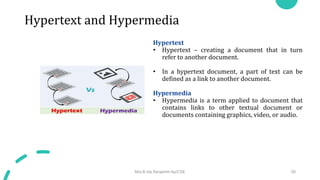
  • 68.
    Mail Transfer Phases •The process of transferring a mail message occurs in three phases: connection establishment, mail transfer, and connection termination. Connection Establishment • The server sends code 220 to tell the client that it is ready to receive mail. • The client sends the HELO message to identify itself using its domain name address. This step is necessary to inform the server of the domain name of the client. • The server responds with code 250. Mrs.B.Ida Seraphim Ap/CSE 68 Connection Establishment
  • 69.
    Mail Transfer Phases MessageTransfer • The client sends the MAIL FROM message to introduce the sender of the message. • The server responds with code 250 or some other appropriate code. • The client sends the RCPT TO (recipient) message, which includes the mail address of the recipient. • The server responds with code 250 or some other appropriate code. • The client sends the DATA message to initialize the message transfer. • The server responds with code 354 (start mail input) or some other appropriate message. • The client sends the contents of the message in consecutive lines. • The server responds with code 250 (OK) or some other appropriate code. Mrs.B.Ida Seraphim Ap/CSE 69 Message transfer
  • 70.
    Mail Transfer Phases •After the message is transferred successfully, the client terminates the connection. • This phase involves two steps. • The client sends the QUIT command. • The server responds with code 221 or some other appropriate code. • After the connection termination phase, the TCP connection must be closed Mrs.B.Ida Seraphim Ap/CSE 70 Connection termination
  • 71.
    Message access agent •The first and the second stages of mail delivery use SMTP. • SMTP is not involved in the third stage because SMTP is a push protocol; it pushes the message from the client to the server. • The third stage needs a pull protocol; the client must pull messages from the server. The direction of the bulk data are from the server to the client. • The third stage uses a message access agent. Currently two message access protocols are available: Post Office Protocol, version 3 (POP3) and Internet Mail Access Protocol, version 4 (IMAP4). Mrs.B.Ida Seraphim Ap/CSE 71 POP3 and IMAP4
  • 72.
    POP3 - PostOffice Protocol, version 3 • The client POP3 software is installed on the recipient computer; the server POP3 software is installed on the mail server. • Mail access starts with the client when the user needs to download its e-mail from the mailbox. • The client opens a connection to the server on TCP port. • It then sends its user name and password to access the mailbox. • The user can then list and retrieve the mail messages, one by one. Mrs.B.Ida Seraphim Ap/CSE 72 POP3
  • 73.
    IMAP4(Internet Mail AccessProtocol, version 4): It is more powerful and more complex. IMAP4 provides the following extra functions: • A user can check the e-mail header prior to downloading. • A user can search the contents of the e-mail for a specific string of characters prior to downloading. • A user can partially download e-mail. This is especially useful if bandwidth is limited and the e-mail contains multimedia with high bandwidth requirements. • A user can create, delete, or rename mailboxes on the mail server. • A user can create a hierarchy of mailboxes in a folder for e-mail storage. Mrs.B.Ida Seraphim Ap/CSE 73 IMAP, Version 4
  • 74.
    MIME • E -mail has a simple structure. It can send messages only in NVT 7-bit ASCII format. • Multipurpose Internet Mail Extensions (MIME) is a supplementary protocol that allows non-ASCII data to be sent through e-mail. • MIME transforms non-ASCII data at the sender site to NVT ASCII data and delivers it to the client MTA to be sent through the Internet. • The message at the receiving site is transformed back to the original data. Mrs.B.Ida Seraphim Ap/CSE 74 MIME MIME header
  • 75.
    MIME header MIME-Version • Thisheader defines the version of MIME used. The current version is 1.1. Content-Type • This header defines the type of data used in the body of the message. The content type and the content subtype are separated by a slash. • Depending on the subtype, the header may contain other parameters. Mrs.B.Ida Seraphim Ap/CSE 75 MIME header Data Types and Subtypes in MIME
  • 76.
    Content Transfer Encoding •Content-Transfer-Encoding: This header defines the method used to encode the messages into 0s and 1s for transport • The five types of encoding methods are listed Mrs.B.Ida Seraphim Ap/CSE 76 Content-Transfer-Encoding
  • 77.
    File Transfer Protocol(FTP) • standard mechanism provided by TCP/IP for copying a file from one host to another. Problems • Two systems may use different file name conventions. • Two systems may have different ways to represent text and data. • Two systems may have different directory structures. Solution • FTP • client-server applications - establishes two connections between the hosts. One connection is used for data transfer, the other for control information (commands and responses). • FTP - Separation of commands and data transfer. • FTP uses two well-known TCP ports • Port 21 - control connection • port 20 - data connection. Mrs.B.Ida Seraphim Ap/CSE 77
  • 78.
    File Transfer Protocol(FTP) The client has three components • User interface • Client control process • Client data transfer process The server has two components • Server control process • Server data transfer process • The control connection is made between the control processes. • The data connection is made between the data transfer processes. • The control connection remains connected during the entire interactive FTP session. • The data connection is opened and then closed for each file transferred. Mrs.B.Ida Seraphim Ap/CSE 78 FTP
  • 79.
    File Transfer Protocol(FTP) Control Connection • There are two steps 1. The server issues a passive open on the well-known port 21 and waits for a client. 2. The client uses an ephemeral port and issues an active open. • The connection remains open during the entire process. Data Connection a. The client, not the server, issues a passive open using an ephemeral port. b. The client sends this port number to the server using the PORT command. c. The server receives the port number and issues an active open using the well known port 20 and the received ephemeral port number. Mrs.B.Ida Seraphim Ap/CSE 79 Opening the control connection Creating the Data Connection
  • 80.
    File Transfer Protocol(FTP) Communication • FTP has two different approaches, one for the control connection and one for the data connection. Communication over Control Connection • FTP uses the same approach as TELNET or SMTP to communicate across the control connection. • It uses the NVT ASCII character set. • Communication is achieved through commands and responses. • Each command or response is only one short line • No need to worry about file format or file structure. • Each line is terminated with a two-character (carriage return and line feed) end-of-line token. Mrs.B.Ida Seraphim Ap/CSE 80 Using the control connection
  • 81.
    File Transfer Protocol(FTP) Communication over Data Connection • To transfer files through the data connection. • The client must define the type of file to be transferred, the structure of the data, and the transmission mode. Before sending the file through the data connection, we prepare for transmission through the control connection. The heterogeneity problem solution • Defines three attributes of communication: file type, data structure, and transmission mode. • File Type – ASCII file, EBCDIC file, image file. • If the file is encoded in ASCII or EBCDIC, another attribute must be added to define the printability of the file. • Nonprint & TELNET Mrs.B.Ida Seraphim Ap/CSE 81 Using the data connection
  • 82.
    File Transfer Protocol(FTP) Data Structure • File structure (default). The file has no structure. It is a continuous stream of bytes. • Record structure. The file is divided into records. This can be used only with text files. • Page structure. The file is divided into pages, with each page having a page number and a page header. Transmission Mode • Stream mode - This is the default mode. Data are delivered from FTP to TCP as a continuous stream of bytes. • Block mode - Data can be delivered from FTP to TCP in blocks. In this case, each block is preceded by a 3-byte header. • Compressed mode - If the file is big, the data can be compressed. The compression method normally used is run-length encoding. Mrs.B.Ida Seraphim Ap/CSE 82
  • 83.
    File Transfer Protocol(FTP) Command Processing • FTP uses the control connection to establish a communication between the client control process and the server control process. Commands • Commands, which are sent from the FTP client control process, are in the form of ASCII uppercase, which may or may not be followed by an argument. • Access commands - These commands let the user access the remote system. • File management commands - These commands let the user access the file system on the remote computer. Mrs.B.Ida Seraphim Ap/CSE 83 Access commands Command processing Command processing
  • 84.
    File Transfer Protocol(FTP) • Data formatting commands - These commands let the user define the data structure, file type, and transmission mode. • Port defining commands - These commands define the port number for the data connection on the client site. • File transfer commands - These commands actually let the user transfer files. Mrs.B.Ida Seraphim Ap/CSE 84 Data formatting commands Port defining commands File transfer commands
  • 85.
    File Transfer Protocol(FTP) • Miscellaneous commands - These commands deliver information to the FTP user at the client site. Responses • Every FTP command generates at least one response. • A response has two parts: a three digit number followed by text. • The numeric part defines the code; the text part defines needed parameters or extra explanations. • First Digit - The first digit defines the status of the command. • 1yz (positive preliminary reply) - The action has started. The server will send another reply before accepting another command. • 2yz (positive completion reply) - The action has been completed. The server will accept another command. • 3yz (positive intermediate reply) - The command has been accepted, but further information is needed. • 4yz (transient negative completion reply) - The action did not take place, but the error is temporary. The same command can be sent later. • 5yz (permanent negative completion reply) - The command was not accepted and should not be retried again. Mrs.B.Ida Seraphim Ap/CSE 85 Miscellaneous commands
  • 86.
    File Transfer Protocol(FTP) • Second Digit - The second digit also defines the status of the command.  x0z (syntax)  x1z (information)  x2z (connections)  x3z (authentication and accounting)  x4z (unspecified)  x5z (file system) • Third Digit - The third digit provides additional information. Mrs.B.Ida Seraphim Ap/CSE 86 Responses
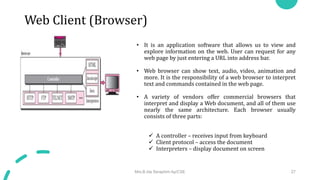
  • 87.
    File Transfer Protocol(FTP) • File Transfer occurs over the data connection under the control of the commands sent over the control connection. • A file is to be copied from the server to the client (download). This is called retrieving a file. It is done under the supervision of the RETR command. • A file is to be copied from the client to the server (upload). This is called storing a file. It is done under the supervision of the STOR command. • A list of directories or file names is to be sent from the server to the client. This is done under the supervision of the LIST command. Mrs.B.Ida Seraphim Ap/CSE 87 File transfer
  • 88.
    File Transfer Protocol(FTP) Mrs.B.Ida Seraphim Ap/CSE 88
  • 89.
    TFTP • There areoccasions when we need to simply copy a file without the need for all of the features of the FTP protocol. • Trivial File Transfer Protocol (TFTP) is designed for these types of file transfer. • It is so simple that the software package can fit into the read- only memory of a diskless workstation. • It can be used at bootstrap time. • TFTP uses the services of UDP on the well-known port 69. Messages • There are five types of TFTP messages, RRQ, WRQ, DATA, ACK, and ERROR Mrs.B.Ida Seraphim Ap/CSE 89 Message categories
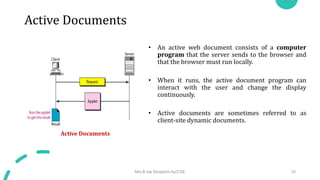
  • 90.
    TFTP RRQ • Theread request (RRQ) message is used by the client to establish a connection for reading data from the server. WRQ • The write request (WRQ) message is used by the client to establish a connection for writing data to the server. DATA • The data (DATA) message is used by the client or the server to send blocks of data. ACK • The acknowledge (ACK) message is used by the client or server to acknowledge the receipt of a data block. The message is only 4 bytes long. ERROR • The ERROR message is used by the client or the server when a connection cannot be established or when there is a problem during data transmission. • It can be sent as a negative response to RRQ or WRQ. Mrs.B.Ida Seraphim Ap/CSE 91 RRQ format WRQ format DATA format ACK format ERROR format
  • 91.
    TFTP Connection • TFTPuses UDP services. Because there is no provision for connection establishment and termination in UDP, UDP transfers each block of data encapsulated in an independent user datagram. • TFTP uses RRQ, WRQ, ACK, and ERROR messages to establish connection. It uses the DATA message with a block of data of fewer than 512 bytes (0–511) to terminate connection. Connection Establishment • Connection establishment for reading files is different from connection establishment for writing files. • Reading - To establish a connection for reading, the TFTP client sends the RRQ message. • Writing - To establish a connection for writing, the TFTP client uses the WRQ message. Connection Termination • After the entire file is transferred, the connection must be terminated. • TFTP does not have a special message for termination. • Termination is accomplished by sending the last block of data, which is less than 512 bytes. Mrs.B.Ida Seraphim Ap/CSE 92 Connection establishment

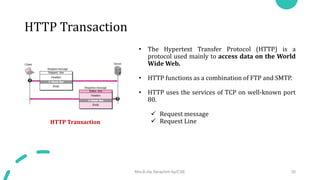
  • 92.
    TFTP Data Transfer • Thedata transfer phase occurs between connection establishment and termination. • TFTP uses the services of UDP, which is unreliable. Flow Control • TFTP sends a block of data using the DATA message and waits for an ACK message. • If the sender receives an acknowledgment before the time-out, it sends the next block. Retrieve a File • When the client wants to retrieve (read) a file, it sends the RRQ message. • The server responds with a DATA message sending the first block of data (if there is no problem) with a block number of 1. Store a File • When the client wants to store (write) a file, it sends the WRQ message. • The server responds with an ACK message (if there is no problem) using 0 for the block number. Mrs.B.Ida Seraphim Ap/CSE 93
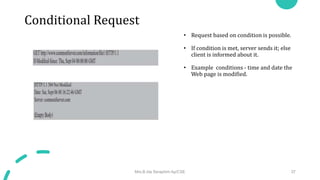
  • 93.
    TFTP Error Control • TheTFTP error-control mechanism is different from those of other protocols. It is symmetric, which means that the sender and the receiver both use time-outs. • Error control is needed in four situations  A damaged message  A lost message  A lost acknowledgment  A duplicated message Damaged Message • There is no negative acknowledgment. If a block of data is damaged, it is detected by the receiver and the block is discarded. Lost Message • If a block is lost, it never reaches the receiver and no acknowledgment is sent. The sender resends the block after the time-out. Lost Acknowledgment • If the timer of the receiver matures before the timer of the sender, the receiver retransmits the acknowledgment • otherwise, the sender retransmits the data. Mrs.B.Ida Seraphim Ap/CSE 94
  • 94.
    TFTP Duplicate Message • Duplicationof blocks can be detected by the receiver through block number. If a block is duplicated, it is simply discarded by the receiver. Applications • TFTP is very useful for basic file transfer where security is not a big issue. • It can be used to initialize devices such as bridges or routers. • Its main application is in conjunction with the DHCP. • TFTP requires only a small amount of memory and uses only the services of UDP and IP. • It can easily be configured in ROM (or PROM). Mrs.B.Ida Seraphim Ap/CSE 95
  • 95.
    TELNET • TErminaLNETwork –remote login • standard TCP/IP protocol for virtual terminal service as proposed by ISO. • TELNET enables the establishment of a connection to a remote system in such a way that the local terminal appears to be a terminal at the remote system. • TELNET is a general-purpose client-server application program Concepts Timesharing Environment • All of the processing must be done by the central computer. • When a user types a character on the keyboard, the character is usually sent to the computer and echoed to the monitor. • It creates an environment in which each user has the illusion of a dedicated computer. Mrs.B.Ida Seraphim Ap/CSE 96 Local login Remote Login
  • 96.
    TELNET • Network VirtualTerminal (NVT) • Heterogeneous systems • Want to access Remote computer- type of the computer to be known • The client TELNET translates characters (data or commands) that come from the local terminal into NVT form and delivers them to the network. • The server TELNET, on the other hand, translates data and commands from NVT form into the form acceptable by the remote computer. Mrs.B.Ida Seraphim Ap/CSE 97 Concept of NVT
  • 97.
    TELNET NVT Character Set •Data Characters called NVT ASCII. • This is an 8-bit character set in which the seven lowest order bits are the same as US ASCII and the highest order bit is 0 • Although it is possible to send an 8-bit ASCII (with the highest order bit set to be 0 or 1)-must first be agreed upon between the client and the server using option negotiation. • To send control characters between computers (from client to server or vice versa), NVT uses an 8-bit character set in which the highest order bit is set to 1 Mrs.B.Ida Seraphim Ap/CSE 98 Format of data and control characters Some NVT control characters
  • 98.
    TELNET Embedding • TELNET usesonly one TCP connection. • The server uses the well-known port 23 and the client uses an ephemeral port. Same connection is used for sending both data and control characters. • TELNET accomplishes this by embedding the control characters in the data stream. • To distinguish data from control characters, each sequence of control characters is preceded by a special control character called interpret as control (IAC). For example, imagine a user wants a server to display a file (file1) on a remote server.  cat file1  cat filea <backspace>1 Mrs.B.Ida Seraphim Ap/CSE 99 An example of embedding
  • 99.
    TELNET Options • Options areextra features available to a user with a more sophisticated terminal. Option Negotiation • To use any of the options mentioned in the previous section first requires option negotiation between the client and the server. Mrs.B.Ida Seraphim Ap/CSE 100 Options NVT character set for option negotiation Offer to enable an option Request to enable an option Offer to disable an option Request to disable an option
  • 100.
    TELNET Symmetry • The clientand server are given equal opportunity • Both are using a default TELNET implementation with no options enabled. • If one party wants an option enabled, it can offer or request. The other party has the right to approve the offer or reject the request if the party is not capable of using the option or does not want to use the option. • This allows for the expansion of TELNET. A client or server can install a more sophisticated version of TELNET with more options. • When it is connected to a party, it can offer or request these new options. • If the other party also supports these options, the options can be enabled; otherwise, they are rejected. Mrs.B.Ida Seraphim Ap/CSE 101 NVT character set for suboption negotiation Example of sub-option negotiation
  • 101.
    TELNET Controlling Server •Some control characters can be used to control the remote server. • When an application program is running on the local computer, special characters are used to interrupt (abort) the program (for example, Ctrl+c), or erase the last character typed (for example, delete key or backspace key), and so on. Out of Band Signalling • TELNET uses out-of-band signaling. • In out-of-band signaling, the control characters are preceded by IAC and are sent to the remote process. Mrs.B.Ida Seraphim Ap/CSE 102 Characters used to control a program running on remote server Interrupting an application program Out-of-band signalling Two different interruptions
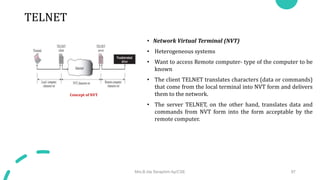
  • 102.
    TELNET Mode of Operation CharacterMode- overhead created • The user enters a character that is sent to the server • The server acknowledges the received character and echoes the character back (in one segment). • The client acknowledges the receipt of the echoed character. Line Mode • Echoing, character erasing, line erasing, and so on are done by the client. • The client then sends TELNET AND SSH 623 the whole line to the server. Although the line mode looks like the default mode, it is not. • The default mode operates in the half-duplex mode; the line mode is full-duplex with the client sending one line after another, without the need for an intervening GA (go ahead) character from the server. Mrs.B.Ida Seraphim Ap/CSE 103
  • 103.
    TELNET Default mode • Usedif no other modes are invoked through option negotiation. • In this mode, the echoing is done by the client. • The user types a character and the client echoes the character on the screen (or printer) but does not send it until a whole line is completed. • After sending the whole line to the server, the client waits for the GA (go ahead) command from the server before accepting a new line from the user. • The operation is half-duplex. • Half-duplex operation is not efficient when the TCP connection itself is full-duplex, and so this mode is becoming obsolete. Mrs.B.Ida Seraphim Ap/CSE 104
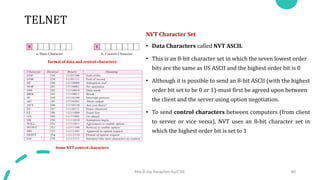
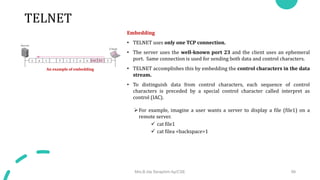
  • 104.
    TELNET User Interface • TELNETsuffers from security problems. • Although TELNET requires only a login name and password (when exchanging text) For instance: A microcomputer connected to a broadcast LAN can easily eavesdrop using snooper software and capture a login name and the corresponding password (even if it is encrypted) Mrs.B.Ida Seraphim Ap/CSE 105 Interface commands
  • 105.
    Secure Shell (SSH) •Remote login application program • Like TELNET, uses TCP as the underlying transport protocol • SSH is more secure and provides more services than TELNET • Versions - two versions of SSH • SSH-1 and SSH-2, which are totally incompatible. • SSH-1 is now deprecated because of security flaws in it. Now SSH-2 only used. Mrs.B.Ida Seraphim Ap/CSE 106 Components of SSH
  • 106.
    Secure Shell (SSH) PortForwarding • Use the secured channels available in SSH to access an application program that does not provide security services. SSH Packet Format • Length - This 4-byte field defines the length of the packet including the type, the data, and the CRC field, but not the padding and the length field. • Padding - One to eight bytes of padding is added to the packet to make the attack on the security provision more difficult. • Type - This one-byte field defines the type of packet used by SSH protocols. • Data - This field is of variable length. The length of the data can be found by deducting the five bytes from the value of the length field. • CRC - The cyclic redundancy check filed is used for error detection Mrs.B.Ida Seraphim Ap/CSE 107 Port Forwarding SSH Packet Format
  • 107.
    Problems Mrs.B.Ida Seraphim Ap/CSE108 • In a connection, the value of cwnd is 3000 and the value of rwnd is 5000. The host has sent 2000 bytes, which have not been acknowledged. How many more bytes can be sent?​ • Given that cwnd or congestion window size =3000 and the receiver window size is =5000 • Sender window size = minimum( congestion window, receiver window) • Therefore the sender window size = min(3000, 5000)= 3000. • The sender can send 3000 bytes of data through the channel.