Document Archiving
System(DAS) with work
Flow
What is Documents Archiving
System
Archiving is the storage or preservation of information.
Organizations are converting paper documents to digital every
day, to increase the life span of documents.
DAS can be used to archive document files like through scanning
them and saving as images and saved other document related
details in Database.
Background
This application
developed using
.NET frame work 4.0
with asp.net.
Visual Studio
2010 is used as
Programming
Interface.
C# as front - end
SQL Server as
back - end
Features
1. Each Document will get a unique bar code which is used as document
number.
2.The file up-loader does not need to scan and then upload it in the system
separately. It will can scan and upload the document at the same time.
3.The up-loader can select the file or document source dynamically while
entering the details.
4. Secret/Confidential file option is embedded to maintain the confidential
documents/files.
5. Permitted user can view the file/document online and can also download
the file.
Features
6.Administrator will Have full control over the system and canView and
analyze the System Logs.
7.Administrator can reset the password for any user incase the user has
forgotten the password.
8. Efficient File/Document search is embedded to search for files and
documents within the system. Only privileged users will be able to search
the confidential documents.
9. Integrated backup system for scan documents.
10. Friendly GUI system.
11. User can download Multiple scan documents in single documents file.
Features
12.Searching the document is very easy and all the users can search the
permitted documents.
13.All Users can Download the Document in PDF format or can view it online in
browser as well.
14.The Data Entry user can forward the document with notes after uploading to
any other user for any permissions or official matters, and this document can be
sent to other user.
15.The Forwarded document will be Archived once the Document Flow is ended
and Document will be show to all other users then.
16.The user can track the Document forwarded and view the document flow
with all the notes.
17User can download Multiple scan document pages in single documents file in
PDF format.
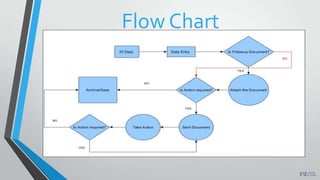
How the process work?
• The user will Scan or upload the file into the system. Users with special
privileges can update or delete these files and their corresponding data.
• The User can also send/forward the document to other registered user to
take some actions and then Archive the document.
• Once the all the action needed is completed, the document will be archived
in the system which can be searched, modified or view at any time.
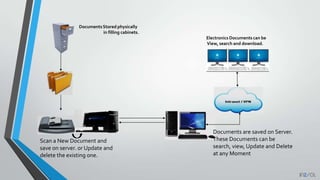
DocumentsStored physically
in filling cabinets.
Electronics Documents can be
View, search and download.
Scan a New Document and
save on server. or Update and
delete the existing one.
Documents are saved on Server.
These Documents can be
search, view, Update and Delete
at any Moment
Flow Chart
Benefits of Document Management
1. Improve staff productivity
2. Reduce costs associated with manual document
3. Promote sharing of knowledge and information
4. Enhance corporate transparency and governance
5. Download and Publish documents to CD, DVD.
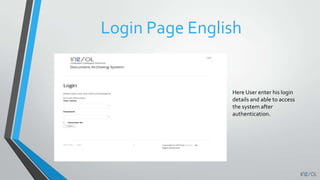
Login Page English
Here User enter his login
details and able to access
the system after
authentication.
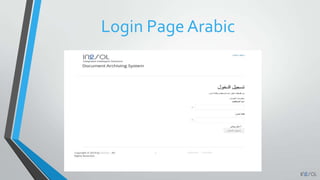
Login Page Arabic
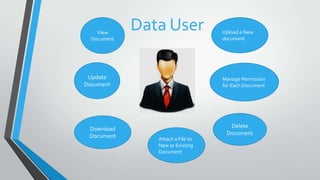
Data UserView
Document
Upload a New
document
Attach a File to
New or Existing
Document
Update
Document
Download
Document
Manage Permission
for Each Document
Delete
Document
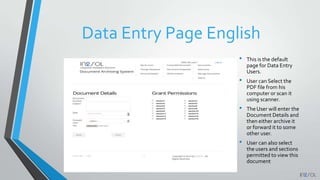
Data Entry Page English
• This is the default
page for Data Entry
Users.
• User can Select the
PDF file from his
computer or scan it
using scanner.
• The User will enter the
Document Details and
then either archive it
or forward it to some
other user.
• User can also select
the users and sections
permitted to view this
document
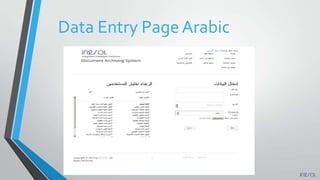
Data Entry Page Arabic
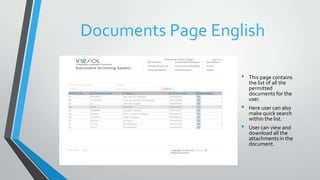
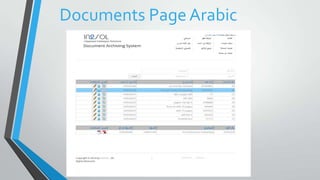
Documents Page English
• This page contains
the list of all the
permitted
documents for the
user.
• Here user can also
make quick search
within the list.
• User can view and
download all the
attachments in the
document.
Documents Page Arabic
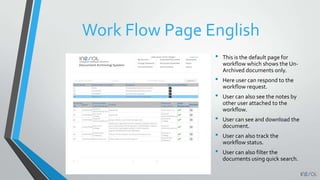
Work Flow Page English
• This is the default page for
workflow which shows the Un-
Archived documents only.
• Here user can respond to the
workflow request.
• User can also see the notes by
other user attached to the
workflow.
• User can see and download the
document.
• User can also track the
workflow status.
• User can also filter the
documents using quick search.
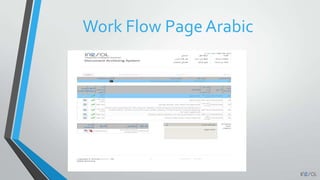
Work Flow Page Arabic
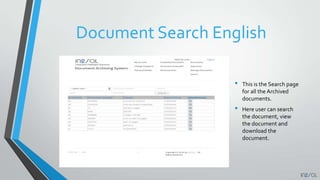
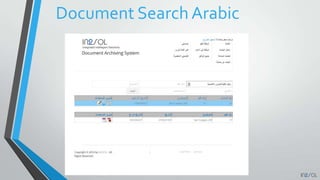
Document Search English
• This is the Search page
for all the Archived
documents.
• Here user can search
the document, view
the document and
download the
document.
Document Search Arabic
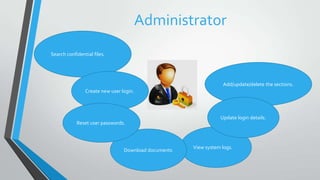
Administrator
Search confidential files.
Create new user login.
View system logs.
Add/update/delete the sections.
Download documents
Update login details.
Reset user passwords.
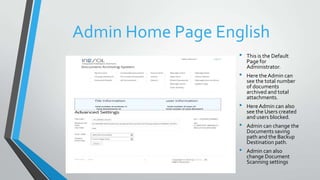
Admin Home Page English
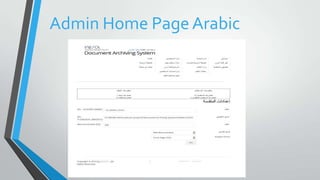
• This is the Default
Page for
Administrator.
• Here theAdmin can
see the total number
of documents
archived and total
attachments.
• HereAdmin can also
see the Users created
and users blocked.
• Admin can change the
Documents saving
path and the Backup
Destination path.
• Admin can also
change Document
Scanning settings
Admin Home Page Arabic
Admin Logs English
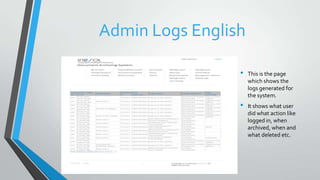
• This is the page
which shows the
logs generated for
the system.
• It shows what user
did what action like
logged in, when
archived, when and
what deleted etc.
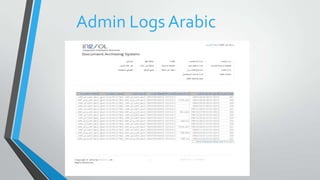
Admin Logs Arabic
END OF PRESENTATION
Thank you for your time.

Document Archieving System (DAS) by In2sol Riyadh

  • 1.
  • 2.
    What is DocumentsArchiving System Archiving is the storage or preservation of information. Organizations are converting paper documents to digital every day, to increase the life span of documents. DAS can be used to archive document files like through scanning them and saving as images and saved other document related details in Database.
  • 3.
    Background This application developed using .NETframe work 4.0 with asp.net. Visual Studio 2010 is used as Programming Interface. C# as front - end SQL Server as back - end
  • 4.
    Features 1. Each Documentwill get a unique bar code which is used as document number. 2.The file up-loader does not need to scan and then upload it in the system separately. It will can scan and upload the document at the same time. 3.The up-loader can select the file or document source dynamically while entering the details. 4. Secret/Confidential file option is embedded to maintain the confidential documents/files. 5. Permitted user can view the file/document online and can also download the file.
  • 5.
    Features 6.Administrator will Havefull control over the system and canView and analyze the System Logs. 7.Administrator can reset the password for any user incase the user has forgotten the password. 8. Efficient File/Document search is embedded to search for files and documents within the system. Only privileged users will be able to search the confidential documents. 9. Integrated backup system for scan documents. 10. Friendly GUI system. 11. User can download Multiple scan documents in single documents file.
  • 6.
    Features 12.Searching the documentis very easy and all the users can search the permitted documents. 13.All Users can Download the Document in PDF format or can view it online in browser as well. 14.The Data Entry user can forward the document with notes after uploading to any other user for any permissions or official matters, and this document can be sent to other user. 15.The Forwarded document will be Archived once the Document Flow is ended and Document will be show to all other users then. 16.The user can track the Document forwarded and view the document flow with all the notes. 17User can download Multiple scan document pages in single documents file in PDF format.
  • 7.
    How the processwork? • The user will Scan or upload the file into the system. Users with special privileges can update or delete these files and their corresponding data. • The User can also send/forward the document to other registered user to take some actions and then Archive the document. • Once the all the action needed is completed, the document will be archived in the system which can be searched, modified or view at any time.
  • 8.
    DocumentsStored physically in fillingcabinets. Electronics Documents can be View, search and download. Scan a New Document and save on server. or Update and delete the existing one. Documents are saved on Server. These Documents can be search, view, Update and Delete at any Moment
  • 9.
  • 10.
    Benefits of DocumentManagement 1. Improve staff productivity 2. Reduce costs associated with manual document 3. Promote sharing of knowledge and information 4. Enhance corporate transparency and governance 5. Download and Publish documents to CD, DVD.
  • 11.
    Login Page English HereUser enter his login details and able to access the system after authentication.
  • 12.
  • 13.
    Data UserView Document Upload aNew document Attach a File to New or Existing Document Update Document Download Document Manage Permission for Each Document Delete Document
  • 14.
    Data Entry PageEnglish • This is the default page for Data Entry Users. • User can Select the PDF file from his computer or scan it using scanner. • The User will enter the Document Details and then either archive it or forward it to some other user. • User can also select the users and sections permitted to view this document
  • 15.
  • 16.
    Documents Page English •This page contains the list of all the permitted documents for the user. • Here user can also make quick search within the list. • User can view and download all the attachments in the document.
  • 17.
  • 18.
    Work Flow PageEnglish • This is the default page for workflow which shows the Un- Archived documents only. • Here user can respond to the workflow request. • User can also see the notes by other user attached to the workflow. • User can see and download the document. • User can also track the workflow status. • User can also filter the documents using quick search.
  • 19.
  • 20.
    Document Search English •This is the Search page for all the Archived documents. • Here user can search the document, view the document and download the document.
  • 21.
  • 22.
    Administrator Search confidential files. Createnew user login. View system logs. Add/update/delete the sections. Download documents Update login details. Reset user passwords.
  • 23.
    Admin Home PageEnglish • This is the Default Page for Administrator. • Here theAdmin can see the total number of documents archived and total attachments. • HereAdmin can also see the Users created and users blocked. • Admin can change the Documents saving path and the Backup Destination path. • Admin can also change Document Scanning settings
  • 24.
  • 25.
    Admin Logs English •This is the page which shows the logs generated for the system. • It shows what user did what action like logged in, when archived, when and what deleted etc.
  • 26.
  • 27.
    END OF PRESENTATION Thankyou for your time.