Process Mapping
for
Information Management Professionals
RIMPA State Seminar
12 July 2019
Simon Rawson
Copyright © PowerMark Solutions, July 2019
• Why map processes?
• Approaches and jargon
• Who to involve and methods
• Examples and resources
• Group exercise
• Recap and tools
Presentation Agenda
• “All business information is produced by
business processes for the support or
consumption of other processes”
• All processes consume resources
• Processes flow across organisations
• Processes / functions / responsibilities
• Processes and reporting go hand in hand
• Few people understand processes end to end
Processes and Their Nature - Why Map?
• Process mapping has been around over 100
years
• There is a current focus on process mapping
as a component of Privacy Impact
Assessments
• Frameworks abound including enterprise
architecture (e.g. Zachmann and TOGAF) and
quality management (e.g. 6 Sigma / LEAN)
• Value Stream Mapping (VSM) and Information
Flow Diagrams (VFM)
An Overview of Techniques and Methods
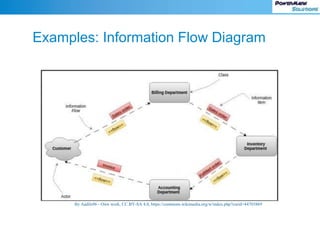
Examples: Information Flow Diagram
By Aadils96 - Own work, CC BY-SA 4.0, https://commons.wikimedia.org/w/index.php?curid=44703869
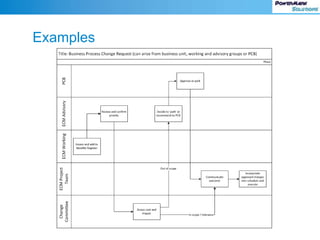
Examples
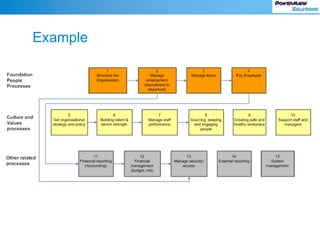
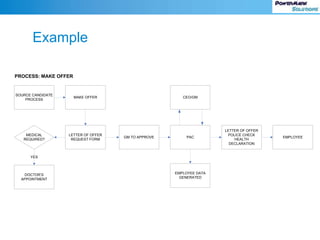
Example
Example
PROCESS: MAKE OFFER
MEDICAL
REQUIRED?
MAKE OFFER
SOURCE CANDIDATE
PROCESS
LETTER OF OFFER
REQUEST FORM
DOCTOR’S
APPOINTMENT
GM TO APPROVE PAC
CEO/GM
LETTER OF OFFER
POLICE CHECK
HEALTH
DECLARATION
EMPLOYEE
EMPLOYEE DATA
GENERATED
YES
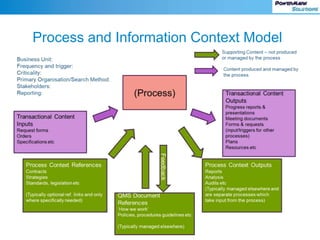
Process and Information Context Model
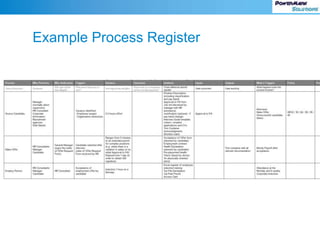
Example Process Register
Purpose of Interviews and BU Level Design
Identify the processes and content which makes each
business unit / team unique
Design EDRM structure to support each team and
their processes
Input to design of the Business Classification Scheme
/ Information Architecture (and its mapping to RDA)
…and along the way identify issues and opportunities
Interview Attendees
IM Specialist or Business Analyst (facilitator)
Business unit staff who understand the key
business unit processes
Business unit or team managers (optional but
preferred)
‘Reference Model’ – Standard Libraries
Common to Each Business Unit
Reports
Plans
Projects
Meetings
Finance
Branch Policies and Procedures
Branch Templates
Team Calendar and Events
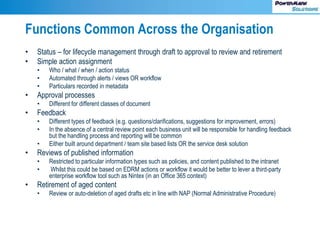
Functions Common Across the Organisation
• Status – for lifecycle management through draft to approval to review and retirement
• Simple action assignment
• Who / what / when / action status
• Automated through alerts / views OR workflow
• Particulars recorded in metadata
• Approval processes
• Different for different classes of document
• Feedback
• Different types of feedback (e.g. questions/clarifications, suggestions for improvement, errors)
• In the absence of a central review point each business unit will be responsible for handling feedback
but the handling process and reporting will be common
• Either built around department / team site based lists OR the service desk solution
• Reviews of published information
• Restricted to particular information types such as policies, and content published to the intranet
• Whilst this could be based on EDRM actions or workflow it would be better to lever a third-party
enterprise workflow tool such as Nintex (in an Office 365 context)
• Retirement of aged content
• Review or auto-deletion of aged drafts etc in line with NAP (Normal Administrative Procedure)
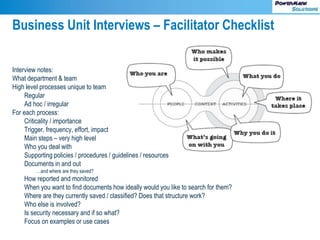
Business Unit Interviews – Facilitator Checklist
Interview notes:
What department & team
High level processes unique to team
Regular
Ad hoc / irregular
For each process:
Criticality / importance
Trigger, frequency, effort, impact
Main steps – very high level
Who you deal with
Supporting policies / procedures / guidelines / resources
Documents in and out
…and where are they saved?
How reported and monitored
When you want to find documents how ideally would you like to search for them?
Where are they currently saved / classified? Does that structure work?
Who else is involved?
Is security necessary and if so what?
Focus on examples or use cases
Interview Documentation
Key processes
Notes
Issues
Suggestions for improvement
Actions
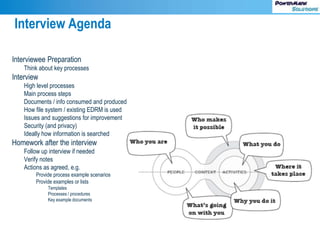
Interview Agenda
Interviewee Preparation
Think about key processes
Interview
High level processes
Main process steps
Documents / info consumed and produced
How file system / existing EDRM is used
Issues and suggestions for improvement
Security (and privacy)
Ideally how information is searched
Homework after the interview
Follow up interview if needed
Verify notes
Actions as agreed, e.g.
Provide process example scenarios
Provide examples or lists
Templates
Processes / procedures
Key example documents
Exercise
With a couple of people around you, identify a
simple process in one of your organisations
• Map out the steps (5 minutes)
• Identify (5 minutes)
• Transactional information (requests etc)
• Context / support information (templates,
procedures etc)
• How you as a user wants to be able to find or
navigate the information
Example Resources and Links
• https://www.informationmapping.com/en/information-
mapping/information-mapping/examples – example templates
• Online process mapping tool http://draw.io
• Nintex ProMapp process mapping -
https://www.promapp.com
• https://www.oaic.gov.au/elearning/pia/topic4.html – key points
to cover in information mapping
• Simon@powermark.net.au / 0430 986 682
A bundle of spreadsheet templates with example content is
available on request
Additional
Resources
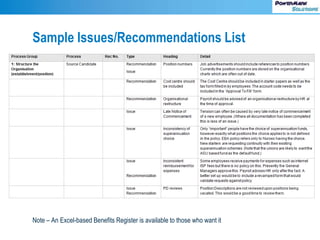
Sample Issues/Recommendations List
Note – An Excel-based Benefits Register is available to those who want it
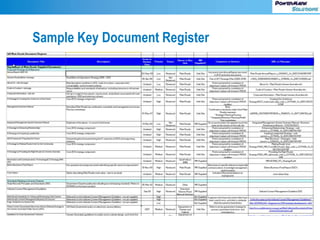
Sample Key Document Register
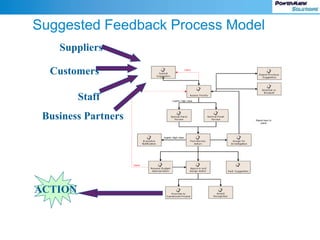
Suggested Feedback Process Model
ACTION
Suppliers
Staff
Customers
Business Partners
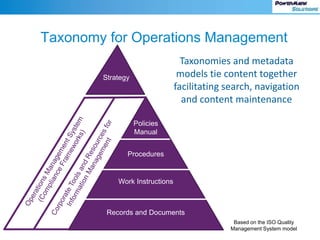
Taxonomy for Operations Management
Policies
Manual
Procedures
Work Instructions
Records and Documents
Strategy
Taxonomies and metadata
models tie content together
facilitating search, navigation
and content maintenance
Based on the ISO Quality
Management System model

Process mapping for Information Management professionals

  • 1.
    Process Mapping for Information ManagementProfessionals RIMPA State Seminar 12 July 2019 Simon Rawson Copyright © PowerMark Solutions, July 2019
  • 2.
    • Why mapprocesses? • Approaches and jargon • Who to involve and methods • Examples and resources • Group exercise • Recap and tools Presentation Agenda
  • 3.
    • “All businessinformation is produced by business processes for the support or consumption of other processes” • All processes consume resources • Processes flow across organisations • Processes / functions / responsibilities • Processes and reporting go hand in hand • Few people understand processes end to end Processes and Their Nature - Why Map?
  • 4.
    • Process mappinghas been around over 100 years • There is a current focus on process mapping as a component of Privacy Impact Assessments • Frameworks abound including enterprise architecture (e.g. Zachmann and TOGAF) and quality management (e.g. 6 Sigma / LEAN) • Value Stream Mapping (VSM) and Information Flow Diagrams (VFM) An Overview of Techniques and Methods
  • 5.
    Examples: Information FlowDiagram By Aadils96 - Own work, CC BY-SA 4.0, https://commons.wikimedia.org/w/index.php?curid=44703869
  • 6.
  • 7.
  • 8.
    Example PROCESS: MAKE OFFER MEDICAL REQUIRED? MAKEOFFER SOURCE CANDIDATE PROCESS LETTER OF OFFER REQUEST FORM DOCTOR’S APPOINTMENT GM TO APPROVE PAC CEO/GM LETTER OF OFFER POLICE CHECK HEALTH DECLARATION EMPLOYEE EMPLOYEE DATA GENERATED YES
  • 9.
  • 10.
  • 11.
    Purpose of Interviewsand BU Level Design Identify the processes and content which makes each business unit / team unique Design EDRM structure to support each team and their processes Input to design of the Business Classification Scheme / Information Architecture (and its mapping to RDA) …and along the way identify issues and opportunities
  • 12.
    Interview Attendees IM Specialistor Business Analyst (facilitator) Business unit staff who understand the key business unit processes Business unit or team managers (optional but preferred)
  • 13.
    ‘Reference Model’ –Standard Libraries Common to Each Business Unit Reports Plans Projects Meetings Finance Branch Policies and Procedures Branch Templates Team Calendar and Events
  • 14.
    Functions Common Acrossthe Organisation • Status – for lifecycle management through draft to approval to review and retirement • Simple action assignment • Who / what / when / action status • Automated through alerts / views OR workflow • Particulars recorded in metadata • Approval processes • Different for different classes of document • Feedback • Different types of feedback (e.g. questions/clarifications, suggestions for improvement, errors) • In the absence of a central review point each business unit will be responsible for handling feedback but the handling process and reporting will be common • Either built around department / team site based lists OR the service desk solution • Reviews of published information • Restricted to particular information types such as policies, and content published to the intranet • Whilst this could be based on EDRM actions or workflow it would be better to lever a third-party enterprise workflow tool such as Nintex (in an Office 365 context) • Retirement of aged content • Review or auto-deletion of aged drafts etc in line with NAP (Normal Administrative Procedure)
  • 15.
    Business Unit Interviews– Facilitator Checklist Interview notes: What department & team High level processes unique to team Regular Ad hoc / irregular For each process: Criticality / importance Trigger, frequency, effort, impact Main steps – very high level Who you deal with Supporting policies / procedures / guidelines / resources Documents in and out …and where are they saved? How reported and monitored When you want to find documents how ideally would you like to search for them? Where are they currently saved / classified? Does that structure work? Who else is involved? Is security necessary and if so what? Focus on examples or use cases
  • 16.
  • 17.
    Interview Agenda Interviewee Preparation Thinkabout key processes Interview High level processes Main process steps Documents / info consumed and produced How file system / existing EDRM is used Issues and suggestions for improvement Security (and privacy) Ideally how information is searched Homework after the interview Follow up interview if needed Verify notes Actions as agreed, e.g. Provide process example scenarios Provide examples or lists Templates Processes / procedures Key example documents
  • 18.
    Exercise With a coupleof people around you, identify a simple process in one of your organisations • Map out the steps (5 minutes) • Identify (5 minutes) • Transactional information (requests etc) • Context / support information (templates, procedures etc) • How you as a user wants to be able to find or navigate the information
  • 19.
    Example Resources andLinks • https://www.informationmapping.com/en/information- mapping/information-mapping/examples – example templates • Online process mapping tool http://draw.io • Nintex ProMapp process mapping - https://www.promapp.com • https://www.oaic.gov.au/elearning/pia/topic4.html – key points to cover in information mapping • Simon@powermark.net.au / 0430 986 682 A bundle of spreadsheet templates with example content is available on request
  • 20.
  • 21.
    Sample Issues/Recommendations List Note– An Excel-based Benefits Register is available to those who want it
  • 22.
  • 23.
    Suggested Feedback ProcessModel ACTION Suppliers Staff Customers Business Partners
  • 24.
    Taxonomy for OperationsManagement Policies Manual Procedures Work Instructions Records and Documents Strategy Taxonomies and metadata models tie content together facilitating search, navigation and content maintenance Based on the ISO Quality Management System model

Editor's Notes

  • #4 The purpose of your organisation is to deliver its services and products. All services and products produced by your organisation are designed, built and delivered through your business processes. Processes fall into a continuum from ad hoc and irregular, to frequent and structured. Strategic processes will be generic in nature (e.g. Planning) with a few key dates and tasks, and run infrequently Strategic processes are hard to objectively measure business benefits – strategic benefits by their nature are difficult to quantify Tactical or operational processes are more structured … are easier to quantify and measure – e.g. how many widgets were produced, average time to execute or calculate response time …can be mapped more readily By mapping processes with a core group from each business or cross-functional unit, you are also promoting a shared understanding, not only of their process, but also of their issues and potential improvements. Therefore this is a team activity which should be carried out in interviews or workshops with an audience restricted to those knowing or participating in the set of processes
  • #5 There are many terms, models and techniques The Office of the Australian Information Commissioner provides guidance on mapping information flows as part of its guidance on Privacy Impact Assessments (link provided). (Many attendees will have substantial experience in PIA processes, far more so than I.) In the next slides I’ll show some common examples of flowchart types, then the process of conducting interviews with business units. Most of the tools and frameworks very involved and outside the scope of IM professionals. I want to give you some simple tools and techniques, and most importantly an approach oriented on Information Management needs. (Most IT tools and models don’t go far enough.)
  • #9 Not all processes need to be mapped. Formal notation for business process mapping is not necessary, and should not ‘get in the way’ of business units mapping processes which are critical or unclear. This is an activity which business units must ‘own’. The primary outcome is agreement on the process and understanding of the main steps.
  • #10 For simplicity, Feedback is shown as applying to Quality documents. In practice, Feedback processes apply to all documents (for consistency). By default the contact point for feedback is either the author but could be a nominated contact role. If the organisation uses an Integrated Management System, all processes must relate to, or be supported by one or more QMS references
  • #14 Excluded from the process model are processes which are common across the organisation. Provision must be made for all teams for general processes involving planning, reporting, meetings, training, departmental/team finances etc, and IM should play a lead in determining how these are managed given the organisation’s EDRM solution/s.
  • #15 IM should also be responsible for low level processes for managing the information lifecycle. In particular I advocate including in IM scope: Simple action assignment, which will apply during the drafting or review processes. Most work takes place around work in progress, so being able to find, track and manage the associated documents helps people in their day-to-day work Managing feedback. Feedback should be able to be provided by anyone within an organisation at any time. People know best if a document or template works for them, or if there is an issue, at the time they are using it. People are also poor at tracking and remembering all issues in a Post Implementation Review. Feedback mechanisms contribute to quality assurance and continual process improvement – both aspects being important in obtaining executive buy-in
  • #17 Notes distributed to workshop or interview participants should include these elements.
  • #20 Visio - PowerPoint
  • #22 I have a set of zipped resources to share the group, including this presentation, AIIM tookits for governance, the benefits register and various whitepapers and models. I’ll collect email addresses from those who want the package.
  • #24 Key aspects in this model: All feedback is assessed and initially classified A fortnightly or monthly review is conducted by a group trained in critical thinking (eg. de Bono 6 Thinking Hats) The group has authority to make decisions and request action (this might be devolved amongst various management groups) An innovation policy should be present to guide decision making An escalation path is available for high value suggestions Having a repository for suggestions facilitates reporting Some organisations have decision making criteria which make it mandatory to action suggested initiatives, typically when the Internal Rate of Return is greater than a threshold % rate. For commercial organisations this is generally based on the cost of capital plus a risk margin. This is an ideal application for a workflow application. However not all complex processes require workflow automation, if you possess an ECM solution like SharePoint with easily configurable metadata, saved searches and views, and notifications or alerts. For example, you could set up a metadata field for priority, create a view showing high priority suggestions, and set up an alert for new high priority suggestions to provide automation support. This is where a business or process analyst who knows what your ECM can be made to do is so valuable. They have the skills to help design solutions to address business problems. Part of their role is to mentor others in your organisation with this skill. Finding opportunities and setting up some sample solutions to showcase ECM capability for process support is very helpful. A good working example is the ECM equivalent of a picture telling 1000 words.
  • #25 The Integrated Management System (IMS) or Operations Management System (OMS) is the set of compliance frameworks used within an organisation should be used as the primary taxonomy for information classification. Organisations with risky operations (such as mining, resources, transportation, construction and engineering) or which are heavily regulated (such as Financial Services and Health) are most likely to have an overarching IMS. Not every organisation has a cohesive, organisation-wide IMS. However every organisation has its own policies and procedures dictating how it operates. Examples of compliance frameworks commonly folded into an IMS include its quality management system (e.g. ISO 9001), risk management (ISO 31000), environmental management (ISO 14001), occupational health and safety (ISO 18001), etc. More information on IMS can be found at https://www.sciqual.com.au/what-integrated-management-system-ims. A local example of an IMS at work is BP’s OMS, which is the framework covering all operations, including in Australia. (Search on BP OMS finds BP templates for their procedures.) If we consider policies and procedures etc, what sort of characteristics or processes apply? Updates to policies or procedures will cascade to related content down the hierarchy – but not up They apply for a date range (cf. content like meeting documents or financial transaction documents which apply for a given date They should have a review date or review trigger event Most policies will apply across the organisation… …but may have departmental or business unit versions Procedures and work instructions etc will generally be specific to business units ISO 9001:2015 clause 4.4 Quality management systems and its processes requires an organisation to “maintain documented information to the extent necessary to support the operation of processes and retain documented information to the extent necessary to have confident that the processes are being carried out as planned.” (https://www.iso.org/files/live/sites/isoorg/files/archive/pdf/en/documented_information.pdf)