Introduction to  Document Management Jim Locke, Principal ResultWorx Technology Group
Agenda The “Paperless Office” Hardware, Storage and Software Considerations Document Formats Workflow Sample Solutions Tips for Getting Started Questions
The arrival of the  “Paperless Office”   has been trumpeted for over 15 years…
YET… Paper grows 25% per year in a typical organization, meaning that it will double in just over three years time!
The Paperless Promise… To reduce time and costs associated with document management To reduce amount of space required for storage To enable business to recover important documents in a disaster To reduce environmental impact and associated costs To improve security of information To improve regulatory compliance
The Case for Going Paperless 70% of “white-collar” worker time is spent processing paper documents  15% of all paper documents are misfiled or misplaced  30% of documents used daily contain obsolete information  40% of worker’s time is spent searching for misfiled, misplaced, or lost documents  Source: Coopers & Lybrands
So Why Now? Availability of affordable hardware Availability of affordable software Integration with business processes E-mail and business productivity software Fax Low cost storage Efficient backup solutions New security and compliance requirements
Hardware Considerations Scanners Duplex Scanning Multi-page tray with good speed Scans directly to file folder as .PDF or .TIF Network connected vs. USB Consider multifunction devices where appropriate Multiple Monitors If you regularly refer to documents, consider multiple monitors for better productivity
Storage Considerations How will you store documents? Structured file folders Database Where to store documents? Local hard drive, network drive or online How will you backup?
Software Considerations What format will you store documents in? .PDF, .TIF or something else What software do you need to integrate with? Microsoft Outlook, Office, Salesforce, etc. How will you retrieve documents? Search for specific text or meta data (e.g. invoice#) Pick from structured file folders How will you share documents? Locally, remotely, website, etc. Internal/External
Document Format Arguments Portable Document Format Easily embedded and read by any computer Full text search with meta-data Security/Encryption Annotation Tagged Image File Format Easily embedded and read by any computer Image-only, cannot be altered (maybe) Requires less storage space Proprietary file formats
Workflow Document management is really about process Make a plan for document processing How will you process received documents Where will you store documents How will you locate stored documents How will you annotate, share and send documents Failing to plan your workflow can cause the project to fail
Home Office Solution Office Profile Single User Hardware & Storage Lexmark Multifunction Device Stored on local hard drive; USB Backup Software Nuance Paperport, NeatDesk, eCopy Paperworks May store in proprietary format Minimal indexing
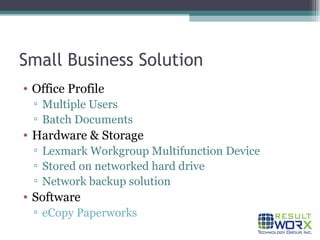
Small Business Solution Office Profile Multiple Users Batch Documents Hardware & Storage Lexmark Workgroup Multifunction Device Stored on networked hard drive Network backup solution Software eCopy Paperworks
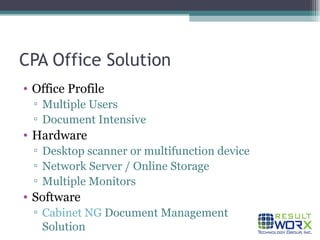
CPA Office Solution Office Profile Multiple Users Document Intensive Hardware Desktop scanner or multifunction device Network Server / Online Storage Multiple Monitors Software Cabinet NG  Document Management Solution
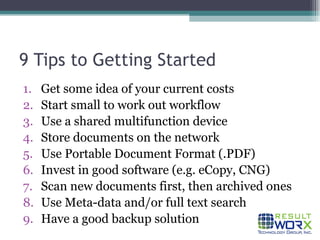
9 Tips to Getting Started Get some idea of your current costs Start small to work out workflow Use a shared multifunction device Store documents on the network Use Portable Document Format (.PDF) Invest in good software (e.g. eCopy, CNG) Scan new documents first, then archived ones Use Meta-data and/or full text search Have a good backup solution
Please feel free to contact us: Jim Locke (626) 689-4491 [email_address]

Introduction to Document Management

  • 1.
    Introduction to Document Management Jim Locke, Principal ResultWorx Technology Group
  • 2.
    Agenda The “PaperlessOffice” Hardware, Storage and Software Considerations Document Formats Workflow Sample Solutions Tips for Getting Started Questions
  • 3.
    The arrival ofthe “Paperless Office” has been trumpeted for over 15 years…
  • 4.
    YET… Paper grows25% per year in a typical organization, meaning that it will double in just over three years time!
  • 5.
    The Paperless Promise…To reduce time and costs associated with document management To reduce amount of space required for storage To enable business to recover important documents in a disaster To reduce environmental impact and associated costs To improve security of information To improve regulatory compliance
  • 6.
    The Case forGoing Paperless 70% of “white-collar” worker time is spent processing paper documents 15% of all paper documents are misfiled or misplaced 30% of documents used daily contain obsolete information 40% of worker’s time is spent searching for misfiled, misplaced, or lost documents Source: Coopers & Lybrands
  • 7.
    So Why Now?Availability of affordable hardware Availability of affordable software Integration with business processes E-mail and business productivity software Fax Low cost storage Efficient backup solutions New security and compliance requirements
  • 8.
    Hardware Considerations ScannersDuplex Scanning Multi-page tray with good speed Scans directly to file folder as .PDF or .TIF Network connected vs. USB Consider multifunction devices where appropriate Multiple Monitors If you regularly refer to documents, consider multiple monitors for better productivity
  • 9.
    Storage Considerations Howwill you store documents? Structured file folders Database Where to store documents? Local hard drive, network drive or online How will you backup?
  • 10.
    Software Considerations Whatformat will you store documents in? .PDF, .TIF or something else What software do you need to integrate with? Microsoft Outlook, Office, Salesforce, etc. How will you retrieve documents? Search for specific text or meta data (e.g. invoice#) Pick from structured file folders How will you share documents? Locally, remotely, website, etc. Internal/External
  • 11.
    Document Format ArgumentsPortable Document Format Easily embedded and read by any computer Full text search with meta-data Security/Encryption Annotation Tagged Image File Format Easily embedded and read by any computer Image-only, cannot be altered (maybe) Requires less storage space Proprietary file formats
  • 12.
    Workflow Document managementis really about process Make a plan for document processing How will you process received documents Where will you store documents How will you locate stored documents How will you annotate, share and send documents Failing to plan your workflow can cause the project to fail
  • 13.
    Home Office SolutionOffice Profile Single User Hardware & Storage Lexmark Multifunction Device Stored on local hard drive; USB Backup Software Nuance Paperport, NeatDesk, eCopy Paperworks May store in proprietary format Minimal indexing
  • 14.
    Small Business SolutionOffice Profile Multiple Users Batch Documents Hardware & Storage Lexmark Workgroup Multifunction Device Stored on networked hard drive Network backup solution Software eCopy Paperworks
  • 15.
    CPA Office SolutionOffice Profile Multiple Users Document Intensive Hardware Desktop scanner or multifunction device Network Server / Online Storage Multiple Monitors Software Cabinet NG Document Management Solution
  • 16.
    9 Tips toGetting Started Get some idea of your current costs Start small to work out workflow Use a shared multifunction device Store documents on the network Use Portable Document Format (.PDF) Invest in good software (e.g. eCopy, CNG) Scan new documents first, then archived ones Use Meta-data and/or full text search Have a good backup solution
  • 17.
    Please feel freeto contact us: Jim Locke (626) 689-4491 [email_address]