Intuitive and Accessible
DCS-DOC is the best choice among document management solutions. It
features an intuitive interface that is so easy to use it requires minimal
training.
It utilizes advanced technology and widely-accepted international
standards to facilitate a non-invasive integration with your system.
DCS-DOC will solve all of your document management needs.
THANKS TO DCS-DOC YOU ARE
SECURE
Store any size
document or group of
documents through a
secure, central
repository.
FREE
DCS-DOC automatically
imports all of your
business files, making
them available
anywhere.
AUTONOMOUS
DCS-DOC interface is
so intuitive that you do
not need training.
Simply drag and drop
files.
BENEFITS OF DCS-DOC
Cost Effective
DCS-DOC allows you to
eliminate paper
documents, freeing up
valuable storage
space.
Good Investment
Your company will save
time and money every
year with DCS-DOC by
low start-up cost.
Support
We ensure a
professional system
configuration & fast
response to your
demands.
High Portability
The DCS-DOC solution
works well on a broad
range of hardware and
software.
Why DCS-DOC?
CENTRALISED DOCUMENT
LIBRARY
Familiar windows explorer style
document style library for easy
retrieval.
Add, edit or delete folders to better
organise the documents.
Intuitive user interface to scan,
upload and tag multiple documents.
QUICK SEARCH AND RETRIEVAL
With various search and retrieval
options such as document title and
creator etc, document tag and full
text indexing.
Real time search functionality to
easily locate the document.
SAFE AND SECURED DOCUMENTS
Set folder level and file level
permissions.
Multiple level security departments
or group. Set permission for printing,
saving to local machine or viewing.
Complete audit trail with information
such as who created/updated and
when.
DIGITIZATION PROCESS FLOW
Prepare
the
document
Validate the
file
Scan/upload
Indexing Store
Approve Access
Share
Internally
DASHBOARD
• Provides easy access and insight about
all the important task or information
regarding the document repository.
• View pending approvals, number of
documents shared or docs marked as
Favourites.
• Ease of access to approval, shared
documents and favourites with a single
click.
DOCUMENT LIBRARY/REPOSITRY
• Manage and retrieve documents
with centralized electronic
cabinets.
• Customize folder structure to
easily categorize each type of
documents.
• Add folder/sub folder, delete or
rename folder.
• Mark selected documents as
favorites for easy access.
DOCUMENT UPLOADING, SCANNING AND
TAGGING
• Upload electronic documents with ease to
relevant folder or use auto indexing feature
to automatically place the upload filesin
relevant folder.
• Drag and drop multiple files in single
upload.
• Customizable document tagging.
DOCUMENT WORKFLOW/APPROVAL INBOX
• Setup multi level approval process to make sure
that right documents are getting published in the
system.
• Search documents, view it and then finally
approve and route it or reject it by with
comments.
• Check the documents that are pending for
approvals or check history to previously approved
documents.
• Document level access control to route a
document to a user for getting a task done by
assigning required privilege to that user.
IN BUILT DOCUMENT VIEWER
• With this feature, users can
easily view the documents
without installing 3rd party
software.
• It enables the users to view
various document details such
as history, doc name, tags,
comments, person uploading
the doc etc.
• For accurate version control, it
comes with Check-in/Check-out
feature.
DOCUMENT RETREIVAL/SEARCH
• With built in OCR, user can easily search and view any documents by using
keywords, tags or the keyword in the content of the document.
• It can also automatically index scanned documents, making them available in
search instantly.
• The search parameters are customizable to suit your requirements.
COMPLETE AUDIT TRAIL & OTHER FEATURES
• Log details about user actions
with the event logging feature.
Export events as XLS/CSV.
• Encrypt documents using industry
standard strong encryption
algorithms.
• Control what actions are allowed
to a user in a specific role. Ex:
configure to allow dept head to
view all documents but only
delete docs that he/she owns.
• Disallow printing, saving to local
machine by denying Distribute
permission for a document.
REPORT
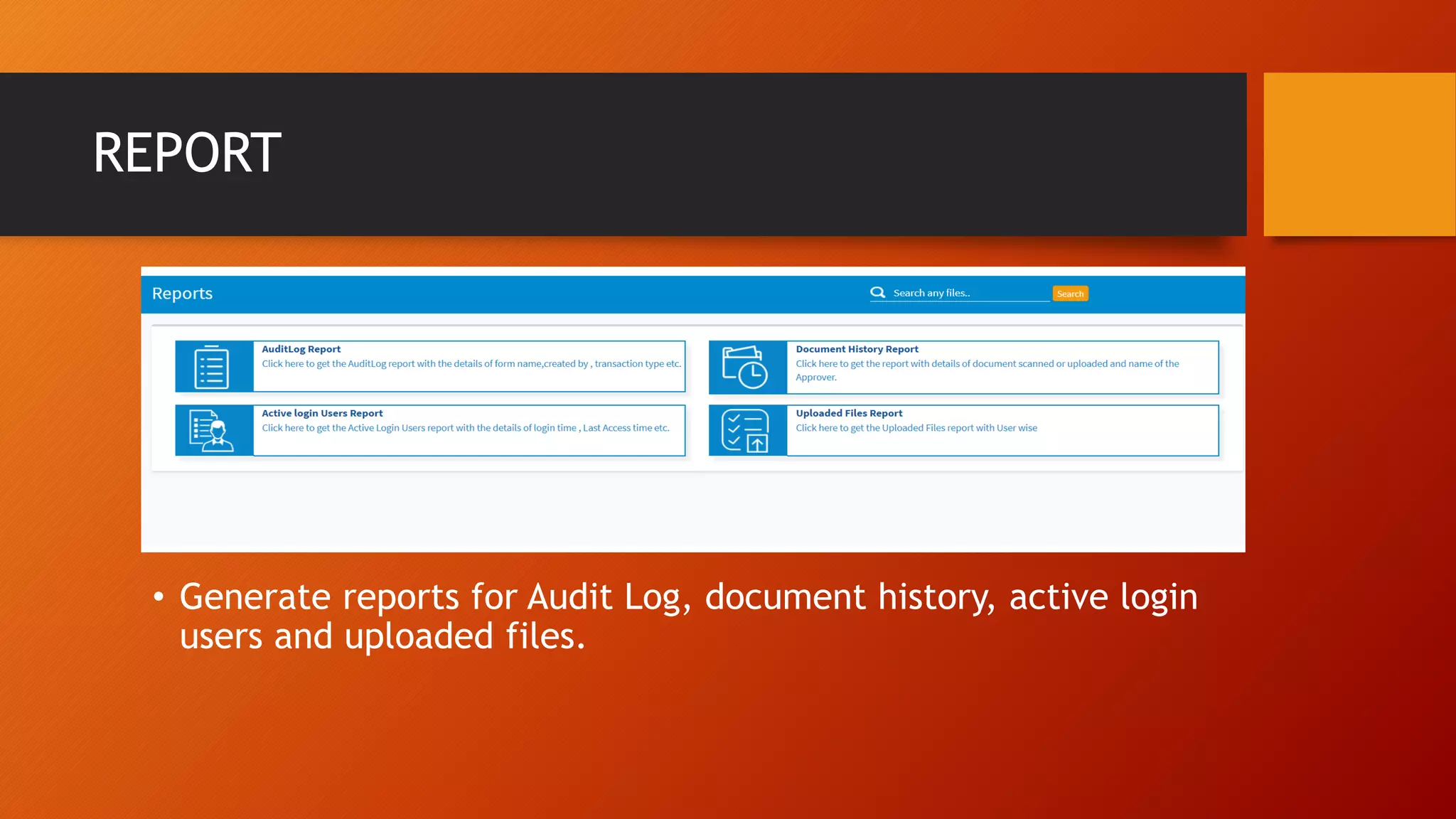
• Generate reports for Audit Log, document history, active login
users and uploaded files.
CONTACT US
+ 971 545 863 905
Book a demo and
we’ll arrange a
session
Chandra@dcsme.com
1207, Latifa Tower,
Sheikh Zayed Road,
Dubai,
UAE

Dcs doc

  • 2.
    Intuitive and Accessible DCS-DOCis the best choice among document management solutions. It features an intuitive interface that is so easy to use it requires minimal training. It utilizes advanced technology and widely-accepted international standards to facilitate a non-invasive integration with your system. DCS-DOC will solve all of your document management needs.
  • 3.
    THANKS TO DCS-DOCYOU ARE SECURE Store any size document or group of documents through a secure, central repository. FREE DCS-DOC automatically imports all of your business files, making them available anywhere. AUTONOMOUS DCS-DOC interface is so intuitive that you do not need training. Simply drag and drop files.
  • 4.
    BENEFITS OF DCS-DOC CostEffective DCS-DOC allows you to eliminate paper documents, freeing up valuable storage space. Good Investment Your company will save time and money every year with DCS-DOC by low start-up cost. Support We ensure a professional system configuration & fast response to your demands. High Portability The DCS-DOC solution works well on a broad range of hardware and software.
  • 5.
    Why DCS-DOC? CENTRALISED DOCUMENT LIBRARY Familiarwindows explorer style document style library for easy retrieval. Add, edit or delete folders to better organise the documents. Intuitive user interface to scan, upload and tag multiple documents. QUICK SEARCH AND RETRIEVAL With various search and retrieval options such as document title and creator etc, document tag and full text indexing. Real time search functionality to easily locate the document. SAFE AND SECURED DOCUMENTS Set folder level and file level permissions. Multiple level security departments or group. Set permission for printing, saving to local machine or viewing. Complete audit trail with information such as who created/updated and when.
  • 6.
    DIGITIZATION PROCESS FLOW Prepare the document Validatethe file Scan/upload Indexing Store Approve Access Share Internally
  • 7.
    DASHBOARD • Provides easyaccess and insight about all the important task or information regarding the document repository. • View pending approvals, number of documents shared or docs marked as Favourites. • Ease of access to approval, shared documents and favourites with a single click.
  • 8.
    DOCUMENT LIBRARY/REPOSITRY • Manageand retrieve documents with centralized electronic cabinets. • Customize folder structure to easily categorize each type of documents. • Add folder/sub folder, delete or rename folder. • Mark selected documents as favorites for easy access.
  • 9.
    DOCUMENT UPLOADING, SCANNINGAND TAGGING • Upload electronic documents with ease to relevant folder or use auto indexing feature to automatically place the upload filesin relevant folder. • Drag and drop multiple files in single upload. • Customizable document tagging.
  • 10.
    DOCUMENT WORKFLOW/APPROVAL INBOX •Setup multi level approval process to make sure that right documents are getting published in the system. • Search documents, view it and then finally approve and route it or reject it by with comments. • Check the documents that are pending for approvals or check history to previously approved documents. • Document level access control to route a document to a user for getting a task done by assigning required privilege to that user.
  • 11.
    IN BUILT DOCUMENTVIEWER • With this feature, users can easily view the documents without installing 3rd party software. • It enables the users to view various document details such as history, doc name, tags, comments, person uploading the doc etc. • For accurate version control, it comes with Check-in/Check-out feature.
  • 12.
    DOCUMENT RETREIVAL/SEARCH • Withbuilt in OCR, user can easily search and view any documents by using keywords, tags or the keyword in the content of the document. • It can also automatically index scanned documents, making them available in search instantly. • The search parameters are customizable to suit your requirements.
  • 13.
    COMPLETE AUDIT TRAIL& OTHER FEATURES • Log details about user actions with the event logging feature. Export events as XLS/CSV. • Encrypt documents using industry standard strong encryption algorithms. • Control what actions are allowed to a user in a specific role. Ex: configure to allow dept head to view all documents but only delete docs that he/she owns. • Disallow printing, saving to local machine by denying Distribute permission for a document.
  • 14.
    REPORT • Generate reportsfor Audit Log, document history, active login users and uploaded files.
  • 15.
    CONTACT US + 971545 863 905 Book a demo and we’ll arrange a session Chandra@dcsme.com 1207, Latifa Tower, Sheikh Zayed Road, Dubai, UAE