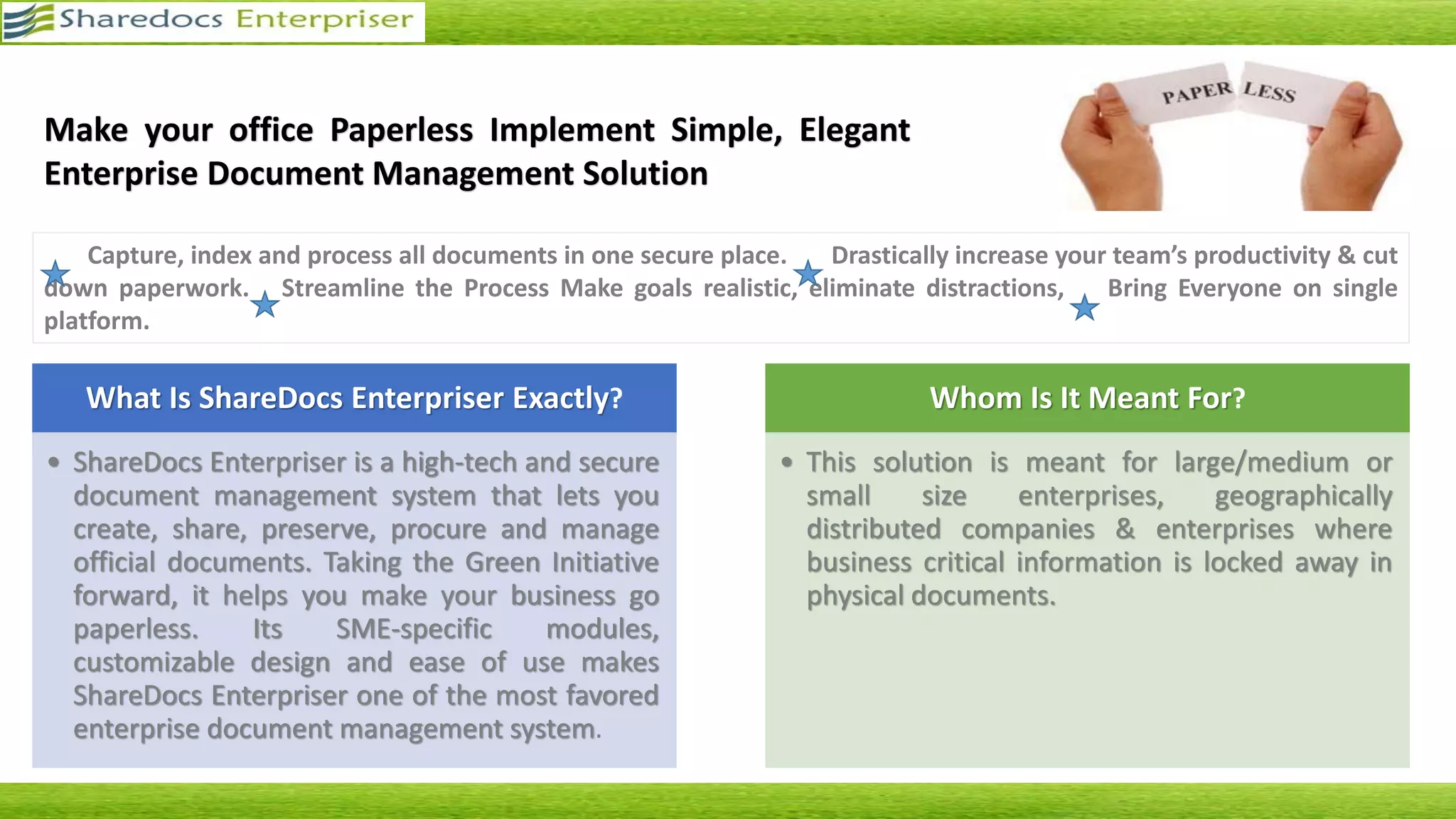
Reliable Document Management System to Make
Your Workplace a Paperless Enterprise
What is ShareDocs Enterpriser?
• High-tech centralized document repository and secure document management system
• Helps to create, share, maintain, procure and manage official documents
Highlights
* Hassle-free implementation
* Ease of Use
* 100% Data Security
* Smooth Workflow
* Customized Solution
* Ideal for companies stationed at multiple locations
* Expert Support for records Management
ShareDocs Enterpriser - A Step Towards Paperless Office
Secure
Documents
Capture, index
and process all
documents in one
secure place
Reduce Paper
Cut down on
paperwork
Reliable online
workflows
Enhance Team
Productivity
Reduce your
team’s time spent
on locating
documents
Increase your team’s
productivity with a
workflow
management system
Streamline
Processes
Organize every
document related
process
Bring everyone on
single platform
Eliminate
deviation
Manage
Disasters
Save documents
from disasters like
fire, water
Salient Features of ShareDocs Enterpriser
ShareDocs Enterpriser - A Step Towards Paperless Office
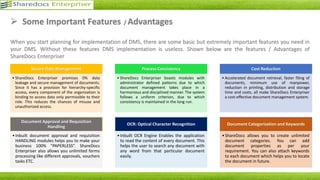
Secure Data Management
• 0% data leakage
• Secure management of documents
• Provision for hierarchy-specific access
• Access to data as per role
• Less chances of misuse and
unauthorized access
OCR: Optical Character Recognition
• Has a built-in OCR Engine
• Enables the application to read the
content of every document
• User can search any document with
any word from that particular
document
Process Consistency
• Modules with administrator defined
patterns
• Smooth, harmonious and disciplined
management of documents
• Uniform criteria
• Consistency guaranteed
Central Repository
• Uniform platform for multiple users
• Enhanced productivity
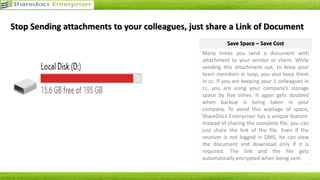
• Helps to save storage space
Document Approval and Requisition
Handling
• Inbuilt document approval and
requisition handling modules
• Helps you to make your business 100%
“PAPERLESS”
• Allows you to process unlimited forms
Advantages of ShareDocs Enterpriser
ShareDocs Enterpriser - A Step Towards Paperless Office
> Folder Hierarchy Creation
> Import Bulk Data Entry
> Unlimited Meta Data Creation
> Page Level Document Tagging
> Document Encryption
> LDAP Integration
> Version Control
> Notes and Keywords
> Audit Trails
> Zip Files Upload
> Search with Multiple Conditions
> OCR
Few More Features
ShareDocs Enterpriser - A Step Towards Paperless Office
Acquire
Documents
Manage /Control
/ Share
Documents
Retrieve Through
Metadata / OCR /
Folders
Download
Documents /
Work on files
Archive
Documents
How it Works ?
ShareDocs Enterpriser - A Step Towards Paperless Office
• Speak to us
• Let our experts
guide you
• Set ShareDocs
server as per
your requirement
• Organize and
categorize all
your physical
documents.
• Make sure to
avoid duplicates
• Scan all your
documents
• Provide logical
names to
documents
• Upload soft
copies to
ShareDocs
Enterpriser with
indexing,
keywords and
remarks
1 2 3 4
Acquire physical Documents in four easy steps..
ShareDocs Enterpriser - A Step Towards Paperless Office
Central
Repository
Central
Repository
Bulk Import
with Data
Entry
Bulk Import
with Data
Entry
Document
Upload by
User
Document
Upload by
User
Template
Based
Document
Generation
Template
Based
Document
Generation
Auto Upload
or Scan to
Folder
Auto Upload
or Scan to
Folder
Four Methods to add Documents to Repository
ShareDocs Enterpriser - A Step Towards Paperless Office
Central
Repository
Central
Repository
Files With
Metadata
Files With
Metadata
Files Without
Metadata
Files Without
Metadata
Requisitions/
Workflow
Requisitions/
Workflow
3 Methods to Store Documents in
ShareDocs Enterpriser
Central
Repository
Central
Repository
Folder
Hierarchy
Folder
Hierarchy
MetaDataMetaData
Document
Sets / Virtual
Folders
Document
Sets / Virtual
Folders
3 Methods to Organize Documents
in ShareDocs Enterpriser
Methods to Store and Organize Documents
ShareDocs Enterpriser - A Step Towards Paperless Office
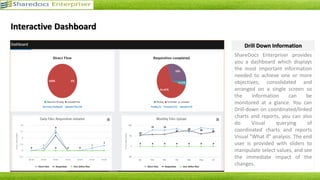
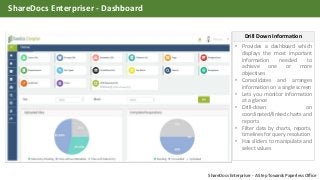
• Provides a dashboard which
displays the most important
information needed to
achieve one or more
objectives
• Consolidates and arranges
information on a single screen
• Lets you monitor information
at a glance
• Drill-down on
coordinated/linked charts and
reports
• Filter data by charts, reports,
timelines for query resolution
• Has sliders to manipulate and
select values
Drill Down Information
ShareDocs Enterpriser - Dashboard
ShareDocs Enterpriser - A Step Towards Paperless Office
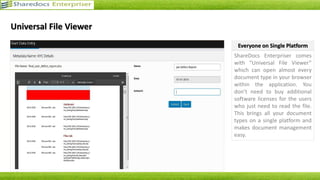
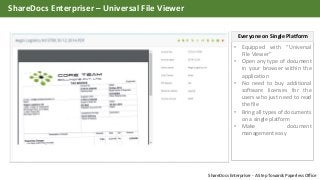
• Equipped with “Universal
File Viewer”
• Open any type of document
in your browser within the
application
• No need to buy additional
software licenses for the
users who just need to read
the file
• Bring all types of documents
on a single platform
• Make document
management easy
Everyone on Single Platform
ShareDocs Enterpriser – Universal File Viewer
ShareDocs Enterpriser - A Step Towards Paperless Office
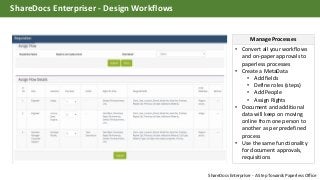
• Convert all your workflows
and on-paper approvals to
paperless processes
• Create a MetaData
• Add fields
• Define roles (steps)
• Add People
• Assign Rights
• Document and additional
data will keep on moving
online from one person to
another as per predefined
process
• Use the same functionality
for document approvals,
requisitions
Manage Processes
ShareDocs Enterpriser - Design Workflows
ShareDocs Enterpriser - A Step Towards Paperless Office
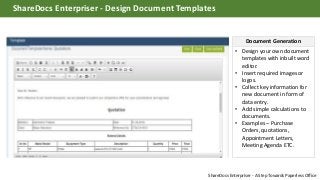
• Design your own document
templates with inbuilt word
editor.
• Insert required images or
logos.
• Collect key information for
new document in form of
data entry.
• Add simple calculations to
documents.
• Examples – Purchase
Orders, quotations,
Appointment Letters,
Meeting Agenda ETC.
Document Generation
ShareDocs Enterpriser - Design Document Templates
ShareDocs Enterpriser - A Step Towards Paperless Office
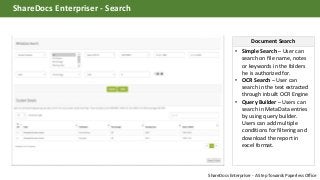
• Simple Search – User can
search on file name, notes
or keywords in the folders
he is authorized for.
• OCR Search – User can
search in the text extracted
through inbuilt OCR Engine
• Query Builder – Users can
search in MetaData entries
by using query builder.
Users can add multiple
conditions for filtering and
download the report in
excel format.
Document Search
ShareDocs Enterpriser - Search
ShareDocs Enterpriser - A Step Towards Paperless Office
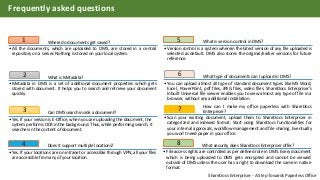
Where do documents get saved?1
•All the documents, which are uploaded to DMS, are stored in a central
repository on a server. Nothing is stored on your local system.
What is Metadata?2
•Metadata in DMS is a set of additional document properties which gets
stored with document. It helps you to search and retrieve your document
quickly.
Can DMS search inside a document?3
•Yes. If your version is E-Office, when you are uploading the document, the
system performs OCR in the background. Thus, while performing search, it
searches in the content of document.
What is version control in DMS?5
•Version control is a system wherein the latest version of any file uploaded is
selected as default. DMS also stores the original/earlier versions for future
reference.
What type of documents can I upload in DMS?6
•You can upload almost all type of standard document types like MS Word,
Excel, PowerPoint, pdf files, JPEG files, video files. ShareDocs Enterpriser’s
Inbuilt Universal file viewer enables you to view almost any type of file in a
browser, without any additional installation.
How can I make my office paperless with ShareDocs
Enterpriser?7
•Scan your existing document, upload them to ShareDocs Enterpriser in
categorized and indexed format. Start using ShareDocs functionalities for
your internal approvals, workflow management and file sharing. Eventually
you won’t need paper in your office.
Does it support multiple locations?4
•Yes. If your locations are on intranet or accessible through VPN, all your files
are accessible from any of your location.
What security does ShareDocs Enterpriser offer?8
•File access rights are controlled as per defined role in DMS. Every document
which is being uploaded to DMS gets encrypted and cannot be viewed
outside of DMS unless the user has a right to download the same in native
format.
Frequently asked questions
ShareDocs Enterpriser - A Step Towards Paperless Office
Hridayam Soft Solutions Pvt. Ltd.
303, Thakkar Heights, Village Road,
Nahur (West), Mumbai 400 078
Maharashtra – India
Landline - +91-22-64567650 ( 16 Lines )
Email – info@hridayamsoft.com
URL – www.sharedocsdms.com / www.hridayamsoft.com
Thank You

ShareDocs Enterpriser - Comprehensive Document Management Solution

  • 1.
    Reliable Document ManagementSystem to Make Your Workplace a Paperless Enterprise
  • 2.
    What is ShareDocsEnterpriser? • High-tech centralized document repository and secure document management system • Helps to create, share, maintain, procure and manage official documents Highlights * Hassle-free implementation * Ease of Use * 100% Data Security * Smooth Workflow * Customized Solution * Ideal for companies stationed at multiple locations * Expert Support for records Management ShareDocs Enterpriser - A Step Towards Paperless Office
  • 3.
    Secure Documents Capture, index and processall documents in one secure place Reduce Paper Cut down on paperwork Reliable online workflows Enhance Team Productivity Reduce your team’s time spent on locating documents Increase your team’s productivity with a workflow management system Streamline Processes Organize every document related process Bring everyone on single platform Eliminate deviation Manage Disasters Save documents from disasters like fire, water Salient Features of ShareDocs Enterpriser ShareDocs Enterpriser - A Step Towards Paperless Office
  • 4.
    Secure Data Management •0% data leakage • Secure management of documents • Provision for hierarchy-specific access • Access to data as per role • Less chances of misuse and unauthorized access OCR: Optical Character Recognition • Has a built-in OCR Engine • Enables the application to read the content of every document • User can search any document with any word from that particular document Process Consistency • Modules with administrator defined patterns • Smooth, harmonious and disciplined management of documents • Uniform criteria • Consistency guaranteed Central Repository • Uniform platform for multiple users • Enhanced productivity • Helps to save storage space Document Approval and Requisition Handling • Inbuilt document approval and requisition handling modules • Helps you to make your business 100% “PAPERLESS” • Allows you to process unlimited forms Advantages of ShareDocs Enterpriser ShareDocs Enterpriser - A Step Towards Paperless Office
  • 5.
    > Folder HierarchyCreation > Import Bulk Data Entry > Unlimited Meta Data Creation > Page Level Document Tagging > Document Encryption > LDAP Integration > Version Control > Notes and Keywords > Audit Trails > Zip Files Upload > Search with Multiple Conditions > OCR Few More Features ShareDocs Enterpriser - A Step Towards Paperless Office
  • 6.
    Acquire Documents Manage /Control / Share Documents RetrieveThrough Metadata / OCR / Folders Download Documents / Work on files Archive Documents How it Works ? ShareDocs Enterpriser - A Step Towards Paperless Office
  • 7.
    • Speak tous • Let our experts guide you • Set ShareDocs server as per your requirement • Organize and categorize all your physical documents. • Make sure to avoid duplicates • Scan all your documents • Provide logical names to documents • Upload soft copies to ShareDocs Enterpriser with indexing, keywords and remarks 1 2 3 4 Acquire physical Documents in four easy steps.. ShareDocs Enterpriser - A Step Towards Paperless Office
  • 8.
    Central Repository Central Repository Bulk Import with Data Entry BulkImport with Data Entry Document Upload by User Document Upload by User Template Based Document Generation Template Based Document Generation Auto Upload or Scan to Folder Auto Upload or Scan to Folder Four Methods to add Documents to Repository ShareDocs Enterpriser - A Step Towards Paperless Office
  • 9.
    Central Repository Central Repository Files With Metadata Files With Metadata FilesWithout Metadata Files Without Metadata Requisitions/ Workflow Requisitions/ Workflow 3 Methods to Store Documents in ShareDocs Enterpriser Central Repository Central Repository Folder Hierarchy Folder Hierarchy MetaDataMetaData Document Sets / Virtual Folders Document Sets / Virtual Folders 3 Methods to Organize Documents in ShareDocs Enterpriser Methods to Store and Organize Documents ShareDocs Enterpriser - A Step Towards Paperless Office
  • 10.
    • Provides adashboard which displays the most important information needed to achieve one or more objectives • Consolidates and arranges information on a single screen • Lets you monitor information at a glance • Drill-down on coordinated/linked charts and reports • Filter data by charts, reports, timelines for query resolution • Has sliders to manipulate and select values Drill Down Information ShareDocs Enterpriser - Dashboard ShareDocs Enterpriser - A Step Towards Paperless Office
  • 11.
    • Equipped with“Universal File Viewer” • Open any type of document in your browser within the application • No need to buy additional software licenses for the users who just need to read the file • Bring all types of documents on a single platform • Make document management easy Everyone on Single Platform ShareDocs Enterpriser – Universal File Viewer ShareDocs Enterpriser - A Step Towards Paperless Office
  • 12.
    • Convert allyour workflows and on-paper approvals to paperless processes • Create a MetaData • Add fields • Define roles (steps) • Add People • Assign Rights • Document and additional data will keep on moving online from one person to another as per predefined process • Use the same functionality for document approvals, requisitions Manage Processes ShareDocs Enterpriser - Design Workflows ShareDocs Enterpriser - A Step Towards Paperless Office
  • 13.
    • Design yourown document templates with inbuilt word editor. • Insert required images or logos. • Collect key information for new document in form of data entry. • Add simple calculations to documents. • Examples – Purchase Orders, quotations, Appointment Letters, Meeting Agenda ETC. Document Generation ShareDocs Enterpriser - Design Document Templates ShareDocs Enterpriser - A Step Towards Paperless Office
  • 14.
    • Simple Search– User can search on file name, notes or keywords in the folders he is authorized for. • OCR Search – User can search in the text extracted through inbuilt OCR Engine • Query Builder – Users can search in MetaData entries by using query builder. Users can add multiple conditions for filtering and download the report in excel format. Document Search ShareDocs Enterpriser - Search ShareDocs Enterpriser - A Step Towards Paperless Office
  • 15.
    Where do documentsget saved?1 •All the documents, which are uploaded to DMS, are stored in a central repository on a server. Nothing is stored on your local system. What is Metadata?2 •Metadata in DMS is a set of additional document properties which gets stored with document. It helps you to search and retrieve your document quickly. Can DMS search inside a document?3 •Yes. If your version is E-Office, when you are uploading the document, the system performs OCR in the background. Thus, while performing search, it searches in the content of document. What is version control in DMS?5 •Version control is a system wherein the latest version of any file uploaded is selected as default. DMS also stores the original/earlier versions for future reference. What type of documents can I upload in DMS?6 •You can upload almost all type of standard document types like MS Word, Excel, PowerPoint, pdf files, JPEG files, video files. ShareDocs Enterpriser’s Inbuilt Universal file viewer enables you to view almost any type of file in a browser, without any additional installation. How can I make my office paperless with ShareDocs Enterpriser?7 •Scan your existing document, upload them to ShareDocs Enterpriser in categorized and indexed format. Start using ShareDocs functionalities for your internal approvals, workflow management and file sharing. Eventually you won’t need paper in your office. Does it support multiple locations?4 •Yes. If your locations are on intranet or accessible through VPN, all your files are accessible from any of your location. What security does ShareDocs Enterpriser offer?8 •File access rights are controlled as per defined role in DMS. Every document which is being uploaded to DMS gets encrypted and cannot be viewed outside of DMS unless the user has a right to download the same in native format. Frequently asked questions ShareDocs Enterpriser - A Step Towards Paperless Office
  • 16.
    Hridayam Soft SolutionsPvt. Ltd. 303, Thakkar Heights, Village Road, Nahur (West), Mumbai 400 078 Maharashtra – India Landline - +91-22-64567650 ( 16 Lines ) Email – info@hridayamsoft.com URL – www.sharedocsdms.com / www.hridayamsoft.com Thank You