
© Black Hills Information Security | @BHInfoSecurity
Mike Felch & Beau Bullock
A few novel techniques for exploiting Microsoft “features”
© Black Hills Information Security | @BHInfoSecurity
Who We Are
• Mike Felch - @ustayready
• Pentest / Red team at BHIS
• Involved w/ OWASP Orlando & BSides Orlando
• Host of Tradecraft Security Weekly
• Host of CoinSec Podcast
• Beau Bullock - @dafthack
•Pentest / Red team at BHIS
• Host of Tradecraft Security Weekly
• Host of CoinSec Podcast
• Avid OWA enthusiast
© Black Hills Information Security | @BHInfoSecurity
What We’re Covering
1. Mystery #1: Attribution
2. Mystery #2: Reconnaissance
3. Mystery #3: Persistence
4. Mystery #4: Weaponization
5. Questions / Comments
© Black Hills Information Security | @BHInfoSecurity
Mystery 1:
The curious case of
event logs with no
attribution
© Black Hills Information Security | @BHInfoSecurity
Failed Login Alerting
• Customers have vastly different alerting setups
• Some log pretty much everything they can…
• … others log nothing
• Password attack detections have been hit or
miss…
• Password spraying
• 1 attempt per user within observation window
• Doesn’t lock out accounts & usually results in a
low number of failed logins per account
Access Denied: You’ve failed to meet the minimum meme threshold
© Black Hills Information Security | @BHInfoSecurity
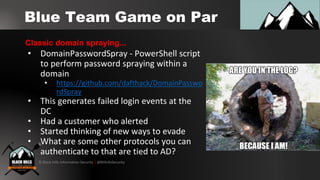
Blue Team Game on Par
• DomainPasswordSpray - PowerShell script
to perform password spraying within a
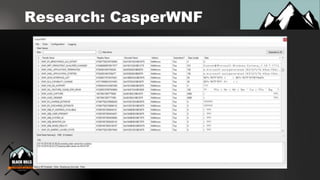
domain
• https://github.com/dafthack/DomainPasswo
rdSpray
• This generates failed login events at the
DC
• Had a customer who alerted
• Started thinking of new ways to evade
• What are some other protocols you can
authenticate to that are tied to AD?
Classic domain spraying...
© Black Hills Information Security | @BHInfoSecurity
Evading Failed Login
Detection
• One possibility is OWA
• Failed logins are in the IIS logs, not in the
Windows Security log
• But… are you watching the IIS logs?
• Many of our customers have seen us use or
talk about MailSniper and have adjusted
their logs accordingly.
• Where else could we try authenticating?
OWA spraying...
© Black Hills Information Security | @BHInfoSecurity
Evading Failed Login
Detection
• What about RDP?
• Tested out xFreeRDP from Linux against a
Windows Server
• To our surprise the failed login event did not
contain the source IP address…
• Hostname was in the log… but xFreeRDP has
an option to set the client hostname (wat?)
• Set out to write a spraying tool for RDP
RDP spraying?
© Black Hills Information Security | @BHInfoSecurity
NLA FTW
• Why was there no IP in the log?
• It turns out RDP w/ NLA (Network Layer Authentication) doesn’t log
source IP in the security log
• NLA pre-authenticates prior to RDP access
• Causes Logon type 3 (Network) instead of 10 (RemoteInteractive)
• Allegedly there is supposed to be a log with the IP located here:
Applications and Services Logs > Microsoft > Windows >
RemoteDesktopServices-RdpCoreTS > Operational (Event ID 140)
© Black Hills Information Security | @BHInfoSecurity
What log?
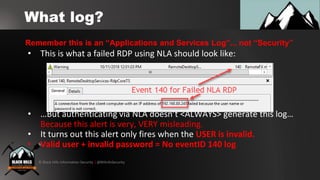
• This is what a failed RDP using NLA should look like:
• …But authenticating via NLA doesn’t <ALWAYS> generate this log…
Because this alert is very, VERY misleading.
• It turns out this alert only fires when the USER is invalid.
• Valid user + invalid password = No eventID 140 log
Remember this is an “Applications and Services Log”... not “Security”
© Black Hills Information Security | @BHInfoSecurity
DEMO:
RDPSpray PoC
© Black Hills Information Security | @BHInfoSecurity
What’s next?
• Here are some items on my “todo” list with
this:
• Build a standalone tool to do this from
Windows
• Add functionality to quickly find servers with
NLA enabled for RDP
© Black Hills Information Security | @BHInfoSecurity
How do I detect/stop this?
• Windows Server 2016 logs the IP
• For other versions:
• Correlate the Applications and Services logs
with the Security logs
• See: http://purerds.org/remote-desktop-
security/auditing-remote-desktop-services-logon-
failures-1/
• It might be worth looking at firewall logs for
alerting on access to port 3389 multiple times
from the same system
© Black Hills Information Security | @BHInfoSecurity
Mystery 2:
The mysterious Azure
Active Directory sync
© Black Hills Information Security | @BHInfoSecurity
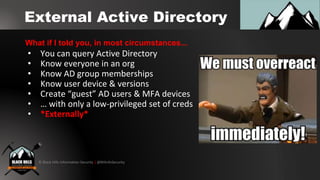
External Active Directory
• You can query Active Directory
• Know everyone in an org
• Know AD group memberships
• Know user device & versions
• Create “guest” AD users & MFA devices
• … with only a low-privileged set of creds
• *Externally*
What if I told you, in most circumstances...
© Black Hills Information Security | @BHInfoSecurity
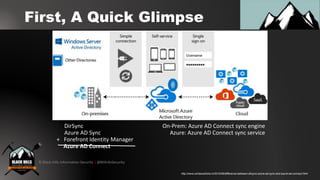
First, A Quick Glimpse
DirSync
Azure AD Sync
+ Forefront Identity Manager
Azure AD Connect
On-Prem: Azure AD Connect sync engine
Azure: Azure AD Connect sync service
http://www.windowstricks.in/2015/06/difference-between-dirsync-azure-ad-sync-and-azure-ad-connect.html
© Black Hills Information Security | @BHInfoSecurity
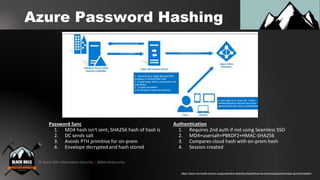
Azure Password Hashing
https://docs.microsoft.com/en-us/azure/active-directory/hybrid/how-to-connect-password-hash-synchronization
Password Sync
1. MD4 hash isn't sent, SHA256 hash of hash is
2. DC sends salt
3. Avoids PTH primitive for on-prem
4. Envelope decrypted and hash stored
Authentication
1. Requires 2nd auth if not using Seamless SSO
2. MD4+usersalt+PBKDF2+HMAC-SHA256
3. Compares cloud hash with on-prem hash
4. Session created
© Black Hills Information Security | @BHInfoSecurity
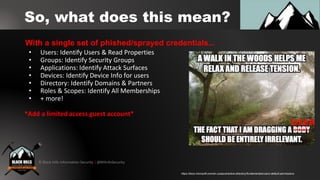
So, what does this mean?
• Users: Identify Users & Read Properties
• Groups: Identify Security Groups
• Applications: Identify Attack Surfaces
• Devices: Identify Device Info for users
• Directory: Identify Domains & Partners
• Roles & Scopes: Identify All Memberships
• + more!
*Add a limited access guest account*
With a single set of phished/sprayed credentials...
https://docs.microsoft.com/en-us/azure/active-directory/fundamentals/users-default-permissions
© Black Hills Information Security | @BHInfoSecurity
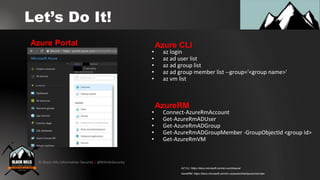
Let’s Do It!
• az login
• az ad user list
• az ad group list
• az ad group member list --group='<group name>'
• az vm list
Azure CLIAzure Portal
• Connect-AzureRmAccount
• Get-AzureRmADUser
• Get-AzureRmADGroup
• Get-AzureRmADGroupMember -GroupObjectId <group id>
• Get-AzureRmVM
AzureRM
AzureRM: https://docs.microsoft.com/en-us/powershell/azure/overview
AZ CLI: https://docs.microsoft.com/en-us/cli/azure/
© Black Hills Information Security | @BHInfoSecurity
DEMO:
Azure CLI PoC
© Black Hills Information Security | @BHInfoSecurity
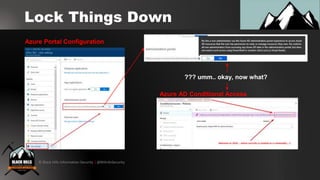
Lock Things Down
Azure Portal Configuration
Azure AD Conditional Access
??? umm.. okay, now what?
© Black Hills Information Security | @BHInfoSecurity
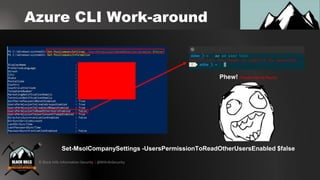
Azure CLI Work-around
Set-MsolCompanySettings -UsersPermissionToReadOtherUsersEnabled $false
Phew! (Thanks Derrick Rauch)
© Black Hills Information Security | @BHInfoSecurity
Mystery 3:
The force-fed Microsoft
Outlook hook
© Black Hills Information Security | @BHInfoSecurity
O365 Creds, so what?
• Maybe you password sprayed
• Perhaps you phished some creds
• But is it useful to pivot internally or persist?
• You can obviously harvest data via
email/SharePoint/Azure
• You may have heard of using Outlook
“rules”
• This has been patched by Microsoft though…
• Let’s talk about some new hotness
Gained access to creds, now what?
© Black Hills Information Security | @BHInfoSecurity
Microsoft Add-Ins
• Microsoft allows for add-ins to various
products
• There are two types of Outlook Add-ins
• Legacy COM or VSTO add-ins
• Code physically installed on desktop client
• Web Add-ins
• No code installed on client
• Manifest file points to JavaScript/HTML that
loads in the browser
Let’s have a chat about Add-ins
© Black Hills Information Security | @BHInfoSecurity
Outlook Web Add-Ins
• WEB ADD-INS SYNC ACROSS WEB CLIENT
BROWSERS & DESKTOP CLIENTS
• I’ll give you a sec to contemplate life…
• … ready?
• So here is the attack path:
• Attacker gets creds
• Adds malicious Add-in to Outlook web client
• Malicious add-in syncs across victims browser
sessions and desktop client
Here’s the kicker…
© Black Hills Information Security | @BHInfoSecurity
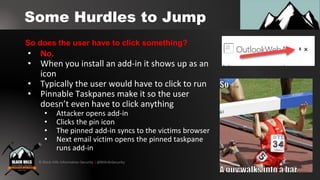
Some Hurdles to Jump
• No.
• When you install an add-in it shows up as an
icon
• Typically the user would have to click to run
• Pinnable Taskpanes make it so the user
doesn’t even have to click anything
• Attacker opens add-in
• Clicks the pin icon
• The pinned add-in syncs to the victims browser
• Next email victim opens the pinned taskpane
runs add-in
So does the user have to click something?
© Black Hills Information Security | @BHInfoSecurity
Outlook Add-in Potential
• Well… you can literally point the browser at
any code you want.
• Every time the add-in launches it uses the
Manifest file provided to point the client at a
web server
• We can host whatever html/js we want
• Note: Outlook desktop client uses Edge
browser
• Let’s walkthrough a few examples
Ok so what can these add-ins do?
© Black Hills Information Security | @BHInfoSecurity
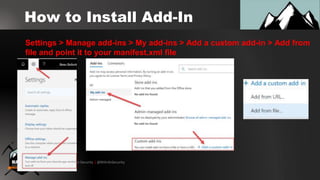
How to Install Add-In
Settings > Manage add-ins > My add-ins > Add a custom add-in > Add from
file and point it to your manifest.xml file
© Black Hills Information Security | @BHInfoSecurity
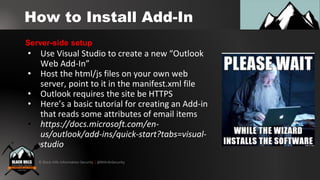
How to Install Add-In
• Use Visual Studio to create a new “Outlook
Web Add-In”
• Host the html/js files on your own web
server, point to it in the manifest.xml file
• Outlook requires the site be HTTPS
• Here’s a basic tutorial for creating an Add-in
that reads some attributes of email items
• https://docs.microsoft.com/en-
us/outlook/add-ins/quick-start?tabs=visual-
studio
Server-side setup
© Black Hills Information Security | @BHInfoSecurity
Outlook Add-in Backdoor
• Create an add-in that reads the content of
email
• Forward content of email to attacker
• Delete sent email so no trace of being sent
• Allows for having access to 2fa codes,
password resets etc…
• We have PoC code for doing this on desktop
client and will share web client code soon
Steal emails and other stuff...
© Black Hills Information Security | @BHInfoSecurity
Outlook Add-In Browser
Hook
• Browser Exploitation Framework (BeEF)
• Inject hook.js into add-in
• Can now utilize BeEF plugins
• Enumerate system/browser/LAN
• Makes it easy to inject additional iframes
• Can pop credential box, deploy hta, etc...
• More research is needed on the potential for
internal pivoting via browser hook
We can hook the users browser with BeEF!
© Black Hills Information Security | @BHInfoSecurity
Outlook Add-In Crypto-
Miner
• Can totally inject the Coinhive miner
• JavaScript based cryptocurrency miner
• Uses CPU to mine Monero (and others)
• Listed as #1 malware throughout this year
• This works and will demo shortly
XMR when moon sir?
© Black Hills Information Security | @BHInfoSecurity
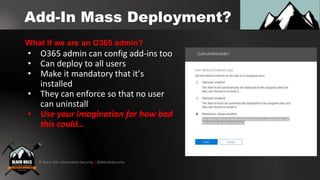
Add-In Mass Deployment?
• O365 admin can config add-ins too
• Can deploy to all users
• Make it mandatory that it’s
installed
• They can enforce so that no user
can uninstall
• Use your imagination for how bad
this could…
What if we are an O365 admin?
© Black Hills Information Security | @BHInfoSecurity
DEMO:
Outlook Add-In PoC
© Black Hills Information Security | @BHInfoSecurity
Outlook Add-In Defense
• Ok let’s go blue team:
• All of this requires an attacker has a cred
• 2FA and strong password policy are your friends
but not perfect (See Credsniper)
• …?
• Any ideas?
Thx for the nightmares… what now?
© Black Hills Information Security | @BHInfoSecurity
Mystery 4:
The silently weaponized
Windows Kernel
© Black Hills Information Security | @BHInfoSecurity
Windows Kernel: WNF
• Publish/Subscribe Windows Subsystem
• Uses State names to track
• User-mode/Kernel Notifications
• Persistent/Volatile Data Storage
• Cross-platform Mobile/App/Xbox
• Undocumented/Potentially Undetectable
• Sub before pub!
Windows Notification Facility
*Major props to Alex Ionescu & Gabrielle Viala*
© Black Hills Information Security | @BHInfoSecurity
WNF State Details
• State names: 64-bit GUID structure
• Lifetime
• Well-known: Reserved by Windows
• Permanent: Bound beyond reboot
• Volatile: Bound until reboot
• Temporary: Bound until process exit
• Scope
• User/Process/Session/Global
• Security Descriptors / DACL
WNF State Names/Lifetime/Scope
© Black Hills Information Security | @BHInfoSecurity
WNF Kernel Fun
• Lot’s of low-level/high-level calls
• Ntdll subscribes to low-level on process behalf
• Zw* vs Rtl* / Ex* / Nt*
• Code-execution in subscriber on event
• Rtl* in host event logs :(
• Create a secret IPC layer between processes
• Across process/user/kernel boundaries
• Hide data/binary in state names
• Inject data/code into processes
© Black Hills Information Security | @BHInfoSecurity
WNF Kernel API Calls
Low-level API
Consume:
ZwQueryWnfStateData
Publish:
ZwUpdateWnfStateData
Create:
ZwCreateWnfStateName
Delete:
ZwDeleteWnfStateName
High-level API
Subscribe:
RtlSubscribeWnfStateChangeNotificatio
n
© Black Hills Information Security | @BHInfoSecurity
Research: Guidance
• State Names are found in registry
• HKEY_LOCAL_MACHINESYSTEMCurrentControlSetControlNotifications
• HKEY_LOCAL_MACHINESOFTWAREMicrosoftWindows NTCurrentVersionNotifications
• HKEY_LOCAL_MACHINESOFTWAREMicrosoftWindows NTCurrentVersionVolatileNotifications
• Windows Internal Names & Descriptions
• Symbols in perf_nt_c.dll via Microsoft ADK
• NT Kernel Hooks: https://www.geoffchappell.com/studies/windows/km/ntoskrnl/api/etw/callouts/hookid.htm
• NativeAPI Signatures
• *WNF*
• https://processhacker.sourceforge.io/doc/ntzwapi_8h_source.html
Get Started Researching
© Black Hills Information Security | @BHInfoSecurity
Research: CasperWNF
© Black Hills Information Security | @BHInfoSecurity
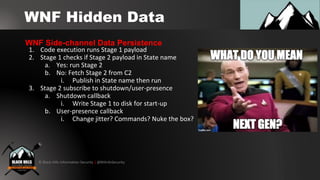
WNF Hidden Data
1. Code execution runs Stage 1 payload
2. Stage 1 checks if Stage 2 payload in State name
a. Yes: run Stage 2
b. No: Fetch Stage 2 from C2
i. Publish in State name then run
3. Stage 2 subscribe to shutdown/user-presence
a. Shutdown callback
i. Write Stage 1 to disk for start-up
b. User-presence callback
i. Change jitter? Commands? Nuke the box?
WNF Side-channel Data Persistence
© Black Hills Information Security | @BHInfoSecurity
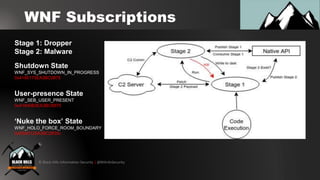
WNF Subscriptions
Stage 1: Dropper
Stage 2: Malware
Shutdown State
WNF_SYS_SHUTDOWN_IN_PROGRESS
0x4195173EA3BC0875
User-presence State
WNF_SEB_USER_PRESENT
0x41840B3EA3BC6875
‘Nuke the box’ State
WNF_HOLO_FORCE_ROOM_BOUNDARY
0xE8A0125A3BC2835c
© Black Hills Information Security | @BHInfoSecurity
DEMO:
Weaponized WNF PoC
© Black Hills Information Security | @BHInfoSecurity
WNF Attack Mitigations
• Event Tracing for Windows
• Only works for Rtl* function calls not Zw*
• Hooks NT Kernel Logger Events
• Hooking Ntdll system calls
• Great idea if you're crazy or writing malware
• Monitor read/writes to registry keys
• System service which is loud
• Filter on specific entries? *shrug*
TLDR; we’re screwed...
© Black Hills Information Security | @BHInfoSecurity
Finishing Up:
Dear Microsoft...
© Black Hills Information Security | @BHInfoSecurity
Dear Microsoft...
A few requests...
• WNF Documentation & Native API logging
• Azure Portal locked-down by default
• Azure AD Conditional access w/o upgrade costs
• Fix the phantom host info w/ RDP NLA
• Make it easy for O365 admins to find rogue add-ins
© Black Hills Information Security | @BHInfoSecurity
Questions?
• Twitter
• Mike - @ustayready
• Beau - @dafthack
• Black Hills Information Security
• http://www.blackhillsinfosec.com/
• Code from demos
• https://github.com/ustayready/CasperStager
• https://github.com/ustayready/CasperWNF
• https://github.com/dafthack/RDPSpray

Covert Attack Mystery Box: A few novel techniques for exploiting Microsoft “features”

  • 1.
    © Black HillsInformation Security | @BHInfoSecurity Mike Felch & Beau Bullock A few novel techniques for exploiting Microsoft “features”
  • 2.
    © Black HillsInformation Security | @BHInfoSecurity Who We Are • Mike Felch - @ustayready • Pentest / Red team at BHIS • Involved w/ OWASP Orlando & BSides Orlando • Host of Tradecraft Security Weekly • Host of CoinSec Podcast • Beau Bullock - @dafthack •Pentest / Red team at BHIS • Host of Tradecraft Security Weekly • Host of CoinSec Podcast • Avid OWA enthusiast
  • 3.
    © Black HillsInformation Security | @BHInfoSecurity What We’re Covering 1. Mystery #1: Attribution 2. Mystery #2: Reconnaissance 3. Mystery #3: Persistence 4. Mystery #4: Weaponization 5. Questions / Comments
  • 4.
    © Black HillsInformation Security | @BHInfoSecurity Mystery 1: The curious case of event logs with no attribution
  • 5.
    © Black HillsInformation Security | @BHInfoSecurity Failed Login Alerting • Customers have vastly different alerting setups • Some log pretty much everything they can… • … others log nothing • Password attack detections have been hit or miss… • Password spraying • 1 attempt per user within observation window • Doesn’t lock out accounts & usually results in a low number of failed logins per account Access Denied: You’ve failed to meet the minimum meme threshold
  • 6.
    © Black HillsInformation Security | @BHInfoSecurity Blue Team Game on Par • DomainPasswordSpray - PowerShell script to perform password spraying within a domain • https://github.com/dafthack/DomainPasswo rdSpray • This generates failed login events at the DC • Had a customer who alerted • Started thinking of new ways to evade • What are some other protocols you can authenticate to that are tied to AD? Classic domain spraying...
  • 7.
    © Black HillsInformation Security | @BHInfoSecurity Evading Failed Login Detection • One possibility is OWA • Failed logins are in the IIS logs, not in the Windows Security log • But… are you watching the IIS logs? • Many of our customers have seen us use or talk about MailSniper and have adjusted their logs accordingly. • Where else could we try authenticating? OWA spraying...
  • 8.
    © Black HillsInformation Security | @BHInfoSecurity Evading Failed Login Detection • What about RDP? • Tested out xFreeRDP from Linux against a Windows Server • To our surprise the failed login event did not contain the source IP address… • Hostname was in the log… but xFreeRDP has an option to set the client hostname (wat?) • Set out to write a spraying tool for RDP RDP spraying?
  • 9.
    © Black HillsInformation Security | @BHInfoSecurity NLA FTW • Why was there no IP in the log? • It turns out RDP w/ NLA (Network Layer Authentication) doesn’t log source IP in the security log • NLA pre-authenticates prior to RDP access • Causes Logon type 3 (Network) instead of 10 (RemoteInteractive) • Allegedly there is supposed to be a log with the IP located here: Applications and Services Logs > Microsoft > Windows > RemoteDesktopServices-RdpCoreTS > Operational (Event ID 140)
  • 10.
    © Black HillsInformation Security | @BHInfoSecurity What log? • This is what a failed RDP using NLA should look like: • …But authenticating via NLA doesn’t <ALWAYS> generate this log… Because this alert is very, VERY misleading. • It turns out this alert only fires when the USER is invalid. • Valid user + invalid password = No eventID 140 log Remember this is an “Applications and Services Log”... not “Security”
  • 11.
    © Black HillsInformation Security | @BHInfoSecurity DEMO: RDPSpray PoC
  • 12.
    © Black HillsInformation Security | @BHInfoSecurity What’s next? • Here are some items on my “todo” list with this: • Build a standalone tool to do this from Windows • Add functionality to quickly find servers with NLA enabled for RDP
  • 13.
    © Black HillsInformation Security | @BHInfoSecurity How do I detect/stop this? • Windows Server 2016 logs the IP • For other versions: • Correlate the Applications and Services logs with the Security logs • See: http://purerds.org/remote-desktop- security/auditing-remote-desktop-services-logon- failures-1/ • It might be worth looking at firewall logs for alerting on access to port 3389 multiple times from the same system
  • 14.
    © Black HillsInformation Security | @BHInfoSecurity Mystery 2: The mysterious Azure Active Directory sync
  • 15.
    © Black HillsInformation Security | @BHInfoSecurity External Active Directory • You can query Active Directory • Know everyone in an org • Know AD group memberships • Know user device & versions • Create “guest” AD users & MFA devices • … with only a low-privileged set of creds • *Externally* What if I told you, in most circumstances...
  • 16.
    © Black HillsInformation Security | @BHInfoSecurity First, A Quick Glimpse DirSync Azure AD Sync + Forefront Identity Manager Azure AD Connect On-Prem: Azure AD Connect sync engine Azure: Azure AD Connect sync service http://www.windowstricks.in/2015/06/difference-between-dirsync-azure-ad-sync-and-azure-ad-connect.html
  • 17.
    © Black HillsInformation Security | @BHInfoSecurity Azure Password Hashing https://docs.microsoft.com/en-us/azure/active-directory/hybrid/how-to-connect-password-hash-synchronization Password Sync 1. MD4 hash isn't sent, SHA256 hash of hash is 2. DC sends salt 3. Avoids PTH primitive for on-prem 4. Envelope decrypted and hash stored Authentication 1. Requires 2nd auth if not using Seamless SSO 2. MD4+usersalt+PBKDF2+HMAC-SHA256 3. Compares cloud hash with on-prem hash 4. Session created
  • 18.
    © Black HillsInformation Security | @BHInfoSecurity So, what does this mean? • Users: Identify Users & Read Properties • Groups: Identify Security Groups • Applications: Identify Attack Surfaces • Devices: Identify Device Info for users • Directory: Identify Domains & Partners • Roles & Scopes: Identify All Memberships • + more! *Add a limited access guest account* With a single set of phished/sprayed credentials... https://docs.microsoft.com/en-us/azure/active-directory/fundamentals/users-default-permissions
  • 19.
    © Black HillsInformation Security | @BHInfoSecurity Let’s Do It! • az login • az ad user list • az ad group list • az ad group member list --group='<group name>' • az vm list Azure CLIAzure Portal • Connect-AzureRmAccount • Get-AzureRmADUser • Get-AzureRmADGroup • Get-AzureRmADGroupMember -GroupObjectId <group id> • Get-AzureRmVM AzureRM AzureRM: https://docs.microsoft.com/en-us/powershell/azure/overview AZ CLI: https://docs.microsoft.com/en-us/cli/azure/
  • 20.
    © Black HillsInformation Security | @BHInfoSecurity DEMO: Azure CLI PoC
  • 21.
    © Black HillsInformation Security | @BHInfoSecurity Lock Things Down Azure Portal Configuration Azure AD Conditional Access ??? umm.. okay, now what?
  • 22.
    © Black HillsInformation Security | @BHInfoSecurity Azure CLI Work-around Set-MsolCompanySettings -UsersPermissionToReadOtherUsersEnabled $false Phew! (Thanks Derrick Rauch)
  • 23.
    © Black HillsInformation Security | @BHInfoSecurity Mystery 3: The force-fed Microsoft Outlook hook
  • 24.
    © Black HillsInformation Security | @BHInfoSecurity O365 Creds, so what? • Maybe you password sprayed • Perhaps you phished some creds • But is it useful to pivot internally or persist? • You can obviously harvest data via email/SharePoint/Azure • You may have heard of using Outlook “rules” • This has been patched by Microsoft though… • Let’s talk about some new hotness Gained access to creds, now what?
  • 25.
    © Black HillsInformation Security | @BHInfoSecurity Microsoft Add-Ins • Microsoft allows for add-ins to various products • There are two types of Outlook Add-ins • Legacy COM or VSTO add-ins • Code physically installed on desktop client • Web Add-ins • No code installed on client • Manifest file points to JavaScript/HTML that loads in the browser Let’s have a chat about Add-ins
  • 26.
    © Black HillsInformation Security | @BHInfoSecurity Outlook Web Add-Ins • WEB ADD-INS SYNC ACROSS WEB CLIENT BROWSERS & DESKTOP CLIENTS • I’ll give you a sec to contemplate life… • … ready? • So here is the attack path: • Attacker gets creds • Adds malicious Add-in to Outlook web client • Malicious add-in syncs across victims browser sessions and desktop client Here’s the kicker…
  • 27.
    © Black HillsInformation Security | @BHInfoSecurity Some Hurdles to Jump • No. • When you install an add-in it shows up as an icon • Typically the user would have to click to run • Pinnable Taskpanes make it so the user doesn’t even have to click anything • Attacker opens add-in • Clicks the pin icon • The pinned add-in syncs to the victims browser • Next email victim opens the pinned taskpane runs add-in So does the user have to click something?
  • 28.
    © Black HillsInformation Security | @BHInfoSecurity Outlook Add-in Potential • Well… you can literally point the browser at any code you want. • Every time the add-in launches it uses the Manifest file provided to point the client at a web server • We can host whatever html/js we want • Note: Outlook desktop client uses Edge browser • Let’s walkthrough a few examples Ok so what can these add-ins do?
  • 29.
    © Black HillsInformation Security | @BHInfoSecurity How to Install Add-In Settings > Manage add-ins > My add-ins > Add a custom add-in > Add from file and point it to your manifest.xml file
  • 30.
    © Black HillsInformation Security | @BHInfoSecurity How to Install Add-In • Use Visual Studio to create a new “Outlook Web Add-In” • Host the html/js files on your own web server, point to it in the manifest.xml file • Outlook requires the site be HTTPS • Here’s a basic tutorial for creating an Add-in that reads some attributes of email items • https://docs.microsoft.com/en- us/outlook/add-ins/quick-start?tabs=visual- studio Server-side setup
  • 31.
    © Black HillsInformation Security | @BHInfoSecurity Outlook Add-in Backdoor • Create an add-in that reads the content of email • Forward content of email to attacker • Delete sent email so no trace of being sent • Allows for having access to 2fa codes, password resets etc… • We have PoC code for doing this on desktop client and will share web client code soon Steal emails and other stuff...
  • 32.
    © Black HillsInformation Security | @BHInfoSecurity Outlook Add-In Browser Hook • Browser Exploitation Framework (BeEF) • Inject hook.js into add-in • Can now utilize BeEF plugins • Enumerate system/browser/LAN • Makes it easy to inject additional iframes • Can pop credential box, deploy hta, etc... • More research is needed on the potential for internal pivoting via browser hook We can hook the users browser with BeEF!
  • 33.
    © Black HillsInformation Security | @BHInfoSecurity Outlook Add-In Crypto- Miner • Can totally inject the Coinhive miner • JavaScript based cryptocurrency miner • Uses CPU to mine Monero (and others) • Listed as #1 malware throughout this year • This works and will demo shortly XMR when moon sir?
  • 34.
    © Black HillsInformation Security | @BHInfoSecurity Add-In Mass Deployment? • O365 admin can config add-ins too • Can deploy to all users • Make it mandatory that it’s installed • They can enforce so that no user can uninstall • Use your imagination for how bad this could… What if we are an O365 admin?
  • 35.
    © Black HillsInformation Security | @BHInfoSecurity DEMO: Outlook Add-In PoC
  • 36.
    © Black HillsInformation Security | @BHInfoSecurity Outlook Add-In Defense • Ok let’s go blue team: • All of this requires an attacker has a cred • 2FA and strong password policy are your friends but not perfect (See Credsniper) • …? • Any ideas? Thx for the nightmares… what now?
  • 37.
    © Black HillsInformation Security | @BHInfoSecurity Mystery 4: The silently weaponized Windows Kernel
  • 38.
    © Black HillsInformation Security | @BHInfoSecurity Windows Kernel: WNF • Publish/Subscribe Windows Subsystem • Uses State names to track • User-mode/Kernel Notifications • Persistent/Volatile Data Storage • Cross-platform Mobile/App/Xbox • Undocumented/Potentially Undetectable • Sub before pub! Windows Notification Facility *Major props to Alex Ionescu & Gabrielle Viala*
  • 39.
    © Black HillsInformation Security | @BHInfoSecurity WNF State Details • State names: 64-bit GUID structure • Lifetime • Well-known: Reserved by Windows • Permanent: Bound beyond reboot • Volatile: Bound until reboot • Temporary: Bound until process exit • Scope • User/Process/Session/Global • Security Descriptors / DACL WNF State Names/Lifetime/Scope
  • 40.
    © Black HillsInformation Security | @BHInfoSecurity WNF Kernel Fun • Lot’s of low-level/high-level calls • Ntdll subscribes to low-level on process behalf • Zw* vs Rtl* / Ex* / Nt* • Code-execution in subscriber on event • Rtl* in host event logs :( • Create a secret IPC layer between processes • Across process/user/kernel boundaries • Hide data/binary in state names • Inject data/code into processes
  • 41.
    © Black HillsInformation Security | @BHInfoSecurity WNF Kernel API Calls Low-level API Consume: ZwQueryWnfStateData Publish: ZwUpdateWnfStateData Create: ZwCreateWnfStateName Delete: ZwDeleteWnfStateName High-level API Subscribe: RtlSubscribeWnfStateChangeNotificatio n
  • 42.
    © Black HillsInformation Security | @BHInfoSecurity Research: Guidance • State Names are found in registry • HKEY_LOCAL_MACHINESYSTEMCurrentControlSetControlNotifications • HKEY_LOCAL_MACHINESOFTWAREMicrosoftWindows NTCurrentVersionNotifications • HKEY_LOCAL_MACHINESOFTWAREMicrosoftWindows NTCurrentVersionVolatileNotifications • Windows Internal Names & Descriptions • Symbols in perf_nt_c.dll via Microsoft ADK • NT Kernel Hooks: https://www.geoffchappell.com/studies/windows/km/ntoskrnl/api/etw/callouts/hookid.htm • NativeAPI Signatures • *WNF* • https://processhacker.sourceforge.io/doc/ntzwapi_8h_source.html Get Started Researching
  • 43.
    © Black HillsInformation Security | @BHInfoSecurity Research: CasperWNF
  • 44.
    © Black HillsInformation Security | @BHInfoSecurity WNF Hidden Data 1. Code execution runs Stage 1 payload 2. Stage 1 checks if Stage 2 payload in State name a. Yes: run Stage 2 b. No: Fetch Stage 2 from C2 i. Publish in State name then run 3. Stage 2 subscribe to shutdown/user-presence a. Shutdown callback i. Write Stage 1 to disk for start-up b. User-presence callback i. Change jitter? Commands? Nuke the box? WNF Side-channel Data Persistence
  • 45.
    © Black HillsInformation Security | @BHInfoSecurity WNF Subscriptions Stage 1: Dropper Stage 2: Malware Shutdown State WNF_SYS_SHUTDOWN_IN_PROGRESS 0x4195173EA3BC0875 User-presence State WNF_SEB_USER_PRESENT 0x41840B3EA3BC6875 ‘Nuke the box’ State WNF_HOLO_FORCE_ROOM_BOUNDARY 0xE8A0125A3BC2835c
  • 46.
    © Black HillsInformation Security | @BHInfoSecurity DEMO: Weaponized WNF PoC
  • 47.
    © Black HillsInformation Security | @BHInfoSecurity WNF Attack Mitigations • Event Tracing for Windows • Only works for Rtl* function calls not Zw* • Hooks NT Kernel Logger Events • Hooking Ntdll system calls • Great idea if you're crazy or writing malware • Monitor read/writes to registry keys • System service which is loud • Filter on specific entries? *shrug* TLDR; we’re screwed...
  • 48.
    © Black HillsInformation Security | @BHInfoSecurity Finishing Up: Dear Microsoft...
  • 49.
    © Black HillsInformation Security | @BHInfoSecurity Dear Microsoft... A few requests... • WNF Documentation & Native API logging • Azure Portal locked-down by default • Azure AD Conditional access w/o upgrade costs • Fix the phantom host info w/ RDP NLA • Make it easy for O365 admins to find rogue add-ins
  • 50.
    © Black HillsInformation Security | @BHInfoSecurity Questions? • Twitter • Mike - @ustayready • Beau - @dafthack • Black Hills Information Security • http://www.blackhillsinfosec.com/ • Code from demos • https://github.com/ustayready/CasperStager • https://github.com/ustayready/CasperWNF • https://github.com/dafthack/RDPSpray