The loop is used to iterate a part of the program several times.
St1
St2
St3
St4
St5
for( initialization; condition; increment/decrement )
{
//statement or code to be executed
}
A simple for loop is the same as C
/C++
. We can initialize the variable
, check condition and increment/decrement value. It consists of four parts:
Initialization: It is the initial condition which is executed once when the loop
starts. Here, we can initialize the variable, or we can use an already initialized
variable. It is an optional condition.
Condition: It is the second condition which is executed each time to test the
condition of the loop. It continues execution until the condition is false. It must
return Boolean value either true or false. It is an optional condition.
Increment/Decrement: It increments or decrements the variable value. It is
an optional condition.
Statement: The statement of the loop is executed each time until the second
condition is false.
// Program to print numbers from 1 to 5
class Main {
public static void main(String[ ] args) {
int n = 5;
// for loop
for (int i = 1; i <= n; ++i) {
System.out.println(i);
}
}
}
Java while loop is used to run a specific code until a certain condition is met
syntax of the while loop is:
while (testExpression)
{
// body of loop
}
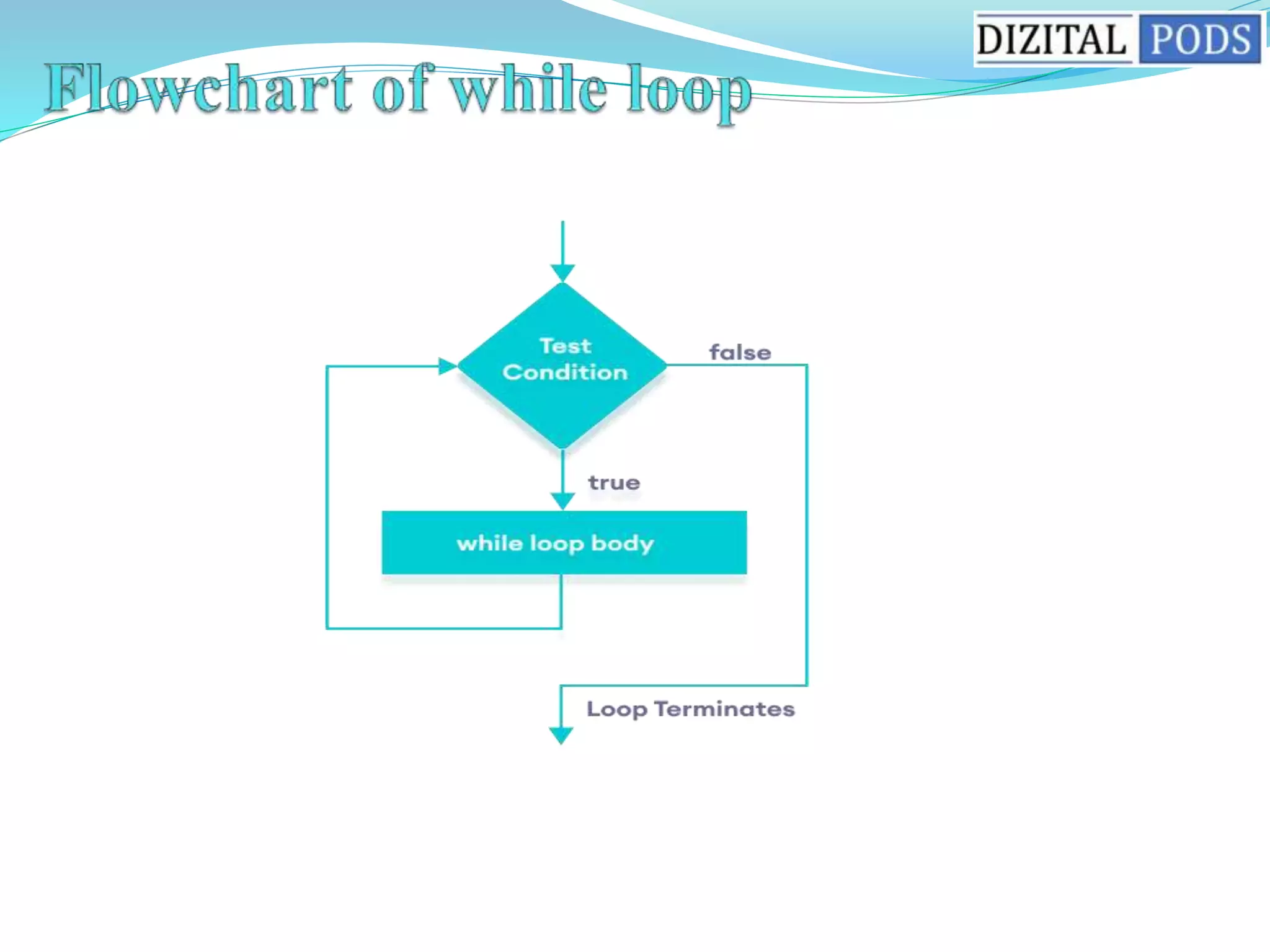
A while loop evaluates the textExpression inside the parenthesis ().
If the textExpression evaluates to true, the code inside the while loop is executed
The textExpression is evaluated again.
This process continues until the textExpression is false.
When the textExpression evaluates to false, the loop stops.
// Program to display numbers from 1 to 5
class Main
{ public static void main(String[ ] args) {
// declare variables
int i = 1, n = 5;
// while loop from 1 to 5
while(i <= n) {
System.out.println(i);
i++;
}
}
}
The do...while loop is similar to while loop. However, the body of do...
while loop is executed once before the test expression is checked
Syntax of the do while loop
do
{
// body of loop
} while(textExpression);
The body of the loop is executed at first. Then the textExpression is evaluated.
If the textExpression evaluates to true,
the body of the loop inside the do statement is executed again.
The textExpression is evaluated once again.
If the textExpression evaluates to true,
the body of the loop inside the do statement is executed again.
This process continues until the textExpression evaluates to false.
Then the loop stops.
import java.util.Scanner;
// Program to find the sum of natural numbers from 1 to 100.
class Main{
public static void main(String[ ] args) {
int i = 1, n = 5;
// do...while loop from 1 to 5
do {
System.out.println(i);
i++;
} while(i <= n);
}
}
The Java break statement is used to break loop or switch statement.
It breaks the current flow of the program at specified condition.
In case of inner loop, it breaks only inner loop.
We can use Java break statement in all types of loops such as
for loop, while loop and do-while loop
Syntax:
jump-statement;
break;
.
public class BreakExample {
public static void main(String[ ] args) {
//using for loop
for(int i=1;i<=10;i++){
if(i==5){
//breaking the loop
break;
}
System.out.println(i);
}
}
}
public class BreakExample2 {
public static void main(String[] args) {
//outer loop
for(int i=1;i<=3;i++){
//inner loop
for(int j=1;j<=3;j++){
if(i==2&&j==2){
//using break statement inside the inner loop
break;
}
System.out.println(i+" "+j);
}
}
}
}
The continue statement is used in loop control structure when you need to jump to
the next iteration of the loop immediately. It can be used with for loop or while loop.
The Java continue statement is used to continue the loop. It continues the current
flow of the program and skips the remaining code at the specified condition. In case
of an inner loop, it continues the inner loop only.
We can use Java continue statement in all types of loops such as for loop, while loop
and do-while loop.
The continue statement is used in loop control structure when you need to jump to
the next iteration of the loop immediately. It can be used with for loop or while loop.
The Java continue statement is used to continue the loop. It continues the current
flow of the program and skips the remaining code at the specified condition. In case
of an inner loop, it continues the inner loop only.
We can use Java continue statement in all types of loops such as for loop, while loop
and do-while loop.
Syntax:
jump-statement;
continue;
//inside the for loop.
public class ContinueExample {
public static void main(String[] args) {
//for loop
for(int i=1;i<=10;i++){
if(i==5){
//using continue statement
continue;//it will skip the rest statement
}
System.out.println(i);
}
}
}
//Java Program to demonstrate the use of continue statement
//inside the while loop.
public class ContinueWhileExample {
public static void main(String[] args) {
//while loop
int i=1;
while(i<=10){
if(i==5){
//using continue statement
i++;
continue;//it will skip the rest statement
}
System.out.println(i);
i++;
}
}
}
//Java Program to demonstrate the use of continue statement
//inside the Java do-while loop.
public class ContinueDoWhileExample {
public static void main(String[] args) {
//declaring variable
int i=1;
//do-while loop
do{
if(i==5){
//using continue statement
i++;
continue;//it will skip the rest statement
}
System.out.println(i);
i++;
}while(i<=10);
}
}
//Java Program to demonstrate the use of continue statement
//inside the Java do-while loop.
public class ContinueDoWhileExample {
public static void main(String[] args) {
//declaring variable
int i=1;
//do-while loop
do{
if(i==5){
//using continue statement
i++;
continue;//it will skip the rest statement
}
System.out.println(i);
i++;
}while(i<=10);
}
}

dizital pods session 5-loops.pptx

  • 1.
    The loop isused to iterate a part of the program several times. St1 St2 St3 St4 St5
  • 3.
    for( initialization; condition;increment/decrement ) { //statement or code to be executed //statement or code to be executed //statement or code to be executed }
  • 4.
    A simple forloop is the same as C /C++ . We can initialize the variable , check condition and increment/decrement value. It consists of four parts: Initialization: It is the initial condition which is executed once when the loop starts. Here, we can initialize the variable, or we can use an already initialized variable. It is an optional condition. Condition: It is the second condition which is executed each time to test the condition of the loop. It continues execution until the condition is false. It must return Boolean value either true or false. It is an optional condition. Increment/Decrement: It increments or decrements the variable value. It is an optional condition. Statement: The statement of the loop is executed each time until the second condition is false.
  • 5.
    // Program toprint numbers from 1 to 5 class Main { public static void main(String[ ] args) { int n = 5; // for loop for (int i = 1; i <= n; ++i) { System.out.println(i); } } }
  • 7.
    Java while loopis used to run a specific code until a certain condition is met syntax of the while loop is: while (testExpression) { // body of loop }
  • 9.
    A while loopevaluates the textExpression inside the parenthesis (). If the textExpression evaluates to true, the code inside the while loop is executed The textExpression is evaluated again. This process continues until the textExpression is false. When the textExpression evaluates to false, the loop stops.
  • 10.
    // Program todisplay numbers from 1 to 5 class Main { public static void main(String[ ] args) { // declare variables int i = 1, n = 5; // while loop from 1 to 5 while(i <= n) { System.out.println(i); i++; } } }
  • 12.
    The do...while loopis similar to while loop. However, the body of do... while loop is executed once before the test expression is checked Syntax of the do while loop do { // body of loop } while(textExpression);
  • 13.
    The body ofthe loop is executed at first. Then the textExpression is evaluated. If the textExpression evaluates to true, the body of the loop inside the do statement is executed again. The textExpression is evaluated once again. If the textExpression evaluates to true, the body of the loop inside the do statement is executed again. This process continues until the textExpression evaluates to false. Then the loop stops.
  • 15.
    import java.util.Scanner; // Programto find the sum of natural numbers from 1 to 100. class Main{ public static void main(String[ ] args) { int i = 1, n = 5; // do...while loop from 1 to 5 do { System.out.println(i); i++; } while(i <= n); } }
  • 17.
    The Java breakstatement is used to break loop or switch statement. It breaks the current flow of the program at specified condition. In case of inner loop, it breaks only inner loop. We can use Java break statement in all types of loops such as for loop, while loop and do-while loop Syntax: jump-statement; break; .
  • 19.
    public class BreakExample{ public static void main(String[ ] args) { //using for loop for(int i=1;i<=10;i++){ if(i==5){ //breaking the loop break; } System.out.println(i); } } }
  • 20.
    public class BreakExample2{ public static void main(String[] args) { //outer loop for(int i=1;i<=3;i++){ //inner loop for(int j=1;j<=3;j++){ if(i==2&&j==2){ //using break statement inside the inner loop break; } System.out.println(i+" "+j); } } } }
  • 21.
    The continue statementis used in loop control structure when you need to jump to the next iteration of the loop immediately. It can be used with for loop or while loop. The Java continue statement is used to continue the loop. It continues the current flow of the program and skips the remaining code at the specified condition. In case of an inner loop, it continues the inner loop only. We can use Java continue statement in all types of loops such as for loop, while loop and do-while loop.
  • 22.
    The continue statementis used in loop control structure when you need to jump to the next iteration of the loop immediately. It can be used with for loop or while loop. The Java continue statement is used to continue the loop. It continues the current flow of the program and skips the remaining code at the specified condition. In case of an inner loop, it continues the inner loop only. We can use Java continue statement in all types of loops such as for loop, while loop and do-while loop. Syntax: jump-statement; continue;
  • 23.
    //inside the forloop. public class ContinueExample { public static void main(String[] args) { //for loop for(int i=1;i<=10;i++){ if(i==5){ //using continue statement continue;//it will skip the rest statement } System.out.println(i); } } }
  • 24.
    //Java Program todemonstrate the use of continue statement //inside the while loop. public class ContinueWhileExample { public static void main(String[] args) { //while loop int i=1; while(i<=10){ if(i==5){ //using continue statement i++; continue;//it will skip the rest statement } System.out.println(i); i++; } } }
  • 25.
    //Java Program todemonstrate the use of continue statement //inside the Java do-while loop. public class ContinueDoWhileExample { public static void main(String[] args) { //declaring variable int i=1; //do-while loop do{ if(i==5){ //using continue statement i++; continue;//it will skip the rest statement } System.out.println(i); i++; }while(i<=10); } }
  • 26.
    //Java Program todemonstrate the use of continue statement //inside the Java do-while loop. public class ContinueDoWhileExample { public static void main(String[] args) { //declaring variable int i=1; //do-while loop do{ if(i==5){ //using continue statement i++; continue;//it will skip the rest statement } System.out.println(i); i++; }while(i<=10); } }