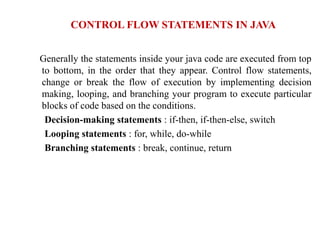
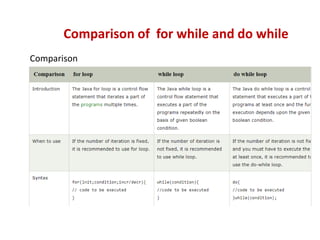
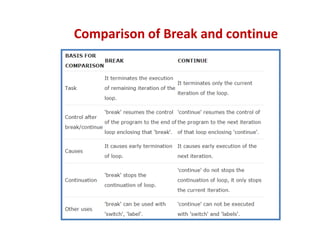
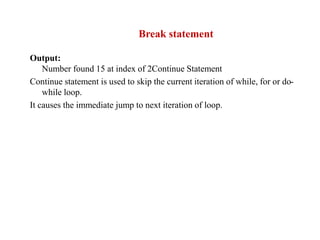
The document discusses various flow control statements in Java including decision-making statements (if-then, if-then-else, switch), looping statements (for, while, do-while), and branching statements (break, continue, return). It provides examples of using these statements, such as an if statement that prints output based on a boolean condition, a for loop that runs infinitely, and a for loop that iterates through an array. The document also compares loops like while and for, and statements like break and continue, providing sample code and expected output.
![What will be the result, if we try to compile and execute
the following code
class Sample{
public static void main(String[]args) {
boolean b = true;
if(b){
System.out.println(" if block ");
}
else {
System.out.println(“ else block ");
}
}
}
Predict the output?](https://image.slidesharecdn.com/day1-230629095057-ea527dfe/85/DAY_1-2-pptx-4-320.jpg)
![public class ForExample {
public static void main(String[] args) {
//Using no condition in for loop
for(;;){
System.out.println("infinitive loop");
}
}
}
Java program to demonstrate the use of infinite for loop
which prints an statement](https://image.slidesharecdn.com/day1-230629095057-ea527dfe/85/DAY_1-2-pptx-5-320.jpg)
![What will be the result, if we try to compile and execute the following
code snippets
1
class Sample {
public static void main(String[] args) {
while(false)
System.out.println("while loop");
}
}
2.
class Sample {
public static void main(String[] args) {
for( ; ; )
System.out.println("For loop");
}
}
MCQ based on while loop](https://image.slidesharecdn.com/day1-230629095057-ea527dfe/85/DAY_1-2-pptx-6-320.jpg)
![public class Sample {
public static void main(String[] args) {
int [] numbers = {10, 20, 30, 40, 50};
for(int i : numbers ) {
System.out.println( "i: "+i );
}
}
}
Output:
i:10
i:20
i: 30
i:40
i:50
Concept of enhanced for loop](https://image.slidesharecdn.com/day1-230629095057-ea527dfe/85/DAY_1-2-pptx-7-320.jpg)
![Predict the output
class BreakDemo
{
public static void main(String args[])
{
int arr[] = {5,10,15,20,25,30};
int n ;
int search = 15;
boolean b = false;
for(n = 0; n < arr.length; n++)
{
if(arr[n] == search)
{
b = true;
break;
}
}
if(b)
System.out.println("Number found " +search+" at index of "+n);
else
System.out.println("Element is not found");
}
}
Break Statement](https://image.slidesharecdn.com/day1-230629095057-ea527dfe/85/DAY_1-2-pptx-9-320.jpg)
![Predict the output
class ContinueDemo
{
public static void main(String []args)
{
for (int j = 1; j <= 10; j++)
{
System.out.print(j+" ");
if (j % 2 != 0)
continue;
System.out.println(" ");
}
}
}
Output:
1 2
3 4
5 6
7 8
9 10
Program for Continue statement](https://image.slidesharecdn.com/day1-230629095057-ea527dfe/85/DAY_1-2-pptx-11-320.jpg)