CS 120
The for-loop and nested
loops
Jubail Industrial College
Computer Science & Engineering Department
2
Outline
 The for loop statement
 Syntax
 Semantics
 Nested Loops
 continue, break, and exit Statements
3
The for Statement
 for loops are used if the number of iterations are known.
 It begins with the keyword for, followed by three expressions in
parentheses that describe what to do with one or more
controlling variables
 It consists of 3 parts separated by a semicolon (;):
 Part 1: initialize control variable. Only executed once.
 This part tells how the controlling variable or variables are
initialized or declared and initialized before the first iteration
 Part 2: condition (boolean expression).
 This part determines when the loop should end, based on the
evaluation of a Boolean expression before each iteration
 Part 3: update of control variable. Executed at the end of each
iteration.
 This part tells how the control variable or variables are updated after
each iteration of the loop body
4
Syntax of the for Statement
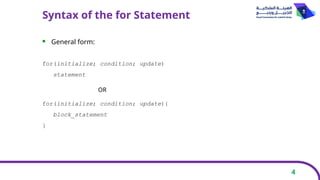
 General form:
for(initialize; condition; update)
statement
for(initialize; condition; update){
block_statement
}
OR
5
Semantics of the for Statement
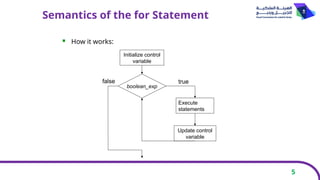
 How it works:
Initialize control
variable
boolean_exp
Execute
statements
Update control
variable
true
false
6
for Statement Syntax and Alternate Semantics
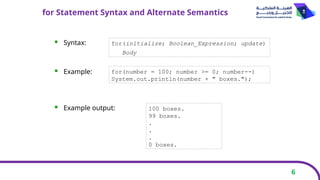
 Syntax:
 Example:
 Example output:
for(initialize; Boolean_Expression; update)
Body
for(number = 100; number >= 0; number--)
System.out.println(number + " boxes.");
100 boxes.
99 boxes.
.
.
.
0 boxes.
7
for Statement Syntax and Alternate Semantics
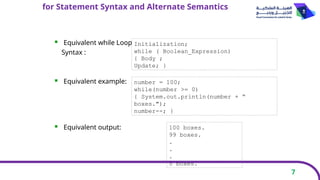
 Equivalent while Loop
Syntax :
 Equivalent example:
 Equivalent output: 100 boxes.
99 boxes.
.
.
.
0 boxes.
number = 100;
while(number >= 0)
{ System.out.println(number + “
boxes.");
number--; }
Initialization;
while ( Boolean_Expression)
{ Body ;
Update; }
8
The for Statement
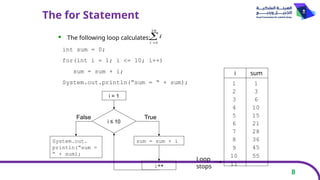
 The following loop calculates:

10
1
i
i
int sum = 0;
for(int i = 1; i <= 10; i++)
sum = sum + i;
System.out.println(“sum = “ + sum);
i = 1
i ≤ 10
sum = sum + i
i++
True
System.out.
println(“sum =
“ + sum);
False
sum
i
1 1
2 3
3 6
4 10
5 15
6 21
7 28
8 36
9 45
10 55
11
Loop
stops
9
The for Statement
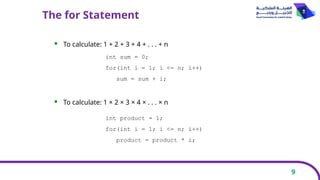
 To calculate: 1 + 2 + 3 + 4 + . . . + n
 To calculate: 1 × 2 × 3 × 4 × . . . × n
int sum = 0;
for(int i = 1; i <= n; i++)
sum = sum + i;
int product = 1;
for(int i = 1; i <= n; i++)
product = product * i;
10
The for Statement
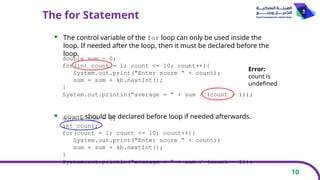
 The control variable of the for loop can only be used inside the
loop. If needed after the loop, then it must be declared before the
loop.
 count should be declared before loop if needed afterwards.
double sum = 0;
for(int count = 1; count <= 10; count++){
System.out.print(“Enter score “ + count);
sum = sum + kb.nextInt();
}
System.out.println(“average = “ + sum / (count – 1));
Error:
count is
undefined
double sum = 0;
int count;
for(count = 1; count <= 10; count++){
System.out.print(“Enter score “ + count);
sum = sum + kb.nextInt();
}
System.out.println(“average = “ + sum / (count – 1));
11
The Comma in the for Statement
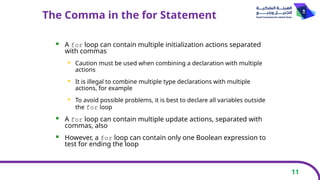
 A for loop can contain multiple initialization actions separated
with commas
 Caution must be used when combining a declaration with multiple
actions
 It is illegal to combine multiple type declarations with multiple
actions, for example
 To avoid possible problems, it is best to declare all variables outside
the for loop
 A for loop can contain multiple update actions, separated with
commas, also
 However, a for loop can contain only one Boolean expression to
test for ending the loop
12
The Comma in the for Statement
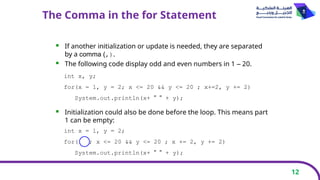
 If another initialization or update is needed, they are separated
by a comma (,).
 The following code display odd and even numbers in 1 – 20.
 Initialization could also be done before the loop. This means part
1 can be empty:
int x, y;
for(x = 1, y = 2; x <= 20 && y <= 20 ; x+=2, y += 2)
System.out.println(x+ " " + y);
int x = 1, y = 2;
for( ; x <= 20 && y <= 20 ; x += 2, y += 2)
System.out.println(x+ " " + y);
13
Extra Semicolon in the for Statement
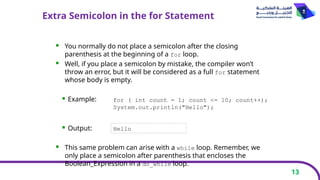
 You normally do not place a semicolon after the closing
parenthesis at the beginning of a for loop.
 Well, if you place a semicolon by mistake, the compiler won’t
throw an error, but it will be considered as a full for statement
whose body is empty.
 Example:
 Output:
 This same problem can arise with a while loop. Remember, we
only place a semicolon after parenthesis that encloses the
Boolean_Expression in a do_while loop.
for ( int count = 1; count <= 10; count++);
System.out.println("Hello");
Hello
14
Nested Loops
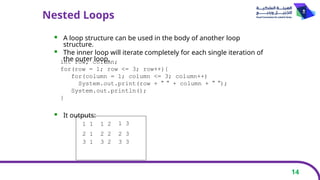
 A loop structure can be used in the body of another loop
structure.
 The inner loop will iterate completely for each single iteration of
the outer loop.
 It outputs:
int row, column;
for(row = 1; row <= 3; row++){
for(column = 1; column <= 3; column++)
System.out.print(row + " " + column + " ");
System.out.println();
}
1 2
1 1
2 1
1 3
2 2 2 3
3 1 3 2 3 3
15
Nested Loops
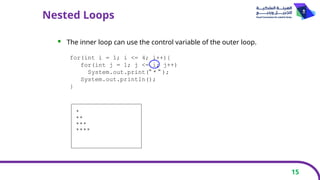
 The inner loop can use the control variable of the outer loop.
for(int i = 1; i <= 4; i++){
for(int j = 1; j <= i; j++)
System.out.print(" * " );
System.out.println();
}
*
**
***
****
16
continue & break
 continue statement ends the current iteration of the loop and
moves to update part.
 Its useful to skip an iteration.
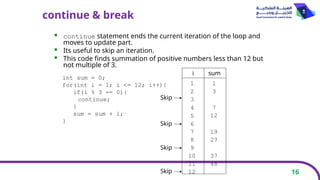
 This code finds summation of positive numbers less than 12 but
not multiple of 3.
int sum = 0;
for(int i = 1; i <= 12; i++){
if(i % 3 == 0){
continue;
}
sum = sum + i;
}
sum
i
1 1
2 3
3
Skip
4
5
6
7
8
9
10
11
12
7
12
Skip
19
27
Skip
37
48
Skip
17
continue & break
 break statement terminates the loop.
 Its useful to stop the loop completely if something happens.
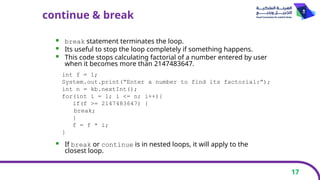
 This code stops calculating factorial of a number entered by user
when it becomes more than 2147483647.
 If break or continue is in nested loops, it will apply to the
closest loop.
int f = 1;
System.out.print(“Enter a number to find its factorial:”);
int n = kb.nextInt();
for(int i = 1; i <= n; i++){
if(f >= 2147483647) {
break;
}
f = f * i;
}
18
exit Statement
 exit statement in System class is used to end the program.
 Its useful to abort the program if something happens.
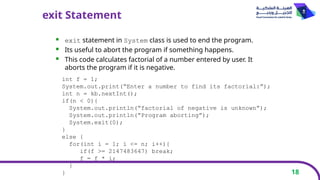
 This code calculates factorial of a number entered by user. It
aborts the program if it is negative.
int f = 1;
System.out.print(“Enter a number to find its factorial:”);
int n = kb.nextInt();
if(n < 0){
System.out.println(“factorial of negative is unknown”);
System.out.println(“Program aborting”);
System.exit(0);
}
else {
for(int i = 1; i <= n; i++){
if(f >= 2147483647) break;
f = f * i;
}
}

19
The end
Important to do at home :
- read section 3.3

The for loop statement and the Nested Loops

  • 1.
    CS 120 The for-loopand nested loops Jubail Industrial College Computer Science & Engineering Department
  • 2.
    2 Outline  The forloop statement  Syntax  Semantics  Nested Loops  continue, break, and exit Statements
  • 3.
    3 The for Statement for loops are used if the number of iterations are known.  It begins with the keyword for, followed by three expressions in parentheses that describe what to do with one or more controlling variables  It consists of 3 parts separated by a semicolon (;):  Part 1: initialize control variable. Only executed once.  This part tells how the controlling variable or variables are initialized or declared and initialized before the first iteration  Part 2: condition (boolean expression).  This part determines when the loop should end, based on the evaluation of a Boolean expression before each iteration  Part 3: update of control variable. Executed at the end of each iteration.  This part tells how the control variable or variables are updated after each iteration of the loop body
  • 4.
    4 Syntax of thefor Statement  General form: for(initialize; condition; update) statement for(initialize; condition; update){ block_statement } OR
  • 5.
    5 Semantics of thefor Statement  How it works: Initialize control variable boolean_exp Execute statements Update control variable true false
  • 6.
    6 for Statement Syntaxand Alternate Semantics  Syntax:  Example:  Example output: for(initialize; Boolean_Expression; update) Body for(number = 100; number >= 0; number--) System.out.println(number + " boxes."); 100 boxes. 99 boxes. . . . 0 boxes.
  • 7.
    7 for Statement Syntaxand Alternate Semantics  Equivalent while Loop Syntax :  Equivalent example:  Equivalent output: 100 boxes. 99 boxes. . . . 0 boxes. number = 100; while(number >= 0) { System.out.println(number + “ boxes."); number--; } Initialization; while ( Boolean_Expression) { Body ; Update; }
  • 8.
    8 The for Statement The following loop calculates:  10 1 i i int sum = 0; for(int i = 1; i <= 10; i++) sum = sum + i; System.out.println(“sum = “ + sum); i = 1 i ≤ 10 sum = sum + i i++ True System.out. println(“sum = “ + sum); False sum i 1 1 2 3 3 6 4 10 5 15 6 21 7 28 8 36 9 45 10 55 11 Loop stops
  • 9.
    9 The for Statement To calculate: 1 + 2 + 3 + 4 + . . . + n  To calculate: 1 × 2 × 3 × 4 × . . . × n int sum = 0; for(int i = 1; i <= n; i++) sum = sum + i; int product = 1; for(int i = 1; i <= n; i++) product = product * i;
  • 10.
    10 The for Statement The control variable of the for loop can only be used inside the loop. If needed after the loop, then it must be declared before the loop.  count should be declared before loop if needed afterwards. double sum = 0; for(int count = 1; count <= 10; count++){ System.out.print(“Enter score “ + count); sum = sum + kb.nextInt(); } System.out.println(“average = “ + sum / (count – 1)); Error: count is undefined double sum = 0; int count; for(count = 1; count <= 10; count++){ System.out.print(“Enter score “ + count); sum = sum + kb.nextInt(); } System.out.println(“average = “ + sum / (count – 1));
  • 11.
    11 The Comma inthe for Statement  A for loop can contain multiple initialization actions separated with commas  Caution must be used when combining a declaration with multiple actions  It is illegal to combine multiple type declarations with multiple actions, for example  To avoid possible problems, it is best to declare all variables outside the for loop  A for loop can contain multiple update actions, separated with commas, also  However, a for loop can contain only one Boolean expression to test for ending the loop
  • 12.
    12 The Comma inthe for Statement  If another initialization or update is needed, they are separated by a comma (,).  The following code display odd and even numbers in 1 – 20.  Initialization could also be done before the loop. This means part 1 can be empty: int x, y; for(x = 1, y = 2; x <= 20 && y <= 20 ; x+=2, y += 2) System.out.println(x+ " " + y); int x = 1, y = 2; for( ; x <= 20 && y <= 20 ; x += 2, y += 2) System.out.println(x+ " " + y);
  • 13.
    13 Extra Semicolon inthe for Statement  You normally do not place a semicolon after the closing parenthesis at the beginning of a for loop.  Well, if you place a semicolon by mistake, the compiler won’t throw an error, but it will be considered as a full for statement whose body is empty.  Example:  Output:  This same problem can arise with a while loop. Remember, we only place a semicolon after parenthesis that encloses the Boolean_Expression in a do_while loop. for ( int count = 1; count <= 10; count++); System.out.println("Hello"); Hello
  • 14.
    14 Nested Loops  Aloop structure can be used in the body of another loop structure.  The inner loop will iterate completely for each single iteration of the outer loop.  It outputs: int row, column; for(row = 1; row <= 3; row++){ for(column = 1; column <= 3; column++) System.out.print(row + " " + column + " "); System.out.println(); } 1 2 1 1 2 1 1 3 2 2 2 3 3 1 3 2 3 3
  • 15.
    15 Nested Loops  Theinner loop can use the control variable of the outer loop. for(int i = 1; i <= 4; i++){ for(int j = 1; j <= i; j++) System.out.print(" * " ); System.out.println(); } * ** *** ****
  • 16.
    16 continue & break continue statement ends the current iteration of the loop and moves to update part.  Its useful to skip an iteration.  This code finds summation of positive numbers less than 12 but not multiple of 3. int sum = 0; for(int i = 1; i <= 12; i++){ if(i % 3 == 0){ continue; } sum = sum + i; } sum i 1 1 2 3 3 Skip 4 5 6 7 8 9 10 11 12 7 12 Skip 19 27 Skip 37 48 Skip
  • 17.
    17 continue & break break statement terminates the loop.  Its useful to stop the loop completely if something happens.  This code stops calculating factorial of a number entered by user when it becomes more than 2147483647.  If break or continue is in nested loops, it will apply to the closest loop. int f = 1; System.out.print(“Enter a number to find its factorial:”); int n = kb.nextInt(); for(int i = 1; i <= n; i++){ if(f >= 2147483647) { break; } f = f * i; }
  • 18.
    18 exit Statement  exitstatement in System class is used to end the program.  Its useful to abort the program if something happens.  This code calculates factorial of a number entered by user. It aborts the program if it is negative. int f = 1; System.out.print(“Enter a number to find its factorial:”); int n = kb.nextInt(); if(n < 0){ System.out.println(“factorial of negative is unknown”); System.out.println(“Program aborting”); System.exit(0); } else { for(int i = 1; i <= n; i++){ if(f >= 2147483647) break; f = f * i; } }
  • 19.
    19 The end Important todo at home : - read section 3.3