Lecture#5
Aleeha Iftikhar
Repetitions Statements
 while Loops
 do-while Loops
 for Loops
 break and continue
The while Statement
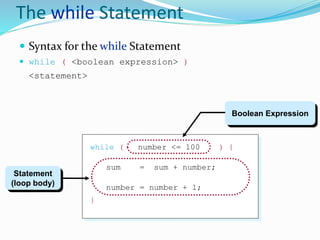
 Syntax for the while Statement
 while ( <boolean expression> )
<statement>
while ( number <= 100 ) {
sum = sum + number;
number = number + 1;
}
Statement
(loop body)
Boolean Expression
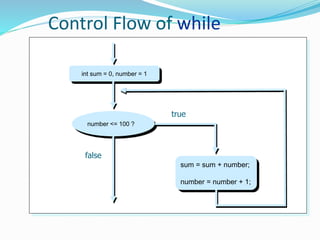
Control Flow of while
int sum = 0, number = 1
number <= 100 ?
false
sum = sum + number;
number = number + 1;
true
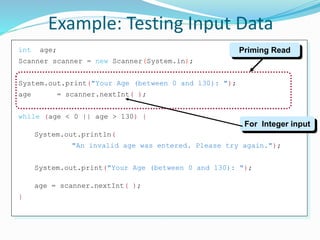
int age;
Scanner scanner = new Scanner(System.in);
System.out.print("Your Age (between 0 and 130): ");
age = scanner.nextInt( );
while (age < 0 || age > 130) {
System.out.println(
"An invalid age was entered. Please try again.");
System.out.print("Your Age (between 0 and 130): ");
age = scanner.nextInt( );
}
Example: Testing Input Data
Priming Read
For Integer input
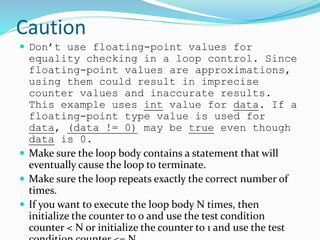
Caution
 Don’t use floating-point values for
equality checking in a loop control. Since
floating-point values are approximations,
using them could result in imprecise
counter values and inaccurate results.
This example uses int value for data. If a
floating-point type value is used for
data, (data != 0) may be true even though
data is 0.
 Make sure the loop body contains a statement that will
eventually cause the loop to terminate.
 Make sure the loop repeats exactly the correct number of
times.
 If you want to execute the loop body N times, then
initialize the counter to 0 and use the test condition
counter < N or initialize the counter to 1 and use the test
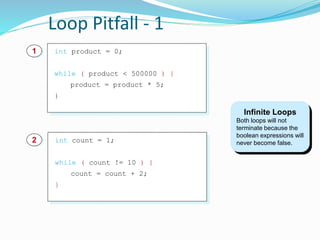
Loop Pitfall - 1
Infinite Loops
Both loops will not
terminate because the
boolean expressions will
never become false.int count = 1;
while ( count != 10 ) {
count = count + 2;
}
2
int product = 0;
while ( product < 500000 ) {
product = product * 5;
}
1
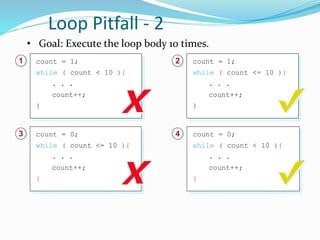
Loop Pitfall - 2
• Goal: Execute the loop body 10 times.
count = 1;
while ( count < 10 ){
. . .
count++;
}
1
count = 0;
while ( count <= 10 ){
. . .
count++;
}
3
count = 1;
while ( count <= 10 ){
. . .
count++;
}
2
count = 0;
while ( count < 10 ){
. . .
count++;
}
4
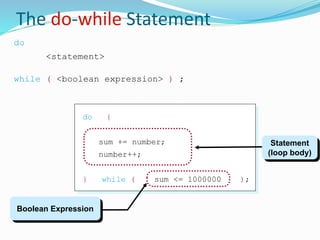
The do-while Statement
do {
sum += number;
number++;
} while ( sum <= 1000000 );
do
<statement>
while ( <boolean expression> ) ;
Statement
(loop body)
Boolean Expression
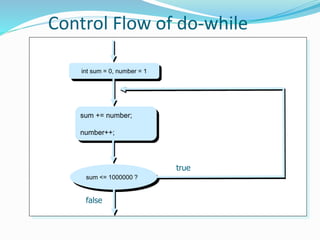
Control Flow of do-while
int sum = 0, number = 1
sum += number;
number++;
sum <= 1000000 ?
true
false
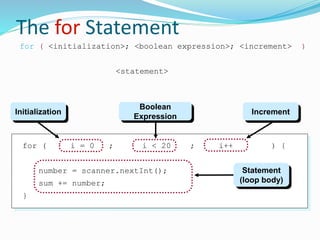
The for Statement
for ( i = 0 ; i < 20 ; i++ ) {
number = scanner.nextInt();
sum += number;
}
for ( <initialization>; <boolean expression>; <increment> )
<statement>
Initialization
Boolean
Expression
Increment
Statement
(loop body)
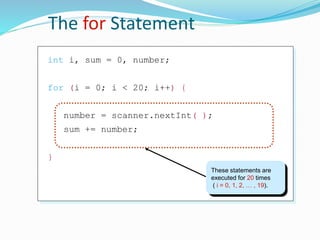
The for Statement
int i, sum = 0, number;
for (i = 0; i < 20; i++) {
number = scanner.nextInt( );
sum += number;
}
These statements are
executed for 20 times
( i = 0, 1, 2, … , 19).
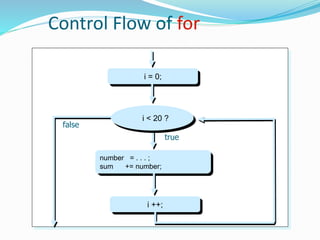
Control Flow of for
i = 0;
false
number = . . . ;
sum += number;
true
i ++;
i < 20 ?
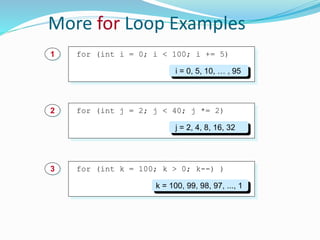
More for Loop Examples
for (int i = 0; i < 100; i += 5)1
i = 0, 5, 10, … , 95
for (int j = 2; j < 40; j *= 2)2
j = 2, 4, 8, 16, 32
for (int k = 100; k > 0; k--) )3
k = 100, 99, 98, 97, ..., 1
Which Loop to Use?
 The three forms of loop statements, while, do, and for, are
expressively equivalent; that is, you can write a loop in any
of these three forms.
 I recommend that you use the one that is most intuitive
and comfortable for you. In general, a for loop may be used
if the number of repetitions is known, as, for example,
when you need to print a message 100 times. A while loop
may be used if the number of repetitions is not known, as
in the case of reading the numbers until the input is 0. A
do-while loop can be used to replace a while loop if the
loop body has to be executed before testing the
continuation condition.
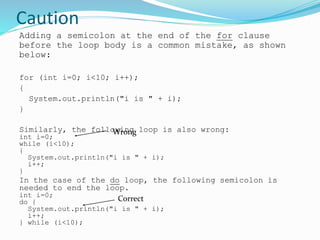
Caution
Adding a semicolon at the end of the for clause
before the loop body is a common mistake, as shown
below:
for (int i=0; i<10; i++);
{
System.out.println("i is " + i);
}
Similarly, the following loop is also wrong:
int i=0;
while (i<10);
{
System.out.println("i is " + i);
i++;
}
In the case of the do loop, the following semicolon is
needed to end the loop.
int i=0;
do {
System.out.println("i is " + i);
i++;
} while (i<10);
Wrong
Correct
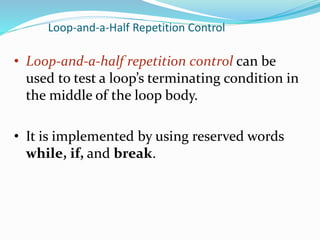
Loop-and-a-Half Repetition Control
• Loop-and-a-half repetition control can be
used to test a loop’s terminating condition in
the middle of the loop body.
• It is implemented by using reserved words
while, if, and break.
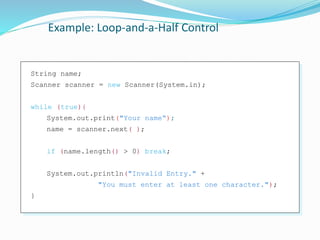
Example: Loop-and-a-Half Control
String name;
Scanner scanner = new Scanner(System.in);
while (true){
System.out.print("Your name“);
name = scanner.next( );
if (name.length() > 0) break;
System.out.println("Invalid Entry." +
"You must enter at least one character.");
}
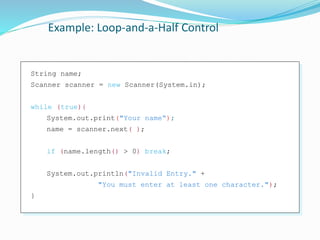
Example: Loop-and-a-Half Control
String name;
Scanner scanner = new Scanner(System.in);
while (true){
System.out.print("Your name“);
name = scanner.next( );
if (name.length() > 0) break;
System.out.println("Invalid Entry." +
"You must enter at least one character.");
}
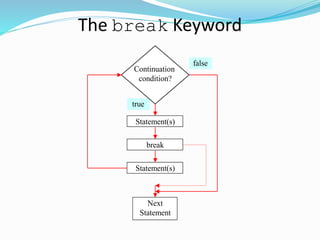
The break Keyword
false
true
Statement(s)
Next
Statement
Continuation
condition?
Statement(s)
break
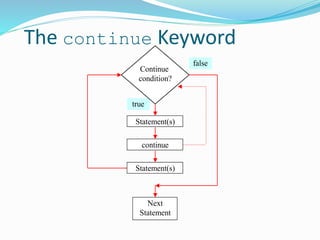
The continue Keyword
false
true
Statement(s)
Next
Statement
Continue
condition?
Statement(s)
continue
Chapter 4 Methods
 Introducing Methods
 Benefits of methods, Declaring Methods, and Calling Methods
 Passing Parameters
 Pass by Value
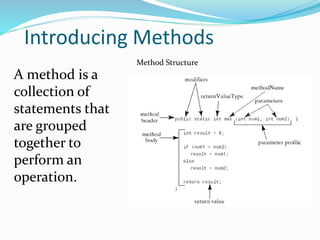
Introducing Methods
Method Structure
A method is a
collection of
statements that
are grouped
together to
perform an
operation.
Introducing Methods, cont.
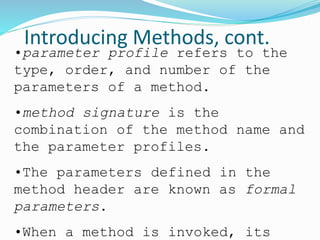
•parameter profile refers to the
type, order, and number of the
parameters of a method.
•method signature is the
combination of the method name and
the parameter profiles.
•The parameters defined in the
method header are known as formal
parameters.
•When a method is invoked, its
DeclaringDefinning Methods
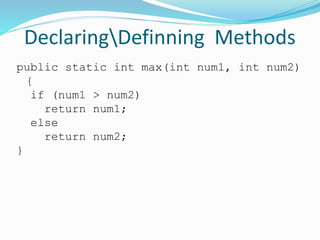
public static int max(int num1, int num2)
{
if (num1 > num2)
return num1;
else
return num2;
}
Calling Methods, cont.
public static void main(String[] args) {
int i = 5;
int j = 2;
int k = max(i, j);
System.out.println(
"The maximum between " + i +
" and " + j + " is " + k);
}
public static int max(int num1, int num2) {
int result;
if (num1 > num2)
result = num1;
else
result = num2;
return result;
}
pass i
pass j
Calling Methods, cont.
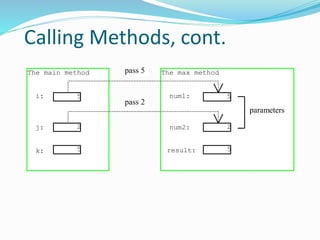
The main method
i:
j:
k:
The max method
num1:
num2:
result:
pass 5
5
2
5
5
2
5
pass 2
parameters
THE END

130707833146508191

  • 1.
  • 2.
    Repetitions Statements  whileLoops  do-while Loops  for Loops  break and continue
  • 3.
    The while Statement Syntax for the while Statement  while ( <boolean expression> ) <statement> while ( number <= 100 ) { sum = sum + number; number = number + 1; } Statement (loop body) Boolean Expression
  • 4.
    Control Flow ofwhile int sum = 0, number = 1 number <= 100 ? false sum = sum + number; number = number + 1; true
  • 5.
    int age; Scanner scanner= new Scanner(System.in); System.out.print("Your Age (between 0 and 130): "); age = scanner.nextInt( ); while (age < 0 || age > 130) { System.out.println( "An invalid age was entered. Please try again."); System.out.print("Your Age (between 0 and 130): "); age = scanner.nextInt( ); } Example: Testing Input Data Priming Read For Integer input
  • 6.
    Caution  Don’t usefloating-point values for equality checking in a loop control. Since floating-point values are approximations, using them could result in imprecise counter values and inaccurate results. This example uses int value for data. If a floating-point type value is used for data, (data != 0) may be true even though data is 0.  Make sure the loop body contains a statement that will eventually cause the loop to terminate.  Make sure the loop repeats exactly the correct number of times.  If you want to execute the loop body N times, then initialize the counter to 0 and use the test condition counter < N or initialize the counter to 1 and use the test
  • 7.
    Loop Pitfall -1 Infinite Loops Both loops will not terminate because the boolean expressions will never become false.int count = 1; while ( count != 10 ) { count = count + 2; } 2 int product = 0; while ( product < 500000 ) { product = product * 5; } 1
  • 8.
    Loop Pitfall -2 • Goal: Execute the loop body 10 times. count = 1; while ( count < 10 ){ . . . count++; } 1 count = 0; while ( count <= 10 ){ . . . count++; } 3 count = 1; while ( count <= 10 ){ . . . count++; } 2 count = 0; while ( count < 10 ){ . . . count++; } 4
  • 9.
    The do-while Statement do{ sum += number; number++; } while ( sum <= 1000000 ); do <statement> while ( <boolean expression> ) ; Statement (loop body) Boolean Expression
  • 10.
    Control Flow ofdo-while int sum = 0, number = 1 sum += number; number++; sum <= 1000000 ? true false
  • 11.
    The for Statement for( i = 0 ; i < 20 ; i++ ) { number = scanner.nextInt(); sum += number; } for ( <initialization>; <boolean expression>; <increment> ) <statement> Initialization Boolean Expression Increment Statement (loop body)
  • 12.
    The for Statement inti, sum = 0, number; for (i = 0; i < 20; i++) { number = scanner.nextInt( ); sum += number; } These statements are executed for 20 times ( i = 0, 1, 2, … , 19).
  • 13.
    Control Flow offor i = 0; false number = . . . ; sum += number; true i ++; i < 20 ?
  • 14.
    More for LoopExamples for (int i = 0; i < 100; i += 5)1 i = 0, 5, 10, … , 95 for (int j = 2; j < 40; j *= 2)2 j = 2, 4, 8, 16, 32 for (int k = 100; k > 0; k--) )3 k = 100, 99, 98, 97, ..., 1
  • 15.
    Which Loop toUse?  The three forms of loop statements, while, do, and for, are expressively equivalent; that is, you can write a loop in any of these three forms.  I recommend that you use the one that is most intuitive and comfortable for you. In general, a for loop may be used if the number of repetitions is known, as, for example, when you need to print a message 100 times. A while loop may be used if the number of repetitions is not known, as in the case of reading the numbers until the input is 0. A do-while loop can be used to replace a while loop if the loop body has to be executed before testing the continuation condition.
  • 16.
    Caution Adding a semicolonat the end of the for clause before the loop body is a common mistake, as shown below: for (int i=0; i<10; i++); { System.out.println("i is " + i); } Similarly, the following loop is also wrong: int i=0; while (i<10); { System.out.println("i is " + i); i++; } In the case of the do loop, the following semicolon is needed to end the loop. int i=0; do { System.out.println("i is " + i); i++; } while (i<10); Wrong Correct
  • 17.
    Loop-and-a-Half Repetition Control •Loop-and-a-half repetition control can be used to test a loop’s terminating condition in the middle of the loop body. • It is implemented by using reserved words while, if, and break.
  • 18.
    Example: Loop-and-a-Half Control Stringname; Scanner scanner = new Scanner(System.in); while (true){ System.out.print("Your name“); name = scanner.next( ); if (name.length() > 0) break; System.out.println("Invalid Entry." + "You must enter at least one character."); }
  • 19.
    Example: Loop-and-a-Half Control Stringname; Scanner scanner = new Scanner(System.in); while (true){ System.out.print("Your name“); name = scanner.next( ); if (name.length() > 0) break; System.out.println("Invalid Entry." + "You must enter at least one character."); }
  • 20.
  • 21.
  • 22.
    Chapter 4 Methods Introducing Methods  Benefits of methods, Declaring Methods, and Calling Methods  Passing Parameters  Pass by Value
  • 23.
    Introducing Methods Method Structure Amethod is a collection of statements that are grouped together to perform an operation.
  • 24.
    Introducing Methods, cont. •parameterprofile refers to the type, order, and number of the parameters of a method. •method signature is the combination of the method name and the parameter profiles. •The parameters defined in the method header are known as formal parameters. •When a method is invoked, its
  • 25.
    DeclaringDefinning Methods public staticint max(int num1, int num2) { if (num1 > num2) return num1; else return num2; }
  • 26.
    Calling Methods, cont. publicstatic void main(String[] args) { int i = 5; int j = 2; int k = max(i, j); System.out.println( "The maximum between " + i + " and " + j + " is " + k); } public static int max(int num1, int num2) { int result; if (num1 > num2) result = num1; else result = num2; return result; } pass i pass j
  • 27.
    Calling Methods, cont. Themain method i: j: k: The max method num1: num2: result: pass 5 5 2 5 5 2 5 pass 2 parameters
  • 28.