Programming in Java
5-day workshop
Loops
Matt Collison
JP Morgan Chase 2021
PiJ1.4: Loops
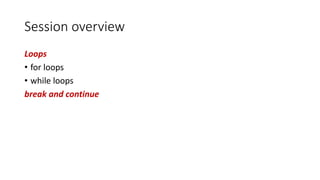
Session overview
Loops
• for loops
• while loops
break and continue
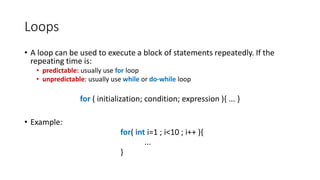
Loops
• A loop can be used to execute a block of statements repeatedly. If the
repeating time is:
• predictable: usually use for loop
• unpredictable: usually use while or do-while loop
for ( initialization; condition; expression ){ ... }
• Example:
for( int i=1 ; i<10 ; i++ ){
...
}
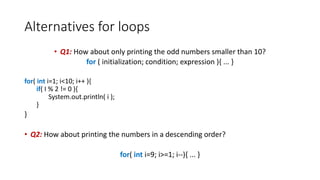
Alternatives for loops
• Q1: How about only printing the odd numbers smaller than 10?
for ( initialization; condition; expression ){ ... }
for( int i=1; i<10; i++ ){
if( I % 2 != 0 ){
System.out.println( i );
}
}
• Q2: How about printing the numbers in a descending order?
for( int i=9; i>=1; i--){ ... }
for-each loops
for ( Type var : array ) {
...
}
• Example:
int[] numArray = {7,2,6,0}
for ( int i : numArray ) {
System.out.println("number is: " + i);
}
Note: the use of a colon
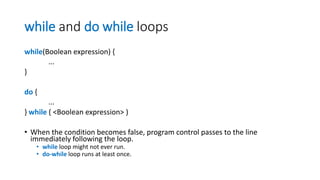
while and do while loops
while(Boolean expression) {
...
}
do {
...
} while ( <Boolean expression> )
• When the condition becomes false, program control passes to the line
immediately following the loop.
• while loop might not ever run.
• do-while loop runs at least once.
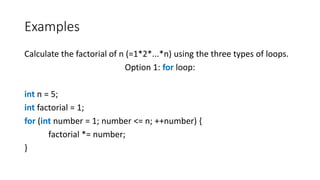
Examples
Calculate the factorial of n (=1*2*...*n) using the three types of loops.
Option 1: for loop:
int n = 5;
int factorial = 1;
for (int number = 1; number <= n; ++number) {
factorial *= number;
}
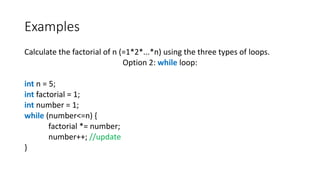
Examples
Calculate the factorial of n (=1*2*...*n) using the three types of loops.
Option 2: while loop:
int n = 5;
int factorial = 1;
int number = 1;
while (number<=n) {
factorial *= number;
number++; //update
}
Examples
Calculate the factorial of n (=1*2*...*n) using the three types of loops.
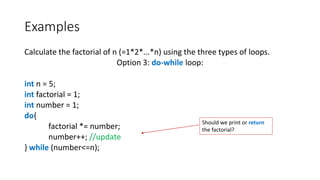
Option 3: do-while loop:
int n = 5;
int factorial = 1;
int number = 1;
do{
factorial *= number;
number++; //update
} while (number<=n);
Should we print or return
the factorial?
break and continue
• The break statement is used to jump out of the loop or switch
statement.
• The continue statement is used to skip to the next iteration of the
loop.
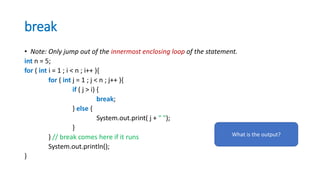
break
• Note: Only jump out of the innermost enclosing loop of the statement.
int n = 5;
for ( int i = 1 ; i < n ; i++ ){
for ( int j = 1 ; j < n ; j++ ){
if ( j > i) {
break;
} else {
System.out.print( j + " ");
}
} // break comes here if it runs
System.out.println();
}
What is the output?
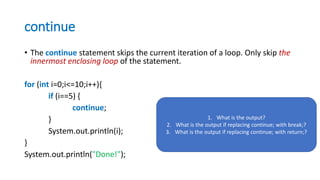
continue
• The continue statement skips the current iteration of a loop. Only skip the
innermost enclosing loop of the statement.
for (int i=0;i<=10;i++){
if (i==5) {
continue;
}
System.out.println(i);
}
System.out.println("Done!");
1. What is the output?
2. What is the output if replacing continue; with break;?
3. What is the output if replacing continue; with return;?
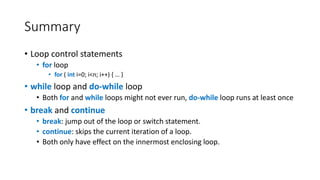
Summary
• Loop control statements
• for loop
• for ( int i=0; i<n; i++) { … }
• while loop and do-while loop
• Both for and while loops might not ever run, do-while loop runs at least once
• break and continue
• break: jump out of the loop or switch statement.
• continue: skips the current iteration of a loop.
• Both only have effect on the innermost enclosing loop.
Learning resources
The workshop homepage
https://mcollison.github.io/JPMC-java-intro-2021/
The course materials
https://mcollison.github.io/java-programming-foundations/
• Session worksheets – updated each week
Additional resources
• Think Java: How to think like a computer scientist
• Allen B Downey (O’Reilly Press)
• Available under Creative Commons license
• https://greenteapress.com/wp/think-java-2e/
• Oracle central Java Documentation –
https://docs.oracle.com/javase/8/docs/api/
• Other sources:
• W3Schools Java - https://www.w3schools.com/java/
• stack overflow - https://stackoverflow.com/
• Coding bat - https://codingbat.com/java

Pi j1.4 loops

  • 1.
    Programming in Java 5-dayworkshop Loops Matt Collison JP Morgan Chase 2021 PiJ1.4: Loops
  • 2.
    Session overview Loops • forloops • while loops break and continue
  • 3.
    Loops • A loopcan be used to execute a block of statements repeatedly. If the repeating time is: • predictable: usually use for loop • unpredictable: usually use while or do-while loop for ( initialization; condition; expression ){ ... } • Example: for( int i=1 ; i<10 ; i++ ){ ... }
  • 4.
    Alternatives for loops •Q1: How about only printing the odd numbers smaller than 10? for ( initialization; condition; expression ){ ... } for( int i=1; i<10; i++ ){ if( I % 2 != 0 ){ System.out.println( i ); } } • Q2: How about printing the numbers in a descending order? for( int i=9; i>=1; i--){ ... }
  • 5.
    for-each loops for (Type var : array ) { ... } • Example: int[] numArray = {7,2,6,0} for ( int i : numArray ) { System.out.println("number is: " + i); } Note: the use of a colon
  • 6.
    while and dowhile loops while(Boolean expression) { ... } do { ... } while ( <Boolean expression> ) • When the condition becomes false, program control passes to the line immediately following the loop. • while loop might not ever run. • do-while loop runs at least once.
  • 7.
    Examples Calculate the factorialof n (=1*2*...*n) using the three types of loops. Option 1: for loop: int n = 5; int factorial = 1; for (int number = 1; number <= n; ++number) { factorial *= number; }
  • 8.
    Examples Calculate the factorialof n (=1*2*...*n) using the three types of loops. Option 2: while loop: int n = 5; int factorial = 1; int number = 1; while (number<=n) { factorial *= number; number++; //update }
  • 9.
    Examples Calculate the factorialof n (=1*2*...*n) using the three types of loops. Option 3: do-while loop: int n = 5; int factorial = 1; int number = 1; do{ factorial *= number; number++; //update } while (number<=n); Should we print or return the factorial?
  • 10.
    break and continue •The break statement is used to jump out of the loop or switch statement. • The continue statement is used to skip to the next iteration of the loop.
  • 11.
    break • Note: Onlyjump out of the innermost enclosing loop of the statement. int n = 5; for ( int i = 1 ; i < n ; i++ ){ for ( int j = 1 ; j < n ; j++ ){ if ( j > i) { break; } else { System.out.print( j + " "); } } // break comes here if it runs System.out.println(); } What is the output?
  • 12.
    continue • The continuestatement skips the current iteration of a loop. Only skip the innermost enclosing loop of the statement. for (int i=0;i<=10;i++){ if (i==5) { continue; } System.out.println(i); } System.out.println("Done!"); 1. What is the output? 2. What is the output if replacing continue; with break;? 3. What is the output if replacing continue; with return;?
  • 13.
    Summary • Loop controlstatements • for loop • for ( int i=0; i<n; i++) { … } • while loop and do-while loop • Both for and while loops might not ever run, do-while loop runs at least once • break and continue • break: jump out of the loop or switch statement. • continue: skips the current iteration of a loop. • Both only have effect on the innermost enclosing loop.
  • 14.
    Learning resources The workshophomepage https://mcollison.github.io/JPMC-java-intro-2021/ The course materials https://mcollison.github.io/java-programming-foundations/ • Session worksheets – updated each week
  • 15.
    Additional resources • ThinkJava: How to think like a computer scientist • Allen B Downey (O’Reilly Press) • Available under Creative Commons license • https://greenteapress.com/wp/think-java-2e/ • Oracle central Java Documentation – https://docs.oracle.com/javase/8/docs/api/ • Other sources: • W3Schools Java - https://www.w3schools.com/java/ • stack overflow - https://stackoverflow.com/ • Coding bat - https://codingbat.com/java

Editor's Notes

  • #12 Answer: 1 1 2 1 2 3 1 2 3 4
  • #13 Answer 1: 0 1 2 3 4 Done Answer 2: 0 1 2 3 4 Answer 3: 0 1 2 3 4
  • #15 All resources hang from the ELE pages. How many of you have looked through them?