JAVA SE
(CORE JAVA)
LECTURE-10
Today’s Agenda
 Loop structures and it’s types.
 while and do-while loop.
 for loop.
 Labeled break and continue.
Loop Structure
Types
 Loops in java also are control statements used for repeating
a set of statements multiple times.
 They are broadly categorized to be of 2 types :-
 Entry controlled – Condition is checked when the control enters loop
body. Example, while and for loop.
 Exit controlled – Condition is checked after the flow enters loop
body. Example, do-while loop.
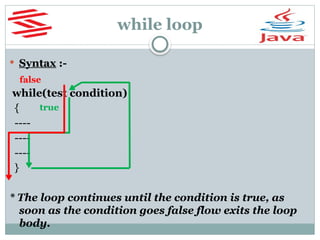
while loop
 Syntax :-
while(test condition)
{
----
----
----
}
* The loop continues until the condition is true, as
soon as the condition goes false flow exits the loop
body.
true
false
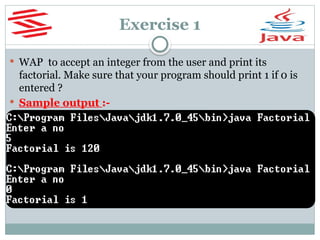
Exercise 1
 WAP to accept an integer from the user and print its
factorial. Make sure that your program should print 1 if 0 is
entered ?
 Sample output :-
Solution Ex 1
import java.util.*;
class Factorial
{
public static void main(String[ ]
args)
{
Scanner kb=new
Scanner(System.in);
int n, f=1;
System.out.println("Enter a
no");
n=kb.nextInt();
while(n>=1)
{
f=f*n;
n--;
}
System.out.println("Factorial is
"+f);
}
}
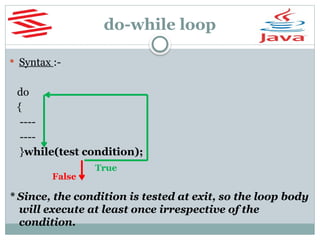
do-while loop
 Syntax :-
do
{
----
----
}while(test condition);
* Since, the condition is tested at exit, so the loop body
will execute at least once irrespective of the
condition.
True
False
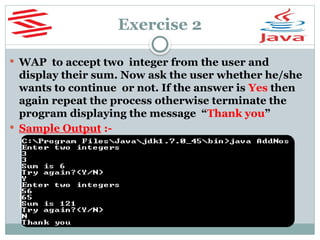
Exercise 2
 WAP to accept two integer from the user and
display their sum. Now ask the user whether he/she
wants to continue or not. If the answer is Yes then
again repeat the process otherwise terminate the
program displaying the message “Thank you”
 Sample Output :-
Solution Ex 2
class AddNos
{
public static void main(String []
args)
{
java.util.Scanner kb=new
java.util.Scanner(System.in);
int a,b;
String choice;
do
{
System.out.println("Enter two
integers");
a=kb.nextInt();
b=kb.nextInt();
System.out.println("Sum is” "+
(a+b));
System.out.println("Try
again?(Y/N)");
choice=kb.next( );
}while(choice.equalsIgnoreCase("Y
"));
System.out.println("Thank you");
}
}
Can we replace next() with
nextLine() ???
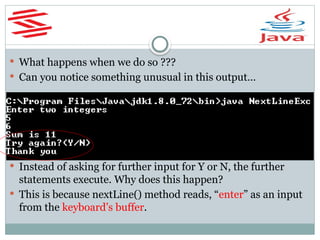
 What happens when we do so ???
 Can you notice something unusual in this output…
 Instead of asking for further input for Y or N, the further
statements execute. Why does this happen?
 This is because nextLine() method reads, “enter” as an input
from the keyboard’s buffer.
Buffer
 Buffer is a region of a physical memory storage used to
temporarily store data while it is being moved from one
place to another.
 So, in above case the keyboard’s buffer is left with an
“ENTER KEY” which we pressed after inputting the
second integer, which nextLine() accepts as an input.
 How can we solve this???...
 By calling nextLine() before accepting actual input. Since,
this call would clean the buffer.
Solution Ex 2
class AddNos
{
public static void main(String [] args)
{
java.util.Scanner kb=new
java.util.Scanner(System.in);
int a,b;
String choice;
do
{
System.out.println("Enter two integers");
a=kb.nextInt();
b=kb.nextInt();
System.out.println("Sum is "+(a+b));
System.out.println("Try again?(Y/N)");
nextLine( );
choice=kb.nextLine( );
}while(choice.equalsIgnoreCase("Y"));
System.out.println("Thank you");
}
}
for and labeled for
loop
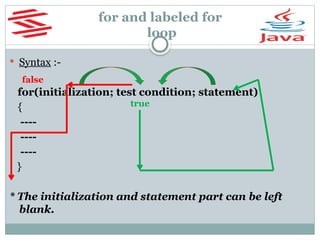
 Syntax :-
for(initialization; test condition; statement)
{
----
----
----
}
* The initialization and statement part can be left
blank.
true
false
break and continue
 To terminate the loop and exit its body providing a condition
before it, in such cases we use the statement break.
 In situations where we want to skip further steps in a loop
and move directly back to the test condition, there we use the
statement continue.
 Let us understand these through an example.
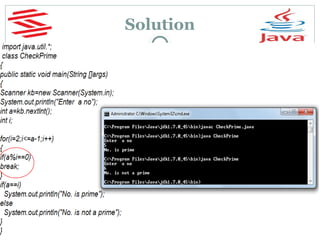
 WAP to accept an integer from user & check
whether it is prime or not ?
Solution
Exercise
 Write a program to continuously accept integers from the
user and as soon as he inputs 0 then display the sum of all the
nos given before 0.
Exercise
 Write a program to accept an integer from the user calculate
and print the sum of it’s digits . For example if input is 75 then
output should be 12.
Write a program to accept an integer from the user calculate
and print the sum of it’s first and last digit only . For example if
input is 21 75 then output should be 7.
Write a program to accept an integer from the user and print
it’s reverse. For example if input is 451 the output should be
154.
Exercise
 Write a program to accept an integer from the user and check
whether it is prime or not.
Write a program to accept an integer from the user and print it’s
table up to 10 terms.
OUTPUT:
Enter a no: 7
Table of 7
7*1=7
7*2=14
7*3=21
.
.
7*10=70
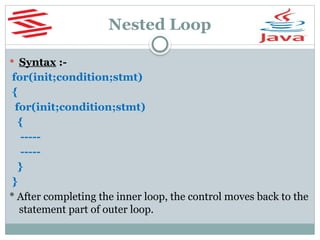
Nested Loop
 Syntax :-
for(init;condition;stmt)
{
for(init;condition;stmt)
{
-----
-----
}
}
* After completing the inner loop, the control moves back to the
statement part of outer loop.
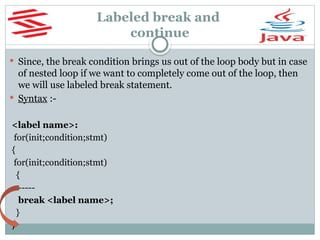
Labeled break and
continue
 Since, the break condition brings us out of the loop body but in case
of nested loop if we want to completely come out of the loop, then
we will use labeled break statement.
 Syntax :-
<label name>:
for(init;condition;stmt)
{
for(init;condition;stmt)
{
-----
break <label name>;
}
}
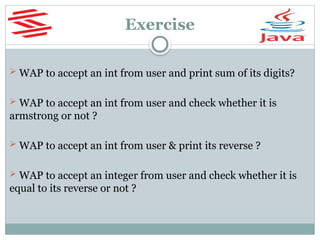
Exercise
 WAP to accept an int from user and print sum of its digits?
 WAP to accept an int from user and check whether it is
armstrong or not ?
 WAP to accept an int from user & print its reverse ?
 WAP to accept an integer from user and check whether it is
equal to its reverse or not ?
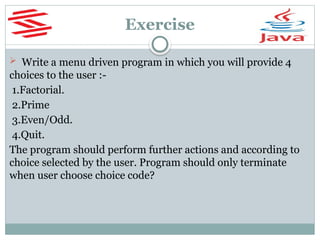
Exercise
 Write a menu driven program in which you will provide 4
choices to the user :-
1.Factorial.
2.Prime
3.Even/Odd.
4.Quit.
The program should perform further actions and according to
choice selected by the user. Program should only terminate
when user choose choice code?
End Of Lecture 10
For any queries mail us @: scalive4u@gmail.com
Call us @ : 0755-4271659, 7879165533
Agenda for Next Lecture:
1. Arrays in Java
2. Single Dimensional array
3. Using length property of array
4. Multi Dimensional array
5. How JVM handles dynamic blocks

Java covers syntax, data types, object-oriented concepts, control flow, exception handling, multithreading

  • 1.
  • 2.
    Today’s Agenda  Loopstructures and it’s types.  while and do-while loop.  for loop.  Labeled break and continue.
  • 3.
    Loop Structure Types  Loopsin java also are control statements used for repeating a set of statements multiple times.  They are broadly categorized to be of 2 types :-  Entry controlled – Condition is checked when the control enters loop body. Example, while and for loop.  Exit controlled – Condition is checked after the flow enters loop body. Example, do-while loop.
  • 4.
    while loop  Syntax:- while(test condition) { ---- ---- ---- } * The loop continues until the condition is true, as soon as the condition goes false flow exits the loop body. true false
  • 5.
    Exercise 1  WAPto accept an integer from the user and print its factorial. Make sure that your program should print 1 if 0 is entered ?  Sample output :-
  • 6.
    Solution Ex 1 importjava.util.*; class Factorial { public static void main(String[ ] args) { Scanner kb=new Scanner(System.in); int n, f=1; System.out.println("Enter a no"); n=kb.nextInt(); while(n>=1) { f=f*n; n--; } System.out.println("Factorial is "+f); } }
  • 7.
    do-while loop  Syntax:- do { ---- ---- }while(test condition); * Since, the condition is tested at exit, so the loop body will execute at least once irrespective of the condition. True False
  • 8.
    Exercise 2  WAPto accept two integer from the user and display their sum. Now ask the user whether he/she wants to continue or not. If the answer is Yes then again repeat the process otherwise terminate the program displaying the message “Thank you”  Sample Output :-
  • 9.
    Solution Ex 2 classAddNos { public static void main(String [] args) { java.util.Scanner kb=new java.util.Scanner(System.in); int a,b; String choice; do { System.out.println("Enter two integers"); a=kb.nextInt(); b=kb.nextInt(); System.out.println("Sum is” "+ (a+b)); System.out.println("Try again?(Y/N)"); choice=kb.next( ); }while(choice.equalsIgnoreCase("Y ")); System.out.println("Thank you"); } } Can we replace next() with nextLine() ???
  • 10.
     What happenswhen we do so ???  Can you notice something unusual in this output…  Instead of asking for further input for Y or N, the further statements execute. Why does this happen?  This is because nextLine() method reads, “enter” as an input from the keyboard’s buffer.
  • 11.
    Buffer  Buffer isa region of a physical memory storage used to temporarily store data while it is being moved from one place to another.  So, in above case the keyboard’s buffer is left with an “ENTER KEY” which we pressed after inputting the second integer, which nextLine() accepts as an input.  How can we solve this???...  By calling nextLine() before accepting actual input. Since, this call would clean the buffer.
  • 12.
    Solution Ex 2 classAddNos { public static void main(String [] args) { java.util.Scanner kb=new java.util.Scanner(System.in); int a,b; String choice; do { System.out.println("Enter two integers"); a=kb.nextInt(); b=kb.nextInt(); System.out.println("Sum is "+(a+b)); System.out.println("Try again?(Y/N)"); nextLine( ); choice=kb.nextLine( ); }while(choice.equalsIgnoreCase("Y")); System.out.println("Thank you"); } }
  • 13.
    for and labeledfor loop  Syntax :- for(initialization; test condition; statement) { ---- ---- ---- } * The initialization and statement part can be left blank. true false
  • 14.
    break and continue To terminate the loop and exit its body providing a condition before it, in such cases we use the statement break.  In situations where we want to skip further steps in a loop and move directly back to the test condition, there we use the statement continue.  Let us understand these through an example.  WAP to accept an integer from user & check whether it is prime or not ?
  • 15.
  • 16.
    Exercise  Write aprogram to continuously accept integers from the user and as soon as he inputs 0 then display the sum of all the nos given before 0.
  • 17.
    Exercise  Write aprogram to accept an integer from the user calculate and print the sum of it’s digits . For example if input is 75 then output should be 12. Write a program to accept an integer from the user calculate and print the sum of it’s first and last digit only . For example if input is 21 75 then output should be 7. Write a program to accept an integer from the user and print it’s reverse. For example if input is 451 the output should be 154.
  • 18.
    Exercise  Write aprogram to accept an integer from the user and check whether it is prime or not. Write a program to accept an integer from the user and print it’s table up to 10 terms. OUTPUT: Enter a no: 7 Table of 7 7*1=7 7*2=14 7*3=21 . . 7*10=70
  • 19.
    Nested Loop  Syntax:- for(init;condition;stmt) { for(init;condition;stmt) { ----- ----- } } * After completing the inner loop, the control moves back to the statement part of outer loop.
  • 20.
    Labeled break and continue Since, the break condition brings us out of the loop body but in case of nested loop if we want to completely come out of the loop, then we will use labeled break statement.  Syntax :- <label name>: for(init;condition;stmt) { for(init;condition;stmt) { ----- break <label name>; } }
  • 21.
    Exercise  WAP toaccept an int from user and print sum of its digits?  WAP to accept an int from user and check whether it is armstrong or not ?  WAP to accept an int from user & print its reverse ?  WAP to accept an integer from user and check whether it is equal to its reverse or not ?
  • 22.
    Exercise  Write amenu driven program in which you will provide 4 choices to the user :- 1.Factorial. 2.Prime 3.Even/Odd. 4.Quit. The program should perform further actions and according to choice selected by the user. Program should only terminate when user choose choice code?
  • 23.
    End Of Lecture10 For any queries mail us @: scalive4u@gmail.com Call us @ : 0755-4271659, 7879165533 Agenda for Next Lecture: 1. Arrays in Java 2. Single Dimensional array 3. Using length property of array 4. Multi Dimensional array 5. How JVM handles dynamic blocks