Diploma in Software Engineering
Module II: Programming Concepts
Rasan Samarasinghe
ESOFT Computer Studies (pvt) Ltd.
No 68/1, Main Street, Pallegama, Embilipitiya.
Contents
1. What is computer programming?
2. Programming Styles
3. Unstructured Programming
4. Structured Programming
5. Object Oriented Programming
6. Computer Programs
7. Concept of Algorithm
8. Computer Programs
9. Concept of Algorithm
10. Flow Charts
11. Questions
12. Pseudo Codes
What is computer programming?
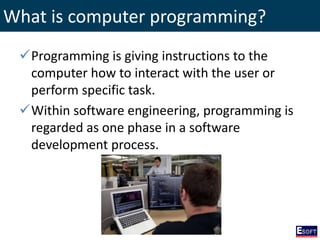
Programming is giving instructions to the
computer how to interact with the user or
perform specific task.
Within software engineering, programming is
regarded as one phase in a software
development process.
Programming Styles
There are 3 main programming styles
1. Unstructured Programming
2. Structured Programming
3. Object Oriented Programming
Unstructured Programming
• Unstructured programming is the historically
earliest programming paradigm.
• It is procedural, the statements are executed in
sequence as written.
• This type of programming uses goto statements.
A goto statement allows control to be passed to
any other place in the program.
• Difficult to understand the logic of the program.
Ex: Machine Language, COBOL
Structured Programming
• Structured programming also a subset of
procedural programming that enforces to write
efficient code easier to understand and modify.
• Use of the goto statement is discouraged.
• Structured programming using 3 controls
constructs:
– Sequence
– Selection
– repetition
Ex: Pascal, Ada
Object Oriented Programming
• Object-oriented programming (OOP) is a
programming model organized around objects
rather than actions and data rather than logic.
• It is more popular in present, because it has an
ability to represent complex relationships, data
and data processing with suitable notations.
Ex: Java, C++, C#
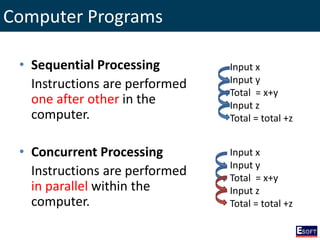
Computer Programs
• Sequential Processing
Instructions are performed
one after other in the
computer.
• Concurrent Processing
Instructions are performed
in parallel within the
computer.
Input x
Input y
Total = x+y
Input z
Total = total +z
Input x
Input y
Total = x+y
Input z
Total = total +z
Concept of Algorithm
• An algorithm is a set of steps for solving a
particular problem.
• Algorithm steps are unambiguous and have a
clear stopping point.
• Algorithms can be expressed in any language,
from natural languages or programming
languages.
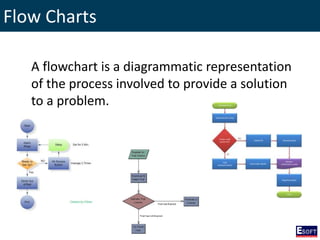
Flow Charts
A flowchart is a diagrammatic representation
of the process involved to provide a solution
to a problem.
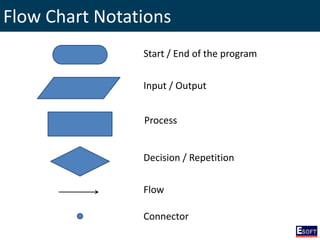
Flow Chart Notations
Start / End of the program
Input / Output
Process
Decision / Repetition
Flow
Connector
Flow Charts
• Question 1:
Draw a flowchart to develop a program to
input the student index number, name and
total marks scored in three modules and
display the students index number, name and
average marks on the screen.
Flow Charts
• Question 2:
Draw a flowchart to develop a program to
input stno, name, module one marks and
module two marks and display stno, name,
avg marks and total marks.
Flow Charts
• Question 3:
A student has sat for an exam and following
details entered through the keyboard;
“student number, name and average marks”. If
he scored more than 50 as average marks he
will be graded as “pass”, otherwise graded as
“fail”. Draw a flowchart to display the student
name, average and grade.
Flow Charts
• Question 4:
Draw a flowchart to input two numbers from
the keyboard and evaluate and display the
maximum value.
Flow Charts
• Question 5:
Draw a flowchart to develop a program to
input student no, name, module one and
module two marks by the keyboard and
display student no, average and the grade. The
grading system is as follows. Average greater
than 75 grade is “distinction”, between 50 and
75 grade is “credit”, between 25 and 50 grade
is “pass” and less than 25 is “fail”.
Flow Charts
• Question 6:
Draw a flowchart to calculate and display the
sum of first five natural numbers.
Flow Charts
• Question 7:
Draw a flowchart to input a number from
keyboard, and there after calculate and
display the factorial number of it.
Flow Charts
• Question 8:
The program has to read a file stored in the
disk in which each record contain customer
number, customer name and amount. Display
only the name of the customers who has
amount greater than 1000. Draw a flowchart
for the above scenario.
Flow Charts
• Question 9:
A program has to be developed to read a file
stored in the disk in which each record contain
employee number, name, basic salary,
allowances and deductions. Calculate and
display all employee names with their net
salary. Draw a flowchart for the above
problem.
Flow Charts
• Question 10:
A program has to be developed to read a file
stored in disk in which each record contain
employee no, name and hours worked.
Calculate and display the percentage of
employees those who has worked more than
40 hours. Draw a flowchart for the above
program.
Flow Charts
• Question 11:
A program has to be developed to read a file
stored in disk in which each record contain
student no, name, subject one marks and
subject two marks. Program is displaying two
student names who has got highest marks and
lowest marks with their total marks. Draw a
flowchart for the above program.
Pseudo Codes
Pseudo code consists of short, English phrases
used to explain specific tasks within a
program's algorithm. Pseudo code should not
include keywords in any specific computer
languages. It should be written as a list of
consecutive phrases.
Pseudo Codes
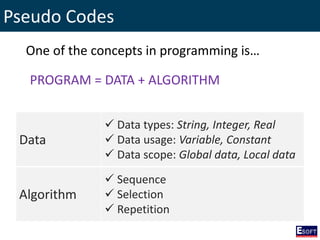
One of the concepts in programming is…
PROGRAM = DATA + ALGORITHM
Data
 Data types: String, Integer, Real
 Data usage: Variable, Constant
 Data scope: Global data, Local data
Algorithm
 Sequence
 Selection
 Repetition
The End
http://twitter.com/rasansmn

DISE - Programming Concepts

  • 1.
    Diploma in SoftwareEngineering Module II: Programming Concepts Rasan Samarasinghe ESOFT Computer Studies (pvt) Ltd. No 68/1, Main Street, Pallegama, Embilipitiya.
  • 2.
    Contents 1. What iscomputer programming? 2. Programming Styles 3. Unstructured Programming 4. Structured Programming 5. Object Oriented Programming 6. Computer Programs 7. Concept of Algorithm 8. Computer Programs 9. Concept of Algorithm 10. Flow Charts 11. Questions 12. Pseudo Codes
  • 3.
    What is computerprogramming? Programming is giving instructions to the computer how to interact with the user or perform specific task. Within software engineering, programming is regarded as one phase in a software development process.
  • 4.
    Programming Styles There are3 main programming styles 1. Unstructured Programming 2. Structured Programming 3. Object Oriented Programming
  • 5.
    Unstructured Programming • Unstructuredprogramming is the historically earliest programming paradigm. • It is procedural, the statements are executed in sequence as written. • This type of programming uses goto statements. A goto statement allows control to be passed to any other place in the program. • Difficult to understand the logic of the program. Ex: Machine Language, COBOL
  • 6.
    Structured Programming • Structuredprogramming also a subset of procedural programming that enforces to write efficient code easier to understand and modify. • Use of the goto statement is discouraged. • Structured programming using 3 controls constructs: – Sequence – Selection – repetition Ex: Pascal, Ada
  • 7.
    Object Oriented Programming •Object-oriented programming (OOP) is a programming model organized around objects rather than actions and data rather than logic. • It is more popular in present, because it has an ability to represent complex relationships, data and data processing with suitable notations. Ex: Java, C++, C#
  • 8.
    Computer Programs • SequentialProcessing Instructions are performed one after other in the computer. • Concurrent Processing Instructions are performed in parallel within the computer. Input x Input y Total = x+y Input z Total = total +z Input x Input y Total = x+y Input z Total = total +z
  • 9.
    Concept of Algorithm •An algorithm is a set of steps for solving a particular problem. • Algorithm steps are unambiguous and have a clear stopping point. • Algorithms can be expressed in any language, from natural languages or programming languages.
  • 10.
    Flow Charts A flowchartis a diagrammatic representation of the process involved to provide a solution to a problem.
  • 11.
    Flow Chart Notations Start/ End of the program Input / Output Process Decision / Repetition Flow Connector
  • 12.
    Flow Charts • Question1: Draw a flowchart to develop a program to input the student index number, name and total marks scored in three modules and display the students index number, name and average marks on the screen.
  • 13.
    Flow Charts • Question2: Draw a flowchart to develop a program to input stno, name, module one marks and module two marks and display stno, name, avg marks and total marks.
  • 14.
    Flow Charts • Question3: A student has sat for an exam and following details entered through the keyboard; “student number, name and average marks”. If he scored more than 50 as average marks he will be graded as “pass”, otherwise graded as “fail”. Draw a flowchart to display the student name, average and grade.
  • 15.
    Flow Charts • Question4: Draw a flowchart to input two numbers from the keyboard and evaluate and display the maximum value.
  • 16.
    Flow Charts • Question5: Draw a flowchart to develop a program to input student no, name, module one and module two marks by the keyboard and display student no, average and the grade. The grading system is as follows. Average greater than 75 grade is “distinction”, between 50 and 75 grade is “credit”, between 25 and 50 grade is “pass” and less than 25 is “fail”.
  • 17.
    Flow Charts • Question6: Draw a flowchart to calculate and display the sum of first five natural numbers.
  • 18.
    Flow Charts • Question7: Draw a flowchart to input a number from keyboard, and there after calculate and display the factorial number of it.
  • 19.
    Flow Charts • Question8: The program has to read a file stored in the disk in which each record contain customer number, customer name and amount. Display only the name of the customers who has amount greater than 1000. Draw a flowchart for the above scenario.
  • 20.
    Flow Charts • Question9: A program has to be developed to read a file stored in the disk in which each record contain employee number, name, basic salary, allowances and deductions. Calculate and display all employee names with their net salary. Draw a flowchart for the above problem.
  • 21.
    Flow Charts • Question10: A program has to be developed to read a file stored in disk in which each record contain employee no, name and hours worked. Calculate and display the percentage of employees those who has worked more than 40 hours. Draw a flowchart for the above program.
  • 22.
    Flow Charts • Question11: A program has to be developed to read a file stored in disk in which each record contain student no, name, subject one marks and subject two marks. Program is displaying two student names who has got highest marks and lowest marks with their total marks. Draw a flowchart for the above program.
  • 23.
    Pseudo Codes Pseudo codeconsists of short, English phrases used to explain specific tasks within a program's algorithm. Pseudo code should not include keywords in any specific computer languages. It should be written as a list of consecutive phrases.
  • 24.
    Pseudo Codes One ofthe concepts in programming is… PROGRAM = DATA + ALGORITHM Data  Data types: String, Integer, Real  Data usage: Variable, Constant  Data scope: Global data, Local data Algorithm  Sequence  Selection  Repetition
  • 25.

Editor's Notes

  • #12 Oval Parallelogram Rectangle Diamond Arrow Connector