COB204A62: BUSINESS ANALYTICS
PROGRAMMING
PROF. DHANAMALAR M
DEPARTMENT OF COMPUTER SCIENCE
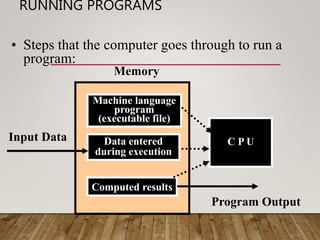
RUNNING PROGRAMS
Memory
Input Data
Program Output
Machine language
program
(executable file)
Data entered
during execution
Computed results
C P U
• Steps that the computer goes through to run a
program:
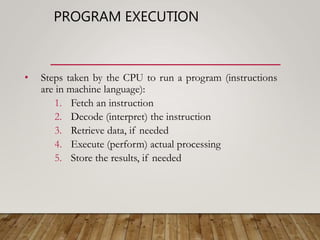
PROGRAM EXECUTION
• Steps taken by the CPU to run a program (instructions
are in machine language):
1. Fetch an instruction
2. Decode (interpret) the instruction
3. Retrieve data, if needed
4. Execute (perform) actual processing
5. Store the results, if needed
PROGRAM ERRORS
• Syntax Errors:
• Errors in grammar of the language
• Runtime error:
• When there are no syntax errors, but the program can’t complete
execution
• Divide by zero
• Invalid input data
• Logical errors:
• The program completes execution, but delivers incorrect results
• Incorrect usage of parentheses
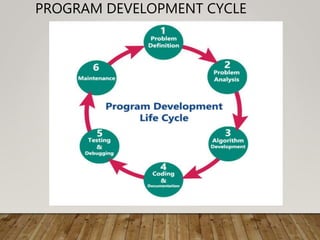
PROGRAM DEVELOPMENT CYCLE
• Many programmers follow a sequence of Steps to create their
programs.
1. Analyze – Define the Problem
• Make sure that you understand what the program should do. What
should the user be able to enter? How? How does the program
come up with an answer? What does the program output? How?
• User – a person who uses a computer program.
• End User – the user that the program was made for.
2. Design – Plan a Solution for the Problem
• Develop a PRECISE sequence of steps to solve the problem
• An algorithm is a precise sequence of steps to solve a problem.
DEVELOP AN ALGORITHM
• Imagine you want a program that tells a user how many
stamps they need in order to mail a certain number of
pages.
• You need one stamp for every 5 pages
• 6 pages = 2 stamps
• 12 pages = 3 stamps
• …
• Write an algorithm (the steps needed) to solve this problem
PROGRAM DEVELOPMENT CYCLE –
DESIGN (CONTINUED)
• Typically a program follows three general steps
1. Input
2. Processing (Formulas)
3. Output
DEVELOP AN ALGORITHM, 2ND
ATTEMPT
• OK, with this knowledge, try writing the algorithm
again
PROGRAM DEVELOPMENT CYCLE –
DESIGN (CONTINUED)
• Are those three steps enough?
• What about if the user enters “Banana” instead of a number of sheets?
• The program does not know how to find the number of stamps required
to mail “Banana” number of sheets
• In order for the program to run without crashing, our algorithm must
make sure that the user inputs some valid data.
• There are two main ways of doing this:
1. Prevention – Making sure that the user is not physically able to
enter in invalid data.
2. Validation – Allowing the user to enter invalid data, but checking it
to make sure it is valid before processing.
PROGRAM DEVELOPMENT CYCLE –
DESIGN (CONTINUED)
• So, there are really 4 general steps most programs follow:
1. Input
1. Read Input
2. Validate Input
2. Process
3. Output
DEVELOP AN ALGORITHM, 3RD
ATTEMPT
• OK, now with THAT information, try developing the algorithm
• One good algorithm developed could look like this:
1. Request the number of sheets of paper from the user; call
it Sheets (Input/Read)
2. Make sure Sheets is a positive whole number
(Input/Validation)
3. Divide Sheets by 5 (Processing)
4. Round the result from step 3 up to the highest whole
number; call it Stamps (Processing)
5. Reply with the number Stamps (Output)
PROGRAMMING TOOLS
• Flowcharts – A chart that consists of symbols connected by arrows.
Within each symbol is a phrase presenting the activity at that step.
The shape of the symbol indicates the type of operation that is to
occur.
• Hierarchy Charts – A chart that shows the overall program structure.
These charts describe what each part, or module, does and how they
are related. These modules intentionally omit details of how they
work.
• Pseudocode – an abbreviated plain English version of actual
computer code. Kind of a mix between English and code. THERE
IS NO OFFICIAL SYNTAX TO PSEUDOCODE.
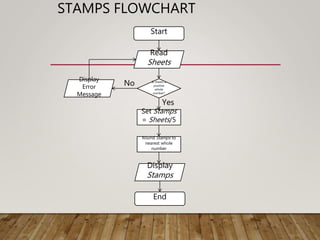
STAMPS FLOWCHART
Yes
No
Start
Read
Sheets
Is sheets a
positive
whole
number?
Display
Error
Message
Set Stamps
= Sheets/5
Round Stamps to
nearest whole
number
Display
Stamps
End
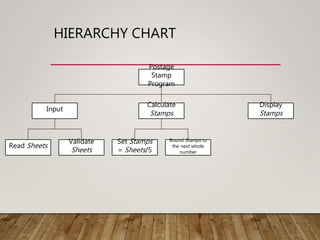
HIERARCHY CHART
Postage
Stamp
Program
Calculate
Stamps
Display
Stamps
Input
Read Sheets
Validate
Sheets
Set Stamps
= Sheets/5
Round Stamps to
the next whole
number
PROGRAM DEVELOPMENT CYCLE
3. Write the Code – Implement a solution
• The instructions in a programming language collectively called
code.
• Your code should be a translation of your algorithm developed
into the programming language.
• In this class we use Java, but there are many other
programming languages: C, C++, C#, Ruby, Python, Visual
Basic, etc.
• This is the major focus of this course, but note that you need to
be able to think algorithmically in order to do this.
• Meaning, you need to be able to logically solve the problem in
order to write a program for it.
PROGRAM DEVELOPMENT CYCLE
4. Testing and Debugging – Locate and remove any errors in the
program
• Testing is the process of finding errors in a program
• Debugging is the process of removing errors in a program.
• An error in a program is called a bug.
• We will talk more specifically about the kinds of errors that can
occur in a program once we start programming.
PROGRAM DEVELOPMENT CYCLE
5. Complete All Documentation – Organize the material that describes
the program.
• Documentation is any material whose purpose is to allow another
person or programmer to use or understand the program
• Two kinds of documentation:
1. External Documentation – Material outside of the code files
that describe the program.
2. Internal Documentation – Lines inside of a code file that do
nothing except describe details of the program. In Java, these
are called comments.
5. Maintenance:
• Updating and correction of the program for changed conditions
and field experience is accounted for in maintenance.
• Maintenance becomes essential in following situations:
• Change in specification,
• Change in equipment,
• Errors which are found during the actual execution of the program.
Uses of Computer Programs
• Today computer programs are being used in almost every field,
household, agriculture, medical, entertainment, defense, communication,
etc. Listed below are a few applications of computer programs −
• MS Word, MS Excel, Adobe Photoshop, Internet Explorer, Chrome, etc.,
are examples of computer programs.
• Computer programs are being used to develop graphics and special
effects in movie making.
• Computer programs are being used to perform Ultrasounds, X-Rays, and
other medical examinations.
• Computer programs are being used in our mobile phones for SMS, Chat,
and voice communication.

Unit 1 program development cycle

  • 1.
    COB204A62: BUSINESS ANALYTICS PROGRAMMING PROF.DHANAMALAR M DEPARTMENT OF COMPUTER SCIENCE
  • 2.
    RUNNING PROGRAMS Memory Input Data ProgramOutput Machine language program (executable file) Data entered during execution Computed results C P U • Steps that the computer goes through to run a program:
  • 3.
    PROGRAM EXECUTION • Stepstaken by the CPU to run a program (instructions are in machine language): 1. Fetch an instruction 2. Decode (interpret) the instruction 3. Retrieve data, if needed 4. Execute (perform) actual processing 5. Store the results, if needed
  • 4.
    PROGRAM ERRORS • SyntaxErrors: • Errors in grammar of the language • Runtime error: • When there are no syntax errors, but the program can’t complete execution • Divide by zero • Invalid input data • Logical errors: • The program completes execution, but delivers incorrect results • Incorrect usage of parentheses
  • 5.
  • 6.
    PROGRAM DEVELOPMENT CYCLE •Many programmers follow a sequence of Steps to create their programs. 1. Analyze – Define the Problem • Make sure that you understand what the program should do. What should the user be able to enter? How? How does the program come up with an answer? What does the program output? How? • User – a person who uses a computer program. • End User – the user that the program was made for. 2. Design – Plan a Solution for the Problem • Develop a PRECISE sequence of steps to solve the problem • An algorithm is a precise sequence of steps to solve a problem.
  • 7.
    DEVELOP AN ALGORITHM •Imagine you want a program that tells a user how many stamps they need in order to mail a certain number of pages. • You need one stamp for every 5 pages • 6 pages = 2 stamps • 12 pages = 3 stamps • … • Write an algorithm (the steps needed) to solve this problem
  • 8.
    PROGRAM DEVELOPMENT CYCLE– DESIGN (CONTINUED) • Typically a program follows three general steps 1. Input 2. Processing (Formulas) 3. Output
  • 9.
    DEVELOP AN ALGORITHM,2ND ATTEMPT • OK, with this knowledge, try writing the algorithm again
  • 10.
    PROGRAM DEVELOPMENT CYCLE– DESIGN (CONTINUED) • Are those three steps enough? • What about if the user enters “Banana” instead of a number of sheets? • The program does not know how to find the number of stamps required to mail “Banana” number of sheets • In order for the program to run without crashing, our algorithm must make sure that the user inputs some valid data. • There are two main ways of doing this: 1. Prevention – Making sure that the user is not physically able to enter in invalid data. 2. Validation – Allowing the user to enter invalid data, but checking it to make sure it is valid before processing.
  • 11.
    PROGRAM DEVELOPMENT CYCLE– DESIGN (CONTINUED) • So, there are really 4 general steps most programs follow: 1. Input 1. Read Input 2. Validate Input 2. Process 3. Output
  • 12.
    DEVELOP AN ALGORITHM,3RD ATTEMPT • OK, now with THAT information, try developing the algorithm • One good algorithm developed could look like this: 1. Request the number of sheets of paper from the user; call it Sheets (Input/Read) 2. Make sure Sheets is a positive whole number (Input/Validation) 3. Divide Sheets by 5 (Processing) 4. Round the result from step 3 up to the highest whole number; call it Stamps (Processing) 5. Reply with the number Stamps (Output)
  • 13.
    PROGRAMMING TOOLS • Flowcharts– A chart that consists of symbols connected by arrows. Within each symbol is a phrase presenting the activity at that step. The shape of the symbol indicates the type of operation that is to occur. • Hierarchy Charts – A chart that shows the overall program structure. These charts describe what each part, or module, does and how they are related. These modules intentionally omit details of how they work. • Pseudocode – an abbreviated plain English version of actual computer code. Kind of a mix between English and code. THERE IS NO OFFICIAL SYNTAX TO PSEUDOCODE.
  • 14.
    STAMPS FLOWCHART Yes No Start Read Sheets Is sheetsa positive whole number? Display Error Message Set Stamps = Sheets/5 Round Stamps to nearest whole number Display Stamps End
  • 15.
  • 16.
    PROGRAM DEVELOPMENT CYCLE 3.Write the Code – Implement a solution • The instructions in a programming language collectively called code. • Your code should be a translation of your algorithm developed into the programming language. • In this class we use Java, but there are many other programming languages: C, C++, C#, Ruby, Python, Visual Basic, etc. • This is the major focus of this course, but note that you need to be able to think algorithmically in order to do this. • Meaning, you need to be able to logically solve the problem in order to write a program for it.
  • 17.
    PROGRAM DEVELOPMENT CYCLE 4.Testing and Debugging – Locate and remove any errors in the program • Testing is the process of finding errors in a program • Debugging is the process of removing errors in a program. • An error in a program is called a bug. • We will talk more specifically about the kinds of errors that can occur in a program once we start programming.
  • 18.
    PROGRAM DEVELOPMENT CYCLE 5.Complete All Documentation – Organize the material that describes the program. • Documentation is any material whose purpose is to allow another person or programmer to use or understand the program • Two kinds of documentation: 1. External Documentation – Material outside of the code files that describe the program. 2. Internal Documentation – Lines inside of a code file that do nothing except describe details of the program. In Java, these are called comments.
  • 19.
    5. Maintenance: • Updatingand correction of the program for changed conditions and field experience is accounted for in maintenance. • Maintenance becomes essential in following situations: • Change in specification, • Change in equipment, • Errors which are found during the actual execution of the program.
  • 20.
    Uses of ComputerPrograms • Today computer programs are being used in almost every field, household, agriculture, medical, entertainment, defense, communication, etc. Listed below are a few applications of computer programs − • MS Word, MS Excel, Adobe Photoshop, Internet Explorer, Chrome, etc., are examples of computer programs. • Computer programs are being used to develop graphics and special effects in movie making. • Computer programs are being used to perform Ultrasounds, X-Rays, and other medical examinations. • Computer programs are being used in our mobile phones for SMS, Chat, and voice communication.