DISCOUNT MOBILE USABILITY
      TECHNIQUES
Getting cheap, fast, reliable product
   feedback for mobile devices
             Chris Nodder
      Chris Nodder Consulting LLC
Share!
• Issues you face
• Tips and tricks
• Best/worst practices
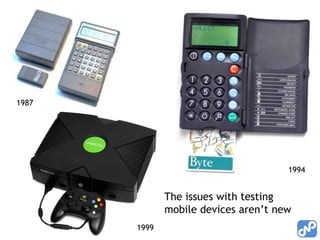
1987


                                      1994


              The issues with testing
              mobile devices aren’t new
       1999
Problems doing mobile usability
• Physical
  – How to see/record what’s going on
  – Many device types – which to test?
• Behavioral
  – Triggering/capturing the important moments
  – Observing the interaction without changing it
  – Usability labs aren’t very true-to-life
• Emotional
  – Many features/apps are discretionary
  – Emotional engagement is hard to test for
Cheap, fast, reliable: pick two
• How can you get feedback to the product
  team quickly and cheaply, and still feel
  confident about it?

• Incremental research
  – Each piece is cheap and fast
  – Each piece answers specific questions that are
    preventing the team from moving on
  – In aggregate, the observations back each other
    up and provide the reliability you need
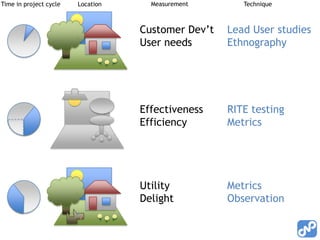
Time in project cycle   Location     Measurement       Technique


                                   Customer Dev’t   Lead User studies
                                   User needs       Ethnography


                                   Effectiveness    RITE testing
                                   Efficiency       Metrics


                                   Utility          Metrics
                                   Delight          Observation
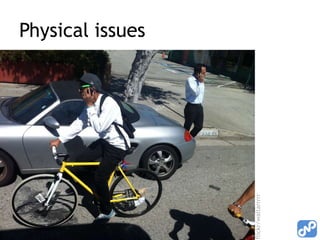
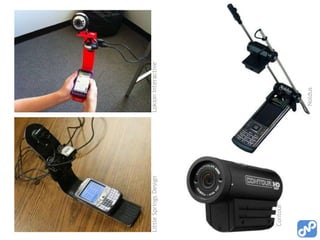
Physical issues


flickr/waltarrrrr
Little Springs Design   Lokion Interactive


  Contour


                          Noldus
Recruiting, location issues
• Recruiting
   – Require at least 3 months familiarity with current device
   – Remind users to bring their phone & charger
   – Find a way to reimburse them for data/minutes used if
     not on all-you-can-eat plan
   – Make sure their provider has reception at your location (if
     lab-based)
   – Do they need glasses to read phone screen? (bring them)
• Testing tips
   – Room without direct overhead lights (glare)
   – Be prepared for higher failure rates doing tasks on mobile
     devices (need to reassure users)
Capturing behavior
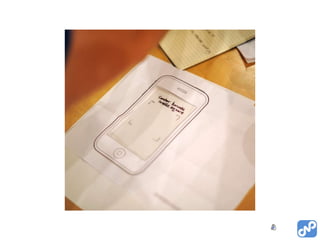
• Low-fidelity for concept validation
   – Paper prototyping
• Higher fidelity for interaction validation
   –   Flash, DHTML either on phone or on PC
   –   Emulator studies
   –   Competitor studies
   –   Early builds
• On-phone (user’s phone) as soon as possible
   –   Must be stable enough
   –   Gather metrics
   –   OTA updates if possible (roll out bug fixes)
   –   Diary studies via twitter and e-mail
Emotional element (delight)
• How do we measure engagement?
  – Amount of use (and use over time) is a proxy
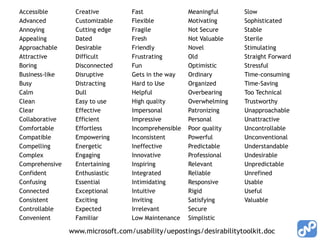
  – Desirability toolkit (Product Reaction Cards)
  – Analysis of adjectives used in forums/blog
    postings
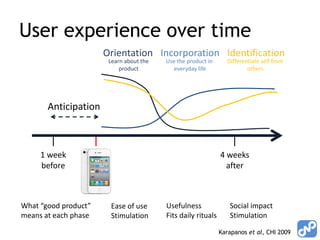
User experience over time
                      Orientation Incorporation Identification
                       Learn about the   Use the product in      Differentiate self from
                           product          everyday life                others


       Anticipation


     1 week                                                   4 weeks
     before                                                     after


What “good product”    Ease of use       Usefulness               Social impact
means at each phase    Stimulation       Fits daily rituals       Stimulation

                                                              Karapanos et al, CHI 2009
Accessible       Creative         Fast               Meaningful     Slow
Advanced         Customizable     Flexible           Motivating     Sophisticated
Annoying         Cutting edge     Fragile            Not Secure     Stable
Appealing        Dated            Fresh              Not Valuable   Sterile
Approachable     Desirable        Friendly           Novel          Stimulating
Attractive       Difficult        Frustrating        Old            Straight Forward
Boring           Disconnected     Fun                Optimistic     Stressful
Business-like    Disruptive       Gets in the way    Ordinary       Time-consuming
Busy             Distracting      Hard to Use        Organized      Time-Saving
Calm             Dull             Helpful            Overbearing    Too Technical
Clean            Easy to use      High quality       Overwhelming   Trustworthy
Clear            Effective        Impersonal         Patronizing    Unapproachable
Collaborative    Efficient        Impressive         Personal       Unattractive
Comfortable      Effortless       Incomprehensible   Poor quality   Uncontrollable
Compatible       Empowering       Inconsistent       Powerful       Unconventional
Compelling       Energetic        Ineffective        Predictable    Understandable
Complex          Engaging         Innovative         Professional   Undesirable
Comprehensive    Entertaining     Inspiring          Relevant       Unpredictable
Confident        Enthusiastic     Integrated         Reliable       Unrefined
Confusing        Essential        Intimidating       Responsive     Usable
Connected        Exceptional      Intuitive          Rigid          Useful
Consistent       Exciting         Inviting           Satisfying     Valuable
Controllable     Expected         Irrelevant         Secure
Convenient       Familiar         Low Maintenance    Simplistic

                www.microsoft.com/usability/uepostings/desirabilitytoolkit.doc
Extra time…
Involving the team
• List of questions team has
  – Write down how each will be answered
  – Write down answers as they come in
  …this way team has a stake in finding answers


• RITE testing: team must attend
• Metrics: team must code into product
• Field visits: encourages user empathy
RITE (Rapid Iterative Testing and
Evaluation)
• Ship an improved interface as rapidly and cheaply as
  possible
   – More important to find and fix big issues than to find
     every issue
• Fix issues as they are found in a study, run only
  enough users to ensure the fix worked
   – Development team must agree what users should be able
     to achieve with the system (helps define issue severity)
   – Development team must attend, agree issue fix, be
     prepared to code fixes “on the fly”
   – Usability Engineer must be experienced in domain and in
     typical user issues to calculate level of severity
RITE - fixing issues
• Categories of issues
  1. Issues with obvious cause and solution, quick fix
        Fix and test with next participant
  2. Issues with obvious cause and solution, big fix
        Start fix now, test with fixed prototype when stable
  3. Issues with no obvious cause (or solution)
        Keep collecting data, upgrade issue to 1 or 2
  4. Issues caused by other factors (test
     script, participant)
        Keep collecting data, learn from mistakes

         … allows you to test fixes in the same study
         … not an excuse for sloppy coding, UX work
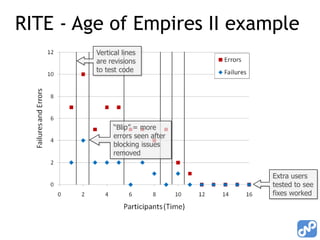
RITE - Age of Empires II example
         Vertical lines
         are revisions
         to test code


               “Blip” = more
               errors seen after
               blocking issues
               removed


                                   Extra users
                                   tested to see
                                   fixes worked
Forrester mobile app model
•   Handy structure for thinking about mobile user testing
•   The five contexts which are amplified by mobile are:
    location, locomotion, immediacy, intimacy and device.
     – Location: People use apps in a wide variety of locations, which can be determined
       through the use of GPS.
     – Locomotion: Mobile users access their devices while on the move - walking, running
       and even (unfortunately), driving. If a phone has an accelerometer, the app can
       detect the motion, speed and direction of the device.
     – Immediacy: Mobile users are not stationary - they need a mobile app to immediately
       react to find a price, transfer funds or update their status, for example. They'll be
       even more pleased when the app combines immediacy with location and locomotion
       info to anticipate their needs.
     – Intimacy: Mobile users identify with their device, but designing for intimacy means
       you have to understand each person's relationship with their device. For example, a
       bargain shopper may love getting in-store coupons via push notifications, but
       another user may hate it.
     – Device: Finally, developers should take into consideration the features specific to
       the device, including the varying form factors, plus the device's touch, voice
       recognition and image recognition capabilities.


                                                          Mobile app design best practices
                                                          Mike Gualtieri, Forrester Research
chris@nodder.com
    @uxgrump


     Taming evil interfaces
 Creating heavenly experiences

Discount mobile usability methods

  • 1.
    DISCOUNT MOBILE USABILITY TECHNIQUES Getting cheap, fast, reliable product feedback for mobile devices Chris Nodder Chris Nodder Consulting LLC
  • 2.
    Share! • Issues youface • Tips and tricks • Best/worst practices
  • 3.
    1987 1994 The issues with testing mobile devices aren’t new 1999
  • 4.
    Problems doing mobileusability • Physical – How to see/record what’s going on – Many device types – which to test? • Behavioral – Triggering/capturing the important moments – Observing the interaction without changing it – Usability labs aren’t very true-to-life • Emotional – Many features/apps are discretionary – Emotional engagement is hard to test for
  • 5.
    Cheap, fast, reliable:pick two • How can you get feedback to the product team quickly and cheaply, and still feel confident about it? • Incremental research – Each piece is cheap and fast – Each piece answers specific questions that are preventing the team from moving on – In aggregate, the observations back each other up and provide the reliability you need
  • 6.
    Time in projectcycle Location Measurement Technique Customer Dev’t Lead User studies User needs Ethnography Effectiveness RITE testing Efficiency Metrics Utility Metrics Delight Observation
  • 7.
  • 9.
    Little Springs Design Lokion Interactive Contour Noldus
  • 10.
    Recruiting, location issues •Recruiting – Require at least 3 months familiarity with current device – Remind users to bring their phone & charger – Find a way to reimburse them for data/minutes used if not on all-you-can-eat plan – Make sure their provider has reception at your location (if lab-based) – Do they need glasses to read phone screen? (bring them) • Testing tips – Room without direct overhead lights (glare) – Be prepared for higher failure rates doing tasks on mobile devices (need to reassure users)
  • 11.
    Capturing behavior • Low-fidelityfor concept validation – Paper prototyping • Higher fidelity for interaction validation – Flash, DHTML either on phone or on PC – Emulator studies – Competitor studies – Early builds • On-phone (user’s phone) as soon as possible – Must be stable enough – Gather metrics – OTA updates if possible (roll out bug fixes) – Diary studies via twitter and e-mail
  • 13.
    Emotional element (delight) •How do we measure engagement? – Amount of use (and use over time) is a proxy – Desirability toolkit (Product Reaction Cards) – Analysis of adjectives used in forums/blog postings
  • 14.
    User experience overtime Orientation Incorporation Identification Learn about the Use the product in Differentiate self from product everyday life others Anticipation 1 week 4 weeks before after What “good product” Ease of use Usefulness Social impact means at each phase Stimulation Fits daily rituals Stimulation Karapanos et al, CHI 2009
  • 15.
    Accessible Creative Fast Meaningful Slow Advanced Customizable Flexible Motivating Sophisticated Annoying Cutting edge Fragile Not Secure Stable Appealing Dated Fresh Not Valuable Sterile Approachable Desirable Friendly Novel Stimulating Attractive Difficult Frustrating Old Straight Forward Boring Disconnected Fun Optimistic Stressful Business-like Disruptive Gets in the way Ordinary Time-consuming Busy Distracting Hard to Use Organized Time-Saving Calm Dull Helpful Overbearing Too Technical Clean Easy to use High quality Overwhelming Trustworthy Clear Effective Impersonal Patronizing Unapproachable Collaborative Efficient Impressive Personal Unattractive Comfortable Effortless Incomprehensible Poor quality Uncontrollable Compatible Empowering Inconsistent Powerful Unconventional Compelling Energetic Ineffective Predictable Understandable Complex Engaging Innovative Professional Undesirable Comprehensive Entertaining Inspiring Relevant Unpredictable Confident Enthusiastic Integrated Reliable Unrefined Confusing Essential Intimidating Responsive Usable Connected Exceptional Intuitive Rigid Useful Consistent Exciting Inviting Satisfying Valuable Controllable Expected Irrelevant Secure Convenient Familiar Low Maintenance Simplistic www.microsoft.com/usability/uepostings/desirabilitytoolkit.doc
  • 16.
  • 17.
    Involving the team •List of questions team has – Write down how each will be answered – Write down answers as they come in …this way team has a stake in finding answers • RITE testing: team must attend • Metrics: team must code into product • Field visits: encourages user empathy
  • 18.
    RITE (Rapid IterativeTesting and Evaluation) • Ship an improved interface as rapidly and cheaply as possible – More important to find and fix big issues than to find every issue • Fix issues as they are found in a study, run only enough users to ensure the fix worked – Development team must agree what users should be able to achieve with the system (helps define issue severity) – Development team must attend, agree issue fix, be prepared to code fixes “on the fly” – Usability Engineer must be experienced in domain and in typical user issues to calculate level of severity
  • 19.
    RITE - fixingissues • Categories of issues 1. Issues with obvious cause and solution, quick fix  Fix and test with next participant 2. Issues with obvious cause and solution, big fix  Start fix now, test with fixed prototype when stable 3. Issues with no obvious cause (or solution)  Keep collecting data, upgrade issue to 1 or 2 4. Issues caused by other factors (test script, participant)  Keep collecting data, learn from mistakes … allows you to test fixes in the same study … not an excuse for sloppy coding, UX work
  • 20.
    RITE - Ageof Empires II example Vertical lines are revisions to test code “Blip” = more errors seen after blocking issues removed Extra users tested to see fixes worked
  • 21.
    Forrester mobile appmodel • Handy structure for thinking about mobile user testing • The five contexts which are amplified by mobile are: location, locomotion, immediacy, intimacy and device. – Location: People use apps in a wide variety of locations, which can be determined through the use of GPS. – Locomotion: Mobile users access their devices while on the move - walking, running and even (unfortunately), driving. If a phone has an accelerometer, the app can detect the motion, speed and direction of the device. – Immediacy: Mobile users are not stationary - they need a mobile app to immediately react to find a price, transfer funds or update their status, for example. They'll be even more pleased when the app combines immediacy with location and locomotion info to anticipate their needs. – Intimacy: Mobile users identify with their device, but designing for intimacy means you have to understand each person's relationship with their device. For example, a bargain shopper may love getting in-store coupons via push notifications, but another user may hate it. – Device: Finally, developers should take into consideration the features specific to the device, including the varying form factors, plus the device's touch, voice recognition and image recognition capabilities. Mobile app design best practices Mike Gualtieri, Forrester Research
  • 22.
    chris@nodder.com @uxgrump Taming evil interfaces Creating heavenly experiences

Editor's Notes

  • #3 Who works on hardware?Who works on OS?Who works on apps? Commercial or in-house (enterprise)?I will compile the suggestions that you give during this session and add them to the end of the presentation so that it’s captured in the record.
  • #4 Techniques are similar to other areas of HCI. Kiosk and ATM testing, dumb terminal interactions, Microsoft Surface, … you aren’t alone! These problems aren’t new.Here is a list of some studies I’ve been involved in. 1993: Psion Series II for banking applications1994: Telephone and TV banking1994: Holiday booking via video kiosk1995: Mondex smart-card “wallet”1997: Video conferencing over WiFi networks1999: Game consoles2000: Mobile versions of Web sitesAll had unusual form factors, were used in a mobile or unusual environment, had atypical input mechanisms, or included completely unfamiliar concepts. For each of them, we had to work out what the issues were likely to be and then observe them and resolve them. Normally on very compressed timescales. Mondex: http://wings.buffalo.edu/academic/department/som/isinterface/is_syllabus/mondex/mondex.html
  • #5 “Killing time is the killer app” – in other words, people tend to do stuff with mobile devices when they have 5 mins and aren’t near a larger deviceGet list of problems from audience tooScreen + buttons + user moving aroundThen of course there are all the traditional issues with doing user research, like getting the team interested. Might touch on those at the end if there’s time.
  • #6 Turn it into a data exploration project for the whole team. What questions do they have? How would they propose answering them? You can play the role of teacher (this is why you can’t just ask users/this is why your prposal won’t work) and evaluator. You can also get the team involved in observations and interpretation of the results. This makes them all more user-aware. It also helps them see that some questions don’t get answered in one go. Instead you chip away at the question piece by piece, and there’s a cost-benefit trade off to each piece of research that you do.
  • #7 Ecological validity vs. solid data collection: Need more than one study – optimize each for capturing different types of behaviorsLab based = data on effectiveness, efficiencyField based = satisfaction, delight, utilityEarly in the project, get out in the field. Make sure you’re developing something that people need Ethnographic/user need analysis/Lead User studiesOnce you start development, stay in the office until you have something that can be sensibly taken out to the field againPaper prototypes to set directionMock-ups or early code to measure interactions“engineer” the interruptions/events that you need to observeOnce it’s good enough (but with enough time before shipping to fix stuff) get back out to the field for validity testing.Competitor products that are already on the marketStable code for field observations on users’ own devicesInstrumented code for metrics-based longitudinal work
  • #8 So we’re going to do lots of fast, cheap studies – but how? First, the physical problems
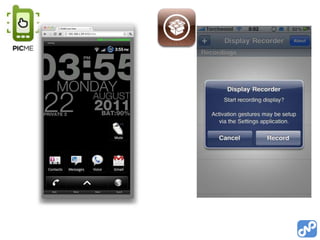
  • #9 PicMe needs root on Android – FREE – screen server duplicates UI in browser – 2-way interaction (demo)Display Recorder is for jailbroken iPhones (Cydia store)Display Out uses VGA dongle on iPads (Cydia, again).
  • #10 Head-mounted camera (slightly intrusive) (Contour HD $250, 3 hours, 120g) but allows for camera, accelerometer, landscape use and flip/slider phones (Looxcie is low fi)Phone-mounted camera (really weird – changes interaction to 2-hand) – USE MANUAL FOCUS. Don’t even think about buying one ready-made ($1000+)Wireless cameras are an issue (lots of radios competing with each other)More resources: http://www.slideshare.net/beleniq/diy-mobile-usability-testing-ia-summit-2011http://www.bowmast.com/mob-device-cam/
  • #12 Diary study - (participants tweet as they use each app, then answer more questions in e-mail each evening)
  • #13 Paper prototyping movie
  • #14 This is one I still struggle with. You get a sense from watching/listening to users, but…
  • #15 Visceral = Anticipation; Behavioral = Orientation, Incorporation; Reflective = IdentificationKarapanos, E., Zimmerman, J., Forlizzi, J., and Martens, J. 2009. User experience over time: an initial framework. In Proceedings of the 27th international Conference on Human Factors in Computing Systems. CHI '09.
  • #16 60/40 positive to negative ratio, 118 words, one per card, users choose the cards that best sum up the product and then discuss with the moderator-- you should choose beforehand what adjectives you are aiming for with your product!
  • #18 Field visits. Tell the team you need a technical assistant to deal with cameras etc. (even if you are quite capable)
  • #19 Medlock, Wixon et al (Microsoft)
  • #21 the build was changed after the first participant. It is instructive to examine an issue that caused the team to make a fix. In the second part of the tutorial participants are supposed to gather resources with their villagers. One of the resources that they are instructed to gather is wood by chopping trees. However, initially there were no trees on screen and as a result the first participant spent a long time confused as to what to do. The problem was clear and so was the solution –place some trees within view and teach users how to explore to find trees off-screen. Both of these were done and the issue never showed up again in the next 15 participants.
  • #22 Something to think about – is this a good framework for research? Have you accommodated each of the LLIID elements in your research plan?http://www.readwriteweb.com/mobile/2011/04/how-to-create-lovable-mobile-apps.phpMike Gualtieri, Forrester Research
  • #23 Taming evil interfaces/Creating heavenly experiences