1
Load Flow Analysis
in
DIgSILENT PowerFactory
Load Flow Analysis in DIgSILENT PowerFactory 2
Load Flow Applications
• Why run load flows?
- Check loading, losses and voltage profile
Are there any overloaded elements? Are the voltage constraits
respected?
• When to perform load flows?
– Network planning and operation
– Generation scheduling, optimization
– Steady state initial conditions for short circuit and stability calculations
2
Load Flow Analysis in DIgSILENT PowerFactory 3
General Procedure
• For each element 2 quantities can be defined
(e.g. P and Q, or P and V)
• The other quantities are results of the load flow calculation
• The grid must contain one element without power dispatch
(“Slack” element, in most cases the “External Grid”)
• According Node Types: PQ, PV, SL
Load flow calculation with PowerFactory
3
Load Flow Analysis in DIgSILENT PowerFactory 5
Model set-up before calculation
Dispatch of generators
Setpoints of loads Define bus type of External grid
Load Flow Analysis in DIgSILENT PowerFactory 6
Load Flow Calculation Options
• Basic options:
– Balanced / unbalanced load flow
– AC or DC load flow method
– Automatic adjustment of taps and
shunts
– Consider/ neglect reactive power limits
– Consider/ neglect voltage dependency
• Active power control (according to
inertia, secondary control etc.)
• Iteration control (number of iterations,
calculation accuracy etc.)
4
Load Flow Analysis in DIgSILENT PowerFactory 7
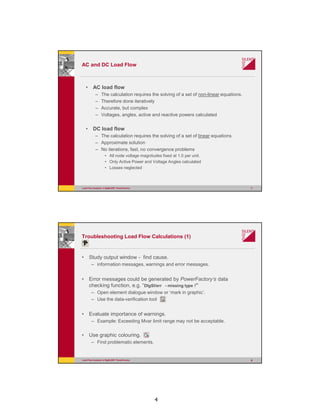
AC and DC Load Flow
• AC load flow
– The calculation requires the solving of a set of non-linear equations.
– Therefore done iteratively
– Accurate, but complex
– Voltages, angles, active and reactive powers calculated
• DC load flow
– The calculation requires the solving of a set of linear equations
– Approximate solution
– No iterations, fast, no convergence problems
• All node voltage magnitudes fixed at 1.0 per unit.
• Only Active Power and Voltage Angles calculated
• Losses neglected
Load Flow Analysis in DIgSILENT PowerFactory 8
Troubleshooting Load Flow Calculations (1)
• Study output window - find cause.
– information messages, warnings and error messages.
• Error messages could be generated by PowerFactory‘s data
checking function, e.g. “DIgSI/err - missing type !”
– Open element dialogue window or ‘mark in graphic’.
– Use the data-verification tool
• Evaluate importance of warnings.
– Example: Exceeding Mvar limit range may not be acceptable.
• Use graphic colouring.
– Find problematic elements.
5
Load Flow Analysis in DIgSILENT PowerFactory 9
Troubleshooting Load Flow Calculations (2)
• A network area is isolated, if no galvanic connection exist to the slack
bus bar.
• If this isolated area is not connected to a generator, then it is
‚isolated and not suplied‘.
• It is recommended to check, if the isolated areas are meant to be
isolated.
Explanation of „Isolated Areas“
Load Flow Analysis in DIgSILENT PowerFactory 10
Accessing Results & Reporting
1. Result and Text Boxes on the single line
diagram
2. Results in form of Tabular Data (export results
to Microsoft Office tools, windows clipboard)
3. Predefined PowerFactory Reports
4. Verification and Convergence Reports
6
Load Flow Analysis in DIgSILENT PowerFactory 11
Load Flow Analysis in PowerFactory
PowerFactory Models
for Load-Flow Analysis
Load Flow Analysis in DIgSILENT PowerFactory 12
Synchronous Generator Model in PowerFactory
• Type data:
– Rated power, voltage, power factor
– Reactances, inertia, time constants
– Saturation characteristic
– Etc.
• Element data
– PV or PQ machine, reference machine
– Dispatched power, voltage / reactive power
– Mvar limits
– Reference to station controller & secondary controller, Virtual Power Plant
– Etc.
7
Load Flow Analysis in DIgSILENT PowerFactory 13
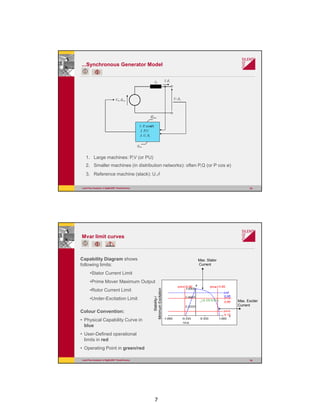
...Synchronous Generator Model
1. Large machines: P,V (or PU)
2. Smaller machines (in distribution networks): often P,Q (or P cos ø)
3. Reference machine (slack): U,δ
UU δ,
dx II δ,
00, UU δ
maxQ
minQ
)cos(, ϕ1. P
U2. P,
U3. U δ,
Load Flow Analysis in DIgSILENT PowerFactory 14
Mvar limit curves
Capability Diagram shows
following limits:
•Stator Current Limit
•Prime Mover Maximum Output
•Rotor Current Limit
•Under-Excitation Limit
Colour Convention:
• Physical Capability Curve in
blue
• User-Defined operational
limits in red
• Operating Point in green/red
Max. Exciter
Current
Max. Stator
Current
Stability-/
MinimumExcitation
8
Load Flow Analysis in DIgSILENT PowerFactory 15
Mvar Limits Capability Curves
Scaling
Application for:
• Synchronous Generators
• Static Generators
Mvar Limits depend on:
• Active Power
• Voltage (optional)
Max. Exciter
Current
Max. Stator
Current
Stability-/
Minimum
Excitation
Prime Mover
Maximum
Load Flow Analysis in DIgSILENT PowerFactory 16
Static Generator
Application for:
• Photovoltaic
• Wind Power
• Fuel Cells
• Battery Systems
• Other Storage Systems
• HVDC Terminals
• Reactive Power Compensations
• Other Renewable Energy Generators
9
Load Flow Analysis in DIgSILENT PowerFactory 17
General Load Model
• A general load model can be defined as having a constant
active and reactive power, P and Q
• But the load can also be defined to be voltage-dependent:
• Consider voltage dependency of loads on the load flow
command.
Load Flow Analysis in DIgSILENT PowerFactory 18
Transformer model in PowerFactory
• Type data:
– Rated power, voltages, vector group
– Reactances and resistances
– Tap changer location, step size, range
– Etc.
• Element data
– Tap position
– Tap controller details
– Etc.
• Some element data is classified as operational data
– e.g. Tap position
10
Load Flow Analysis in DIgSILENT PowerFactory 19
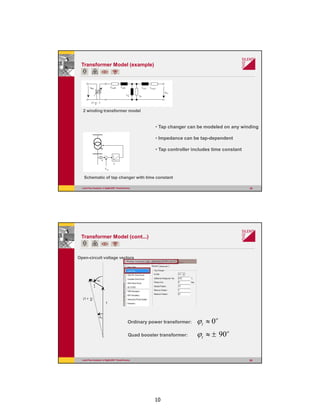
Transformer Model (example)
2 winding transformer model
• Tap changer can be modeled on any winding
• Impedance can be tap-dependent
• Tap controller includes time constant
Schematic of tap changer with time constant
Load Flow Analysis in DIgSILENT PowerFactory 20
Transformer Model (cont...)
Open-circuit voltage vectors
Ordinary power transformer:
t
1
(1 + t)
ϕt
ϕu
o
t 0≈ϕ
Quad booster transformer:
o
t 90±≈ϕ
11
Load Flow Analysis in DIgSILENT PowerFactory 21
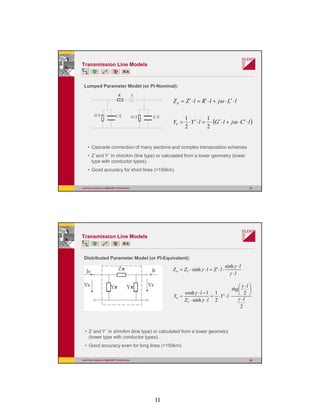
R´ L´
G´/2 G´/2C´/2 C´/2
lLjlRlZZ ⋅′⋅+⋅′=⋅′= ωπ
( )lCjlGlYY ⋅′⋅+⋅′⋅=⋅′⋅= ωπ
2
1
2
1
Transmission Line Models
Lumped Parameter Model (or PI-Nominal):
• Cascade connection of many sections and complex transposition schemes
• Z´and Y´ in ohm/km (line type) or calculated from a tower geometry (tower
type with conductor types).
• Good accuracy for short lines (<150km)
Load Flow Analysis in DIgSILENT PowerFactory 22
Transmission Line Models
Distributed Parameter Model (or PI-Equivalent):
l
l
lZlZZ C
⋅
⋅
⋅⋅′=⋅⋅=
γ
γ
γπ
sinh
sinh
2
2
2
1
sinh
1cosh
l
l
thg
lY
lZ
l
Y
C
⋅





 ⋅
⋅⋅′⋅=
⋅⋅
−⋅
=
γ
γ
γ
γ
π
• Z´and Y´ in ohm/km (line type) or calculated from a tower geometry
(tower type with conductor types).
• Good accuracy even for long lines (>150km)
12
Load Flow Analysis in DIgSILENT PowerFactory 23
Asynchronous Machine
Model, Single Cage Rotor
Load Flow Analysis in DIgSILENT PowerFactory 24
Asynchronous Machine
Double Cage Rotor:
13
Load Flow Analysis in DIgSILENT PowerFactory 25
Asynchronous Machine Parameters Calculation
• Rated Mechanical Power (pgn)
• Rated Load Factor (cosn)
• Efficiency in Rated Operation (effic)
• Rated mech. Frequency (anend)
• Ratio ILR (LockedRotor)/Ir (aiazn)
• Max. Torque (amkzn)
• Locked-Rotor Torque (amazn)
Load Flow Analysis in DIgSILENT PowerFactory 26
Load Flow Analysis in PowerFactory
Reactive Power
&
Voltage Control
14
Load Flow Analysis in DIgSILENT PowerFactory 27
Transformer Automatic Tap Changer
• Summary of tap type info)
• Tap position
• Automatic tap changer for load
flow calculation
– Taps adjusted to reach
voltage setpoint
– Error if final voltage not within
band
– Warning if tap limit reached
– Time constant used to
influence priorities amongst
transformers
Load Flow Analysis in DIgSILENT PowerFactory 28
Station Controller
• Participants: generators, transformers, static var systems etc.
• Control by:
– Separate ‘controllers’
– Station controller for a group of devices
Voltage
Control 1
Voltage
Control 2
Voltage
Control 3
Generator 1
Generator 2
Generator 3
Station
Control
Ue QG
U
Set Value
Set Value
Set Value
Contribution
Ue
Ue
QG
QG
Busbar
15
Load Flow Analysis in DIgSILENT PowerFactory 29
Load Flow Analysis in PowerFactory
Active Power Control
Load Flow Analysis in DIgSILENT PowerFactory 30
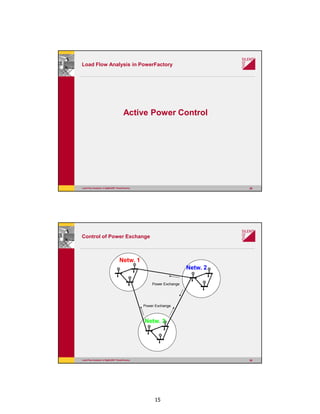
Control of Power Exchange
G
G
G
G
G
G
G
G
G
Netw. 1
Netw. 2
Netw. 3
Power Exchange
Power Exchange
16
Load Flow Analysis in DIgSILENT PowerFactory 31
Active Power Control – Secondary control
• How to balance supply (generation) and demand (load):
– As dispatched + reference machine
– According to secondary frequency control
Turbine 1
Turbine 2
Turbine 3
Generator 1
Generator 2
Generator 3
Network
Secondary
Control
PT PG
PT PG
PT PG
f PA
Set Value
Set Value
Set Value
Contribution
Load Flow Analysis in DIgSILENT PowerFactory 32
Load Flow Analysis in PowerFactory
Analysis of
Radially Operated Grids
17
Load Flow Analysis in DIgSILENT PowerFactory 33
Feeders
• Purpose: Automatic load scaling in DNO networks.
• Related functions:
– Colouring according to feeder definitions
– Load flow results can be displayed for individual feeders
• Maximum loading
• Minimum voltage
• Load scaling must be enabled in the load flow command
Option: “Feeder Load Scaling”
Load Flow Analysis in DIgSILENT PowerFactory 34
Radial Feeders
Approx 10MW Known 20MW Approx 10MW
Measured 50MW
Scale Do not scale Scale
15MW 20MW 15MW
18
Load Flow Analysis in DIgSILENT PowerFactory 35
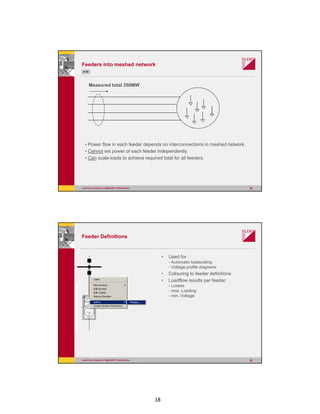
Feeders into meshed network
Measured total 350MW
• Power flow in each feeder depends on interconnections in meshed network.
• Cannot set power of each feeder independently.
• Can scale loads to achieve required total for all feeders.
Load Flow Analysis in DIgSILENT PowerFactory 36
Feeder Definitions
• Used for :
- Automatic loadscaling
- Voltage profile diagrams
• Colouring to feeder definitions
• Loadflow results per feeder:
- Losses
- max. Loading
- min. Voltage
19
Load Flow Analysis in DIgSILENT PowerFactory 37
Voltage Profile
5.004.003.002.001.000.0-1.00 [km]
789
2924
2445
4218
459
245
Infeed
0.984
0.980
0.976
0.972
0.968
0.964
0.960
[p.u.]
Voltage, Magnitude
LowerLimity=0.962p.u.
4.037 km
1.000 km
0.975 p.u.
DIgSILENT
Feeder Voltage Profile Voltage Profile Date: 8/23/2000
Annex: Distr.2 /1
DIgSILENT
Voltage profile, overloading and limits in one diagram
Load Flow Analysis in DIgSILENT PowerFactory 38
Load Scaling
• Load Scaling:
- Edit or create feeder definition:
- Options:
a ) no scaling
b) scaling to measured reactive power
c) scaling to measured active power
d) scaling to measured current
• Loads that are to be scaled in order to match the measured value must be
marked as such
Option in the load „Adjusted by Load Scaling”
• Load scaling must be enabled in the loadflow command
Option: „Feeder Load Scaling”
20
Load Flow Analysis in DIgSILENT PowerFactory 39
Load Scaling

DigSILENT PF - 03 load flow analysis

  • 1.
    1 Load Flow Analysis in DIgSILENTPowerFactory Load Flow Analysis in DIgSILENT PowerFactory 2 Load Flow Applications • Why run load flows? - Check loading, losses and voltage profile Are there any overloaded elements? Are the voltage constraits respected? • When to perform load flows? – Network planning and operation – Generation scheduling, optimization – Steady state initial conditions for short circuit and stability calculations
  • 2.
    2 Load Flow Analysisin DIgSILENT PowerFactory 3 General Procedure • For each element 2 quantities can be defined (e.g. P and Q, or P and V) • The other quantities are results of the load flow calculation • The grid must contain one element without power dispatch (“Slack” element, in most cases the “External Grid”) • According Node Types: PQ, PV, SL Load flow calculation with PowerFactory
  • 3.
    3 Load Flow Analysisin DIgSILENT PowerFactory 5 Model set-up before calculation Dispatch of generators Setpoints of loads Define bus type of External grid Load Flow Analysis in DIgSILENT PowerFactory 6 Load Flow Calculation Options • Basic options: – Balanced / unbalanced load flow – AC or DC load flow method – Automatic adjustment of taps and shunts – Consider/ neglect reactive power limits – Consider/ neglect voltage dependency • Active power control (according to inertia, secondary control etc.) • Iteration control (number of iterations, calculation accuracy etc.)
  • 4.
    4 Load Flow Analysisin DIgSILENT PowerFactory 7 AC and DC Load Flow • AC load flow – The calculation requires the solving of a set of non-linear equations. – Therefore done iteratively – Accurate, but complex – Voltages, angles, active and reactive powers calculated • DC load flow – The calculation requires the solving of a set of linear equations – Approximate solution – No iterations, fast, no convergence problems • All node voltage magnitudes fixed at 1.0 per unit. • Only Active Power and Voltage Angles calculated • Losses neglected Load Flow Analysis in DIgSILENT PowerFactory 8 Troubleshooting Load Flow Calculations (1) • Study output window - find cause. – information messages, warnings and error messages. • Error messages could be generated by PowerFactory‘s data checking function, e.g. “DIgSI/err - missing type !” – Open element dialogue window or ‘mark in graphic’. – Use the data-verification tool • Evaluate importance of warnings. – Example: Exceeding Mvar limit range may not be acceptable. • Use graphic colouring. – Find problematic elements.
  • 5.
    5 Load Flow Analysisin DIgSILENT PowerFactory 9 Troubleshooting Load Flow Calculations (2) • A network area is isolated, if no galvanic connection exist to the slack bus bar. • If this isolated area is not connected to a generator, then it is ‚isolated and not suplied‘. • It is recommended to check, if the isolated areas are meant to be isolated. Explanation of „Isolated Areas“ Load Flow Analysis in DIgSILENT PowerFactory 10 Accessing Results & Reporting 1. Result and Text Boxes on the single line diagram 2. Results in form of Tabular Data (export results to Microsoft Office tools, windows clipboard) 3. Predefined PowerFactory Reports 4. Verification and Convergence Reports
  • 6.
    6 Load Flow Analysisin DIgSILENT PowerFactory 11 Load Flow Analysis in PowerFactory PowerFactory Models for Load-Flow Analysis Load Flow Analysis in DIgSILENT PowerFactory 12 Synchronous Generator Model in PowerFactory • Type data: – Rated power, voltage, power factor – Reactances, inertia, time constants – Saturation characteristic – Etc. • Element data – PV or PQ machine, reference machine – Dispatched power, voltage / reactive power – Mvar limits – Reference to station controller & secondary controller, Virtual Power Plant – Etc.
  • 7.
    7 Load Flow Analysisin DIgSILENT PowerFactory 13 ...Synchronous Generator Model 1. Large machines: P,V (or PU) 2. Smaller machines (in distribution networks): often P,Q (or P cos ø) 3. Reference machine (slack): U,δ UU δ, dx II δ, 00, UU δ maxQ minQ )cos(, ϕ1. P U2. P, U3. U δ, Load Flow Analysis in DIgSILENT PowerFactory 14 Mvar limit curves Capability Diagram shows following limits: •Stator Current Limit •Prime Mover Maximum Output •Rotor Current Limit •Under-Excitation Limit Colour Convention: • Physical Capability Curve in blue • User-Defined operational limits in red • Operating Point in green/red Max. Exciter Current Max. Stator Current Stability-/ MinimumExcitation
  • 8.
    8 Load Flow Analysisin DIgSILENT PowerFactory 15 Mvar Limits Capability Curves Scaling Application for: • Synchronous Generators • Static Generators Mvar Limits depend on: • Active Power • Voltage (optional) Max. Exciter Current Max. Stator Current Stability-/ Minimum Excitation Prime Mover Maximum Load Flow Analysis in DIgSILENT PowerFactory 16 Static Generator Application for: • Photovoltaic • Wind Power • Fuel Cells • Battery Systems • Other Storage Systems • HVDC Terminals • Reactive Power Compensations • Other Renewable Energy Generators
  • 9.
    9 Load Flow Analysisin DIgSILENT PowerFactory 17 General Load Model • A general load model can be defined as having a constant active and reactive power, P and Q • But the load can also be defined to be voltage-dependent: • Consider voltage dependency of loads on the load flow command. Load Flow Analysis in DIgSILENT PowerFactory 18 Transformer model in PowerFactory • Type data: – Rated power, voltages, vector group – Reactances and resistances – Tap changer location, step size, range – Etc. • Element data – Tap position – Tap controller details – Etc. • Some element data is classified as operational data – e.g. Tap position
  • 10.
    10 Load Flow Analysisin DIgSILENT PowerFactory 19 Transformer Model (example) 2 winding transformer model • Tap changer can be modeled on any winding • Impedance can be tap-dependent • Tap controller includes time constant Schematic of tap changer with time constant Load Flow Analysis in DIgSILENT PowerFactory 20 Transformer Model (cont...) Open-circuit voltage vectors Ordinary power transformer: t 1 (1 + t) ϕt ϕu o t 0≈ϕ Quad booster transformer: o t 90±≈ϕ
  • 11.
    11 Load Flow Analysisin DIgSILENT PowerFactory 21 R´ L´ G´/2 G´/2C´/2 C´/2 lLjlRlZZ ⋅′⋅+⋅′=⋅′= ωπ ( )lCjlGlYY ⋅′⋅+⋅′⋅=⋅′⋅= ωπ 2 1 2 1 Transmission Line Models Lumped Parameter Model (or PI-Nominal): • Cascade connection of many sections and complex transposition schemes • Z´and Y´ in ohm/km (line type) or calculated from a tower geometry (tower type with conductor types). • Good accuracy for short lines (<150km) Load Flow Analysis in DIgSILENT PowerFactory 22 Transmission Line Models Distributed Parameter Model (or PI-Equivalent): l l lZlZZ C ⋅ ⋅ ⋅⋅′=⋅⋅= γ γ γπ sinh sinh 2 2 2 1 sinh 1cosh l l thg lY lZ l Y C ⋅       ⋅ ⋅⋅′⋅= ⋅⋅ −⋅ = γ γ γ γ π • Z´and Y´ in ohm/km (line type) or calculated from a tower geometry (tower type with conductor types). • Good accuracy even for long lines (>150km)
  • 12.
    12 Load Flow Analysisin DIgSILENT PowerFactory 23 Asynchronous Machine Model, Single Cage Rotor Load Flow Analysis in DIgSILENT PowerFactory 24 Asynchronous Machine Double Cage Rotor:
  • 13.
    13 Load Flow Analysisin DIgSILENT PowerFactory 25 Asynchronous Machine Parameters Calculation • Rated Mechanical Power (pgn) • Rated Load Factor (cosn) • Efficiency in Rated Operation (effic) • Rated mech. Frequency (anend) • Ratio ILR (LockedRotor)/Ir (aiazn) • Max. Torque (amkzn) • Locked-Rotor Torque (amazn) Load Flow Analysis in DIgSILENT PowerFactory 26 Load Flow Analysis in PowerFactory Reactive Power & Voltage Control
  • 14.
    14 Load Flow Analysisin DIgSILENT PowerFactory 27 Transformer Automatic Tap Changer • Summary of tap type info) • Tap position • Automatic tap changer for load flow calculation – Taps adjusted to reach voltage setpoint – Error if final voltage not within band – Warning if tap limit reached – Time constant used to influence priorities amongst transformers Load Flow Analysis in DIgSILENT PowerFactory 28 Station Controller • Participants: generators, transformers, static var systems etc. • Control by: – Separate ‘controllers’ – Station controller for a group of devices Voltage Control 1 Voltage Control 2 Voltage Control 3 Generator 1 Generator 2 Generator 3 Station Control Ue QG U Set Value Set Value Set Value Contribution Ue Ue QG QG Busbar
  • 15.
    15 Load Flow Analysisin DIgSILENT PowerFactory 29 Load Flow Analysis in PowerFactory Active Power Control Load Flow Analysis in DIgSILENT PowerFactory 30 Control of Power Exchange G G G G G G G G G Netw. 1 Netw. 2 Netw. 3 Power Exchange Power Exchange
  • 16.
    16 Load Flow Analysisin DIgSILENT PowerFactory 31 Active Power Control – Secondary control • How to balance supply (generation) and demand (load): – As dispatched + reference machine – According to secondary frequency control Turbine 1 Turbine 2 Turbine 3 Generator 1 Generator 2 Generator 3 Network Secondary Control PT PG PT PG PT PG f PA Set Value Set Value Set Value Contribution Load Flow Analysis in DIgSILENT PowerFactory 32 Load Flow Analysis in PowerFactory Analysis of Radially Operated Grids
  • 17.
    17 Load Flow Analysisin DIgSILENT PowerFactory 33 Feeders • Purpose: Automatic load scaling in DNO networks. • Related functions: – Colouring according to feeder definitions – Load flow results can be displayed for individual feeders • Maximum loading • Minimum voltage • Load scaling must be enabled in the load flow command Option: “Feeder Load Scaling” Load Flow Analysis in DIgSILENT PowerFactory 34 Radial Feeders Approx 10MW Known 20MW Approx 10MW Measured 50MW Scale Do not scale Scale 15MW 20MW 15MW
  • 18.
    18 Load Flow Analysisin DIgSILENT PowerFactory 35 Feeders into meshed network Measured total 350MW • Power flow in each feeder depends on interconnections in meshed network. • Cannot set power of each feeder independently. • Can scale loads to achieve required total for all feeders. Load Flow Analysis in DIgSILENT PowerFactory 36 Feeder Definitions • Used for : - Automatic loadscaling - Voltage profile diagrams • Colouring to feeder definitions • Loadflow results per feeder: - Losses - max. Loading - min. Voltage
  • 19.
    19 Load Flow Analysisin DIgSILENT PowerFactory 37 Voltage Profile 5.004.003.002.001.000.0-1.00 [km] 789 2924 2445 4218 459 245 Infeed 0.984 0.980 0.976 0.972 0.968 0.964 0.960 [p.u.] Voltage, Magnitude LowerLimity=0.962p.u. 4.037 km 1.000 km 0.975 p.u. DIgSILENT Feeder Voltage Profile Voltage Profile Date: 8/23/2000 Annex: Distr.2 /1 DIgSILENT Voltage profile, overloading and limits in one diagram Load Flow Analysis in DIgSILENT PowerFactory 38 Load Scaling • Load Scaling: - Edit or create feeder definition: - Options: a ) no scaling b) scaling to measured reactive power c) scaling to measured active power d) scaling to measured current • Loads that are to be scaled in order to match the measured value must be marked as such Option in the load „Adjusted by Load Scaling” • Load scaling must be enabled in the loadflow command Option: „Feeder Load Scaling”
  • 20.
    20 Load Flow Analysisin DIgSILENT PowerFactory 39 Load Scaling